
Apps that target Android 13 (API level 33) or higher and manage Wi-Fi connections
should request the NEARBY_WIFI_DEVICES runtime permission. This
permission makes it easier to justify an app's access of nearby Wi-Fi devices;
on previous versions of Android, these apps needed to declare the
ACCESS_FINE_LOCATION permission instead.
Permission is part of the nearby devices group
The NEARBY_WIFI_DEVICES permission is part of the Nearby devices
permission group. This group, added in Android 12 (API level 31), also includes
permissions related to Bluetooth and Ultra-wideband. When you request any
combination of permissions from this permission group, the system shows a single
runtime dialog and asks the user to approve your app's access to nearby devices.
In system settings, the user must enable and disable the Nearby devices
permissions as a group; for example, users can't disable Wi-Fi access but keep
Bluetooth access enabled for a given app.
Strongly assert that your app doesn't derive physical location
When you target Android 13 or higher, consider whether your app
ever derives location information from Wi-Fi APIs; if not, you should strongly
assert that. To make this assertion, set the usesPermissionFlags attribute to
neverForLocation in your app's manifest file, as shown in the following code
snippet. This process is similar to how you assert that Bluetooth device
information is never used for location:
<manifest ...>
    <uses-permission android:name="android.permission.NEARBY_WIFI_DEVICES"
                     android:usesPermissionFlags="neverForLocation" />
    <application ...>
        ...
    </application>
</manifest>
Previous versions and some APIs require location permission
Several Wi-Fi APIs require the ACCESS_FINE_LOCATION permission, even when your
app targets Android 13 or higher. Examples include the following
methods from the WifiManager class:
Also, because the NEARBY_WIFI_DEVICES permission is available only on
Android 13 and higher, you should keep any declarations for
ACCESS_FINE_LOCATION to provide backward compatibility in your app.
However, as long as your app doesn't otherwise rely on precise location
information, you can set the maximum SDK version of this permission to 32,
as shown in the following code snippet:
<manifest ...>
    <uses-permission android:name="android.permission.ACCESS_FINE_LOCATION"
                     android:maxSdkVersion="32" />
    <application ...>
        ...
    </application>
</manifest>
Check for APIs that require the permission
If your app targets Android 13 or higher, you must declare the
NEARBY_WIFI_DEVICES permission to call any of the following Wi-Fi APIs:
WifiManagerWifiAwareManagerWifiAwareSessionWifiP2pManagerWifiRttManager
Wi-Fi access workflows
Figure 1 shows the Wi-Fi access workflow on devices that run
Android 13 or higher, for apps that target
Android 13 or higher. Note that, as long as you assert that your
app doesn't derive physical location from Wi-Fi device information, you don't
need to declare the ACCESS_FINE_LOCATION permission anymore:
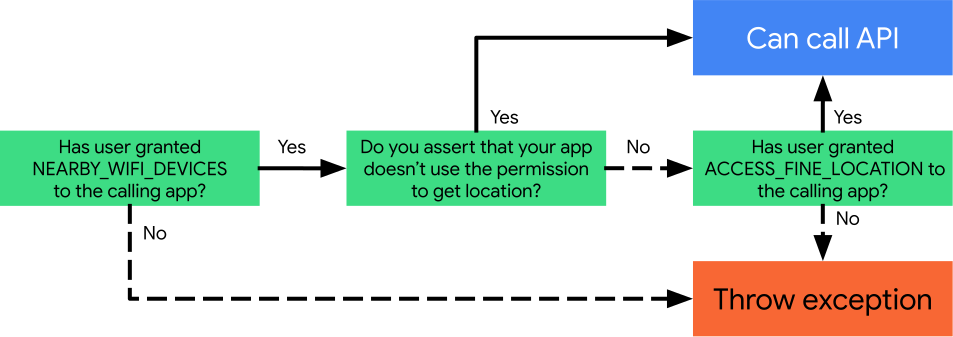
Figure 2 shows the Wi-Fi access workflow on devices that run
12L or lower. Note the reliance on the
ACCESS_FINE_LOCATION permission.
