

アプリで Bluetooth 機能を使用するには、いくつかの権限を宣言する必要があります。また、アプリが Bluetooth Classic または Bluetooth Low Energy(BLE)のサポートを必要とするかどうかを指定する 必要があります。アプリが Bluetooth Classic または BLE を必要としないが、これらの テクノロジーのメリットを享受できる場合は、実行時に可用性を確認できます。
権限を宣言する
アプリで宣言する権限のセットは、アプリのターゲット SDK バージョンによって異なります。
Android 12 以降をターゲットとする
注: Android 8.0(API レベル 26)以降では、 コンパニオン デバイス マネージャー(CDM)を使用すると、このセクションで説明されている権限よりも効率よく コンパニオン デバイスに接続できます。CDM システムはアプリに代わってペア設定 UI を提供します。位置情報の利用許可は必要ありません。
ペア設定と接続のエクスペリエンスをより細かく制御する場合は、 このセクションで説明されている権限を使用します。
アプリが Android 12(API レベル 31)以降をターゲットとしている場合は、アプリのマニフェスト ファイルで次の権限を宣言します。
- アプリが Bluetooth
デバイス(BLE 周辺機器など)を探す場合は、
BLUETOOTH_SCAN権限を宣言します。 - アプリが現在のデバイスを他の Bluetooth デバイスから検出可能にする場合は、`BLUETOOTH_ADVERTISE` 権限を宣言します。
BLUETOOTH_ADVERTISE - アプリがすでにペア設定されている Bluetooth デバイスと通信する場合は、
BLUETOOTH_CONNECT権限を宣言します。 - Bluetooth 関連の従来の権限宣言では、
android:maxSdkVersionを 30 に設定します。アプリの互換性に関するこのステップでは、Android 12 以降を搭載したデバイスにインストールされた場合、アプリに必要な Bluetooth 権限のみが付与されます。 - アプリが Bluetooth スキャン結果を使用して物理的な位置情報を取得する場合は、
the
ACCESS_FINE_LOCATION権限を宣言します。それ以外の場合は、アプリが物理的な位置情報を取得しないことを強く表明し 、android:maxSdkVersionを 30 に設定できます。ACCESS_FINE_LOCATION
BLUETOOTH_ADVERTISE、BLUETOOTH_CONNECT、BLUETOOTH_SCAN の各権限
は実行時の権限です。
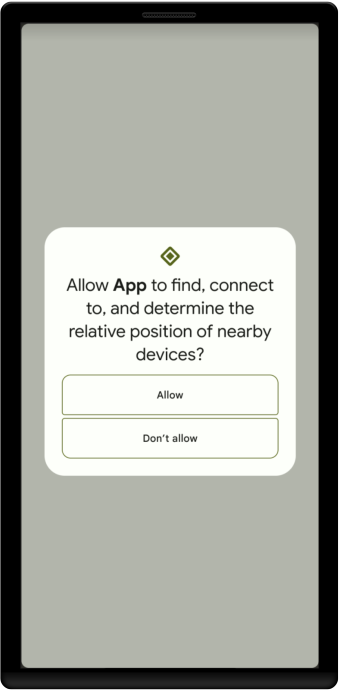
そのため、Bluetooth デバイスを探したり、デバイスを他のデバイスから検出可能にしたり、すでにペア設定されている Bluetooth デバイスと通信したりする前に、アプリでユーザーの承認を明示的にリクエストする必要があります。アプリがこれらの権限の少なくとも 1 つをリクエストすると、図 1 に示すように、アプリが付近のデバイスにアクセスすることを許可するよう求めるプロンプトが表示されます。
次のコード スニペットは、Android 12 以降をターゲットとするアプリで Bluetooth 関連の権限を宣言する方法を示しています。
<manifest>
    <!-- Request legacy Bluetooth permissions on older devices. -->
    <uses-permission android:name="android.permission.BLUETOOTH"
                     android:maxSdkVersion="30" />
    <uses-permission android:name="android.permission.BLUETOOTH_ADMIN"
                     android:maxSdkVersion="30" />

    <!-- Needed only if your app looks for Bluetooth devices.
         If your app doesn't use Bluetooth scan results to derive physical
         location information, you can
         <a href="#assert-never-for-location">strongly assert that your app
         doesn't derive physical location</a>. -->
    <uses-permission android:name="android.permission.BLUETOOTH_SCAN" />

    <!-- Needed only if your app makes the device discoverable to Bluetooth
         devices. -->
    <uses-permission android:name="android.permission.BLUETOOTH_ADVERTISE" />

    <!-- Needed only if your app communicates with already-paired Bluetooth
         devices. -->
    <uses-permission android:name="android.permission.BLUETOOTH_CONNECT" />

    <!-- Needed only if your app uses Bluetooth scan results to derive
         physical location. -->
    <uses-permission android:name="android.permission.ACCESS_FINE_LOCATION" />
    ...
</manifest>
アプリが物理的な位置情報を取得しないことを強く表明する
アプリが Bluetooth スキャン結果を使用して物理的な位置情報を取得しない場合は、アプリが物理的な位置情報を取得するために Bluetooth 権限を使用することはないという旨を強く表明できます。そのためには、次の手順を完了します。
android:usesPermissionFlags属性をBLUETOOTH_SCAN権限宣言に追加し、この属性の値をneverForLocationに設定します。アプリで位置情報が必要ない場合は、アプリのマニフェストから
ACCESS_FINE_LOCATION権限を削除します。
次のコード スニペットは、アプリのマニフェスト ファイルを更新する方法を示しています。
<manifest>
    <!-- Include "neverForLocation" only if you can strongly assert that
         your app never derives physical location from Bluetooth scan results. -->
    <uses-permission android:name="android.permission.BLUETOOTH_SCAN"
                     android:usesPermissionFlags="neverForLocation" />

    <!-- Set maxSdkVersion to 30 if you can strongly assert that, on
         Android 12 and higher, your app never derives physical location from
         Bluetooth scan results and doesn't need location access for any other
         purpose. -->
    <uses-permission android:name="android.permission.ACCESS_FINE_LOCATION"
                     android:maxSdkVersion="30" />
    ...
</manifest>
Android 11 以前をターゲットとする
アプリが Android 11(API レベル 30)以前をターゲットとしている場合は、アプリのマニフェスト ファイルで次の権限を宣言します。
BLUETOOTHは、接続のリクエスト、接続の受け入れ、データの転送など、Bluetooth Classic または BLE 通信を行うために必要です。ACCESS_FINE_LOCATIONAndroid 11 以前では、Bluetooth スキャン を使用してユーザーの位置情報に関する情報を収集できる可能性があるため、 が必要です。
位置情報の利用許可は実行時の権限であるため、 マニフェストで宣言するだけでなく、実行時にこれらの権限をリクエストする 必要があります。
ローカルの Bluetooth デバイスを検出する
アプリでデバイスの検出を開始したり、Bluetooth
設定を操作したりする場合は、
BLUETOOTH_ADMIN
権限を宣言する必要があります。ほとんどのアプリでは、ローカルの Bluetooth デバイスを検出する機能のみにこの権限が必要です。ユーザーのリクエストに応じて Bluetooth 設定を変更する「電源管理」アプリでない限り、この権限によって付与される他の機能は使用しないでください。アプリ マニフェスト ファイルで権限を宣言します。次に例を示します。
<manifest>
...
<uses-permission android:name="android.permission.BLUETOOTH_ADMIN" />
...
</manifest>
アプリがサービスをサポートし、Android 10(API レベル 29)または
Android 11 で実行できる場合は、Bluetooth デバイスを検出するために
ACCESS_BACKGROUND_LOCATION
権限も宣言する必要があります。この
要件について詳しくは、バックグラウンドでの位置情報へのアクセスをご覧ください。
次のコード スニペットは、ACCESS_BACKGROUND_LOCATION 権限を宣言する方法を示しています。
<manifest>
...
<uses-permission android:name="android.permission.ACCESS_BACKGROUND_LOCATION" />
...
</manifest>
アプリの権限の宣言について詳しくは、<uses-permission>
リファレンスをご覧ください。
Bluetooth 機能の使用を指定する
Bluetooth がアプリの重要な要素である場合は、この要件を示すフラグをマニフェスト ファイルに追加できます。
<uses-feature> 要素を使用すると、アプリが使用するハードウェアのタイプと、それが
必須かどうかを指定できます。
この例は、アプリに Bluetooth Classic が必要であることを示す方法を示しています。
<uses-feature android:name="android.hardware.bluetooth" android:required="true"/>
アプリが Bluetooth Low Energy に依存している場合は、次のものを使用できます。
<uses-feature android:name="android.hardware.bluetooth_le" android:required="true"/>
アプリに機能が必要であることを指定すると、Google Play ストアでは、これらの機能がないデバイスのユーザーにアプリが表示されなくなります。そのため、アプリがその機能なしでは動作しない場合にのみ、required 属性を true に設定する必要があります。
実行時に機能の可用性を確認する
Bluetooth Classic または
BLE をサポートしていないデバイスでアプリを使用できるようにするには、アプリの
マニフェストに <uses-feature> 要素を含める必要がありますが、required="false" に設定します。実行時に、
機能の可用性を
PackageManager.hasSystemFeature()使用して確認できます。
Kotlin
// Check to see if the Bluetooth classic feature is available.
val bluetoothAvailable = packageManager.hasSystemFeature(PackageManager.FEATURE_BLUETOOTH)

// Check to see if the BLE feature is available.
val bluetoothLEAvailable = packageManager.hasSystemFeature(PackageManager.FEATURE_BLUETOOTH_LE)
Java
// Use this check to determine whether Bluetooth classic is supported on the device.
// Then you can selectively disable BLE-related features.
boolean bluetoothAvailable = getPackageManager().hasSystemFeature(PackageManager.FEATURE_BLUETOOTH);

// Use this check to determine whether BLE is supported on the device. Then
// you can selectively disable BLE-related features.
boolean bluetoothLEAvailable = getPackageManager().hasSystemFeature(PackageManager.FEATURE_BLUETOOTH_LE);