
If your app handles non-trivial amounts of structured data, you can benefit greatly from persisting that data locally. The most common use case is to cache relevant pieces of data so that when the device can't access the network, you can still browse that content while you're offline.
The Room persistence library provides an abstraction layer over SQLite to let you access the database fluently while harnessing the full power of SQLite.
Set up Room 2.x
To use Room 2.x in your app, add the following dependencies to your app's
build.gradle file:
dependencies {
    val room_version = "2.6.1"

    implementation("androidx.room:room-runtime:$room_version")
    annotationProcessor("androidx.room:room-compiler:$room_version")

    // To use Kotlin Symbol Processing (KSP)
    // ksp("androidx.room:room-compiler:$room_version")

    // optional - Kotlin Extensions and Coroutines support for Room
    implementation("androidx.room:room-ktx:$room_version")

    // optional - RxJava2 support for Room
    implementation("androidx.room:room-rxjava2:$room_version")

    // optional - Guava support for Room, including Optional and ListenableFuture
    implementation("androidx.room:room-guava:$room_version")

    // optional - Test helpers
    testImplementation("androidx.room:room-testing:$room_version")
}
Primary components
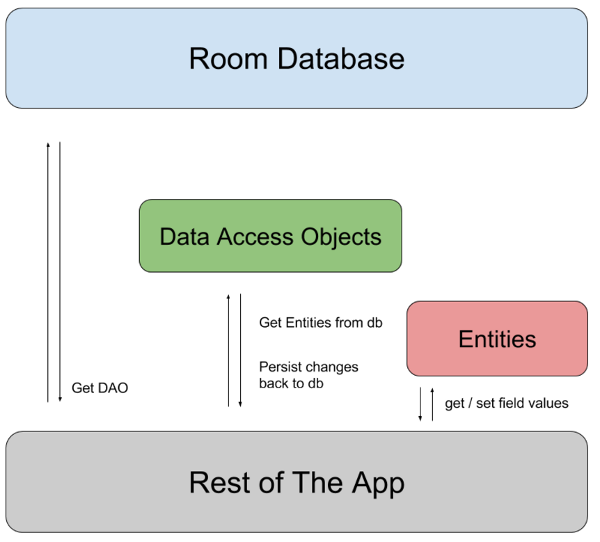
Room has three major components:
- Database class that holds the database and serves as the main access point for the underlying connection to your app's persisted data.
- Data entities that represent tables in your app's database.
- Data access objects (DAOs) that provide methods your app can use to query, update, insert, and delete data in the database.
Figure 1 illustrates the relationship between the different components of Room.
Sample implementation
// Entity
@Entity
data class User(
    @PrimaryKey val uid: Int,
    @ColumnInfo(name = "first_name") val firstName: String?,
    @ColumnInfo(name = "last_name") val lastName: String?
)

// DAO
@Dao
interface UserDao {
    @Query("SELECT * FROM user")
    fun getAll(): List<User>

    @Insert
    fun insertAll(vararg users: User)

    @Delete
    fun delete(user: User)
}

// Database
@Database(entities = [User::class], version = 1)
abstract class AppDatabase : RoomDatabase() {
    abstract fun userDao(): UserDao
}

// Usage
val db = Room.databaseBuilder(
            applicationContext,
            AppDatabase::class.java, "database-name"
        ).build()

val userDao = db.userDao()
val users: List<User> = userDao.getAll()
Define data using entities
Each Room entity represents a table in the database. You define each entity as a
class annotated with @Entity.
@Entity(tableName = "users")
data class User (
    @PrimaryKey val id: Int,
    @ColumnInfo(name = "first_name") val firstName: String?,
    @ColumnInfo(name = "last_name") val lastName: String?,
    @Ignore val picture: Bitmap? = null
)
- Custom table and column names: By default, Room uses the class name as
the table name and property names as column names. To customize them, use
the
tableNameproperty in@Entityand the@ColumnInfo(name = "...")annotation. - Primary key: To define a primary key, use
@PrimaryKey. For composite keys, use theprimaryKeysproperty of@Entity:@Entity(primaryKeys = ["firstName", "lastName"]). - Ignore fields: To prevent fields from being persisted, use
@Ignore.
Type converters
Sometimes, you need to store custom types, such as Date, in a single column.
Provide @TypeConverter methods to convert custom types to and from types
Room can persist.
class Converters {
  @TypeConverter
  fun fromTimestamp(value: Long?): Date? = value?.let { Date(it) }

  @TypeConverter
  fun dateToTimestamp(date: Date?): Long? = date?.time
}

// Register in your Database class
@Database(entities = [User::class], version = 1)
@TypeConverters(Converters::class)
abstract class AppDatabase : RoomDatabase() { ... }
Access data using DAOs
DAOs define methods for database interaction. Annotate the interface or abstract
class with @Dao.
Convenience methods
@Dao
interface UserDao {
    @Insert(onConflict = OnConflictStrategy.REPLACE)
    fun insertUsers(vararg users: User)

    @Update
    fun updateUsers(vararg users: User)

    @Delete
    fun deleteUsers(vararg users: User)
}
- Insert: The insert method can return a
Longthat represents the inserted row ID, or aList<Long>containing the IDs of all inserted rows. - Update or Delete: The update or delete method can return an
Intrepresenting the number of affected rows.
Query methods
Annotate methods with @Query to write SQL statements. Room validates
queries at compile time.
@Dao
interface UserDao {
    // Simple query
    @Query("SELECT * FROM user")
    fun loadAllUsers(): Array<User>

    // Return a subset of columns using a POJO or tuple
    @Query("SELECT first_name, last_name FROM user")
    fun loadFullName(): List<NameTuple>

    // Pass parameters
    @Query("SELECT * FROM user WHERE age > :minAge")
    fun loadAllUsersOlderThan(minAge: Int): Array<User>

    // Collection of parameters
    @Query("SELECT * FROM user WHERE region IN (:regions)")
    fun loadUsersFromRegions(regions: List<String>): List<User>

    // Join tables
    @Query("SELECT * FROM book INNER JOIN user ON user.id = book.user_id WHERE user.name = :userName")
    fun findBooksBorrowedByName(userName: String): List<Book>
}
Multimap return types
In Room 2.4 and higher, query methods can return a multimap directly using
the Map type:
@Query("SELECT * FROM user JOIN book ON user.id = book.user_id")
fun loadUserAndBookNames(): Map<User, List<Book>>
Asynchronous DAO queries
To avoid UI freezes, database queries can't run on the main thread. Make your queries asynchronous using one of the following integrations:
Kotlin coroutines and Flow
Requires the room-ktx dependency.
@Dao
interface UserDao {
    // One-shot async query
    @Insert
    suspend fun insertUsers(vararg users: User)

    // Observable query using Flow
    @Query("SELECT * FROM user WHERE id = :id")
    fun loadUserById(id: Int): Flow<User>
}
Java with RxJava
Requires room-rxjava2 or room-rxjava3.
@Dao
interface UserDao {
    @Insert
    fun insertUsers(users: List<User>): Completable

    @Query("SELECT * FROM user WHERE id = :id")
    fun loadUserById(id: Int): Flowable<User>
}
Java with LiveData and Guava
Requires room-guava for ListenableFuture.
@Dao
interface UserDao {
    // LiveData for observable queries
    @Query("SELECT * FROM user WHERE id = :id")
    fun loadUserById(id: Int): LiveData<User>

    // Guava ListenableFuture for one-shot queries
    @Insert
    fun insertUsers(users: List<User>): ListenableFuture<Integer>
}
Define relationships in Room 2.x
To prevent lazy loading on the UI thread, you can't use direct object
references between entities. Instead, define relationships using intermediate
data classes with @Relation.
One-to-one
Each user has only one library.
@Entity
data class User(@PrimaryKey val userId: Long, val name: String)

@Entity
data class Library(@PrimaryKey val libraryId: Long, val userOwnerId: Long)

// Intermediate class
data class UserAndLibrary(
    @Embedded val user: User,
    @Relation(
         parentColumn = "userId",
         entityColumn = "userOwnerId"
    )
    val library: Library
)

// DAO Query
@Transaction
@Query("SELECT * FROM User")
fun getUsersAndLibraries(): List<UserAndLibrary>
One-to-many
Each user can have many playlists.
@Entity
data class Playlist(@PrimaryKey val playlistId: Long, val userCreatorId: Long)

data class UserWithPlaylists(
    @Embedded val user: User,
    @Relation(
          parentColumn = "userId",
          entityColumn = "userCreatorId"
    )
    val playlists: List<Playlist>
)
Many-to-many
Playlists can have many songs, and songs can be in many playlists. Requires a junction table.
@Entity
data class Song(@PrimaryKey val songId: Long, val songName: String)

@Entity(primaryKeys = ["playlistId", "songId"])
data class PlaylistSongCrossRef(val playlistId: Long, val songId: Long)

data class PlaylistWithSongs(
    @Embedded val playlist: Playlist,
    @Relation(
         parentColumn = "playlistId",
         entityColumn = "songId",
         associateBy = Junction(PlaylistSongCrossRef::class)
    )
    val songs: List<Song>
)
Nested relationships
Query users, their playlists, and all songs in those playlists.
data class UserWithPlaylistsAndSongs(
      @Embedded val user: User,
      @Relation(
          entity = Playlist::class,
          parentColumn = "userId",
          entityColumn = "userCreatorId"
      )
      val playlists: List<PlaylistWithSongs> // Nesting PlaylistWithSongs
  )
Database management
This section covers various aspects of managing your Room database, including database views, prepopulating data, and database migrations.
Database views
Encapsulate a complex query into a class annotated with @DatabaseView.
@DatabaseView("SELECT user.id, user.name, department.name AS departmentName FROM user INNER JOIN department ON user.departmentId = department.id")
data class UserDetail(val id: Long, val name: String, val departmentName: String)

// Register in Database class
@Database(entities = [User::class], views = [UserDetail::class], version = 1)
abstract class AppDatabase : RoomDatabase() { ... }
Prepopulate the database
Populate the database at initialization from an asset file or the file system.
Room.databaseBuilder(appContext, AppDatabase::class.java, "Sample.db")
    .createFromAsset("database/myapp.db")
    .build()
Migrations
When you change the schema, increment the database version and define a
Migration object.
val MIGRATION_1_2 = object : Migration(1, 2) {
  override fun migrate(database: SupportSQLiteDatabase) {
    database.execSQL("ALTER TABLE User ADD COLUMN age INTEGER NOT NULL DEFAULT 0")
  }
}

Room.databaseBuilder(applicationContext, AppDatabase::class.java, "database-name")
  .addMigrations(MIGRATION_1_2)
  .build()
- Automated migrations: If you use Room 2.4.0 or higher, you can use
@AutoMigrationto automatically migrate basic schema changes. This requires that you setexportSchematotruein your database configuration:@Database(version = 2, autoMigrations = [AutoMigration(from = 1, to = 2)]). - Destructive fallback: If losing data is acceptable when migration paths
are missing, call
.fallbackToDestructiveMigrationwhen building the database.
Test migrations
To verify migrations, use MigrationTestHelper from the room-testing
artifact. To support this, ensure that you export schemas in your
build.gradle configuration.
@RunWith(AndroidJUnit4::class)
class MigrationTest {
    @get:Rule
    val helper: MigrationTestHelper = MigrationTestHelper(
            InstrumentationRegistry.getInstrumentation(),
            AppDatabase::class.java.canonicalName,
            FrameworkSQLiteOpenHelperFactory()
    )

    @Test
    fun migrate1To2() {
        var db = helper.createDatabase("test-db", 1).apply {
            execSQL("INSERT INTO User VALUES (1, 'John')")
            close()
        }
        db = helper.runMigrationsAndValidate("test-db", 2, true, MIGRATION_1_2)
        // Verify data was migrated correctly
    }
}
Migrate from SQLite to Room
To migrate your app from SQLite to Room, complete the following steps:
- Update dependencies to include Room.
- Annotate model classes with
@Entity,@PrimaryKey, and@ColumnInfo. - Create DAOs to replace your helper query methods.
- Create a RoomDatabase class referencing your entities and DAOs. Increment the version number.
- Define an empty migration path because the schema doesn't change, only
the framework:
kotlin val MIGRATION_1_2 = object : Migration(1, 2) { override fun migrate(database: SupportSQLiteDatabase) {} } - Update instantiation to use
Room.databaseBuilderwith the migration path.