
Save data in a local database using Room Part of Android Jetpack.

Apps that handle non-trivial amounts of structured data can benefit greatly from persisting that data locally. The most common use case is to cache relevant pieces of data so that when the device can't access the network, your users can still browse that content while they're offline.
The Room persistence library provides an abstraction layer over SQLite to allow fluent database access while harnessing the full power of SQLite. In particular, Room provides the following benefits:
- Compile-time verification of SQL queries.
- Convenience annotations that minimize repetitive and error-prone boilerplate code.
- Streamlined database migration paths.
We recommend using Room instead of using the SQLite APIs directly.
Setup
To use Room in your app, add the following dependencies to your module's
build.gradle.kts file. Room 3.0 requires KSP for annotation processing.
Kotlin
dependencies {
    val room_version = "3.0.1"

    implementation("androidx.room3:room3-runtime:$room_version")
    ksp("androidx.room3:room3-compiler:$room_version")
}
Groovy
dependencies {
    def room_version = "3.0.1"

    implementation "androidx.room3:room3-runtime:$room_version"

    ksp "androidx.room3:room3-compiler:$room_version"
}
Primary components
There are three major components in Room:
- The database class that holds the database and serves as the main access point for the underlying connection to your app's persisted data.
- The data entities that represent tables in your app's database.
- The data access objects (DAOs) that provide functions that your app can use to query, update, insert, and delete data in the database.
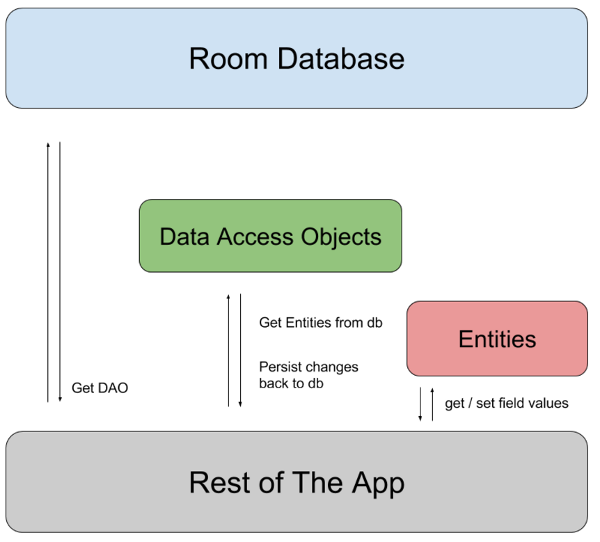
The database class provides your app with instances of the DAOs associated with that database. In turn, the app can use the DAOs to retrieve data from the database as instances of the associated data entity objects. The app can also use the defined data entities to update rows from the corresponding tables, or to create new rows for insertion. Figure 1 illustrates the relationship between the different components of Room.
Sample implementation
This section presents an example implementation of a Room database with a single data entity and a single DAO.
Data entity
The following code defines a User data entity. Each instance of User
represents a row in a user table in the app's database.
@Entity data class User( @PrimaryKey val uid: Int, @ColumnInfo(name = "first_name") val firstName: String, @ColumnInfo(name = "last_name") val lastName: String )
To learn more about data entities in Room, see Defining data using Room entities.
Data access object (DAO)
The following code defines a DAO called UserDao. UserDao provides the
functions that the rest of the app uses to interact with data in the user
table.
@Dao interface UserDao { @Query("SELECT * FROM user") suspend fun getAll(): List<User> @Query("SELECT * FROM user WHERE uid IN (:userIds)") suspend fun loadAllByIds(userIds: IntArray): List<User> @Query( """ SELECT * FROM user WHERE first_name LIKE :first AND last_name LIKE :last LIMIT 1 """ ) suspend fun findByName(first: String, last: String): User @Insert suspend fun insertAll(vararg users: User) @Delete suspend fun delete(user: User) }
To learn more about DAOs, see Accessing data using Room DAOs.
Database
The following code defines an AppDatabase class to hold the database.
AppDatabase defines the database configuration and serves as the app's main
access point to the persisted data. The database class must satisfy the
following conditions:
- The class must be annotated with a
@Databaseannotation that includes anentitiesarray that lists all of the data entities associated with the database. - The class must be an abstract class that extends
RoomDatabase. - For each DAO class associated with the database, the database class must define an abstract function that takes no arguments and returns an instance of the DAO class.
@Database(entities = [User::class], version = 1) abstract class AppDatabase : RoomDatabase() { abstract fun userDao(): UserDao }
Note: If your app runs in a single process, you should follow the
singleton design pattern when instantiating an AppDatabase
object. Each RoomDatabase instance is fairly expensive, and you
rarely need access to multiple instances within a single process.
If your app runs in multiple processes, include
enableMultiInstanceInvalidation() in your database builder
invocation. That way, when you have an instance of AppDatabase
in each process, you can invalidate the shared database file in one process,
and this invalidation automatically propagates to the instances of
AppDatabase within other processes.
Usage
After you have defined the data entity, the DAO, and the database object, you can use the following code to create an instance of the database:
val db = Room.databaseBuilder<AppDatabase>(applicationContext, "database-name") .setDriver(AndroidSQLiteDriver()) .build()
You can then use the abstract functions from the AppDatabase to get an
instance of the DAO. In turn, you can use the functions from the DAO
instance to interact with the database:
val userDao = db.userDao() val users: List<User> = userDao.getAll()
Additional resources
To learn more about Room, see the following additional resources: