

Android 앱 내에서 디지털 사용자 인증 정보 확인을 사용하여 사용자의 신원 (예: 정부 발급 신분증), 사용자에 관한 속성 (예: 운전면허증, 학위 또는 연령이나 주소와 같은 속성)을 인증 및 승인하거나, 사용자 인증 정보를 발급하고 확인하여 법인의 진위 여부를 확인해야 하는 기타 시나리오를 인증 및 승인할 수 있습니다.
Verifier API는 Android 9 (API 수준 28) 이상에서 지원됩니다.
구현
Android 프로젝트에서 디지털 사용자 인증 정보를 확인하려면 다음 단계를 따르세요.
- 앱의 빌드 스크립트에 종속 항목을 추가하고
CredentialManager클래스를 초기화합니다. - 디지털 사용자 인증 정보 요청을 구성하고 이를 사용하여
DigitalCredentialOption를 초기화한 후GetCredentialRequest를 빌드합니다. - 구성된 요청으로
getCredential흐름을 실행하여 성공적인GetCredentialResponse를 수신하거나 발생할 수 있는 예외를 처리합니다. 성공적으로 검색되면 응답을 검증합니다.
종속 항목 추가 및 초기화
Gradle 빌드 스크립트에 다음 종속 항목을 추가합니다.
dependencies {
    implementation("androidx.credentials:credentials:1.6.0-beta01")
    implementation("androidx.credentials:credentials-play-services-auth:1.6.0-beta01")
}
다음으로 CredentialManager 클래스의 인스턴스를 초기화합니다.
val credentialManager = CredentialManager.create(context)
디지털 사용자 인증 정보 요청 구성
디지털 사용자 인증 정보 요청을 구성하고 이를 사용하여 DigitalCredentialOption를 초기화합니다.
// The request in the JSON format to conform with
// the JSON-ified Credential Manager - Verifier API request definition.
val requestJson = generateRequestFromServer()
val digitalCredentialOption =
    GetDigitalCredentialOption(requestJson = requestJson)

// Use the option from the previous step to build the `GetCredentialRequest`.
val getCredRequest = GetCredentialRequest(
    listOf(digitalCredentialOption)
)
다음 예는 OpenId4Vp1 요청을 보여줍니다. 이 요청의 필드에 관한 자세한 내용은 OpenID 문서를 참고하세요.
{
  "requests": [
    {
      "protocol": "openid4vp-v1-unsigned",
      "data": {
        "response_type": "vp_token",
        "response_mode": "dc_api",
        "nonce": "OD8eP8BYfr0zyhgq4QCVEGN3m7C1Ht_No9H5fG5KJFk",
        "dcql_query": {
          "credentials": [
            {
              "id": "cred1",
              "format": "mso_mdoc",
              "meta": {
                "doctype_value": "org.iso.18013.5.1.mDL"
              },
              "claims": [
                {
                  "path": [
                    "org.iso.18013.5.1",
                    "family_name"
                  ]
                },
                {
                  "path": [
                    "org.iso.18013.5.1",
                    "given_name"
                  ]
                },
                {
                  "path": [
                    "org.iso.18013.5.1",
                    "age_over_21"
                  ]
                }
              ]
            }
          ]
        }
      }
    }
  ]
}
사용자 인증 정보 가져오기
생성된 요청으로 getCredential 흐름을 실행합니다. 요청이 실패하면 성공적인 GetCredentialResponse 또는 GetCredentialException를 수신합니다.
getCredential 흐름은 Android 시스템 대화상자를 트리거하여 사용자가 사용할 수 있는 사용자 인증 정보 옵션을 표시하고 사용자의 선택을 수집합니다. 다음으로, 선택한 사용자 인증 정보 옵션이 포함된 월렛 앱은 동의를 수집하고 디지털 사용자 인증 정보 응답을 생성하는 데 필요한 작업을 실행하는 UI를 표시합니다.
coroutineScope.launch {
    try {
        val result = credentialManager.getCredential(
            context = activityContext,
            request = getCredRequest
        )
        verifyResult(result)
    } catch (e : GetCredentialException) {
        handleFailure(e)
    }
}

// Handle the successfully returned credential.
fun verifyResult(result: GetCredentialResponse) {
    val credential = result.credential
    when (credential) {
        is DigitalCredential -> {
            val responseJson = credential.credentialJson
            validateResponseOnServer(responseJson)
        }
        else -> {
            // Catch any unrecognized credential type here.
            Log.e(TAG, "Unexpected type of credential ${credential.type}")
        }
    }
}

// Handle failure.
fun handleFailure(e: GetCredentialException) {
  when (e) {
        is GetCredentialCancellationException -> {
            // The user intentionally canceled the operation and chose not
            // to share the credential.
        }
        is GetCredentialInterruptedException -> {
            // Retry-able error. Consider retrying the call.
        }
        is NoCredentialException -> {
            // No credential was available.
        }
        else -> Log.w(TAG, "Unexpected exception type ${e::class.java}")
    }
}
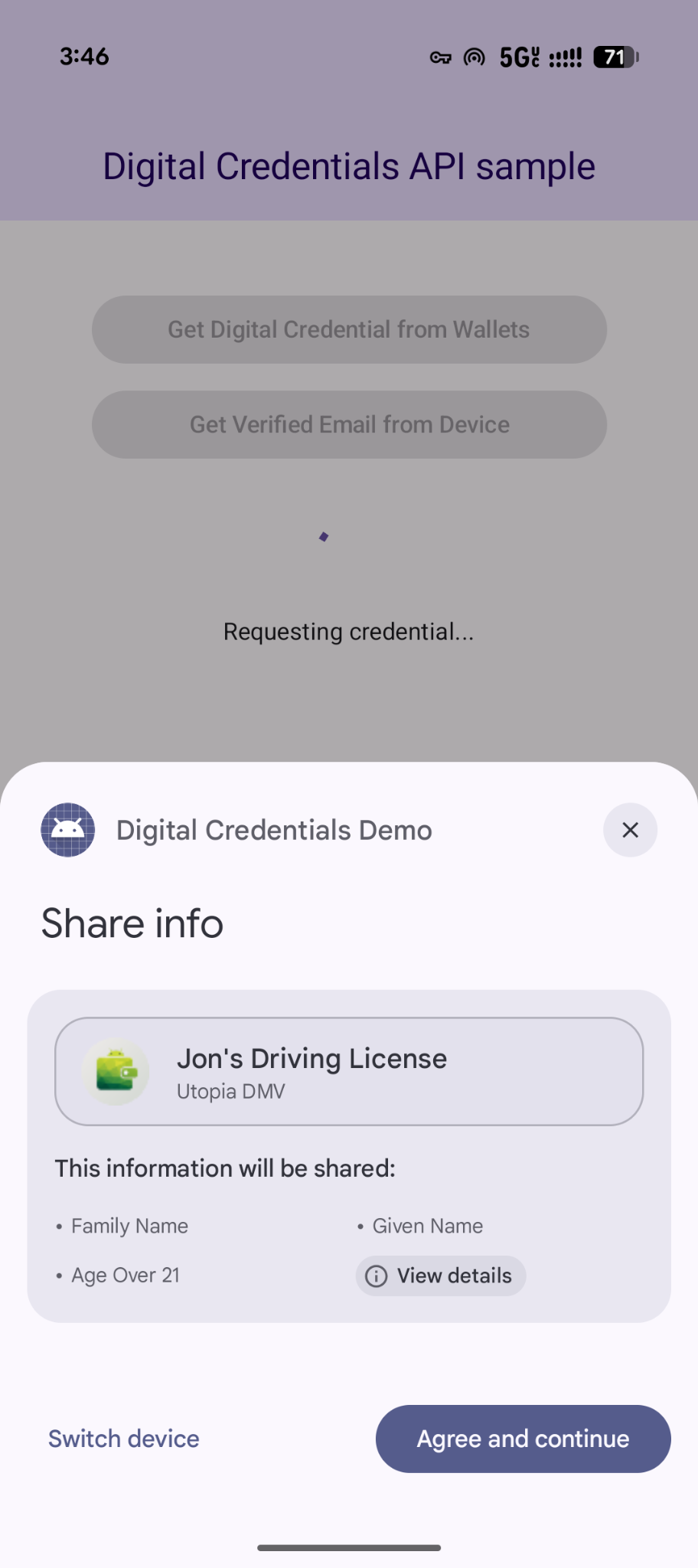
유연한 다중 사용자 인증 정보 요청
Digital Credentials API는 OpenID4VP를 사용하여 한 번에 여러 유형의 사용자 인증 정보를 요청하는 기능도 지원합니다.
- 동시 요청: 단일 사용자 트랜잭션에서 여러 사용자 인증 정보를 요청합니다. 예를 들어 여행 앱은 탑승권과 정부 발급 신분증을 동시에 요청할 수 있으므로 사용자는 한 번의 탭으로 두 가지를 모두 검토하고 동의할 수 있습니다.
- 유연한 처리: 여러 사용자 인증 정보 유형 또는 발급기관 중 하나를 허용합니다. 예를 들어 연령 인증 흐름은 운전면허증 또는 여권을 허용할 수 있으므로 사용자는 소지품에 저장된 사용자 인증 정보를 사용하여 요청을 처리할 수 있습니다.
다음은 단일 요청에서 여러 사용자 인증 정보를 요청하는 예입니다.
{
  "credentials": [
    {
      "id": "gov_id1",
      "format": "mso_mdoc",
      "meta": {
        "doctype_value": "org.iso.18013.5.1.mDL"
      },
      "claims": [
        {
          "path": [
            "org.iso.18013.5.1",
            "age_over_21"
          ]
        }
      ]
    },
    {
      "id": "boarding_pass1",
      "format": "dc+sd-jwt",
      "meta": {
        "vct_values": [
          "https://credentials.example.airline/boarding-pass"
        ]
      },
      "claims": [
        {
          "path": [
            "flight_number"
          ]
        },
        {
          "path": [
            "seat"
          ]
        }
      ]
    }
  ]
}
응답 처리
사용자 인증 정보 요청을 한 후 CredentialManager에서 반환된 GetCredentialResponse를 처리합니다.
// Handle the successfully returned credential.
fun verifyResult(result: GetCredentialResponse) {
    val credential = result.credential
    when (credential) {
        is DigitalCredential -> {
            val responseJson = credential.credentialJson
            validateResponseOnServer(responseJson)
        }
        else -> {
            // Catch any unrecognized credential type here.
            Log.e(TAG, "Unexpected type of credential ${credential.type}")
        }
    }
}
예외 처리
앱은 기기에 사용자 인증 정보가 없거나 사용자가 작업을 취소하는 경우를 비롯하여 발생할 수 있는 오류를 처리해야 합니다.
// Handle failure.
fun handleFailure(e: GetCredentialException) {
    when (e) {
        is GetCredentialCancellationException -> {
            // The user intentionally canceled the operation and chose not
            // to share the credential.
        }
        is GetCredentialInterruptedException -> {
            // Retry-able error. Consider retrying the call.
        }
        is NoCredentialException -> {
            // No credential was available.
        }
        is CreateCredentialUnknownException -> {
            // An unknown, usually unexpected, error has occurred. Check the
            // message error for any additional debugging information.
        }
        is CreateCredentialCustomException -> {
            // You have encountered a custom error thrown by the wallet.
            // If you made the API call with a request object that's a
            // subclass of CreateCustomCredentialRequest using a 3rd-party SDK,
            // then you should check for any custom exception type constants
            // within that SDK to match with e.type. Otherwise, drop or log the
            // exception.
        }
        else -> Log.w(TAG, "Unexpected exception type ${e::class.java}")
    }
}