Header
Stay organized with collections
Save and categorize content based on your preferences.
Headers help drivers understand which app and what part of the app they're
using. They need to be brief and easy to read at a glance while on the road.
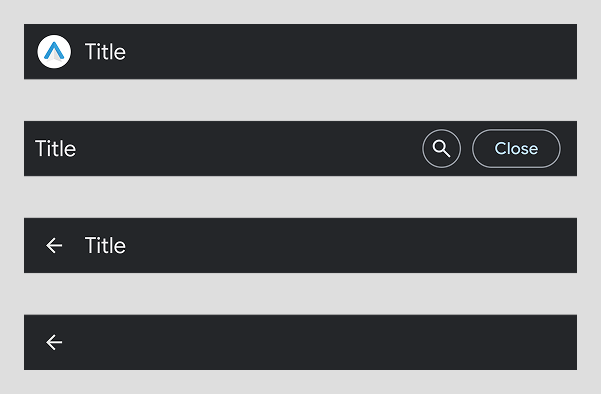
Headers must include at least one of the following: text, app icon, or back
button.
Headers can include:
Icon or image (optional), such as app icon
Text (limited to one line – longer text is truncated), typically the
title of the screen
This example shows different types of headers you can create.
This example shows different types of headers you can create.
Expanded header (section item template)
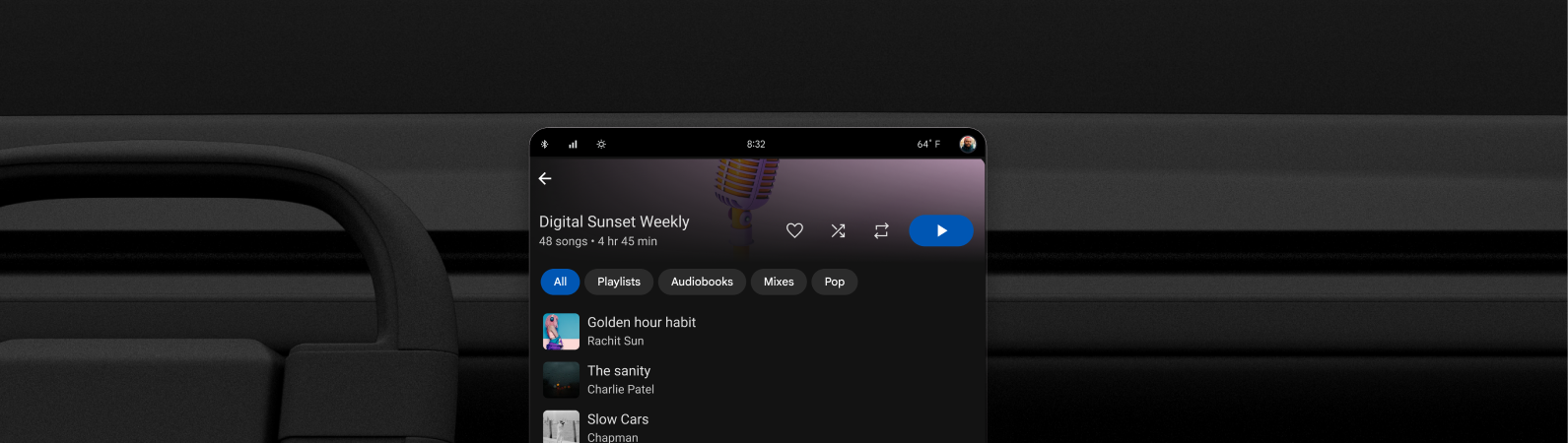
Expanded headers on Sectioned Item templates support rich layouts beyond basic
title bars. Use expanded headers to:
Add images that collapse on scroll
Display secondary actions
Examples of expanded headers with images and secondary actions.
Content and code samples on this page are subject to the licenses described in the Content License. Java and OpenJDK are trademarks or registered trademarks of Oracle and/or its affiliates.
Last updated 2026-07-13 UTC.
[[["Easy to understand","easyToUnderstand","thumb-up"],["Solved my problem","solvedMyProblem","thumb-up"],["Other","otherUp","thumb-up"]],[["Missing the information I need","missingTheInformationINeed","thumb-down"],["Too complicated / too many steps","tooComplicatedTooManySteps","thumb-down"],["Out of date","outOfDate","thumb-down"],["Samples / code issue","samplesCodeIssue","thumb-down"],["Other","otherDown","thumb-down"]],["Last updated 2026-07-13 UTC."],[],[]]