

আপনার ব্যবহারকারীরা যেখানেই থাকুক না কেন, তাদের কাছে পৌঁছে অ্যাপের সম্পৃক্ততা বাড়ান। কালেকশন , এন্টারটেইনমেন্ট স্পেস এবং প্লে স্টোরের মতো ডিভাইসের বিভিন্ন প্ল্যাটফর্মে ব্যবহারকারীদের কাছে সরাসরি ব্যক্তিগতকৃত সুপারিশ এবং ধারাবাহিক কন্টেন্ট পৌঁছে দিতে Engage SDK ইন্টিগ্রেট করুন। এই ইন্টিগ্রেশনটি গড় APK-তে ৫০ কেবি-রও কম (কম্প্রেসড) সাইজ যোগ করে এবং বেশিরভাগ অ্যাপের জন্য ডেভেলপারদের প্রায় এক সপ্তাহ সময় লাগে। আমাদের বিজনেস সাইটে আরও জানুন।
এই নথিতে ডেভেলপার অংশীদারদের জন্য রিজার্ভেশন, ইভেন্ট, বাসস্থান, দর্শনীয় স্থান, ব্যক্তি এবং এমন অন্যান্য বিষয়বস্তুর মতো নতুন কন্টেন্ট সংহত করার নির্দেশাবলী রয়েছে, যা হয়তো এই বিভাগগুলির কোনোটির অন্তর্ভুক্ত নয়।
একীকরণের বিবরণ
পরিভাষা
এই ইন্টিগ্রেশনে নিম্নলিখিত তিন ধরনের ক্লাস্টার অন্তর্ভুক্ত রয়েছে: রিকমেন্ডেশন , ফিচার্ড এবং কন্টিনিউয়েশন ।
সুপারিশ ক্লাস্টার একজন নির্দিষ্ট ডেভেলপার পার্টনারের কাছ থেকে ব্যক্তিগতকৃত পরামর্শ দেখায়। এটি একটি UI ভিউ, যেখানে একই ডেভেলপার পার্টনারের দেওয়া একাধিক সুপারিশ থাকে।
ArticleEntity : এটি এমন একটি ArticleEntity যা একাধিক ক্যাটাগরির কন্টেন্টের জন্য প্রাসঙ্গিক টেক্সট-ভিত্তিক সুপারিশ উপস্থাপন করে। ArticleEntity আইটেমটি ডেভেলপারদেরকে GenericFeaturedEntity-এর তুলনায় ব্যবহারকারীদের কাছে তথ্য আরও স্পষ্টভাবে তুলে ধরার জন্য আরও বেশি মেটাডেটা সহ বিভিন্ন ধরণের টেক্সট এবং ইমেজ কন্টেন্ট সরবরাহ করার সুযোগ দেয়। উদাহরণ: মার্কেটিং কন্টেন্ট, নিউজ স্নিপেট।
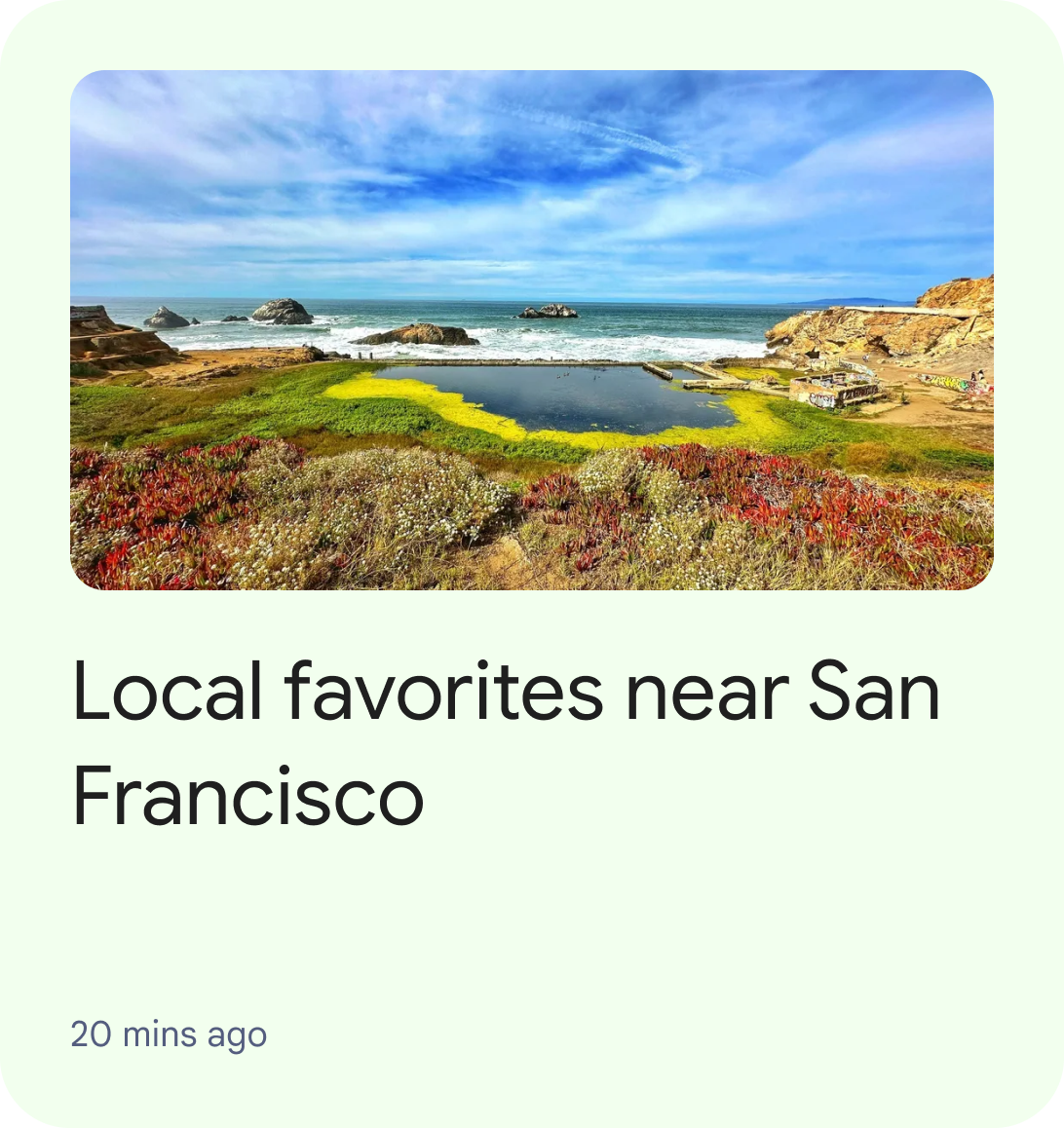
চিত্র ১: রিকমেন্ডেশনস ক্লাস্টারের মধ্যে একটিমাত্র আর্টিকেলএন্টিটি দেখানো ইউআই। ইভেন্টএন্টিটি : ইভেন্টএন্টিটি ভবিষ্যতে ঘটতে যাওয়া একটি ঘটনাকে বোঝায়। ঘটনা শুরুর সময় একটি অত্যন্ত গুরুত্বপূর্ণ তথ্য যা ব্যবহারকারীদের জানানো প্রয়োজন।
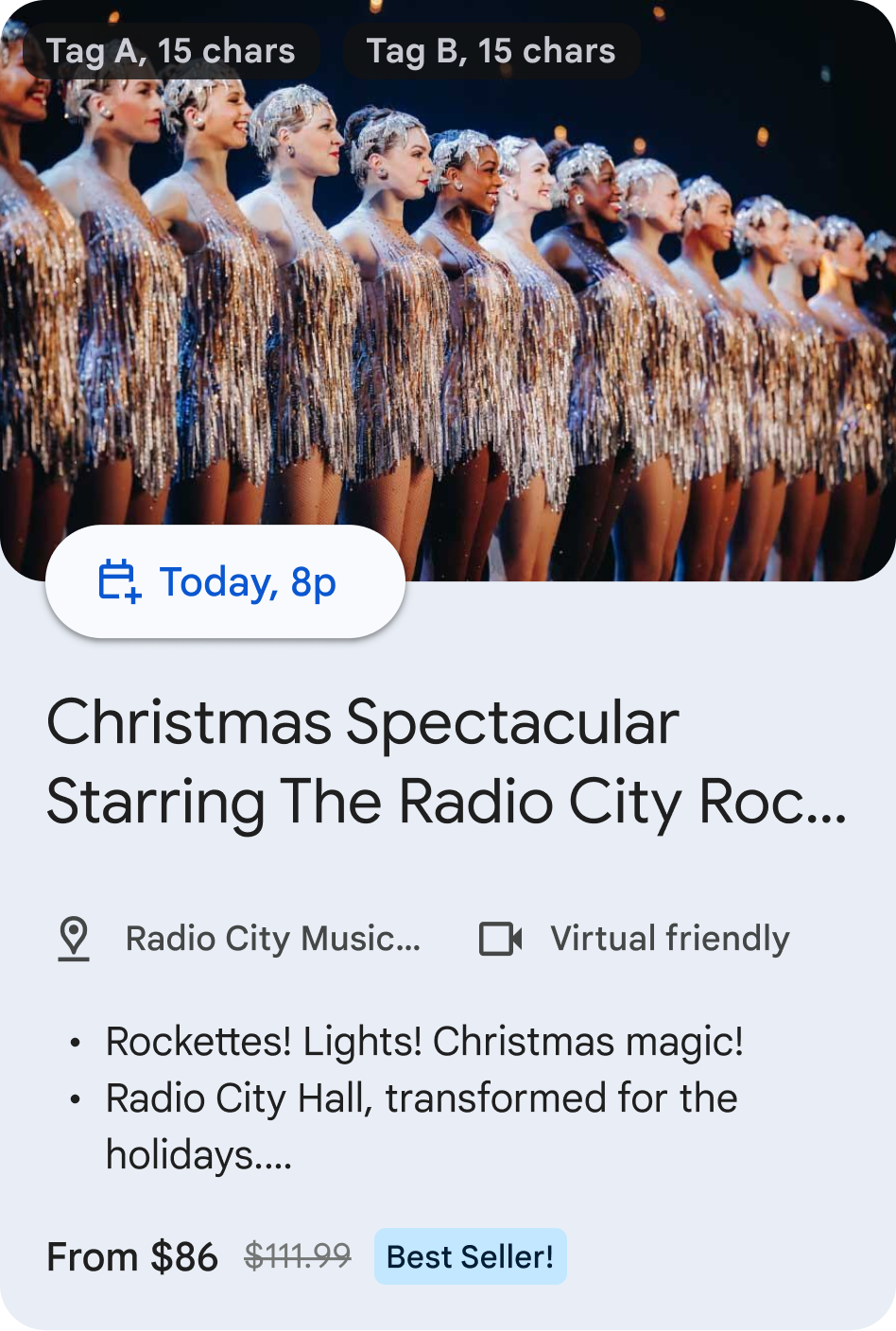
চিত্র ২: রিকমেন্ডেশনস ক্লাস্টারের মধ্যে একটিমাত্র ইভেন্টএন্টিটি দেখানো ইউআই। আবাসন সত্তা : আবাসন সত্তা বলতে স্বল্প ও দীর্ঘমেয়াদী ভাড়ার জন্য হোটেল, অ্যাপার্টমেন্ট, বা অবকাশকালীন বাড়ির মতো কোনো বাসস্থানকে বোঝায়।
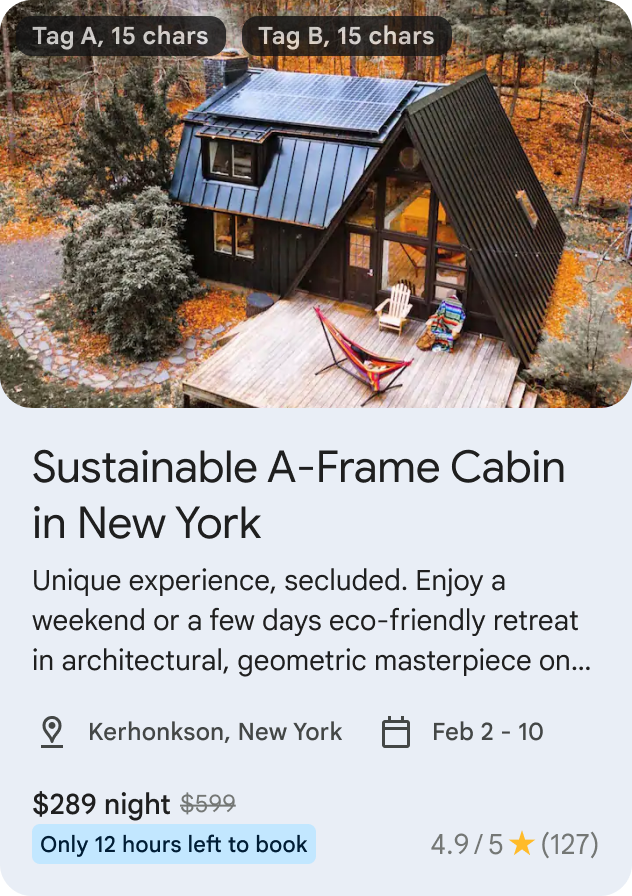
চিত্র ৩: ইউআই (UI) যেখানে রিকমেন্ডেশনস (Recommendations) ক্লাস্টারের মধ্যে একটিমাত্র লজিংএন্টিটি (LodgingEntity) দেখানো হচ্ছে। স্টোরএন্টিটি : স্টোরএন্টিটি একটি দোকান, রেস্তোরাঁ, ক্যাফে ইত্যাদির প্রতিনিধিত্ব করে। এটি এমন বিষয়বস্তুকে তুলে ধরে যেখানে কোনো খাবারের স্থান বা দোকান সম্পর্কিত গুরুত্বপূর্ণ তথ্য ব্যবহারকারীদের কাছে পৌঁছে দেওয়া প্রয়োজন।
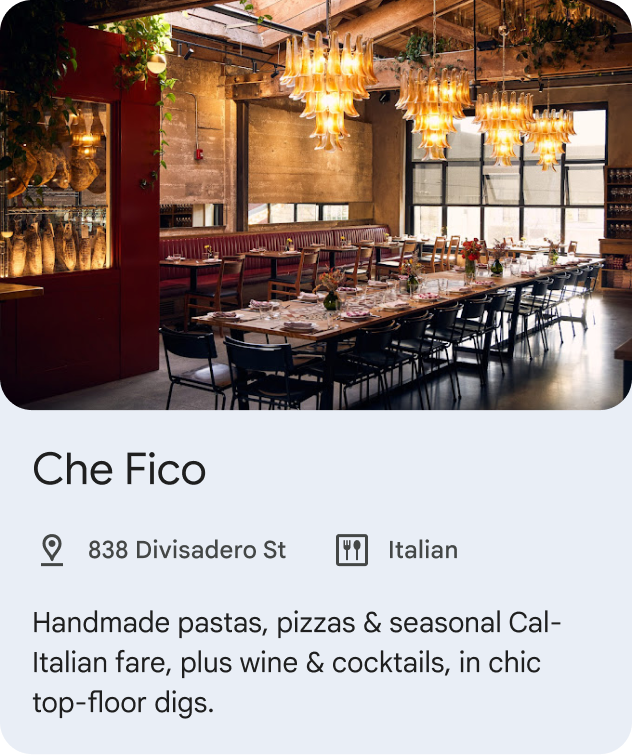
চিত্র ৪: রিকমেন্ডেশন ক্লাস্টারের মধ্যে একটিমাত্র স্টোরএন্টিটি দেখানো ইউআই। PointOfInterestEntity : PointOfInterestEntity একটি আকর্ষণীয় স্থানকে বোঝায়, যেমন—গ্যাস স্টেশন, অনুষ্ঠানস্থল, থিম পার্ক, জাদুঘর, পর্যটন কেন্দ্র, হাইকিং ট্রেইল ইত্যাদি। এটি এমন বিষয়বস্তুকে হাইলাইট করে যেখানে অবস্থান একটি অত্যন্ত গুরুত্বপূর্ণ তথ্য যা ব্যবহারকারীদের কাছে পৌঁছে দেওয়া প্রয়োজন। এটি বাসস্থান, দোকান বা খাবারের জায়গার জন্য ব্যবহার করা উচিত নয়।

চিত্র ৫: রিকমেন্ডেশন ক্লাস্টারের মধ্যে একটিমাত্র পয়েন্ট অফ ইন্টারেস্ট এনটিটি (PointOfInterestEntity) প্রদর্শনকারী ইউআই (UI)। PersonEntity : PersonEntity একজন ব্যক্তিকে প্রতিনিধিত্ব করে। স্বাস্থ্য ও ফিটনেস, খেলাধুলা, ডেটিং ইত্যাদির মতো বিভাগগুলিতে একজন ব্যক্তিকে হাইলাইট করার পরামর্শ দেওয়া যেতে পারে।
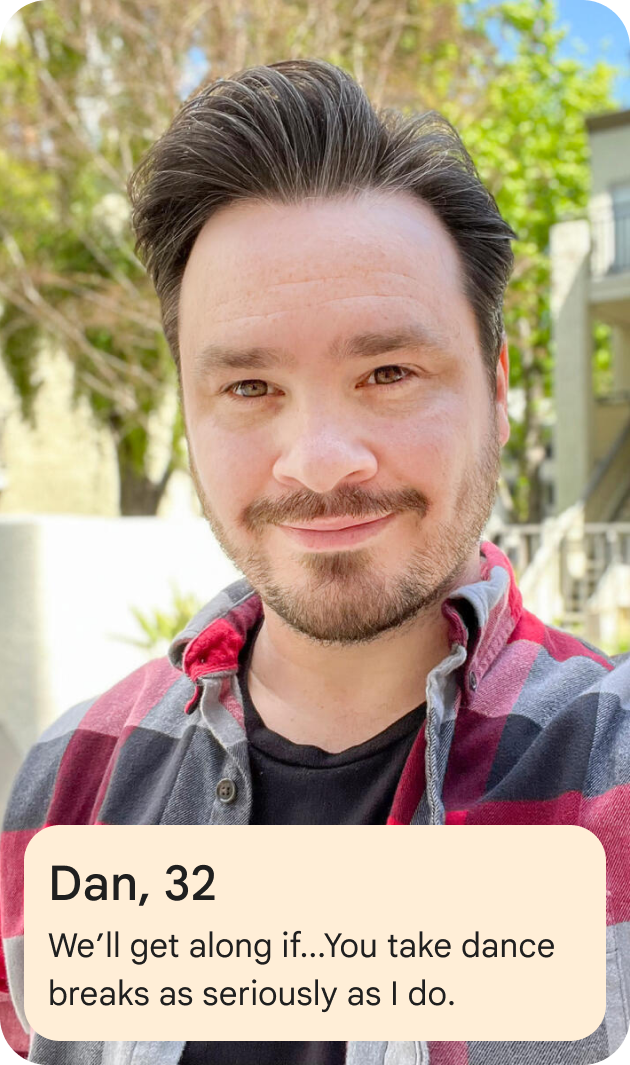
চিত্র ৫: রিকমেন্ডেশন ক্লাস্টারের মধ্যে একটিমাত্র পার্সনএন্টিটি দেখানো ইউআই।
কন্টিনিউয়েশন ক্লাস্টার একাধিক ডেভেলপার পার্টনারের ব্যবহারকারীদের দ্বারা সম্প্রতি ব্যবহৃত কন্টেন্ট একটি একক UI গ্রুপে প্রদর্শন করে। প্রতিটি ডেভেলপার পার্টনারকে কন্টিনিউয়েশন ক্লাস্টারে সর্বোচ্চ ১০টি এনটিটি ব্রডকাস্ট করার অনুমতি দেওয়া হবে।
আপনার পরবর্তী বিষয়বস্তু নিম্নলিখিত কাঠামো অনুসরণ করতে পারে:
ArticleEntity : এমন একটি ArticleEntity যা একাধিক কন্টেন্ট ক্যাটাগরির সাথে প্রাসঙ্গিক কন্টেন্টের জন্য টেক্সট-ভিত্তিক সুপারিশ উপস্থাপন করে। এই এনটিটিটি অসমাপ্ত সংবাদ নিবন্ধ বা অন্য কোনো কন্টেন্ট উপস্থাপন করতে ব্যবহার করা যেতে পারে, যা ব্যবহারকারী যেখান থেকে পড়া ছেড়েছিলেন সেখান থেকে আবার শুরু করতে চান। উদাহরণ: মার্কেটিং কন্টেন্ট, সংবাদের সংক্ষিপ্ত অংশ।
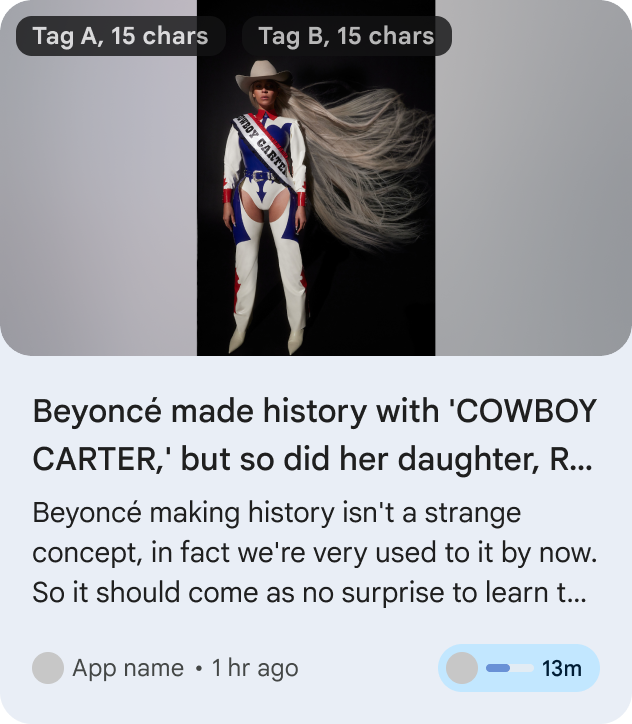
চিত্র ৬. একটি কন্টিনিউয়েশন ক্লাস্টারের মধ্যে একটিমাত্র ArticleEntity প্রদর্শনকারী UI। RestaurantReservationEntity : RestaurantReservationEntity একটি রেস্তোরাঁ বা ক্যাফের রিজার্ভেশনকে প্রতিনিধিত্ব করে এবং ব্যবহারকারীদের আসন্ন বা চলমান রেস্তোরাঁর রিজার্ভেশন ট্র্যাক করতে সাহায্য করে।

চিত্র ৭. একটি কন্টিনিউয়েশন ক্লাস্টারের মধ্যে অবস্থিত একটিমাত্র RestaurantReservationEntity প্রদর্শনকারী UI। EventReservationEntity : EventReservationEntity একটি ইভেন্টের রিজার্ভেশনকে প্রতিনিধিত্ব করে এবং ব্যবহারকারীদের আসন্ন বা চলমান ইভেন্টের রিজার্ভেশন ট্র্যাক করতে সাহায্য করে। ইভেন্টগুলোর মধ্যে নিম্নলিখিতগুলো অন্তর্ভুক্ত থাকতে পারে, তবে এগুলোতেই সীমাবদ্ধ নয়:
- ফুটবল ম্যাচের রিজার্ভেশনের মতো ক্রীড়া ইভেন্ট
- ই-স্পোর্টসের জন্য রিজার্ভেশনের মতো গেমিং ইভেন্ট
- সিনেমা হলে সিনেমার টিকিট সংরক্ষণ, কনসার্ট, থিয়েটার, বই স্বাক্ষর অনুষ্ঠানের মতো বিনোদনমূলক অনুষ্ঠান।
- ভ্রমণ বা দর্শনীয় স্থানের রিজার্ভেশন, যেমন গাইডেড ট্যুর, জাদুঘরের টিকিট
- সামাজিক অনুষ্ঠান / সেমিনার / সম্মেলনের রিজার্ভেশন
- শিক্ষা / প্রশিক্ষণ সেশনের জন্য রিজার্ভেশন
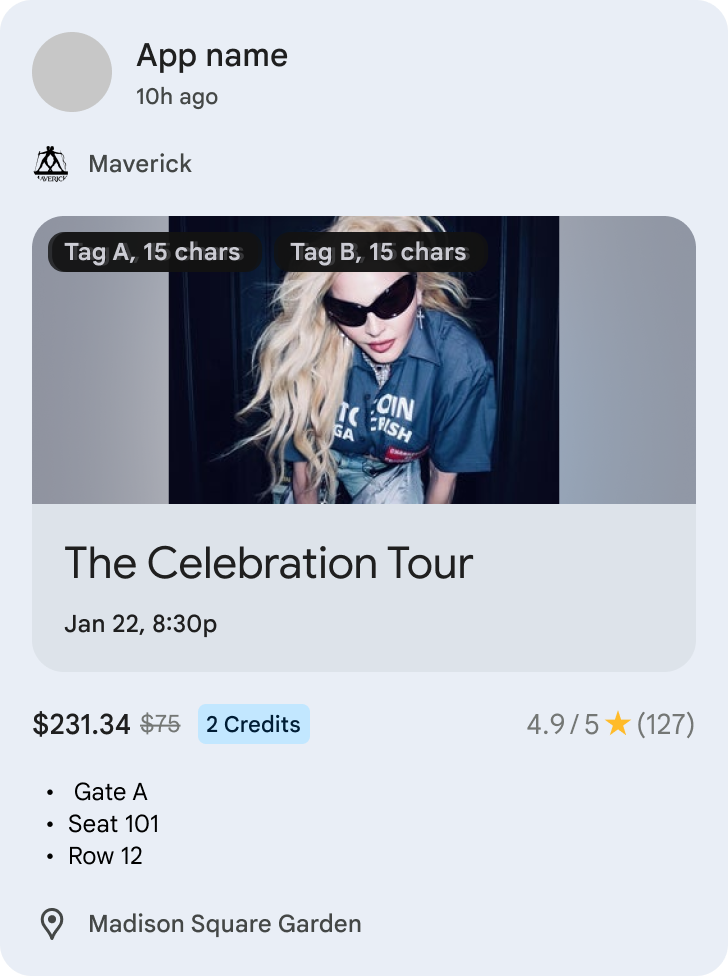
চিত্র ৮. একটি কন্টিনিউয়েশন ক্লাস্টারের মধ্যে অবস্থিত একটিমাত্র ইভেন্টরিজারভেশনএন্টিটি (EventReservationEntity) প্রদর্শনকারী ইউআই (UI)। LodgingReservationEntity : LodgingEntityReservation হলো ভ্রমণের জন্য আবাসনের একটি রিজার্ভেশন এবং এটি ব্যবহারকারীদের আসন্ন বা চলমান হোটেল বা অবকাশকালীন ভাড়ার রিজার্ভেশন ট্র্যাক করতে সাহায্য করে।
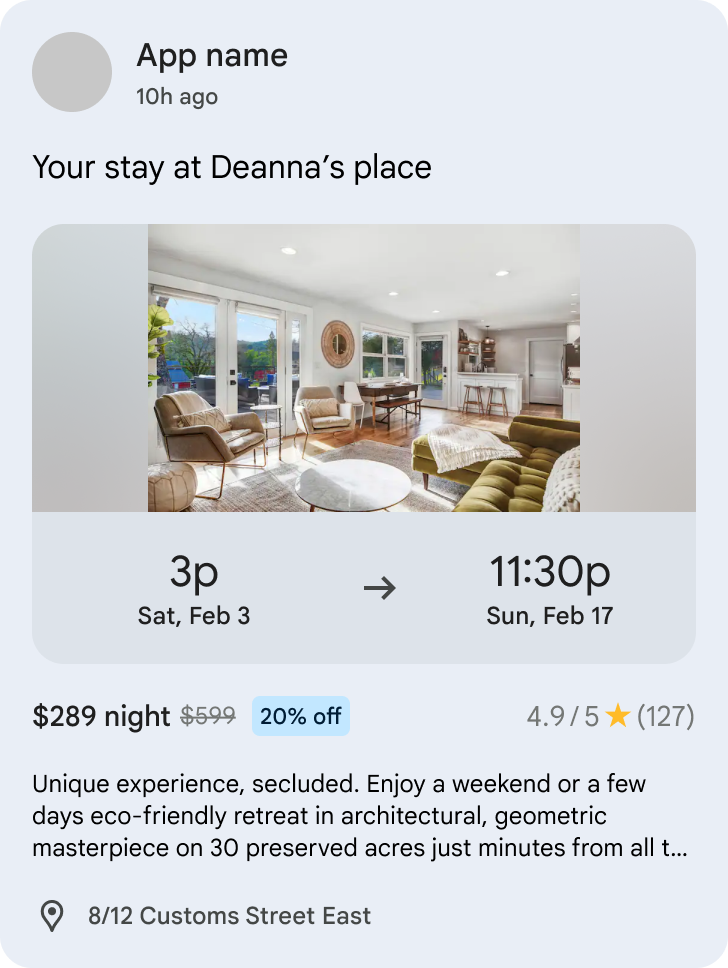
চিত্র ৯। একটি কন্টিনিউয়েশন ক্লাস্টারের মধ্যে একটিমাত্র LodgingReservationEntity প্রদর্শনকারী UI। TransportationReservationEntity : TransportationReservationEntity যেকোনো ধরনের পরিবহনের জন্য করা একটি রিজার্ভেশনকে বোঝায় এবং ব্যবহারকারীদের আসন্ন বা চলমান ফ্লাইট, ফেরি, ট্রেন, বাস, রাইড-হেইলিং বা ক্রুজের রিজার্ভেশন ট্র্যাক করতে সাহায্য করে।

চিত্র ১০। একটি কন্টিনিউয়েশন ক্লাস্টারের মধ্যে অবস্থিত একটিমাত্র ট্রান্সপোর্টেশনরিজার্ভেশনএন্টিটি প্রদর্শনকারী ইউআই। VehicleRentalReservationEntity : VehicleRentalReservationEntity একটি যানবাহন ভাড়ার রিজার্ভেশনকে প্রতিনিধিত্ব করে এবং ব্যবহারকারীদের আসন্ন বা চলমান যানবাহন ভাড়ার রিজার্ভেশন ট্র্যাক করতে সাহায্য করে।

চিত্র ১১। একটি কন্টিনিউয়েশন ক্লাস্টারের মধ্যে একটিমাত্র VehicleRentalReservationEntity প্রদর্শনকারী UI।
ফিচার্ড ক্লাস্টার হলো একটি UI ভিউ, যা অনেক ডেভেলপার পার্টনারদের থেকে নির্বাচিত হিরো
GenericFeaturedEntityএকটি UI গ্রুপে প্রদর্শন করে। একটিমাত্র ফিচার্ড ক্লাস্টার থাকে, যা UI-এর উপরের দিকে প্রদর্শিত হয় এবং সমস্ত রিকমেন্ডেশন ক্লাস্টারের উপরে এর অগ্রাধিকার থাকে। প্রত্যেক ডেভেলপার পার্টনারকে ফিচার্ড-এ একটি সমর্থিত ধরনের একটিমাত্র এনটিটি সম্প্রচার করার অনুমতি দেওয়া হয়, যেখানে এই ফিচার্ড ক্লাস্টারে একাধিক অ্যাপ ডেভেলপারের অনেকগুলো এনটিটি (সম্ভাব্যভাবে বিভিন্ন ধরনের) থাকতে পারে।GenericFeaturedEntity : GenericFeaturedEntity, Recommendation আইটেম থেকে এই কারণে ভিন্ন যে, Featured আইটেমটি ডেভেলপারদের তৈরি একটি সেরা কন্টেন্টের জন্য ব্যবহৃত হওয়া উচিত এবং এটি এমন একটি সবচেয়ে গুরুত্বপূর্ণ কন্টেন্টকে উপস্থাপন করবে যা ব্যবহারকারীদের কাছে আকর্ষণীয় এবং প্রাসঙ্গিক হবে।
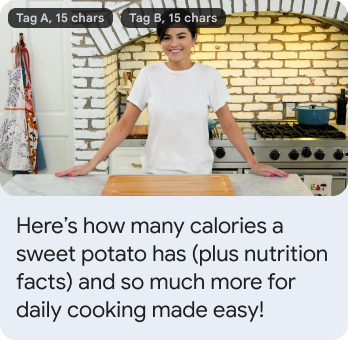
চিত্র ১২: একটি ফিচার্ড ক্লাস্টারের মধ্যে একটি একক হিরো GenericFeaturedEntity কার্ড প্রদর্শনকারী UI।
প্রাক-কাজ
সর্বনিম্ন এপিআই স্তর: ১৯
আপনার অ্যাপে com.google.android.engage:engage-core লাইব্রেরিটি যোগ করুন:
dependencies {
    // Make sure you also include that repository in your project's build.gradle file.
    implementation 'com.google.android.engage:engage-core:1.5.12'
}
সারসংক্ষেপ
ডিজাইনটি একটি বাউন্ড সার্ভিসের বাস্তবায়নের উপর ভিত্তি করে তৈরি।
বিভিন্ন ক্লাস্টার প্রকারের জন্য একজন ক্লায়েন্ট যে ডেটা প্রকাশ করতে পারে তা নিম্নলিখিত সীমাবদ্ধতার অধীন:
| ক্লাস্টার টাইপ | ক্লাস্টার সীমা | একটি ক্লাস্টারে সর্বনিম্ন সত্তার সীমা | একটি ক্লাস্টারে সত্তার সর্বোচ্চ সীমা |
|---|---|---|---|
| সুপারিশ ক্লাস্টার(গুলি) | সর্বাধিক ৭ | অন্তত ১ | সর্বাধিক ৫০টি ( ArticleEntity , EventEntity , LodgingEntity , StoreEntity , PointOfInterestEntity , অথবা PersonEntity ) |
| ধারাবাহিকতা ক্লাস্টার | সর্বাধিক ১ | অন্তত ১ | সর্বাধিক ২০টি ( ArticleEntity , EventReservationEntity , LodgingReservationEntity , TransportationReservationEntity , অথবা VehicleRentalReservationEntity ) |
| বৈশিষ্ট্যযুক্ত ক্লাস্টার | সর্বাধিক ১ | অন্তত ১ | সর্বাধিক ২০ ( GenericFeaturedEntity ) |
ধাপ ১: সত্তার তথ্য প্রদান করুন
এসডিকে প্রতিটি আইটেমের ধরন বোঝানোর জন্য বিভিন্ন এনটিটি সংজ্ঞায়িত করেছে। আমরা 'অন্যান্য' বিভাগের জন্য নিম্নলিখিত এনটিটিগুলো সমর্থন করি:
-
GenericFeaturedEntity -
ArticleEntity -
EventEntity -
LodgingEntity -
StoreEntity -
PointOfInterestEntity -
PersonEntity -
RestaurantReservationEntity -
EventReservationEntity -
LodgingReservationEntity -
TransportationReservationEntity -
VehicleRentalReservationEntity
নিচের চার্টগুলোতে প্রতিটি প্রকারের জন্য উপলব্ধ বৈশিষ্ট্য এবং প্রয়োজনীয়তাগুলো তুলে ধরা হয়েছে।
GenericFeaturedEntity
| বৈশিষ্ট্য | প্রয়োজনীয়তা | বর্ণনা | ফর্ম্যাট |
|---|---|---|---|
| অ্যাকশন উরি | প্রয়োজনীয় | প্রোভাইডার অ্যাপে থাকা এনটিটির ডিপ লিঙ্ক। দ্রষ্টব্য: অ্যাট্রিবিউশনের জন্য আপনি ডিপ লিঙ্ক ব্যবহার করতে পারেন। এই প্রায়শই জিজ্ঞাসিত প্রশ্নাবলী (FAQ) দেখুন। | উরি |
| পোস্টারের ছবি | প্রয়োজনীয় | একাধিক ছবি দেওয়া হলে আমরা কেবল ১টি ছবিই দেখাব। প্রস্তাবিত অ্যাসপেক্ট রেশিও হলো ১৬:৯। দ্রষ্টব্য: যদি কোনো ব্যাজ প্রদান করা হয়, তবে ছবির উপরে এবং নীচে উভয় দিকে ২৪ ডিপিএস-এর নিরাপদ স্থান নিশ্চিত করুন। | নির্দেশনার জন্য ছবির বিবরণ দেখুন। |
| শিরোনাম | ঐচ্ছিক | সত্তার শিরোনাম। | মুক্ত পাঠ্য প্রস্তাবিত লেখার আকার: ৫০ অক্ষর |
| বর্ণনা | ঐচ্ছিক | সত্তাটির বর্ণনা দেওয়ার জন্য একটিমাত্র অনুচ্ছেদ। দ্রষ্টব্য: ব্যবহারকারীকে হয় বিবরণ অথবা উপশিরোনাম তালিকা দেখানো হবে, উভয়ই নয়। | মুক্ত পাঠ্য প্রস্তাবিত লেখার আকার: ১৮০ অক্ষর |
| সাবটাইটেল তালিকা | ঐচ্ছিক | সর্বোচ্চ ৩টি সাবটাইটেল, এবং প্রতিটি সাবটাইটেল এক লাইনের লেখা হবে। দ্রষ্টব্য: ব্যবহারকারীকে হয় বিবরণ অথবা উপশিরোনাম তালিকা দেখানো হবে, উভয়ই নয়। | মুক্ত পাঠ্য প্রতিটি উপশিরোনামের জন্য প্রস্তাবিত লেখার আকার: সর্বোচ্চ ৫০ অক্ষর |
| ব্যাজ | ঐচ্ছিক | প্রতিটি ব্যাজ হয় মুক্ত লেখা (সর্বোচ্চ ১৫ অক্ষর) অথবা একটি ছোট ছবি। ছবি/ভিডিওর উপরে বিশেষ ইউএক্স ট্রিটমেন্ট, যেমন—ছবির উপরে ব্যাজ ওভারলে হিসেবে।
| |
| ব্যাজ - টেক্সট | ঐচ্ছিক | ব্যাজের জন্য শিরোনাম দ্রষ্টব্য: ব্যাজের জন্য লেখা অথবা ছবি যেকোনো একটি আবশ্যক। | মুক্ত পাঠ্য প্রস্তাবিত লেখার আকার: সর্বোচ্চ ১৫ অক্ষর |
| ব্যাজ - ছবি | ঐচ্ছিক | ছোট ছবি বিশেষ ইউএক্স ট্রিটমেন্ট, যেমন ছবি/ভিডিও থাম্বনেইলের উপর ব্যাজ ওভারলে হিসেবে। দ্রষ্টব্য: ব্যাজের জন্য লেখা অথবা ছবি যেকোনো একটি আবশ্যক। | নির্দেশনার জন্য ছবির বিবরণ দেখুন। |
| বিষয়বস্তুর বিভাগ | ঐচ্ছিক | সত্তাটির বিষয়বস্তুর শ্রেণি বর্ণনা করুন। | এনামের তালিকা নির্দেশনার জন্য বিষয়বস্তুর শ্রেণীবিভাগ দেখুন। |
ArticleEntity
| বৈশিষ্ট্য | প্রয়োজনীয়তা | বর্ণনা | ফর্ম্যাট |
|---|---|---|---|
| অ্যাকশন উরি | প্রয়োজনীয় | প্রোভাইডার অ্যাপে থাকা এনটিটির ডিপ লিঙ্ক। দ্রষ্টব্য: অ্যাট্রিবিউশনের জন্য আপনি ডিপ লিঙ্ক ব্যবহার করতে পারেন। এই প্রায়শই জিজ্ঞাসিত প্রশ্নাবলী (FAQ) দেখুন। | উরি |
| শিরোনাম | প্রয়োজনীয় | সত্তার শিরোনাম। | মুক্ত পাঠ্য প্রস্তাবিত লেখার আকার: সর্বোচ্চ ৫০ অক্ষর |
| পোস্টারের ছবি | ঐচ্ছিক | একাধিক ছবি দেওয়া হলে আমরা কেবল ১টি ছবিই দেখাব। প্রস্তাবিত অ্যাসপেক্ট রেশিও হলো ১৬:৯। দ্রষ্টব্য: ছবি ব্যবহার করা বিশেষভাবে বাঞ্ছনীয়। যদি ব্যাজ দেওয়া হয়, তবে ছবির উপরে এবং নীচে ২৪ ডিপিএস-এর নিরাপদ দূরত্ব নিশ্চিত করুন। | নির্দেশনার জন্য ছবির বিবরণ দেখুন। |
| উৎস - শিরোনাম | ঐচ্ছিক | লেখক, সংস্থা বা প্রতিবেদকের নাম | মুক্ত পাঠ্য প্রস্তাবিত লেখার আকার: ২৫ অক্ষরের কম |
| উৎস - ছবি | ঐচ্ছিক | লেখক, সংস্থা, প্রতিবেদকের মতো উৎসের একটি ছবি। | নির্দেশনার জন্য ছবির বিবরণ দেখুন। |
| বর্ণনা | ঐচ্ছিক | সত্তাটির বর্ণনা দেওয়ার জন্য একটিমাত্র অনুচ্ছেদ। দ্রষ্টব্য: ব্যবহারকারীকে হয় বিবরণ অথবা উপশিরোনাম তালিকা দেখানো হবে, উভয়ই নয়। | মুক্ত পাঠ্য প্রস্তাবিত লেখার আকার: ১৮০ অক্ষর |
| সাবটাইটেল তালিকা | ঐচ্ছিক | সর্বোচ্চ ৩টি সাবটাইটেল, এবং প্রতিটি সাবটাইটেল এক লাইনের লেখা হবে। দ্রষ্টব্য: ব্যবহারকারীকে হয় বিবরণ অথবা উপশিরোনাম তালিকা দেখানো হবে, উভয়ই নয়। | মুক্ত পাঠ্য প্রতিটি উপশিরোনামের জন্য প্রস্তাবিত লেখার আকার: সর্বোচ্চ ৫০ অক্ষর |
| ব্যাজ | ঐচ্ছিক | প্রতিটি ব্যাজ হয় মুক্ত লেখা (সর্বোচ্চ ১৫ অক্ষর) অথবা একটি ছোট ছবি। ছবি/ভিডিওর উপরে বিশেষ ইউএক্স ট্রিটমেন্ট, যেমন ছবির উপর ব্যাজ ওভারলে হিসেবে।
| |
| ব্যাজ - টেক্সট | ঐচ্ছিক | ব্যাজের জন্য শিরোনাম দ্রষ্টব্য: ব্যাজের জন্য লেখা অথবা ছবি যেকোনো একটি আবশ্যক। | মুক্ত পাঠ্য প্রস্তাবিত লেখার আকার: সর্বোচ্চ ১৫ অক্ষর |
| ব্যাজ - ছবি | ঐচ্ছিক | ছোট ছবি বিশেষ ইউএক্স ট্রিটমেন্ট, যেমন ছবি/ভিডিও থাম্বনেইলের উপর ব্যাজ ওভারলে হিসেবে। দ্রষ্টব্য: ব্যাজের জন্য লেখা অথবা ছবি যেকোনো একটি আবশ্যক। | নির্দেশনার জন্য ছবির বিবরণ দেখুন। |
| বিষয়বস্তু প্রকাশের সময় | ঐচ্ছিক | অ্যাপে কন্টেন্টটি কখন প্রকাশিত বা আপডেট করা হয়েছিল, এটি সেই ইপক টাইমস্ট্যাম্প যা মিলিসেকেন্ডে পরিমাপ করা হয়। | মিলিসেকেন্ডে ইপক টাইমস্ট্যাম্প |
| শেষ বাগদানের সময় | শর্তসাপেক্ষে আবশ্যক | ব্যবহারকারী শেষবার এই সত্তাটির সাথে যখন ইন্টারঅ্যাক্ট করেছিলেন, সেই ইপক টাইমস্ট্যাম্প (মিলিসেকেন্ডে)। দ্রষ্টব্য: এই সত্তাটি যদি কন্টিনিউয়েশন ক্লাস্টারের অংশ হয়, তবে এই ফিল্ডটি আবশ্যক। | মিলিসেকেন্ডে ইপক টাইমস্ট্যাম্প |
| অগ্রগতির শতাংশ | শর্তসাপেক্ষে আবশ্যক | ব্যবহারকারী কর্তৃক এ পর্যন্ত সম্পূর্ণ কন্টেন্টের যে শতাংশ গ্রহণ করা হয়েছে। দ্রষ্টব্য: এই সত্তাটি যদি কন্টিনিউয়েশন ক্লাস্টারের অংশ হয়, তবে এই ফিল্ডটি আবশ্যক। | ০ থেকে ১০০ পর্যন্ত একটি পূর্ণসংখ্যা। |
| বিষয়বস্তুর বিভাগ | ঐচ্ছিক | সত্তাটির বিষয়বস্তুর শ্রেণি বর্ণনা করুন। | এনামের তালিকা নির্দেশনার জন্য বিষয়বস্তুর শ্রেণীবিভাগ দেখুন। |
EventEntity
| বৈশিষ্ট্য | প্রয়োজনীয়তা | বর্ণনা | ফর্ম্যাট |
|---|---|---|---|
| অ্যাকশন উরি | প্রয়োজনীয় | প্রোভাইডার অ্যাপে থাকা এনটিটির ডিপ লিঙ্ক। দ্রষ্টব্য: অ্যাট্রিবিউশনের জন্য আপনি ডিপ লিঙ্ক ব্যবহার করতে পারেন। এই প্রায়শই জিজ্ঞাসিত প্রশ্নাবলী (FAQ) দেখুন। | উরি |
| শিরোনাম | প্রয়োজনীয় | সত্তার শিরোনাম। | স্ট্রিং প্রস্তাবিত লেখার আকার: সর্বোচ্চ ৫০ অক্ষর |
| শুরুর সময় | প্রয়োজনীয় | যে ইপক টাইমস্ট্যাম্পে ইভেন্টটি শুরু হওয়ার কথা। দ্রষ্টব্য: এটি মিলিসেকেন্ডে প্রকাশ করা হবে। | মিলিসেকেন্ডে ইপক টাইমস্ট্যাম্প |
| ইভেন্ট মোড | প্রয়োজনীয় | অনুষ্ঠানটি ভার্চুয়াল, সশরীরে নাকি উভয়ই হবে, তা নির্দেশ করার জন্য একটি ক্ষেত্র। | Enum: ভার্চুয়াল, সশরীরে, অথবা হাইব্রিড |
| পোস্টারের ছবি | প্রয়োজনীয় | একাধিক ছবি দেওয়া হলে আমরা কেবল ১টি ছবিই দেখাব। প্রস্তাবিত অ্যাসপেক্ট রেশিও হলো ১৬:৯। দ্রষ্টব্য: ছবি ব্যবহার করা বিশেষভাবে বাঞ্ছনীয়। যদি ব্যাজ দেওয়া হয়, তবে ছবির উপরে এবং নীচে ২৪ ডিপিএস-এর নিরাপদ দূরত্ব নিশ্চিত করুন। | নির্দেশনার জন্য ছবির বিবরণ দেখুন। |
| অবস্থান - দেশ | শর্তসাপেক্ষে আবশ্যক | যে দেশে অনুষ্ঠানটি অনুষ্ঠিত হচ্ছে। দ্রষ্টব্য: যেসব অনুষ্ঠান সরাসরি উপস্থিতিতে (IN_PERSON) অথবা হাইব্রিড (HYBRID) পদ্ধতিতে অনুষ্ঠিত হয়, সেগুলোর জন্য এটি আবশ্যক। | মুক্ত পাঠ্য প্রস্তাবিত লেখার আকার: সর্বোচ্চ প্রায় ২০ অক্ষর |
| অবস্থান - শহর | শর্তসাপেক্ষে আবশ্যক | যে শহরে অনুষ্ঠানটি অনুষ্ঠিত হচ্ছে। দ্রষ্টব্য: যেসব অনুষ্ঠান সরাসরি উপস্থিতিতে (IN_PERSON) অথবা হাইব্রিড (HYBRID) পদ্ধতিতে অনুষ্ঠিত হয়, সেগুলোর জন্য এটি আবশ্যক। | মুক্ত পাঠ্য প্রস্তাবিত লেখার আকার: সর্বোচ্চ প্রায় ২০ অক্ষর |
| অবস্থান - ঠিকানা প্রদর্শন করুন | শর্তসাপেক্ষে আবশ্যক | অনুষ্ঠানটি যে ঠিকানায় বা স্থানে অনুষ্ঠিত হবে, তা ব্যবহারকারীকে দেখানো উচিত। দ্রষ্টব্য: যেসব অনুষ্ঠান সরাসরি উপস্থিতিতে (IN_PERSON) অথবা হাইব্রিড (HYBRID) পদ্ধতিতে অনুষ্ঠিত হয়, সেগুলোর জন্য এটি আবশ্যক। | মুক্ত পাঠ্য প্রস্তাবিত লেখার আকার: সর্বোচ্চ প্রায় ২০ অক্ষর |
| অবস্থান - রাস্তার ঠিকানা | ঐচ্ছিক | যে স্থানে অনুষ্ঠানটি আয়োজন করা হচ্ছে, সেই স্থানের রাস্তার ঠিকানা (যদি প্রযোজ্য হয়)। | মুক্ত পাঠ্য প্রস্তাবিত লেখার আকার: সর্বোচ্চ প্রায় ২০ অক্ষর |
| অবস্থান - রাজ্য | ঐচ্ছিক | যে রাজ্য বা প্রদেশে (প্রযোজ্য ক্ষেত্রে) অনুষ্ঠানটি আয়োজিত হচ্ছে। | মুক্ত পাঠ্য প্রস্তাবিত লেখার আকার: সর্বোচ্চ প্রায় ২০ অক্ষর |
| অবস্থান - জিপ কোড | ঐচ্ছিক | যে স্থানে অনুষ্ঠানটি আয়োজন করা হচ্ছে, সেই স্থানের জিপ কোড (যদি প্রযোজ্য হয়)। | মুক্ত পাঠ্য প্রস্তাবিত লেখার আকার: সর্বোচ্চ প্রায় ২০ অক্ষর |
| অবস্থান - এলাকা | ঐচ্ছিক | যে এলাকায় (প্রযোজ্য ক্ষেত্রে) অনুষ্ঠানটি আয়োজন করা হচ্ছে। | মুক্ত পাঠ্য প্রস্তাবিত লেখার আকার: সর্বোচ্চ প্রায় ২০ অক্ষর |
| শেষ সময় | ঐচ্ছিক | যে ইপক টাইমস্ট্যাম্পে ইভেন্টটি শেষ হওয়ার কথা। দ্রষ্টব্য: এটি মিলিসেকেন্ডে প্রকাশ করা হবে। | মিলিসেকেন্ডে ইপক টাইমস্ট্যাম্প |
| বর্ণনা | ঐচ্ছিক | সত্তাটির বর্ণনা দেওয়ার জন্য একটিমাত্র অনুচ্ছেদ। দ্রষ্টব্য: ব্যবহারকারীকে হয় বিবরণ অথবা উপশিরোনাম তালিকা দেখানো হবে, উভয়ই নয়। | মুক্ত পাঠ্য প্রস্তাবিত লেখার আকার: ১৮০ অক্ষর |
| সাবটাইটেল তালিকা | ঐচ্ছিক | সর্বোচ্চ ৩টি সাবটাইটেল, এবং প্রতিটি সাবটাইটেল এক লাইনের লেখা হবে। দ্রষ্টব্য: ব্যবহারকারীকে হয় বিবরণ অথবা উপশিরোনাম তালিকা দেখানো হবে, উভয়ই নয়। | মুক্ত পাঠ্য প্রতিটি উপশিরোনামের জন্য প্রস্তাবিত লেখার আকার: সর্বোচ্চ ৫০ অক্ষর |
| ব্যাজ | ঐচ্ছিক | প্রতিটি ব্যাজ হয় মুক্ত লেখা (সর্বোচ্চ ১৫ অক্ষর) অথবা একটি ছোট ছবি। | |
| ব্যাজ - টেক্সট | ঐচ্ছিক | ব্যাজের জন্য শিরোনাম দ্রষ্টব্য: ব্যাজের জন্য লেখা অথবা ছবি যেকোনো একটি আবশ্যক। | মুক্ত পাঠ্য প্রস্তাবিত লেখার আকার: সর্বোচ্চ ১৫ অক্ষর |
| ব্যাজ - ছবি | ঐচ্ছিক | ছোট ছবি বিশেষ ইউএক্স ট্রিটমেন্ট, যেমন ছবি/ভিডিও থাম্বনেইলের উপর ব্যাজ ওভারলে হিসেবে। দ্রষ্টব্য: ব্যাজের জন্য লেখা অথবা ছবি যেকোনো একটি আবশ্যক। | নির্দেশনার জন্য ছবির বিবরণ দেখুন। |
| মূল্য - বর্তমান মূল্য | শর্তসাপেক্ষে আবশ্যক | অনুষ্ঠানটির টিকিট/পাসের বর্তমান মূল্য। যদি কেটে দেওয়া মূল্য প্রদান করা হয়, তবে এটি অবশ্যই প্রদান করতে হবে। | মুক্ত পাঠ্য |
| মূল্য - কাটা-চিহ্নিত মূল্য | ঐচ্ছিক | অনুষ্ঠানটির টিকিট/পাসের মূল মূল্য। | মুক্ত পাঠ্য |
| মূল্য ঘোষণা | ঐচ্ছিক | কোনো প্রোমো, ইভেন্ট বা সদস্য ছাড় (যদি থাকে) তুলে ধরতে মূল্য উল্লেখ করা হবে। | মুক্ত পাঠ্য প্রস্তাবিত লেখার আকার: ৪৫ অক্ষরের কম (অতিরিক্ত দীর্ঘ লেখার শেষে ডট ডট চিহ্ন দেখা যেতে পারে) |
| বিষয়বস্তুর বিভাগ | ঐচ্ছিক | সত্তাটির বিষয়বস্তুর শ্রেণি বর্ণনা করুন। | যোগ্য এনামের তালিকা
নির্দেশনার জন্য বিষয়বস্তুর শ্রেণীবিভাগ দেখুন। |
LodgingEntity
| বৈশিষ্ট্য | প্রয়োজনীয়তা | বর্ণনা | ফর্ম্যাট |
|---|---|---|---|
| অ্যাকশন উরি | প্রয়োজনীয় | প্রোভাইডার অ্যাপে থাকা এনটিটির ডিপ লিঙ্ক। দ্রষ্টব্য: অ্যাট্রিবিউশনের জন্য আপনি ডিপ লিঙ্ক ব্যবহার করতে পারেন। এই প্রায়শই জিজ্ঞাসিত প্রশ্নাবলী (FAQ) দেখুন। | উরি |
| শিরোনাম | প্রয়োজনীয় | সত্তার শিরোনাম। | স্ট্রিং প্রস্তাবিত লেখার আকার: সর্বোচ্চ ৫০ অক্ষর |
| পোস্টারের ছবি | প্রয়োজনীয় | একাধিক ছবি দেওয়া হলে আমরা কেবল ১টি ছবিই দেখাব। প্রস্তাবিত অ্যাসপেক্ট রেশিও হলো ১৬:৯। দ্রষ্টব্য: যদি কোনো ব্যাজ প্রদান করা হয়, তবে ছবির উপরে এবং নীচে উভয় দিকে ২৪ ডিপিএস-এর নিরাপদ স্থান নিশ্চিত করুন। | নির্দেশনার জন্য ছবির বিবরণ দেখুন। |
| অবস্থান - দেশ | প্রয়োজনীয় | যে দেশে থাকার ব্যবস্থাটি করা হচ্ছে। | মুক্ত পাঠ্য প্রস্তাবিত লেখার আকার: সর্বোচ্চ প্রায় ২০ অক্ষর |
| অবস্থান - শহর | প্রয়োজনীয় | যে শহরে থাকার ব্যবস্থা করা হচ্ছে। | মুক্ত পাঠ্য প্রস্তাবিত লেখার আকার: সর্বোচ্চ প্রায় ২০ অক্ষর |
| অবস্থান - ঠিকানা প্রদর্শন করুন | প্রয়োজনীয় | আবাসস্থলের ঠিকানা যা ব্যবহারকারীকে দেখানো হবে। | মুক্ত পাঠ্য প্রস্তাবিত লেখার আকার: সর্বোচ্চ প্রায় ২০ অক্ষর |
| অবস্থান - রাস্তার ঠিকানা | ঐচ্ছিক | বাসস্থানের রাস্তার ঠিকানা (যদি প্রযোজ্য হয়)। | মুক্ত পাঠ্য প্রস্তাবিত লেখার আকার: সর্বোচ্চ প্রায় ২০ অক্ষর |
| অবস্থান - রাজ্য | ঐচ্ছিক | যে রাজ্য বা প্রদেশে (প্রযোজ্য ক্ষেত্রে) বাসস্থানটি অবস্থিত। | মুক্ত পাঠ্য প্রস্তাবিত লেখার আকার: সর্বোচ্চ প্রায় ২০ অক্ষর |
| অবস্থান - জিপ কোড | ঐচ্ছিক | বাসস্থানের জিপ কোড (যদি প্রযোজ্য হয়)। | মুক্ত পাঠ্য প্রস্তাবিত লেখার আকার: সর্বোচ্চ প্রায় ২০ অক্ষর |
| অবস্থান - এলাকা | ঐচ্ছিক | আবাসস্থলের এলাকা (যদি প্রযোজ্য হয়)। | মুক্ত পাঠ্য প্রস্তাবিত লেখার আকার: সর্বোচ্চ প্রায় ২০ অক্ষর |
| ব্যাজ | ঐচ্ছিক | প্রতিটি ব্যাজ হয় মুক্ত লেখা (সর্বোচ্চ ১৫ অক্ষর) অথবা একটি ছোট ছবি। | |
| ব্যাজ - টেক্সট | ঐচ্ছিক | ব্যাজের জন্য শিরোনাম দ্রষ্টব্য: ব্যাজের জন্য লেখা অথবা ছবি যেকোনো একটি আবশ্যক। | মুক্ত পাঠ্য প্রস্তাবিত লেখার আকার: সর্বোচ্চ ১৫ অক্ষর |
| ব্যাজ - ছবি | ঐচ্ছিক | ছোট ছবি বিশেষ ইউএক্স ট্রিটমেন্ট, যেমন ছবি/ভিডিও থাম্বনেইলের উপর ব্যাজ ওভারলে হিসেবে। দ্রষ্টব্য: ব্যাজের জন্য লেখা অথবা ছবি যেকোনো একটি আবশ্যক। | নির্দেশনার জন্য ছবির বিবরণ দেখুন। |
| বর্ণনা | ঐচ্ছিক | সত্তাটির বর্ণনা দেওয়ার জন্য একটিমাত্র অনুচ্ছেদ। দ্রষ্টব্য: ব্যবহারকারীকে হয় বিবরণ অথবা উপশিরোনাম তালিকা দেখানো হবে, উভয়ই নয়। | মুক্ত পাঠ্য প্রস্তাবিত লেখার আকার: ১৮০ অক্ষর |
| সাবটাইটেল তালিকা | ঐচ্ছিক | সর্বোচ্চ ৩টি সাবটাইটেল, এবং প্রতিটি সাবটাইটেল এক লাইনের লেখা হবে। দ্রষ্টব্য: ব্যবহারকারীকে হয় বিবরণ অথবা উপশিরোনাম তালিকা দেখানো হবে, উভয়ই নয়। | মুক্ত পাঠ্য প্রতিটি উপশিরোনামের জন্য প্রস্তাবিত লেখার আকার: সর্বোচ্চ ৫০ অক্ষর |
| উপলব্ধতার সময় - শুরুর সময় | ঐচ্ছিক | মিলিসেকেন্ডে সেই ইপক টাইমস্ট্যাম্প, যখন বাসস্থানটি খোলা/উপলব্ধ হবে বলে আশা করা হচ্ছে। | মিলিসেকেন্ডে ইপক টাইমস্ট্যাম্প |
| উপলব্ধতার সময়সীমা - শেষ সময় | ঐচ্ছিক | মিলিসেকেন্ডে ইপক টাইমস্ট্যাম্প, যা পর্যন্ত আবাসনটি খোলা/উপলব্ধ থাকবে বলে আশা করা হচ্ছে। | মিলিসেকেন্ডে ইপক টাইমস্ট্যাম্প |
| রেটিং - সর্বোচ্চ মান | ঐচ্ছিক | রেটিং স্কেলের সর্বোচ্চ মান। রেটিং-এর বর্তমান মান প্রদান করা হলে এটিও অবশ্যই প্রদান করতে হবে। | সংখ্যা >= ০.০ |
| রেটিং - বর্তমান মান | ঐচ্ছিক | রেটিং স্কেলের বর্তমান মান। রেটিং-এর সর্বোচ্চ মান প্রদান করা হলে এটিও অবশ্যই প্রদান করতে হবে। | সংখ্যা >= ০.০ |
| রেটিং - গণনা | ঐচ্ছিক | আবাসনটির রেটিং সংখ্যা। দ্রষ্টব্য: আপনার অ্যাপ যদি ব্যবহারকারীদের কাছে সংখ্যাটি কীভাবে প্রদর্শিত হবে তা নিয়ন্ত্রণ করে, তবে এই ফিল্ডটি প্রদান করুন। একটি সংক্ষিপ্ত স্ট্রিং ব্যবহার করুন। উদাহরণস্বরূপ, যদি সংখ্যাটি 1,000,000 হয়, তাহলে 1M-এর মতো একটি সংক্ষিপ্ত রূপ ব্যবহার করার কথা বিবেচনা করুন, যাতে ছোট ডিসপ্লে আকারে সংখ্যাটি কেটে না যায়। | স্ট্রিং |
| রেটিং - গণনার মান | ঐচ্ছিক | আবাসনটির রেটিং সংখ্যা। দ্রষ্টব্য: আপনি যদি সংক্ষিপ্ত রূপ প্রদর্শনের লজিকটি নিজে পরিচালনা না করেন, তবে এই ফিল্ডটি প্রদান করুন। যদি Count এবং Count Value উভয়ই উপস্থিত থাকে, তবে ব্যবহারকারীদের কাছে Count প্রদর্শিত হবে। | দীর্ঘ |
| মূল্য - বর্তমান মূল্য | শর্তসাপেক্ষে আবশ্যক | আবাসনটির বর্তমান মূল্য। যদি কেটে দেওয়া মূল্য প্রদান করা হয়, তবে এটি অবশ্যই প্রদান করতে হবে। | মুক্ত পাঠ্য |
| মূল্য - কাটা-চিহ্নিত মূল্য | ঐচ্ছিক | আবাসনের আসল মূল্য, যা UI-তে কেটে দেওয়া থাকবে। | মুক্ত পাঠ্য |
| মূল্য ঘোষণা | ঐচ্ছিক | কোনো প্রোমো, ইভেন্ট বা সদস্য ছাড় (যদি থাকে) তুলে ধরতে মূল্য উল্লেখ করা হবে। | মুক্ত পাঠ্য প্রস্তাবিত লেখার আকার: ৪৫ অক্ষরের কম (অতিরিক্ত দীর্ঘ লেখার শেষে ডট ডট চিহ্ন দেখা যেতে পারে) |
StoreEntity
StoreEntity অবজেক্টটি একটি স্বতন্ত্র স্টোরকে প্রতিনিধিত্ব করে, যা ডেভেলপার পার্টনাররা প্রকাশ করতে চান, যেমন একটি রেস্তোরাঁ বা মুদি দোকান।
| বৈশিষ্ট্য | প্রয়োজনীয়তা | বর্ণনা | ফর্ম্যাট |
|---|---|---|---|
| পোস্টারের ছবি | প্রয়োজনীয় | কমপক্ষে একটি ছবি অবশ্যই প্রদান করতে হবে। | নির্দেশনার জন্য ছবির বিবরণ দেখুন। |
| অ্যাকশন উরি | প্রয়োজনীয় | প্রোভাইডার অ্যাপে থাকা এনটিটির ডিপ লিঙ্ক। দ্রষ্টব্য: অ্যাট্রিবিউশনের জন্য আপনি ডিপ লিঙ্ক ব্যবহার করতে পারেন। এই প্রায়শই জিজ্ঞাসিত প্রশ্নাবলী (FAQ) দেখুন। | উরি |
| শিরোনাম | ঐচ্ছিক | দোকানের নাম। | মুক্ত পাঠ্য প্রস্তাবিত লেখার আকার: ৪৫ অক্ষরের কম (অতিরিক্ত দীর্ঘ লেখার শেষে ডট ডট চিহ্ন দেখা যেতে পারে) |
| অবস্থান | ঐচ্ছিক | দোকানটির অবস্থান। | মুক্ত পাঠ্য প্রস্তাবিত লেখার আকার: ৪৫ অক্ষরের কম (অতিরিক্ত দীর্ঘ লেখার শেষে ডট ডট চিহ্ন দেখা যেতে পারে) |
| কলআউট | ঐচ্ছিক | স্টোরের কোনো প্রোমো, ইভেন্ট বা আপডেট থাকলে, তা তুলে ধরতে কলআউট করুন। | মুক্ত পাঠ্য প্রস্তাবিত লেখার আকার: ৪৫ অক্ষরের কম (অতিরিক্ত দীর্ঘ লেখার শেষে ডট ডট চিহ্ন দেখা যেতে পারে) |
| কলআউট সূক্ষ্ম মুদ্রণ | ঐচ্ছিক | কলআউটের জন্য সূক্ষ্ম হরফের লেখা। | মুক্ত পাঠ্য প্রস্তাবিত লেখার আকার: ৪৫ অক্ষরের কম (অতিরিক্ত দীর্ঘ লেখার শেষে ডট ডট চিহ্ন দেখা যেতে পারে) |
| বর্ণনা | ঐচ্ছিক | দোকানটির একটি বিবরণ। | মুক্ত পাঠ্য প্রস্তাবিত লেখার আকার: ৯০ অক্ষরের কম (অতিরিক্ত দীর্ঘ লেখার শেষে ডট ডট চিহ্ন দেখা যেতে পারে) |
| রেটিং - সর্বোচ্চ মান | ঐচ্ছিক | রেটিং স্কেলের সর্বোচ্চ মান। রেটিং-এর বর্তমান মান প্রদান করা হলে এটিও অবশ্যই প্রদান করতে হবে। | সংখ্যা >= ০.০ |
| রেটিং - বর্তমান মান | ঐচ্ছিক | রেটিং স্কেলের বর্তমান মান। রেটিং-এর সর্বোচ্চ মান প্রদান করা হলে এটিও অবশ্যই প্রদান করতে হবে। | সংখ্যা >= ০.০ |
| রেটিং - গণনা | ঐচ্ছিক | আবাসনটির রেটিং সংখ্যা। দ্রষ্টব্য: আপনার অ্যাপ যদি ব্যবহারকারীদের কাছে এটি কীভাবে প্রদর্শিত হবে তা নিয়ন্ত্রণ করতে চায়, তবে এই ফিল্ডটি প্রদান করুন। ব্যবহারকারীকে দেখানোর জন্য সংক্ষিপ্ত স্ট্রিংটি প্রদান করুন। উদাহরণস্বরূপ, যদি সংখ্যাটি 1,000,000 হয়, তাহলে 1M-এর মতো সংক্ষিপ্ত রূপ ব্যবহার করার কথা বিবেচনা করুন, যাতে এটি ছোট ডিসপ্লে আকারে কেটে না যায়। | স্ট্রিং |
| রেটিং - গণনার মান | ঐচ্ছিক | আবাসনটির রেটিং সংখ্যা। দ্রষ্টব্য: আপনি যদি প্রদর্শনের সংক্ষিপ্ত রূপের লজিক নিজে পরিচালনা করতে না চান, তবে এই ফিল্ডটি প্রদান করুন। যদি Count এবং Count Value উভয়ই উপস্থিত থাকে, তবে আমরা ব্যবহারকারীদের দেখানোর জন্য Count ব্যবহার করব। | দীর্ঘ |
PointOfInterestEntity
| বৈশিষ্ট্য | প্রয়োজনীয়তা | বর্ণনা | ফর্ম্যাট |
|---|---|---|---|
| অ্যাকশন উরি | প্রয়োজনীয় | প্রোভাইডার অ্যাপে থাকা এনটিটির ডিপ লিঙ্ক। দ্রষ্টব্য: অ্যাট্রিবিউশনের জন্য আপনি ডিপ লিঙ্ক ব্যবহার করতে পারেন। এই প্রায়শই জিজ্ঞাসিত প্রশ্নাবলী (FAQ) দেখুন। | উরি |
| শিরোনাম | প্রয়োজনীয় | সত্তার শিরোনাম। | স্ট্রিং প্রস্তাবিত লেখার আকার: সর্বোচ্চ ৫০ অক্ষর |
| পোস্টারের ছবি | প্রয়োজনীয় | একাধিক ছবি দেওয়া হলে আমরা কেবল ১টি ছবিই দেখাব। প্রস্তাবিত অ্যাসপেক্ট রেশিও হলো ১৬:৯। দ্রষ্টব্য: ছবি ব্যবহার করা বিশেষভাবে বাঞ্ছনীয়। যদি ব্যাজ দেওয়া হয়, তবে ছবির উপরে এবং নীচে ২৪ ডিপিএস-এর নিরাপদ দূরত্ব নিশ্চিত করুন। | নির্দেশনার জন্য ছবির বিবরণ দেখুন। |
| অবস্থান - দেশ | প্রয়োজনীয় | যে দেশে আলোচ্য ঘটনাটি ঘটছে। | মুক্ত পাঠ্য প্রস্তাবিত লেখার আকার: সর্বোচ্চ প্রায় ২০ অক্ষর |
| অবস্থান - শহর | প্রয়োজনীয় | যে শহরে আকর্ষণীয় ঘটনাটি ঘটছে। | মুক্ত পাঠ্য প্রস্তাবিত লেখার আকার: সর্বোচ্চ প্রায় ২০ অক্ষর |
| অবস্থান - ঠিকানা প্রদর্শন করুন | প্রয়োজনীয় | আগ্রহের স্থানটির ঠিকানা, যা ব্যবহারকারীকে দেখানো হবে। | মুক্ত পাঠ্য প্রস্তাবিত লেখার আকার: সর্বোচ্চ প্রায় ২০ অক্ষর |
| অবস্থান - রাস্তার ঠিকানা | ঐচ্ছিক | দর্শনীয় স্থানটির রাস্তার ঠিকানা (যদি প্রযোজ্য হয়)। | মুক্ত পাঠ্য প্রস্তাবিত লেখার আকার: সর্বোচ্চ প্রায় ২০ অক্ষর |
| অবস্থান - রাজ্য | ঐচ্ছিক | যে রাজ্য বা প্রদেশে (প্রযোজ্য ক্ষেত্রে) আগ্রহের স্থানটি অবস্থিত। | মুক্ত পাঠ্য প্রস্তাবিত লেখার আকার: সর্বোচ্চ প্রায় ২০ অক্ষর |
| অবস্থান - জিপ কোড | ঐচ্ছিক | আগ্রহের স্থানটির জিপ কোড (যদি প্রযোজ্য হয়)। | মুক্ত পাঠ্য প্রস্তাবিত লেখার আকার: সর্বোচ্চ প্রায় ২০ অক্ষর |
| অবস্থান - এলাকা | ঐচ্ছিক | আগ্রহের স্থানটির পার্শ্ববর্তী এলাকা (যদি প্রযোজ্য হয়)। | মুক্ত পাঠ্য প্রস্তাবিত লেখার আকার: সর্বোচ্চ প্রায় ২০ অক্ষর |
| উপলব্ধতার সময় - শুরুর সময় | ঐচ্ছিক | মিলিসেকেন্ডে ইপক টাইমস্ট্যাম্প, যখন কাঙ্ক্ষিত পয়েন্টটি খোলা/উপলব্ধ থাকবে বলে আশা করা হয়। | মিলিসেকেন্ডে ইপক টাইমস্ট্যাম্প |
| উপলব্ধতার সময়সীমা - শেষ সময় | ঐচ্ছিক | মিলিসেকেন্ডে ইপক টাইমস্ট্যাম্প, যা পর্যন্ত কাঙ্ক্ষিত পয়েন্টটি খোলা/উপলব্ধ থাকবে বলে আশা করা যায়। | মিলিসেকেন্ডে ইপক টাইমস্ট্যাম্প |
| ব্যাজ | ঐচ্ছিক | প্রতিটি ব্যাজ হয় মুক্ত লেখা (সর্বোচ্চ ১৫ অক্ষর) অথবা একটি ছোট ছবি। | |
| ব্যাজ - টেক্সট | ঐচ্ছিক | ব্যাজের জন্য শিরোনাম দ্রষ্টব্য: ব্যাজের জন্য লেখা অথবা ছবি যেকোনো একটি আবশ্যক। | মুক্ত পাঠ্য প্রস্তাবিত লেখার আকার: সর্বোচ্চ ১৫ অক্ষর |
| ব্যাজ - ছবি | ঐচ্ছিক | ছোট ছবি বিশেষ ইউএক্স ট্রিটমেন্ট, যেমন ছবি/ভিডিও থাম্বনেইলের উপর ব্যাজ ওভারলে হিসেবে। দ্রষ্টব্য: ব্যাজের জন্য লেখা অথবা ছবি যেকোনো একটি আবশ্যক। | নির্দেশনার জন্য ছবির বিবরণ দেখুন। |
| বর্ণনা | ঐচ্ছিক | সত্তাটির বর্ণনা দেওয়ার জন্য একটিমাত্র অনুচ্ছেদ। দ্রষ্টব্য: ব্যবহারকারীকে হয় বিবরণ অথবা উপশিরোনাম তালিকা দেখানো হবে, উভয়ই নয়। | মুক্ত পাঠ্য প্রস্তাবিত লেখার আকার: ১৮০ অক্ষর |
| সাবটাইটেল তালিকা | ঐচ্ছিক | সর্বোচ্চ ৩টি সাবটাইটেল, এবং প্রতিটি সাবটাইটেল এক লাইনের লেখা হবে। দ্রষ্টব্য: ব্যবহারকারীকে হয় বিবরণ অথবা উপশিরোনাম তালিকা দেখানো হবে, উভয়ই নয়। | মুক্ত পাঠ্য প্রতিটি উপশিরোনামের জন্য প্রস্তাবিত লেখার আকার: সর্বোচ্চ ৫০ অক্ষর |
| রেটিং - সর্বোচ্চ মান | ঐচ্ছিক | রেটিং স্কেলের সর্বোচ্চ মান। রেটিং-এর বর্তমান মান প্রদান করা হলে এটিও অবশ্যই প্রদান করতে হবে। | সংখ্যা >= ০.০ |
| রেটিং - বর্তমান মান | ঐচ্ছিক | রেটিং স্কেলের বর্তমান মান। রেটিং-এর সর্বোচ্চ মান প্রদান করা হলে এটিও অবশ্যই প্রদান করতে হবে। | সংখ্যা >= ০.০ |
| রেটিং - গণনা | ঐচ্ছিক | আগ্রহের স্থানটির রেটিং সংখ্যা। দ্রষ্টব্য: আপনার অ্যাপ যদি ব্যবহারকারীদের কাছে সংখ্যাটি কীভাবে প্রদর্শিত হবে তা নিয়ন্ত্রণ করে, তবে এই ফিল্ডটি প্রদান করুন। একটি সংক্ষিপ্ত স্ট্রিং ব্যবহার করুন। উদাহরণস্বরূপ, যদি সংখ্যাটি 1,000,000 হয়, তাহলে 1M-এর মতো একটি সংক্ষিপ্ত রূপ ব্যবহার করার কথা বিবেচনা করুন, যাতে ছোট ডিসপ্লে আকারে সংখ্যাটি কেটে না যায়। | স্ট্রিং |
| রেটিং - গণনার মান | ঐচ্ছিক | আগ্রহের স্থানটির রেটিং সংখ্যা। দ্রষ্টব্য: আপনি যদি সংক্ষিপ্ত রূপ প্রদর্শনের লজিক নিজে পরিচালনা না করেন, তবে এই ফিল্ডটি প্রদান করুন। যদি Count এবং Count Value উভয়ই উপস্থিত থাকে, তবে ব্যবহারকারীদের কাছে Count প্রদর্শিত হবে। | দীর্ঘ |
| মূল্য - বর্তমান মূল্য | শর্তসাপেক্ষে আবশ্যক | দর্শনীয় স্থানটির টিকিট/প্রবেশ পাসের বর্তমান মূল্য। যদি কেটে দেওয়া মূল্য প্রদান করা হয়, তবে এটি অবশ্যই প্রদান করতে হবে। | মুক্ত পাঠ্য |
| মূল্য - কাটা-চিহ্নিত মূল্য | ঐচ্ছিক | দর্শনীয় স্থানটির টিকিট/প্রবেশ পাসের মূল মূল্য। | মুক্ত পাঠ্য |
| মূল্য ঘোষণা | ঐচ্ছিক | কোনো প্রোমো, ইভেন্ট বা সদস্য ছাড় (যদি থাকে) তুলে ধরতে মূল্য উল্লেখ করা হবে। | মুক্ত পাঠ্য প্রস্তাবিত লেখার আকার: ৪৫ অক্ষরের কম (অতিরিক্ত দীর্ঘ লেখার শেষে ডট ডট চিহ্ন দেখা যেতে পারে) |
| বিষয়বস্তুর বিভাগ | ঐচ্ছিক | সত্তাটির বিষয়বস্তুর শ্রেণি বর্ণনা করুন। | যোগ্য এনামের তালিকা
নির্দেশনার জন্য বিষয়বস্তুর শ্রেণীবিভাগ দেখুন। |
PersonEntity
| বৈশিষ্ট্য | প্রয়োজনীয়তা | বর্ণনা | ফর্ম্যাট |
|---|---|---|---|
| অ্যাকশন উরি | প্রয়োজনীয় | প্রোভাইডার অ্যাপে থাকা এনটিটির ডিপ লিঙ্ক। দ্রষ্টব্য: অ্যাট্রিবিউশনের জন্য আপনি ডিপ লিঙ্ক ব্যবহার করতে পারেন। এই প্রায়শই জিজ্ঞাসিত প্রশ্নাবলী (FAQ) দেখুন। | উরি |
| প্রোফাইল - নাম | প্রয়োজনীয় | প্রোফাইলের নাম বা আইডি বা হ্যান্ডেল, যেমন 'জন ডো', '@টিমপিক্সেল', ইত্যাদি। | স্ট্রিং প্রস্তাবিত লেখার আকার: সর্বোচ্চ ৫০ অক্ষর |
| প্রোফাইল - অবতার | প্রয়োজনীয় | ব্যবহারকারীর প্রোফাইল ছবি বা অ্যাভাটার ছবি। দ্রষ্টব্য: ছবিটি অবশ্যই ১:১ বর্গাকার হতে হবে। | নির্দেশনার জন্য ছবির বিবরণ দেখুন। |
| প্রোফাইল - অতিরিক্ত লেখা | ঐচ্ছিক | প্রোফাইল হ্যান্ডেলের মতো মুক্ত লেখা। | মুক্ত পাঠ্য প্রস্তাবিত লেখার আকার: সর্বোচ্চ ১৫ অক্ষর |
| প্রোফাইল - অতিরিক্ত ছবি | ঐচ্ছিক | যাচাইকৃত ব্যাজের মতো ছোট ছবি। | নির্দেশনার জন্য ছবির বিবরণ দেখুন। |
| হেডার ইমেজ | ঐচ্ছিক | একাধিক ছবি দেওয়া হলে আমরা কেবল ১টি ছবিই দেখাব। প্রস্তাবিত অ্যাসপেক্ট রেশিও হলো ১৬:৯। দ্রষ্টব্য: ছবি ব্যবহার করা বিশেষভাবে বাঞ্ছনীয়। যদি ব্যাজ দেওয়া হয়, তবে ছবির উপরে এবং নীচে ২৪ ডিপিএস-এর নিরাপদ দূরত্ব নিশ্চিত করুন। | নির্দেশনার জন্য ছবির বিবরণ দেখুন। |
| জনপ্রিয়তা - গণনা | ঐচ্ছিক | অনুসারীর সংখ্যা বা জনপ্রিয়তার মান উল্লেখ করুন, যেমন - "৩.৭ মিলিয়ন"। দ্রষ্টব্য: যদি Count এবং Count Value উভয়ই প্রদান করা হয়, তবে Count ব্যবহৃত হবে। | স্ট্রিং প্রস্তাবিত লেখার আকার: সংখ্যা ও লেবেল মিলিয়ে সর্বোচ্চ ২০ অক্ষর |
| জনপ্রিয়তা - গণনার মান | ঐচ্ছিক | অনুসারীর সংখ্যা বা জনপ্রিয়তার মান। দ্রষ্টব্য: যদি আপনার অ্যাপ বিভিন্ন ডিসপ্লে আকারের জন্য একটি বড় সংখ্যাকে কীভাবে অপ্টিমাইজ করা হবে সেই লজিকটি পরিচালনা করতে না চায়, তাহলে Count Value প্রদান করুন। যদি Count এবং Count Value উভয়ই প্রদান করা হয়, তবে Count ব্যবহৃত হবে। | দীর্ঘ |
| জনপ্রিয়তা - লেবেল | ঐচ্ছিক | জনপ্রিয়তার লেবেলটি কী তা উল্লেখ করুন। উদাহরণস্বরূপ - "লাইক"। | স্ট্রিং প্রস্তাবিত লেখার আকার: সংখ্যা ও লেবেল মিলিয়ে সর্বোচ্চ ২০টি অক্ষর |
| জনপ্রিয়তা - চাক্ষুষ | ঐচ্ছিক | ইন্টারঅ্যাকশনটি কীসের জন্য তা উল্লেখ করুন। উদাহরণস্বরূপ - লাইক আইকন, ইমোজি দেখানো ছবি। একাধিক ছবি দেওয়া যেতে পারে, তবে সবগুলো ছবি সব ফর্ম ফ্যাক্টরে দেখানো নাও যেতে পারে। দ্রষ্টব্য: ছবিটি অবশ্যই ১:১ বর্গাকার হতে হবে। | নির্দেশনার জন্য ছবির বিবরণ দেখুন। |
| রেটিং - সর্বোচ্চ মান | প্রয়োজনীয় | রেটিং স্কেলের সর্বোচ্চ মান। রেটিং-এর বর্তমান মান প্রদান করা হলে এটিও অবশ্যই প্রদান করতে হবে। | সংখ্যা >= ০.০ |
| রেটিং - বর্তমান মান | প্রয়োজনীয় | রেটিং স্কেলের বর্তমান মান। রেটিং-এর সর্বোচ্চ মান প্রদান করা হলে এটিও অবশ্যই প্রদান করতে হবে। | সংখ্যা >= ০.০ |
| রেটিং - গণনা | ঐচ্ছিক | সত্তাটির রেটিং সংখ্যা। দ্রষ্টব্য: আপনার অ্যাপ যদি ব্যবহারকারীদের কাছে এটি কীভাবে প্রদর্শিত হবে তা নিয়ন্ত্রণ করতে চায়, তবে এই ফিল্ডটি প্রদান করুন। ব্যবহারকারীকে দেখানোর জন্য সংক্ষিপ্ত স্ট্রিংটি প্রদান করুন। উদাহরণস্বরূপ, যদি সংখ্যাটি 1,000,000 হয়, তাহলে 1M-এর মতো সংক্ষিপ্ত রূপ ব্যবহার করার কথা বিবেচনা করুন, যাতে এটি ছোট ডিসপ্লে আকারে কেটে না যায়। | স্ট্রিং |
| রেটিং - গণনার মান | ঐচ্ছিক | সত্তাটির রেটিং সংখ্যা। দ্রষ্টব্য: আপনি যদি প্রদর্শনের সংক্ষিপ্ত রূপের লজিক নিজে পরিচালনা করতে না চান, তবে এই ফিল্ডটি প্রদান করুন। যদি Count এবং Count Value উভয়ই উপস্থিত থাকে, তবে আমরা ব্যবহারকারীদের দেখানোর জন্য Count ব্যবহার করব। | দীর্ঘ |
| অবস্থান - দেশ | ঐচ্ছিক | যে দেশে ব্যক্তিটি অবস্থান করছেন বা কর্মরত আছেন। | মুক্ত পাঠ্য প্রস্তাবিত লেখার আকার: সর্বোচ্চ প্রায় ২০ অক্ষর |
| অবস্থান - শহর | ঐচ্ছিক | যে শহরে ব্যক্তিটি অবস্থান করছেন বা কর্মরত আছেন। | মুক্ত পাঠ্য প্রস্তাবিত লেখার আকার: সর্বোচ্চ প্রায় ২০ অক্ষর |
| অবস্থান - ঠিকানা প্রদর্শন করুন | ঐচ্ছিক | ব্যক্তিটি যেখানে অবস্থান করছেন বা কর্মরত আছেন, সেই ঠিকানাটি ব্যবহারকারীকে দেখানো হবে। | মুক্ত পাঠ্য প্রস্তাবিত লেখার আকার: সর্বোচ্চ প্রায় ২০ অক্ষর |
| অবস্থান - রাস্তার ঠিকানা | ঐচ্ছিক | ব্যক্তিটি যেখানে অবস্থান করছেন বা পরিষেবা দিচ্ছেন, সেই রাস্তার ঠিকানা (যদি প্রযোজ্য হয়)। | মুক্ত পাঠ্য প্রস্তাবিত লেখার আকার: সর্বোচ্চ প্রায় ২০ অক্ষর |
| অবস্থান - রাজ্য | ঐচ্ছিক | যে রাজ্যে (প্রযোজ্য ক্ষেত্রে) ব্যক্তিটি অবস্থান করছেন বা কর্মরত আছেন। | মুক্ত পাঠ্য প্রস্তাবিত লেখার আকার: সর্বোচ্চ প্রায় ২০ অক্ষর |
| অবস্থান - জিপ কোড | ঐচ্ছিক | ব্যক্তিটি যেখানে অবস্থান করছেন বা কর্মরত আছেন, তার জিপ কোড (যদি প্রযোজ্য হয়)। | মুক্ত পাঠ্য প্রস্তাবিত লেখার আকার: সর্বোচ্চ প্রায় ২০ অক্ষর |
| অবস্থান - এলাকা | ঐচ্ছিক | যে এলাকায় (প্রযোজ্য ক্ষেত্রে) ব্যক্তিটি অবস্থান করছেন বা সেবা প্রদান করছেন। | মুক্ত পাঠ্য প্রস্তাবিত লেখার আকার: সর্বোচ্চ প্রায় ২০ অক্ষর |
| ব্যাজ | ঐচ্ছিক | প্রতিটি ব্যাজ হয় মুক্ত লেখা (সর্বোচ্চ ১৫ অক্ষর) অথবা একটি ছোট ছবি। | |
| ব্যাজ - টেক্সট | ঐচ্ছিক | ব্যাজের জন্য শিরোনাম দ্রষ্টব্য: ব্যাজের জন্য লেখা অথবা ছবি যেকোনো একটি আবশ্যক। | মুক্ত পাঠ্য প্রস্তাবিত লেখার আকার: সর্বোচ্চ ১৫ অক্ষর |
| ব্যাজ - ছবি | ঐচ্ছিক | ছোট ছবি বিশেষ ইউএক্স ট্রিটমেন্ট, যেমন ছবি/ভিডিও থাম্বনেইলের উপর ব্যাজ ওভারলে হিসেবে। দ্রষ্টব্য: ব্যাজের জন্য লেখা অথবা ছবি যেকোনো একটি আবশ্যক। | নির্দেশনার জন্য ছবির বিবরণ দেখুন। |
| বর্ণনা | ঐচ্ছিক | সত্তাটির বর্ণনা দেওয়ার জন্য একটিমাত্র অনুচ্ছেদ। দ্রষ্টব্য: ব্যবহারকারীকে হয় বিবরণ অথবা উপশিরোনাম তালিকা দেখানো হবে, উভয়ই নয়। | মুক্ত পাঠ্য প্রস্তাবিত লেখার আকার: ১৮০ অক্ষর |
| সাবটাইটেল তালিকা | ঐচ্ছিক | সর্বোচ্চ ৩টি সাবটাইটেল, এবং প্রতিটি সাবটাইটেল এক লাইনের লেখা হবে। দ্রষ্টব্য: ব্যবহারকারীকে হয় বিবরণ অথবা উপশিরোনাম তালিকা দেখানো হবে, উভয়ই নয়। | মুক্ত পাঠ্য প্রতিটি উপশিরোনামের জন্য প্রস্তাবিত লেখার আকার: সর্বোচ্চ ৫০ অক্ষর |
| বিষয়বস্তুর বিভাগ | ঐচ্ছিক | সত্তাটির বিষয়বস্তুর শ্রেণি বর্ণনা করুন। | যোগ্য এনামের তালিকা
নির্দেশনার জন্য বিষয়বস্তুর শ্রেণীবিভাগ দেখুন। |
RestaurantReservationEntity
| বৈশিষ্ট্য | প্রয়োজনীয়তা | বর্ণনা | ফর্ম্যাট |
|---|---|---|---|
| অ্যাকশন উরি | প্রয়োজনীয় | প্রোভাইডার অ্যাপে থাকা এনটিটির ডিপ লিঙ্ক। দ্রষ্টব্য: অ্যাট্রিবিউশনের জন্য আপনি ডিপ লিঙ্ক ব্যবহার করতে পারেন। এই প্রায়শই জিজ্ঞাসিত প্রশ্নাবলী (FAQ) দেখুন। | উরি |
| শিরোনাম | প্রয়োজনীয় | সত্তার শিরোনাম। | স্ট্রিং প্রস্তাবিত লেখার আকার: সর্বোচ্চ ৫০ অক্ষর |
| রিজার্ভেশন শুরুর সময় | প্রয়োজনীয় | মিলিসেকেন্ডে সেই ইপক টাইমস্ট্যাম্প, যখন রিজার্ভেশনটি শুরু হবে বলে আশা করা হচ্ছে। | মিলিসেকেন্ডে ইপক টাইমস্ট্যাম্প |
| অবস্থান - দেশ | প্রয়োজনীয় | যে দেশে রেস্তোরাঁটি অবস্থিত। | মুক্ত পাঠ্য প্রস্তাবিত লেখার আকার: সর্বোচ্চ প্রায় ২০ অক্ষর |
| অবস্থান - শহর | প্রয়োজনীয় | যে শহরে রেস্তোরাঁটি অবস্থিত। | মুক্ত পাঠ্য প্রস্তাবিত লেখার আকার: সর্বোচ্চ প্রায় ২০ অক্ষর |
| অবস্থান - ঠিকানা প্রদর্শন করুন | প্রয়োজনীয় | প্রি-রেস্টুরেন্টটির ঠিকানা যা ব্যবহারকারীকে দেখানো হবে। | মুক্ত পাঠ্য প্রস্তাবিত লেখার আকার: সর্বোচ্চ প্রায় ২০ অক্ষর |
| অবস্থান - রাস্তার ঠিকানা | ঐচ্ছিক | রেস্তোরাঁটির রাস্তার ঠিকানা (যদি প্রযোজ্য হয়)। | মুক্ত পাঠ্য প্রস্তাবিত লেখার আকার: সর্বোচ্চ প্রায় ২০ অক্ষর |
| অবস্থান - রাজ্য | ঐচ্ছিক | যে রাজ্য বা প্রদেশে (প্রযোজ্য ক্ষেত্রে) রেস্তোরাঁটি অবস্থিত। | মুক্ত পাঠ্য প্রস্তাবিত লেখার আকার: সর্বোচ্চ প্রায় ২০ অক্ষর |
| অবস্থান - জিপ কোড | ঐচ্ছিক | রেস্তোরাঁর জিপ কোড (যদি প্রযোজ্য হয়)। | মুক্ত পাঠ্য প্রস্তাবিত লেখার আকার: সর্বোচ্চ প্রায় ২০ অক্ষর |
| অবস্থান - এলাকা | ঐচ্ছিক | রেস্তোরাঁটির এলাকা (যদি প্রযোজ্য হয়)। | মুক্ত পাঠ্য প্রস্তাবিত লেখার আকার: সর্বোচ্চ প্রায় ২০ অক্ষর |
| পোস্টারের ছবি | ঐচ্ছিক | একাধিক ছবি দেওয়া হলে আমরা কেবল ১টি ছবিই দেখাব। প্রস্তাবিত অ্যাসপেক্ট রেশিও হলো ১৬:৯। | নির্দেশনার জন্য ছবির বিবরণ দেখুন। |
| বর্ণনা | ঐচ্ছিক | সত্তাটির বর্ণনা দেওয়ার জন্য একটিমাত্র অনুচ্ছেদ। দ্রষ্টব্য: ব্যবহারকারীকে হয় বিবরণ অথবা উপশিরোনাম তালিকা দেখানো হবে, উভয়ই নয়। | মুক্ত পাঠ্য প্রস্তাবিত লেখার আকার: ১৮০ অক্ষর |
| সাবটাইটেল তালিকা | ঐচ্ছিক | সর্বোচ্চ ৩টি সাবটাইটেল, এবং প্রতিটি সাবটাইটেল এক লাইনের লেখা হবে। দ্রষ্টব্য: ব্যবহারকারীকে হয় বিবরণ অথবা উপশিরোনাম তালিকা দেখানো হবে, উভয়ই নয়। | মুক্ত পাঠ্য প্রতিটি উপশিরোনামের জন্য প্রস্তাবিত লেখার আকার: সর্বোচ্চ ৫০ অক্ষর |
| টেবিলের আকার | ঐচ্ছিক | সংরক্ষিত গোষ্ঠীতে থাকা লোকের সংখ্যা | পূর্ণসংখ্যা > ০ |
EventReservationEntity
| বৈশিষ্ট্য | প্রয়োজনীয়তা | বর্ণনা | ফর্ম্যাট |
|---|---|---|---|
| অ্যাকশন উরি | প্রয়োজনীয় | প্রোভাইডার অ্যাপে থাকা এনটিটির ডিপ লিঙ্ক। দ্রষ্টব্য: অ্যাট্রিবিউশনের জন্য আপনি ডিপ লিঙ্ক ব্যবহার করতে পারেন। এই প্রায়শই জিজ্ঞাসিত প্রশ্নাবলী (FAQ) দেখুন। | উরি |
| শিরোনাম | প্রয়োজনীয় | সত্তার শিরোনাম। | স্ট্রিং প্রস্তাবিত লেখার আকার: সর্বোচ্চ ৫০ অক্ষর |
| শুরুর সময় | প্রয়োজনীয় | যে ইপক টাইমস্ট্যাম্পে ইভেন্টটি শুরু হওয়ার কথা। দ্রষ্টব্য: এটি মিলিসেকেন্ডে প্রকাশ করা হবে। | মিলিসেকেন্ডে ইপক টাইমস্ট্যাম্প |
| ইভেন্ট মোড | প্রয়োজনীয় | অনুষ্ঠানটি ভার্চুয়াল, সশরীরে নাকি উভয়ই হবে, তা নির্দেশ করার জন্য একটি ক্ষেত্র। | Enum: ভার্চুয়াল, সশরীরে, অথবা হাইব্রিড |
| অবস্থান - দেশ | শর্তসাপেক্ষে আবশ্যক | যে দেশে অনুষ্ঠানটি অনুষ্ঠিত হচ্ছে। দ্রষ্টব্য: যেসব অনুষ্ঠান সরাসরি উপস্থিতিতে (IN_PERSON) অথবা হাইব্রিড (HYBRID) পদ্ধতিতে অনুষ্ঠিত হয়, সেগুলোর জন্য এটি আবশ্যক। | মুক্ত পাঠ্য Recommended text size: max ~20 chars |
| Location - City | Conditionally Required | The city in which the event is happening. Note: This is required for events which are IN_PERSON or HYBRID | Free text Recommended text size: max ~20 chars |
| Location - Display Address | Conditionally Required | The address or venue name where the event will take place that should be displayed to the user. Note: This is required for events which are IN_PERSON or HYBRID | Free text Recommended text size: max ~20 chars |
| Location - Street Address | ঐচ্ছিক | The street address (if applicable) of the location at which event is being hosted. | Free text Recommended text size: max ~20 chars |
| Location - State | ঐচ্ছিক | The state or province (if applicable) in which the event is being hosted. | Free text Recommended text size: max ~20 chars |
| Location - Zip code | ঐচ্ছিক | The zip code (if applicable) of the location in which the event is being hosted. | Free text Recommended text size: max ~20 chars |
| Location - Neighborhood | ঐচ্ছিক | The neighborhood (if applicable) in which the event is being hosted. | Free text Recommended text size: max ~20 chars |
| Poster images | ঐচ্ছিক | We will show only 1 image when multiple images are provided. Recommended aspect ratio is 16:9 Note: Image is highly recommended. If a badge is provided, ensure safe space of 24 dps at both the top and bottom of the image | See Image Specifications for guidance. |
| শেষ সময় | ঐচ্ছিক | The epoch timestamp when the event is expected to end. Note: This will be represented in milliseconds. | Epoch timestamp in milliseconds |
| Service Provider - Name | ঐচ্ছিক | The name of the service provider. Note: Either text or image is required for the service provider. | Free text. For example, name of the event organizer/tour |
| Service Provider - Image | ঐচ্ছিক | The logo/image of the service provider. Note: Either text or image is required for the service provider. | See Image Specifications for guidance. |
| বর্ণনা | ঐচ্ছিক | A single paragraph of text to describe the entity. Note: Either description or subtitle list will be displayed to the user, not both. | Free text Recommended text size: 180 chars |
| Subtitle list | ঐচ্ছিক | Up to 3 subtitles, with each subtitle a single line of text. Note: Either description or subtitle list will be displayed to the user, not both. | Free text Recommended text size for each subtitle: max 50 chars |
| Badges | ঐচ্ছিক | Each badge is either free text (max 15 chars) or small image. | |
| Badge - Text | ঐচ্ছিক | Title for the badge Note: Either text or image is required for the badge | Free text Recommended text size: max 15 chars |
| Badge - Image | ঐচ্ছিক | Small image Special UX treatment, for example as badge overlay on the image/video thumbnail. Note: Either text or image is required for the badge | See Image Specifications for guidance. |
| Reservation ID | ঐচ্ছিক | The reservation ID for the event reservation. | Free text |
| Price - CurrentPrice | Conditionally required | The current price of the ticket/pass for the event. Must be provided if strikethrough price is provided. | Free text |
| Price - StrikethroughPrice | ঐচ্ছিক | The original price of the ticket/pass for the event. | Free text |
| Price Callout | ঐচ্ছিক | Price callout to feature a promo, event, member discount, if available. | Free text Recommended text size: under 45 chars (Text that is too long may show ellipses) |
| Rating - Max value | ঐচ্ছিক | The maximum value of the rating scale. Must be provided if current value of rating is also provided. | Number >= 0.0 |
| Rating - Current value | ঐচ্ছিক | The current value of the rating scale. Must be provided if maximum value of rating is also provided. | Number >= 0.0 |
| Rating - Count | ঐচ্ছিক | The count of the ratings for the event. Note: Provide this field if your app wants to control how this is displayed to the users. Provide the concise string that can be displayed to the user. For example, if the count is 1,000,000, consider using abbreviations like 1M, so that it won't be truncated on smaller display sizes. | String |
| Rating - Count Value | ঐচ্ছিক | The count of the ratings for the event. Note: Provide this field if you don't want to handle the display abbreviation logic yourself. If both Count and Count Value are present, we will use the Count to display to users | দীর্ঘ |
| Content Categories | ঐচ্ছিক | Describe the category of the content in the entity. | List of Eligible Enums
See the Content Category section for guidance. |
LodgingReservationEntity
| বৈশিষ্ট্য | প্রয়োজনীয়তা | বর্ণনা | ফর্ম্যাট |
|---|---|---|---|
| Action Uri | প্রয়োজনীয় | Deep Link to the entity in the provider app. Note: You can use deep links for attribution. Refer to this FAQ | Uri |
| শিরোনাম | প্রয়োজনীয় | Title of the entity. | Free text. For example, "Your Stay from Dec 12th" Recommended text size: Max 50 chars |
| Check-in Time | প্রয়োজনীয় | The epoch timestamp in milliseconds that represents the check in time for the reservation. | Epoch timestamp in milliseconds |
| Check-out Time | প্রয়োজনীয় | The epoch timestamp in milliseconds that represents the check out time for the reservation. | Epoch timestamp in milliseconds |
| Location - Country | প্রয়োজনীয় | The country in which the lodging is located. | Free text Recommended text size: max ~20 chars |
| Location - City | প্রয়োজনীয় | The city in which the lodging is located. | Free text Recommended text size: max ~20 chars |
| Location - Display Address | প্রয়োজনীয় | The address of the lodging that will be displayed to the user. | Free text Recommended text size: max ~20 chars |
| Location - Street Address | ঐচ্ছিক | The street address (if applicable) of the lodging. | Free text Recommended text size: max ~20 chars |
| Location - State | ঐচ্ছিক | The state or province (if applicable) in which the lodging is located. | Free text Recommended text size: max ~20 chars |
| Location - Zip code | ঐচ্ছিক | The zip code (if applicable) of the lodging. | Free text Recommended text size: max ~20 chars |
| Location - Neighborhood | ঐচ্ছিক | The neighborhood (if applicable) of the lodging. | Free text Recommended text size: max ~20 chars |
| Poster images | ঐচ্ছিক | We will show only 1 image when multiple images are provided. Recommended aspect ratio is 16:9 Note: If a badge is provided, ensure safe space of 24 dps at both the top and bottom of the image | See Image Specifications for guidance. |
| বর্ণনা | ঐচ্ছিক | A single paragraph of text to describe the entity. Note: Either description or subtitle list will be displayed to the user, not both. | Free text Recommended text size: 180 chars |
| Subtitle list | ঐচ্ছিক | Up to 3 subtitles, with each subtitle a single line of text. Note: Either description or subtitle list will be displayed to the user, not both. | Free text Recommended text size for each subtitle: max 50 chars |
| Reservation ID | ঐচ্ছিক | The reservation ID for the lodging reservation. | Free text |
| Rating - Max value | ঐচ্ছিক | The maximum value of the rating scale. Must be provided if current value of rating is also provided. | Number >= 0.0 |
| Rating - Current value | ঐচ্ছিক | The current value of the rating scale. Must be provided if maximum value of rating is also provided. | Number >= 0.0 |
| Rating - Count | ঐচ্ছিক | The count of the ratings for the lodging. Note: Provide this field if your app wants to control how this is displayed to the users. Provide the concise string that can be displayed to the user. For example, if the count is 1,000,000, consider using abbreviations like 1M, so that it won't be truncated on smaller display sizes. | String |
| Rating - Count Value | ঐচ্ছিক | The count of the ratings for the lodging. Note: Provide this field if you don't want to handle the display abbreviation logic yourself. If both Count and Count Value are present, we will use the Count to display to users | দীর্ঘ |
| Price - CurrentPrice | Conditionally required | The current price of the lodging. Must be provided if strikethrough price is provided. | Free text |
| Price - StrikethroughPrice | ঐচ্ছিক | The original price of the lodging, which is be struck-through in the UI. | Free text |
| Price Callout | ঐচ্ছিক | Price callout to feature a promo, event, member discount, if available. | Free text Recommended text size: under 45 chars (Text that is too long may show ellipses) |
TransportationReservationEntity
| বৈশিষ্ট্য | প্রয়োজনীয়তা | বর্ণনা | ফর্ম্যাট |
|---|---|---|---|
| Action Uri | প্রয়োজনীয় | Deep Link to the entity in the provider app. Note: You can use deep links for attribution. Refer to this FAQ | Uri |
| শিরোনাম | প্রয়োজনীয় | Title of the entity. | Free text. For example, "SFO to SAN" Recommended text size: Max 50 chars |
| Transportation Type | প্রয়োজনীয় | The mode/type of transportation for the reservation. | Enum: FLIGHT, TRAIN, BUS, or FERRY |
| প্রস্থানের সময় | প্রয়োজনীয় | The epoch timestamp in milliseconds that represents the departure time. | Epoch timestamp in milliseconds |
| আগমনের সময় | প্রয়োজনীয় | The epoch timestamp in milliseconds that represents the arrival time. | Epoch timestamp in milliseconds |
| Departure Location - Country | ঐচ্ছিক | The country of departure. | Free text Recommended text size: max ~20 chars |
| Departure Location - City | ঐচ্ছিক | The city of departure. | Free text Recommended text size: max ~20 chars |
| Departure Location - Display Address | ঐচ্ছিক | The location of departure that will be displayed to the user. | Free text Recommended text size: max ~20 chars |
| Departure Location - Street Address | ঐচ্ছিক | The street address (if applicable) of the departure location. | Free text Recommended text size: max ~20 chars |
| Departure Location - State | ঐচ্ছিক | The state or province (if applicable) of the departure location. | Free text Recommended text size: max ~20 chars |
| Departure Location - Zip code | ঐচ্ছিক | The zip code (if applicable) of the departure location. | Free text Recommended text size: max ~20 chars |
| Departure Location - Neighborhood | ঐচ্ছিক | The neighborhood (if applicable) of the departure location. | Free text Recommended text size: max ~20 chars |
| Arrival Location - Country | ঐচ্ছিক | The country of arrival. | Free text Recommended text size: max ~20 chars |
| Arrival Location - City | ঐচ্ছিক | The city of arrival. | Free text Recommended text size: max ~20 chars |
| Arrival Location - Display Address | ঐচ্ছিক | The location of arrival that will be displayed to the user. | Free text Recommended text size: max ~20 chars |
| Arrival Location - Street Address | ঐচ্ছিক | The street address (if applicable) of the arrival location. | Free text Recommended text size: max ~20 chars |
| Arrival Location - State | ঐচ্ছিক | The state or province (if applicable) of the arrival location. | Free text Recommended text size: max ~20 chars |
| Arrival Location - Zip code | ঐচ্ছিক | The zip code (if applicable) of the arrival location. | Free text Recommended text size: max ~20 chars |
| Arrival Location - Neighborhood | ঐচ্ছিক | The neighborhood (if applicable) of the arrival location. | Free text Recommended text size: max ~20 chars |
| Service Provider - Name | ঐচ্ছিক | The name of the service provider. Note: Either text or image is required for the service provider. | Free text. For example, Airline name |
| Service Provider - Image | ঐচ্ছিক | The logo/image of the service provider. Note: Either text or image is required for the service provider. | See Image Specifications for guidance. |
| Poster images | ঐচ্ছিক | We will show only 1 image when multiple images are provided. Recommended aspect ratio is 16:9 | See Image Specifications for guidance. |
| বর্ণনা | ঐচ্ছিক | A single paragraph of text to describe the entity. Note: Either description or subtitle list will be displayed to the user, not both. | Free text Recommended text size: 180 chars |
| Subtitle list | ঐচ্ছিক | Up to 3 subtitles, with each subtitle a single line of text. Note: Either description or subtitle list will be displayed to the user, not both. | Free text Recommended text size for each subtitle: max 50 chars |
| Reservation ID | ঐচ্ছিক | The reservation ID for the transportation reservation. | Free text |
| Price - CurrentPrice | Conditionally required | The current price of the reservation. Must be provided if strikethrough price is provided. | Free text |
| Price - StrikethroughPrice | ঐচ্ছিক | The original price of the reservation, which is be struck-through in the UI. | Free text |
| Price Callout | ঐচ্ছিক | Price callout to feature a promo, event, member discount, if available. | Free text Recommended text size: under 45 chars (Text that is too long may show ellipses) |
| Transportation Number | প্রয়োজনীয় | The flight number, bus number, train number, or ferry/cruise number. | Free text |
| Boarding Time | প্রয়োজনীয় | The epoch timestamp that represents the boarding time for the reservation (if applicable) | Epoch timestamp in milliseconds |
VehicleRentalReservationEntity
| বৈশিষ্ট্য | প্রয়োজনীয়তা | বর্ণনা | ফর্ম্যাট |
|---|---|---|---|
| Action Uri | প্রয়োজনীয় | Deep Link to the entity in the provider app. Note: You can use deep links for attribution. Refer to this FAQ | Uri |
| শিরোনাম | প্রয়োজনীয় | Title of the entity. | Free text. For example, "Avis Union Square SF" Recommended text size: Max 50 chars |
| Pickup Time | প্রয়োজনীয় | The epoch timestamp that represents the pick up time for the reservation. | Epoch timestamp in milliseconds |
| Return Time | ঐচ্ছিক | The epoch timestamp that represents the check out time for the reservation. | Epoch timestamp in milliseconds |
| Pickup Address - Country | ঐচ্ছিক | The country of the pickup location. | Free text Recommended text size: max ~20 chars |
| Pickup Address - City | ঐচ্ছিক | The city of the pickup location. | Free text Recommended text size: max ~20 chars |
| Pickup Address - Display Address | ঐচ্ছিক | The pickup location that will be displayed to the user. | Free text Recommended text size: max ~20 chars |
| Pickup Address - Street Address | ঐচ্ছিক | The street address (if applicable) of the pickup location. | Free text Recommended text size: max ~20 chars |
| Pickup Address - State | ঐচ্ছিক | The state or province (if applicable) of the pickup location. | Free text Recommended text size: max ~20 chars |
| Pickup Address - Zip code | ঐচ্ছিক | The zip code (if applicable) of the pickup location. | Free text Recommended text size: max ~20 chars |
| Pickup Address - Neighborhood | ঐচ্ছিক | The neighborhood (if applicable) of the pickup location. | Free text Recommended text size: max ~20 chars |
| Return Address - Country | ঐচ্ছিক | The country of return location. | Free text Recommended text size: max ~20 chars |
| Return Address - City | ঐচ্ছিক | The city of return location. | Free text Recommended text size: max ~20 chars |
| Return Address - Display Address | ঐচ্ছিক | The return location that will be displayed to the user. | Free text Recommended text size: max ~20 chars |
| Return Address - Street Address | ঐচ্ছিক | The street address (if applicable) of the return location. | Free text Recommended text size: max ~20 chars |
| Return Address - State | ঐচ্ছিক | The state or province (if applicable) of the return location. | Free text Recommended text size: max ~20 chars |
| Return Address - Zip code | ঐচ্ছিক | The zip code (if applicable) of the return location. | Free text Recommended text size: max ~20 chars |
| Return Address - Neighborhood | ঐচ্ছিক | The neighborhood (if applicable) of the return location. | Free text Recommended text size: max ~20 chars |
| Service Provider - Name | ঐচ্ছিক | The name of the service provider. Note: Either text or image is required for the service provider. | Free text. For example, "Avis Car Rental" |
| Service Provider - Image | ঐচ্ছিক | The logo/image of the service provider. Note: Either text or image is required for the service provider. | See Image Specifications for guidance. |
| Poster images | ঐচ্ছিক | We will show only 1 image when multiple images are provided. Recommended aspect ratio is 16:9 | See Image Specifications for guidance. |
| বর্ণনা | ঐচ্ছিক | A single paragraph of text to describe the entity. Note: Either description or subtitle list will be displayed to the user, not both. | Free text Recommended text size: 180 chars |
| Subtitle list | ঐচ্ছিক | Up to 3 subtitles, with each subtitle a single line of text. Note: Either description or subtitle list will be displayed to the user, not both. | Free text Recommended text size for each subtitle: max 50 chars |
| Confirmation ID | ঐচ্ছিক | The confirmation ID for the vehicle rental reservation. | Free text |
| Price - CurrentPrice | Conditionally required | The current price of the reservation. Must be provided if strikethrough price is provided. | Free text |
| Price - StrikethroughPrice | ঐচ্ছিক | The original price of the reservation, which is be struck-through in the UI. | Free text |
| Price Callout | ঐচ্ছিক | Price callout to feature a promo, event, member discount, if available. | Free text Recommended text size: under 45 chars (Text that is too long may show ellipses) |
Image specifications
Required specifications for image assets are listed in this table:
| আকৃতির অনুপাত | Minimum pixels | Recommended pixels |
|---|---|---|
Square (1x1) Preferred | 300x300 | 1200x1200 |
| Landscape (1.91x1) | 600x314 | 1200x628 |
| Portrait (4x5) | 480x600 | 960x1200 |
The images are required to be hosted on public CDNs so that Google can access them.
ফাইল ফরম্যাট
PNG, JPG, static GIF, WebP
Maximum file size
5120 KB
Additional recommendations
- Image safe area: Put your important content in the center 80% of the image.
- Use a transparent background so that the image can be properly displayed in Dark and Light theme settings.
Content Category
The content category allows apps to publish content belonging to multiple categories. This maps the content with some of the predefined categories namely:
-
TYPE_EDUCATION -
TYPE_SPORTS -
TYPE_MOVIES_AND_TV_SHOWS -
TYPE_BOOKS -
TYPE_AUDIOBOOKS -
TYPE_MUSIC -
TYPE_DIGITAL_GAMES -
TYPE_TRAVEL_AND_LOCAL -
TYPE_HOME_AND_AUTO -
TYPE_BUSINESS -
TYPE_NEWS -
TYPE_FOOD_AND_DRINK -
TYPE_SHOPPING -
TYPE_HEALTH_AND_FITENESS -
TYPE_MEDICAL -
TYPE_PARENTING -
TYPE_DATING
The images are required to be hosted on public CDNs so that Google can access them.
Guidelines to use the content categories
- Some entities like ArticleEntity and GenericFeaturedEntity are eligible to use any of the content categories. For other entities like EventEntity , EventReservationEntity , PointOfInterestEntity , only a subset of these categories are eligible. Check the list of categories eligible for an entity type before populating the list.
Use the specific entity type for some content categories over a combination of the Generic entities and the ContentCategory:
- TYPE_MOVIES_AND_TV_SHOWS - Check out the entities from Watch integration guide before using the generic entities.
- TYPE_BOOKS - Check out the EbookEntity before using the generic entities.
- TYPE_AUDIOBOOKS - Check out AudiobookEntity before using the generic entities.
- TYPE_SHOPPING - Check out ShoppingEntity before using the generic entities.
- TYPE_FOOD_AND_DRINK - Check out entities from Food Integration guide before using the generic entities.
The ContentCategory field is optional and should be left blank if the content doesn't belong to any of the categories mentioned earlier.
In case multiple content categories are provided, provide them in the order of relevance to the content with the most relevant content category placed first in the list.
Step 2: Provide Cluster data
It is recommended to have the content publish job executed in the background (for example, using WorkManager ) and scheduled on a regular basis or on an event basis (for example, every time the user opens the app or when the user just added something to their cart).
AppEngagePublishClient is responsible for publishing clusters.
There are following APIs to publish clusters in the client:
-
isServiceAvailable -
publishRecommendationClusters -
publishFeaturedCluster -
publishContinuationCluster -
publishUserAccountManagementRequest -
updatePublishStatus -
deleteRecommendationsClusters -
deleteFeaturedCluster -
deleteContinuationCluster -
deleteUserManagementCluster -
deleteClusters
isServiceAvailable
This API is used to check if the service is available for integration and whether the content can be presented on the device.
কোটলিন
client.isServiceAvailable.addOnCompleteListener { task ->
    if (task.isSuccessful) {
        // Handle IPC call success
        if(task.result) {
          // Service is available on the device, proceed with content publish
          // calls.
        } else {
          // Service is not available, no further action is needed.
        }
    } else {
      // The IPC call itself fails, proceed with error handling logic here,
      // such as retry.
    }
}
জাভা
client.isServiceAvailable().addOnCompleteListener(task - > {
    if (task.isSuccessful()) {
        // Handle success
        if(task.getResult()) {
          // Service is available on the device, proceed with content publish
          // calls.
        } else {
          // Service is not available, no further action is needed.
        }
    } else {
      // The IPC call itself fails, proceed with error handling logic here,
      // such as retry.
    }
});
publishRecommendationClusters
This API is used to publish a list of RecommendationCluster objects.
কোটলিন
client.publishRecommendationClusters(
      PublishRecommendationClustersRequest.Builder()
        .addRecommendationCluster(
          RecommendationCluster.Builder()
            .addEntity(entity1)
            .addEntity(entity2)
            .setTitle("Top Picks For You")
            .build()
        )
        .build()
    )
জাভা
client.publishRecommendationClusters(
            new PublishRecommendationClustersRequest.Builder()
                .addRecommendationCluster(
                    new RecommendationCluster.Builder()
                        .addEntity(entity1)
                        .addEntity(entity2)
                        .setTitle("Top Picks For You")
                        .build())
                .build());
When the service receives the request, the following actions take place within one transaction:
- Existing
RecommendationClusterdata from the developer partner is removed. - Data from the request is parsed and stored in the updated Recommendation Cluster.
In case of an error, the entire request is rejected and the existing state is maintained.
publishFeaturedCluster
This API is used to publish a list of FeaturedCluster objects.
কোটলিন
client.publishFeaturedCluster(
    PublishFeaturedClusterRequest.Builder()
      .setFeaturedCluster(
        FeaturedCluster.Builder()
          .addEntity(entity1)
          .addEntity(entity2)
          .build())
      .build())
জাভা
client.publishFeaturedCluster(
            new PublishFeaturedClustersRequest.Builder()
                .addFeaturedCluster(
                    new FeaturedCluster.Builder()
                        .addEntity(entity1)
                        .addEntity(entity2)
                        .build())
                .build());
When the service receives the request, the following actions take place within one transaction:
- Existing
FeaturedClusterdata from the developer partner is removed. - Data from the request is parsed and stored in the updated Featured Cluster.
In case of an error, the entire request is rejected and the existing state is maintained.
publishContinuationCluster
This API is used to publish a ContinuationCluster object.
কোটলিন
client.publishContinuationCluster(
    PublishContinuationClusterRequest.Builder()
      .setContinuationCluster(
        ContinuationCluster.Builder()
          .addEntity(entity1)
          .addEntity(entity2)
          .build())
      .build())
জাভা
client.publishContinuationCluster(
            new PublishContinuationClusterRequest.Builder()
                .setContinuationCluster(
                    new ContinuationCluster.Builder()
                        .addEntity(entity1)
                        .addEntity(entity2)
                        .build())
                .build());
When the service receives the request, the following actions take place within one transaction:
- Existing
ContinuationClusterdata from the developer partner is removed. - Data from the request is parsed and stored in the updated Continuation Cluster.
In case of an error, the entire request is rejected and the existing state is maintained.
publishUserAccountManagementRequest
This API is used to publish a Sign In card . The signin action directs users to the app's sign in page so that the app can publish content (or provide more personalized content)
The following metadata is part of the Sign In Card -
| বৈশিষ্ট্য | প্রয়োজনীয়তা | বর্ণনা |
|---|---|---|
| Action Uri | প্রয়োজনীয় | Deeplink to Action (ie navigates to app sign in page) |
| ছবি | Optional - If not provided, Title must be provided | Image Shown on the Card 16x9 aspect ratio images with a resolution of 1264x712 |
| শিরোনাম | Optional - If not provided, Image must be provided | Title on the Card |
| Action Text | ঐচ্ছিক | Text Shown on the CTA (ie Sign in) |
| উপশিরোনাম | ঐচ্ছিক | Optional Subtitle on the Card |
কোটলিন
var SIGN_IN_CARD_ENTITY =
      SignInCardEntity.Builder()
          .addPosterImage(
              Image.Builder()
                  .setImageUri(Uri.parse("http://www.x.com/image.png"))
                  .setImageHeightInPixel(500)
                  .setImageWidthInPixel(500)
                  .build())
          .setActionText("Sign In")
          .setActionUri(Uri.parse("http://xx.com/signin"))
          .build()

client.publishUserAccountManagementRequest(
            PublishUserAccountManagementRequest.Builder()
                .setSignInCardEntity(SIGN_IN_CARD_ENTITY)
                .build());
জাভা
SignInCardEntity SIGN_IN_CARD_ENTITY =
      new SignInCardEntity.Builder()
          .addPosterImage(
              new Image.Builder()
                  .setImageUri(Uri.parse("http://www.x.com/image.png"))
                  .setImageHeightInPixel(500)
                  .setImageWidthInPixel(500)
                  .build())
          .setActionText("Sign In")
          .setActionUri(Uri.parse("http://xx.com/signin"))
          .build();

client.publishUserAccountManagementRequest(
            new PublishUserAccountManagementRequest.Builder()
                .setSignInCardEntity(SIGN_IN_CARD_ENTITY)
                .build());
When the service receives the request, the following actions take place within one transaction:
- Existing
UserAccountManagementClusterdata from the developer partner is removed. - Data from the request is parsed and stored in the updated UserAccountManagementCluster Cluster.
In case of an error, the entire request is rejected and the existing state is maintained.
updatePublishStatus
If for any internal business reason, none of the clusters is published, we strongly recommend updating the publish status using the updatePublishStatus API. This is important because :
- Providing the status in all scenarios, even when the content is published (STATUS == PUBLISHED), is critical to populate dashboards that use this explicit status to convey the health and other metrics of your integration.
- If no content is published but the integration status isn't broken (STATUS == NOT_PUBLISHED), Google can avoid triggering alerts in the app health dashboards. It confirms that content is not published due to an expected situation from the provider's standpoint.
- It helps developers provide insights into when the data is published versus not.
- Google may use the status codes to nudge the user to do certain actions in the app so they can see the app content or overcome it.
The list of eligible publish status codes are :
// Content is published
AppEngagePublishStatusCode.PUBLISHED,

// Content is not published as user is not signed in
AppEngagePublishStatusCode.NOT_PUBLISHED_REQUIRES_SIGN_IN,

// Content is not published as user is not subscribed
AppEngagePublishStatusCode.NOT_PUBLISHED_REQUIRES_SUBSCRIPTION,

// Content is not published as user location is ineligible
AppEngagePublishStatusCode.NOT_PUBLISHED_INELIGIBLE_LOCATION,

// Content is not published as there is no eligible content
AppEngagePublishStatusCode.NOT_PUBLISHED_NO_ELIGIBLE_CONTENT,

// Content is not published as the feature is disabled by the client
// Available in v1.3.1
AppEngagePublishStatusCode.NOT_PUBLISHED_FEATURE_DISABLED_BY_CLIENT,

// Content is not published as the feature due to a client error
// Available in v1.3.1
AppEngagePublishStatusCode.NOT_PUBLISHED_CLIENT_ERROR,

// Content is not published as the feature due to a service error
// Available in v1.3.1
AppEngagePublishStatusCode.NOT_PUBLISHED_SERVICE_ERROR,

// Content is not published due to some other reason
// Reach out to engage-developers@ before using this enum.
AppEngagePublishStatusCode.NOT_PUBLISHED_OTHER
If the content is not published due to a user not logged in, Google would recommend publishing the Sign In Card. If for any reason providers are not able to publish the Sign In Card then we recommend calling the updatePublishStatus API with the status code NOT_PUBLISHED_REQUIRES_SIGN_IN
কোটলিন
client.updatePublishStatus(
   PublishStatusRequest.Builder()
     .setStatusCode(AppEngagePublishStatusCode.NOT_PUBLISHED_REQUIRES_SIGN_IN)
     .build())
জাভা
client.updatePublishStatus(
    new PublishStatusRequest.Builder()
        .setStatusCode(AppEngagePublishStatusCode.NOT_PUBLISHED_REQUIRES_SIGN_IN)
        .build());
deleteRecommendationClusters
This API is used to delete the content of Recommendation Clusters.
কোটলিন
client.deleteRecommendationClusters()
জাভা
client.deleteRecommendationClusters();
When the service receives the request, it removes the existing data from the Recommendation Clusters. In case of an error, the entire request is rejected and the existing state is maintained.
deleteFeaturedCluster
This API is used to delete the content of Featured Cluster.
কোটলিন
client.deleteFeaturedCluster()
জাভা
client.deleteFeaturedCluster();
When the service receives the request, it removes the existing data from the Featured Cluster. In case of an error, the entire request is rejected and the existing state is maintained.
deleteContinuationCluster
This API is used to delete the content of Continuation Cluster.
কোটলিন
client.deleteContinuationCluster()
জাভা
client.deleteContinuationCluster();
When the service receives the request, it removes the existing data from the Continuation Cluster. In case of an error, the entire request is rejected and the existing state is maintained.
deleteUserManagementCluster
This API is used to delete the content of UserAccountManagement Cluster.
কোটলিন
client.deleteUserManagementCluster()
জাভা
client.deleteUserManagementCluster();
When the service receives the request, it removes the existing data from the UserAccountManagement Cluster. In case of an error, the entire request is rejected and the existing state is maintained.
deleteClusters
This API is used to delete the content of a given cluster type.
কোটলিন
client.deleteClusters(
    DeleteClustersRequest.Builder()
      .addClusterType(ClusterType.TYPE_CONTINUATION)
      .addClusterType(ClusterType.TYPE_FEATURED)
      .addClusterType(ClusterType.TYPE_RECOMMENDATION)
      .build())
জাভা
client.deleteClusters(
            new DeleteClustersRequest.Builder()
                .addClusterType(ClusterType.TYPE_CONTINUATION)
                .addClusterType(ClusterType.TYPE_FEATURED)
                .addClusterType(ClusterType.TYPE_RECOMMENDATION)
                .build());
When the service receives the request, it removes the existing data from all clusters matching the specified cluster types. Clients can choose to pass one or many cluster types. In case of an error, the entire request is rejected and the existing state is maintained.
Error handling
It is highly recommended to listen to the task result from the publish APIs such that a follow-up action can be taken to recover and resubmit an successful task.
কোটলিন
client.publishRecommendationClusters(
        PublishRecommendationClustersRequest.Builder()
          .addRecommendationCluster(..)
          .build())
      .addOnCompleteListener { task ->
        if (task.isSuccessful) {
          // do something
        } else {
          val exception = task.exception
          if (exception is AppEngageException) {
            @AppEngageErrorCode val errorCode = exception.errorCode
            if (errorCode == AppEngageErrorCode.SERVICE_NOT_FOUND) {
              // do something
            }
          }
        }
      }
জাভা
client.publishRecommendationClusters(
              new PublishRecommendationClustersRequest.Builder()
                  .addRecommendationCluster(...)
                  .build())
          .addOnCompleteListener(
              task -> {
                if (task.isSuccessful()) {
                  // do something
                } else {
                  Exception exception = task.getException();
                  if (exception instanceof AppEngageException) {
                    @AppEngageErrorCode
                    int errorCode = ((AppEngageException) exception).getErrorCode();
                    if (errorCode == AppEngageErrorCode.SERVICE_NOT_FOUND) {
                      // do something
                    }
                  }
                }
              });
The error is returned as an AppEngageException with the cause included as an error code.
| ত্রুটি কোড | Error name | দ্রষ্টব্য |
|---|---|---|
1 | SERVICE_NOT_FOUND | The service is not available on the given device. |
2 | SERVICE_NOT_AVAILABLE | The service is available on the given device, but it is not available at the time of the call (for example, it is explicitly disabled). |
3 | SERVICE_CALL_EXECUTION_FAILURE | The task execution failed due to threading issues. In this case, it can be retried. |
4 | SERVICE_CALL_PERMISSION_DENIED | The caller is not allowed to make the service call. |
5 | SERVICE_CALL_INVALID_ARGUMENT | The request contains invalid data (for example, more than the allowed number of clusters). |
6 | SERVICE_CALL_INTERNAL | There is an error on the service side. |
7 | SERVICE_CALL_RESOURCE_EXHAUSTED | The service call is made too frequently. |
Step 3: Handle broadcast intents
In addition to making publish content API calls through a job, it is also required to set up a BroadcastReceiver to receive the request for a content publish.
The goal of broadcast intents is mainly for app reactivation and forcing data sync. Broadcast intents are not designed to be sent very frequently. It is only triggered when the Engage Service determines the content might be stale (for example, a week old). That way, there is more confidence that the user can have a fresh content experience, even if the application has not been executed for a long period of time.
The BroadcastReceiver must be set up in the following two ways:
Dynamically register an instance of the
BroadcastReceiverclass usingContext.registerReceiver(). This enables communication from applications that are still live in memory.
কোটলিন
class AppEngageBroadcastReceiver : BroadcastReceiver(){
  // Trigger recommendation cluster publish when PUBLISH_RECOMMENDATION broadcast
  // is received
  // Trigger featured cluster publish when PUBLISH_FEATURED broadcast is received
  // Trigger continuation cluster publish when PUBLISH_CONTINUATION broadcast is
  // received
}

fun registerBroadcastReceivers(context: Context){
  var  context = context
  context = context.applicationContext

// Register Recommendation Cluster Publish Intent
  context.registerReceiver(AppEngageBroadcastReceiver(),
                           IntentFilter(Intents.ACTION_PUBLISH_RECOMMENDATION),
                           com.google.android.engage.service.BroadcastReceiverPermissions.BROADCAST_REQUEST_DATA_PUBLISH_PERMISSION,
                           /*scheduler=*/null)

// Register Featured Cluster Publish Intent
  context.registerReceiver(AppEngageBroadcastReceiver(),
                           IntentFilter(Intents.ACTION_PUBLISH_FEATURED),
                           com.google.android.engage.service.BroadcastReceiverPermissions.BROADCAST_REQUEST_DATA_PUBLISH_PERMISSION,
                           /*scheduler=*/null)

// Register Continuation Cluster Publish Intent
  context.registerReceiver(AppEngageBroadcastReceiver(),
                           IntentFilter(Intents.ACTION_PUBLISH_CONTINUATION),
                           com.google.android.engage.service.BroadcastReceiverPermissions.BROADCAST_REQUEST_DATA_PUBLISH_PERMISSION,
                           /*scheduler=*/null)
}
জাভা
class AppEngageBroadcastReceiver extends BroadcastReceiver {
// Trigger recommendation cluster publish when PUBLISH_RECOMMENDATION broadcast
// is received

// Trigger featured cluster publish when PUBLISH_FEATURED broadcast is received

// Trigger continuation cluster publish when PUBLISH_CONTINUATION broadcast is
// received
}

public static void registerBroadcastReceivers(Context context) {

context = context.getApplicationContext();

// Register Recommendation Cluster Publish Intent
context.registerReceiver(new AppEngageBroadcastReceiver(),
                         new IntentFilter(com.google.android.engage.service.Intents.ACTION_PUBLISH_RECOMMENDATION),
                         com.google.android.engage.service.BroadcastReceiverPermissions.BROADCAST_REQUEST_DATA_PUBLISH_PERMISSION,
                         /*scheduler=*/null);

// Register Featured Cluster Publish Intent
context.registerReceiver(new AppEngageBroadcastReceiver(),
                         new IntentFilter(com.google.android.engage.service.Intents.ACTION_PUBLISH_FEATURED),
                         com.google.android.engage.service.BroadcastReceiverPermissions.BROADCAST_REQUEST_DATA_PUBLISH_PERMISSION,
                         /*scheduler=*/null);

// Register Continuation Cluster Publish Intent
context.registerReceiver(new AppEngageBroadcastReceiver(),
                         new IntentFilter(com.google.android.engage.service.Intents.ACTION_PUBLISH_CONTINUATION),
                         com.google.android.engage.service.BroadcastReceiverPermissions.BROADCAST_REQUEST_DATA_PUBLISH_PERMISSION,
                         /*scheduler=*/null);
}
Statically declare an implementation with the
<receiver>tag in yourAndroidManifest.xmlfile. This allows the application to receive broadcast intents when it is not running, and also allows the application to publish the content.
<application>
   <receiver
      android:name=".AppEngageBroadcastReceiver"
      android:permission="com.google.android.engage.REQUEST_ENGAGE_DATA"
      android:exported="true"
      android:enabled="true">
      <intent-filter>
         <action android:name="com.google.android.engage.action.PUBLISH_RECOMMENDATION" />
      </intent-filter>
      <intent-filter>
         <action android:name="com.google.android.engage.action.PUBLISH_FEATURED" />
      </intent-filter>
      <intent-filter>
         <action android:name="com.google.android.engage.action.PUBLISH_CONTINUATION" />
      </intent-filter>
   </receiver>
</application>
The following intents is sent by the service:
-
com.google.android.engage.action.PUBLISH_RECOMMENDATIONIt is recommended to start apublishRecommendationClusterscall when receiving this intent. -
com.google.android.engage.action.PUBLISH_FEATUREDIt is recommended to start apublishFeaturedClustercall when receiving this intent. -
com.google.android.engage.action.PUBLISH_CONTINUATIONIt is recommended to start apublishContinuationClustercall when receiving this intent.
Integration workflow
For a step-by-step guide on verifying your integration after it is complete, see Engage developer integration workflow .
প্রায়শই জিজ্ঞাসিত প্রশ্নাবলী
See Engage SDK Frequently Asked Questions for FAQs.
যোগাযোগ করুন
Contact engage-developers@google.com if there are any questions during the integration process.
পরবর্তী পদক্ষেপ
After completing this integration, your next steps are as follows:
- Send an email to
engage-developers@google.comand attach your integrated APK that is ready for testing by Google. - Google performs a verification and reviews internally to make sure the integration works as expected. If changes are needed, Google contacts you with any necessary details.
- When testing is complete and no changes are needed, Google contacts you to notify you that you can start publishing the updated and integrated APK to the Play Store.
- After Google has confirmed that your updated APK has been published to the Play Store, your Recommendation , Featured , and Continuation clusters may be published and visible to users.