Android 16 では、デバイス間の正確な距離測定のための統一された標準化されたインターフェースを提供する Ranging モジュールが導入されました。この API サーフェスを使用すると、個々の測距テクノロジーを処理することなく、ピア デバイスの距離と位置を測定できます。
Ranging モジュールは、次のテクノロジーをサポートしています。
- 超広帯域無線
- Bluetooth チャンネルのサウンディング
- Wi-Fi NAN RTT
- Bluetooth RSSI の範囲指定
測距機能と可用性
RangingManager クラスは、ローカル デバイスでサポートされている測距テクノロジーに関する情報と、各テクノロジーの可用性と機能に関する情報をアプリに提供します。アプリは Callback に登録して、サポートされているテクノロジーの可用性や機能の変更に関する更新情報を受け取ることができます。
デバイスの役割
距離測定セッションに参加するデバイスは、イニシエータまたはレスポンダのいずれかである必要があります。イニシエータ デバイスは、1 つ以上のレスポンダ デバイスとの距離測定セッションを開始します。レスポンダー デバイスは、一度に 1 つのイニシエーターからの距離測定リクエストに応答します。RangingPreference クラスを使用して、レンジング セッションで特定のデバイスの役割を指定できます。
測距セッションのタイプ
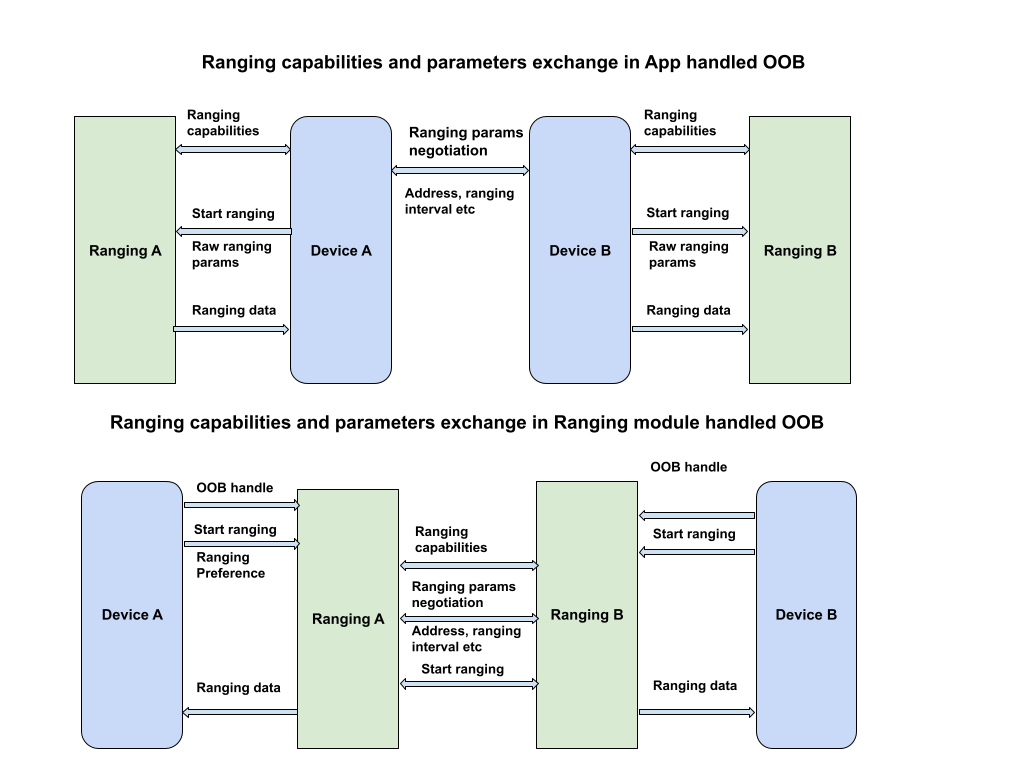
デバイス間のレンジング セッションを開始する際は、セッションのパラメータを交換するために、帯域外(OOB)データ転送を確立する必要があることがよくあります。
Ranging モジュールは OOB ネゴシエーションを処理できますが、カスタム OOB 実装もサポートしています。
初期設定のデフォルト実装
このセッション タイプ(RANGING_SESSION_OOB)では、Ranging モジュールが OOB ネゴシエーションを処理して、レンジング セッションを開始します。アプリから提供された測距設定に基づいて適切なパラメータを選択し、両方のデバイスがサポートしているテクノロジーに基づいて適切なテクノロジーを使用します。このセッション タイプでは、標準化された OOB specification が使用されます。
Ranging モジュールは、ピアデバイスとのやり取りに使用する OOB データ形式とシーケンスのみを定義します。ピア デバイスの検出や接続の確立は処理しません。
カスタム OOB 実装
このセッション タイプ(RANGING_SESSION_RAW)では、アプリは Ranging モジュールの OOB フローをバイパスし、独自の OOB ネゴシエーションとパラメータを処理します。つまり、アプリはピアデバイスがサポートするテクノロジーを判断し、測距パラメータをネゴシエートして、測距セッションを開始する必要があります。
距離測定の設定
RangingPreference オブジェクトを使用して、測距セッションで選択されたパラメータを指定します。これには次のものが含まれます。
- デバイスの役割。これは、デバイスがイニシエータになるかレスポンダになるかを示します。
- 測距構成。
RangingConfigオブジェクトは、レンジング セッションのタイプと、レンジング セッションの開始に必要なその他のパラメータを指定します。 - セッション構成。
SessionConfigオブジェクトは、測定上限、センサー フュージョン、ジオフェンス構成など、測距セッションに適用するパラメータを指定します。
距離測定の権限
測距モジュールは、現在および今後のすべての測距テクノロジーにアクセスするために、新しい統合権限(android.permission.RANGING)を必要とします。この権限は NEARBY_DEVICES_PERMISSIONS リストにあります。
<uses-permission android:name="android.permission.RANGING" />
制限事項
Ranging モジュールは、次のような理由でレンジングを制限する場合があります。
- サードパーティ製アプリは、超広帯域無線を使用してバックグラウンドで測距を行うことのみが許可されます。また、サポートされているデバイスでのみ許可されます。他のテクノロジーとのバックグラウンドでの測距は許可されていません。
- デバイスによる同時測距セッションの最大数に達している場合、測距は許可されません。
- バッテリー、パフォーマンス、メモリなどのシステム ヘルスに関する問題により、測距が制限されることがあります。
Ranging モジュールには、以下の既知の制限事項もあります。
- Ranging モジュールは、超広帯帯域無線 のピア デバイスへの測距データの配信のみをサポートします。他のテクノロジーの場合、Ranging モジュールは、測距データを発信側デバイスにのみ配信します。
- Ranging モジュールは、生測距モードでのデバイスの動的な追加のみをサポートし、超広帯域無線でのみサポートします。
- Ranging モジュールは、デフォルトの OOB 実装で 1 対多の超広帯域無線セッションをサポートしていません。複数のデバイス ハンドルを渡すと、モジュールは超広帯域無線をサポートするピアデバイスごとに 1 対 1 のセッションを作成します。
測距セッションを実施する
Ranging モジュールを使用して測距セッションを実施する手順は次のとおりです。
- すべてのデバイスが Android 16 以降で動作していることを確認します。
- アプリ マニフェストで
android.permission.RANGING権限をリクエストします。 - 測距技術の機能と可用性を評価します。
- 測距オペレーションのピア デバイスを検出します。
- 距離測定セッションのタイプで説明されているセッションのいずれかを使用して、アウトオブバンド交換の接続を確立します。
- 測距を開始し、測距データを継続的に取得します。
- 測距セッションを終了します。
次のコードサンプルは、イニシエータ ロールとレスポンダー ロールの両方でこれらの手順を示しています。
Kotlin
class RangingApp {

    // Starts a ranging session on the initiator side.
    fun startRangingInitiator(
        context: Context,
        deviceHandle: DeviceHandle,
        executor: Executor,
        callback: RangingSessionCallback
    ) {

        // Get the RangingManager which is the entry point for ranging module.
        val manager = context.getSystemService(RangingManager::class.java)

        // Create a new RangingSession using the provided executor and callback.
        val session = manager.createRangingSession(executor, callback)

        // Create an OobInitiatorRangingConfig, which specifies the ranging parameters for
        // the initiator role.
        val config = OobInitiatorRangingConfig.Builder()
            .setFastestRangingInterval(Duration.ofMillis(100))
            .setSlowestRangingInterval(Duration.ofMillis(5000))
            .setRangingMode(RANGING_MODE_AUTO)
            .setSecurityLevel(SECURITY_LEVEL_BASIC)
            .addDeviceHandle(deviceHandle)
            .build()

        // Create a RangingPreference, which specifies the role (initiator) and
        // configuration for the ranging session.
        val preference =
            RangingPreference.Builder(DEVICE_ROLE_INITIATOR, config).build()

        // Start ranging session.
        session.start(preference)

        // If successful, the ranging data will be sent through callback#onResults

        // Stop ranging session
        session.stop()
    }

    // Starts a ranging session on the responder side.
    fun startRangingResponder(
        context: Context,
        deviceHandle: DeviceHandle,
        executor: Executor,
        callback: RangingSessionCallback
    ) {

        // Get the RangingManager which is the entry point for ranging module.
        val manager = context.getSystemService(RangingManager::class.java)

        // Create a new RangingSession using the provided executor and callback.
        val session = manager.createRangingSession(executor, callback)

        // Create an OobResponderRangingConfig, which specifies the ranging parameters for
        // the responder role.
        val config = OobResponderRangingConfig.Builder(deviceHandle).build()

        // Create a RangingPreference, which specifies the role (responder) and
        // configuration for the ranging session.
        val preference =
            RangingPreference.Builder(DEVICE_ROLE_RESPONDER, config).build()

        // Start the ranging session.
        session.start(preference)

        // Stop the ranging session
        session.stop()
    }
}
Java
public class RangingApp {

    // Starts a ranging session on the initiator side.
    void startRangingInitiator(Context context, DeviceHandle deviceHandle, Executor executor, RangingSessionCallback callback) {

        // Get the RangingManager which is the entry point for ranging module.
        RangingManager manager = context.getSystemService(RangingManager.class);

        // Create a new RangingSession using the provided executor and callback.
        RangingSession session = manager.createRangingSession(executor, callback);

        // Create an OobInitiatorRangingConfig, which specifies the ranging parameters for
        // the initiator role.
        OobInitiatorRangingConfig config = new OobInitiatorRangingConfig.Builder()
                .setFastestRangingInterval(Duration.ofMillis(100))
                .setSlowestRangingInterval(Duration.ofMillis(5000))
                .setRangingMode(RANGING_MODE_AUTO)
                .setSecurityLevel(SECURITY_LEVEL_BASIC)
                .addDeviceHandle(deviceHandle)
                .build();

        // Create a RangingPreference, which specifies the role (initiator) and
        // configuration for the ranging session.
        RangingPreference preference =
                new RangingPreference.Builder(DEVICE_ROLE_INITIATOR, config).build();

        // Start ranging session.
        session.start(preference);

        // If successful, the ranging data will be sent through callback#onResults

        // Stop ranging session
        session.stop();

    }

    // Starts a ranging session on the responder side.
    void startRangingResponder(Context context,  DeviceHandle deviceHandle, Executor executor, RangingSessionCallback callback) {

        // Get the RangingManager which is the entry point for ranging module.
        RangingManager manager = context.getSystemService(RangingManager.class);

        // Create a new RangingSession using the provided executor and callback.
        RangingSession session = manager.createRangingSession(executor, callback);

        // Create an OobResponderRangingConfig, which specifies the ranging parameters for
        // the responder role.
        OobResponderRangingConfig config = new OobResponderRangingConfig.Builder(  deviceHandle).build();

        // Create a RangingPreference, which specifies the role (responder) and
        // configuration for the ranging session.
        RangingPreference preference =
                new RangingPreference.Builder(DEVICE_ROLE_RESPONDER, config).build();

        // Start the ranging session.
        session.start(preference);

        // Stop the ranging session
        session.stop();
    }
}
iOS デバイスとの UWB 相互運用性
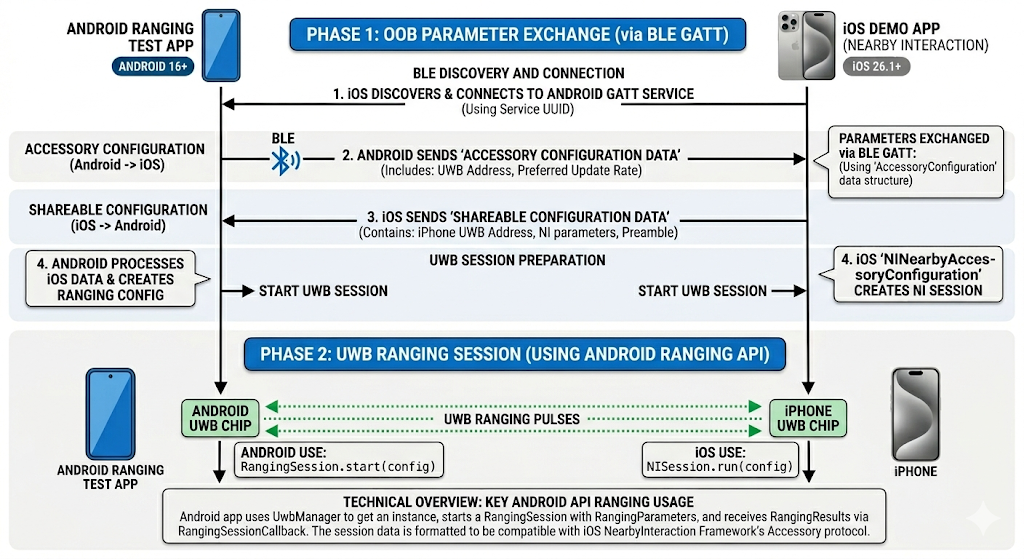
Ranging モジュールは、超広帯域無線(UWB)を使用した iOS デバイスとの相互運用性をサポートしています。iOS デバイスで距離測定を行うには、カスタム OOB 実装を使用し、Apple Nearby Interaction Accessory Protocol に一致する特定のパラメータで距離測定セッションを構成する必要があります。参考として、サンプルアプリをご覧ください。
RangingPreference を作成するときに、RawRangingDevice と UwbRangingParams を使用して構成を指定します。次のパラメータは、iOS の相互運用性にとって重要です。
- 構成 ID:
UwbRangingParams.CONFIG_UNICAST_DS_TWRを使用します。 - セッションキー情報: ベンダー ID と静的 STS IV を含むバイト配列を提供します。
- 複雑なチャンネル: iOS デバイスの設定に合わせてチャンネル番号とプリアンブル インデックスを設定します。
次のコード スニペットは、iOS レスポンダーとのイニシエーター デバイスのレンジング用の RangingPreference を作成する方法を示しています。
Kotlin
// Create UwbRangingParams with iOS-specific configuration
val uwbRangingParams = UwbRangingParams.Builder(
    sessionId,
    UwbRangingParams.CONFIG_UNICAST_DS_TWR,
    sourceAddress,
    destinationAddress
)
    .setComplexChannel(
        UwbComplexChannel.Builder()
            .setChannel(channelNumber)
            .setPreambleIndex(preambleIndex)
            .build()
    )
    .setRangingUpdateRate(updateRate)
    .setSessionKeyInfo(sessionKeyInfo) // Vendor ID + STS IV
    .setSlotDuration(slotDuration)
    .build()

// Create RawRangingDevice
val rawRangingDevice = RawRangingDevice.Builder()
    .setRangingDevice(RangingDevice.Builder().build())
    .setUwbRangingParams(uwbRangingParams)
    .build()

// Create SessionConfig
val sessionConfig = SessionConfig.Builder()
    .setAngleOfArrivalNeeded(true)
    .setDataNotificationConfig(DataNotificationConfig.Builder()
        .setNotificationConfigType(DataNotificationConfig.NOTIFICATION_CONFIG_ENABLE)
        .build())
    .build()

// Create RangingPreference for the initiator
val preference = RangingPreference.Builder(
    RangingPreference.DEVICE_ROLE_INITIATOR,
    RawInitiatorRangingConfig.Builder()
        .addRawRangingDevice(rawRangingDevice)
        .build()
)
    .setSessionConfig(sessionConfig)
    .build()
Java
// Create UwbRangingParams with iOS-specific configuration
UwbRangingParams uwbRangingParams = new UwbRangingParams.Builder(
        sessionId,
        UwbRangingParams.CONFIG_UNICAST_DS_TWR,
        sourceAddress,
        destinationAddress)
        .setComplexChannel(new UwbComplexChannel.Builder()
                .setChannel(channelNumber)
                .setPreambleIndex(preambleIndex)
                .build())
        .setRangingUpdateRate(updateRate)
        .setSessionKeyInfo(sessionKeyInfo) // Vendor ID + STS IV
        .setSlotDuration(slotDuration)
        .build();

// Create RawRangingDevice
RawRangingDevice rawRangingDevice = new RawRangingDevice.Builder()
        .setRangingDevice(new RangingDevice.Builder().build())
        .setUwbRangingParams(uwbRangingParams)
        .build();

// Create SessionConfig
SessionConfig sessionConfig = new SessionConfig.Builder()
        .setAngleOfArrivalNeeded(true)
        .setDataNotificationConfig(new DataNotificationConfig.Builder()
                .setNotificationConfigType(DataNotificationConfig.NOTIFICATION_CONFIG_ENABLE)
                .build())
        .build();

// Create RangingPreference for the initiator
RangingPreference preference = new RangingPreference.Builder(
        RangingPreference.DEVICE_ROLE_INITIATOR,
        new RawInitiatorRangingConfig.Builder()
                .addRawRangingDevice(rawRangingDevice)
                .build())
        .setSessionConfig(sessionConfig)
        .build();
UWB Downlink-TDoA API
UWB DL-TDoA API については、Android 17 の新機能をご覧ください。
サンプルアプリ
Ranging モジュールの使用方法のエンドツーエンドの例については、AOSP のサンプルアプリをご覧ください。このサンプルアプリは、Ranging モジュールでサポートされているすべての測距テクノロジーを対象としており、サポートされている両方のセッション タイプのフローが含まれています。
iOS デバイスとの UWB 相互運用性
Android サンプルアプリは、iOS サンプルアプリとの UWB 測距セッションの開始をサポートしています。