

雖然許多 Android TV 應用程式都是使用原生 Android 元件建構而成,但請務必考量第三方架構或元件的無障礙功能,尤其是使用自訂檢視區塊時。
如果自訂檢視畫面元件直接與 OpenGL 或 Canvas 介接,可能無法順利搭配 TalkBack 和切換控制功能等無障礙服務運作。
開啟 TalkBack 時,可能會發生下列問題:
- 應用程式中的無障礙焦點 (綠色矩形) 可能會消失。
- 無障礙焦點可能會選取整個畫面的邊界。
- 無障礙焦點可能無法移動。
- 即使程式碼正在處理方向鍵,D-Pad 上的四個方向鍵可能也不會產生任何效果。
如果在應用程式中發現上述任何問題,請確認應用程式是否向無障礙服務公開 AccessibilityNodeInfo 樹狀結構。
本指南的後續內容將提供一些解決方案和最佳做法,協助您解決這些問題。
無障礙服務會使用 D-Pad 事件
這個問題的根本原因是無障礙服務會耗用重要事件。
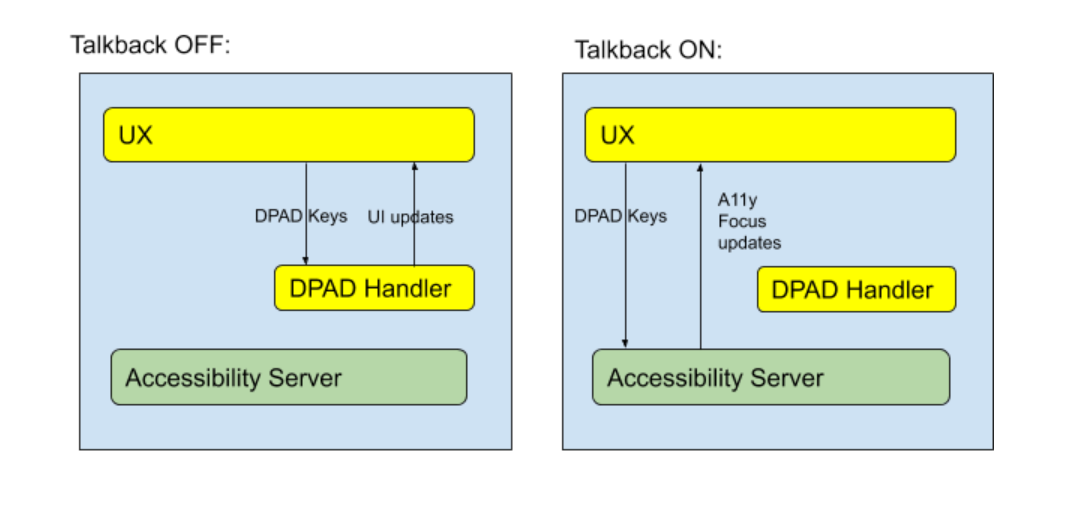
如圖 1 所示,開啟 Talkback 後,D-pad 事件不會傳遞至開發人員定義的 D-pad 處理常式。無障礙服務會接收按鍵事件,以便移動無障礙焦點。由於自訂 Android 元件預設不會向無障礙服務公開螢幕上的位置資訊,因此無障礙服務無法移動無障礙焦點來醒目顯示這些元件。
其他無障礙服務也會受到類似影響:使用切換控制功能時,D-pad 事件也可能會遭到取用。
由於 D-pad 事件會提交至無障礙服務,而該服務不知道自訂檢視區塊中的 UI 元件位置,因此您必須為應用程式實作 AccessibilityNodeInfo,才能正確轉送按鍵事件。
向無障礙服務公開資訊
如要為無障礙服務提供自訂檢視區塊位置和說明的充足資訊,請實作 AccessibilityNodeInfo,公開每個元件的詳細資料。如要定義檢視區塊的邏輯關係,讓無障礙服務可以管理焦點,請實作 ExploreByTouchHelper,並針對自訂檢視區塊使用 ViewCompat.setAccessibilityDelegate(View, AccessibilityDelegateCompat) 進行設定。
實作 ExploreByTouchHelper 時,請覆寫其四個抽象方法:
Kotlin
// Return the virtual view ID whose view is covered by the input point (x, y).
protected fun getVirtualViewAt(x: Float, y: Float): Int

// Fill the virtual view ID list into the input parameter virtualViewIds.
protected fun getVisibleVirtualViews(virtualViewIds: List<Int>)

// For the view whose virtualViewId is the input virtualViewId, populate the
// accessibility node information into the AccessibilityNodeInfoCompat parameter.
protected fun onPopulateNodeForVirtualView(virtualViewId: Int, @NonNull node: AccessibilityNodeInfoCompat)

// Set the accessibility handling when perform action.
protected fun onPerformActionForVirtualView(virtualViewId: Int, action: Int, @Nullable arguments: Bundle): Boolean
Java
// Return the virtual view ID whose view is covered by the input point (x, y).
protected int getVirtualViewAt(float x, float y)

// Fill the virtual view ID list into the input parameter virtualViewIds.
protected void getVisibleVirtualViews(List<Integer> virtualViewIds)

// For the view whose virtualViewId is the input virtualViewId, populate the
// accessibility node information into the AccessibilityNodeInfoCompat parameter.
protected void onPopulateNodeForVirtualView(int virtualViewId, @NonNull AccessibilityNodeInfoCompat node)

// Set the accessibility handling when perform action.
protected boolean onPerformActionForVirtualView(int virtualViewId, int action, @Nullable Bundle arguments)
詳情請觀看 Google I/O 2013 - Enabling Blind and Low-Vision Accessibility on Android,或進一步瞭解如何填入無障礙事件。
最佳做法
必要:
AccessibilityNodeInfo.getBoundsInScreen()必須定義元件的位置。必要:
AccessibilityNodeInfo.setVisibleToUser()必須反映元件的可見度。必要條件:
AccessibilityNodeInfo.getContentDescription()必須指定 TalkBack 要朗讀的內容說明。指定
AccessibilityNodeInfo.setClassName(),讓服務區分元件類型。實作
performAction()時,請使用對應的AccessibilityEvent反映動作。如要實作更多動作類型 (例如
ACTION_CLICK),請使用performAction()中的對應邏輯,叫用AccessibilityNodeInfo.addAction(ACTION_CLICK)。在適用的情況下,請反映
setFocusable()、setClickable()、setScrollable()和類似方法的元件狀態。請詳閱
AccessibilityNodeInfo說明文件,瞭解如何讓無障礙服務與元件互動。
範例
請參閱 Android TV 的自訂檢視畫面無障礙功能範例,瞭解如何運用最佳做法,為使用自訂檢視畫面的應用程式新增無障礙功能支援。