

应用的安全性取决于其底层操作系统的安全性。为降低风险,您的应用应通过实时评估设备的安全状况来限制安全敏感型操作,从而确定设备(尤其是其核心系统组件)是否已完全更新并受到保护,免受 Android 安全公告中公布的漏洞的侵害。了解设备安全状态有助于您在应用执行高风险操作之前建立安全防护措施。
AndroidX Security State 是一个 Jetpack 库,可提供对 Android 设备安全状态的统一访问权限。它结合了 AOSP API 和 Android 公共漏洞 Feed,可提供全面、精确且可据以采取行动的设备安全状态,而不仅仅是安全补丁级别 (SPL)。
架构概览
下图展示了 AndroidX Security State 库如何将设备端平台属性、进程间通信 (IPC) 更新提供程序和公开的漏洞 Feed 统一到一组连贯的 API 中。
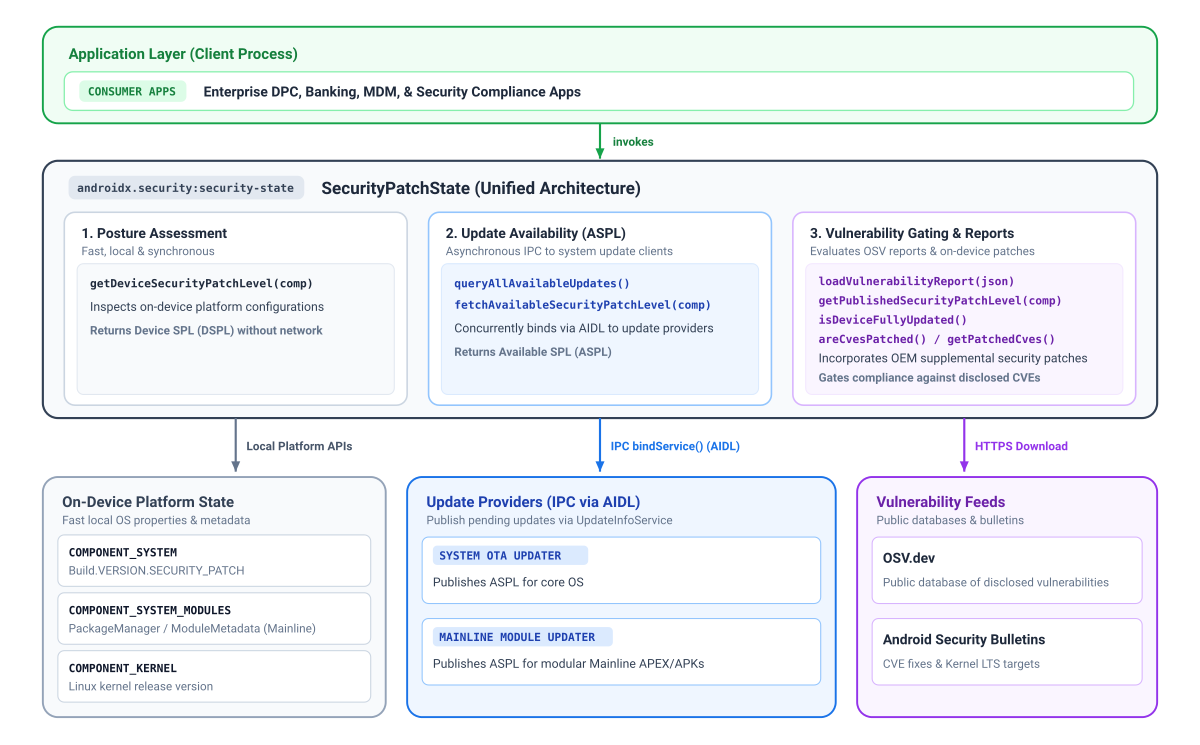
安全补丁状态和组件
使用 Security State 库的主要优势在于,它能够以精细的组件级提供安全补丁级别 (SPL)。多年来,Android 已向 Google Play 系统更新 (Project Mainline) 引入了更多模块,这些模块使用 Google Play 进行更新,独立于标准系统无线下载 (OTA) 更新,以不同的节奏提供关键安全修复。
同样,虽然安全补丁级别通常会强制规定最低必需的通用内核映像 (GKI) 版本,但内核更新实际上可以提前于系统时间表。这些特定于内核的修复可能无法完全通过系统的主 SPL 字符串捕获。
为了提高透明度,安全状态库为所有三个组件分别提供了一个有效补丁级别:
- 系统 (
COMPONENT_SYSTEM):表示从标准安全补丁级别字段派生的标准操作系统和系统安全状态。 - 系统 Mainline 模块 (
COMPONENT_SYSTEM_MODULES):表示模块化系统组件(Google Play 系统更新)的安全状态,该状态源自特定的模块发布版本。 - 内核 (
COMPONENT_KERNEL):表示设备内核的安全状态,直接从内核版本字符串派生而来。
根据组件的不同,该库最多可提供 3 个维度的补丁级别信息:
- 设备 SPL (DSPL):设备上运行的各个组件的当前补丁级别,以同步方式查询,无需网络请求。系统和 Mainline 报告日历日期 (
DateBasedSecurityPatchLevel),而内核报告其发布版本(例如VersionedSecurityPatchLevel、5.15.148)。 - 已发布的 SPL (PSPL):在 Android 安全公告和开源漏洞 (OSV) 数据库报告中正式发布的基准。您的应用可以通过比较设备 SPL 提供的日期或版本字符串来评估合规性。
- 可用 SPL (ASPL):表示设备是否具有来自更新提供商的待处理更新(使用 IPC 异步查询)。Android Google Play 系统更新功能可提供 Mainline 模块,而 OEM OTA 客户端可提供系统更新。由于内核更新捆绑在操作系统映像中,因此使用
COMPONENT_SYSTEM评估内核更新可用性。
限制安全敏感型功能
您可以结合使用来自设备 SPL (DSPL)、可用 SPL (ASPL) 和已发布 SPL (PSPL) 的信息,针对门控安全敏感型功能做出情境化判定。例如,您可以将 DSPL 与 ASPL 进行比较,以确定是否有用户尚未安装的更新的安全补丁,从而提示用户在发起付款或凭据注册等敏感操作之前进行更新。您还可以使用 areCvesPatched() 在调用易受攻击的子系统之前验证设备上是否已修复特定的高风险漏洞,例如在授权基于近距离的付款或数据共享之前检查是否存在严重的 NFC 或蓝牙漏洞。
平台版本注意事项
某些安全状态功能依赖于底层平台架构,在较低版本的 Android 上不可用:
- Android 11(API 级别 30)及更高版本:完全支持所有组件,包括公告发布的内核 LTS 版本和更新可用性 (ASPL) 查询。
- Android 10(API 级别 29):支持系统和系统模块补丁级别;不过,由于 Android 安全公告中的通用内核映像 (GKI) 跟踪和内核 LTS 目标是从 Android 11 开始的,因此无法获取公告发布的内核版本,但仍可在本地读取设备上的内核版本。
- Android 9(API 级别 28)及更低版本:除了 Android 10 的限制之外,模块化系统组件(Mainline 计划)在 Android 10 之前并不存在。当系统模块 SPL 不可用时,安全地调用
getDeviceSecurityPatchLevel(COMPONENT_SYSTEM_MODULES)会回退到基准 Unix epoch 日期 (1970-01-01)。
了解更新可用性和可用 SPL (ASPL)
确定设备的安全状况需要了解是否有待处理的安全更新可用于各个组件。Android 设备通过多种不同的交付机制接收安全更新,例如系统无线下载 (OTA) 更新和针对模块化组件的 Google Play 系统更新。
在应用能够检索给定组件的 ASPL 之前,相应的更新提供方必须发布该信息。为了协调这些不同的更新来源,客户端应用使用 AndroidX 安全状态库来查询安全状态,而设备端更新客户端使用配套的 AndroidX 安全状态提供程序库来发布其可用安全补丁级别 (ASPL)。
Google 会向所有 GMS Android 设备提供 Mainline 模块的更新信息,并向使用 Google OTA 客户端 (GOTA) 的设备提供系统 OTA 信息。
下图说明了客户端应用如何使用 AndroidX Security State 库查询 Google Play 系统更新和系统 OTA 更新的安全状况:
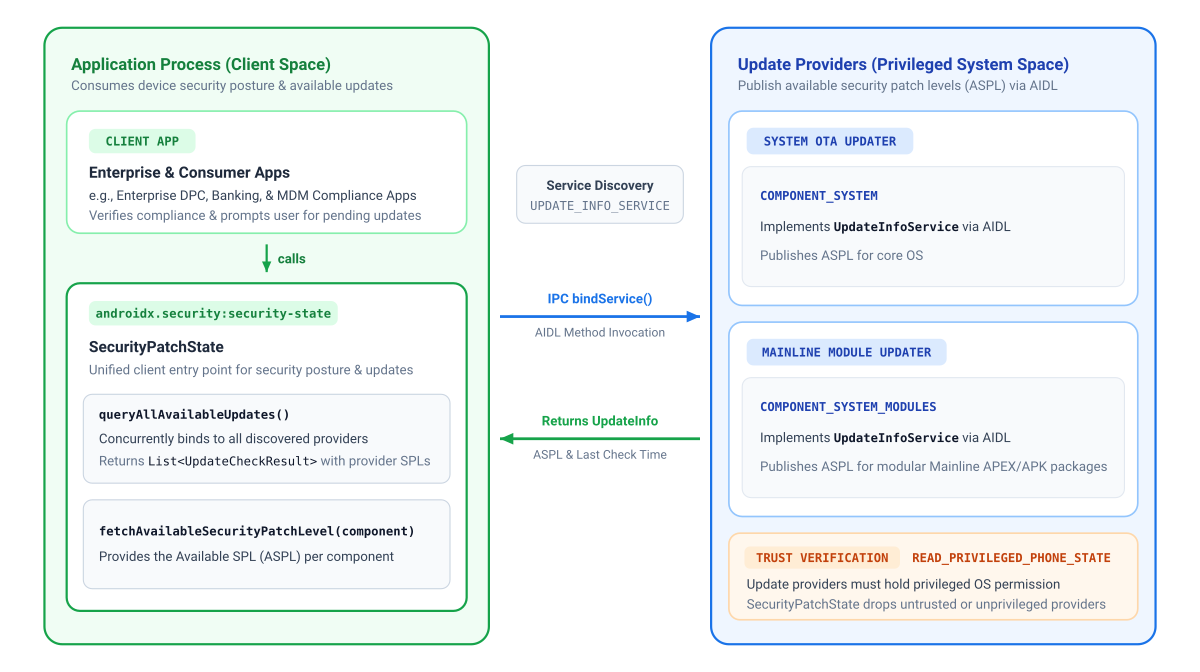
添加依赖项
如需添加 AndroidX Security State 的依赖项,您必须在项目中添加 Google Maven 制品库。将依赖项添加到应用的 build.gradle.kts 或 build.gradle 文件中:
Kotlin
// Kotlin DSL (build.gradle.kts)
dependencies {
    implementation("androidx.security:security-state:1.1.0")
}
Groovy
// Groovy DSL (build.gradle)
dependencies {
    implementation "androidx.security:security-state:1.1.0"
}
已声明的权限矩阵
| 目标 API | AndroidManifest.xml 中所需的权限 |
运营备注 |
|---|---|---|
getDeviceSecurityPatchLevel() |
无 | 同步读取本地原生系统属性和软件包元数据。 |
fetchAvailableSecurityPatchLevel()queryAllAvailableUpdates() |
无 | 使用设备上的 IPC 进行通信。该库仅查询设备上的可信组件(要求更新提供程序持有特权 READ_PRIVILEGED_PHONE_STATE 权限),因此您的应用可以放心地使用其收到的信息的真实性。 |
createVulnerabilityReportUrl()loadVulnerabilityReport()getPublishedSecurityPatchLevel()areCvesPatched()isDeviceFullyUpdated() |
android.permission.INTERNET |
需要此权限才能获取公开的 OSV 报告。使用 loadVulnerabilityReport() 加载到内存后,查询方法会在本地执行,无需网络访问权限。 |
初始化库
使用 Android Context 初始化 SecurityPatchState:
Kotlin
import androidx.security.state.SecurityPatchState

val securityPatchState = SecurityPatchState(context)
Java
import androidx.security.state.SecurityPatchState;

SecurityPatchState securityPatchState = new SecurityPatchState(context);
仅使用 context 进行初始化可立即访问离线设备补丁级别,而无需依赖网络。(更新可用性查询与设备端提供程序异步通信)。
如果您的应用会评估 CVE 合规性,并且已将 OSV 漏洞报告加载到内存中,则 Kotlin 调用方可以直接将 JSON 字符串传递给 Kotlin 中的构造函数:
val securityPatchState = SecurityPatchState(context, vulnerabilityReportJsonString = jsonString)
在 Java 中,或者在启动后异步加载报告时,使用上下文进行初始化并调用 securityPatchState.loadVulnerabilityReport(jsonString)。
检查设备补丁级别
同步查询设备上的补丁级别:
Kotlin
val deviceSpl = securityPatchState.getDeviceSecurityPatchLevel(SecurityPatchState.COMPONENT_SYSTEM)
val mainlineSpl = securityPatchState.getDeviceSecurityPatchLevel(SecurityPatchState.COMPONENT_SYSTEM_MODULES)
val kernelVersion = securityPatchState.getDeviceSecurityPatchLevel(SecurityPatchState.COMPONENT_KERNEL)

// Gatekeeping check: compare against a required baseline patch date
val requiredSpl = SecurityPatchState.DateBasedSecurityPatchLevel.fromString("2026-01-01")
if (deviceSpl < requiredSpl) {
    // Restrict access to sensitive features or guide user to update
}
Java
SecurityPatchState.SecurityPatchLevel deviceSpl = securityPatchState.getDeviceSecurityPatchLevel(SecurityPatchState.COMPONENT_SYSTEM);
SecurityPatchState.SecurityPatchLevel mainlineSpl = securityPatchState.getDeviceSecurityPatchLevel(SecurityPatchState.COMPONENT_SYSTEM_MODULES);
SecurityPatchState.SecurityPatchLevel kernelVersion = securityPatchState.getDeviceSecurityPatchLevel(SecurityPatchState.COMPONENT_KERNEL);

// Gatekeeping check: compare against a required baseline patch date
SecurityPatchState.SecurityPatchLevel requiredSpl = SecurityPatchState.DateBasedSecurityPatchLevel.fromString("2026-01-01");
if (deviceSpl.compareTo(requiredSpl) < 0) {
    // Restrict access to sensitive features or guide user to update
}
检查是否有待处理的系统更新
应用可以通过与受信任的设备端更新提供程序(最常见的是 Google Play 系统更新和 OEM OTA 客户端)进行异步通信来评估待处理的更新是否可用:
fetchAvailableSecurityPatchLevel():返回指定组件的有效可用 SPL(如果没有更新的更新,则回退到当前设备 SPL),可用于与设备 SPL 和已发布的 SPL 进行比较。queryAllAvailableUpdates():发现设备上的所有可信更新提供程序,并返回精细的UpdateCheckResult以及有关数据来源和新鲜度的元数据。
示例 1:提示用户进行待处理的更新
当有安全更新可用时,使用 fetchAvailableSecurityPatchLevel() 提示用户(例如,通过启动 Settings.ACTION_SYSTEM_UPDATE_SETTINGS):
Kotlin
import androidx.lifecycle.lifecycleScope
import androidx.security.state.SecurityPatchState
import kotlinx.coroutines.launch

// Pattern A: Prompt users for pending updates (with automatic offline fallback)
lifecycleScope.launch {
    val currentSpl = securityPatchState.getDeviceSecurityPatchLevel(SecurityPatchState.COMPONENT_SYSTEM)
    val availableSpl = securityPatchState.fetchAvailableSecurityPatchLevel(SecurityPatchState.COMPONENT_SYSTEM)
    if (availableSpl > currentSpl) {
        // Prompt the user to install pending updates in system settings
    }
}
Java
在 Java 中,异步方法会返回 ListenableFuture,并使用 ContextCompat.getMainExecutor() 路由回调:
import androidx.core.content.ContextCompat;
import androidx.security.state.SecurityPatchState;
import androidx.security.state.SecurityPatchState.SecurityPatchLevel;
import com.google.common.util.concurrent.FutureCallback;
import com.google.common.util.concurrent.Futures;
import com.google.common.util.concurrent.ListenableFuture;

// Pattern A: Prompt users for pending updates (with automatic offline fallback)
SecurityPatchLevel currentSpl = securityPatchState.getDeviceSecurityPatchLevel(SecurityPatchState.COMPONENT_SYSTEM);
ListenableFuture<SecurityPatchLevel> availableSpl = securityPatchState.fetchAvailableSecurityPatchLevelAsync(
    SecurityPatchState.COMPONENT_SYSTEM,
    SecurityPatchState.UPDATE_INFO_SERVICE_BINDING_TIMEOUT_MS
);

Futures.addCallback(availableSpl, new FutureCallback<SecurityPatchLevel>() {
    @Override
    public void onSuccess(SecurityPatchLevel available) {
        if (available.compareTo(currentSpl) > 0) {
            // Prompt the user to install pending updates in system settings
        }
    }

    @Override
    public void onFailure(Throwable t) {
        // Handle timeout or IPC communication error
    }
}, ContextCompat.getMainExecutor(context));
示例 2:检查详细的提供方状态
使用 queryAllAvailableUpdates() 检查各个提供方、时间戳和 UpdateInfo 记录:
Kotlin
import androidx.lifecycle.lifecycleScope
import androidx.security.state.SecurityPatchState
import kotlinx.coroutines.launch

// Pattern B: Inspect detailed provider status
lifecycleScope.launch {
    val updateResults = securityPatchState.queryAllAvailableUpdates()
    for (result in updateResults) {
        val provider = result.providerPackageName
        val lastCheck = result.lastCheckTimeMillis
        val updates = result.updates // List<UpdateInfo>
    }
}
Java
import androidx.core.content.ContextCompat;
import androidx.security.state.SecurityPatchState;
import androidx.security.state.UpdateCheckResult;
import androidx.security.state.UpdateInfo;
import com.google.common.util.concurrent.FutureCallback;
import com.google.common.util.concurrent.Futures;
import com.google.common.util.concurrent.ListenableFuture;
import java.util.List;

// Pattern B: Inspect detailed provider status
ListenableFuture<List<UpdateCheckResult>> updateResults = securityPatchState.queryAllAvailableUpdatesAsync(
    SecurityPatchState.UPDATE_INFO_SERVICE_BINDING_TIMEOUT_MS
);

Futures.addCallback(updateResults, new FutureCallback<List<UpdateCheckResult>>() {
    @Override
    public void onSuccess(List<UpdateCheckResult> results) {
        for (UpdateCheckResult result : results) {
            String provider = result.getProviderPackageName();
            long lastCheck = result.getLastCheckTimeMillis();
            List<UpdateInfo> updates = result.getUpdates();
        }
    }

    @Override
    public void onFailure(Throwable t) {
        // Handle error
    }
}, ContextCompat.getMainExecutor(context));
验证漏洞解决情况并检查 CVE
如需评估 CVE 缓解措施、检查总体更新合规性或检查已发布的安全补丁级别 (PSPL),您的应用必须先获取并加载 OSV 漏洞报告,如 SecurityPatchState 的 API 参考文档中所述。
Kotlin
// Load vulnerability report
val reportUrl = SecurityPatchState.createVulnerabilityReportUrl()
// ... download JSON string from reportUrl ...
securityPatchState.loadVulnerabilityReport(jsonString)

// Check overall update compliance against published bulletin
val isFullyUpdated = securityPatchState.isDeviceFullyUpdated()

val cves = listOf("CVE-2019-9501", "CVE-2020-3699", "CVE-2024-0016")
val isPatched = securityPatchState.areCvesPatched(cves)

// Get a list of all patched CVEs for a specific component and SPL
val deviceSpl = securityPatchState.getDeviceSecurityPatchLevel(SecurityPatchState.COMPONENT_SYSTEM)
val patchedSystemCVEs = securityPatchState.getPatchedCves(SecurityPatchState.COMPONENT_SYSTEM, deviceSpl)

// Inspect published SPL and kernel LTS target versions from the bulletin
val publishedSystemSpl = securityPatchState.getPublishedSecurityPatchLevel(SecurityPatchState.COMPONENT_SYSTEM)
val kernelLtsTargets = securityPatchState.getPublishedSecurityPatchLevel(SecurityPatchState.COMPONENT_KERNEL)
Java
// Load vulnerability report
Uri reportUrl = SecurityPatchState.createVulnerabilityReportUrl();
// ... download JSON string from reportUrl ...
securityPatchState.loadVulnerabilityReport(jsonString);

// Check overall update compliance against published bulletin
boolean isFullyUpdated = securityPatchState.isDeviceFullyUpdated();

List<String> cves = Arrays.asList("CVE-2019-9501", "CVE-2020-3699", "CVE-2024-0016");
boolean isPatched = securityPatchState.areCvesPatched(cves);

// Get a list of all patched CVEs for a specific component and SPL
SecurityPatchState.SecurityPatchLevel deviceSpl = securityPatchState.getDeviceSecurityPatchLevel(SecurityPatchState.COMPONENT_SYSTEM);
Map<SecurityPatchState.Severity, Set<String>> patchedSystemCVEs =
    securityPatchState.getPatchedCves(SecurityPatchState.COMPONENT_SYSTEM, deviceSpl);

// Inspect published SPL and kernel LTS target versions from the bulletin
List<SecurityPatchState.SecurityPatchLevel> publishedSystemSpl =
    securityPatchState.getPublishedSecurityPatchLevel(SecurityPatchState.COMPONENT_SYSTEM);
List<SecurityPatchState.SecurityPatchLevel> kernelLtsTargets =
    securityPatchState.getPublishedSecurityPatchLevel(SecurityPatchState.COMPONENT_KERNEL);
加载漏洞报告
- 本地缓存和 WorkManager 刷新:由于 Android 安全公告每月发布一次,因此请将下载的 JSON 缓存到内部存储空间 (
context.filesDir),并使用WorkManager(最好每 24-48 小时)安排定期后台任务来刷新报告,并在应用启动时从本地缓存同步读取。 - 后台线程:在后台线程(Kotlin 中的
Dispatchers.IO或 Java 中的Executor)上调用loadVulnerabilityReport(),以避免在解析 CVE 记录时阻塞主界面线程。 - 内核 LTS 评估:调用
getPatchedCves(COMPONENT_KERNEL, ...)会抛出IllegalArgumentException,而areCvesPatched()不会评估内核 CVE。而是通过将设备的内核版本与getPublishedSecurityPatchLevel(COMPONENT_KERNEL)返回的 Android 通用内核 LTS 目标进行比较来评估内核安全性,其中getPublishedSecurityPatchLevel(COMPONENT_KERNEL)返回的 LTS 目标与设备的内核版本的主分支和次分支相匹配(例如,将5.15.140内核与5.15.159目标进行比较)。
其他资源
如需详细了解设备安全状态,请参阅以下资源: