
Digital credentials are cryptographically verifiable documents that can be used to authenticate, authorize, or otherwise provide information about a user. These are typically things such as mobile driver's licenses, digital passports, boarding passes, etc. They reside in virtual containers called digital wallets, and are part of a W3C standard that specifies how to access and retrieve them. This standard is implemented for web use cases with the W3C Credential Management API and on Android, with Credential Manager's DigitalCredential API.
Understand digital credentials
In the physical world, a person might keep their identity in their wallet, and present it to a requesting party when asked:
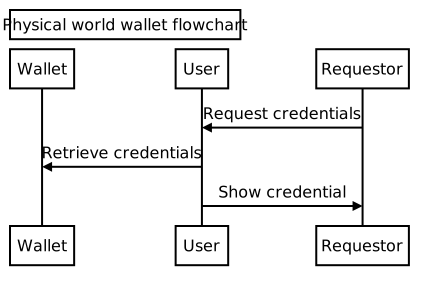
In this case, a user generally has a single wallet, and retrieves the requested credentials from the wallet to present to the requestor. Wallets are mostly interchangeable, and can generally store the same things.
Digital credentials have the following differences from credentials in the physical world:
- Users are expected to have multiple wallets - also known as holders - which can contain various different credentials. Wallets determine which credentials may be stored inside of them.
- The app or service asking for the credential to grant access or verify an identity is called the verifier.
- The entity that creates the credential and asserts claims about the subject (such as, a university, a government, or a tech company) is referred to as the issuer.
- The credential presentation happens in software, which means an API surface retrieves and presents the credentials - in Android, this is Credential Manager.
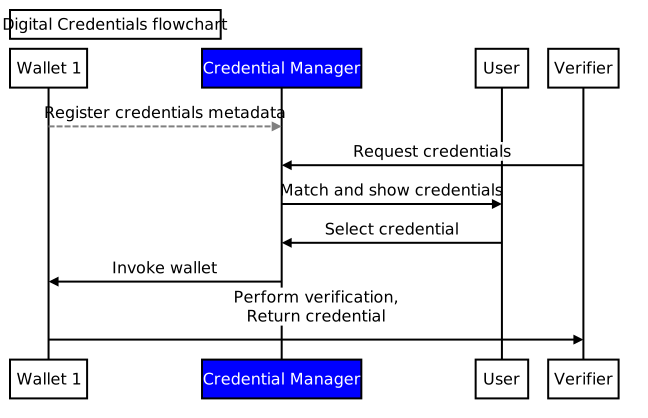
As such, Credential Manager takes on several roles that were formerly handled by the user:
- On Android, wallets must register their credentials metadata with Credential Manager to be listed in the Credential Manager UI.
- Credential Manager matches credentials across wallets based on the request and presents a list for the user to select.
- When the user selects a credential in the list, Credential Manager then invokes the wallet, which will handle the remainder of the transaction (showing UIs, etc.) and return the credential to the application.
This flow is shown here:
Verifiable credentials
Verifiable credentials are a subset of digital credentials governed by strict standards (like the W3C Verifiable Credentials Data Model). These credentials contain claims that are cryptographically secured, making them tamper-evident and proving exactly who issued them.
Not all digital credentials are verifiable credentials, but all verifiable credentials are digital credentials.
What it means for a claim to be verified
When a credential arrives through the Android Credential Manager API and a claim within it is marked as "verified," it implies that the issuer is asserting that they performed a check on that specific piece of data. However, it does not mean the data is an absolute, universal truth. "Verified" is an assertion of process, not an automatic guarantee of trust.
The core philosophy of this ecosystem is that trust is always resolved at the verifier. When the verifier (your app) receives the cryptographically secure data, and sees that the issuer marked it as "verified," it must determine whether it trusts the issuer to have verified the claim to its standards.
User experience
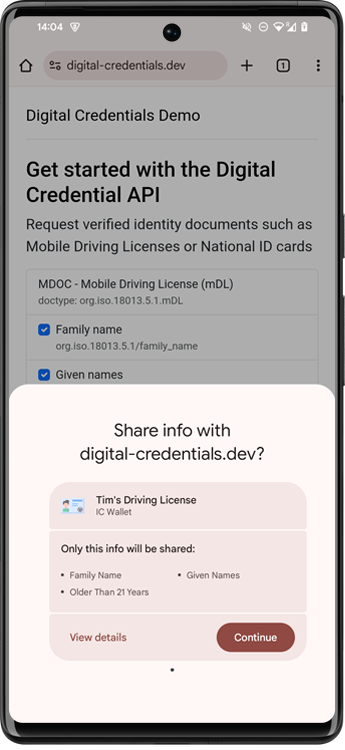
As shown in the Android flow, the user only needs to interact once with the Credential Manager UI to select the appropriate credential. Here is an example of how the selector looks:
Standards
Digital credentials requests are created using the OpenID4VP standard. You can see example requests at the Digital Credentials Demo site.
Digital credential responses are typically returned in a standardized credential format. These are maintained by different standards bodies, and include W3C Verifiable Credentials, sd-jwt, and mdoc.
Custom protocols are also feasible, though we recommend using one of the standard protocols in your application.
Try it out
You can test out the digital credentials flow across platforms with an Android wallet and web-based verifier:
- Install the CMWallet public sample on your Android phone.
You can do this by pulling from the repository and installing directly from
Android Studio or navigating to
https://github.com/digitalcredentialsdev/CMWallet/actions
and selecting the latest build to access the latest
app-debug.apkfile. - Open the CMWallet to register the metadata with Credential Manager. Make sure Bluetooth is enabled to allow your devices to connect to each other.
- Navigate to https://digital-credentials.dev/ and select
Request Credentials (OpenID4VP). - Accept the warning prompts and scan the QR Code with your phone, then select "Use passkey" and tap through the confirmation to show the available credentials.
- Select the credential from CMWallet to return to the browser. The browser should show the returned credential.
See also
- To learn more about using Credential Manager to request digital credentials in your app, read the Credential Manager - Verifier API page.
- To learn more about building a digital wallet using Credential Manager, read the Credential Manager - Holder API page.