

การยืนยันข้อมูลเข้าสู่ระบบดิจิทัลภายในแอป Android สามารถใช้เพื่อตรวจสอบสิทธิ์และให้สิทธิ์ตัวตนของผู้ใช้ (เช่น บัตรประจำตัวที่ออกโดยหน่วยงานราชการ) คุณสมบัติเกี่ยวกับผู้ใช้รายนั้น (เช่น ใบขับขี่ วุฒิการศึกษา หรือแอตทริบิวต์ต่างๆ เช่น อายุหรือที่อยู่) หรือสถานการณ์อื่นๆ ที่จำเป็นต้องออกและยืนยันข้อมูลเข้าสู่ระบบเพื่อยืนยันความถูกต้องของเอนทิตี
Verifier API รองรับใน Android 9 (ระดับ API 28) ขึ้นไป
การใช้งาน
หากต้องการยืนยันข้อมูลเข้าสู่ระบบดิจิทัลในโปรเจ็กต์ Android ให้ทำดังนี้
- เพิ่มทรัพยากร Dependency ลงในสคริปต์บิลด์ของแอปและเริ่มต้นคลาส
CredentialManager - สร้างคำขอข้อมูลเข้าสู่ระบบดิจิทัลและใช้เพื่อเริ่มต้น
DigitalCredentialOptionตามด้วยการสร้างGetCredentialRequest - เปิดใช้งานขั้นตอน
getCredentialด้วยคำขอที่สร้างขึ้นเพื่อรับGetCredentialResponseที่สำเร็จหรือจัดการข้อยกเว้นที่อาจเกิดขึ้น เมื่อดึงข้อมูลสำเร็จแล้ว ให้ตรวจสอบความถูกต้องของการตอบกลับ
เพิ่มทรัพยากร Dependency และเริ่มต้นใช้งาน
เพิ่มทรัพยากร Dependency ต่อไปนี้ลงในสคริปต์บิลด์ Gradle
dependencies {
    implementation("androidx.credentials:credentials:1.6.0-beta01")
    implementation("androidx.credentials:credentials-play-services-auth:1.6.0-beta01")
}
ถัดไป ให้เริ่มต้นอินสแตนซ์ของคลาส CredentialManager
val credentialManager = CredentialManager.create(context)
สร้างคำขอข้อมูลเข้าสู่ระบบดิจิทัล
สร้างคำขอข้อมูลเข้าสู่ระบบดิจิทัลและใช้เพื่อเริ่มต้น DigitalCredentialOption
// The request in the JSON format to conform with
// the JSON-ified Credential Manager - Verifier API request definition.
val requestJson = generateRequestFromServer()
val digitalCredentialOption =
    GetDigitalCredentialOption(requestJson = requestJson)

// Use the option from the previous step to build the `GetCredentialRequest`.
val getCredRequest = GetCredentialRequest(
    listOf(digitalCredentialOption)
)
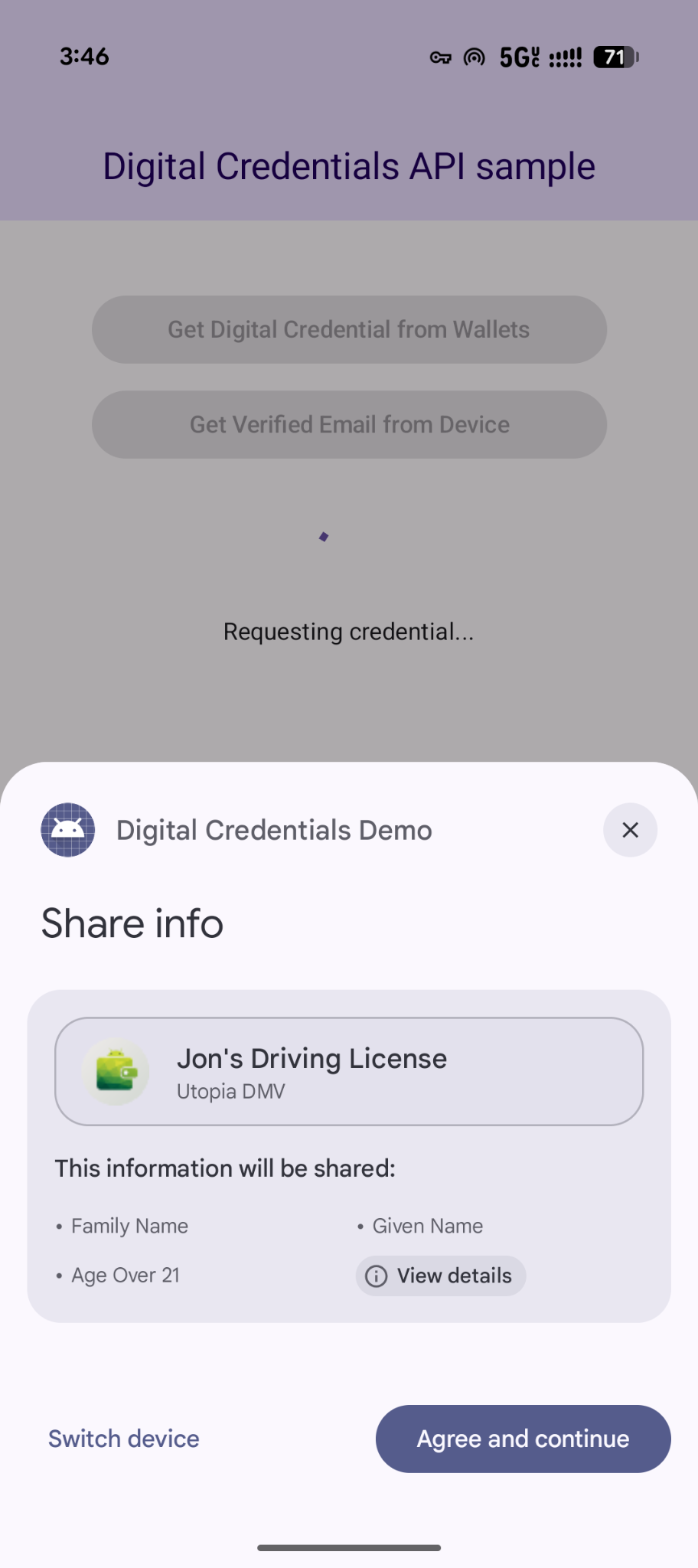
ตัวอย่างต่อไปนี้แสดงคำขอ OpenId4Vp1 ดูรายละเอียดเกี่ยวกับช่องในคำขอนี้ได้ที่เอกสารประกอบของ OpenID
{
  "requests": [
    {
      "protocol": "openid4vp-v1-unsigned",
      "data": {
        "response_type": "vp_token",
        "response_mode": "dc_api",
        "nonce": "OD8eP8BYfr0zyhgq4QCVEGN3m7C1Ht_No9H5fG5KJFk",
        "dcql_query": {
          "credentials": [
            {
              "id": "cred1",
              "format": "mso_mdoc",
              "meta": {
                "doctype_value": "org.iso.18013.5.1.mDL"
              },
              "claims": [
                {
                  "path": [
                    "org.iso.18013.5.1",
                    "family_name"
                  ]
                },
                {
                  "path": [
                    "org.iso.18013.5.1",
                    "given_name"
                  ]
                },
                {
                  "path": [
                    "org.iso.18013.5.1",
                    "age_over_21"
                  ]
                }
              ]
            }
          ]
        }
      }
    }
  ]
}
รับข้อมูลเข้าสู่ระบบ
เปิดขั้นตอน getCredential ด้วยคำขอที่สร้างขึ้น คุณจะได้รับ GetCredentialResponse ที่สำเร็จ หรือ GetCredentialException หากคำขอล้มเหลว
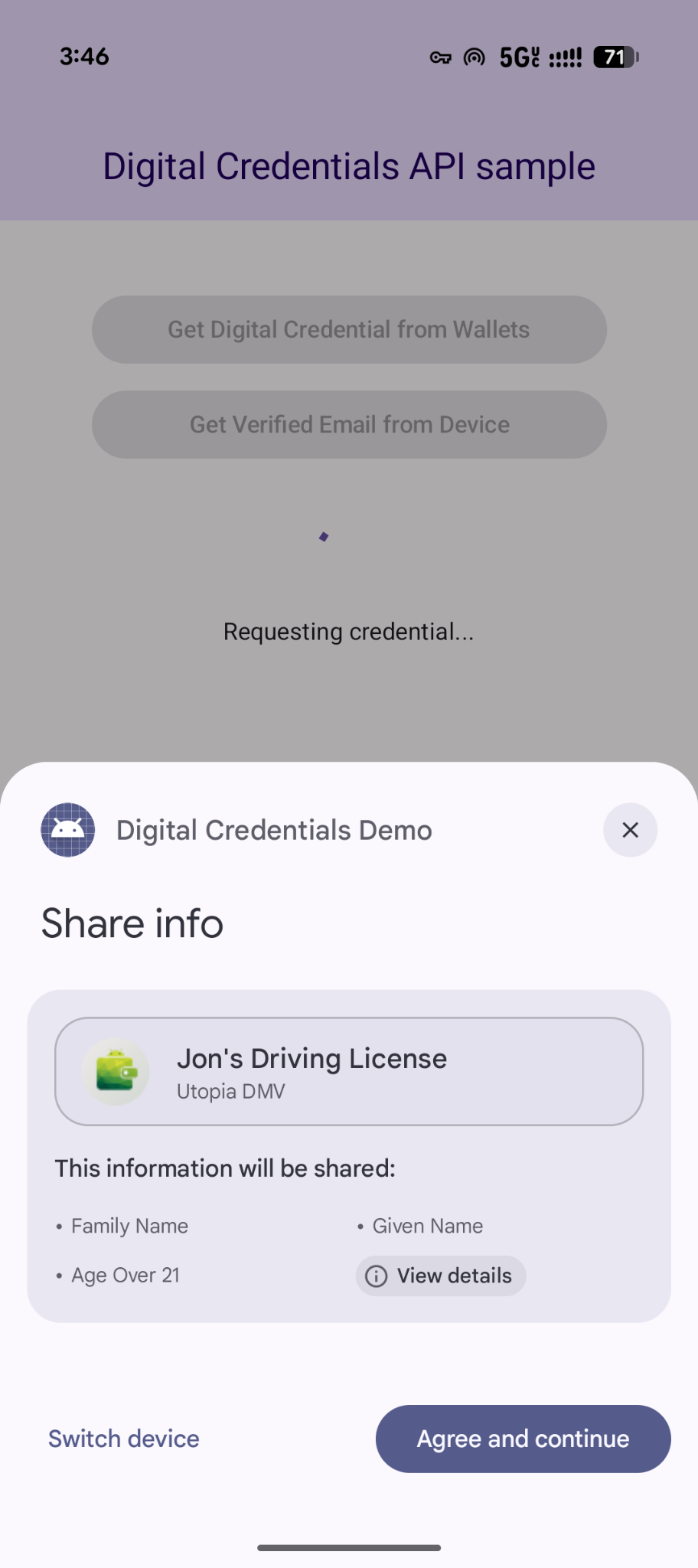
ขั้นตอน getCredential จะทริกเกอร์กล่องโต้ตอบของระบบ Android เพื่อแสดงตัวเลือกข้อมูลเข้าสู่ระบบที่ผู้ใช้มีอยู่และรวบรวมตัวเลือกของผู้ใช้ จากนั้น แอป Wallet ที่มีตัวเลือกข้อมูลเข้าสู่ระบบที่เลือกจะแสดง UI เพื่อขอความยินยอมและขอให้ดำเนินการที่จำเป็นเพื่อสร้างการตอบกลับข้อมูลเข้าสู่ระบบดิจิทัล
coroutineScope.launch {
    try {
        val result = credentialManager.getCredential(
            context = activityContext,
            request = getCredRequest
        )
        verifyResult(result)
    } catch (e : GetCredentialException) {
        handleFailure(e)
    }
}

// Handle the successfully returned credential.
fun verifyResult(result: GetCredentialResponse) {
    val credential = result.credential
    when (credential) {
        is DigitalCredential -> {
            val responseJson = credential.credentialJson
            validateResponseOnServer(responseJson)
        }
        else -> {
            // Catch any unrecognized credential type here.
            Log.e(TAG, "Unexpected type of credential ${credential.type}")
        }
    }
}

// Handle failure.
fun handleFailure(e: GetCredentialException) {
  when (e) {
        is GetCredentialCancellationException -> {
            // The user intentionally canceled the operation and chose not
            // to share the credential.
        }
        is GetCredentialInterruptedException -> {
            // Retry-able error. Consider retrying the call.
        }
        is NoCredentialException -> {
            // No credential was available.
        }
        else -> Log.w(TAG, "Unexpected exception type ${e::class.java}")
    }
}
คำขอข้อมูลเข้าสู่ระบบหลายรายการที่ยืดหยุ่น
นอกจากนี้ Digital Credentials API ยังรองรับการขอข้อมูลเข้าสู่ระบบหลายประเภทพร้อมกันโดยใช้ OpenID4VP ด้วย
- คำขอพร้อมกัน: ขอข้อมูลเข้าสู่ระบบหลายรายการในธุรกรรมของผู้ใช้รายการเดียว ตัวอย่างเช่น แอปการเดินทางสามารถขอบอร์ดดิ้งพาสและบัตรประจำตัวที่ออกโดยหน่วยงานราชการพร้อมกันได้ ซึ่งช่วยให้ผู้ใช้ตรวจสอบและให้ความยินยอมสำหรับทั้ง 2 รายการได้ด้วยการแตะเพียงครั้งเดียว
- การดำเนินการที่ยืดหยุ่น: ยอมรับข้อมูลเข้าสู่ระบบหรือผู้ออกข้อมูลเข้าสู่ระบบประเภทใดประเภทหนึ่งจากหลายประเภท ตัวอย่างเช่น ขั้นตอนการยืนยันอายุสามารถยอมรับใบขับขี่หรือหนังสือเดินทางได้ ซึ่งช่วยให้ผู้ใช้ดำเนินการตามคำขอได้โดยใช้ข้อมูลเข้าสู่ระบบที่จัดเก็บไว้ในที่เก็บข้อมูลของตน
ต่อไปนี้เป็นตัวอย่างการขอข้อมูลเข้าสู่ระบบหลายรายการในคำขอเดียว
{
  "credentials": [
    {
      "id": "gov_id1",
      "format": "mso_mdoc",
      "meta": {
        "doctype_value": "org.iso.18013.5.1.mDL"
      },
      "claims": [
        {
          "path": [
            "org.iso.18013.5.1",
            "age_over_21"
          ]
        }
      ]
    },
    {
      "id": "boarding_pass1",
      "format": "dc+sd-jwt",
      "meta": {
        "vct_values": [
          "https://credentials.example.airline/boarding-pass"
        ]
      },
      "claims": [
        {
          "path": [
            "flight_number"
          ]
        },
        {
          "path": [
            "seat"
          ]
        }
      ]
    }
  ]
}
จัดการการตอบกลับ
หลังจากส่งคำขอข้อมูลเข้าสู่ระบบแล้ว ให้จัดการ GetCredentialResponse ที่แสดงผลจาก CredentialManager
// Handle the successfully returned credential.
fun verifyResult(result: GetCredentialResponse) {
    val credential = result.credential
    when (credential) {
        is DigitalCredential -> {
            val responseJson = credential.credentialJson
            validateResponseOnServer(responseJson)
        }
        else -> {
            // Catch any unrecognized credential type here.
            Log.e(TAG, "Unexpected type of credential ${credential.type}")
        }
    }
}
จัดการข้อยกเว้น
แอปของคุณควรจัดการข้อผิดพลาดที่อาจเกิดขึ้นได้ ซึ่งรวมถึงกรณีที่ไม่มีข้อมูลเข้าสู่ระบบในอุปกรณ์หรือผู้ใช้ยกเลิกการดำเนินการ ดังนี้
// Handle failure.
fun handleFailure(e: GetCredentialException) {
    when (e) {
        is GetCredentialCancellationException -> {
            // The user intentionally canceled the operation and chose not
            // to share the credential.
        }
        is GetCredentialInterruptedException -> {
            // Retry-able error. Consider retrying the call.
        }
        is NoCredentialException -> {
            // No credential was available.
        }
        is CreateCredentialUnknownException -> {
            // An unknown, usually unexpected, error has occurred. Check the
            // message error for any additional debugging information.
        }
        is CreateCredentialCustomException -> {
            // You have encountered a custom error thrown by the wallet.
            // If you made the API call with a request object that's a
            // subclass of CreateCustomCredentialRequest using a 3rd-party SDK,
            // then you should check for any custom exception type constants
            // within that SDK to match with e.type. Otherwise, drop or log the
            // exception.
        }
        else -> Log.w(TAG, "Unexpected exception type ${e::class.java}")
    }
}