

Компонент Contacts Provider — это мощный и гибкий компонент Android, управляющий центральным хранилищем данных о пользователях на устройстве. Contacts Provider является источником данных, которые вы видите в приложении «Контакты» на устройстве, а также вы можете получить доступ к этим данным в своем собственном приложении и передавать данные между устройством и онлайн-сервисами. Провайдер поддерживает широкий спектр источников данных и стремится управлять как можно большим объемом данных для каждого человека, в результате чего его организация является сложной. Из-за этого API провайдера включает в себя обширный набор классов контрактов и интерфейсов, которые упрощают как получение, так и изменение данных.
В данном руководстве описаны следующие вопросы:
- Базовая структура поставщика услуг.
- Как получить данные от поставщика.
- Как изменить данные в системе поставщика услуг.
- Как написать адаптер синхронизации для синхронизации данных с вашего сервера с поставщиком контактов.
В этом руководстве предполагается, что вы знакомы с основами работы с поставщиками контента Android. Чтобы узнать больше о поставщиках контента Android, прочтите руководство по основам работы с поставщиками контента .
Организация-поставщик контактов
Компонент «Контакты» — это компонент поставщика контента для Android. Он хранит три типа данных о человеке, каждый из которых соответствует таблице, предоставляемой поставщиком, как показано на рисунке 1:
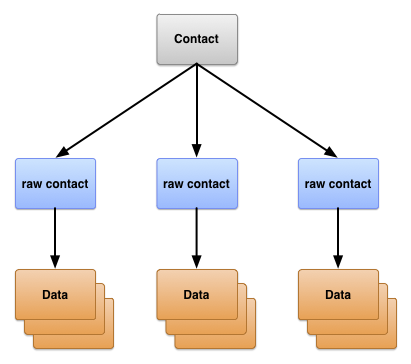
Рисунок 1. Структура таблицы «Поставщики контактов».
Три таблицы обычно обозначаются именами соответствующих классов контрактов. Эти классы определяют константы для URI содержимого, имен столбцов и значений столбцов, используемых таблицами:
- Таблица
ContactsContract.Contacts - Строки, представляющие разных людей, основаны на агрегированных данных из исходных контактных записей.
- Таблица
ContactsContract.RawContacts - Строки, содержащие сводную информацию о пользователе, относящуюся к его учетной записи и типу.
- Таблица
ContactsContract.Data - Строки, содержащие подробные контактные данные, такие как адреса электронной почты или номера телефонов.
Другие таблицы, представленные классами контрактов в ContactsContract являются вспомогательными таблицами, которые поставщик контактов использует для управления своей деятельностью или поддержки определенных функций в контактных или телефонных приложениях устройства.
Необработанные контакты
Исходные данные контакта представляют собой информацию о человеке, полученную из одного типа учетной записи и с одним именем учетной записи. Поскольку поставщик контактов позволяет использовать более одной онлайн-службы в качестве источника данных для одного человека, он позволяет создавать несколько исходных контактов для одного и того же человека. Создание нескольких исходных контактов также позволяет пользователю объединять данные о человеке из нескольких учетных записей одного типа.
Большая часть данных о контакте в исходном виде хранится не в таблице ContactsContract.RawContacts . Вместо этого они хранятся в одной или нескольких строках таблицы ContactsContract.Data . Каждая строка данных имеет столбец Data.RAW_CONTACT_ID , содержащий значение RawContacts._ID родительской строки таблицы ContactsContract.RawContacts .
Важные исходные контактные колонки
Важные столбцы таблицы ContactsContract.RawContacts перечислены в таблице 1. Пожалуйста, ознакомьтесь с примечаниями, приведенными ниже после таблицы:
Таблица 1. Важные исходные контактные колонки.
| Название столбца | Использовать | Примечания |
|---|---|---|
ACCOUNT_NAME | Имя учетной записи для типа учетной записи, являющегося источником этого исходного контакта. Например, имя учетной записи Google — это один из адресов Gmail владельца устройства. Дополнительную информацию см. в следующей записи ACCOUNT_TYPE . | Формат этого имени зависит от типа учетной записи. Это не обязательно адрес электронной почты. |
ACCOUNT_TYPE | Тип учетной записи, являющийся источником этих исходных данных. Например, тип учетной записи Google — com.google . Всегда указывайте в качестве типа учетной записи домен, которым вы владеете или управляете. Это обеспечит уникальность вашего типа учетной записи. | Тип учетной записи, предоставляющий данные о контактах, обычно имеет связанный адаптер синхронизации, который синхронизируется с поставщиком контактов. |
DELETED | Флаг «удален» для исходного контакта. | Этот флаг позволяет поставщику контактов поддерживать строку внутри системы до тех пор, пока адаптеры синхронизации не смогут удалить строку со своих серверов, а затем окончательно удалить строку из репозитория. |
Примечания
Ниже приведены важные замечания о таблице ContactsContract.RawContacts :
- Имя контакта в исходном виде не хранится в соответствующей строке таблицы
ContactsContract.RawContacts. Вместо этого оно хранится в таблицеContactsContract.Data, в строкеContactsContract.CommonDataKinds.StructuredName. У контакта в исходном виде в таблицеContactsContract.Dataесть только одна строка такого типа. - Внимание: Чтобы использовать данные вашей учетной записи в исходной строке контакта, их необходимо сначала зарегистрировать в
AccountManager. Для этого предложите пользователям добавить тип учетной записи и имя своей учетной записи в список учетных записей. Если вы этого не сделаете, поставщик контактов автоматически удалит вашу исходную строку контакта.Например, если вы хотите, чтобы ваше приложение хранило контактные данные для вашего веб-сервиса с доменом
com.example.dataservice, а учетная запись пользователя в вашем сервисе —becky.sharp@dataservice.example.com, то пользователь должен сначала добавить «тип» учетной записи (com.example.dataservice) и «имя» учетной записи (becky.smart@dataservice.example.com), прежде чем ваше приложение сможет добавлять необработанные строки контактов. Вы можете объяснить это требование пользователю в документации или предложить ему добавить тип и имя, или и то, и другое. Типы учетных записей и имена учетных записей более подробно описаны в следующем разделе.
Источники исходных данных о контактах
Чтобы понять, как работают необработанные контакты, рассмотрим пользователя «Эмили Дикинсон», у которого на устройстве определены следующие три учетные записи:
-
emily.dickinson@gmail.com -
emilyd@gmail.com - Аккаунт в Твиттере "belle_of_amherst"
В настройках учетных записей этот пользователь включил синхронизацию контактов для всех трех своих учетных записей.
Предположим, Эмили Дикинсон открывает окно браузера, входит в Gmail под ником emily.dickinson@gmail.com , открывает «Контакты» и добавляет «Томаса Хиггинсона». Позже она входит в Gmail под ником emilyd@gmail.com и отправляет электронное письмо «Томасу Хиггинсону», после чего он автоматически добавляется в контакты. Она также подписана на «colonel_tom» (идентификатор Томаса Хиггинсона в Твиттере).
В результате этой работы поставщик контактов создает три исходных контакта:
- Исходные контактные данные "Томаса Хиггинсона", связанные с
emily.dickinson@gmail.com. Тип учетной записи пользователя - Google. - Второй контакт для "Томаса Хиггинсона", связанный с
emilyd@gmail.com. Тип учетной записи пользователя также Google. Второй контакт существует, несмотря на то, что имя идентично предыдущему, потому что человек был добавлен для другой учетной записи пользователя. - Третий контакт для "Томаса Хиггинсона", связанный с "belle_of_amherst". Тип учетной записи пользователя - Twitter.
Данные
Как отмечалось ранее, данные для исходного контакта хранятся в строке ContactsContract.Data , которая связана со значением _ID исходного контакта. Это позволяет одному исходному контакту иметь несколько экземпляров одного и того же типа данных, таких как адреса электронной почты или номера телефонов. Например, если у "Томаса Хиггинсона" для emilyd@gmail.com (строка исходного контакта для Томаса Хиггинсона, связанная с учетной записью Google emilyd@gmail.com ) домашний адрес электронной почты thigg@gmail.com и рабочий адрес электронной почты thomas.higginson@gmail.com , то поставщик контактов сохраняет обе строки с адресами электронной почты и связывает их обе с исходным контактом.
Обратите внимание, что в этой единой таблице хранятся данные разных типов. В таблице ContactsContract.Data содержатся строки с отображаемым именем, номером телефона, адресом электронной почты, почтовым адресом, фотографией и информацией о веб-сайте. Для удобства управления таблица ContactsContract.Data имеет столбцы с описательными именами и столбцы с общими именами. Содержимое столбца с описательным именем имеет одинаковое значение независимо от типа данных в строке, в то время как содержимое столбца с общим именем имеет различное значение в зависимости от типа данных.
Описательные названия столбцов
Вот несколько примеров описательных названий столбцов:
-
RAW_CONTACT_ID - Значение столбца
_IDисходных данных контакта. -
MIMETYPE - Тип данных, хранящихся в этой строке, выражен в виде пользовательского MIME-типа. Поставщик контактов использует MIME-типы, определенные в подклассах
ContactsContract.CommonDataKinds. Эти MIME-типы являются открытым исходным кодом и могут использоваться любым приложением или адаптером синхронизации, работающим с поставщиком контактов. -
IS_PRIMARY - Если данные такого типа могут встречаться в контакте более одного раза, столбец
IS_PRIMARYуказывает на строку данных, содержащую основные данные для этого типа. Например, если пользователь удерживает нажатой номер телефона контакта и выбирает «Установить по умолчанию» , то в строкеContactsContract.Data, содержащей этот номер, столбецIS_PRIMARYбудет иметь ненулевое значение.
Общие названия столбцов
Существует 15 универсальных столбцов с именами DATA1 до DATA15 , которые обычно доступны, и еще четыре универсальных столбца SYNC1 до SYNC4 , которые должны использоваться только адаптерами синхронизации. Константы имен универсальных столбцов всегда работают независимо от типа данных, содержащихся в строке.
Столбец DATA1 индексируется. Поставщик данных о контактах всегда использует этот столбец для данных, которые, по его мнению, будут наиболее часто встречаться в запросах. Например, в строке с адресом электронной почты этот столбец содержит фактический адрес электронной почты.
По общепринятой практике, столбец DATA15 зарезервирован для хранения данных в формате Binary Large Object (BLOB), таких как миниатюры фотографий.
Названия столбцов, специфичные для типа данных
Для упрощения работы со столбцами определенного типа строк поставщик контактов также предоставляет константы имен столбцов, специфичные для каждого типа, определенные в подклассах ContactsContract.CommonDataKinds . Эти константы просто присваивают разные имена константам одному и тому же имени столбца, что помогает вам получать доступ к данным в строке определенного типа.
Например, класс ContactsContract.CommonDataKinds.Email определяет константы имен столбцов, специфичные для типа данных, для строки ContactsContract.Data , имеющей MIME-тип Email.CONTENT_ITEM_TYPE . Класс содержит константу ADDRESS для столбца адресов электронной почты. Фактическое значение ADDRESS — "data1", что совпадает с общим именем столбца.
Внимание: Не добавляйте собственные пользовательские данные в таблицу ContactsContract.Data , используя строку с одним из предопределенных MIME-типов поставщика. В противном случае вы можете потерять данные или привести к сбоям в работе поставщика. Например, не следует добавлять строку с MIME-типом Email.CONTENT_ITEM_TYPE , содержащую имя пользователя вместо адреса электронной почты в столбце DATA1 . Если вы используете собственный пользовательский MIME-тип для строки, вы можете определить собственные имена столбцов, специфичные для этого типа, и использовать столбцы по своему усмотрению.
На рисунке 2 показано, как описательные столбцы и столбцы данных отображаются в строке ContactsContract.Data , и как имена столбцов, специфичные для типа данных, «накладываются» на общие имена столбцов.
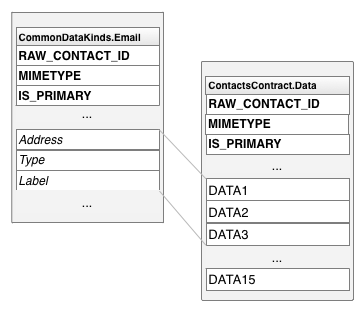
Рисунок 2. Названия столбцов, специфичные для каждого типа данных, и общие названия столбцов.
Классы имен столбцов, специфичные для типа данных
В таблице 2 перечислены наиболее часто используемые классы имен столбцов, специфичные для каждого типа данных:
Таблица 2. Классы имен столбцов, специфичные для каждого типа данных.
| Класс картографирования | Тип данных | Примечания |
|---|---|---|
ContactsContract.CommonDataKinds.StructuredName | Имена контактных лиц, связанных с данной строкой данных. | В исходном контакте содержится только одна из этих строк. |
ContactsContract.CommonDataKinds.Photo | Основное фото для исходного контакта, связанного с этой строкой данных. | В исходном контакте содержится только одна из этих строк. |
ContactsContract.CommonDataKinds.Email | Адрес электронной почты контактного лица, указанного в данной строке данных. | В исходном контакте может быть несколько адресов электронной почты. |
ContactsContract.CommonDataKinds.StructuredPostal | Почтовый адрес контактного лица, указанного в данной строке данных. | В исходном контакте может быть несколько почтовых адресов. |
ContactsContract.CommonDataKinds.GroupMembership | Идентификатор, связывающий исходный контакт с одной из групп в поставщике контактов. | Группы — это необязательная функция типа учетной записи и имени учетной записи. Более подробное описание приведено в разделе «Группы контактов» . |
Контакты
Поставщик контактов объединяет исходные строки контактов по всем типам учетных записей и именам учетных записей для формирования контакта . Это упрощает отображение и изменение всех данных, собранных пользователем для конкретного человека. Поставщик контактов управляет созданием новых строк контактов и агрегированием исходных контактов с существующей строкой контакта. Ни приложениям, ни адаптерам синхронизации не разрешается добавлять контакты, а некоторые столбцы в строке контакта доступны только для чтения.
Примечание: Если вы попытаетесь добавить контакт в поставщик контактов с помощью insert() , вы получите исключение UnsupportedOperationException . Если вы попытаетесь обновить столбец, который указан как "только для чтения", обновление будет проигнорировано.
Поставщик контактов создает новый контакт в ответ на добавление нового исходного контакта, который не соответствует ни одному из существующих контактов. Поставщик также делает это, если данные существующего исходного контакта изменяются таким образом, что они больше не соответствуют контакту, к которому он был ранее привязан. Если приложение или адаптер синхронизации создает новый исходный контакт, который соответствует существующему контакту, новый исходный контакт агрегируется с существующим контактом.
Поставщик контактов связывает строку контакта с исходными строками контактов с помощью столбца _ID строки контакта в таблице Contacts . Столбец CONTACT_ID исходной таблицы контактов ContactsContract.RawContacts содержит значения _ID для строки контактов, связанной с каждой исходной строкой контактов.
В таблице ContactsContract.Contacts также есть столбец LOOKUP_KEY , который является «постоянной» ссылкой на строку контакта. Поскольку поставщик контактов автоматически поддерживает контакты, он может изменять значение _ID строки контакта в ответ на агрегацию или синхронизацию. Даже если это произойдет, URI содержимого CONTENT_LOOKUP_URI в сочетании с LOOKUP_KEY контакта все равно будет указывать на строку контакта, поэтому вы можете использовать LOOKUP_KEY для поддержания ссылок на «избранные» контакты и так далее. Этот столбец имеет собственный формат, не связанный с форматом столбца _ID .
На рисунке 3 показано, как три основные таблицы соотносятся друг с другом.
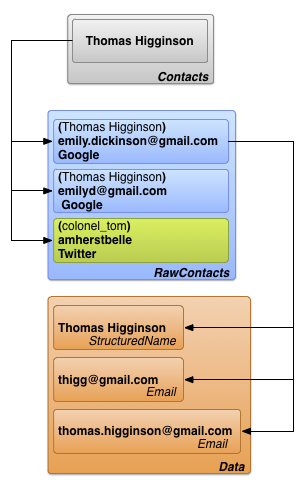
Рисунок 3. Взаимосвязи в таблицах «Контакты», «Необработанные контакты» и «Подробная информация».
Внимание: если вы публикуете свое приложение в Google Play Store или если ваше приложение установлено на устройстве под управлением Android 10 (уровень API 29) или выше, имейте в виду, что ограниченный набор полей и методов для работы с контактными данными устарел.
При указанных условиях система периодически очищает все значения, записанные в эти поля данных:
-
ContactsContract.ContactOptionsColumns.LAST_TIME_CONTACTED -
ContactsContract.ContactOptionsColumns.TIMES_CONTACTED -
ContactsContract.DataUsageStatColumns.LAST_TIME_USED -
ContactsContract.DataUsageStatColumns.TIMES_USED
API-интерфейсы, используемые для установки указанных выше полей данных, также устарели:
Кроме того, следующие поля больше не возвращают часто встречающиеся контакты. Обратите внимание, что некоторые из этих полей влияют на ранжирование контактов только в том случае, если контакты относятся к определенному типу данных .
-
ContactsContract.Contacts.CONTENT_FREQUENT_URI -
ContactsContract.Contacts.CONTENT_STREQUENT_URI -
ContactsContract.Contacts.CONTENT_STREQUENT_FILTER_URI -
CONTENT_FILTER_URI(влияет только на типы данных Email , Phone , Callable и Contactables ) -
ENTERPRISE_CONTENT_FILTER_URI(влияет только на типы данных Email , Phone и Callable )
Если ваши приложения обращаются к этим полям или API или обновляют их, используйте альтернативные методы. Например, вы можете реализовать определенные сценарии использования, используя частные поставщики контента или другие данные, хранящиеся в вашем приложении или серверных системах.
Чтобы убедиться, что функциональность вашего приложения не пострадает от этого изменения, вы можете вручную очистить эти поля данных. Для этого выполните следующую команду ADB на устройстве под управлением Android 4.1 (уровень API 16) или выше:
adb shell content delete \
--uri content://com.android.contacts/contacts/delete_usage
Данные с синхронизирующих адаптеров
Пользователи вводят контактные данные непосредственно в устройство, но данные также поступают в Contacts Provider из веб-сервисов через адаптеры синхронизации , которые автоматизируют передачу данных между устройством и сервисами. Адаптеры синхронизации работают в фоновом режиме под управлением системы и вызывают методы ContentResolver для управления данными.
В Android веб-сервис, с которым работает адаптер синхронизации, определяется типом учетной записи. Каждый адаптер синхронизации работает с одним типом учетной записи, но может поддерживать несколько имен учетных записей для этого типа. Типы и имена учетных записей кратко описаны в разделе « Источники необработанных данных контактов» . Следующие определения содержат более подробную информацию и описывают, как тип и имя учетной записи связаны с адаптерами и сервисами синхронизации.
- Тип счета
- Идентифицирует сервис, в котором пользователь сохранил данные. В большинстве случаев пользователю необходимо пройти аутентификацию в этом сервисе. Например, Google Контакты — это тип учетной записи, идентифицируемый кодом
google.com. Это значение соответствует типу учетной записи, используемомуAccountManager. - Имя учетной записи
- Идентифицирует конкретную учетную запись или логин для определенного типа учетной записи. Учетные записи контактов Google аналогичны учетным записям Google, у которых в качестве имени учетной записи используется адрес электронной почты. В других сервисах может использоваться однословное имя пользователя или числовой идентификатор.
Типы учетных записей не обязательно должны быть уникальными. Пользователь может настроить несколько учетных записей Google Контакты и загрузить их данные в Поставщик контактов; это может произойти, если у пользователя есть один набор личных контактов для личного имени учетной записи и другой набор для работы. Имена учетных записей обычно уникальны. Вместе они определяют конкретный поток данных между Поставщиком контактов и внешним сервисом.
Если вы хотите передать данные вашей службы в поставщик контактов, вам необходимо написать собственный адаптер синхронизации. Это более подробно описано в разделе «Адаптеры синхронизации поставщика контактов» .
На рисунке 4 показано, как поставщик контактов вписывается в поток данных о людях. В блоке с пометкой «адаптеры синхронизации» каждый адаптер обозначен типом учетной записи.
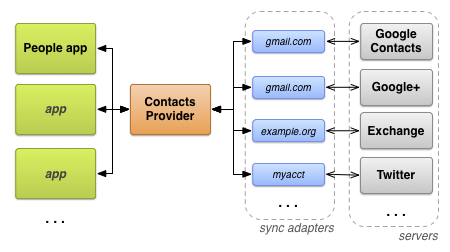
Рисунок 4. Поток данных поставщика контактной информации.
Необходимые разрешения
Приложениям, желающим получить доступ к поставщику контактов, необходимо запросить следующие разрешения:
- Доступ на чтение к одной или нескольким таблицам.
-
READ_CONTACTS, указанный вAndroidManifest.xmlс помощью элемента<uses-permission>как<uses-permission android:name="android.permission.READ_CONTACTS">. - Доступ на запись к одной или нескольким таблицам.
-
WRITE_CONTACTS, указанный вAndroidManifest.xmlс помощью элемента<uses-permission>как<uses-permission android:name="android.permission.WRITE_CONTACTS">.
Эти разрешения не распространяются на данные профиля пользователя. Профиль пользователя и необходимые для него разрешения обсуждаются в следующем разделе « Профиль пользователя» .
Помните, что контактные данные пользователя являются личными и конфиденциальными. Пользователи заботятся о своей конфиденциальности, поэтому не хотят, чтобы приложения собирали данные о них или их контактах. Если не очевидно, зачем вам нужно разрешение на доступ к их контактным данным, они могут поставить вашему приложению низкую оценку или просто отказаться его устанавливать.
Профиль пользователя
Таблица ContactsContract.Contacts содержит одну строку с данными профиля пользователя устройства. Эти данные описывают user устройства, а не один из его контактов. Строка с контактами профиля связана со строкой с исходными контактами для каждой системы, использующей профиль. Каждая строка с исходными контактами профиля может содержать несколько строк данных. Константы для доступа к профилю пользователя доступны в классе ContactsContract.Profile .
Для доступа к профилю пользователя требуются специальные разрешения. В дополнение к разрешениям READ_CONTACTS и WRITE_CONTACTS , необходимым для чтения и записи, доступ к профилю пользователя требует разрешений android.Manifest.permission#READ_PROFILE и android.Manifest.permission#WRITE_PROFILE для чтения и записи соответственно.
Помните, что профиль пользователя следует рассматривать как конфиденциальную информацию. Разрешение android.Manifest.permission#READ_PROFILE позволяет получить доступ к персональным данным пользователя устройства. Обязательно объясните пользователю, зачем вам нужны разрешения на доступ к профилю пользователя, в описании вашего приложения.
Чтобы получить строку контакта, содержащую профиль пользователя, вызовите метод ContentResolver.query() . Установите URI содержимого равным CONTENT_URI и не указывайте никаких критериев выбора. Вы также можете использовать этот URI содержимого в качестве базового URI для получения необработанных контактов или данных профиля. Например, этот фрагмент кода извлекает данные для профиля:
Котлин
// Sets the columns to retrieve for the user profile
projection = arrayOf(
        ContactsContract.Profile._ID,
        ContactsContract.Profile.DISPLAY_NAME_PRIMARY,
        ContactsContract.Profile.LOOKUP_KEY,
        ContactsContract.Profile.PHOTO_THUMBNAIL_URI
)

// Retrieves the profile from the Contacts Provider
profileCursor = contentResolver.query(
        ContactsContract.Profile.CONTENT_URI,
        projection,
        null,
        null,
        null
)
Java
// Sets the columns to retrieve for the user profile
projection = new String[]
    {
        Profile._ID,
        Profile.DISPLAY_NAME_PRIMARY,
        Profile.LOOKUP_KEY,
        Profile.PHOTO_THUMBNAIL_URI
    };

// Retrieves the profile from the Contacts Provider
profileCursor =
        getContentResolver().query(
                Profile.CONTENT_URI,
                projection ,
                null,
                null,
                null);
Примечание: Если вы получаете несколько строк с контактами и хотите определить, является ли одна из них профилем пользователя, проверьте столбец IS_USER_PROFILE в этой строке. Если контакт является профилем пользователя, значение этого столбца будет равно "1".
Метаданные поставщика контактов
Поставщик контактов управляет данными, отслеживающими состояние контактной информации в репозитории. Эти метаданные о репозитории хранятся в различных местах, включая строки таблиц Raw Contacts, Data и Contacts, таблицу ContactsContract.Settings и таблицу ContactsContract.SyncState . В следующей таблице показано влияние каждого из этих элементов метаданных:
Таблица 3. Метаданные в поставщике контактов
| Стол | Столбец | Ценности | Значение |
|---|---|---|---|
ContactsContract.RawContacts | DIRTY | "0" - не изменилось с момента последней синхронизации. | Отмечает необработанные контакты, которые были изменены на устройстве и должны быть синхронизированы с сервером. Значение устанавливается автоматически поставщиком контактов, когда приложения Android обновляют строку. Адаптеры синхронизации, изменяющие исходные таблицы контактов или данных, всегда должны добавлять строку |
| "1" - изменилось с момента последней синхронизации, необходимо синхронизировать обратно с сервером. | |||
ContactsContract.RawContacts | VERSION | Номер версии этой строки. | Поставщик контактов автоматически увеличивает это значение всякий раз, когда изменяется строка или связанные с ней данные. |
ContactsContract.Data | DATA_VERSION | Номер версии этой строки. | Поставщик контактов автоматически увеличивает это значение при каждом изменении строки данных. |
ContactsContract.RawContacts | SOURCE_ID | Строковое значение, однозначно идентифицирующее этот исходный контакт по учетной записи, в которой он был создан. | Когда адаптер синхронизации создает новый необработанный контакт, в этом столбце следует установить уникальный идентификатор этого контакта на сервере. Когда приложение Android создает новый необработанный контакт, это поле следует оставить пустым. Это сигнализирует адаптеру синхронизации о необходимости создания нового необработанного контакта на сервере и получения значения для SOURCE_ID .В частности, идентификатор источника должен быть уникальным для каждого типа учетной записи и оставаться стабильным при синхронизации:
|
ContactsContract.Groups | GROUP_VISIBLE | «0» — Контакты из этой группы не должны отображаться в пользовательском интерфейсе приложений Android. | Этот столбец предназначен для обеспечения совместимости с серверами, которые позволяют пользователю скрывать контакты в определенных группах. |
| «1» — Контакты из этой группы могут отображаться в пользовательском интерфейсе приложения. | |||
ContactsContract.Settings | UNGROUPED_VISIBLE | "0" - Для этой учетной записи и типа учетной записи контакты, не входящие в группу, невидимы для пользовательского интерфейса приложений Android. | По умолчанию контакты невидимы, если ни один из их исходных контактов не принадлежит к группе (принадлежность контакта к группе указывается одной или несколькими строками ContactsContract.CommonDataKinds.GroupMembership в таблице ContactsContract.Data ). Установив этот флаг в строке таблицы ContactsContract.Settings для типа учетной записи и самой учетной записи, вы можете принудительно отображать контакты без групп. Один из вариантов использования этого флага — отображение контактов с серверов, которые не используют группы. |
| «1» — Для данной учетной записи и типа учетной записи контакты, не входящие в группу, отображаются в пользовательском интерфейсе приложения. | |||
ContactsContract.SyncState | (все) | Используйте эту таблицу для хранения метаданных вашего адаптера синхронизации. | С помощью этой таблицы вы можете постоянно хранить состояние синхронизации и другие данные, связанные с синхронизацией, на устройстве. |
Контакты Доступ к поставщику
В этом разделе описаны правила доступа к данным от поставщика контактной информации, с акцентом на следующие аспекты:
- Запросы к сущностям.
- Пакетная модификация.
- Извлечение и изменение данных с указанием намерений.
- Целостность данных.
Внесение изменений через адаптер синхронизации также более подробно описано в разделе «Адаптеры синхронизации поставщика контактов» .
Запросы к сущностям
Поскольку таблицы поставщика контактов организованы в иерархическом порядке, часто бывает полезно получить строку и все связанные с ней «дочерние» строки. Например, чтобы отобразить всю информацию о человеке, вы можете захотеть получить все строки ContactsContract.RawContacts для одной строки ContactsContract.Contacts или все строки ContactsContract.CommonDataKinds.Email для одной строки ContactsContract.RawContacts . Для этого поставщик контактов предлагает конструкции сущностей , которые действуют как соединения между таблицами базы данных.
Сущность — это таблица, состоящая из выбранных столбцов из родительской и дочерней таблиц. При запросе к сущности вы указываете проекцию и критерии поиска на основе столбцов, доступных в сущности. Результатом является Cursor , содержащий одну строку для каждой строки дочерней таблицы, которая была получена. Например, если вы запрашиваете ContactsContract.Contacts.Entity по имени контакта и все строки ContactsContract.CommonDataKinds.Email для всех исходных контактов с этим именем, вы получите Cursor содержащий одну строку для каждой строки ContactsContract.CommonDataKinds.Email .
Сущности упрощают запросы. Используя сущность, вы можете получить все данные о контакте или только о контакте за один раз, вместо того чтобы сначала запрашивать идентификатор из родительской таблицы, а затем запрашивать этот идентификатор из дочерней таблицы. Кроме того, поставщик контактов обрабатывает запрос к сущности в рамках одной транзакции, что гарантирует внутреннюю согласованность полученных данных.
Примечание: Обычно сущность не содержит всех столбцов родительской и дочерней таблиц. Если вы попытаетесь работать с именем столбца, которого нет в списке констант имен столбцов для сущности, вы получите Exception .
Следующий фрагмент кода показывает, как получить все исходные строки данных контакта. Этот фрагмент является частью более крупного приложения, которое содержит две активности: «основная» и «подробная». Основная активность отображает список строк данных контакта; когда пользователь выбирает одну из них, активность отправляет её идентификатор в активность подробной информации. Активность подробной информации использует сущность ContactsContract.Contacts.Entity для отображения всех строк данных из всех исходных контактов, связанных с выбранным контактом.
Этот фрагмент взят из задания "подробности":
Котлин
...
    /*
     * Appends the entity path to the URI. In the case of the Contacts Provider, the
     * expected URI is content://com.google.contacts/#/entity (# is the ID value).
     */
    contactUri = Uri.withAppendedPath(
            contactUri,
            ContactsContract.Contacts.Entity.CONTENT_DIRECTORY
    )

    // Initializes the loader identified by LOADER_ID.
    loaderManager.initLoader(
            LOADER_ID,  // The identifier of the loader to initialize
            null,       // Arguments for the loader (in this case, none)
            this        // The context of the activity
    )

    // Creates a new cursor adapter to attach to the list view
    cursorAdapter = SimpleCursorAdapter(
            this,                       // the context of the activity
            R.layout.detail_list_item,  // the view item containing the detail widgets
            mCursor,                    // the backing cursor
            fromColumns,               // the columns in the cursor that provide the data
            toViews,                   // the views in the view item that display the data
            0)                          // flags

    // Sets the ListView's backing adapter.
    rawContactList.adapter = cursorAdapter
...
override fun onCreateLoader(id: Int, args: Bundle?): Loader<Cursor> {
    /*
     * Sets the columns to retrieve.
     * RAW_CONTACT_ID is included to identify the raw contact associated with the data row.
     * DATA1 contains the first column in the data row (usually the most important one).
     * MIMETYPE indicates the type of data in the data row.
     */
    val projection: Array<String> = arrayOf(
            ContactsContract.Contacts.Entity.RAW_CONTACT_ID,
            ContactsContract.Contacts.Entity.DATA1,
            ContactsContract.Contacts.Entity.MIMETYPE
    )

    /*
     * Sorts the retrieved cursor by raw contact id, to keep all data rows for a single raw
     * contact collated together.
     */
    val sortOrder = "${ContactsContract.Contacts.Entity.RAW_CONTACT_ID} ASC"

    /*
     * Returns a new CursorLoader. The arguments are similar to
     * ContentResolver.query(), except for the Context argument, which supplies the location of
     * the ContentResolver to use.
     */
    return CursorLoader(
            applicationContext, // The activity's context
            contactUri,        // The entity content URI for a single contact
            projection,         // The columns to retrieve
            null,               // Retrieve all the raw contacts and their data rows.
            null,               //
            sortOrder           // Sort by the raw contact ID.
    )
}
Java
...
    /*
     * Appends the entity path to the URI. In the case of the Contacts Provider, the
     * expected URI is content://com.google.contacts/#/entity (# is the ID value).
     */
    contactUri = Uri.withAppendedPath(
            contactUri,
            ContactsContract.Contacts.Entity.CONTENT_DIRECTORY);

    // Initializes the loader identified by LOADER_ID.
    getLoaderManager().initLoader(
            LOADER_ID,  // The identifier of the loader to initialize
            null,       // Arguments for the loader (in this case, none)
            this);      // The context of the activity

    // Creates a new cursor adapter to attach to the list view
    cursorAdapter = new SimpleCursorAdapter(
            this,                        // the context of the activity
            R.layout.detail_list_item,   // the view item containing the detail widgets
            mCursor,                     // the backing cursor
            fromColumns,                // the columns in the cursor that provide the data
            toViews,                    // the views in the view item that display the data
            0);                          // flags

    // Sets the ListView's backing adapter.
    rawContactList.setAdapter(cursorAdapter);
...
@Override
public Loader<Cursor> onCreateLoader(int id, Bundle args) {

    /*
     * Sets the columns to retrieve.
     * RAW_CONTACT_ID is included to identify the raw contact associated with the data row.
     * DATA1 contains the first column in the data row (usually the most important one).
     * MIMETYPE indicates the type of data in the data row.
     */
    String[] projection =
        {
            ContactsContract.Contacts.Entity.RAW_CONTACT_ID,
            ContactsContract.Contacts.Entity.DATA1,
            ContactsContract.Contacts.Entity.MIMETYPE
        };

    /*
     * Sorts the retrieved cursor by raw contact id, to keep all data rows for a single raw
     * contact collated together.
     */
    String sortOrder =
            ContactsContract.Contacts.Entity.RAW_CONTACT_ID +
            " ASC";

    /*
     * Returns a new CursorLoader. The arguments are similar to
     * ContentResolver.query(), except for the Context argument, which supplies the location of
     * the ContentResolver to use.
     */
    return new CursorLoader(
            getApplicationContext(),  // The activity's context
            contactUri,              // The entity content URI for a single contact
            projection,               // The columns to retrieve
            null,                     // Retrieve all the raw contacts and their data rows.
            null,                     //
            sortOrder);               // Sort by the raw contact ID.
}
После завершения загрузки LoaderManager вызывает функцию обратного вызова onLoadFinished() . Одним из входящих аргументов этого метода является Cursor с результатами запроса. В вашем собственном приложении вы можете получить данные из этого Cursor для их отображения или дальнейшей обработки.
Пакетная модификация
По возможности следует вставлять, обновлять и удалять данные в поставщике контактов в «пакетном режиме», создавая ArrayList объектов ContentProviderOperation и вызывая applyBatch() . Поскольку поставщик контактов выполняет все операции в applyBatch() в рамках одной транзакции, ваши изменения никогда не приведут к несогласованному состоянию репозитория контактов. Пакетная модификация также упрощает одновременную вставку как исходных данных контакта, так и его подробных данных.
Примечание: Чтобы изменить отдельный необработанный контакт, рекомендуется отправлять интент в приложение контактов устройства, а не обрабатывать изменение в вашем приложении. Более подробно это описано в разделе «Получение и изменение с помощью интентов» .
Точки доходности
Пакетная модификация, содержащая большое количество операций, может блокировать другие процессы, что приводит к ухудшению общего пользовательского опыта. Чтобы организовать все необходимые модификации в как можно меньшем количестве отдельных списков и одновременно предотвратить блокировку системы, следует установить точки приостановки для одной или нескольких операций. Точка приостановки — это объект ContentProviderOperation , значение isYieldAllowed() которого установлено в true . Когда поставщик контактов сталкивается с точкой приостановки, он приостанавливает свою работу, чтобы позволить другим процессам продолжить работу, и закрывает текущую транзакцию. Когда поставщик возобновляет работу, он переходит к следующей операции в ArrayList и начинает новую транзакцию.
Точки возврата приводят к выполнению более одной транзакции за один вызов applyBatch() . Поэтому следует устанавливать точку возврата для последней операции для набора связанных строк. Например, точку возврата следует устанавливать для последней операции в наборе, который добавляет необработанные строки контакта и связанные с ними строки данных, или для последней операции для набора строк, связанных с одним контактом.
Точки перехода также являются единицей атомарной операции. Все обращения между двумя точками перехода будут либо успешными, либо неудачными как единое целое. Если вы не устанавливаете точки перехода, наименьшей атомарной операцией является весь пакет операций. Если вы используете точки перехода, вы предотвращаете снижение производительности системы из-за операций, одновременно обеспечивая атомарность подмножества операций.
Модификация обратных ссылок
При вставке новой строки необработанного контакта и связанных с ней строк данных в виде набора объектов ContentProviderOperation необходимо связать строки данных со строкой необработанного контакта, вставив значение _ID необработанного контакта в качестве значения RAW_CONTACT_ID . Однако это значение недоступно при создании ContentProviderOperation для строки данных, поскольку ContentProviderOperation еще не применен к строке необработанного контакта. Чтобы обойти это ограничение, класс ContentProviderOperation.Builder имеет метод withValueBackReference() . Этот метод позволяет вставлять или изменять столбец с результатом предыдущей операции.
Метод withValueBackReference() принимает два аргумента:
-
key - Ключ пары "ключ-значение". Значением этого аргумента должно быть имя столбца в таблице, которую вы изменяете.
-
previousResult - Индекс значения в массиве объектов
ContentProviderResultизapplyBatch(), начинающийся с 0. По мере применения пакетных операций результат каждой операции сохраняется в промежуточном массиве результатов. ЗначениеpreviousResult— это индекс одного из этих результатов, который извлекается и сохраняется вместе со значениемkey. Это позволяет вставить новую запись контакта и получить обратно значение его_ID, а затем создать «обратную ссылку» на это значение при добавлении строкиContactsContract.Data.Весь результирующий массив создается при первом вызове метода
applyBatch(), его размер равен размеруArrayListобъектовContentProviderOperation, которые вы предоставляете. Однако все элементы в результирующем массиве устанавливаются вnull, и если вы попытаетесь создать обратную ссылку на результат операции, которая еще не была применена,withValueBackReference()вызоветException.
Приведенные ниже фрагменты кода показывают, как вставить новый необработанный контакт и данные в пакетном режиме. Они включают код, который устанавливает точку возврата и использует обратную ссылку.
Первый фрагмент кода извлекает контактные данные из пользовательского интерфейса. На этом этапе пользователь уже выбрал учетную запись, для которой необходимо добавить новый контакт.
Котлин
// Creates a contact entry from the current UI values, using the currently-selected account.
private fun createContactEntry() {
    /*
     * Gets values from the UI
     */
    val name = contactNameEditText.text.toString()
    val phone = contactPhoneEditText.text.toString()
    val email = contactEmailEditText.text.toString()

    val phoneType: String = contactPhoneTypes[mContactPhoneTypeSpinner.selectedItemPosition]

    val emailType: String = contactEmailTypes[mContactEmailTypeSpinner.selectedItemPosition]
Java
// Creates a contact entry from the current UI values, using the currently-selected account.
protected void createContactEntry() {
    /*
     * Gets values from the UI
     */
    String name = contactNameEditText.getText().toString();
    String phone = contactPhoneEditText.getText().toString();
    String email = contactEmailEditText.getText().toString();

    int phoneType = contactPhoneTypes.get(
            contactPhoneTypeSpinner.getSelectedItemPosition());

    int emailType = contactEmailTypes.get(
            contactEmailTypeSpinner.getSelectedItemPosition());
Следующий фрагмент кода создает операцию вставки исходной строки контакта в таблицу ContactsContract.RawContacts :
Котлин
    /*
     * Prepares the batch operation for inserting a new raw contact and its data. Even if
     * the Contacts Provider does not have any data for this person, you can't add a Contact,
     * only a raw contact. The Contacts Provider will then add a Contact automatically.
     */

    // Creates a new array of ContentProviderOperation objects.
    val ops = arrayListOf<ContentProviderOperation>()

    /*
     * Creates a new raw contact with its account type (server type) and account name
     * (user's account). Remember that the display name is not stored in this row, but in a
     * StructuredName data row. No other data is required.
     */
    var op: ContentProviderOperation.Builder =
            ContentProviderOperation.newInsert(ContactsContract.RawContacts.CONTENT_URI)
                    .withValue(ContactsContract.RawContacts.ACCOUNT_TYPE, selectedAccount.name)
                    .withValue(ContactsContract.RawContacts.ACCOUNT_NAME, selectedAccount.type)

    // Builds the operation and adds it to the array of operations
    ops.add(op.build())
Java
    /*
     * Prepares the batch operation for inserting a new raw contact and its data. Even if
     * the Contacts Provider does not have any data for this person, you can't add a Contact,
     * only a raw contact. The Contacts Provider will then add a Contact automatically.
     */

     // Creates a new array of ContentProviderOperation objects.
    ArrayList<ContentProviderOperation> ops =
            new ArrayList<ContentProviderOperation>();

    /*
     * Creates a new raw contact with its account type (server type) and account name
     * (user's account). Remember that the display name is not stored in this row, but in a
     * StructuredName data row. No other data is required.
     */
    ContentProviderOperation.Builder op =
            ContentProviderOperation.newInsert(ContactsContract.RawContacts.CONTENT_URI)
            .withValue(ContactsContract.RawContacts.ACCOUNT_TYPE, selectedAccount.getType())
            .withValue(ContactsContract.RawContacts.ACCOUNT_NAME, selectedAccount.getName());

    // Builds the operation and adds it to the array of operations
    ops.add(op.build());
Далее код создает строки данных для отображаемого имени, номера телефона и адреса электронной почты.
Каждый объект конструктора операций использует withValueBackReference() для получения RAW_CONTACT_ID . Эта ссылка указывает на объект ContentProviderResult из первой операции, который добавляет строку необработанного контакта и возвращает ее новое значение _ID . В результате каждая строка данных автоматически связывается по своему RAW_CONTACT_ID с новой строкой ContactsContract.RawContacts , к которой она принадлежит.
Объект ContentProviderOperation.Builder , добавляющий строку с адресом электронной почты, помечается функцией withYieldAllowed() , которая устанавливает точку возврата:
Котлин
    // Creates the display name for the new raw contact, as a StructuredName data row.
    op = ContentProviderOperation.newInsert(ContactsContract.Data.CONTENT_URI)
            /*
             * withValueBackReference sets the value of the first argument to the value of
             * the ContentProviderResult indexed by the second argument. In this particular
             * call, the raw contact ID column of the StructuredName data row is set to the
             * value of the result returned by the first operation, which is the one that
             * actually adds the raw contact row.
             */
            .withValueBackReference(ContactsContract.Data.RAW_CONTACT_ID, 0)

            // Sets the data row's MIME type to StructuredName
            .withValue(ContactsContract.Data.MIMETYPE,
                    ContactsContract.CommonDataKinds.StructuredName.CONTENT_ITEM_TYPE)

            // Sets the data row's display name to the name in the UI.
            .withValue(ContactsContract.CommonDataKinds.StructuredName.DISPLAY_NAME, name)

    // Builds the operation and adds it to the array of operations
    ops.add(op.build())

    // Inserts the specified phone number and type as a Phone data row
    op = ContentProviderOperation.newInsert(ContactsContract.Data.CONTENT_URI)
            /*
             * Sets the value of the raw contact id column to the new raw contact ID returned
             * by the first operation in the batch.
             */
            .withValueBackReference(ContactsContract.Data.RAW_CONTACT_ID, 0)

            // Sets the data row's MIME type to Phone
            .withValue(ContactsContract.Data.MIMETYPE,
                    ContactsContract.CommonDataKinds.Phone.CONTENT_ITEM_TYPE)

            // Sets the phone number and type
            .withValue(ContactsContract.CommonDataKinds.Phone.NUMBER, phone)
            .withValue(ContactsContract.CommonDataKinds.Phone.TYPE, phoneType)

    // Builds the operation and adds it to the array of operations
    ops.add(op.build())

    // Inserts the specified email and type as a Phone data row
    op = ContentProviderOperation.newInsert(ContactsContract.Data.CONTENT_URI)
            /*
             * Sets the value of the raw contact id column to the new raw contact ID returned
             * by the first operation in the batch.
             */
            .withValueBackReference(ContactsContract.Data.RAW_CONTACT_ID, 0)

            // Sets the data row's MIME type to Email
            .withValue(ContactsContract.Data.MIMETYPE,
                    ContactsContract.CommonDataKinds.Email.CONTENT_ITEM_TYPE)

            // Sets the email address and type
            .withValue(ContactsContract.CommonDataKinds.Email.ADDRESS, email)
            .withValue(ContactsContract.CommonDataKinds.Email.TYPE, emailType)

    /*
     * Demonstrates a yield point. At the end of this insert, the batch operation's thread
     * will yield priority to other threads. Use after every set of operations that affect a
     * single contact, to avoid degrading performance.
     */
    op.withYieldAllowed(true)

    // Builds the operation and adds it to the array of operations
    ops.add(op.build())
Java
    // Creates the display name for the new raw contact, as a StructuredName data row.
    op =
            ContentProviderOperation.newInsert(ContactsContract.Data.CONTENT_URI)
            /*
             * withValueBackReference sets the value of the first argument to the value of
             * the ContentProviderResult indexed by the second argument. In this particular
             * call, the raw contact ID column of the StructuredName data row is set to the
             * value of the result returned by the first operation, which is the one that
             * actually adds the raw contact row.
             */
            .withValueBackReference(ContactsContract.Data.RAW_CONTACT_ID, 0)

            // Sets the data row's MIME type to StructuredName
            .withValue(ContactsContract.Data.MIMETYPE,
                    ContactsContract.CommonDataKinds.StructuredName.CONTENT_ITEM_TYPE)

            // Sets the data row's display name to the name in the UI.
            .withValue(ContactsContract.CommonDataKinds.StructuredName.DISPLAY_NAME, name);

    // Builds the operation and adds it to the array of operations
    ops.add(op.build());

    // Inserts the specified phone number and type as a Phone data row
    op =
            ContentProviderOperation.newInsert(ContactsContract.Data.CONTENT_URI)
            /*
             * Sets the value of the raw contact id column to the new raw contact ID returned
             * by the first operation in the batch.
             */
            .withValueBackReference(ContactsContract.Data.RAW_CONTACT_ID, 0)

            // Sets the data row's MIME type to Phone
            .withValue(ContactsContract.Data.MIMETYPE,
                    ContactsContract.CommonDataKinds.Phone.CONTENT_ITEM_TYPE)

            // Sets the phone number and type
            .withValue(ContactsContract.CommonDataKinds.Phone.NUMBER, phone)
            .withValue(ContactsContract.CommonDataKinds.Phone.TYPE, phoneType);

    // Builds the operation and adds it to the array of operations
    ops.add(op.build());

    // Inserts the specified email and type as a Phone data row
    op =
            ContentProviderOperation.newInsert(ContactsContract.Data.CONTENT_URI)
            /*
             * Sets the value of the raw contact id column to the new raw contact ID returned
             * by the first operation in the batch.
             */
            .withValueBackReference(ContactsContract.Data.RAW_CONTACT_ID, 0)

            // Sets the data row's MIME type to Email
            .withValue(ContactsContract.Data.MIMETYPE,
                    ContactsContract.CommonDataKinds.Email.CONTENT_ITEM_TYPE)

            // Sets the email address and type
            .withValue(ContactsContract.CommonDataKinds.Email.ADDRESS, email)
            .withValue(ContactsContract.CommonDataKinds.Email.TYPE, emailType);

    /*
     * Demonstrates a yield point. At the end of this insert, the batch operation's thread
     * will yield priority to other threads. Use after every set of operations that affect a
     * single contact, to avoid degrading performance.
     */
    op.withYieldAllowed(true);

    // Builds the operation and adds it to the array of operations
    ops.add(op.build());
The last snippet shows the call to applyBatch() that inserts the new raw contact and data rows.
Котлин
    // Ask the Contacts Provider to create a new contact
    Log.d(TAG, "Selected account: ${mSelectedAccount.name} (${mSelectedAccount.type})")
    Log.d(TAG, "Creating contact: $name")

    /*
     * Applies the array of ContentProviderOperation objects in batch. The results are
     * discarded.
     */
    try {
        contentResolver.applyBatch(ContactsContract.AUTHORITY, ops)
    } catch (e: Exception) {
        // Display a warning
        val txt: String = getString(R.string.contactCreationFailure)
        Toast.makeText(applicationContext, txt, Toast.LENGTH_SHORT).show()

        // Log exception
        Log.e(TAG, "Exception encountered while inserting contact: $e")
    }
}
Java
    // Ask the Contacts Provider to create a new contact
    Log.d(TAG,"Selected account: " + selectedAccount.getName() + " (" +
            selectedAccount.getType() + ")");
    Log.d(TAG,"Creating contact: " + name);

    /*
     * Applies the array of ContentProviderOperation objects in batch. The results are
     * discarded.
     */
    try {

            getContentResolver().applyBatch(ContactsContract.AUTHORITY, ops);
    } catch (Exception e) {

            // Display a warning
            Context ctx = getApplicationContext();

            CharSequence txt = getString(R.string.contactCreationFailure);
            int duration = Toast.LENGTH_SHORT;
            Toast toast = Toast.makeText(ctx, txt, duration);
            toast.show();

            // Log exception
            Log.e(TAG, "Exception encountered while inserting contact: " + e);
    }
}
Batch operations also allow you to implement optimistic concurrency control , a method of applying modification transactions without having to lock the underlying repository. To use this method, you apply the transaction and then check for other modifications that may have been made at the same time. If you find an inconsistent modification has occurred, you roll back your transaction and retry it.
Optimistic concurrency control is useful for a mobile device, where there's only one user at a time, and simultaneous accesses to a data repository are rare. Because locking isn't used, no time is wasted on setting locks or waiting for other transactions to release their locks.
To use optimistic concurrency control while updating a single ContactsContract.RawContacts row, follow these steps:
- Retrieve the raw contact's
VERSIONcolumn along with the other data you retrieve. - Create a
ContentProviderOperation.Builderobject suitable for enforcing a constraint, using the methodnewAssertQuery(Uri). For the content URI, useRawContacts.CONTENT_URIwith the raw contact's_IDappended to it. - For the
ContentProviderOperation.Builderobject, callwithValue()to compare theVERSIONcolumn to the version number you just retrieved. - For the same
ContentProviderOperation.Builder, callwithExpectedCount()to ensure that only one row is tested by this assertion. - Call
build()to create theContentProviderOperationobject, then add this object as the first object in theArrayListthat you pass toapplyBatch(). - Apply the batch transaction.
If the raw contact row is updated by another operation between the time you read the row and the time you attempt to modify it, the "assert" ContentProviderOperation will fail, and the entire batch of operations will be backed out. You can then choose to retry the batch or take some other action.
The following snippet demonstrates how to create an "assert" ContentProviderOperation after querying for a single raw contact using a CursorLoader :
Котлин
/*
 * The application uses CursorLoader to query the raw contacts table. The system calls this method
 * when the load is finished.
 */
override fun onLoadFinished(loader: Loader<Cursor>, cursor: Cursor) {
    // Gets the raw contact's _ID and VERSION values
    rawContactID = cursor.getLong(cursor.getColumnIndex(BaseColumns._ID))
    mVersion = cursor.getInt(cursor.getColumnIndex(SyncColumns.VERSION))
}

...

// Sets up a Uri for the assert operation
val rawContactUri: Uri = ContentUris.withAppendedId(
        ContactsContract.RawContacts.CONTENT_URI,
        rawContactID
)

// Creates a builder for the assert operation
val assertOp: ContentProviderOperation.Builder =
        ContentProviderOperation.newAssertQuery(rawContactUri).apply {
            // Adds the assertions to the assert operation: checks the version
            withValue(SyncColumns.VERSION, mVersion)

            // and count of rows tested
            withExpectedCount(1)
        }

// Creates an ArrayList to hold the ContentProviderOperation objects
val ops = arrayListOf<ContentProviderOperation>()

ops.add(assertOp.build())

// You would add the rest of your batch operations to "ops" here

...

// Applies the batch. If the assert fails, an Exception is thrown
try {
    val results: Array<ContentProviderResult> = contentResolver.applyBatch(AUTHORITY, ops)
} catch (e: OperationApplicationException) {
    // Actions you want to take if the assert operation fails go here
}
Java
/*
 * The application uses CursorLoader to query the raw contacts table. The system calls this method
 * when the load is finished.
 */
public void onLoadFinished(Loader<Cursor> loader, Cursor cursor) {

    // Gets the raw contact's _ID and VERSION values
    rawContactID = cursor.getLong(cursor.getColumnIndex(BaseColumns._ID));
    mVersion = cursor.getInt(cursor.getColumnIndex(SyncColumns.VERSION));
}

...

// Sets up a Uri for the assert operation
Uri rawContactUri = ContentUris.withAppendedId(RawContacts.CONTENT_URI, rawContactID);

// Creates a builder for the assert operation
ContentProviderOperation.Builder assertOp = ContentProviderOperation.newAssertQuery(rawContactUri);

// Adds the assertions to the assert operation: checks the version and count of rows tested
assertOp.withValue(SyncColumns.VERSION, mVersion);
assertOp.withExpectedCount(1);

// Creates an ArrayList to hold the ContentProviderOperation objects
ArrayList ops = new ArrayList<ContentProviderOperation>;

ops.add(assertOp.build());

// You would add the rest of your batch operations to "ops" here

...

// Applies the batch. If the assert fails, an Exception is thrown
try
    {
        ContentProviderResult[] results =
                getContentResolver().applyBatch(AUTHORITY, ops);

    } catch (OperationApplicationException e) {

        // Actions you want to take if the assert operation fails go here
    }
Retrieval and modification with intents
Sending an intent to the device's contacts application allows you to access the Contacts Provider indirectly. The intent starts the device's contacts application UI, in which users can do contacts-related work. With this type of access, users can:
- Pick a contact from a list and have it returned to your app for further work.
- Edit an existing contact's data.
- Insert a new raw contact for any of their accounts.
- Delete a contact or contacts data.
If the user is inserting or updating data, you can collect the data first and send it as part of the intent.
When you use intents to access the Contacts Provider via the device's contacts application, you don't have to write your own UI or code for accessing the provider. You also don't have to request permission to read or write to the provider. The device's contacts application can delegate read permission for a contact to you, and because you're making modifications to the provider through another application, you don't have to have write permissions.
The general process of sending an intent to access a provider is described in detail in the Content Provider basics guide in the section "Data access via intents." The action, MIME type, and data values you use for the available tasks are summarized in Table 4, while the extras values you can use with putExtra() are listed in the reference documentation for ContactsContract.Intents.Insert :
Table 4. Contacts Provider Intents.
| Задача | Действие | Данные | MIME type | Примечания |
|---|---|---|---|---|
| Pick a contact from a list | ACTION_PICK | One of:
| Не используется | Displays a list of raw contacts or a list of data from a raw contact, depending on the content URI type you supply. Call |
| Insert a new raw contact | Insert.ACTION | Н/Д | RawContacts.CONTENT_TYPE , MIME type for a set of raw contacts. | Displays the device's contacts application's Add Contact screen. The extras values you add to the intent are displayed. If sent with startActivityForResult() , the content URI of the newly-added raw contact is passed back to your activity's onActivityResult() callback method in the Intent argument, in the "data" field. To get the value, call getData() . |
| Редактировать контакт | ACTION_EDIT | CONTENT_LOOKUP_URI for the contact. The editor activity will allow the user to edit any of the data associated with this contact. | Contacts.CONTENT_ITEM_TYPE , a single contact. | Displays the Edit Contact screen in the contacts application. The extras values you add to the intent are displayed. When the user clicks Done to save the edits, your activity returns to the foreground. |
| Display a picker that can also add data. | ACTION_INSERT_OR_EDIT | Н/Д | CONTENT_ITEM_TYPE | This intent always displays the contacts app's picker screen. The user can either pick a contact to edit, or add a new contact. Either the edit or the add screen appears, depending on the user's choice, and the extras data you pass in the intent is displayed. If your app displays contact data such as an email or phone number, use this intent to allow the user to add the data to an existing contact. contact, Note: There's no need to send a name value in this intent's extras, because the user always picks an existing name or adds a new one. Moreover, if you send a name, and the user chooses to do an edit, the contacts app will display the name you send, overwriting the previous value. If the user doesn't notice this and saves the edit, the old value is lost. |
The device's contacts app doesn't allow you to delete a raw contact or any of its data with an intent. Instead, to delete a raw contact, use ContentResolver.delete() or ContentProviderOperation.newDelete() .
The following snippet shows how to construct and send an intent that inserts a new raw contact and data:
Котлин
// Gets values from the UI
val name = contactNameEditText.text.toString()
val phone = contactPhoneEditText.text.toString()
val email = contactEmailEditText.text.toString()

val company = companyName.text.toString()
val jobtitle = jobTitle.text.toString()

/*
 * Demonstrates adding data rows as an array list associated with the DATA key
 */

// Defines an array list to contain the ContentValues objects for each row
val contactData = arrayListOf<ContentValues>()

/*
 * Defines the raw contact row
 */

// Sets up the row as a ContentValues object
val rawContactRow = ContentValues().apply {
    // Adds the account type and name to the row
    put(ContactsContract.RawContacts.ACCOUNT_TYPE, selectedAccount.type)
    put(ContactsContract.RawContacts.ACCOUNT_NAME, selectedAccount.name)
}

// Adds the row to the array
contactData.add(rawContactRow)

/*
 * Sets up the phone number data row
 */

// Sets up the row as a ContentValues object
val phoneRow = ContentValues().apply {
    // Specifies the MIME type for this data row (all data rows must be marked by their type)
    put(ContactsContract.Data.MIMETYPE,ContactsContract.CommonDataKinds.Phone.CONTENT_ITEM_TYPE)

    // Adds the phone number and its type to the row
    put(ContactsContract.CommonDataKinds.Phone.NUMBER, phone)
}

// Adds the row to the array
contactData.add(phoneRow)

/*
 * Sets up the email data row
 */

// Sets up the row as a ContentValues object
val emailRow = ContentValues().apply {
    // Specifies the MIME type for this data row (all data rows must be marked by their type)
    put(ContactsContract.Data.MIMETYPE, ContactsContract.CommonDataKinds.Email.CONTENT_ITEM_TYPE)

    // Adds the email address and its type to the row
    put(ContactsContract.CommonDataKinds.Email.ADDRESS, email)
}

// Adds the row to the array
contactData.add(emailRow)

// Creates a new intent for sending to the device's contacts application
val insertIntent = Intent(ContactsContract.Intents.Insert.ACTION).apply {
    // Sets the MIME type to the one expected by the insertion activity
    type = ContactsContract.RawContacts.CONTENT_TYPE

    // Sets the new contact name
    putExtra(ContactsContract.Intents.Insert.NAME, name)

    // Sets the new company and job title
    putExtra(ContactsContract.Intents.Insert.COMPANY, company)
    putExtra(ContactsContract.Intents.Insert.JOB_TITLE, jobtitle)

    /*
    * Adds the array to the intent's extras. It must be a parcelable object in order to
    * travel between processes. The device's contacts app expects its key to be
    * Intents.Insert.DATA
    */
    putParcelableArrayListExtra(ContactsContract.Intents.Insert.DATA, contactData)
}

// Send out the intent to start the device's contacts app in its add contact activity.
startActivity(insertIntent)
Java
// Gets values from the UI
String name = contactNameEditText.getText().toString();
String phone = contactPhoneEditText.getText().toString();
String email = contactEmailEditText.getText().toString();

String company = companyName.getText().toString();
String jobtitle = jobTitle.getText().toString();

// Creates a new intent for sending to the device's contacts application
Intent insertIntent = new Intent(ContactsContract.Intents.Insert.ACTION);

// Sets the MIME type to the one expected by the insertion activity
insertIntent.setType(ContactsContract.RawContacts.CONTENT_TYPE);

// Sets the new contact name
insertIntent.putExtra(ContactsContract.Intents.Insert.NAME, name);

// Sets the new company and job title
insertIntent.putExtra(ContactsContract.Intents.Insert.COMPANY, company);
insertIntent.putExtra(ContactsContract.Intents.Insert.JOB_TITLE, jobtitle);

/*
 * Demonstrates adding data rows as an array list associated with the DATA key
 */

// Defines an array list to contain the ContentValues objects for each row
ArrayList<ContentValues> contactData = new ArrayList<ContentValues>();


/*
 * Defines the raw contact row
 */

// Sets up the row as a ContentValues object
ContentValues rawContactRow = new ContentValues();

// Adds the account type and name to the row
rawContactRow.put(ContactsContract.RawContacts.ACCOUNT_TYPE, selectedAccount.getType());
rawContactRow.put(ContactsContract.RawContacts.ACCOUNT_NAME, selectedAccount.getName());

// Adds the row to the array
contactData.add(rawContactRow);

/*
 * Sets up the phone number data row
 */

// Sets up the row as a ContentValues object
ContentValues phoneRow = new ContentValues();

// Specifies the MIME type for this data row (all data rows must be marked by their type)
phoneRow.put(
        ContactsContract.Data.MIMETYPE,
        ContactsContract.CommonDataKinds.Phone.CONTENT_ITEM_TYPE
);

// Adds the phone number and its type to the row
phoneRow.put(ContactsContract.CommonDataKinds.Phone.NUMBER, phone);

// Adds the row to the array
contactData.add(phoneRow);

/*
 * Sets up the email data row
 */

// Sets up the row as a ContentValues object
ContentValues emailRow = new ContentValues();

// Specifies the MIME type for this data row (all data rows must be marked by their type)
emailRow.put(
        ContactsContract.Data.MIMETYPE,
        ContactsContract.CommonDataKinds.Email.CONTENT_ITEM_TYPE
);

// Adds the email address and its type to the row
emailRow.put(ContactsContract.CommonDataKinds.Email.ADDRESS, email);

// Adds the row to the array
contactData.add(emailRow);

/*
 * Adds the array to the intent's extras. It must be a parcelable object in order to
 * travel between processes. The device's contacts app expects its key to be
 * Intents.Insert.DATA
 */
insertIntent.putParcelableArrayListExtra(ContactsContract.Intents.Insert.DATA, contactData);

// Send out the intent to start the device's contacts app in its add contact activity.
startActivity(insertIntent);
целостность данных
Because the contacts repository contains important and sensitive data that users expect to be correct and up-to-date, the Contacts Provider has well-defined rules for data integrity. It's your responsibility to conform to these rules when you modify contacts data. The important rules are listed here:
- Always add a
ContactsContract.CommonDataKinds.StructuredNamerow for everyContactsContract.RawContactsrow you add. - A
ContactsContract.RawContactsrow without aContactsContract.CommonDataKinds.StructuredNamerow in theContactsContract.Datatable may cause problems during aggregation. - Always link new
ContactsContract.Datarows to their parentContactsContract.RawContactsrow. - A
ContactsContract.Datarow that isn't linked to aContactsContract.RawContactswon't be visible in the device's contacts application, and it might cause problems with sync adapters. - Change data only for those raw contacts that you own.
- Remember that the Contacts Provider is usually managing data from several different account types/online services. You need to ensure that your application only modifies or deletes data for rows that belong to you, and that it only inserts data with an account type and name that you control.
- Always use the constants defined in
ContactsContractand its subclasses for authorities, content URIs, URI paths, column names, MIME types, andTYPEvalues. - Using these constants helps you to avoid errors. You'll also be notified with compiler warnings if any of the constants is deprecated.
Custom data rows
By creating and using your own custom MIME types, you can insert, edit, delete, and retrieve your own data rows in the ContactsContract.Data table. Your rows are limited to using the column defined in ContactsContract.DataColumns , although you can map your own type-specific column names to the default column names. In the device's contacts application, the data for your rows is displayed but can't be edited or deleted, and users can't add additional data. To allow users to modify your custom data rows, you must provide an editor activity in your own application.
To display your custom data, provide a contacts.xml file containing a <ContactsAccountType> element and one or more of its <ContactsDataKind> child elements. This is described in more detail in the section <ContactsDataKind> element .
To learn more about custom MIME types, read the Create a Content Provider guide.
Contacts Provider sync adapters
The Contacts Provider is specifically designed for handling synchronization of contacts data between a device and an online service. This allows users to download existing data to a new device and upload existing data to a new account. Synchronization also ensures that users have the latest data at hand, regardless of the source of additions and changes. Another advantage of synchronization is that it makes contacts data available even when the device is not connected to the network.
Although you can implement synchronization in a variety of ways, the Android system provides a plug-in synchronization framework that automates the following tasks:
- Checking network availability.
- Scheduling and executing synchronization, based on user preferences.
- Restarting synchronizations that have stopped.
To use this framework, you supply a sync adapter plug-in. Each sync adapter is unique to a service and content provider, but can handle multiple account names for the same service. The framework also allows multiple sync adapters for the same service and provider.
Sync adapter classes and files
You implement a sync adapter as a subclass of AbstractThreadedSyncAdapter and install it as part of an Android application. The system learns about the sync adapter from elements in your application manifest, and from a special XML file pointed to by the manifest. The XML file defines the account type for the online service and the authority for the content provider, which together uniquely identify the adapter. The sync adapter does not become active until the user adds an account for the sync adapter's account type and enables synchronization for the content provider the sync adapter syncs with. At that point, the system starts managing the adapter, calling it as necessary to synchronize between the content provider and the server.
Note: Using an account type as part of the sync adapter's identification allows the system to detect and group together sync adapters that access different services from the same organization. For example, sync adapters for Google online services all have the same account type com.google . When users add a Google Account to their devices, all of the installed sync adapters for Google services are listed together; each sync adapter listed syncs with a different content provider on the device.
Because most services require users to verify their identity before accessing data, the Android system offers an authentication framework that is similar to, and often used in conjunction with, the sync adapter framework. The authentication framework uses plug-in authenticators that are subclasses of AbstractAccountAuthenticator . An authenticator verifies the user's identity in the following steps:
- Collects the user's name, password or similar information (the user's credentials ).
- Sends the credentials to the service
- Examines the service's reply.
If the service accepts the credentials, the authenticator can store the credentials for later use. Because of the plug-in authenticator framework, the AccountManager can provide access to any authtokens an authenticator supports and chooses to expose, such as OAuth2 authtokens.
Although authentication is not required, most contacts services use it. However, you're not required to use the Android authentication framework to do authentication.
Sync adapter implementation
To implement a sync adapter for the Contacts Provider, you start by creating an Android application that contains the following:
- A
Servicecomponent that responds to requests from the system to bind to the sync adapter. - When the system wants to run a synchronization, it calls the service's
onBind()method to get anIBinderfor the sync adapter. This allows the system to do cross-process calls to the adapter's methods. - The actual sync adapter, implemented as a concrete subclass of
AbstractThreadedSyncAdapter. - This class does the work of downloading data from the server, uploading data from the device, and resolving conflicts. The main work of the adapter is done in the method
onPerformSync(). This class must be instantiated as a singleton. - A subclass of
Application. - This class acts as a factory for the sync adapter singleton. Use the
onCreate()method to instantiate the sync adapter, and provide a static "getter" method to return the singleton to theonBind()method of the sync adapter's service. - Optional: A
Servicecomponent that responds to requests from the system for user authentication. -
AccountManagerstarts this service to begin the authentication process. The service'sonCreate()method instantiates an authenticator object. When the system wants to authenticate a user account for the application's sync adapter, it calls the service'sonBind()method to get anIBinderfor the authenticator. This allows the system to do cross-process calls to the authenticator's methods.. - Optional: A concrete subclass of
AbstractAccountAuthenticatorthat handles requests for authentication. - This class provides methods that the
AccountManagerinvokes to authenticate the user's credentials with the server. The details of the authentication process vary widely, based on the server technology in use. You should refer to the documentation for your server software to learn more about authentication. - XML files that define the sync adapter and authenticator to the system.
- The sync adapter and authenticator service components described previously are defined in
< service >elements in the application manifest. These elements contain< meta-data >child elements that provide specific data to the system:- The
< meta-data >element for the sync adapter service points to the XML fileres/xml/syncadapter.xml. In turn, this file specifies a URI for the web service that will be synchronized with the Contacts Provider, and an account type for the web service. - Optional: The
< meta-data >element for the authenticator points to the XML fileres/xml/authenticator.xml. In turn, this file specifies the account type that this authenticator supports, as well as UI resources that appear during the authentication process. The account type specified in this element must be the same as the account type specified for the sync adapter.
- The
Social stream data
The android.provider.ContactsContract.StreamItems and android.provider.ContactsContract.StreamItemPhotos tables manage incoming data from social networks. You can write a sync adapter that adds stream data from your own network to these tables, or you can read stream data from these tables and display it in your own application, or both. With these features, your social networking services and applications can be integrated into Android's social networking experience.
Social stream text
Stream items are always associated with a raw contact. The android.provider.ContactsContract.StreamItemsColumns#RAW_CONTACT_ID links to the _ID value for the raw contact. The account type and account name of the raw contact are also stored in the stream item row.
Store the data from your stream in the following columns:
- android.provider.ContactsContract.StreamItemsColumns#ACCOUNT_TYPE
- Required. The user's account type for the raw contact associated with this stream item. Remember to set this value when you insert a stream item.
- android.provider.ContactsContract.StreamItemsColumns#ACCOUNT_NAME
- Required. The user's account name for the raw contact associated with this stream item. Remember to set this value when you insert a stream item.
- Identifier columns
- Required. You must insert the following identifier columns when you insert a stream item:
- android.provider.ContactsContract.StreamItemsColumns#CONTACT_ID: The android.provider.BaseColumns#_ID value of the contact that this stream item is associated with.
- android.provider.ContactsContract.StreamItemsColumns#CONTACT_LOOKUP_KEY: The android.provider.ContactsContract.ContactsColumns#LOOKUP_KEY value of the contact this stream item is associated with.
- android.provider.ContactsContract.StreamItemsColumns#RAW_CONTACT_ID: The android.provider.BaseColumns#_ID value of the raw contact that this stream item is associated with.
- android.provider.ContactsContract.StreamItemsColumns#COMMENTS
- Optional. Stores summary information that you can display at the beginning of a stream item.
- android.provider.ContactsContract.StreamItemsColumns#TEXT
- The text of the stream item, either the content that was posted by the source of the item, or a description of some action that generated the stream item. This column can contain any formatting and embedded resource images that can be rendered by
fromHtml(). The provider may truncate or ellipsize long content, but it will try to avoid breaking tags. - android.provider.ContactsContract.StreamItemsColumns#TIMESTAMP
- A text string containing the time the stream item was inserted or updated, in the form of milliseconds since epoch. Applications that insert or update stream items are responsible for maintaining this column; it is not automatically maintained by the Contacts Provider.
To display identifying information for your stream items, use the android.provider.ContactsContract.StreamItemsColumns#RES_ICON, android.provider.ContactsContract.StreamItemsColumns#RES_LABEL, and android.provider.ContactsContract.StreamItemsColumns#RES_PACKAGE to link to resources in your application.
The android.provider.ContactsContract.StreamItems table also contains the columns android.provider.ContactsContract.StreamItemsColumns#SYNC1 through android.provider.ContactsContract.StreamItemsColumns#SYNC4 for the exclusive use of sync adapters.
Social stream photos
The android.provider.ContactsContract.StreamItemPhotos table stores photos associated with a stream item. The table's android.provider.ContactsContract.StreamItemPhotosColumns#STREAM_ITEM_ID column links to values in the _ID column of android.provider.ContactsContract.StreamItems table. Photo references are stored in the table in these columns:
- android.provider.ContactsContract.StreamItemPhotos#PHOTO column (a BLOB).
- A binary representation of the photo, resized by the provider for storage and display. This column is available for backwards compatibility with previous versions of the Contacts Provider that used it for storing photos. However, in the current version you should not use this column to store photos. Instead, use either android.provider.ContactsContract.StreamItemPhotosColumns#PHOTO_FILE_ID or android.provider.ContactsContract.StreamItemPhotosColumns#PHOTO_URI (both of which are described in the following points) to store photos in a file. This column now contains a thumbnail of the photo, which is available for reading.
- android.provider.ContactsContract.StreamItemPhotosColumns#PHOTO_FILE_ID
- A numeric identifier of a photo for a raw contact. Append this value to the constant
DisplayPhoto.CONTENT_URIto get a content URI pointing to a single photo file, and then callopenAssetFileDescriptor()to get a handle to the photo file. - android.provider.ContactsContract.StreamItemPhotosColumns#PHOTO_URI
- A content URI pointing directly to the photo file for the photo represented by this row. Call
openAssetFileDescriptor()with this URI to get a handle to the photo file.
Using the social stream tables
These tables work the same as the other main tables in the Contacts Provider, except that:
- These tables require additional access permissions. To read from them, your application must have the permission android.Manifest.permission#READ_SOCIAL_STREAM. To modify them, your application must have the permission android.Manifest.permission#WRITE_SOCIAL_STREAM.
- For the android.provider.ContactsContract.StreamItems table, the number of rows stored for each raw contact is limited. Once this limit is reached, the Contacts Provider makes space for new stream item rows by automatically deleting the rows having the oldest android.provider.ContactsContract.StreamItemsColumns#TIMESTAMP. To get the limit, issue a query to the content URI android.provider.ContactsContract.StreamItems#CONTENT_LIMIT_URI. You can leave all the arguments other than the content URI set to
null. The query returns a Cursor containing a single row, with the single column android.provider.ContactsContract.StreamItems#MAX_ITEMS.
The class android.provider.ContactsContract.StreamItems.StreamItemPhotos defines a sub-table of android.provider.ContactsContract.StreamItemPhotos containing the photo rows for a single stream item.
Social stream interactions
The social stream data managed by the Contacts Provider, in conjunction with the device's contacts application, offers a powerful way to connect your social networking system with existing contacts. The following features are available:
- By syncing your social networking service to the Contacts Provider with a sync adapter, you can retrieve recent activity for a user's contacts and store it in the android.provider.ContactsContract.StreamItems and android.provider.ContactsContract.StreamItemPhotos tables for later use.
- Besides regular synchronization, you can trigger your sync adapter to retrieve additional data when the user selects a contact to view. This allows your sync adapter to retrieve high-resolution photos and the most recent stream items for the contact.
- By registering a notification with the device's contacts application and the Contacts Provider, you can receive an intent when a contact is viewed, and at that point update the contact's status from your service. This approach may be faster and use less bandwidth than doing a full sync with a sync adapter.
- Users can add a contact to your social networking service while looking at the contact in the device's contacts application. You enable this with the "invite contact" feature, which you enable with a combination of an activity that adds an existing contact to your network, and an XML file that provides the device's contacts application and the Contacts Provider with the details of your application.
Regular synchronization of stream items with the Contacts Provider is the same as other synchronizations. To learn more about synchronization, see the section Contacts Provider sync adapters . Registering notifications and inviting contacts are covered in the next two sections.
Registering to handle social networking views
To register your sync adapter to receive notifications when the user views a contact that's managed by your sync adapter:
- Create a file named
contacts.xmlin your project'sres/xml/directory. If you already have this file, you can skip this step. - In this file, add the element
<ContactsAccountType xmlns:android="http://schemas.android.com/apk/res/android">. If this element already exists, you can skip this step. - To register a service that is notified when the user opens a contact's detail page in the device's contacts application, add the attribute
viewContactNotifyService=" serviceclass "to the element, whereserviceclassis the fully-qualified classname of the service that should receive the intent from the device's contacts application. For the notifier service, use a class that extendsIntentService, to allow the service to receive intents. The data in the incoming intent contains the content URI of the raw contact the user clicked. From the notifier service, you can bind to and then call your sync adapter to update the data for the raw contact.
To register an activity to be called when the user clicks on a stream item or photo or both:
- Create a file named
contacts.xmlin your project'sres/xml/directory. If you already have this file, you can skip this step. - In this file, add the element
<ContactsAccountType xmlns:android="http://schemas.android.com/apk/res/android">. If this element already exists, you can skip this step. - To register one of your activities to handle the user clicking on a stream item in the device's contacts application, add the attribute
viewStreamItemActivity=" activityclass "to the element, whereactivityclassis the fully-qualified classname of the activity that should receive the intent from the device's contacts application. - To register one of your activities to handle the user clicking on a stream photo in the device's contacts application, add the attribute
viewStreamItemPhotoActivity=" activityclass "to the element, whereactivityclassis the fully-qualified classname of the activity that should receive the intent from the device's contacts application.
The <ContactsAccountType> element is described in more detail in the section <ContactsAccountType> element .
The incoming intent contains the content URI of the item or photo that the user clicked. To have separate activities for text items and for photos, use both attributes in the same file.
Interacting with your social networking service
Users don't have to leave the device's contacts application to invite a contact to your social networking site. Instead, you can have the device's contacts app send an intent for inviting the contact to one of your activities. To set this up:
- Create a file named
contacts.xmlin your project'sres/xml/directory. If you already have this file, you can skip this step. - In this file, add the element
<ContactsAccountType xmlns:android="http://schemas.android.com/apk/res/android">. If this element already exists, you can skip this step. - Добавьте следующие атрибуты:
-
inviteContactActivity=" activityclass " -
inviteContactActionLabel="@string/ invite_action_label "
activityclassvalue is the fully-qualified classname of the activity that should receive the intent. Theinvite_action_labelvalue is a text string that's displayed in the Add Connection menu in the device's contacts application. -
Note: ContactsSource is a deprecated tag name for ContactsAccountType .
contacts.xml reference
The file contacts.xml contains XML elements that control the interaction of your sync adapter and application with the contacts application and the Contacts Provider. These elements are described in the following sections.
<ContactsAccountType> element
The <ContactsAccountType> element controls the interaction of your application with the contacts application. It has the following syntax:
<ContactsAccountType
        xmlns:android="http://schemas.android.com/apk/res/android"
        inviteContactActivity="activity_name"
        inviteContactActionLabel="invite_command_text"
        viewContactNotifyService="view_notify_service"
        viewGroupActivity="group_view_activity"
        viewGroupActionLabel="group_action_text"
        viewStreamItemActivity="viewstream_activity_name"
        viewStreamItemPhotoActivity="viewphotostream_activity_name">
содержится в:
res/xml/contacts.xml
can contain:
<ContactsDataKind>
Описание:
Declares Android components and UI labels that allow users to invite one of their contacts to a social network, notify users when one of their social networking streams is updated, and so forth.
Notice that the attribute prefix android: is not necessary for the attributes of <ContactsAccountType> .
Атрибуты:
-
inviteContactActivity - The fully-qualified class name of the activity in your application that you want to activate when the user selects Add connection from the device's contacts application.
-
inviteContactActionLabel - A text string that is displayed for the activity specified in
inviteContactActivity, in the Add connection menu. For example, you can use the string "Follow in my network". You can use a string resource identifier for this label. -
viewContactNotifyService - The fully-qualified class name of a service in your application that should receive notifications when the user views a contact. This notification is sent by the device's contacts application; it allows your application to postpone data-intensive operations until they're needed. For example, your application can respond to this notification by reading in and displaying the contact's high-resolution photo and most recent social stream items. This feature is described in more detail in the section Social stream interactions .
-
viewGroupActivity - The fully-qualified class name of an activity in your application that can display group information. When the user clicks the group label in the device's contacts application, the UI for this activity is displayed.
-
viewGroupActionLabel - The label that the contacts application displays for a UI control that allows the user to look at groups in your application.
A string resource identifier is allowed for this attribute.
-
viewStreamItemActivity - The fully-qualified class name of an activity in your application that the device's contacts application launches when the user clicks a stream item for a raw contact.
-
viewStreamItemPhotoActivity - The fully-qualified class name of an activity in your application that the device's contacts application launches when the user clicks a photo in the stream item for a raw contact.
<ContactsDataKind> element
The <ContactsDataKind> element controls the display of your application's custom data rows in the contacts application's UI. It has the following syntax:
<ContactsDataKind
        android:mimeType="MIMEtype"
        android:icon="icon_resources"
        android:summaryColumn="column_name"
        android:detailColumn="column_name">
содержится в:
<ContactsAccountType>Описание:
Use this element to have the contacts application display the contents of a custom data row as part of the details of a raw contact. Each <ContactsDataKind> child element of <ContactsAccountType> represents a type of custom data row that your sync adapter adds to the ContactsContract.Data table. Add one <ContactsDataKind> element for each custom MIME type you use. You don't have to add the element if you have a custom data row for which you don't want to display data.
Атрибуты:
-
android:mimeType - The custom MIME type you've defined for one of your custom data row types in the
ContactsContract.Datatable. For example, the valuevnd.android.cursor.item/vnd.example.locationstatuscould be a custom MIME type for a data row that records a contact's last known location. -
android:icon - An Android drawable resource that the contacts application displays next to your data. Use this to indicate to the user that the data comes from your service.
-
android:summaryColumn - The column name for the first of two values retrieved from the data row. The value is displayed as the first line of the entry for this data row. The first line is intended to be used as a summary of the data, but that is optional. See also android:detailColumn .
-
android:detailColumn - The column name for the second of two values retrieved from the data row. The value is displayed as the second line of the entry for this data row. See also
android:summaryColumn.
Additional Contacts Provider features
Besides the main features described in previous sections, the Contacts Provider offers these useful features for working with contacts data:
- Контактные группы
- Photo features
Контактные группы
The Contacts Provider can optionally label collections of related contacts with group data. If the server associated with a user account wants to maintain groups, the sync adapter for the account's account type should transfer groups data between the Contacts Provider and the server. When users add a new contact to the server and then put this contact in a new group, the sync adapter must add the new group to the ContactsContract.Groups table. The group or groups a raw contact belongs to are stored in the ContactsContract.Data table, using the ContactsContract.CommonDataKinds.GroupMembership MIME type.
If you're designing a sync adapter that will add raw contact data from server to the Contacts Provider, and you aren't using groups, then you need to tell the Provider to make your data visible. In the code that is executed when a user adds an account to the device, update the ContactsContract.Settings row that the Contacts Provider adds for the account. In this row, set the value of the Settings.UNGROUPED_VISIBLE column to 1. When you do this, the Contacts Provider will always make your contacts data visible, even if you don't use groups.
Contact photos
The ContactsContract.Data table stores photos as rows with MIME type Photo.CONTENT_ITEM_TYPE . The row's CONTACT_ID column is linked to the _ID column of the raw contact to which it belongs. The class ContactsContract.Contacts.Photo defines a sub-table of ContactsContract.Contacts containing photo information for a contact's primary photo, which is the primary photo of the contact's primary raw contact. Similarly, the class ContactsContract.RawContacts.DisplayPhoto defines a sub-table of ContactsContract.RawContacts containing photo information for a raw contact's primary photo.
The reference documentation for ContactsContract.Contacts.Photo and ContactsContract.RawContacts.DisplayPhoto contain examples of retrieving photo information. There is no convenience class for retrieving the primary thumbnail for a raw contact, but you can send a query to the ContactsContract.Data table, selecting on the raw contact's _ID , the Photo.CONTENT_ITEM_TYPE , and the IS_PRIMARY column to find the raw contact's primary photo row.
Social stream data for a person may also include photos. These are stored in the android.provider.ContactsContract.StreamItemPhotos table, which is described in more detail in the section Social stream photos .