Android 16 introduces the Ranging module, which provides a unified and standardized interface for precise ranging between devices. You can use this API surface to measure the distance and position of peer devices without needing to handle each ranging technology individually.
The Ranging module supports the following technologies:
- Ultra-wideband
- Bluetooth channel sounding
- Wi-Fi NAN RTT
- Bluetooth RSSI ranging
Ranging capabilities and availabilities
The RangingManager class provides apps with information about the ranging
technologies supported by the local device, as well as the availability and
capabilities of each technology. Apps can register for a Callback to
receive updates on any changes to the availability or capabilities of any
supported technologies.
Device roles
A device participating in a ranging session must be either an initiator or a
responder. The initiator device starts the ranging session with one or more
responder devices. A responder device responds to ranging requests from only one
initiator at a time. You can specify the role for a given device in a ranging
session with the RangingPreference class.
Ranging session types
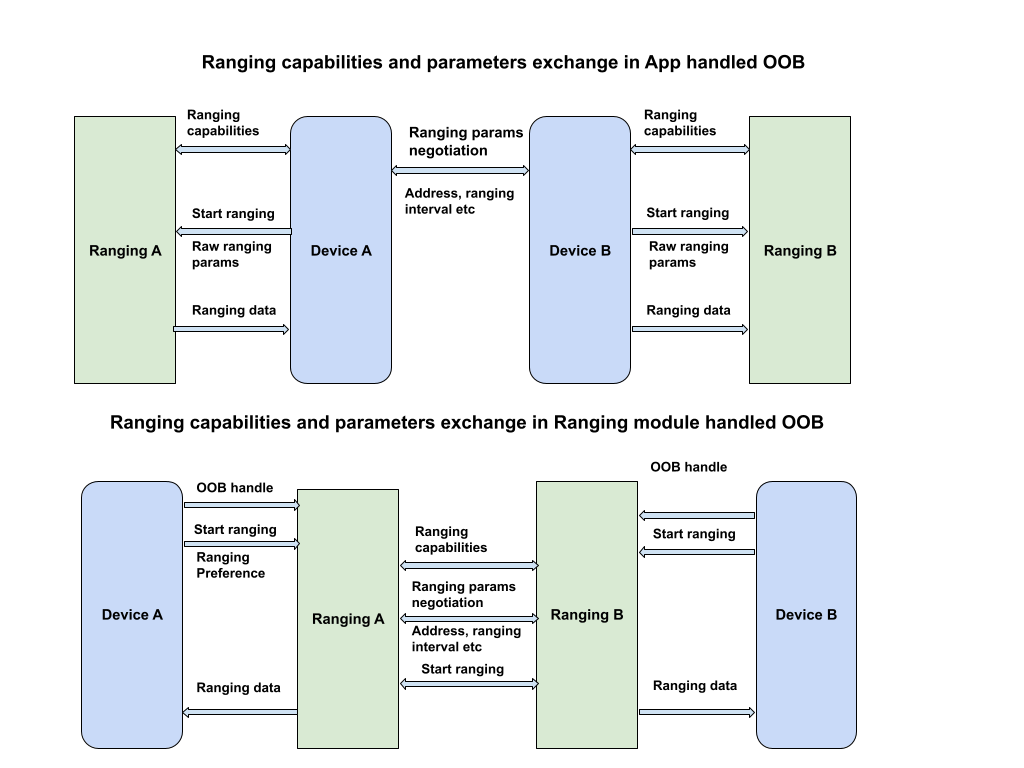
When starting a ranging session between devices, it's often necessary to establish an out-of-band (OOB) data transport to exchange parameters for the session.
The Ranging module can handle OOB negotiations for you, but it also supports custom OOB implementations.
Default OOB implementation
In this session type (RANGING_SESSION_OOB), the Ranging module handles
OOB negotiations to start a ranging session. It selects suitable parameters
based on the ranging preferences provided by the app, and it uses the
appropriate technologies based on what both devices support. This session type
uses a standardized OOB specification.
The Ranging module only defines the OOB data format and sequence to be used to interact with a peer device. It doesn't handle peer device discovery or connection establishment.
Custom OOB implementation
In this session type (RANGING_SESSION_RAW), the app bypasses the Ranging
module's OOB flow and handles its own OOB negotiation and parameters. That means
the app must determine which technologies the peer device supports, negotiate
ranging parameters, and begin the ranging session.
Ranging preferences
Use a RangingPreference object to specify the selected parameters for a
ranging session. This includes the following:
- Device role. This indicates whether the device will be the initiator or the responder.
- Ranging configuration. A
RangingConfigobject specifies the ranging session type and other parameters needed to start a ranging session. - Session configuration. A
SessionConfigobject specifies parameters to be enforced on the ranging session such as measurement limit, sensor fusion, geofence configuration, and more.
Ranging permission
The Ranging module requires a new unified permission
(android.permission.RANGING) to access all current and future ranging
technologies. This permission is in the NEARBY_DEVICES_PERMISSIONS list.
<uses-permission android:name="android.permission.RANGING" />
Restrictions and limitations
The Ranging module might restrict ranging due to several reasons, including the following:
- Third-party apps are only allowed to perform background ranging with ultra-wideband, and only on supported devices. Ranging in the background with other technologies is not allowed.
- Ranging is not allowed when the maximum number of concurrent ranging sessions by device has been reached.
- Ranging might be restricted due to system health concerns such as battery, performance, or memory.
The Ranging module also has the following known limitations:
- The Ranging module only supports delivery of ranging data to peer devices for ultra-wideband. For other technologies, the Ranging module only delivers ranging data to the initiator device.
- The Ranging module only supports dynamic addition of devices in raw ranging mode, and only for ultra-wideband.
- The Ranging module doesn't support one-to-many ultra-wideband sessions for default OOB implementations. If you pass in multiple device handles, the module creates a one-to-one session for each peer device that supports ultra-wideband.
Conduct a ranging session
To conduct a ranging session using the Ranging module, follow these steps:
- Verify that all devices are operating on Android 16 or higher.
- Request the
android.permission.RANGINGpermission in the app manifest. - Assess the capabilities and availability of ranging technologies.
- Discover a peer device for ranging operations.
- Establish a connection for an out-of-band exchange, using either of the session types described in Ranging session types.
- Initiate ranging and continuously acquire ranging data.
- Terminate the ranging session.
The following code sample demonstrates these steps for both the initiator role and the responder role.
Kotlin
class RangingApp {

    // Starts a ranging session on the initiator side.
    fun startRangingInitiator(
        context: Context,
        deviceHandle: DeviceHandle,
        executor: Executor,
        callback: RangingSessionCallback
    ) {

        // Get the RangingManager which is the entry point for ranging module.
        val manager = context.getSystemService(RangingManager::class.java)

        // Create a new RangingSession using the provided executor and callback.
        val session = manager.createRangingSession(executor, callback)

        // Create an OobInitiatorRangingConfig, which specifies the ranging parameters for
        // the initiator role.
        val config = OobInitiatorRangingConfig.Builder()
            .setFastestRangingInterval(Duration.ofMillis(100))
            .setSlowestRangingInterval(Duration.ofMillis(5000))
            .setRangingMode(RANGING_MODE_AUTO)
            .setSecurityLevel(SECURITY_LEVEL_BASIC)
            .addDeviceHandle(deviceHandle)
            .build()

        // Create a RangingPreference, which specifies the role (initiator) and
        // configuration for the ranging session.
        val preference =
            RangingPreference.Builder(DEVICE_ROLE_INITIATOR, config).build()

        // Start ranging session.
        session.start(preference)

        // If successful, the ranging data will be sent through callback#onResults

        // Stop ranging session
        session.stop()
    }

    // Starts a ranging session on the responder side.
    fun startRangingResponder(
        context: Context,
        deviceHandle: DeviceHandle,
        executor: Executor,
        callback: RangingSessionCallback
    ) {

        // Get the RangingManager which is the entry point for ranging module.
        val manager = context.getSystemService(RangingManager::class.java)

        // Create a new RangingSession using the provided executor and callback.
        val session = manager.createRangingSession(executor, callback)

        // Create an OobResponderRangingConfig, which specifies the ranging parameters for
        // the responder role.
        val config = OobResponderRangingConfig.Builder(deviceHandle).build()

        // Create a RangingPreference, which specifies the role (responder) and
        // configuration for the ranging session.
        val preference =
            RangingPreference.Builder(DEVICE_ROLE_RESPONDER, config).build()

        // Start the ranging session.
        session.start(preference)

        // Stop the ranging session
        session.stop()
    }
}
Java
public class RangingApp {

    // Starts a ranging session on the initiator side.
    void startRangingInitiator(Context context, DeviceHandle deviceHandle, Executor executor, RangingSessionCallback callback) {

        // Get the RangingManager which is the entry point for ranging module.
        RangingManager manager = context.getSystemService(RangingManager.class);

        // Create a new RangingSession using the provided executor and callback.
        RangingSession session = manager.createRangingSession(executor, callback);

        // Create an OobInitiatorRangingConfig, which specifies the ranging parameters for
        // the initiator role.
        OobInitiatorRangingConfig config = new OobInitiatorRangingConfig.Builder()
                .setFastestRangingInterval(Duration.ofMillis(100))
                .setSlowestRangingInterval(Duration.ofMillis(5000))
                .setRangingMode(RANGING_MODE_AUTO)
                .setSecurityLevel(SECURITY_LEVEL_BASIC)
                .addDeviceHandle(deviceHandle)
                .build();

        // Create a RangingPreference, which specifies the role (initiator) and
        // configuration for the ranging session.
        RangingPreference preference =
                new RangingPreference.Builder(DEVICE_ROLE_INITIATOR, config).build();

        // Start ranging session.
        session.start(preference);

        // If successful, the ranging data will be sent through callback#onResults

        // Stop ranging session
        session.stop();

    }

    // Starts a ranging session on the responder side.
    void startRangingResponder(Context context,  DeviceHandle deviceHandle, Executor executor, RangingSessionCallback callback) {

        // Get the RangingManager which is the entry point for ranging module.
        RangingManager manager = context.getSystemService(RangingManager.class);

        // Create a new RangingSession using the provided executor and callback.
        RangingSession session = manager.createRangingSession(executor, callback);

        // Create an OobResponderRangingConfig, which specifies the ranging parameters for
        // the responder role.
        OobResponderRangingConfig config = new OobResponderRangingConfig.Builder(  deviceHandle).build();

        // Create a RangingPreference, which specifies the role (responder) and
        // configuration for the ranging session.
        RangingPreference preference =
                new RangingPreference.Builder(DEVICE_ROLE_RESPONDER, config).build();

        // Start the ranging session.
        session.start(preference);

        // Stop the ranging session
        session.stop();
    }
}
UWB interoperability with iOS devices
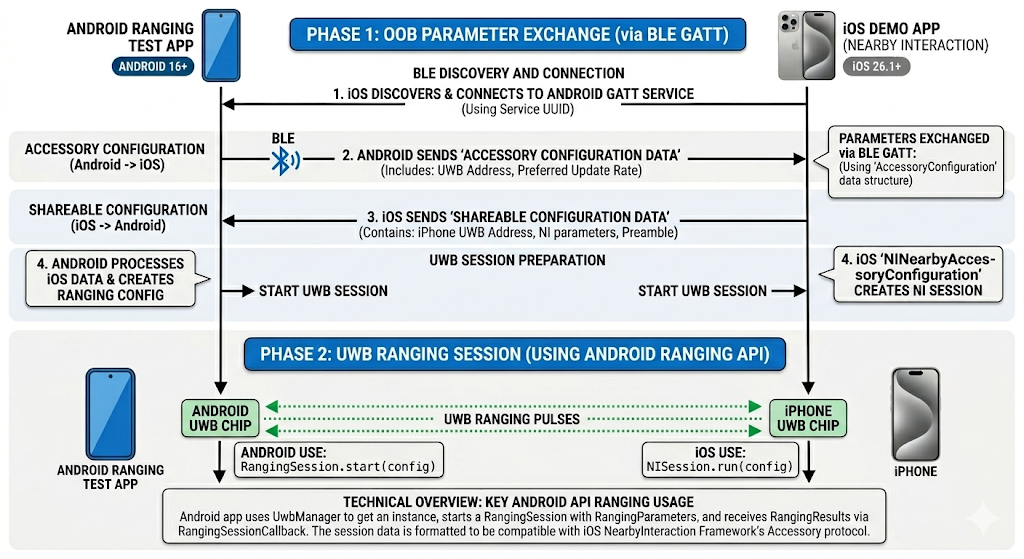
The Ranging module supports interoperability with iOS devices using ultra-wideband (UWB). To range with an iOS device, you must use a custom OOB implementation and configure the ranging session with specific parameters that match the Apple Nearby Interaction Accessory Protocol. Refer to the sample app for reference.
When creating the RangingPreference, use RawRangingDevice and
UwbRangingParams to specify the configuration. The following parameters are
crucial for iOS interoperability:
- Configuration ID: Use
UwbRangingParams.CONFIG_UNICAST_DS_TWR. - Session Key Info: Provide a byte array containing the Vendor ID and the Static STS IV.
- Complex Channel: Set the channel number and preamble index to match the iOS device's configuration.
The following code snippet demonstrates how to create a RangingPreference for
an initiator device ranging with an iOS responder:
Kotlin
// Create UwbRangingParams with iOS-specific configuration
val uwbRangingParams = UwbRangingParams.Builder(
    sessionId,
    UwbRangingParams.CONFIG_UNICAST_DS_TWR,
    sourceAddress,
    destinationAddress
)
    .setComplexChannel(
        UwbComplexChannel.Builder()
            .setChannel(channelNumber)
            .setPreambleIndex(preambleIndex)
            .build()
    )
    .setRangingUpdateRate(updateRate)
    .setSessionKeyInfo(sessionKeyInfo) // Vendor ID + STS IV
    .setSlotDuration(slotDuration)
    .build()

// Create RawRangingDevice
val rawRangingDevice = RawRangingDevice.Builder()
    .setRangingDevice(RangingDevice.Builder().build())
    .setUwbRangingParams(uwbRangingParams)
    .build()

// Create SessionConfig
val sessionConfig = SessionConfig.Builder()
    .setAngleOfArrivalNeeded(true)
    .setDataNotificationConfig(DataNotificationConfig.Builder()
        .setNotificationConfigType(DataNotificationConfig.NOTIFICATION_CONFIG_ENABLE)
        .build())
    .build()

// Create RangingPreference for the initiator
val preference = RangingPreference.Builder(
    RangingPreference.DEVICE_ROLE_INITIATOR,
    RawInitiatorRangingConfig.Builder()
        .addRawRangingDevice(rawRangingDevice)
        .build()
)
    .setSessionConfig(sessionConfig)
    .build()
Java
// Create UwbRangingParams with iOS-specific configuration
UwbRangingParams uwbRangingParams = new UwbRangingParams.Builder(
        sessionId,
        UwbRangingParams.CONFIG_UNICAST_DS_TWR,
        sourceAddress,
        destinationAddress)
        .setComplexChannel(new UwbComplexChannel.Builder()
                .setChannel(channelNumber)
                .setPreambleIndex(preambleIndex)
                .build())
        .setRangingUpdateRate(updateRate)
        .setSessionKeyInfo(sessionKeyInfo) // Vendor ID + STS IV
        .setSlotDuration(slotDuration)
        .build();

// Create RawRangingDevice
RawRangingDevice rawRangingDevice = new RawRangingDevice.Builder()
        .setRangingDevice(new RangingDevice.Builder().build())
        .setUwbRangingParams(uwbRangingParams)
        .build();

// Create SessionConfig
SessionConfig sessionConfig = new SessionConfig.Builder()
        .setAngleOfArrivalNeeded(true)
        .setDataNotificationConfig(new DataNotificationConfig.Builder()
                .setNotificationConfigType(DataNotificationConfig.NOTIFICATION_CONFIG_ENABLE)
                .build())
        .build();

// Create RangingPreference for the initiator
RangingPreference preference = new RangingPreference.Builder(
        RangingPreference.DEVICE_ROLE_INITIATOR,
        new RawInitiatorRangingConfig.Builder()
                .addRawRangingDevice(rawRangingDevice)
                .build())
        .setSessionConfig(sessionConfig)
        .build();
UWB Downlink-TDoA API
For UWB DL-TDoA API, see Android 17 new features.
Sample app
For an end-to-end example of how to use the Ranging module, see the sample app in AOSP. This sample app covers all ranging technologies supported by the Ranging module and includes flows for both supported session types.
UWB interoperability with iOS devices
The Android sample app supports starting a UWB ranging session with the iOS sample app.