Android 16에서는 기기 간 정확한 범위 지정을 위한 통합되고 표준화된 인터페이스를 제공하는 범위 지정 모듈이 도입되었습니다. 이 API 노출 영역을 사용하면 각 범위 지정 기술을 개별적으로 처리하지 않고도 피어 기기의 거리와 위치를 측정할 수 있습니다.
범위 지정 모듈은 다음 기술을 지원합니다.
- 초광대역
- 블루투스 채널 사운딩
- Wi-Fi NAN RTT
- 블루투스 RSSI 범위 지정
다양한 기능 및 사용 가능 여부
RangingManager 클래스는 로컬 기기에서 지원하는 범위 지정 기술과 각 기술의 가용성 및 기능에 관한 정보를 앱에 제공합니다. 앱은 지원되는 기술의 사용 가능 여부나 기능 변경에 관한 업데이트를 수신하기 위해 Callback를 등록할 수 있습니다.
기기 역할
범위 지정 세션에 참여하는 기기는 시작자 또는 응답자여야 합니다. 시작 기기는 하나 이상의 응답 기기로 범위 지정 세션을 시작합니다. 응답기 기기는 한 번에 하나의 이니시에이터의 범위 지정 요청에만 응답합니다. RangingPreference 클래스를 사용하여 범위 지정 세션에서 지정된 기기의 역할을 지정할 수 있습니다.
범위 지정 세션 유형
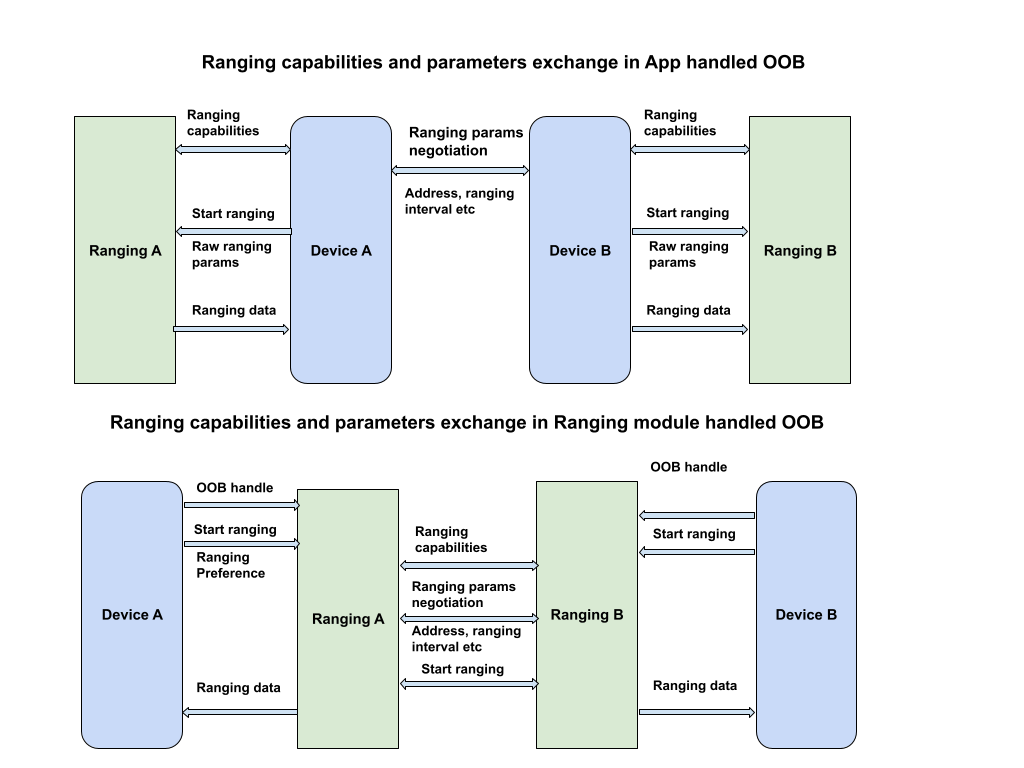
기기 간 범위 지정 세션을 시작할 때는 세션의 매개변수를 교환하기 위해 대역 외 (OOB) 데이터 전송을 설정해야 하는 경우가 많습니다.
범위 지정 모듈은 OOB 협상을 처리할 수 있지만 맞춤 OOB 구현도 지원합니다.
기본 OOB 구현
이 세션 유형 (RANGING_SESSION_OOB)에서 범위 지정 모듈은 범위 지정 세션을 시작하기 위해 OOB 협상을 처리합니다. 앱에서 제공한 범위 지정 환경설정을 기반으로 적합한 매개변수를 선택하고 두 기기 모두 지원하는 항목에 따라 적절한 기술을 사용합니다. 이 세션 유형은 표준화된 OOB specification를 사용합니다.
범위 지정 모듈은 피어 기기와 상호작용하는 데 사용되는 OOB 데이터 형식과 시퀀스만 정의합니다. 피어 기기 검색 또는 연결 설정을 처리하지 않습니다.
맞춤 OOB 구현
이 세션 유형 (RANGING_SESSION_RAW)에서 앱은 범위 지정 모듈의 OOB 흐름을 우회하고 자체 OOB 협상 및 매개변수를 처리합니다. 즉, 앱은 피어 기기에서 지원하는 기술을 확인하고, 범위 지정 매개변수를 협상하고, 범위 지정 세션을 시작해야 합니다.
범위 지정 환경설정
RangingPreference 객체를 사용하여 범위 지정 세션에 대해 선택된 매개변수를 지정합니다. 다음과 같은 상호작용에 반응합니다.
- 기기 역할. 이는 기기가 시작자인지 응답자인지 나타냅니다.
- 범위 지정 구성
RangingConfig객체는 범위 지정 세션을 시작하는 데 필요한 범위 지정 세션 유형과 기타 매개변수를 지정합니다. - 세션 구성.
SessionConfig객체는 측정 제한, 센서 융합, 지오펜스 구성 등 범위 지정 세션에 적용할 매개변수를 지정합니다.
측정 범위 권한
범위 지정 모듈에는 현재 및 향후의 모든 범위 지정 기술에 액세스할 수 있는 새로운 통합 권한(android.permission.RANGING)이 필요합니다. 이 권한은 NEARBY_DEVICES_PERMISSIONS 목록에 있습니다.
<uses-permission android:name="android.permission.RANGING" />
제한
범위 지정 모듈은 다음을 비롯한 여러 이유로 범위 지정을 제한할 수 있습니다.
- 서드 파티 앱은 초광대역을 사용한 백그라운드 범위 지정만 허용되며 지원되는 기기에서만 허용됩니다. 다른 기술을 사용하여 백그라운드에서 범위 지정하는 것은 허용되지 않습니다.
- 기기별 최대 동시 범위 지정 세션 수에 도달하면 범위 지정이 허용되지 않습니다.
- 배터리, 성능, 메모리와 같은 시스템 상태 문제로 인해 범위 지정이 제한될 수 있습니다.
범위 지정 모듈에는 다음과 같은 알려진 제한사항도 있습니다.
- 범위 지정 모듈은 초광대역의 피어 기기에 범위 지정 데이터 전송만 지원합니다. 다른 기술의 경우 범위 지정 모듈은 범위 지정 데이터를 시작 기기에만 제공합니다.
- 범위 지정 모듈은 원시 범위 지정 모드에서만 기기의 동적 추가를 지원하며 초광대역에만 해당합니다.
- 범위 지정 모듈은 기본 OOB 구현의 일대다 초광대역 세션을 지원하지 않습니다. 기기 핸들을 여러 개 전달하면 모듈은 초광대역을 지원하는 각 피어 기기에 대해 일대일 세션을 만듭니다.
범위 지정 세션 실행
범위 지정 모듈을 사용하여 범위 지정 세션을 실행하려면 다음 단계를 따르세요.
- 모든 기기가 Android 16 이상에서 작동하는지 확인합니다.
- 앱 매니페스트에서
android.permission.RANGING권한을 요청합니다. - 범위 지정 기술의 기능과 가용성을 평가합니다.
- 범위 지정 작업을 위한 피어 기기를 검색합니다.
- 범위 지정 세션 유형에 설명된 세션 유형 중 하나를 사용하여 아웃오브밴드 교환을 위한 연결을 설정합니다.
- 범위 지정을 시작하고 범위 지정 데이터를 지속적으로 획득합니다.
- 범위 지정 세션을 종료합니다.
다음 코드 샘플은 이 단계를 시작자 역할과 응답자 역할 모두에 대해 보여줍니다.
Kotlin
class RangingApp {

    // Starts a ranging session on the initiator side.
    fun startRangingInitiator(
        context: Context,
        deviceHandle: DeviceHandle,
        executor: Executor,
        callback: RangingSessionCallback
    ) {

        // Get the RangingManager which is the entry point for ranging module.
        val manager = context.getSystemService(RangingManager::class.java)

        // Create a new RangingSession using the provided executor and callback.
        val session = manager.createRangingSession(executor, callback)

        // Create an OobInitiatorRangingConfig, which specifies the ranging parameters for
        // the initiator role.
        val config = OobInitiatorRangingConfig.Builder()
            .setFastestRangingInterval(Duration.ofMillis(100))
            .setSlowestRangingInterval(Duration.ofMillis(5000))
            .setRangingMode(RANGING_MODE_AUTO)
            .setSecurityLevel(SECURITY_LEVEL_BASIC)
            .addDeviceHandle(deviceHandle)
            .build()

        // Create a RangingPreference, which specifies the role (initiator) and
        // configuration for the ranging session.
        val preference =
            RangingPreference.Builder(DEVICE_ROLE_INITIATOR, config).build()

        // Start ranging session.
        session.start(preference)

        // If successful, the ranging data will be sent through callback#onResults

        // Stop ranging session
        session.stop()
    }

    // Starts a ranging session on the responder side.
    fun startRangingResponder(
        context: Context,
        deviceHandle: DeviceHandle,
        executor: Executor,
        callback: RangingSessionCallback
    ) {

        // Get the RangingManager which is the entry point for ranging module.
        val manager = context.getSystemService(RangingManager::class.java)

        // Create a new RangingSession using the provided executor and callback.
        val session = manager.createRangingSession(executor, callback)

        // Create an OobResponderRangingConfig, which specifies the ranging parameters for
        // the responder role.
        val config = OobResponderRangingConfig.Builder(deviceHandle).build()

        // Create a RangingPreference, which specifies the role (responder) and
        // configuration for the ranging session.
        val preference =
            RangingPreference.Builder(DEVICE_ROLE_RESPONDER, config).build()

        // Start the ranging session.
        session.start(preference)

        // Stop the ranging session
        session.stop()
    }
}
자바
public class RangingApp {

    // Starts a ranging session on the initiator side.
    void startRangingInitiator(Context context, DeviceHandle deviceHandle, Executor executor, RangingSessionCallback callback) {

        // Get the RangingManager which is the entry point for ranging module.
        RangingManager manager = context.getSystemService(RangingManager.class);

        // Create a new RangingSession using the provided executor and callback.
        RangingSession session = manager.createRangingSession(executor, callback);

        // Create an OobInitiatorRangingConfig, which specifies the ranging parameters for
        // the initiator role.
        OobInitiatorRangingConfig config = new OobInitiatorRangingConfig.Builder()
                .setFastestRangingInterval(Duration.ofMillis(100))
                .setSlowestRangingInterval(Duration.ofMillis(5000))
                .setRangingMode(RANGING_MODE_AUTO)
                .setSecurityLevel(SECURITY_LEVEL_BASIC)
                .addDeviceHandle(deviceHandle)
                .build();

        // Create a RangingPreference, which specifies the role (initiator) and
        // configuration for the ranging session.
        RangingPreference preference =
                new RangingPreference.Builder(DEVICE_ROLE_INITIATOR, config).build();

        // Start ranging session.
        session.start(preference);

        // If successful, the ranging data will be sent through callback#onResults

        // Stop ranging session
        session.stop();

    }

    // Starts a ranging session on the responder side.
    void startRangingResponder(Context context,  DeviceHandle deviceHandle, Executor executor, RangingSessionCallback callback) {

        // Get the RangingManager which is the entry point for ranging module.
        RangingManager manager = context.getSystemService(RangingManager.class);

        // Create a new RangingSession using the provided executor and callback.
        RangingSession session = manager.createRangingSession(executor, callback);

        // Create an OobResponderRangingConfig, which specifies the ranging parameters for
        // the responder role.
        OobResponderRangingConfig config = new OobResponderRangingConfig.Builder(  deviceHandle).build();

        // Create a RangingPreference, which specifies the role (responder) and
        // configuration for the ranging session.
        RangingPreference preference =
                new RangingPreference.Builder(DEVICE_ROLE_RESPONDER, config).build();

        // Start the ranging session.
        session.start(preference);

        // Stop the ranging session
        session.stop();
    }
}
iOS 기기와의 UWB 상호 운용성
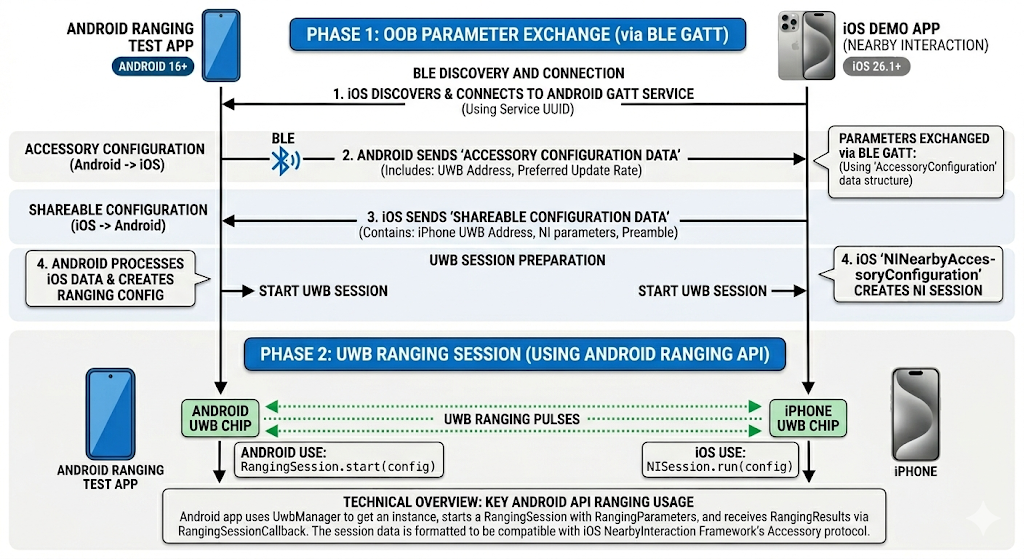
범위 지정 모듈은 초광대역 (UWB)을 사용하여 iOS 기기와의 상호 운용성을 지원합니다. iOS 기기로 범위를 지정하려면 맞춤 OOB 구현을 사용하고 Apple Nearby Interaction Accessory Protocol과 일치하는 특정 매개변수로 범위 지정 세션을 구성해야 합니다. 참고용 샘플 앱을 참고하세요.
RangingPreference를 만들 때 RawRangingDevice 및 UwbRangingParams를 사용하여 구성을 지정합니다. 다음 매개변수는 iOS 상호 운용성에 중요합니다.
- 구성 ID:
UwbRangingParams.CONFIG_UNICAST_DS_TWR사용 - 세션 키 정보: 공급업체 ID와 정적 STS IV가 포함된 바이트 배열을 제공합니다.
- 복잡한 채널: 채널 번호와 프리앰블 색인을 iOS 기기의 구성과 일치하도록 설정합니다.
다음 코드 스니펫은 iOS 응답자와 범위가 지정된 이니시에이터 기기의 RangingPreference을 만드는 방법을 보여줍니다.
Kotlin
// Create UwbRangingParams with iOS-specific configuration
val uwbRangingParams = UwbRangingParams.Builder(
    sessionId,
    UwbRangingParams.CONFIG_UNICAST_DS_TWR,
    sourceAddress,
    destinationAddress
)
    .setComplexChannel(
        UwbComplexChannel.Builder()
            .setChannel(channelNumber)
            .setPreambleIndex(preambleIndex)
            .build()
    )
    .setRangingUpdateRate(updateRate)
    .setSessionKeyInfo(sessionKeyInfo) // Vendor ID + STS IV
    .setSlotDuration(slotDuration)
    .build()

// Create RawRangingDevice
val rawRangingDevice = RawRangingDevice.Builder()
    .setRangingDevice(RangingDevice.Builder().build())
    .setUwbRangingParams(uwbRangingParams)
    .build()

// Create SessionConfig
val sessionConfig = SessionConfig.Builder()
    .setAngleOfArrivalNeeded(true)
    .setDataNotificationConfig(DataNotificationConfig.Builder()
        .setNotificationConfigType(DataNotificationConfig.NOTIFICATION_CONFIG_ENABLE)
        .build())
    .build()

// Create RangingPreference for the initiator
val preference = RangingPreference.Builder(
    RangingPreference.DEVICE_ROLE_INITIATOR,
    RawInitiatorRangingConfig.Builder()
        .addRawRangingDevice(rawRangingDevice)
        .build()
)
    .setSessionConfig(sessionConfig)
    .build()
자바
// Create UwbRangingParams with iOS-specific configuration
UwbRangingParams uwbRangingParams = new UwbRangingParams.Builder(
        sessionId,
        UwbRangingParams.CONFIG_UNICAST_DS_TWR,
        sourceAddress,
        destinationAddress)
        .setComplexChannel(new UwbComplexChannel.Builder()
                .setChannel(channelNumber)
                .setPreambleIndex(preambleIndex)
                .build())
        .setRangingUpdateRate(updateRate)
        .setSessionKeyInfo(sessionKeyInfo) // Vendor ID + STS IV
        .setSlotDuration(slotDuration)
        .build();

// Create RawRangingDevice
RawRangingDevice rawRangingDevice = new RawRangingDevice.Builder()
        .setRangingDevice(new RangingDevice.Builder().build())
        .setUwbRangingParams(uwbRangingParams)
        .build();

// Create SessionConfig
SessionConfig sessionConfig = new SessionConfig.Builder()
        .setAngleOfArrivalNeeded(true)
        .setDataNotificationConfig(new DataNotificationConfig.Builder()
                .setNotificationConfigType(DataNotificationConfig.NOTIFICATION_CONFIG_ENABLE)
                .build())
        .build();

// Create RangingPreference for the initiator
RangingPreference preference = new RangingPreference.Builder(
        RangingPreference.DEVICE_ROLE_INITIATOR,
        new RawInitiatorRangingConfig.Builder()
                .addRawRangingDevice(rawRangingDevice)
                .build())
        .setSessionConfig(sessionConfig)
        .build();
UWB 다운링크-TDoA API
UWB DL-TDoA API는 Android 17 새로운 기능을 참고하세요.
샘플 앱
범위 지정 모듈 사용 방법에 관한 엔드 투 엔드 예는 AOSP의 샘플 앱을 참고하세요. 이 샘플 앱은 범위 지정 모듈에서 지원하는 모든 범위 지정 기술을 다루며 지원되는 세션 유형의 흐름을 모두 포함합니다.
iOS 기기와의 UWB 상호 운용성
Android 샘플 앱은 iOS 샘플 앱으로 UWB 범위 측정 세션을 시작하는 것을 지원합니다.