Ready to review some changes but not others? Try using Play Console’s new Save for later feature
2 min read

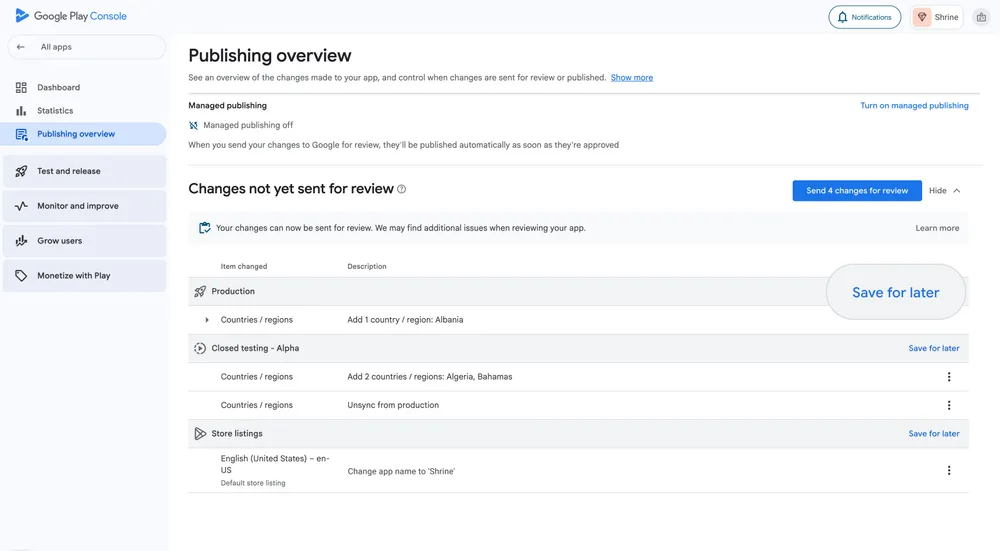
We’ve launched a new Save for later feature on Google Play Console’s Publishing overview to give you more control over when you send changes for review.
In the past, changes to your app were bundled together before being sent for review. This presented challenges if you needed to reprioritize changes, or if the changes were no longer relevant. For example, updates to your test tracks grouped with marketing changes that need to be rescheduled. This lack of flexibility meant that if some changes were ready for review but not others, you could end up delaying urgent fixes, or publishing changes that you weren’t quite ready to make.
Now, you have the ability to hold back the changes you’re not ready to have reviewed.
How it works
In the 'Changes not yet sent for review' section of the Publishing overview page, select ‘Save for later’ on the groups of changes that you don’t want to include in your next review. You can view and edit the list of saved changes, and return them to the Publishing overview if you change your mind. Once the review has started, your saved changes will be added back to ‘Changes not yet sent for review’.
Integration with our pre-review checks
Save for later also works with our pre-review checks. Pre-review checks look for issues in your changes that may prevent your app from being published, so that you can fix them before you send changes for review. If checks find issues with your app, there are two ways you can proceed:
- If issues are isolated to an individual track, we’ll show you an error beside that change, so you know what to save for later in order to proceed to review with your other changes.
- If you have issues that affect your whole app, for example, App content issues, Save for later will be unavailable and you will need to fix them before you can send any changes for review.
Greater flexibility in your workflows
Our goal for Save for later is to give you greater flexibility over your release schedule. With this feature you can manage what changes you send for review, and address issues affecting individual tracks without holding up ready-to-release changes, so you can iterate faster and minimize the impact of rejections on your release timeline.
So, what's next?
We're committed to continuously improving your publishing experience. Save for later is a significant step towards providing you with more granular control over this all-important stage in the journey to publishing your app. We'll continue to gather your feedback and look at ways we can provide greater flexibility to the review and publishing process.
We're excited to see how Save for later helps you to streamline your release process and bring your app innovations to users even faster.
-

 Product News
With Unity powering over half of all mobile titles worldwide, first impressions matter. For game developers, a smooth, reliable player onboarding experience is essential to driving day-one retention and long-term engagement.
Michelle Martin • 1 min read -

 Product News
From full immersion at home to glanceable experiences on the go, building on Android XR lets you meet users at any moment across the entire spectrum of spatial applications. At Android Developer Summit, we marked an exciting milestone with the launch of XREAL AURA.
Amy Zeppenfeld, Vinny DaSilva • 3 min read -

 Product News
In the intelligence era, users are no longer just tapping through apps, they express high-level goals and expect AI agents like Gemini to complete multi-step workflows, sometimes across multiple apps on their devices.
Jingyu Shi • 4 min read
Get the latest Android development insights delivered to your inbox weekly.