What's new in Android developer tools and performance at Android Dev Summit
10 min read

This year at Android Dev Summit we shared how Android developer tools are evolving to help you be more productive alongside your agents. Whether you prefer to work in Android Studio or from the terminal using Android CLI, our goal is the same: to give you and your agents the tools and knowledge to build high-quality Android apps faster.
We shared some of these updates in action in the Android Dev Summit keynote. In this blog post we round up all of the developer tools and performance announcements from Android Dev Summit and point you to the event content where you can go deeper. We'll cover three areas:
- Any agent + any model + Android Studio: Bring the coding agents and models of your choice into Android Studio, and pair it with the IDE's deep understanding of your Android project.
- Build and deploy from anywhere with Android CLI: Give any agent, terminal, or CI pipeline first-class access to the Android toolchain, including real physical devices.
- Ship better-performing apps faster and with more confidence: Go from a production signal to a verified fix, in Android Studio or from the command line, with help from your agent.
Any agent + any model + Android Studio = 🔥
Android Studio has always been the best place for professional Android developers to build Android apps, and now it's the best place to build them with the agents and models of your choice.
Bring Your Own Agent (BYOA) in Android Studio
You told us you want the flexibility to use the agents and models best suited for the task at hand, including the AI tools your team already relies on. That's why Android Studio now supports over 40 ACP-compatible coding agents directly inside Android Studio through Bring Your Own Agent and the open Agent Client Protocol (ACP). BYOA is now stable in today’s release of Android Studio Rabbit 2.
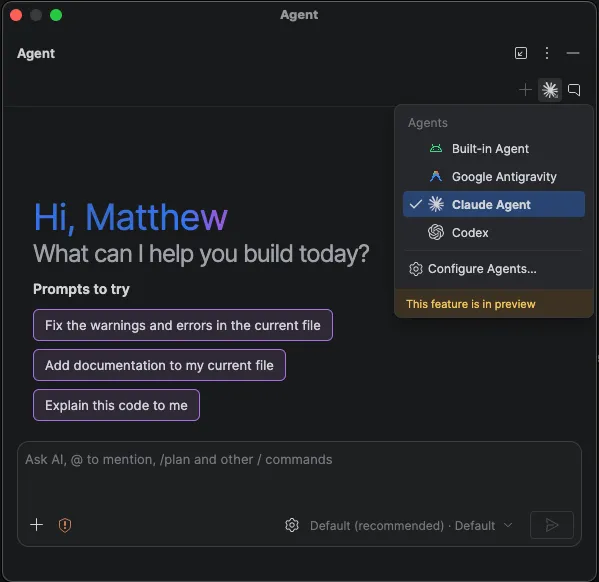
Just open Settings > Tools > AI > Agents to browse and install agents from the marketplace. You can install more than one and switch between them as you work. You get new agent features as soon as they ship, while your agent also gets access to everything that makes Android Studio great: a deep understanding of your project structure and build, symbol resolution, Compose Preview rendering, the Emulator, Logcat, and more.
Bring Your Own Agent also gives you the best of Google Antigravity directly in Android Studio. Log in for access to the latest Gemini models as soon as they launch, along with new Antigravity capabilities as they roll out.
Get expert Android feedback on your changes with Change Review
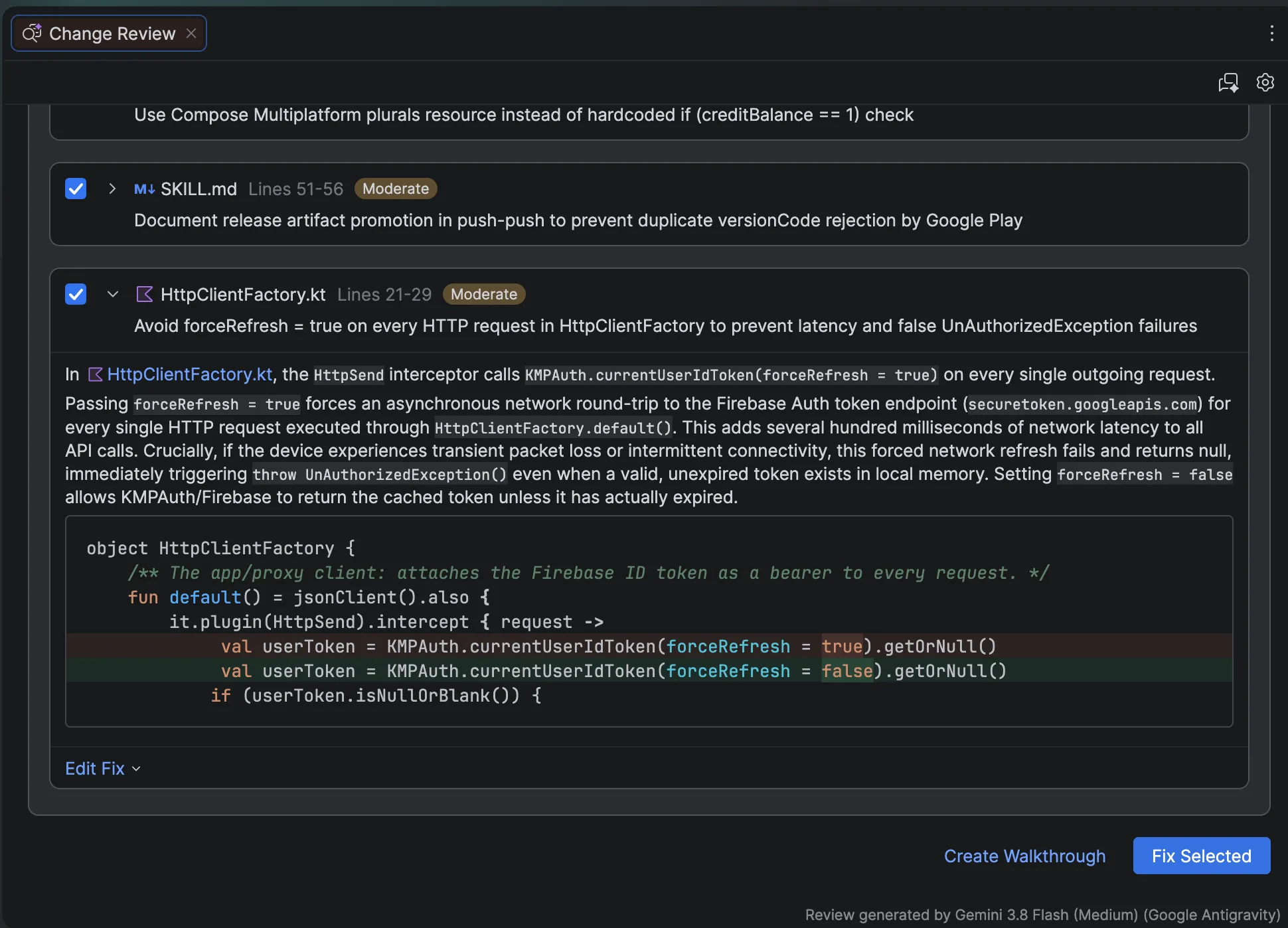
You’ve told us how hard it is to review large changes your agents made and understand exactly what the AI has done. Android Studio now includes a new agentic code review experience to help. Start a review session from pending agent changes or the Git changes window, and Android Studio generates a report of potential issues. You can also invoke the change review flow by calling the /review command from the agent tool window, ask for an AI-guided walkthrough to understand longer changes, and have your agent fix the issues it finds.
Choose the right model with Android Bench
With so many models and agents to choose from, how do you know which one is right for your project? We built Android Bench to give you more transparency into how LLMs can help you build for Android. Android Bench 2.0 is an LLM leaderboard which evaluates how models and agent harnesses perform on long-running, real-world Android development tasks, such as migrating an app's UI or building a new app from mocks. The tasks are designed to be ones that take an Android engineer days to complete. Each solution is graded on whether it actually works, not just whether it compiles as well as measured for cost and time. Check out the latest results to see how the models stack up.
Build for Android XR with Emulators
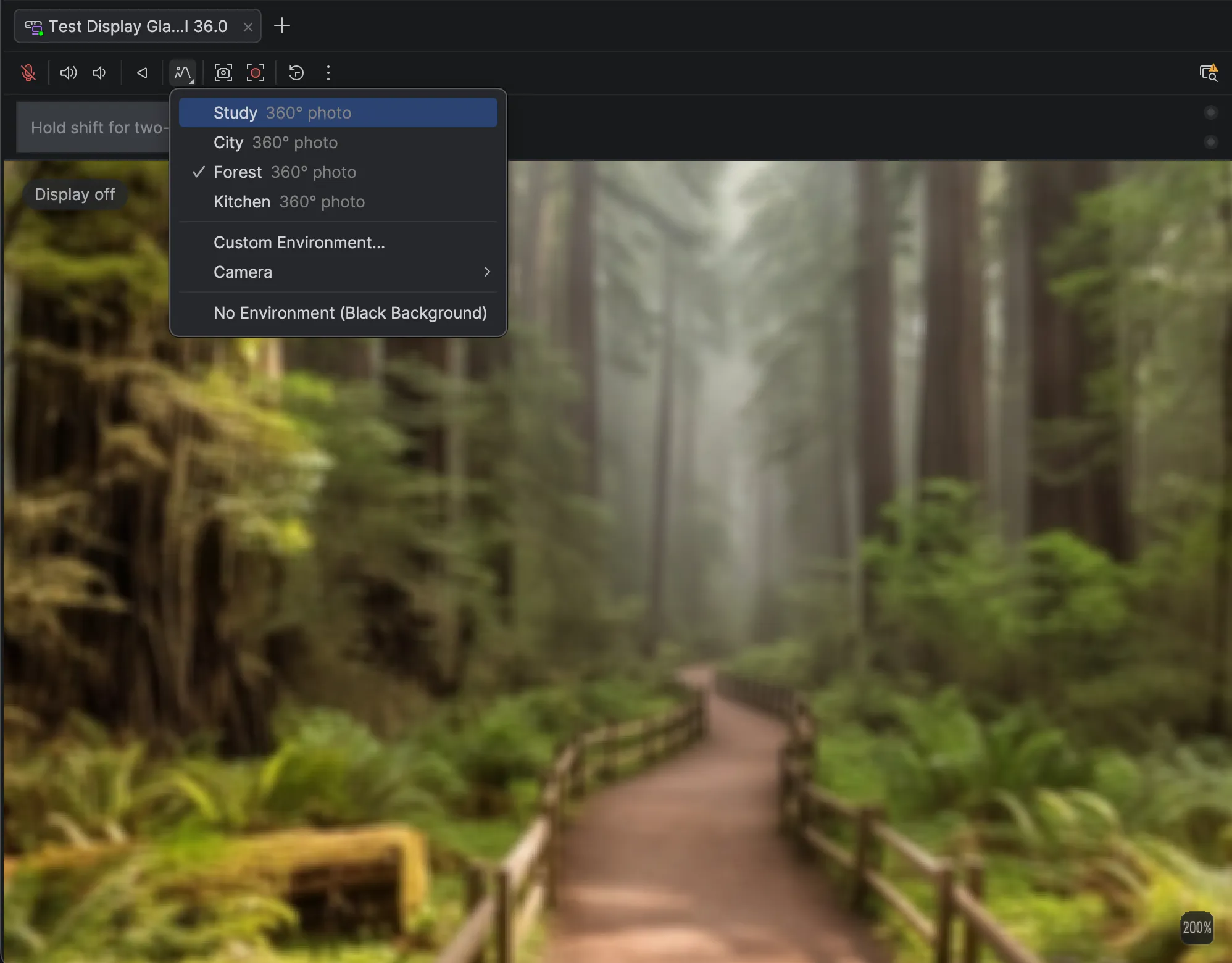
Emulators for XR glasses, audio glasses, and display glasses are now stable, and you can create them from Android Studio. The updated Emulator now lets you customize the environment with your own 360-degree photos or a feed from a connected camera so you can test real physical locations from anywhere. We’ve also introduced new hardware LED indicators for microphone and camera state and improvements to the Pairing Wizard so you can pair a virtual phone with virtual glasses faster and more reliably. With new and updated features, you can build, iterate, and test XR experiences right from your preferred work environment. To get started, launch your desired Android XR Emulators from Device Manager in the latest version of Android Studio.
Migrate from XML Views to Compose
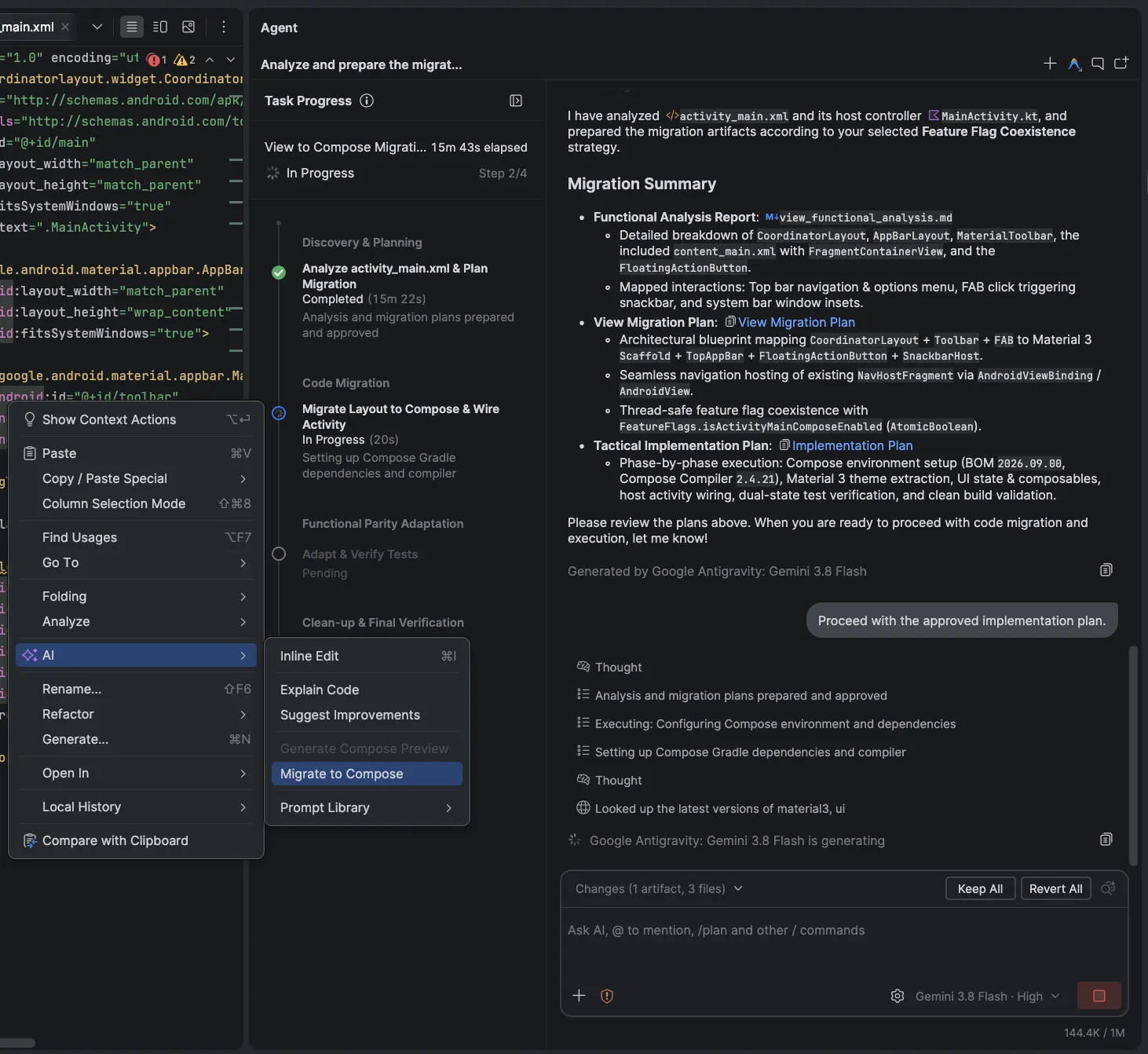
Migrating UI from XML Views to Compose has traditionally been a large, manual effort. Android Studio now includes the Migration Assistant which takes the majority of the Views to Compose work off your plate. Right-click any XML layout and choose AI > Migrate to Compose, or run it across the project from the action palette. The agent scopes the work with you, drafts a plan, and converts your layouts, view-binding code and logic into idiomatic Compose, using the built-in agent or any agent you've added through Bring Your Own Agent.
A progress timeline in the agent window shows which step is running, and where to resume if the agent stops, and it's saved with the conversation so you can step away and come back. This feature is available in the latest version of Android Studio Canary.
Build and deploy from anywhere with Android CLI
Earlier this year, we launched Android CLI as a tool-first interface that gives your agents the Android expertise they need, enhanced with official Android skills. Android CLI works in any terminal, with any agent harness, and in your CI pipelines, so your agents can build, run, and debug Android apps autonomously without burning through tokens guessing how Android works. Here's what's new:
Test on real physical devices, from anywhere
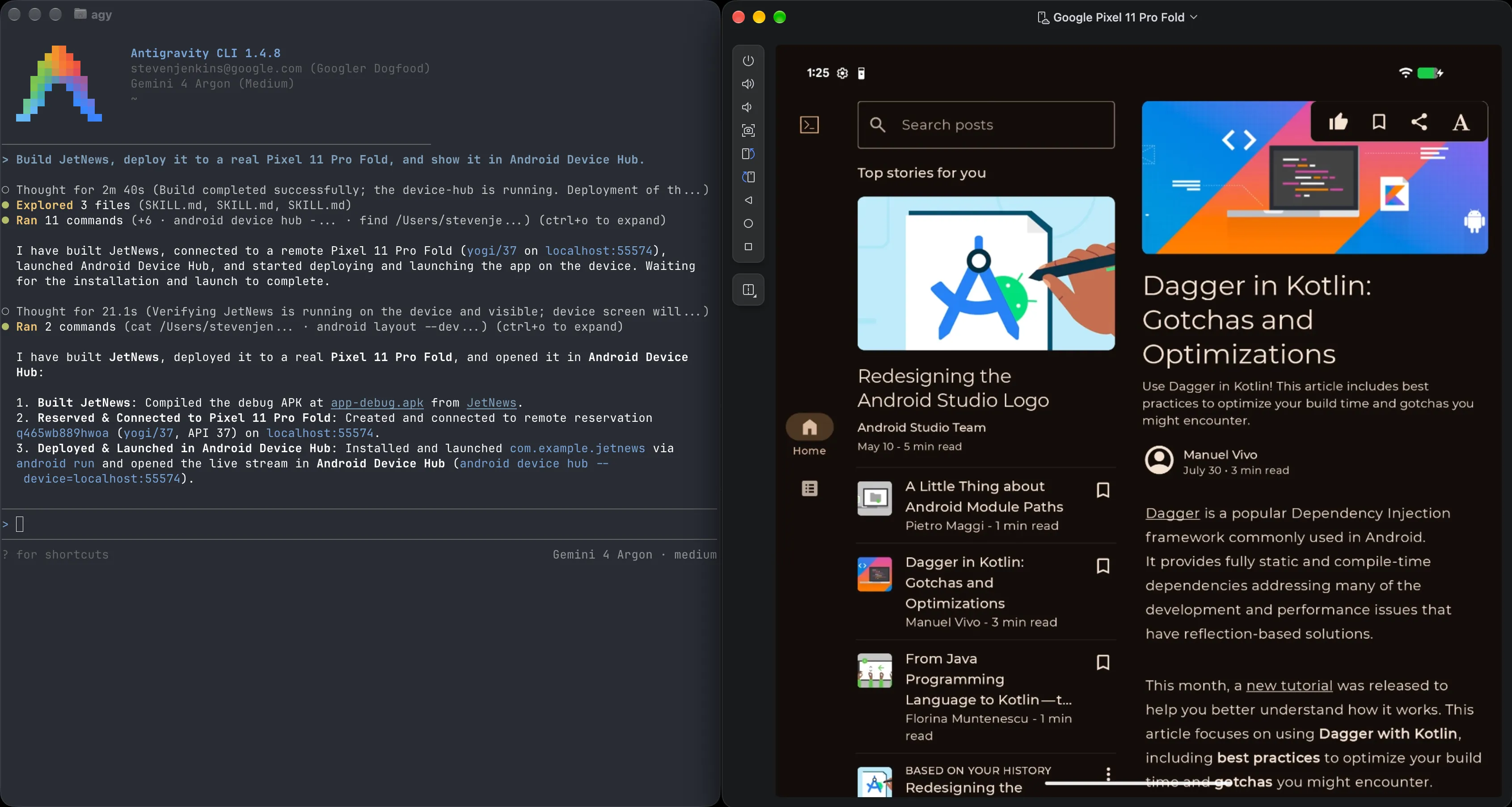
Emulators are great, but often you need real hardware for testing. The latest version of Android CLI brings support for physical device streaming, directly from your agent or CI pipeline. Run android device remote to provision a real physical device from a secure Google device lab and connect to it, and then install and test your app just like you would with a local device connected over adb.
To see and interact with your devices, run android device hub. Device Hub gives you a lightweight way to view and interact with all your local and remote devices and emulators, without needing to open an IDE.
Render Compose Previews from the terminal
Your agents work best when they can check their own work. The new android preview command renders your Compose Previews without needing an emulator or the IDE, so your agent can verify UI changes visually across screen sizes as it iterates. In our internal testing, agents that used android preview completed UI tasks 77% faster while using up to 3x fewer tokens.
The official Android plugin for Google Antigravity
The official Android plugin for Google Antigravity brings Android CLI, our official skills, and Android knowledge together in one install. Now we're updating it with deep platform integrations featuring interactive tools that appear right alongside your conversation, powered by Android CLI.
- Compose Previews: See and interact with your Compose Previews as your agent iterates, so you can catch layout issues on different form factors before you ever run the app.
- Android Device Hub: See and interact with virtual and physical devices from local or remote connections right into the agent window to validate how your app behaves on hardware.
To get started, open the plugin marketplace in the Google Antigravity App and install the Android plugin from Customizations > Build with Google.
Android plugins for Claude Code and Codex from OpenAI
Android CLI is now available to install as an official agent plugin for Claude and Codex. The plugin equips your coding agent with the tools and instructions to create Android projects, manage emulators and virtual devices, inspect live UI layouts, run Journeys, browse and install official Android skills, and search the official Android Knowledge Base.
You can install the plugin in the following ways:
1.a Install for Claude from a Claude Code session:
/plugin marketplace add android/android-cli-plugin
/plugin install android-cli@android-cli-plugin
1.b. Install for Claude from the terminal:
claude plugin marketplace add android/android-cli-plugin
claude plugin install android-cli@android-cli-plugin
2. Install for Codex from the terminal:
codex plugin marketplace add android/android-cli-plugin
codex plugin add android-cli@android-cli-plugin
We will continue to expand the plugin with deeper agent-specific integration and more features in future updates. See the Agent Plugins documentation for full setup instructions.
Ship better-performing apps faster and with more confidence
Building fast is only half the story. Your users expect apps that are fast and stable. Every workflow in this section works in both Android Studio and Android CLI, so you, or your agent, can go from a production signal to a verified fix wherever you work.
Find and fix memory leaks with your agent of choice
Memory leaks can quietly degrade performance until they turn into Out-of-Memory (OOM) crashes. LeakCanary is a great open source library to find memory leaks in Android apps.
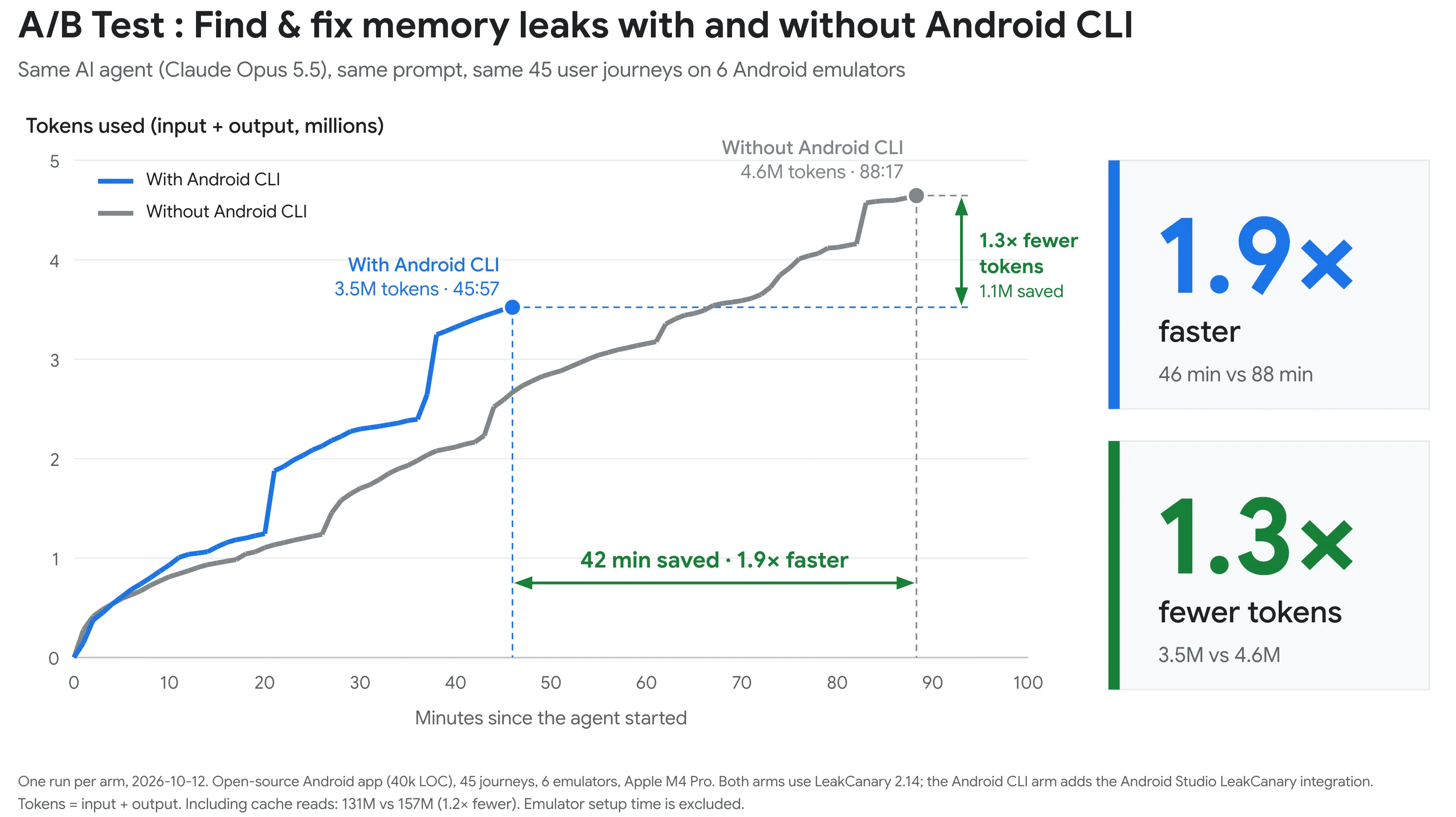
LeakCanary is now integrated directly into Android CLI with a new subcommand: android profiler leakcanary. This analyzes heap dumps on your computer instead of on the device so it doesn't slow your app down & improves the agent’s efficiency drastically. With Android CLI’s LeakCanary tool, the most capable models ran this process almost 2x faster while using up to 25% lesser tokens as compared to without using Android CLI.

In the Android Dev Summit keynote, we gave Claude Code a list of critical user journeys and a single prompt: find and fix memory leaks in this app. Claude ran each journey on a separate device running in parallel, used “android profiler leakcanary” subcommand and found leaks in many of the journeys, followed each reference chain to fix the underlying code, and then re-ran every journey to confirm the leaks were fixed.
In Android Studio, LeakCanary is also built right into the Profiler, and you can use ‘Fix with AI’ to have the agent review a leak, generate an insight, and suggest a fix.
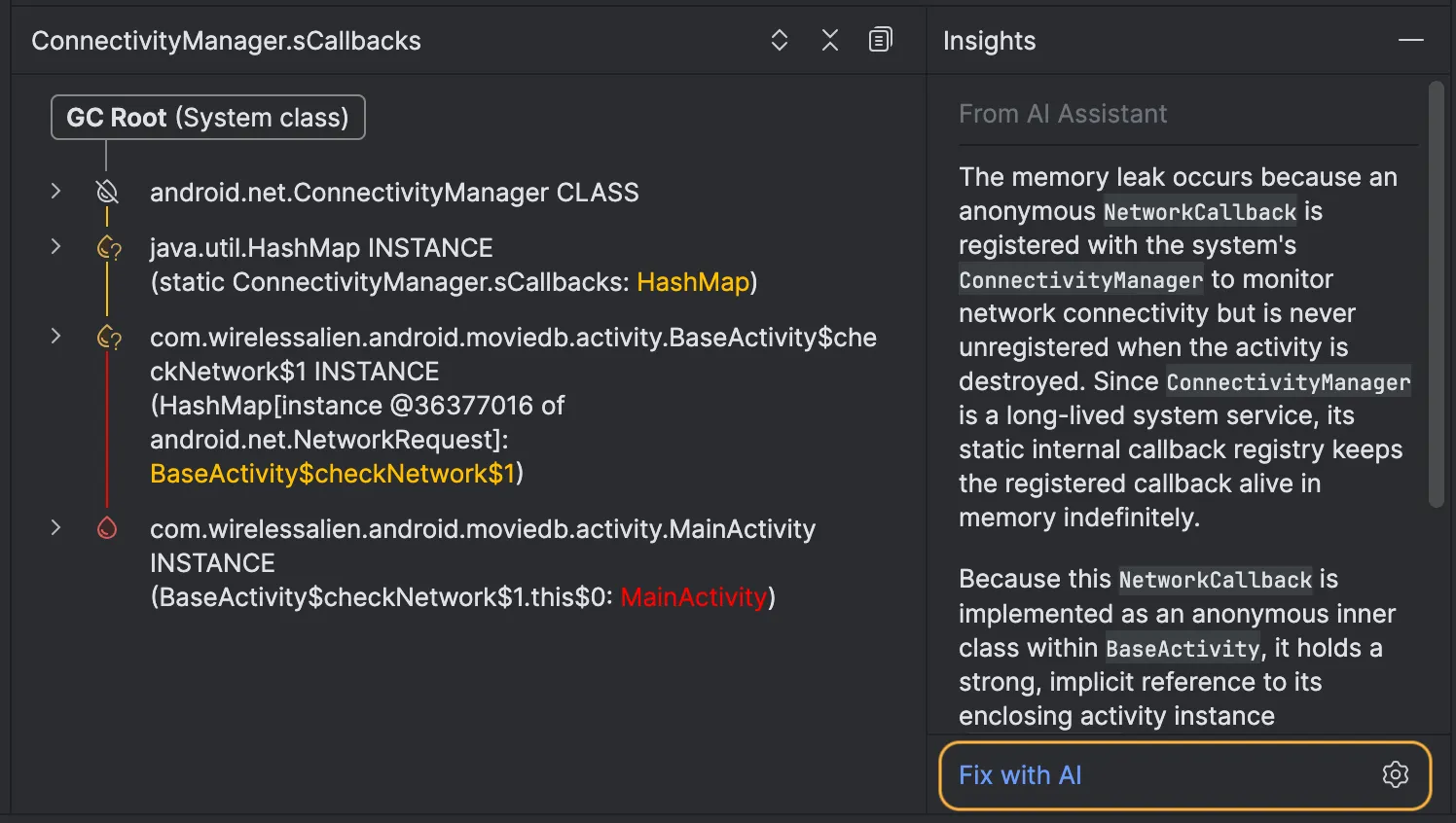
Fix with AI for memory leaks is available in the Android Studio canary build, and the memory leak subcommand is coming soon to Android CLI.
Agentic performance analysis with Android Performance Analyzer
Android Performance Analyzer (APA) is the profiler that powers performance analysis in Android Studio, and now it powers the android profiler subcommand in Android CLI too. Use the CLI profiler subcommand to capture system traces and other profiling data from the command line or in CI, and pair it with the new android-profiler skill so your agent can capture traces, analyze the results, propose fixes, verify the changes and measure the impact. The Android Performance Analyzer standalone app now also allows you to use your favorite agent using ACP to analyze the trace dynamically.
With androidx.tracing 2.0, your app's trace sections can include details like the source file, line number and arguments, and coroutine work appears as connected flows. When you open the trace in Android Performance Analyzer, it's easier for you or your agent to connect slow work back to the code that caused it. To get started, add androidx.tracing:tracing-wire to your app.
Bring production signals to your desk
The hardest issues to fix are the ones you can't reproduce locally. In Android Studio, App Quality Insights brings Android vitals and Firebase Crashlytics data right into the IDE, and Fix with AI helps you get from a crash to a code change. Now, the new android signals command brings that same data to the terminal and your agent, so you can list and investigate crashes, ANRs, and memory issues from production without switching context.
The data itself is also getting richer:
- Heap dumps from the field: Firebase Crashlytics can now collect heap dumps from real out-of-memory crashes and Android 17 Memory Limiter Kills, deobfuscate them using your existing R8 mappings, and let you open them directly in Perfetto. Sign up for early access.
- Better memory insights: Crashlytics also groups Memory Limiter Kills, adds thread insights to help you find the root-cause of ANRs, and surfaces GWP-ASan and Arm MTE reports to help you track down native memory bugs.
- Bitmap memory in Android vitals: A new metric in Android vitals shows how much memory your app's bitmaps use across devices, so you can spot and fix regressions.
Ship smaller, faster apps with R8
R8 is one of the best ways to improve your app's performance and reduce its size, but its benefits depend on how much of your code it's allowed to optimize. Overly broad keep rules, often from libraries, can hold your app back. We have new tools to help you and your agent get the most out of R8.
android analyze: Point it at your APK or app bundle to see how well R8 shrinks, optimizes, and obfuscates your code, with JSON output that works great in CI. Point it at a library to see its size, cost and any overly broad keep rules it ships to consumers.- R8 Configuration Analyzer: Now built into AGP 9.3, it scores your R8 configuration and ranks your keep rules by how much they cost you. Run
./gradlew :app:analyzeReleaseR8Configto generate a report, and install ther8-analyzerskill to have your agent focus on the rules with the biggest impact. - Jetpack Keep (alpha): Replace broad keep rules with precise, type-safe annotations, and use lint to add them for you automatically.
Understand why Jetpack Compose recomposes
Jetpack Compose 1.13 introduces recomposition tracing, which shows you not just which functions were recomposed, but why, all the way back to the state write that caused it. Combine it with composition tracing in the Android Studio Profiler, and install the jetpack-compose-performance skill to help your agent avoid common performance anti-patterns.
Try Lightbuild, a declarative build for you and your agents
Lightbuild is our early preview of a declarative, agent-ready build experience. Your build configuration becomes data, not code: a strict YAML schema that both you and your agent can read and edit with confidence. Lightbuild projects open and sync quickly in Android Studio Canary, include schema validation and autocomplete, and use pre-resolved dependencies for reproducible builds across your machine, your team, and CI. Use the Lightbuild CLI to build your project and give your agent insight into its structure with its built-in query command. The new android build command also supports Lightbuild projects.
Lightbuild is still early, so we recommend trying it with new or experimental projects while continuing to use Gradle and AGP for production apps. Try Lightbuild and let us know what you think.

Keep any agent up to date with Android skills
Models aren't always trained on the latest Android APIs and best practices. That's why we publish official Android skills, to ground models with additional knowledge on Android development, and we now have over 30 skills across more than 20 areas. Every skill is backed by evaluations, so we're not unnecessarily instructing models on things they already know. Instead, skills target fast-moving areas where models often fall short, like Compose performance optimizations, new and advanced Camera APIs, and thorough security audits. We continually re-evaluate skills against the latest frontier models, and add or adjust them as models evolve.
Use android skills list and android skills add [<skill>] to install skills for any agent, and agents can also use android docs search to access the Android Knowledge Base.
Catch policy and security issues before you submit
Getting rejected from review is a frustrating way to slow down a launch. The play-policy-insights skill audits your code, manifest, and SDKs against Google Play policies before you submit, and can even cross-check your existing Data safety declarations. We've also launched two new security skills, android-intent-security and android-permissions-security, which give your agent project-aware security reviews with specific, actionable fixes. And in Android Studio, Play Policy Insights surfaces policy guidance as lint checks right in your code. Try asking your agent: "Audit this app for Google Play policy compliance before I submit it."
Get started
Ready to dive in? Here's how to get started:
- Download the latest stable version of Android Studio to try Bring Your Own Agent, Change Review, and the XR Emulators.
- Download the latest Android Studio Canary to try Lightbuild.
- Install Android CLI and run
android initto set up your agent. - Install the Android plugin in Google Antigravity App.
- Browse and install Android skills.
- See how models stack up on Android Bench.
To go deeper, watch the Tools & Performance sessions from Android Dev Summit. As always, your feedback helps shape the future of our tools. Report a bug or share your ideas, and connect with us on LinkedIn, YouTube, and X. Happy coding!
-
 Events & Programs
We’re opening applications for the Android XR Developer Catalyst Program, a dedicated initiative to accelerate the development of Android XR apps ready to launch within the next year.
1 min read -
 Events & Programs
The Google I/O schedule is here!
1 min read -

 Events & Programs
Last September, we shared our vision for the future of Google Play Games grounded in a core belief: the best way to drive your game’s success is to deliver a world-class player experience.
Maru Ahues Bouza • 3 min read
Get the latest Android development insights delivered to your inbox weekly.