
The Android Contact Picker is a standardized, browsable interface for users to
share contacts with your app. Available on devices running
Android 17 (API level 37) or higher, the picker offers a privacy-preserving
alternative to the broad READ_CONTACTS permission. Instead of requesting
access to the user's entire address book, your app specifies the data fields it
needs, such as phone numbers or email addresses, and the user selects specific
contacts to share. This grants your app read access to only the selected data,
ensuring granular control while providing a consistent user experience with
built-in search, profile switching, and multi-selection capabilities without
having to build or maintain the UI.
Integrate the Contact Picker
To integrate the Contact Picker, use the
ContactsPickerSessionContract.ACTION_PICK_CONTACTS intent.
This intent launches the picker and returns the selected contacts to your app.
Unlike the legacy ACTION_PICK, the Contact Picker lets you specify multiple
data fields your app requires at the same time. You do this using
ContactsPickerSessionContract.EXTRA_REQUESTED_DATA_FIELDS, passing an
ArrayList<String> of MIME types defined in ContactsContract.CommonDataKinds.
Common MIME types include:
ContactsContract.CommonDataKinds.Phone.CONTENT_ITEM_TYPEContactsContract.CommonDataKinds.Email.CONTENT_ITEM_TYPEContactsContract.CommonDataKinds.StructuredPostal.CONTENT_ITEM_TYPE
Launch the picker
Use registerForActivityResult with the StartActivityForResult contract to
launch the picker. You can configure the intent to allow single or multiple
selections.
// Launcher for the Contact Picker intent
val pickContact = rememberLauncherForActivityResult(StartActivityForResult()) {
if (it.resultCode == Activity.RESULT_OK) {
val resultUri = it.data?.data ?: return@rememberLauncherForActivityResult
// Process the result URI in a background thread to fetch all selected contacts
coroutine.launch {
contacts = processContactPickerResultUri(resultUri, context)
}
}
}
Selection mode
The Contact Picker's UI adjusts according to the data fields requested. Depending on these requirements, users can either choose an entire contact record when multiple fields are needed, or select specific data items from within a contact's information.
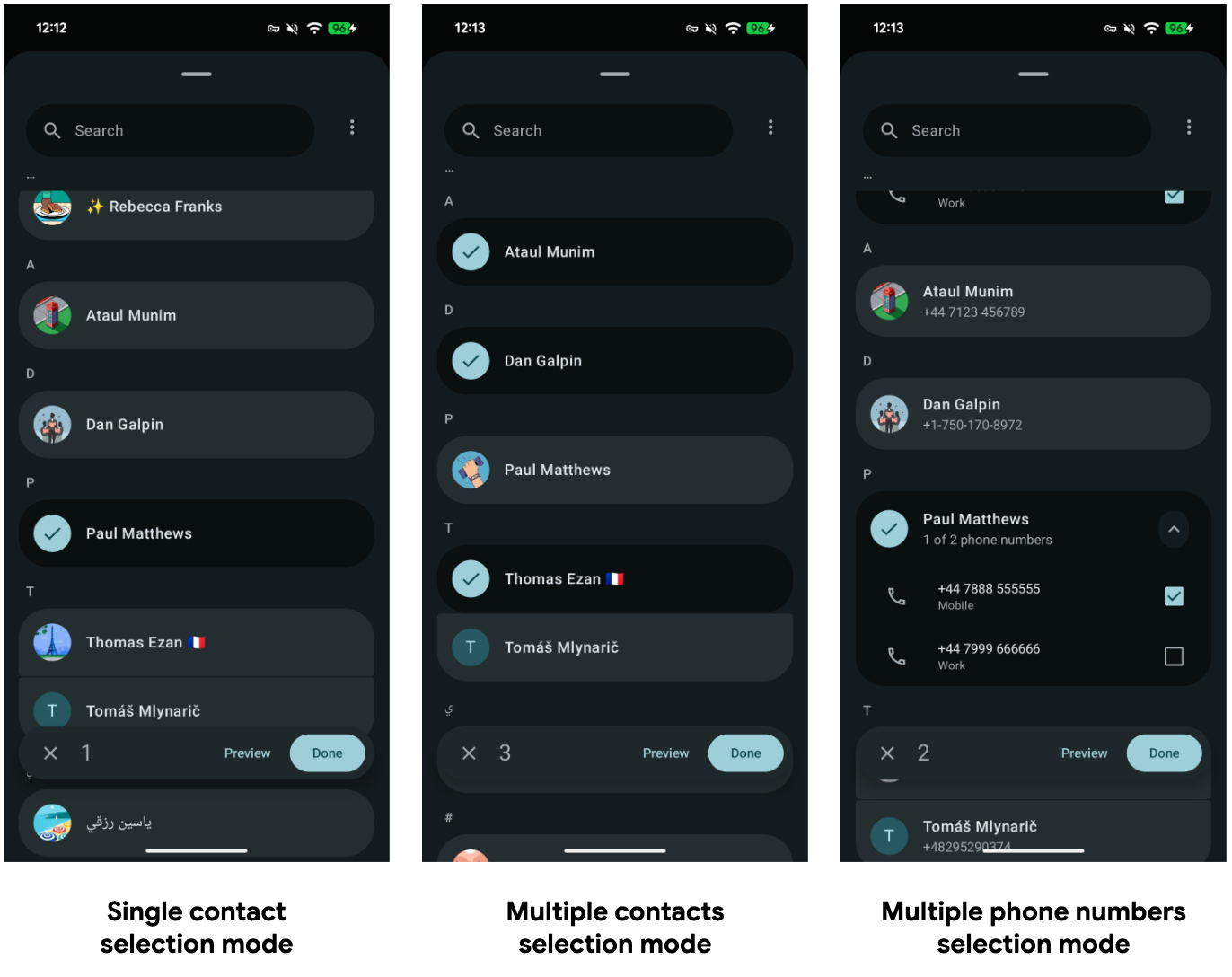
Select a single contact
In this example, the app requests only phone numbers. The picker will filter the list to show only contacts with phone numbers and lets the user select a specific number.
// Define the specific contact data fields you need
val requestedFields = arrayListOf(
Email.CONTENT_ITEM_TYPE,
Phone.CONTENT_ITEM_TYPE,
)
// Set up the intent for the Contact Picker
val pickContactIntent = Intent(ACTION_PICK_CONTACTS).apply {
putExtra(EXTRA_USE_SYSTEM_CONTACTS_PICKER, true)
putStringArrayListExtra(
EXTRA_PICK_CONTACTS_REQUESTED_DATA_FIELDS,
requestedFields
)
}
// Launch the picker
pickContact.launch(pickContactIntent)
Select multiple contacts
To enable multi-selection, add the Intent.EXTRA_ALLOW_MULTIPLE extra. You can
optionally limit the number of items a user can select.
val requestedFields = arrayListOf(
Email.CONTENT_ITEM_TYPE,
Phone.CONTENT_ITEM_TYPE,
)
// Set up the intent for the Contact Picker
val pickContactIntent = Intent(ACTION_PICK_CONTACTS).apply {
putExtra(EXTRA_USE_SYSTEM_CONTACTS_PICKER, true)
// Enable multi-select
putExtra(Intent.EXTRA_ALLOW_MULTIPLE, true)
// Set limit of selectable contacts
putExtra(EXTRA_PICK_CONTACTS_SELECTION_LIMIT, 5)
// Define the specific contact data fields you need
putStringArrayListExtra(
EXTRA_PICK_CONTACTS_REQUESTED_DATA_FIELDS,
requestedFields
)
// Enable this option to only filter contacts that have all the requested data fields
putExtra(EXTRA_PICK_CONTACTS_MATCH_ALL_DATA_FIELDS, false)
}
// Launch the picker
pickContact.launch(pickContactIntent)
Handle the results
When the user completes the selection, the system returns a RESULT_OK and a
Session URI. This URI grants temporary read access to the selected data.
You can query this URI using a standard ContentResolver. The resulting
Cursor contains the requested data fields and follows the schema of
ContactsContract.Data.
// Data class representing a parsed Contact with selected details.
data class Contact(
val lookupKey: String,
val name: String,
val emails: List<String>,
val phones: List<String>
)
// Helper function to query the content resolver with the URI returned by the Contact Picker.
// Parses the cursor to extract contact details such as name, email, and phone number.
private suspend fun processContactPickerResultUri(
sessionUri: Uri,
context: Context
): List<Contact> = withContext(Dispatchers.IO) {
// Define the columns we want to retrieve from the ContactPicker ContentProvider
val projection = arrayOf(
ContactsContract.Contacts.LOOKUP_KEY,
ContactsContract.Contacts.DISPLAY_NAME_PRIMARY,
ContactsContract.Data.MIMETYPE, // Type of data (e.g., email or phone)
ContactsContract.Data.DATA1, // The actual data (Phone number / Email string)
)
// We use `LOOKUP_KEY` as a unique ID to aggregate all contact info related to a same person
val contactsMap = mutableMapOf<String, Contact>()
// Note: The Contact Picker Session Uri doesn't support custom selection & selectionArgs.
// We query the URI directly to get the results chosen by the user.
context.contentResolver.query(sessionUri, projection, null, null, null)?.use { cursor ->
// Get the column indices for our requested projection
val lookupKeyIdx = cursor.getColumnIndex(ContactsContract.Contacts.LOOKUP_KEY)
val mimeTypeIdx = cursor.getColumnIndex(ContactsContract.Data.MIMETYPE)
val nameIdx = cursor.getColumnIndex(ContactsContract.Contacts.DISPLAY_NAME_PRIMARY)
val data1Idx = cursor.getColumnIndex(ContactsContract.Data.DATA1)
while (cursor.moveToNext()) {
val lookupKey = cursor.getString(lookupKeyIdx)
val mimeType = cursor.getString(mimeTypeIdx)
val name = cursor.getString(nameIdx) ?: ""
val data1 = cursor.getString(data1Idx) ?: ""
val email = if (mimeType == Email.CONTENT_ITEM_TYPE) data1 else null
val phone = if (mimeType == Phone.CONTENT_ITEM_TYPE) data1 else null
val existingContact = contactsMap[lookupKey]
if (existingContact != null) {
contactsMap[lookupKey] = existingContact.copy(
emails = if (email != null) existingContact.emails + email else existingContact.emails,
phones = if (phone != null) existingContact.phones + phone else existingContact.phones
)
} else {
contactsMap[lookupKey] = Contact(
lookupKey = lookupKey,
name = name,
emails = if (email != null) listOf(email) else emptyList(),
phones = if (phone != null) listOf(phone) else emptyList()
)
}
}
}
return@withContext contactsMap.values.toList()
}
Backward Compatibility
For apps targeting Android 17 (API level 37) and higher, the system
automatically upgrades the existing Intent.ACTION_PICK intent to use the new
Contact Picker interface.
If your app already uses ACTION_PICK, you don't need to change your code to
receive the new UI. However, to take advantage of new features, such as
receiving a single Uri to query contact data, switching between personal &
work profiles or multiple data field requests, you must update your
implementation to use ContactsPickerSessionContract.ACTION_PICK_CONTACTS or
the new intent extras.
Testing on older target SDKs
You can test the new picker behavior on devices running Android 17 and
higher even if your app targets a lower SDK version by adding the
EXTRA_USE_SYSTEM_CONTACTS_PICKER boolean extra to your ACTION_PICK intent.
Best practices
- Request only what you need: If your app only needs to send an SMS,
request
Phone.CONTENT_ITEM_TYPE. The picker will automatically filter out contacts that don't have phone numbers, resulting in a cleaner UI for the user. - Managing multiple data entries per contact: Individual contacts often
contain various email addresses or phone numbers. To help ensure these are
presented clearly and intuitively for the user, it is recommended to group
them using
ContactsContract.Contacts.LOOKUP_KEY. Furthermore, you can retrieve specific labels for each entry (such as work or personal) to offer more granular selection options within your app's interface. - Persist data immediately: The Session URI grants temporary read permission. If you need to access this contact information later (after your app process is killed), your app has to persist the contact data.
- Don't rely on Account Data: To protect user privacy and prevent fingerprinting, account-specific metadata is stripped from the results.