

ב-Android 14 נוספו תכונות וממשקי API מעולים למפתחים. המאמרים הבאים יעזרו לכם להבין את התכונות של האפליקציות ולהתחיל להשתמש בממשקי ה-API שקשורים אליהן.
רשימה מפורטת של ממשקי API שנוספו, שונו או הוסרו מופיעה בדוח ההבדלים בין גרסאות ה-API. פרטים על ממשקי API שנוספו זמינים במאמרי העזרה של ה-Android API. ב-Android 14, אפשר לחפש ממשקי API שנוספו ברמת API 34. כדי לקבל מידע על תחומים שבהם שינויים בפלטפורמה עשויים להשפיע על האפליקציות שלכם, כדאי לעיין בשינויים בהתנהגות ב-Android 14 באפליקציות שמטרגטות ל-Android 14 ובכל האפליקציות.
אינטרנציונליזציה
העדפות שפה לכל אפליקציה
ב-Android 14 נוספו לתכונות של שפה לכל אפליקציה, שהוצגו ב-Android 13 (רמת API 33), היכולות הבאות:
יצירה אוטומטית של
localeConfigשל אפליקציה: החל מ-Android Studio Giraffe Canary 7 ו-AGP 8.1.0-alpha07, אפשר להגדיר את האפליקציה כך שתתמוך באופן אוטומטי בהעדפות שפה לכל אפליקציה. על סמך המשאבים של הפרויקט, הפלאגין של Android Gradle יוצר את הקובץLocaleConfigומוסיף לו הפניה בקובץ המניפסט הסופי, כך שאין יותר צורך ליצור או לעדכן את הקובץ באופן ידני. מערכת AGP משתמשת במשאבים בתיקיותresשל מודולי האפליקציה ובכל יחסי התלות של מודולי הספריות כדי לקבוע את האזורים הגיאוגרפיים שצריך לכלול בקובץLocaleConfig.עדכונים דינמיים של
localeConfigבאפליקציה: משתמשים בשיטותsetOverrideLocaleConfig()ו-getOverrideLocaleConfig()שמפורטות ב-LocaleManagerכדי לעדכן באופן דינמי את רשימת השפות הנתמכות באפליקציה בהגדרות המערכת של המכשיר. הגמישות הזו מאפשרת לכם להתאים אישית את רשימת השפות הנתמכות לפי אזור, להריץ ניסויים מסוג A/B או לספק רשימה מעודכנת של אזורי זמן אם האפליקציה שלכם משתמשת בהעברות (push) בצד השרת לצורך לוקליזציה.הצגת שפת האפליקציה לעורכי שיטות קלט (IME): עורכי שיטות קלט יכולים להשתמש ב-method
getApplicationLocales()כדי לבדוק את שפת האפליקציה הנוכחית ולהתאים את שפת ה-IME לשפה הזו.
Grammatical Inflection API
3 מיליארד אנשים דוברים שפות עם מגדר: שפות שבהן קטגוריות דקדוקיות – כמו שמות עצם, פעלים, שמות תואר ומילות יחס – משתנות בהתאם למגדר של האנשים והאובייקטים שאתם מדברים אליהם או עליהם. באופן מסורתי, בשפות רבות עם מגדר נעשה שימוש במגדר grammatcal masculine כמגדר ברירת המחדל או כמגדר כללי.
שימוש במגדר הדקדוקי הלא נכון למשתמשים, למשל שימוש במגדר הדקדוקי הזכרי לנשים, עלול להשפיע לרעה על הביצועים והגישה שלהם. לעומת זאת, ממשק משתמש עם שפה שמשקפת בצורה נכונה את המגדר הדקדוקי של המשתמש יכול לשפר את המעורבות של המשתמש ולספק חוויית משתמש מותאמת אישית יותר וטבעית יותר.
To help you build a user-centric UI for gendered languages, Android 14 introduces the Grammatical Inflection API, which lets you add support for grammatical gender without refactoring your app.
העדפות הפורמט והמידות
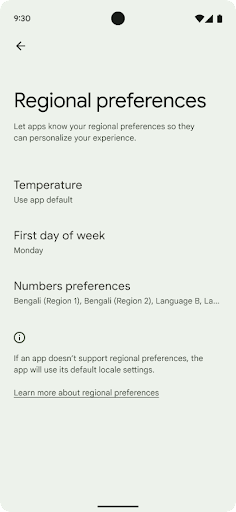
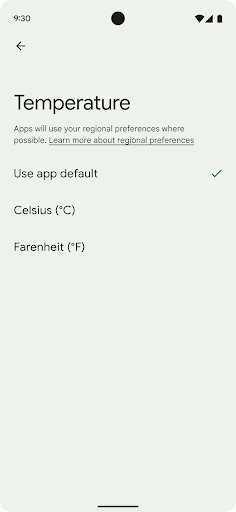
Regional preferences enable users to personalize temperature units, the first day of the week, and numbering systems. A European living in the United States might prefer temperature units to be in Celsius rather than Fahrenheit and for apps to treat Monday as the beginning of the week instead of the US default of Sunday.
New Android Settings menus for these preferences provide users with a
discoverable and centralized location to change app preferences. These
preferences also persist through backup and restore. Several APIs and
intents—such as
getTemperatureUnit
and
getFirstDayOfWeek—
grant your app read access to user preferences, so your app can adjust how it
displays information. You can also register a
BroadcastReceiver on
ACTION_LOCALE_CHANGED
to handle locale configuration changes when regional preferences change.
To find these settings, open the Settings app and navigate to System > Languages & input > Regional preferences.
נגישות
הגדלה לא לינארית של הגופן עד 200%
Starting in Android 14, the system supports font scaling up to 200%, providing users with additional accessibility options.
To prevent large text elements on screen from scaling too large, the system applies a nonlinear scaling curve. This scaling strategy means that large text doesn't scale at the same rate as smaller text. Nonlinear font scaling helps preserve the proportional hierarchy between elements of different sizes while mitigating issues with linear text scaling at high degrees (such as text being cut off or text that becomes harder to read due to an extremely large display sizes).
Test your app with nonlinear font scaling
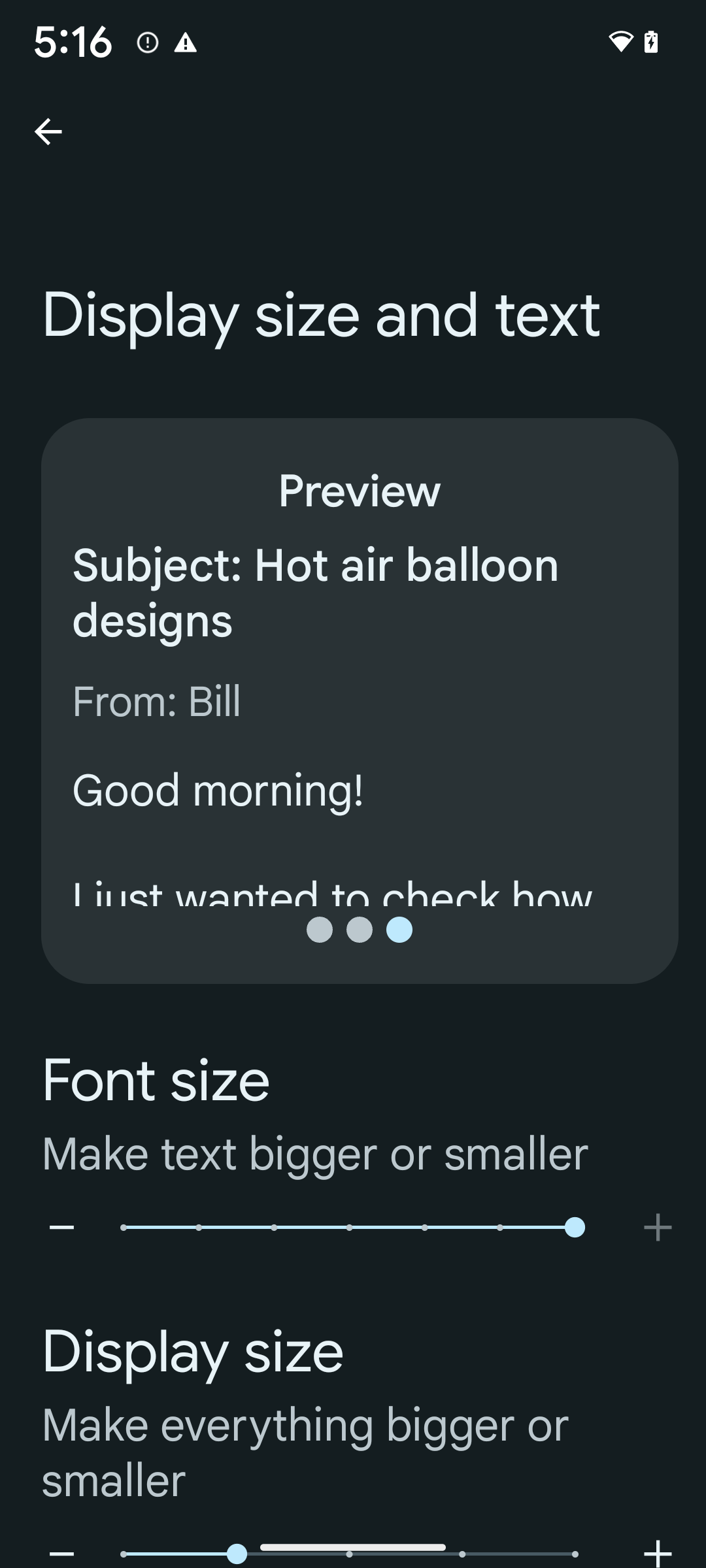
If you already use scaled pixels (sp) units to define text sizing, then these additional options and scaling improvements are applied automatically to the text in your app. However, you should still perform UI testing with the maximum font size enabled (200%) to ensure that your app applies the font sizes correctly and can accommodate larger font sizes without impacting usability.
To enable 200% font size, follow these steps:
- Open the Settings app and navigate to Accessibility > Display size and text.
- For the Font size option, tap the plus (+) icon until the maximum font size setting is enabled, as shown in the image that accompanies this section.
Use scaled pixel (sp) units for text-sizes
Remember to always specify text sizes in sp units. When your app uses sp units, Android can apply the user's preferred text size and scale it appropriately.
Don't use sp units for padding or define view heights assuming implicit padding: with nonlinear font scaling sp dimensions might not be proportional, so 4sp + 20sp might not equal 24sp.
Convert scaled pixel (sp) units
Use TypedValue.applyDimension() to convert from sp units
to pixels, and use TypedValue.deriveDimension() to
convert pixels to sp. These methods apply the appropriate nonlinear scaling
curve automatically.
Avoid hardcoding equations using
Configuration.fontScale or
DisplayMetrics.scaledDensity. Because font scaling is
nonlinear, the scaledDensity field is no longer accurate. The fontScale
field should be used for informational purposes only because fonts are no longer
scaled with a single scalar value.
Use sp units for lineHeight
Always define android:lineHeight using sp units instead
of dp, so the line height scales along with your text. Otherwise, if your text
is sp but your lineHeight is in dp or px, it doesn't scale and looks cramped.
TextView automatically corrects the lineHeight so that your intended
proportions are preserved, but only if both textSize and lineHeight are
defined in sp units.
מצלמה ומדיה
תמונות ב-Ultra HDR

Android 14 adds support for High Dynamic Range (HDR) images that retain more of the information from the sensor when taking a photo, which enables vibrant colors and greater contrast. Android uses the Ultra HDR format, which is fully backward compatible with JPEG images, allowing apps to seamlessly interoperate with HDR images, displaying them in Standard Dynamic Range (SDR) as needed.
Rendering these images in the UI in HDR is done automatically by the framework
when your app opts in to using HDR UI for its Activity Window, either through a
manifest entry or at runtime by calling
Window.setColorMode(). You can also capture compressed Ultra
HDR still images on supported devices. With more colors recovered
from the sensor, editing in post can be more flexible. The
Gainmap associated with Ultra HDR images can be used to render
them using OpenGL or Vulkan.
זום, מיקוד, תצוגה מקדימה ועוד בתוספים למצלמה
Android 14 upgrades and improves camera extensions, allowing apps to handle longer processing times, which enables improved images using compute-intensive algorithms like low-light photography on supported devices. These features give users an even more robust experience when using camera extension capabilities. Examples of these improvements include:
- Dynamic still capture processing latency estimation provides much more
accurate still capture latency estimates based on the current scene and
environment conditions. Call
CameraExtensionSession.getRealtimeStillCaptureLatency()to get aStillCaptureLatencyobject that has two latency estimation methods. ThegetCaptureLatency()method returns the estimated latency betweenonCaptureStartedandonCaptureProcessStarted(), and thegetProcessingLatency()method returns the estimated latency betweenonCaptureProcessStarted()and the final processed frame being available. - Support for capture progress callbacks so that apps can display the current
progress of long-running, still-capture processing operations. You can check
if this feature is available with
CameraExtensionCharacteristics.isCaptureProcessProgressAvailable, and if it is, you implement theonCaptureProcessProgressed()callback, which has the progress (from 0 to 100) passed in as a parameter. Extension specific metadata, such as
CaptureRequest.EXTENSION_STRENGTHfor dialing in the amount of an extension effect, such as the amount of background blur withEXTENSION_BOKEH.Postview Feature for Still Capture in camera extensions, which provides a less-processed image more quickly than the final image. If an extension has increased processing latency, a postview image could be provided as a placeholder to improve UX and switched out later for the final image. You can check if this feature is available with
CameraExtensionCharacteristics.isPostviewAvailable. Then you can pass anOutputConfigurationtoExtensionSessionConfiguration.setPostviewOutputConfiguration.Support for
SurfaceViewallowing for a more optimized and power-efficient preview render path.Support for tap to focus and zoom during extension usage.
זום בחיישן
When REQUEST_AVAILABLE_CAPABILITIES_STREAM_USE_CASE in
CameraCharacteristics contains
SCALER_AVAILABLE_STREAM_USE_CASES_CROPPED_RAW, your app
can use advanced sensor capabilities to give a cropped RAW stream the same
pixels as the full field of view by using a CaptureRequest
with a RAW target that has stream use case set to
CameraMetadata.SCALER_AVAILABLE_STREAM_USE_CASES_CROPPED_RAW.
By implementing the request override controls, the updated camera gives users
zoom control even before other camera controls are ready.
אודיו ב-USB ללא אובדן מידע
Android 14 gains support for lossless audio formats for audiophile-level
experiences over USB wired headsets. You can query a USB device for its
preferred mixer attributes, register a listener for changes in preferred mixer
attributes, and configure mixer attributes using the
AudioMixerAttributes class. This class represents the
format, such as channel mask, sample rate, and behavior of the audio mixer. The
class allows for audio to be sent directly, without mixing,
volume adjustment, or processing effects.
פרודוקטיביות וכלים למפתחים
מנהל פרטי הכניסה
Android 14 adds Credential Manager as a platform API, with additional support back to Android 4.4 (API level 19) devices through a Jetpack Library using Google Play services. Credential Manager aims to make sign-in easier for users with APIs that retrieve and store credentials with user-configured credential providers. Credential Manager supports multiple sign-in methods, including username and password, passkeys, and federated sign-in solutions (such as Sign-in with Google) in a single API.
Passkeys provide many advantages. For example, passkeys are built on industry standards, can work across different operating systems and browser ecosystems, and can be used with both websites and apps.
For more information, see the Credential Manager and passkeys documentation and the blogpost about Credential Manager and passkeys.
Health Connect
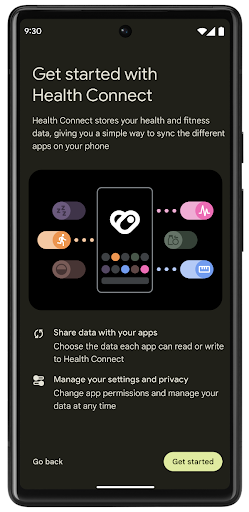
Health Connect is an on-device repository for user health and fitness data. It allows users to share data between their favorite apps, with a single place to control what data they want to share with these apps.
On devices running Android versions prior to Android 14, Health Connect is available to download as an app on the Google Play store. Starting with Android 14, Health Connect is part of the platform and receives updates through Google Play system updates without requiring a separate download. With this, Health Connect can be updated frequently, and your apps can rely on Health Connect being available on devices running Android 14 or higher. Users can access Health Connect from the Settings in their device, with privacy controls integrated into the system settings.
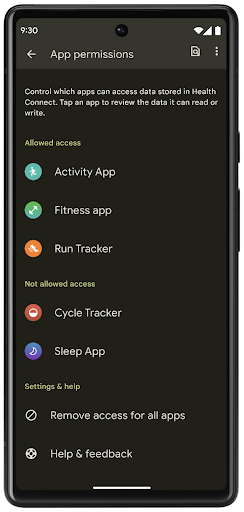
Health Connect includes several new features in Android 14, such as exercise routes, allowing users to share a route of their workout which can be visualized on a map. A route is defined as a list of locations saved within a window of time, and your app can insert routes into exercise sessions, tying them together. To ensure that users have complete control over this sensitive data, users must allow sharing individual routes with other apps.
For more information, see the Health Connection documentation and the blogpost on What's new in Android Health.
עדכונים ל-OpenJDK 17
Android 14 continues the work of refreshing Android's core libraries to align with the features in the latest OpenJDK LTS releases, including both library updates and Java 17 language support for app and platform developers.
The following features and improvements are included:
- Updated approximately 300
java.baseclasses to Java 17 support. - Text Blocks, which introduce multi-line string literals to the Java programming language.
- Pattern Matching for instanceof, which allows an object to
be treated as having a specific type in an
instanceofwithout any additional variables. - Sealed classes, which allow you restrict which classes and interfaces can extend or implement them.
Thanks to Google Play system updates (Project Mainline), over 600 million devices are enabled to receive the latest Android Runtime (ART) updates that include these changes. This is part of our commitment to give apps a more consistent, secure environment across devices, and to deliver new features and capabilities to users independent of platform releases.
Java and OpenJDK are trademarks or registered trademarks of Oracle and/or its affiliates.
שיפורים בחנויות אפליקציות
Android 14 introduces several PackageInstaller APIs that
allow app stores to improve their user experience.
Request install approval before downloading
Installing or updating an app might require user approval.
For example, when an installer making use of the
REQUEST_INSTALL_PACKAGES permission attempts to install a
new app. In prior Android versions, app stores can only request user approval
after APKs are written to the install session and the
session is committed.
Starting with Android 14, the requestUserPreapproval()
method lets installers request user approval before committing the install
session. This improvement lets an app store defer downloading any APKs until
after the installation has been approved by the user. Furthermore, once a user
has approved installation, the app store can download and install the app in the
background without interrupting the user.
Claim responsibility for future updates
The setRequestUpdateOwnership() method allows an installer
to indicate to the system that it intends to be responsible for future updates
to an app it is installing. This capability enables update ownership
enforcement, meaning that only the update owner is permitted
to install automatic updates to the app. Update ownership enforcement helps to
ensure that users receive updates only from the expected app store.
Any other installer, including those making use of the
INSTALL_PACKAGES permission, must receive explicit user
approval in order to install an update. If a user decides to proceed with an
update from another source, update ownership is lost.
Update apps at less-disruptive times
App stores typically want to avoid updating an app that is actively in use because this leads to the app's running processes being killed, which potentially interrupts what the user was doing.
Starting with Android 14, the InstallConstraints API
gives installers a way to ensure that their app updates happen at an opportune
moment. For example, an app store can call the
commitSessionAfterInstallConstraintsAreMet() method to
make sure that an update is only committed when the user is no longer
interacting with the app in question.
Seamlessly install optional splits
With split APKs, features of an app can be delivered in separate APK files,
rather than as a monolithic APK. Split APKs allow app stores to optimize the
delivery of different app components. For example, app stores might optimize
based on the properties of the target device. The
PackageInstaller API has supported splits since its
introduction in API level 22.
In Android 14, the setDontKillApp() method allows an
installer to indicate that the app's running processes shouldn't be killed when
new splits are installed. App stores can use this feature to seamlessly install
new features of an app while the user is using the app.
חבילות מטא-נתונים של אפליקציות
Starting in Android 14, the Android package installer lets you specify app metadata, such as data safety practices, to include on app store pages such as Google Play.
זיהוי מתי משתמשים מצלמים צילומי מסך במכשיר
To create a more standardized experience for detecting screenshots, Android 14 introduces a privacy-preserving screenshot detection API. This API lets apps register callbacks on a per-activity basis. These callbacks are invoked, and the user is notified, when the user takes a screenshot while that activity is visible.
חוויית משתמש
פעולות מותאמות אישית בקובץ לשיתוף ודירוג משופר
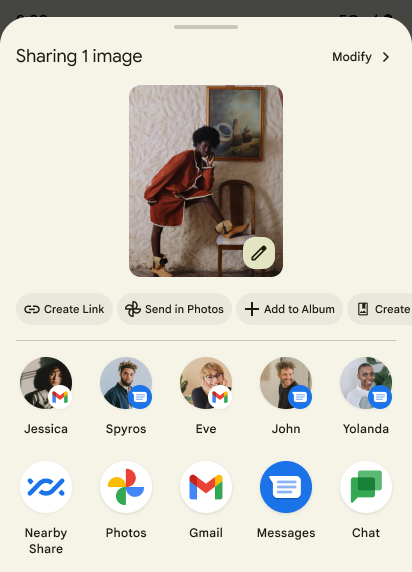
Android 14 updates the system sharesheet to support custom app actions and more informative preview results for users.
Add custom actions
With Android 14, your app can add custom actions to the system sharesheet it invokes.
Improve ranking of Direct Share targets
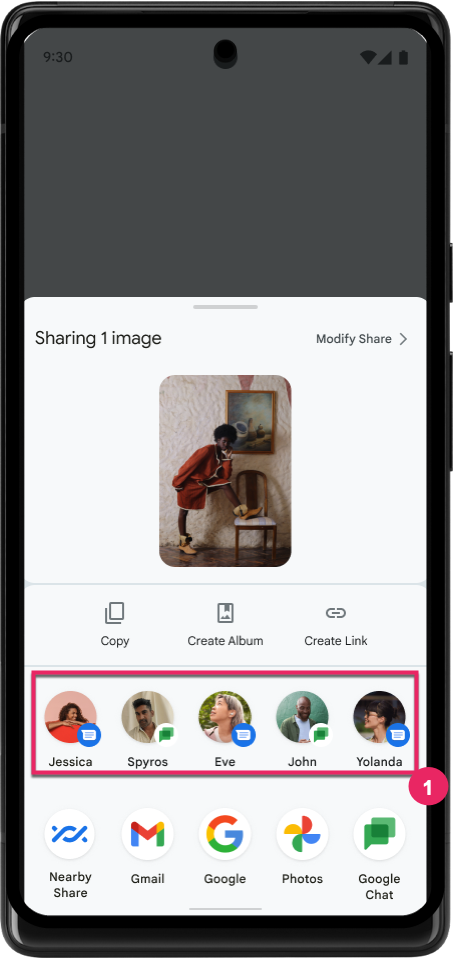
Android 14 uses more signals from apps to determine the ranking of the direct share targets to provide more helpful results for the user. To provide the most useful signal for ranking, follow the guidance for improving rankings of your Direct Share targets. Communication apps can also report shortcut usage for outgoing and incoming messages.
תמיכה באנימציות מובנות ומותאמות אישית לחיזוי של תנועת החזרה
Android 13 introduced the predictive back-to-home animation behind a developer option. When used in a supported app with the developer option enabled, swiping back shows an animation indicating that the back gesture exits the app back to the home screen.
Android 14 includes multiple improvements and new guidance for Predictive Back:
- You can set
android:enableOnBackInvokedCallback=trueto opt in to predictive back system animations per-Activity instead of for the entire app. - We've added new system animations to accompany the back-to-home animation from Android 13. The new system animations are cross-activity and cross-task, which you get automatically after migrating to Predictive Back.
- We've added new Material Component animations for Bottom sheets, Side sheets, and Search.
- We've created design guidance for creating custom in-app animations and transitions.
- We've added new APIs to support custom in-app transition animations:
handleOnBackStarted,handleOnBackProgressed,handleOnBackCancelledinOnBackPressedCallbackonBackStarted,onBackProgressed,onBackCancelledinOnBackAnimationCallback- Use
overrideActivityTransitioninstead ofoverridePendingTransitionfor transitions that respond as the user swipes back.
With this Android 14 preview release, all features of Predictive Back remain behind a developer option. See the developer guide to migrate your app to predictive back, as well as the developer guide to creating custom in-app transitions.
שינויים בהגדרות של אפליקציות ספציפיות במכשירים עם מסך גדול
Per-app overrides enable device manufacturers to change the behavior of apps on large screen devices. For example, the FORCE_RESIZE_APP override instructs the system to resize the app to fit display dimensions (avoiding size compatibility mode) even if resizeableActivity="false" is set in the app manifest.
Overrides are intended to improve the user experience on large screens.
New manifest properties enable you to disable some device manufacturer overrides for your app.
שינויים בהגדרות של כל אפליקציה בנפרד למשתמשים במסכים גדולים
שינוי ההגדרות של כל אפליקציה בנפרד משנה את התנהגות האפליקציות במכשירים עם מסך גדול. לדוגמה, שינוי ברירת המחדל של יצרן המכשיר OVERRIDE_MIN_ASPECT_RATIO_LARGE מגדיר את יחס הגובה-רוחב של האפליקציה ל-16:9, ללא קשר להגדרות האפליקציה.
ב-Android 14 QPR1, משתמשים יכולים להחיל שינויים ספציפיים לאפליקציות באמצעות תפריט הגדרות חדש במכשירים עם מסך גדול.
שיתוף מסך של אפליקציה
App screen sharing enables users to share an app window instead of the entire device screen during screen content recording.
With app screen sharing, the status bar, navigation bar, notifications, and other system UI elements are excluded from the shared display. Only the content of the selected app is shared.
App screen sharing improves productivity and privacy by enabling users to run multiple apps but limit content sharing to a single app.
תשובה מהירה מבוססת-LLM ב-Gboard ב-Pixel 8 Pro
On Pixel 8 Pro devices with the December Feature Drop, developers can try out higher-quality smart replies in Gboard powered by on-device Large Language Models (LLMs) running on Google Tensor.
This feature is available as a limited preview for US English in WhatsApp, Line, and KakaoTalk. It requires using a Pixel 8 Pro device with Gboard as your keyboard.
To try it out, first enable the feature in Settings > Developer Options > AiCore Settings > Enable Aicore Persistent.
Next, open a conversation in a supported app to see LLM-powered Smart Reply in Gboard's suggestion strip in response to incoming messages.
גרפיקה
אפשר להריץ שאילתות על נתיבים ולבצע בהם אינטרפולציה
ה-API Path של Android הוא מנגנון עוצמתי וגמיש ליצירה ולרינדור של גרפיקה וקטורית, עם אפשרות לצייר או למלא נתיב, לבנות נתיב מקטעי קו או מעקומות ריבועיות או ממעלה שלישית, לבצע פעולות בוליאניות כדי לקבל צורות מורכבות יותר או את כל האפשרויות האלה בו-זמנית. אחת מהמגבלות היא היכולת לברר מה נמצא בפועל באובייקט Path. הרכיבים הפנימיים של האובייקט לא גלויים למבצעי הקריאה אחרי היצירה.
כדי ליצור Path, צריך לבצע קריאה ל-methods כמו moveTo(), lineTo() ו-cubicTo() כדי להוסיף קטעי נתיב. אבל לא הייתה אפשרות לשאול את הנתיב הזה מהם הפלחים, ולכן צריך לשמור את המידע הזה בזמן היצירה.
החל מ-Android 14, אפשר לשלוח שאילתות לגבי נתיבים כדי לבדוק מה נמצא בהם.
קודם כול, צריך לקבל אובייקט PathIterator באמצעות API של Path.getPathIterator:
Kotlin
val path = Path().apply {
    moveTo(1.0f, 1.0f)
    lineTo(2.0f, 2.0f)
    close()
}
val pathIterator = path.pathIterator
Java
Path path = new Path();
path.moveTo(1.0F, 1.0F);
path.lineTo(2.0F, 2.0F);
path.close();
PathIterator pathIterator = path.getPathIterator();
לאחר מכן אפשר לקרוא ל-PathIterator כדי לבצע איטרציה אחרי הפילוחים אחד אחרי השני, ולאחזר את כל הנתונים הנדרשים לכל פלח. בדוגמה הזו נעשה שימוש באובייקטים מסוג PathIterator.Segment, שמארזים את הנתונים בשבילכם:
Kotlin
for (segment in pathIterator) {
    println("segment: ${segment.verb}, ${segment.points}")
}
Java
while (pathIterator.hasNext()) {
    PathIterator.Segment segment = pathIterator.next();
    Log.i(LOG_TAG, "segment: " + segment.getVerb() + ", " + segment.getPoints());
}
ב-PathIterator יש גם גרסה של next() שלא מקצה לה, שבה אפשר להעביר במאגר נתונים זמני כדי לשמור את נתוני הנקודות.
אחד מהתרחישים החשובים לדוגמה לשליחת שאילתות לגבי נתוני Path הוא אינטרפולציה. לדוגמה, יכול להיות שתרצו ליצור אנימציה (או טרנספורמציה) בין שני נתיבים שונים. כדי לפשט את התרחיש הזה, Android 14 כולל גם את השיטה interpolate() ב-Path. בהנחה שלשני הנתיבים יש מבנה פנימי זהה, ה-method interpolate() יוצרת Path חדש עם התוצאה בעלת האינטרפולציה. הדוגמה הזו מחזירה נתיב שהצורה שלו היא חצי (אינטרפולציה לינארית של 0 .5) בין path ל-otherPath:
Kotlin
val interpolatedResult = Path()
if (path.isInterpolatable(otherPath)) {
    path.interpolate(otherPath, .5f, interpolatedResult)
}
Java
Path interpolatedResult = new Path();
if (path.isInterpolatable(otherPath)) {
    path.interpolate(otherPath, 0.5F, interpolatedResult);
}
ספריית graphics-path של Jetpack מאפשרת להשתמש בממשקי API דומים גם בגרסאות קודמות של Android.
רשתות מותאמות אישית עם הצללות של קודקודים ושל שברים
Android has long supported drawing triangle meshes with custom shading, but the input mesh format has been limited to a few predefined attribute combinations. Android 14 adds support for custom meshes, which can be defined as triangles or triangle strips, and can, optionally, be indexed. These meshes are specified with custom attributes, vertex strides, varying, and vertex and fragment shaders written in AGSL.
The vertex shader defines the varyings, such as position and color, while the
fragment shader can optionally define the color for the pixel, typically by
using the varyings created by the vertex shader. If color is provided by the
fragment shader, it is then blended with the current Paint
color using the blend mode selected when
drawing the mesh. Uniforms can be passed
into the fragment and vertex shaders for additional flexibility.
מעבד מאגר חומרה ל-Canvas
To assist in using Android's Canvas API to draw with
hardware acceleration into a HardwareBuffer, Android 14
introduces HardwareBufferRenderer. This API is
particularly useful when your use case involves communication with the system
compositor through SurfaceControl for low-latency
drawing.