

इस गाइड में, DigitalCredential API का इस्तेमाल करके, अपने उपयोगकर्ताओं के लिए पुष्टि किए गए फ़ोन नंबर पाने का तरीका बताया गया है. इसके लिए, दो चरण पूरे करने होते हैं:
- के लिए अनुरोध करना
TS.43 token: आपका क्लाइंट ऐप्लिकेशन ("पुष्टि करने वाला ऐप्लिकेशन"), उपयोगकर्ता के डिवाइस से अस्थायी TS.43 टोकन का अनुरोध करता है.TS.43 tokenमोबाइल और इंटरनेट सेवा देने वाली कंपनी की ओर से जारी किया गया क्रेडेंशियल है. यह उपयोगकर्ता की पहचान दिखाता है. - टोकन के बदले फ़ोन नंबर पाना: आपके ऐप्लिकेशन का बैकएंड, उपयोगकर्ता के पुष्टि किए गए फ़ोन नंबर के लिए,
TS.43 tokenको एग्रीगेटर या मोबाइल और इंटरनेट सेवा देने वाली कंपनी के साथ शेयर करता है.
Android वर्शन के साथ काम करने की सुविधा
फ़ोन नंबर की पुष्टि करने की सुविधा वाला API, Android 10 (एपीआई लेवल 29) और इसके बाद के वर्शन पर काम करता है.
ज़रूरी शर्तें
DigitalCredential API की मदद से, फ़ोन नंबर की पुष्टि करने की सुविधा लागू करने के लिए, आपके पास एग्रीगेटर या मोबाइल और इंटरनेट सेवा देने वाली कंपनी के साथ खाता होना चाहिए. एग्रीगेटर, मोबाइल और इंटरनेट सेवा देने वाली कंपनियों के साथ इंटरैक्ट करता है और आपके ऐप्लिकेशन के लिए ज़रूरी एपीआई सर्फ़ेस उपलब्ध कराता है. आम तौर पर, यह बिल किए जा सकने वाले क्लाउड एपीआई एंडपॉइंट के तौर पर उपलब्ध होता है. इस गाइड में, एग्रीगेटर और मोबाइल और इंटरनेट सेवा देने वाली कंपनियों, दोनों को सामूहिक तौर पर एग्रीगेटर कहा गया है.
आपको अपने Gradle बिल्ड स्क्रिप्ट में, ये डिपेंडेंसी भी जोड़नी होंगी:
Kotlin
dependencies {
    implementation("androidx.credentials:credentials:1.7.0-alpha02")
    implementation("androidx.credentials:credentials-play-services-auth:1.7.0-alpha02")
}
Groovy
dependencies {
    implementation "androidx.credentials:credentials:1.7.0-alpha02"
    implementation "androidx.credentials:credentials-play-services-auth:1.7.0-alpha02"
}
लागू करना
आम तौर पर, एंड-टू-एंड प्रोसेस में ये चरण शामिल होते हैं:
- किसी एग्रीगेटर से DCQL (डिजिटल क्रेडेंशियल क्वेरी लैंग्वेज) पैरामीटर का अनुरोध करना: एक या उससे ज़्यादा एग्रीगेटर को कॉल करें और DCQL पैरामीटर के सेट का अनुरोध करें. DCQL की मदद से, हर एग्रीगेटर से ज़रूरी डिजिटल क्रेडेंशियल के बारे में बताया जा सकता है.
OpenID4VP अनुरोध बनाना: अपने ऐप्लिकेशन के बैकएंड से, OpenID4VP अनुरोध बनाएं. इसमें एग्रीगेटर से मिले DCQL पैरामीटर शामिल करें. इसके बाद, OpenID4VP अनुरोध को अपने क्लाइंट ऐप्लिकेशन पर भेजें.
Credential Manager API को कॉल करना: अपने क्लाइंट ऐप्लिकेशन में, ऑपरेटिंग सिस्टम को OpenID4VP अनुरोध भेजने के लिए, Credential Manager API का इस्तेमाल करें. इसके जवाब में, आपको OpenID4VP रिस्पॉन्स ऑब्जेक्ट मिलता है. इसमें
TS.43 Digital Credentialशामिल होता है. यह क्रेडेंशियल एन्क्रिप्ट किया गया होता है. इसे सिर्फ़ इससे जुड़े एग्रीगेटर से डिक्रिप्ट किया जा सकता है. मोबाइल और इंटरनेट सेवा देने वाली कंपनी का टोकन मिलने के बाद, अपने क्लाइंट ऐप्लिकेशन से रिस्पॉन्स को ऐप्लिकेशन के बैकएंड पर भेजें.रिस्पॉन्स की पुष्टि करना: अपने ऐप्लिकेशन के बैकएंड में, OpenID4VP रिस्पॉन्स की पुष्टि करें.
फ़ोन नंबर के बदले टोकन पाना: अपने ऐप्लिकेशन के बैकएंड से,
TS.43 Digital Credentialको एग्रीगेटर पर भेजें. एग्रीगेटर, क्रेडेंशियल की पुष्टि करता है और पुष्टि किया गया फ़ोन नंबर दिखाता है.
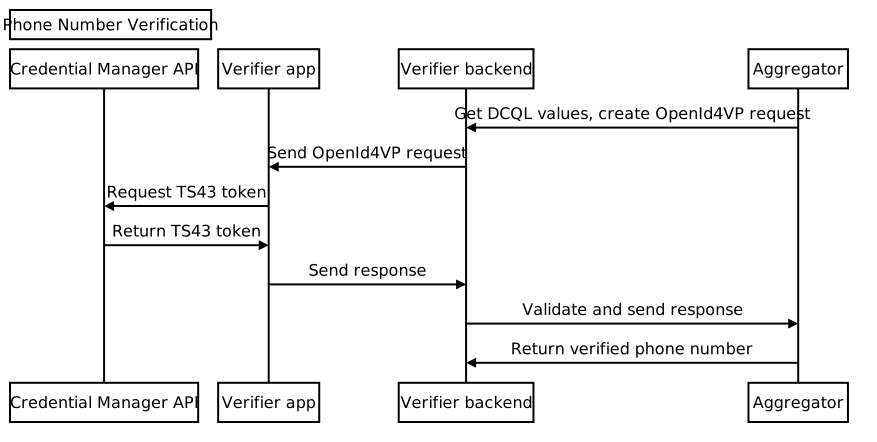
किसी एग्रीगेटर से DCQL पैरामीटर का अनुरोध करना
अपने ऐप्लिकेशन के बैकएंड से, एग्रीगेटर को डिजिटल क्रेडेंशियल क्वेरी लैंग्वेज (DCQL) क्रेडेंशियल ऑब्जेक्ट के लिए अनुरोध भेजें. पक्का करें कि आपने अपने अनुरोध में, नॉनस और अनुरोध आईडी दिया हो. एग्रीगेटर, DCQL क्रेडेंशियल ऑब्जेक्ट दिखाता है. इसका स्ट्रक्चर, इस तरह का होता है:
{
  // The credential ID is mapped to the request ID that is sent in your request to the aggregator.
  "id": "aggregator1",
  "format": "dc-authorization+sd-jwt",
  "meta": {
    "vct_values": [
      "number-verification/device-phone-number/ts43"
    ],
    "credential_authorization_jwt": "..."
  },
  "claims": [
    {
      "path": ["subscription_hint"],
      "values": [1]
    },
    {
      "path": ["phone_number_hint"],
      "values": ["+14155552671"]
    }
  ]
}
OpenID4VP अनुरोध बनाना
सबसे पहले, अपने ऐप्लिकेशन के बैकएंड से, dcql_query ऑब्जेक्ट बनाएं. इसके लिए, DCQL क्रेडेंशियल ऑब्जेक्ट को dcql_query ऑब्जेक्ट में नेस्ट की गई credentials कलेक्शन में रखें. जैसा कि यहां दिए गए उदाहरण में दिखाया गया है:
"dcql_query": {
  "credentials": [
      "id": "aggregator1",
      "format": "dc-authorization+sd-jwt",
      "meta": {
        "vct_values": [
          "number-verification/device-phone-number/ts43"
        ],
        "credential_authorization_jwt": "..."
      },
      "claims": [
        {
          "path": ["subscription_hint"],
          "values": [1]
        },
        {
          "path": ["phone_number_hint"],
          "values": ["+14155552671"]
        }
      ]
  ]
}
इसके बाद, इस स्ट्रक्चर के साथ OpenID4VP अनुरोध बनाएं:
{
  "protocol": "openid4vp-v1-unsigned",
  "data": {
    "response_type": "vp_token",
    "response_mode": "dc_api",
    "nonce": "...",
    "dcql_query": { ... }
  }
}
protocol: फ़ोन नंबर की पुष्टि करने के अनुरोधों के लिए, इसेopenid4vp-v1-unsignedपर सेट करना ज़रूरी है.response_typeऔरresponse_mode: ये कॉन्स्टैंट, अनुरोध के फ़ॉर्मैट को दिखाते हैं. इनकी वैल्यू, क्रमशःvp_tokenऔरdc_apiहोती हैं.nonce: यह एक यूनीक वैल्यू है, जो आपके बैकएंड से हर अनुरोध के लिए जनरेट होती है. एग्रीगेटर DCQL क्रेडेंशियल ऑब्जेक्ट में मौजूद नॉनस, इस नॉनस से मेल खाना चाहिए.dcql_query: इस मामले में, यह बताने के लिएdcql_queryका इस्तेमाल करें किTS.43 Digital Credentialका अनुरोध किया जा रहा है. यहां अन्य डिजिटल क्रेडेंशियल का अनुरोध भी किया जा सकता है.
इसके बाद, OpenID4VP अनुरोध को DigitalCredential API अनुरोध ऑब्जेक्ट में रैप करें और इसे क्लाइंट ऐप्लिकेशन पर भेजें.
{
  "requests":
    [
      {
        "protocol": "openid4vp-v1-unsigned",
        "data": {
          "response_type": "vp_token",
          "response_mode": "dc_api",
          "nonce": "...",
          "dcql_query": { ... }
        }
      }
    ]
}
यहां दिए गए स्निपेट में, DigitalCredential API अनुरोध जनरेट करने का तरीका बताया गया है:
def GenerateDCRequest():
    credentials = []
    aggregator1_dcql = call_aggregator_endpoint(nonce, "aggregator1", additional_params)
    credentials.append(aggregator1_dcql) # You can optionally work with multiple
    # aggregators, or request other types of credentials

    val dc_request =
    {
      "requests":
        [
          {
            "protocol": "openid4vp-v1-unsigned",
            "data": {
              "response_type": "vp_token",
              "response_mode": "dc_api",
              "nonce": "...",
              "dcql_query": {"credentials": credentials}
            }
          }
        ]
    }
    return dc_request
Credential Manager API को कॉल करना
अपने क्लाइंट ऐप्लिकेशन में, Credential Manager API को कॉल करें. इसके लिए, अपने ऐप्लिकेशन के बैकएंड से मिले DigitalCredential API अनुरोध का इस्तेमाल करें.
val requestJson = generateTs43DigitalCredentialRequestFromServer()
val digiCredOption = GetDigitalCredentialOption(requestJson = requestJson)
val getCredRequest = GetCredentialRequest(
    listOf(digiCredOption)
)

coroutineScope.launch {
  try {
    val response = credentialManager.getCredential(
      context = activityContext,
      request = getCredRequest
    )
    val credential = response.credential
    when (credential) {
      is DigitalCredential -> {
        val responseJson = credential.credentialJson
        validateResponseOnServer(responseJson)
      }
      else -> {
        // Catch any unrecognized credential type here.
        Log.e(TAG, "Unexpected type of credential ${credential.type}")
      }
    }
  } catch (e : GetCredentialException) {
      // If user cancels the operation, the feature isn't available, or the
      // SIM doesn't support the feature, a GetCredentialCancellationException
      // will be returned. Otherwise, a GetCredentialUnsupportedException will
      // be returned with details in the exception message.
      handleFailure(e)
  }
}
DigitalCredential API के रिस्पॉन्स में, OpenID4VP रिस्पॉन्स शामिल होता है. एक सामान्य
क्रेडेंशियल JSON जो DigitalCredential नतीजे से मिला है, इस तरह का होता है:
{
  "protocol": "openid4vp-v1-unsigned",

  "data": {
    "vp_token": {
      "aggregator1": ["eyJhbGciOiAiRVMy..."] # The encrypted TS.43 Digital
                                             # Credential in an array structure.
    }
  }
}
अपने क्लाइंट ऐप्लिकेशन से, DigitalCredential API के रिस्पॉन्स को वापस बैकएंड सर्वर पर भेजें. यहां इसकी पुष्टि की जा सकती है और इसका इस्तेमाल, एग्रीगेटर के साथ पुष्टि किए गए फ़ोन नंबर के बदले टोकन पाने के लिए किया जा सकता है.
कुछ मामलों में, रिस्पॉन्स में TS.43 से जुड़ी गड़बड़ी हो सकती है. गड़बड़ी का रिस्पॉन्स, OpenID4VP गड़बड़ी के रिस्पॉन्स फ़ॉर्मैट के मुताबिक JSON ऑब्जेक्ट होता है:
{
  "protocol": "openid4vp-v1-unsigned",

  "data": {
    "error": "<error_code>",
    "error_description": "<Human-readable description of the error>",
  }
}
error_code की दो संभावित वैल्यू हैं:
invalid_request: इससे पता चलता है कि अनुरोध का फ़ॉर्मैट सही नहीं था.server_error: इससे पता चलता है कि अनुरोध को प्रोसेस करते समय गड़बड़ियां हुईं. ये गड़बड़ियां, स्थानीय गड़बड़ियां या TS.43 से जुड़ी समस्याएं हो सकती हैं.
error_description फ़ील्ड में, समस्या के बारे में ज़्यादा जानकारी मिलती है.
डिजिटल क्रेडेंशियल के रिस्पॉन्स की पुष्टि करना
यहां दिए गए उदाहरण में, अपने ऐप्लिकेशन के बैकएंड में रिस्पॉन्स को पार्स करने और पुष्टि करने का तरीका बताया गया है:
def processDigitalCredentialsResponse(response):
  # Step 1: Parse out the TS.43 Digital Credential from the response
  openId4VpResponse = response['data']

  ts43_digital_credential = response['vp_token']["aggregator1"][0]

  # Step 2: Perform response validation
  verifyResponse(ts43_digital_credential)

def verifyResponse(ts43_digital_credential):
  # The returned ts43_digital_credential is an SD-JWT-based Verifiable Credentials
  # (SD-JWT VC) as defined in this IETF spec. The section 3.4 of the specification
  # outlines how to validate the credential. At a high level, the steps involves
  # validating (1) the nonce in the response credential matches the one in the
  # request, (2) the integrity of the credential by checking the credential is
  # signed by the trusted issuer Android Telephony, and (3) other validity
  # properties associated with this credential, such as issue time and expiration
  # time

  # In most cases, you can use an SD-JWT VC library to perform these validations.

  # Some aggregators may also perform the validation logic for you. Check with your
  # aggregator to decide the exact scope of the validation required.
फ़ोन नंबर के बदले टोकन पाना
अपने ऐप्लिकेशन के बैकएंड से, पुष्टि किए गए TS.43 Digital Credential को
एग्रीगेटर के एंडपॉइंट पर भेजें. इससे क्रेडेंशियल की पुष्टि की जा सकेगी और पुष्टि किया गया
फ़ोन नंबर मिल सकेगा.
def processDigitalCredentialsResponse(response):
  # ... prior steps

  # Step 3: Call aggregator endpoint to exchange the verified phone number
  callAggregatorPnvEndpoint(ts43_digital_credential)