

इस पेज पर, इंटिग्रिटी के फ़ैसलों से जुड़ी समस्याओं को हल करने का तरीका बताया गया है.
इंटिग्रिटी टोकन का अनुरोध करने के बाद, आपके पास उपयोगकर्ता को Google Play का डायलॉग बॉक्स दिखाने का विकल्प होता है. अगर इंटिग्रिटी के फ़ैसले से जुड़ी एक या उससे ज़्यादा समस्याएं हैं या Integrity API के अनुरोध के दौरान कोई अपवाद हुआ है, तो डायलॉग दिखाया जा सकता है. डायलॉग बंद होने के बाद, पुष्टि की जा सकती है कि समस्या ठीक हो गई है. इसके लिए, इंटिग्रिटी टोकन का एक और अनुरोध करें. अगर स्टैंडर्ड अनुरोध किए जाते हैं, तो आपको नया फ़ैसला पाने के लिए, टोकन देने वाली कंपनी को फिर से वॉर्म अप करना होगा.
फ़ैसले से जुड़ी समस्या को ठीक करने के लिए, इंटिग्रिटी डायलॉग का अनुरोध करना
जब क्लाइंट, इंटिग्रिटी टोकन का अनुरोध करता है, तब StandardIntegrityToken (स्टैंडर्ड एपीआई) और IntegrityTokenResponse (क्लासिक एपीआई) में दिए गए तरीके का इस्तेमाल किया जा सकता है:
showDialog(Activity activity, int integrityDialogTypeCode).
यहां दिए गए तरीके से, GET_LICENSED डायलॉग कोड का इस्तेमाल करके, समस्या हल करने से जुड़ा डायलॉग दिखाया जा सकता है. इसके लिए, Play Integrity API का इस्तेमाल करें.
इस सेक्शन के बाद, अन्य डायलॉग कोड की सूची दी गई है. आपका ऐप्लिकेशन इनके लिए अनुरोध कर सकता है.
अपने ऐप्लिकेशन से इंटिग्रिटी टोकन का अनुरोध करें और टोकन को अपने सर्वर पर भेजें. स्टैंडर्ड या क्लासिक अनुरोध का इस्तेमाल किया जा सकता है.
Kotlin
// Request an integrity token
val tokenResponse: StandardIntegrityToken = requestIntegrityToken()
// Send token to app server and get response on what to do next
val yourServerResponse: YourServerResponse = sendToServer(tokenResponse.token())
Java
// Request an integrity token
StandardIntegrityToken tokenResponse = requestIntegrityToken();
// Send token to app server and get response on what to do next
YourServerResponse yourServerResponse = sendToServer(tokenResponse.token());
Unity
// Request an integrity token
StandardIntegrityToken tokenResponse = RequestIntegrityToken();
// Send token to app server and get response on what to do next
YourServerResponse yourServerResponse = sendToServer(tokenResponse.Token);
Unreal Engine
// Request an integrity token
StandardIntegrityToken* Response = RequestIntegrityToken();
// Send token to app server and get response on what to do next
YourServerResponse YourServerResponse = SendToServer(Response->Token);
नेटिव
/// Request an integrity token
StandardIntegrityToken* response = requestIntegrityToken();
/// Send token to app server and get response on what to do next
YourServerResponse yourServerResponse = sendToServer(StandardIntegrityToken_getToken(response));
अपने सर्वर पर, इंटेग्रिटी टोकन को डिक्रिप्ट करें और
appLicensingVerdictफ़ील्ड की जांच करें. यह कुछ ऐसा दिख सकता है:// Licensing issue { ... "accountDetails": { "appLicensingVerdict": "UNLICENSED" } }
अगर टोकन में
appLicensingVerdict: "UNLICENSED"मौजूद है, तो अपने ऐप्लिकेशन क्लाइंट को जवाब दें और उससे लाइसेंसिंग डायलॉग दिखाने का अनुरोध करें:Kotlin
private fun getDialogTypeCode(integrityToken: String): Int{
  // Get licensing verdict from decrypted and verified integritytoken
  val licensingVerdict: String = getLicensingVerdictFromDecryptedToken(integrityToken)

  return if (licensingVerdict == "UNLICENSED") {
          1 // GET_LICENSED
      } else 0
}
Java
private int getDialogTypeCode(String integrityToken) {
  // Get licensing verdict from decrypted and verified integrityToken
  String licensingVerdict = getLicensingVerdictFromDecryptedToken(integrityToken);

  if (licensingVerdict.equals("UNLICENSED")) {
    return 1; // GET_LICENSED
  }
  return 0;
}
Unity
private int GetDialogTypeCode(string IntegrityToken) {
  // Get licensing verdict from decrypted and verified integrityToken
  string licensingVerdict = GetLicensingVerdictFromDecryptedToken(IntegrityToken);

  if (licensingVerdict == "UNLICENSED") {
    return 1; // GET_LICENSED
  }
  return 0;
}
Unreal Engine
private int GetDialogTypeCode(FString IntegrityToken) {
  // Get licensing verdict from decrypted and verified integrityToken
  FString LicensingVerdict = GetLicensingVerdictFromDecryptedToken(IntegrityToken);

  if (LicensingVerdict == "UNLICENSED") {
    return 1; // GET_LICENSED
  }
  return 0;
}
नेटिव
private int getDialogTypeCode(string integrity_token) {
  /// Get licensing verdict from decrypted and verified integrityToken
  string licensing_verdict = getLicensingVerdictFromDecryptedToken(integrity_token);

  if (licensing_verdict == "UNLICENSED") {
    return 1; // GET_LICENSED
  }
  return 0;
}
अपने ऐप्लिकेशन पर, सर्वर से मिले अनुरोध किए गए कोड के साथ
showDialogको कॉल करें:Kotlin
// Show dialog as indicated by the server
val showDialogType: Int? = yourServerResponse.integrityDialogTypeCode()
if (showDialogType == null) {
   return
}

// Create dialog request
val dialogRequest = StandardIntegrityDialogRequest.builder()
        .setActivity(activity)
        .setTypeCode(showDialogType)
        .setStandardIntegrityResponse(StandardIntegrityResponse.TokenResponse(token))
        .build()

// Call showDialog, the dialog will be shown on top of the provided activity
// and the task will complete when the dialog is closed.
val result: Task<Int> = standardIntegrityManager.showDialog(dialogRequest)

// Handle response code, call the Integrity API again to confirm that the
// verdict issue has been resolved.
Java
// Show dialog as indicated by the server
@Nullable Integer showDialogType = yourServerResponse.integrityDialogTypeCode();
if (showDialogType == null) {
   return;
}

// Create dialog request
StandardIntegrityDialogRequest dialogRequest =
    StandardIntegrityDialogRequest.builder()
        .setActivity(getActivity())
        .setTypeCode(showDialogTypeCode)
        .setStandardIntegrityResponse(new StandardIntegrityResponse.TokenResponse(token))
        .build();

// Call showDialog, the dialog will be shown on top of the provided activity
// and the task will complete when the dialog is closed.
Task<Integer> result = standardIntegrityManager.showDialog(dialogRequest);

// Handle response code, call the Integrity API again to confirm that the
// verdict issue has been resolved.
Unity
// Initialize the V2 manager. Requires Play Integrity Unity Plugin v2.0.0 or
// higher.
var standardIntegrityManager = new StandardIntegrityManagerV2();
IEnumerator ShowDialogCoroutine() {
  int showDialogType = yourServerResponse.IntegrityDialogTypeCode();

  PlayAsyncOperation<IntegrityDialogResponseCode, StandardIntegrityError> showDialogTask;

  using (var activity = UnityPlayerHelper.GetCurrentActivity())
  {
      // Create a dialog request
      var dialogRequest = new StandardIntegrityDialogRequest(tokenResponse, activity, showDialogType);

      // Call showDialog with the request, the dialog will be shown on top of the
      // provided activity and complete when the dialog is closed.
      showDialogTask = standardIntegrityManager.ShowDialog(dialogRequest);
  }

  // Wait for PlayAsyncOperation to complete.
  yield return showDialogTask;

  // Handle response code, call the Integrity API again to confirm that the
  // verdict issue been resolved.
}
Unreal Engine
// .h
void MyClass::OnShowDialogCompleted(
  EStandardIntegrityErrorCode Error,
  EIntegrityDialogResponseCode Response)
{
  // Handle response code, call the Integrity API again to confirm that the
  // verdict issue has been resolved.
}

// .cpp
void MyClass::RequestIntegrityToken()
{
  UStandardIntegrityToken* Response = ...
  int TypeCode = YourServerResponse.integrityDialogTypeCode();

  // Create a delegate to bind the callback function.
  FShowDialogStandardOperationCompletedDelegate Delegate;

  // Bind the completion handler (OnShowDialogCompleted) to the delegate.
  Delegate.BindDynamic(this, &MyClass::OnShowDialogCompleted);

  // Call ShowDialog with TypeCode which completes when the dialog is closed.
  Response->ShowDialog(TypeCode, Delegate);
}
नेटिव
// Show dialog as indicated by the server
int show_dialog_type = yourServerResponse.integrityDialogTypeCode();
if(show_dialog_type == 0){
return;
}

/// Create dialog request
StandardIntegrityDialogRequest* dialog_request;
StandardIntegrityDialogRequest_create(&dialog_request);
StandardIntegrityDialogRequest_setTypeCode(dialog_request, show_dialog_type);
StandardIntegrityDialogRequest_setActivity(dialog_request, activity);
StandardIntegrityDialogRequest_setStandardIntegrityToken(dialog_request,
                                              token_response);

/// Call showDialog with the dialog request. The dialog will be shown on top
/// of the provided activity and complete when the dialog is closed by the
/// user.
StandardIntegrityDialogResponse* dialog_response;
StandardIntegrityErrorCode error_code =
  StandardIntegrityManager_showDialog(dialog_request, &dialog_response);

/// Use polling to wait for the async operation to complete. Note, the polling
/// shouldn't block the thread where the StandardIntegrityManager is running.
IntegrityDialogResponseCode response_code = INTEGRITY_DIALOG_RESPONSE_UNKNOWN;
while (error_code == STANDARD_INTEGRITY_NO_ERROR) {
  error_code = StandardIntegrityDialogResponse_getResponseCode(dialog_response, &response_code);
  if(response_code != INTEGRITY_DIALOG_RESPONSE_UNKNOWN){
    break;
  }
}

/// Free memory
StandardIntegrityDialogRequest_destroy(dialog_request);
StandardIntegrityDialogResponse_destroy(dialog_response);

/// Handle response code, call the Integrity API again to confirm that the
/// verdict issues have been resolved.
डायलॉग बॉक्स, दी गई गतिविधि के ऊपर दिखता है. जब उपयोगकर्ता डायलॉग बंद कर देता है, तो टास्क रिस्पॉन्स कोड के साथ पूरा हो जाता है.
(ज़रूरी नहीं) अन्य डायलॉग दिखाने के लिए, किसी दूसरे टोकन का अनुरोध करें. अगर स्टैंडर्ड अनुरोध किए जाते हैं, तो आपको नया फ़ैसला पाने के लिए, टोकन देने वाली कंपनी को फिर से वॉर्म अप करना होगा.
क्लाइंट साइड के अपवाद को ठीक करने के लिए, इंटिग्रिटी डायलॉग का अनुरोध करना
अगर Integrity API का अनुरोध StandardIntegrityException (Standard API) या IntegrityServiceException (Classic API) के साथ पूरा नहीं होता है और अपवाद को ठीक किया जा सकता है, तो गड़बड़ी को ठीक करने के लिए, GET_INTEGRITY या GET_STRONG_INTEGRITY डायलॉग का इस्तेमाल किया जा सकता है.
यहां दिए गए तरीके से, GET_INTEGRITY
डायलॉग का इस्तेमाल करके, क्लाइंट की ओर से हुई ऐसी गड़बड़ी को ठीक किया जा सकता है जिसे ठीक किया जा सकता है. इस गड़बड़ी की सूचना Integrity API ने दी है.
देखें कि Integrity API के अनुरोध से मिला अपवाद ठीक किया जा सकता है या नहीं.
Kotlin
private fun isExceptionRemediable(exception: ExecutionException): Boolean {
  val cause = exception.cause
  if (cause is StandardIntegrityException && cause.isRemediable) {
      return true
  }
  return false
}
Java
private boolean isExceptionRemediable(ExecutionException exception) {
  Throwable cause = exception.getCause();
  if (cause instanceof StandardIntegrityException integrityException
&& integrityException.isRemediable()) {
      return true;
  }
  return false;
}
Unity
private bool IsExceptionRemediable(StandardIntegrityError error) {
  // Check if the operation resulted in a remediable error
  if (error != null && error.ErrorCode != StandardIntegrityErrorCode.NoError && error.IsRemediable) {
      return true;
  }
  return false;
}
नेटिव
bool IsErrorRemediable(StandardIntegrityToken* token) {
  /// Check if the error associated with the token is remediable
  bool isRemediable = false;
  if(StandardIntegrityToken_getIsRemediable(response, &isRemediable) == STANDARD_INTEGRITY_NO_ERROR){
    return isRemediable;
  }
  return false;
}
अगर अपवाद को ठीक किया जा सकता है, तो अपवाद के तौर पर मिले जवाब का इस्तेमाल करके,
GET_INTEGRITYडायलॉग बॉक्स का अनुरोध करें. डायलॉग, दी गई गतिविधि के ऊपर दिखेगा. साथ ही, उपयोगकर्ता के डायलॉग बंद करने के बाद, लौटाया गया टास्क रिस्पॉन्स कोड के साथ पूरा हो जाएगा.Kotlin
private fun showDialog(exception: StandardIntegrityException) {
  // Create a dialog request
  val standardIntegrityDialogRequest =
      StandardIntegrityDialogRequest.builder()
          .setActivity(activity)
          .setType(IntegrityDialogTypeCode.GET_INTEGRITY)
          .setStandardIntegrityResponse(ExceptionDetails(exception))
          .build()

  // Request dialog
  val responseCode: Task<Int> =
        standardIntegrityManager.showDialog(standardIntegrityDialogRequest)
}
Java
private void showDialog(StandardIntegrityException exception) {
  // Create a dialog request
  StandardIntegrityDialogRequest standardIntegrityDialogRequest =
      StandardIntegrityDialogRequest.builder()
          .setActivity(this.activity)
          .setType(IntegrityDialogTypeCode.GET_INTEGRITY)
          .setStandardIntegrityResponse(new ExceptionDetails(exception))
          .build();

  // Request dialog
  Task<Integer> responseCode =
        standardIntegrityManager.showDialog(standardIntegrityDialogRequest);
}
Unity
// Initialize the V2 manager. Requires Play Integrity Unity Plugin v2.0.0 or
// higher.
var standardIntegrityManager = new StandardIntegrityManagerV2();
IEnumerator ShowDialogToFixError(StandardIntegrityError error) {
  PlayAsyncOperation<IntegrityDialogResponseCode, StandardIntegrityError> showDialogTask;

  using (var activity = UnityPlayerHelper.GetCurrentActivity())
  {
      // Create a dialog request using the error
      var dialogRequest = new StandardIntegrityDialogRequest(error, activity, GET_INTEGRITY_DIALOG);

      // Request dialog
      showDialogTask = standardIntegrityManager.ShowDialog(dialogRequest);
  }

  // Wait for PlayAsyncOperation to complete.
  yield return showDialogTask;
}
नेटिव
private void showDialogToFixError(StandardIntegrityToken* token) {
  /// If the token request failed, and the underlying error is not fixable
  /// then return early
  if(isErrorRemediable(token)) {
    return;
  }

  /// Create dialog request
  StandardIntegrityDialogRequest* dialog_request;
  StandardIntegrityDialogRequest_create(&dialog_request);
  StandardIntegrityDialogRequest_setTypeCode(dialog_request,
                                     kGetIntegrityDialogTypeCode);
  StandardIntegrityDialogRequest_setActivity(dialog_request, activity);
  StandardIntegrityDialogRequest_setStandardIntegrityToken(dialog_request,
                                                  token_response);

  /// Call showDialog with the dialog request. The dialog will be shown on
  /// top of the provided activity and complete when the dialog is closed by
  /// the user.
  StandardIntegrityDialogResponse* dialog_response;
  StandardIntegrityErrorCode error_code =
      StandardIntegrityManager_showDialog(dialog_request, &dialog_response);

  /// Use polling to wait for the async operation to complete.
  /// Note, the polling shouldn't block the thread where the
  /// StandardIntegrityManager is running.
  IntegrityDialogResponseCode response_code = INTEGRITY_DIALOG_RESPONSE_UNKNOWN;
  while (error_code == STANDARD_INTEGRITY_NO_ERROR) {
      error_code = StandardIntegrityDialogResponse_getResponseCode(response, &response_code);
      if(response_code != INTEGRITY_DIALOG_RESPONSE_UNKNOWN){
        break;
      }
  }

  /// Free memory
  StandardIntegrityDialogRequest_destroy(dialog_request);
  StandardIntegrityDialogResponse_destroy(dialog_response);

}
अगर जवाब में मिला रिस्पॉन्स कोड, अनुरोध पूरा होने की पुष्टि करता है, तो इंटिग्रिटी टोकन के लिए किए गए अगले अनुरोध को बिना किसी अपवाद के पूरा किया जाना चाहिए. अगर आपको स्टैंडर्ड अनुरोध करने हैं, तो आपको टोकन देने वाली कंपनी को फिर से चालू करना होगा, ताकि आपको नया फ़ैसला मिल सके.
डायलॉग बॉक्स के इंटिग्रिटी कोड
GET_LICENSED (टाइप कोड 1)
नतीजे से जुड़ी समस्या
यह डायलॉग बॉक्स, इन दो समस्याओं के लिए सही है:
- बिना अनुमति के ऐक्सेस:
appLicensingVerdict: "UNLICENSED". इसका मतलब है कि उपयोगकर्ता खाते के पास आपके ऐप्लिकेशन को इस्तेमाल करने का अधिकार नहीं है. ऐसा तब हो सकता है, जब उपयोगकर्ता ने इसे साइडलोड किया हो या Google Play के अलावा किसी दूसरे ऐप्लिकेशन स्टोर से हासिल किया हो. - छेड़छाड़ किया गया ऐप्लिकेशन:
appRecognitionVerdict: "UNRECOGNIZED_VERSION". इसका मतलब है कि आपके ऐप्लिकेशन की बाइनरी में बदलाव किया गया है या यह ऐसा वर्शन नहीं है जिसे Google Play ने मंज़ूरी दी है.
बचा हुआ डेटा एक्सपोर्ट करना
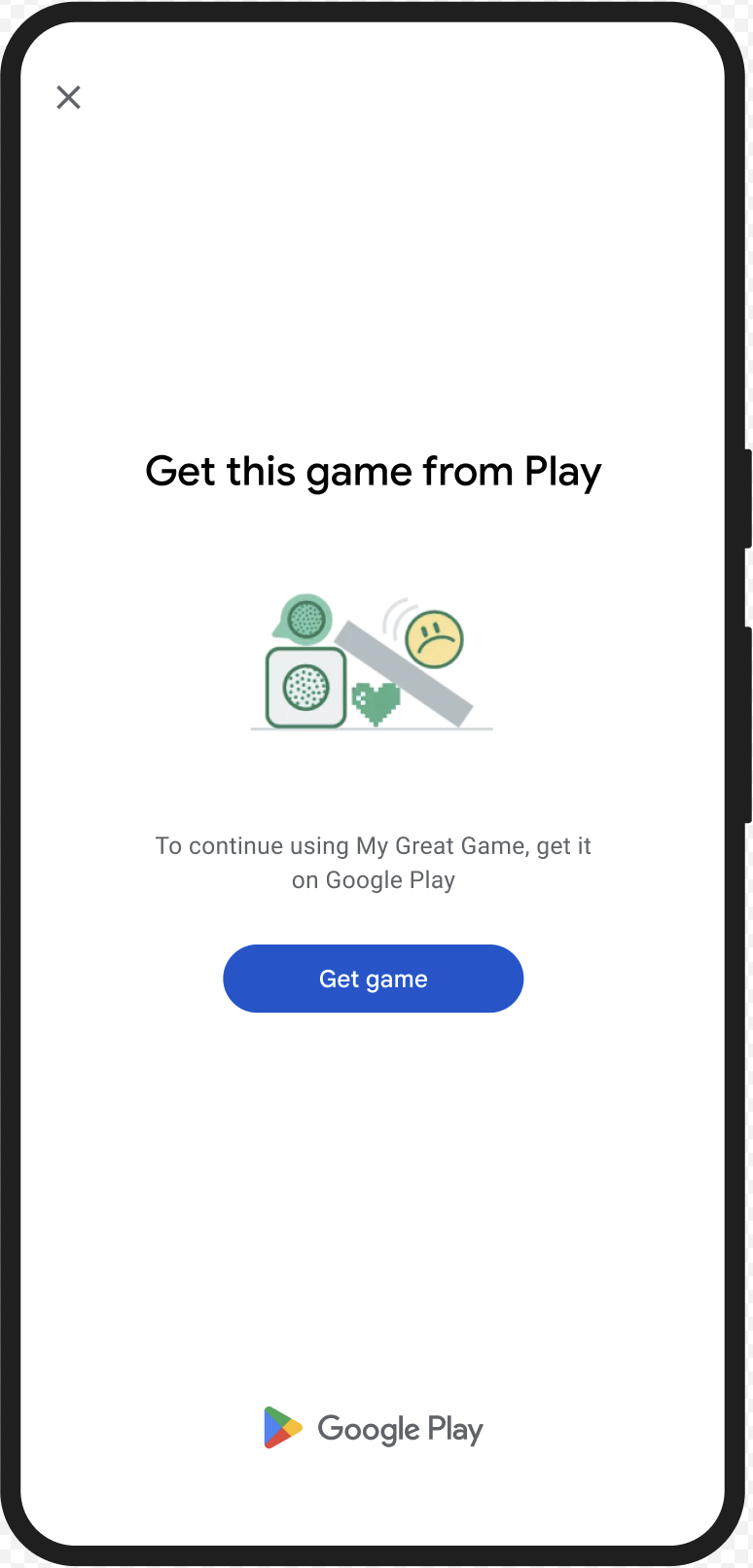
उपयोगकर्ता को Google Play से असली ऐप्लिकेशन डाउनलोड करने के लिए, GET_LICENSED डायलॉग दिखाया जा सकता है. इस एक डायलॉग बॉक्स में, दोनों स्थितियों के बारे में बताया गया है:
- बिना लाइसेंस वाले उपयोगकर्ता को Play का लाइसेंस मिलता है. इससे उपयोगकर्ता को Google Play से ऐप्लिकेशन के अपडेट मिलते हैं.
- अगर किसी उपयोगकर्ता के पास ऐप्लिकेशन का बदला गया वर्शन है, तो यह उसे Google Play से ऐप्लिकेशन का बिना बदलाव वाला वर्शन इंस्टॉल करने का तरीका बताता है.
जब उपयोगकर्ता डायलॉग बॉक्स में जानकारी भर देता है, तो इसके बाद होने वाली इंटिग्रिटी की जांच में appLicensingVerdict: "LICENSED" और appRecognitionVerdict: "PLAY_RECOGNIZED" मिलता है.
UX का उदाहरण
CLOSE_UNKNOWN_ACCESS_RISK (टाइप कोड 2)
नतीजे से जुड़ी समस्या
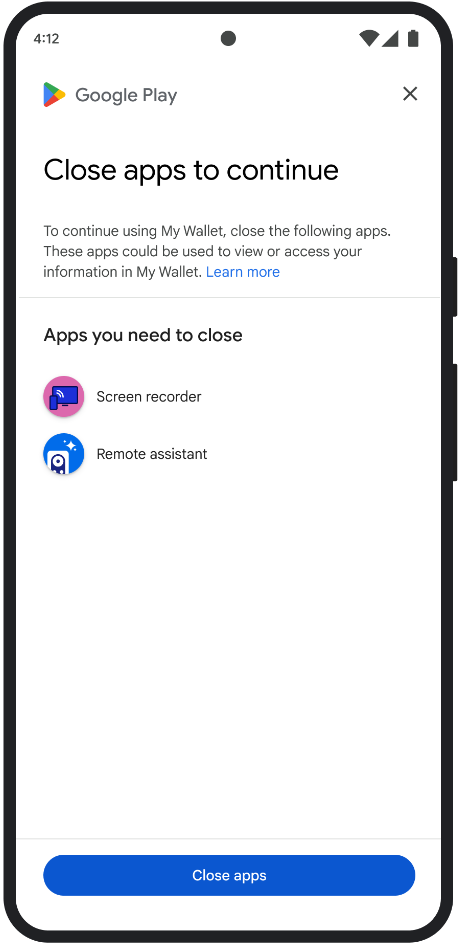
जब environmentDetails.appAccessRiskVerdict.appsDetected में "UNKNOWN_CAPTURING" या "UNKNOWN_CONTROLLING" मौजूद होता है, तो इसका मतलब है कि डिवाइस पर ऐसे अन्य ऐप्लिकेशन चल रहे हैं जिन्हें Google Play से इंस्टॉल नहीं किया गया है या डिवाइस बनाने वाली कंपनी ने सिस्टम के पार्टिशन पर उन्हें पहले से लोड नहीं किया है. ये ऐप्लिकेशन, स्क्रीन कैप्चर कर सकते हैं या डिवाइस को कंट्रोल कर सकते हैं.
बचा हुआ डेटा एक्सपोर्ट करना
उपयोगकर्ता को CLOSE_UNKNOWN_ACCESS_RISK डायलॉग दिखाया जा सकता है. इससे उपयोगकर्ता को उन सभी अनजान ऐप्लिकेशन को बंद करने के लिए कहा जा सकता है जो स्क्रीन कैप्चर कर सकते हैं या डिवाइस को कंट्रोल कर सकते हैं.
अगर उपयोगकर्ता Close all बटन पर टैप करता है, तो ऐसे सभी ऐप्लिकेशन बंद हो जाते हैं.
UX का उदाहरण
CLOSE_ALL_ACCESS_RISK (टाइप कोड 3)
नतीजे से जुड़ी समस्या
अगर environmentDetails.appAccessRiskVerdict.appsDetected में "KNOWN_CAPTURING", "KNOWN_CONTROLLING","UNKNOWN_CAPTURING" या "UNKNOWN_CONTROLLING" में से कोई भी मौजूद है, तो इसका मतलब है कि डिवाइस पर ऐसे ऐप्लिकेशन चल रहे हैं जो स्क्रीन कैप्चर कर सकते हैं या डिवाइस को कंट्रोल कर सकते हैं.
बचा हुआ डेटा एक्सपोर्ट करना
उपयोगकर्ता को CLOSE_ALL_ACCESS_RISK डायलॉग दिखाया जा सकता है. इससे उपयोगकर्ता को उन सभी ऐप्लिकेशन को बंद करने के लिए कहा जाएगा जो स्क्रीन कैप्चर कर सकते हैं या डिवाइस को कंट्रोल कर सकते हैं. अगर उपयोगकर्ता Close all बटन पर टैप करता है, तो डिवाइस पर ऐसे सभी ऐप्लिकेशन बंद हो जाते हैं.
UX का उदाहरण
GET_INTEGRITY (टाइप कोड 4)
नतीजे से जुड़ी समस्या
यह डायलॉग बॉक्स, इनमें से किसी भी समस्या के लिए सही है:
डिवाइस इंटिग्रिटी की कमज़ोर स्थिति: जब
deviceRecognitionVerdictमेंMEETS_DEVICE_INTEGRITYशामिल नहीं होता है, तो हो सकता है कि डिवाइस, असली और सर्टिफ़ाइड Android डिवाइस न हो. उदाहरण के लिए, ऐसा तब हो सकता है, जब डिवाइस का बूटलोडर अनलॉक हो या लोड किया गया Android OS, डिवाइस बनाने वाली कंपनी की सर्टिफ़ाइड इमेज न हो.बिना अनुमति के ऐक्सेस:
appLicensingVerdict: "UNLICENSED". इसका मतलब है कि उपयोगकर्ता खाते के पास आपके ऐप्लिकेशन को इस्तेमाल करने का अधिकार नहीं है. ऐसा तब हो सकता है, जब उपयोगकर्ता ने इसे साइडलोड किया हो या Google Play के अलावा किसी दूसरे ऐप्लिकेशन स्टोर से हासिल किया हो.छेड़छाड़ किया गया ऐप्लिकेशन:
appRecognitionVerdict: "UNRECOGNIZED_VERSION". इसका मतलब है कि आपके ऐप्लिकेशन की बाइनरी में बदलाव किया गया है या यह ऐसा वर्शन नहीं है जिसे Google Play ने मंज़ूरी दी है.क्लाइंट साइड के अपवाद: जब Integrity API के अनुरोध के दौरान, ठीक किए जा सकने वाला कोई अपवाद होता है. ठीक की जा सकने वाली गड़बड़ियां, Integrity API की ऐसी गड़बड़ियां होती हैं जिनके लिए
PLAY_SERVICES_VERSION_OUTDATED,NETWORK_ERROR,PLAY_SERVICES_NOT_FOUNDजैसे गड़बड़ी कोड मिलते हैं.exception.isRemediable()तरीके का इस्तेमाल करके, यह पता लगाया जा सकता है कि किसी गड़बड़ी को डायलॉग से ठीक किया जा सकता है या नहीं.
बचा हुआ डेटा एक्सपोर्ट करना
GET_INTEGRITY डायलॉग को इस तरह से डिज़ाइन किया गया है कि उपयोगकर्ता को आसानी से समस्या हल करने में मदद मिल सके. इसके लिए, समस्या हल करने के कई चरणों को एक ही फ़्लो में शामिल किया गया है. इससे उपयोगकर्ता को अलग-अलग समस्याओं को ठीक करने के लिए, कई अलग-अलग डायलॉग बॉक्स के साथ इंटरैक्ट नहीं करना पड़ता.
डायलॉग का अनुरोध करने पर, यह अपने-आप पता लगा लेता है कि टारगेट किए गए फ़ैसले से जुड़ी कौनसी समस्याएं मौजूद हैं. साथ ही, उन्हें ठीक करने के लिए ज़रूरी तरीके बताता है. इसका मतलब है कि एक डायलॉग अनुरोध में एक साथ कई समस्याओं को हल किया जा सकता है. जैसे:
- डिवाइस इंटेग्रिटी: अगर डिवाइस इंटेग्रिटी से जुड़ी कोई समस्या मिलती है, तो डायलॉग बॉक्स में उपयोगकर्ता को डिवाइस की सुरक्षा का स्टेटस बेहतर बनाने के लिए निर्देश दिए जाएंगे. इससे
MEETS_DEVICE_INTEGRITYके फ़ैसले से जुड़ी ज़रूरी शर्तें पूरी की जा सकेंगी. - ऐप्लिकेशन की इंटिग्रिटी: अगर बिना अनुमति के ऐक्सेस करने या ऐप्लिकेशन में छेड़छाड़ करने जैसी समस्याएं पाई जाती हैं, तो डायलॉग बॉक्स में लोगों को Play Store से ऐप्लिकेशन डाउनलोड करने के लिए कहा जाएगा, ताकि वे इन समस्याओं को ठीक कर सकें.
- क्लाइंट-साइड अपवाद: यह डायलॉग, Integrity API से जुड़ी किसी भी समस्या की जांच करता है और उसे ठीक करने की कोशिश करता है. उदाहरण के लिए, यह उपयोगकर्ता को Google Play services के पुराने वर्शन को अपडेट करने के लिए कह सकता है.
UX का उदाहरण

GET_STRONG_INTEGRITY (टाइप कोड 5)
नतीजे से जुड़ी समस्या
इस डायलॉग को उन सभी समस्याओं को ठीक करने के लिए डिज़ाइन किया गया है जिन्हें GET_INTEGRITY ठीक करता है. साथ ही, इसमें उन समस्याओं को ठीक करने की अतिरिक्त क्षमता भी है जिनकी वजह से किसी डिवाइस को MEETS_STRONG_INTEGRITY का फ़ैसला नहीं मिल पाता. इसके अलावा, यह Play Protect के फ़ैसले से जुड़ी समस्याओं को भी ठीक करता है.
बचा हुआ डेटा एक्सपोर्ट करना
GET_STRONG_INTEGRITY को उपयोगकर्ता के अनुभव को बेहतर बनाने के लिए डिज़ाइन किया गया है. यह एक ही फ़्लो में, उल्लंघन ठीक करने के कई चरणों को मैनेज करता है. डायलॉग बॉक्स, पते से जुड़ी इंटिग्रिटी की समस्याओं की अपने-आप जांच करता है. इनमें ये समस्याएं शामिल हैं:
- डिवाइस इंटेग्रिटी: अगर डिवाइस इंटेग्रिटी से जुड़ी कोई समस्या मिलती है, तो डायलॉग बॉक्स में उपयोगकर्ता को डिवाइस की सुरक्षा का स्टेटस बेहतर बनाने के लिए निर्देश दिए जाएंगे. इससे
MEETS_STRONG_INTEGRITYके फ़ैसले से जुड़ी ज़रूरी शर्तें पूरी की जा सकेंगी. Play Protect की स्थिति: अगर
playProtectVerdictसे किसी समस्या का पता चलता है, तो डायलॉग बॉक्स में उपयोगकर्ता को समस्या ठीक करने का तरीका बताया जाएगा:- अगर Play Protect बंद है (
playProtectVerdict == POSSIBLE_RISK), तो डायलॉग बॉक्स में उपयोगकर्ता को इसे चालू करने के लिए कहा जाएगा. साथ ही, डिवाइस पर मौजूद सभी ऐप्लिकेशन को स्कैन करने के लिए कहा जाएगा. - अगर नुकसान पहुंचाने वाले ऐप्लिकेशन (
playProtectVerdict == MEDIUM_RISKयाHIGH_RISK) का पता चलता है, तो डायलॉग बॉक्स में उपयोगकर्ता को Google Play Protect का इस्तेमाल करके, उन्हें अनइंस्टॉल करने का तरीका बताया जाएगा.
- अगर Play Protect बंद है (
ऐप इंटेग्रिटी: अगर बिना अनुमति के ऐक्सेस करने या ऐप्लिकेशन में छेड़छाड़ करने जैसी समस्याएं पाई जाती हैं, तो डायलॉग बॉक्स में उपयोगकर्ता को Play Store से ऐप्लिकेशन डाउनलोड करने के लिए कहा जाएगा, ताकि समस्या ठीक की जा सके.
क्लाइंट-साइड से जुड़ी समस्याएं: डायलॉग बॉक्स, Integrity API से जुड़ी किसी भी समस्या को हल करने की कोशिश करता है. उदाहरण के लिए, अगर Google Play services बंद है, तो यह उपयोगकर्ता को उसे चालू करने के लिए कह सकता है. सुधारी जा सकने वाली गड़बड़ियां, Integrity API से जुड़ी ऐसी गड़बड़ियां होती हैं जिनके लिए गड़बड़ी कोड मौजूद होते हैं. जैसे,
PLAY_SERVICES_VERSION_OUTDATED,NETWORK_ERRORयाPLAY_SERVICES_NOT_FOUND.exception.isRemediable()तरीके का इस्तेमाल करके, यह देखा जा सकता है कि डायलॉग बॉक्स से किसी गड़बड़ी को ठीक किया जा सकता है या नहीं.
UX का उदाहरण
