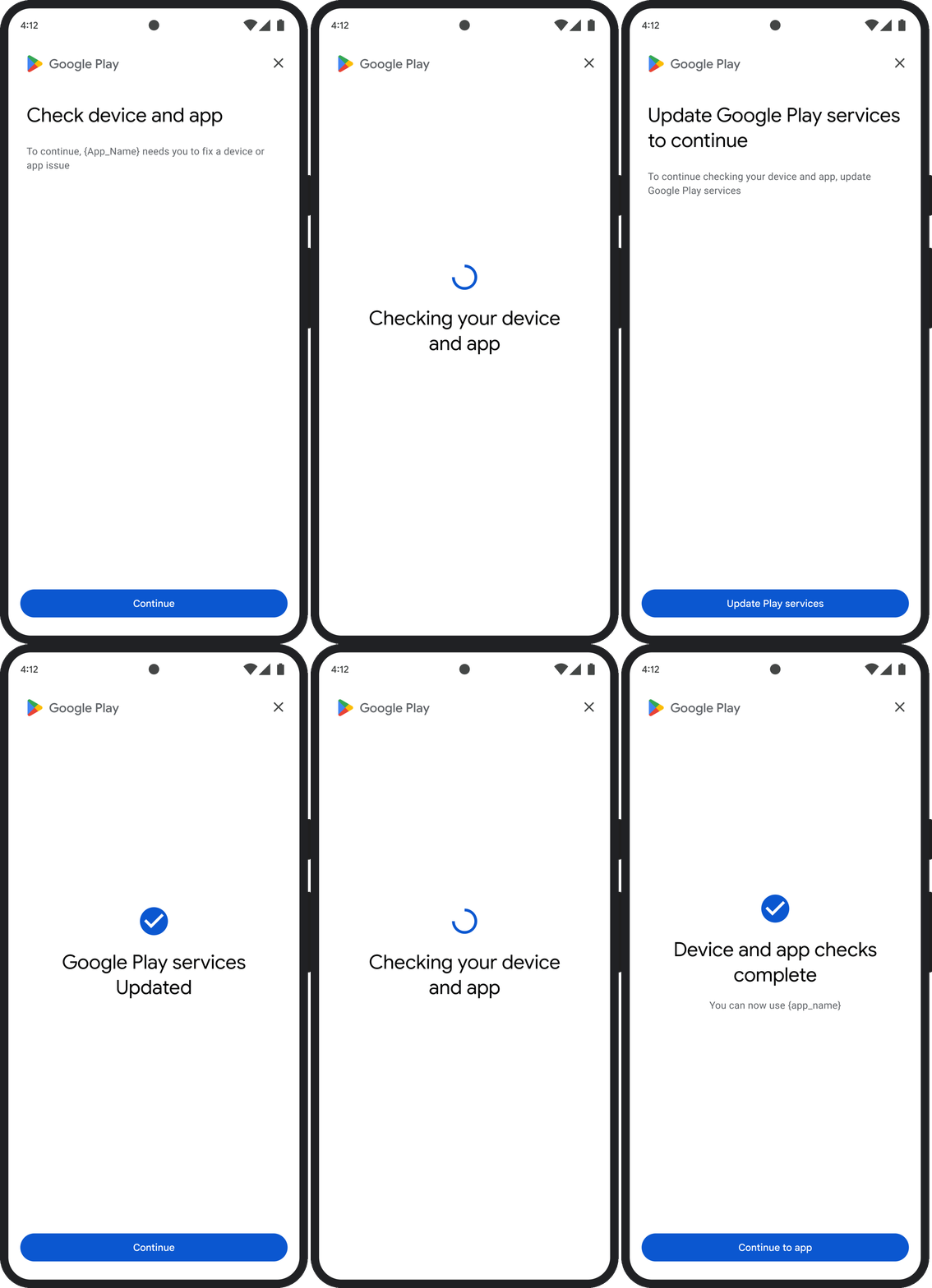
توضّح هذه الصفحة كيفية التعامل مع المشاكل المتعلّقة بنتائج التحقّق من السلامة.
بعد طلب رمز مميّز للسلامة، يمكنك عرض مربّع حوار Google Play للمستخدم. يمكنك عرض مربّع الحوار عندما تكون هناك مشكلة واحدة أو أكثر في بيان السلامة أو إذا حدث استثناء أثناء طلب بيانات من واجهة برمجة التطبيقات Integrity API. بعد إغلاق مربّع الحوار، يمكنك التأكّد من حلّ المشكلة من خلال طلب رمز مميّز آخر للتحقّق من السلامة. إذا أرسلت طلبات عادية، عليك إعادة إعداد موفّر الرموز المميزة للحصول على نتيجة جديدة.
طلب ظهور مربّع حوار بشأن السلامة لحلّ مشكلة في النتيجة
عندما يطلب العميل رمزًا مميّزًا للتحقّق من السلامة، يمكنك استخدام الطريقة المتاحة في StandardIntegrityToken (واجهة برمجة التطبيقات العادية) وIntegrityTokenResponse (واجهة برمجة التطبيقات الكلاسيكية): showDialog(Activity activity, int integrityDialogTypeCode).
توضّح الخطوات التالية كيفية استخدام واجهة برمجة التطبيقات Play Integrity API لعرض مربّع حوار مخصَّص لتصدير البيانات الناقصة باستخدام رمز مربّع الحوار GET_LICENSED.
يتم إدراج رموز مربّعات الحوار الأخرى التي يمكن أن يطلبها تطبيقك بعد هذا القسم.
اطلب رمزًا مميزًا للسلامة من تطبيقك، وأرسِل الرمز إلى الخادم. يمكنك استخدام الطلب "العادي" أو "الكلاسيكي".
Kotlin
// Request an integrity token
val tokenResponse: StandardIntegrityToken = requestIntegrityToken()
// Send token to app server and get response on what to do next
val yourServerResponse: YourServerResponse = sendToServer(tokenResponse.token())
Java
// Request an integrity token
StandardIntegrityToken tokenResponse = requestIntegrityToken();
// Send token to app server and get response on what to do next
YourServerResponse yourServerResponse = sendToServer(tokenResponse.token());
Unity
// Request an integrity token
StandardIntegrityToken tokenResponse = RequestIntegrityToken();
// Send token to app server and get response on what to do next
YourServerResponse yourServerResponse = sendToServer(tokenResponse.Token);
Unreal Engine
// Request an integrity token
StandardIntegrityToken* Response = RequestIntegrityToken();
// Send token to app server and get response on what to do next
YourServerResponse YourServerResponse = SendToServer(Response->Token);
الإعلانات المدمجة مع المحتوى
/// Request an integrity token
StandardIntegrityToken* response = requestIntegrityToken();
/// Send token to app server and get response on what to do next
YourServerResponse yourServerResponse = sendToServer(StandardIntegrityToken_getToken(response));
على الخادم، فكِّر تشفير الرمز المميز للسلامة وتحقَّق من الحقل
appLicensingVerdict. قد يبدو ذلك على النحو التالي:// Licensing issue { ... "accountDetails": { "appLicensingVerdict": "UNLICENSED" } }
إذا كانت الرمز المميّز يحتوي على
appLicensingVerdict: "UNLICENSED"، أرسِل ردًا إلى عميل تطبيقك تطلب منه عرض مربّع حوار الترخيص:Kotlin
private fun getDialogTypeCode(integrityToken: String): Int{
  // Get licensing verdict from decrypted and verified integritytoken
  val licensingVerdict: String = getLicensingVerdictFromDecryptedToken(integrityToken)

  return if (licensingVerdict == "UNLICENSED") {
          1 // GET_LICENSED
      } else 0
}
Java
private int getDialogTypeCode(String integrityToken) {
  // Get licensing verdict from decrypted and verified integrityToken
  String licensingVerdict = getLicensingVerdictFromDecryptedToken(integrityToken);

  if (licensingVerdict.equals("UNLICENSED")) {
    return 1; // GET_LICENSED
  }
  return 0;
}
Unity
private int GetDialogTypeCode(string IntegrityToken) {
  // Get licensing verdict from decrypted and verified integrityToken
  string licensingVerdict = GetLicensingVerdictFromDecryptedToken(IntegrityToken);

  if (licensingVerdict == "UNLICENSED") {
    return 1; // GET_LICENSED
  }
  return 0;
}
Unreal Engine
private int GetDialogTypeCode(FString IntegrityToken) {
  // Get licensing verdict from decrypted and verified integrityToken
  FString LicensingVerdict = GetLicensingVerdictFromDecryptedToken(IntegrityToken);

  if (LicensingVerdict == "UNLICENSED") {
    return 1; // GET_LICENSED
  }
  return 0;
}
الإعلانات المدمجة مع المحتوى
private int getDialogTypeCode(string integrity_token) {
  /// Get licensing verdict from decrypted and verified integrityToken
  string licensing_verdict = getLicensingVerdictFromDecryptedToken(integrity_token);

  if (licensing_verdict == "UNLICENSED") {
    return 1; // GET_LICENSED
  }
  return 0;
}
في تطبيقك، استدعِ الدالة
showDialogباستخدام الرمز المطلوب الذي تم استرداده من الخادم:Kotlin
// Show dialog as indicated by the server
val showDialogType: Int? = yourServerResponse.integrityDialogTypeCode()
if (showDialogType == null) {
   return
}

// Create dialog request
val dialogRequest = StandardIntegrityDialogRequest.builder()
        .setActivity(activity)
        .setTypeCode(showDialogType)
        .setStandardIntegrityResponse(StandardIntegrityResponse.TokenResponse(token))
        .build()

// Call showDialog, the dialog will be shown on top of the provided activity
// and the task will complete when the dialog is closed.
val result: Task<Int> = standardIntegrityManager.showDialog(dialogRequest)

// Handle response code, call the Integrity API again to confirm that the
// verdict issue has been resolved.
Java
// Show dialog as indicated by the server
@Nullable Integer showDialogType = yourServerResponse.integrityDialogTypeCode();
if (showDialogType == null) {
   return;
}

// Create dialog request
StandardIntegrityDialogRequest dialogRequest =
    StandardIntegrityDialogRequest.builder()
        .setActivity(getActivity())
        .setTypeCode(showDialogTypeCode)
        .setStandardIntegrityResponse(new StandardIntegrityResponse.TokenResponse(token))
        .build();

// Call showDialog, the dialog will be shown on top of the provided activity
// and the task will complete when the dialog is closed.
Task<Integer> result = standardIntegrityManager.showDialog(dialogRequest);

// Handle response code, call the Integrity API again to confirm that the
// verdict issue has been resolved.
Unity
// Initialize the V2 manager. Requires Play Integrity Unity Plugin v2.0.0 or
// higher.
var standardIntegrityManager = new StandardIntegrityManagerV2();
IEnumerator ShowDialogCoroutine() {
  int showDialogType = yourServerResponse.IntegrityDialogTypeCode();

  PlayAsyncOperation<IntegrityDialogResponseCode, StandardIntegrityError> showDialogTask;

  using (var activity = UnityPlayerHelper.GetCurrentActivity())
  {
      // Create a dialog request
      var dialogRequest = new StandardIntegrityDialogRequest(tokenResponse, activity, showDialogType);

      // Call showDialog with the request, the dialog will be shown on top of the
      // provided activity and complete when the dialog is closed.
      showDialogTask = standardIntegrityManager.ShowDialog(dialogRequest);
  }

  // Wait for PlayAsyncOperation to complete.
  yield return showDialogTask;

  // Handle response code, call the Integrity API again to confirm that the
  // verdict issue been resolved.
}
Unreal Engine
// .h
void MyClass::OnShowDialogCompleted(
  EStandardIntegrityErrorCode Error,
  EIntegrityDialogResponseCode Response)
{
  // Handle response code, call the Integrity API again to confirm that the
  // verdict issue has been resolved.
}

// .cpp
void MyClass::RequestIntegrityToken()
{
  UStandardIntegrityToken* Response = ...
  int TypeCode = YourServerResponse.integrityDialogTypeCode();

  // Create a delegate to bind the callback function.
  FShowDialogStandardOperationCompletedDelegate Delegate;

  // Bind the completion handler (OnShowDialogCompleted) to the delegate.
  Delegate.BindDynamic(this, &MyClass::OnShowDialogCompleted);

  // Call ShowDialog with TypeCode which completes when the dialog is closed.
  Response->ShowDialog(TypeCode, Delegate);
}
الإعلانات المدمجة مع المحتوى
// Show dialog as indicated by the server
int show_dialog_type = yourServerResponse.integrityDialogTypeCode();
if(show_dialog_type == 0){
return;
}

/// Create dialog request
StandardIntegrityDialogRequest* dialog_request;
StandardIntegrityDialogRequest_create(&dialog_request);
StandardIntegrityDialogRequest_setTypeCode(dialog_request, show_dialog_type);
StandardIntegrityDialogRequest_setActivity(dialog_request, activity);
StandardIntegrityDialogRequest_setStandardIntegrityToken(dialog_request,
                                              token_response);

/// Call showDialog with the dialog request. The dialog will be shown on top
/// of the provided activity and complete when the dialog is closed by the
/// user.
StandardIntegrityDialogResponse* dialog_response;
StandardIntegrityErrorCode error_code =
  StandardIntegrityManager_showDialog(dialog_request, &dialog_response);

/// Use polling to wait for the async operation to complete. Note, the polling
/// shouldn't block the thread where the StandardIntegrityManager is running.
IntegrityDialogResponseCode response_code = INTEGRITY_DIALOG_RESPONSE_UNKNOWN;
while (error_code == STANDARD_INTEGRITY_NO_ERROR) {
  error_code = StandardIntegrityDialogResponse_getResponseCode(dialog_response, &response_code);
  if(response_code != INTEGRITY_DIALOG_RESPONSE_UNKNOWN){
    break;
  }
}

/// Free memory
StandardIntegrityDialogRequest_destroy(dialog_request);
StandardIntegrityDialogResponse_destroy(dialog_response);

/// Handle response code, call the Integrity API again to confirm that the
/// verdict issues have been resolved.
يظهر مربّع الحوار أعلى النشاط المقدَّم. عندما يغلق المستخدم مربّع الحوار، تكتمل المهمة برمز استجابة.
(اختياري) اطلب رمزًا مميّزًا آخر لعرض أي مربّعات حوار أخرى. إذا أرسلت طلبات عادية، عليك إعادة تحضير موفّر الرموز المميزة للحصول على نتيجة جديدة.
طلب ظهور مربّع حوار "توفير السلامة" لإصلاح استثناء من جهة العميل
إذا تعذّر تنفيذ طلب Integrity API وظهر الرمز StandardIntegrityException
(واجهة برمجة التطبيقات العادية) أو IntegrityServiceException (واجهة برمجة التطبيقات الكلاسيكية) وكان من الممكن إصلاح الاستثناء، يمكنك استخدام مربّعَي الحوار GET_INTEGRITY أو GET_STRONG_INTEGRITY لإصلاح الخطأ.
توضّح الخطوات التالية كيفية استخدام مربّع الحوار GET_INTEGRITY
لإصلاح خطأ يمكن إصلاحه من جهة العميل تم الإبلاغ عنه من خلال واجهة Integrity API.
تأكَّد من إمكانية حلّ الاستثناء الذي تم إرجاعه من طلب بيانات من واجهة برمجة التطبيقات Integrity API.
Kotlin
private fun isExceptionRemediable(exception: ExecutionException): Boolean {
  val cause = exception.cause
  if (cause is StandardIntegrityException && cause.isRemediable) {
      return true
  }
  return false
}
Java
private boolean isExceptionRemediable(ExecutionException exception) {
  Throwable cause = exception.getCause();
  if (cause instanceof StandardIntegrityException integrityException
&& integrityException.isRemediable()) {
      return true;
  }
  return false;
}
Unity
private bool IsExceptionRemediable(StandardIntegrityError error) {
  // Check if the operation resulted in a remediable error
  if (error != null && error.ErrorCode != StandardIntegrityErrorCode.NoError && error.IsRemediable) {
      return true;
  }
  return false;
}
الإعلانات المدمجة مع المحتوى
bool IsErrorRemediable(StandardIntegrityToken* token) {
  /// Check if the error associated with the token is remediable
  bool isRemediable = false;
  if(StandardIntegrityToken_getIsRemediable(response, &isRemediable) == STANDARD_INTEGRITY_NO_ERROR){
    return isRemediable;
  }
  return false;
}
إذا كان الاستثناء قابلاً للتصحيح، اطلب مربع الحوار
GET_INTEGRITYباستخدام الاستثناء الذي تم عرضه. سيتم عرض مربّع الحوار فوق النشاط المقدَّم، وسيكتمل Task المعروض مع رمز استجابة بعد أن يغلق المستخدم مربّع الحوار.Kotlin
private fun showDialog(exception: StandardIntegrityException) {
  // Create a dialog request
  val standardIntegrityDialogRequest =
      StandardIntegrityDialogRequest.builder()
          .setActivity(activity)
          .setType(IntegrityDialogTypeCode.GET_INTEGRITY)
          .setStandardIntegrityResponse(ExceptionDetails(exception))
          .build()

  // Request dialog
  val responseCode: Task<Int> =
        standardIntegrityManager.showDialog(standardIntegrityDialogRequest)
}
Java
private void showDialog(StandardIntegrityException exception) {
  // Create a dialog request
  StandardIntegrityDialogRequest standardIntegrityDialogRequest =
      StandardIntegrityDialogRequest.builder()
          .setActivity(this.activity)
          .setType(IntegrityDialogTypeCode.GET_INTEGRITY)
          .setStandardIntegrityResponse(new ExceptionDetails(exception))
          .build();

  // Request dialog
  Task<Integer> responseCode =
        standardIntegrityManager.showDialog(standardIntegrityDialogRequest);
}
Unity
// Initialize the V2 manager. Requires Play Integrity Unity Plugin v2.0.0 or
// higher.
var standardIntegrityManager = new StandardIntegrityManagerV2();
IEnumerator ShowDialogToFixError(StandardIntegrityError error) {
  PlayAsyncOperation<IntegrityDialogResponseCode, StandardIntegrityError> showDialogTask;

  using (var activity = UnityPlayerHelper.GetCurrentActivity())
  {
      // Create a dialog request using the error
      var dialogRequest = new StandardIntegrityDialogRequest(error, activity, GET_INTEGRITY_DIALOG);

      // Request dialog
      showDialogTask = standardIntegrityManager.ShowDialog(dialogRequest);
  }

  // Wait for PlayAsyncOperation to complete.
  yield return showDialogTask;
}
الإعلانات المدمجة مع المحتوى
private void showDialogToFixError(StandardIntegrityToken* token) {
  /// If the token request failed, and the underlying error is not fixable
  /// then return early
  if(isErrorRemediable(token)) {
    return;
  }

  /// Create dialog request
  StandardIntegrityDialogRequest* dialog_request;
  StandardIntegrityDialogRequest_create(&dialog_request);
  StandardIntegrityDialogRequest_setTypeCode(dialog_request,
                                     kGetIntegrityDialogTypeCode);
  StandardIntegrityDialogRequest_setActivity(dialog_request, activity);
  StandardIntegrityDialogRequest_setStandardIntegrityToken(dialog_request,
                                                  token_response);

  /// Call showDialog with the dialog request. The dialog will be shown on
  /// top of the provided activity and complete when the dialog is closed by
  /// the user.
  StandardIntegrityDialogResponse* dialog_response;
  StandardIntegrityErrorCode error_code =
      StandardIntegrityManager_showDialog(dialog_request, &dialog_response);

  /// Use polling to wait for the async operation to complete.
  /// Note, the polling shouldn't block the thread where the
  /// StandardIntegrityManager is running.
  IntegrityDialogResponseCode response_code = INTEGRITY_DIALOG_RESPONSE_UNKNOWN;
  while (error_code == STANDARD_INTEGRITY_NO_ERROR) {
      error_code = StandardIntegrityDialogResponse_getResponseCode(response, &response_code);
      if(response_code != INTEGRITY_DIALOG_RESPONSE_UNKNOWN){
        break;
      }
  }

  /// Free memory
  StandardIntegrityDialogRequest_destroy(dialog_request);
  StandardIntegrityDialogResponse_destroy(dialog_response);

}
إذا كان رمز الاستجابة الذي تم إرجاعه يشير إلى نجاح العملية، من المفترض أن ينجح الطلب التالي للحصول على رمز مميّز للسلامة بدون أي استثناءات. في حال تقديم طلبات عادية، عليك إعادة إعداد موفّر الرموز المميزة للحصول على نتيجة جديدة.
رموز مربّع حوار التحقّق من السلامة
GET_LICENSED (رمز النوع 1)
مشكلة في البيان
مربّع الحوار هذا مناسب لحالتَين:
- الوصول غير المصرَّح به:
appLicensingVerdict: "UNLICENSED"وهذا يعني أنّ حساب المستخدم لا يملك إذن الوصول إلى تطبيقك، وهو ما يحدث إذا ثبَّت المستخدم التطبيق من مصدر غير معروف أو حصل عليه من متجر تطبيقات آخر غير Google Play. - تطبيق تم التلاعب به:
appRecognitionVerdict: "UNRECOGNIZED_VERSION"وهذا يعني أنّه تم تعديل البرنامج الثنائي لتطبيقك أو أنّه ليس إصدارًا يتعرّف عليه Google Play.
تصدير البيانات الناقصة
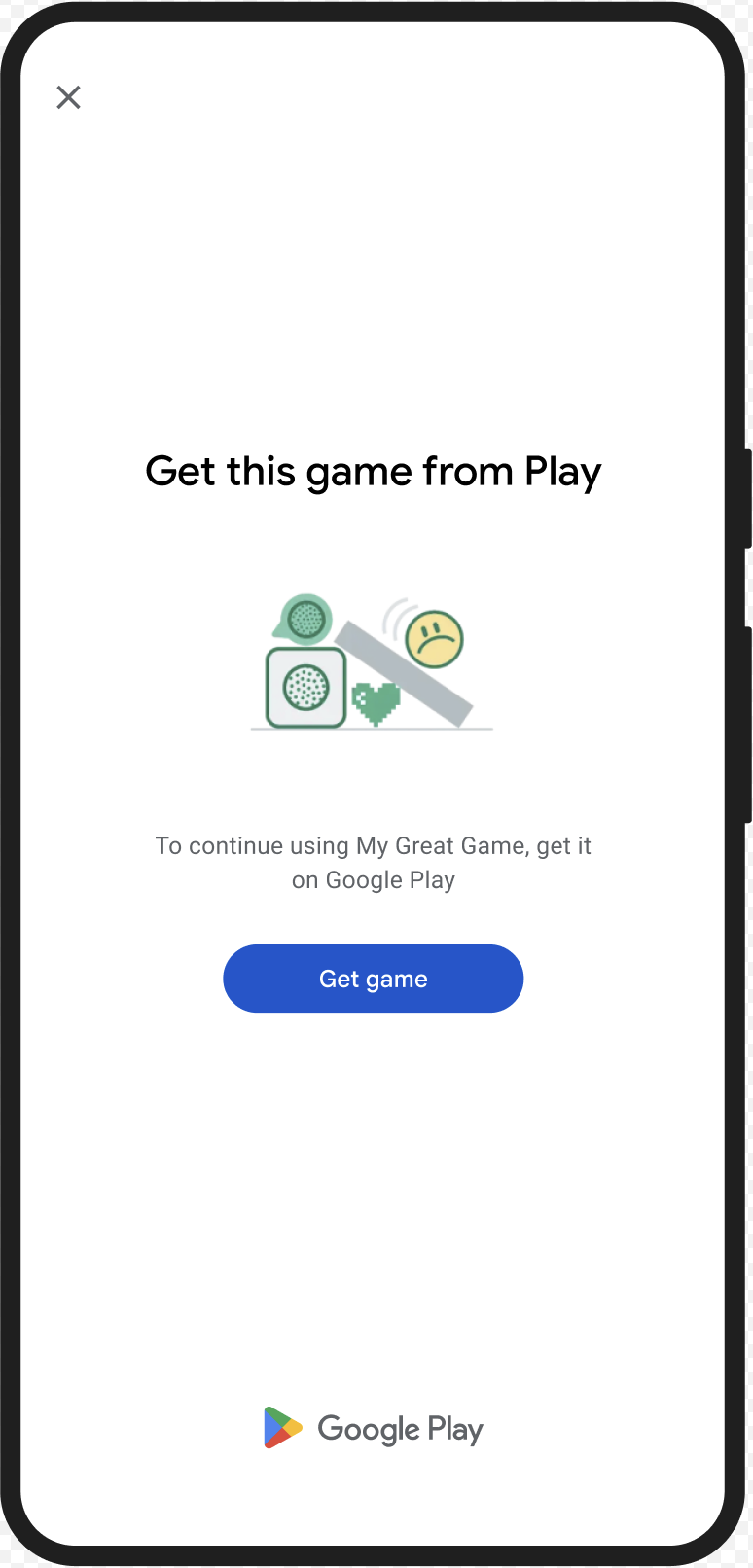
يمكنك عرض مربّع الحوار GET_LICENSED لكي تطلب من المستخدم الحصول على التطبيق الأصلي من Google Play. يتناول مربّع الحوار الفردي هذا كلا السيناريوهَين:
- بالنسبة إلى المستخدم غير المرخَّص، يمنحه ترخيصًا على Play. ويتيح ذلك للمستخدم تلقّي تحديثات التطبيق من Google Play.
- بالنسبة إلى المستخدم الذي لديه إصدار معدَّل من التطبيق، يوجّهه إلى تثبيت الإصدار غير المعدَّل من Google Play.
عندما يُكمل المستخدم مربّع الحوار، تعرض عمليات التحقّق اللاحقة من السلامة الرمزين appLicensingVerdict: "LICENSED" وappRecognitionVerdict: "PLAY_RECOGNIZED".
مثال على تجربة المستخدم
CLOSE_UNKNOWN_ACCESS_RISK (رمز النوع 2)
مشكلة في البيان
عندما تتضمّن environmentDetails.appAccessRiskVerdict.appsDetected القيمة "UNKNOWN_CAPTURING" أو "UNKNOWN_CONTROLLING"، يعني ذلك أنّ هناك تطبيقات أخرى (لم يتم تثبيتها من خلال Google Play أو تحميلها مسبقًا على قسم النظام من قِبل الشركة المصنّعة للجهاز) تعمل على الجهاز ويمكنها أخذ لقطات للشاشة أو التحكّم في الجهاز.
تصدير البيانات الناقصة
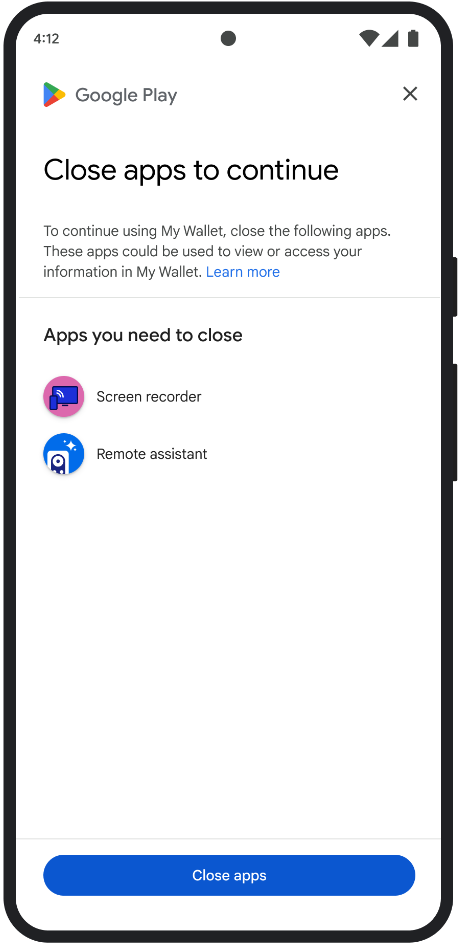
يمكنك عرض مربّع الحوار CLOSE_UNKNOWN_ACCESS_RISK لتطلب من المستخدم إغلاق جميع التطبيقات غير المعروفة التي قد تسجّل الشاشة أو تتحكّم في الجهاز.
إذا نقر المستخدم على الزر Close all، سيتم إغلاق جميع هذه التطبيقات.
مثال على تجربة المستخدم
CLOSE_ALL_ACCESS_RISK (رمز النوع 3)
مشكلة في البيان
عندما تتضمّن environmentDetails.appAccessRiskVerdict.appsDetected أيًا من "KNOWN_CAPTURING" أو "KNOWN_CONTROLLING" أو "UNKNOWN_CAPTURING" أو "UNKNOWN_CONTROLLING"، يعني ذلك أنّ هناك تطبيقات قيد التشغيل على الجهاز يمكنها أخذ لقطات للشاشة أو التحكّم في الجهاز.
تصدير البيانات الناقصة
يمكنك عرض مربّع الحوار CLOSE_ALL_ACCESS_RISK لطلب إغلاق جميع التطبيقات التي يمكنها أخذ لقطات للشاشة أو التحكّم في الجهاز. إذا نقر المستخدم على الزر Close all، سيتم إغلاق جميع هذه التطبيقات على الجهاز.
مثال على تجربة المستخدم
GET_INTEGRITY (رمز النوع 4)
مشكلة في البيان
هذا المربع مناسب لأي من المشاكل التالية:
سلامة الجهاز ضعيفة: عندما لا يحتوي
deviceRecognitionVerdictعلىMEETS_DEVICE_INTEGRITY، قد لا يكون الجهاز جهاز Android حقيقيًا ومعتمدًا. يمكن أن يحدث ذلك، على سبيل المثال، إذا كان برنامج إقلاع الجهاز مفتوحًا أو إذا كان نظام التشغيل Android المحمَّل ليس صورة معتمَدة من الشركة المصنّعة.الوصول غير المصرَّح به:
appLicensingVerdict: "UNLICENSED"وهذا يعني أنّ حساب المستخدم لا يملك إذن الوصول إلى تطبيقك، وهو ما يحدث إذا ثبَّت المستخدم التطبيق من مصدر غير معروف أو حصل عليه من متجر تطبيقات آخر غير Google Play.تطبيق تم التلاعب به:
appRecognitionVerdict: "UNRECOGNIZED_VERSION"وهذا يعني أنّه تم تعديل البرنامج الثنائي لتطبيقك أو أنّه ليس إصدارًا يتعرّف عليه Google Play.استثناءات من جهة العميل: تحدث عندما يقع استثناء يمكن إصلاحه أثناء طلب بيانات من واجهة برمجة التطبيقات Integrity API. الاستثناءات القابلة للإصلاح هي استثناءات Integrity API التي تتضمّن رموز خطأ، مثل
PLAY_SERVICES_VERSION_OUTDATEDوNETWORK_ERRORوPLAY_SERVICES_NOT_FOUNDوما إلى ذلك. يمكنك استخدام طريقةexception.isRemediable()للتحقّق مما إذا كان يمكن إصلاح الاستثناء من خلال مربّع الحوار.
تصدير البيانات الناقصة
تم تصميم مربّع الحوار GET_INTEGRITY لتبسيط تجربة المستخدم من خلال معالجة خطوات متعددة للإصلاح ضمن مسار واحد متواصل. ويمنع ذلك المستخدم من التفاعل مع مربّعات حوار منفصلة متعددة لإصلاح مشاكل مختلفة.
عند طلب مربّع الحوار، يتم تلقائيًا رصد المشاكل المتعلّقة بالنتائج المستهدَفة وتقديم خطوات الإصلاح المناسبة. وهذا يعني أنّ طلب حوار واحد يمكنه معالجة مشاكل متعددة في الوقت نفسه، بما في ذلك:
- سلامة الجهاز: في حال رصد مشكلة تتعلّق بسلامة الجهاز، سيوجه مربع الحوار المستخدم إلى تحسين حالة أمان الجهاز لاستيفاء متطلبات الحصول على نتيجة
MEETS_DEVICE_INTEGRITY. - سلامة التطبيق: إذا تم رصد مشاكل، مثل الوصول غير المصرّح به أو التلاعب بالتطبيق، سيوجه مربّع الحوار المستخدمين إلى تنزيل التطبيق من "متجر Play" لحلّ هذه المشاكل.
- استثناءات من جهة العميل: يتحقّق مربّع الحوار من أي مشاكل أساسية تسبّبت في حدوث استثناء في Integrity API ويحاول حلّها. على سبيل المثال، قد تطلب من المستخدم تحديث إصدار قديم من "خدمات Google Play".
مثال على تجربة المستخدم

GET_STRONG_INTEGRITY (رمز النوع 5)
مشكلة في البيان
تم تصميم مربّع الحوار هذا لحلّ جميع المشاكل التي يعالجها طلب GET_INTEGRITY، مع إمكانية إضافية لحلّ المشاكل التي تمنع الجهاز من تلقّي نتيجة MEETS_STRONG_INTEGRITY وحلّ المشاكل المتعلّقة بنتائج خدمة "Play للحماية".
تصدير البيانات الناقصة
تم تصميم GET_STRONG_INTEGRITY لتبسيط تجربة المستخدم من خلال
التعامل مع خطوات متعددة للإصلاح ضمن مسار واحد متواصل. يتحقّق مربّع الحوار تلقائيًا من المشاكل المتعلّقة بالسلامة التي تنطبق على العنوان، بما في ذلك:
- سلامة الجهاز: في حال رصد مشكلة تتعلّق بسلامة الجهاز، سيوجه مربع الحوار المستخدم إلى تحسين حالة أمان الجهاز لاستيفاء متطلبات الحصول على نتيجة
MEETS_STRONG_INTEGRITY. حالة Play للحماية: إذا كان الرمز
playProtectVerdictيشير إلى وجود مشكلة، سيوجه مربع الحوار المستخدم لحلّها:- إذا كانت خدمة "Play للحماية" غير مفعّلة (
playProtectVerdict == POSSIBLE_RISK)، سيطلب مربع الحوار من المستخدم تفعيلها وإجراء فحص لجميع التطبيقات على الجهاز. - في حال رصد تطبيقات ضارة (
playProtectVerdict == MEDIUM_RISKأوHIGH_RISK)، سيوجه مربّع الحوار المستخدم إلى إلغاء تثبيتها باستخدام "Google Play للحماية".
- إذا كانت خدمة "Play للحماية" غير مفعّلة (
سلامة التطبيق: إذا تم رصد مشاكل مثل الوصول غير المصرَّح به أو التلاعب بالتطبيق، سيطلب مربّع الحوار من المستخدم الحصول على التطبيق من "متجر Play" لحلّ المشكلة.
استثناءات من جهة العميل: تحاول النافذة أيضًا حلّ أي مشاكل أساسية تسبّبت في حدوث استثناء في Integrity API. على سبيل المثال، قد يطلب من المستخدم تفعيل "خدمات Google Play" إذا تبيّن أنّها غير مفعَّلة. الاستثناءات القابلة للإصلاح هي استثناءات Integrity API التي تتضمّن رموز خطأ مثل
PLAY_SERVICES_VERSION_OUTDATEDأوNETWORK_ERRORأوPLAY_SERVICES_NOT_FOUND. يمكنك استخدام طريقةexception.isRemediable()للتحقّق مما إذا كان يمكن إصلاح الخطأ باستخدام مربّع الحوار.
مثال على تجربة المستخدم