
AppFunctions allow your Android app to share specific pieces of functionality that the system and various AI agents and assistants can discover and invoke. By defining these functions, you enable your app to provide services, data, and actions to the Android OS, allowing users to complete tasks through AI agents and system-level interactions.
AppFunctions serve as the mobile equivalent of tools within the Model Context
Protocol (MCP). While MCP traditionally standardizes how agents
connect to server-side tools, AppFunctions provide the same mechanism for
Android apps. This enables you to expose your app's capabilities as
orchestratable "tools" that authorized apps (callers) can discover and execute
to fulfill user intents. Callers must have the EXECUTE_APP_FUNCTIONS
permission to discover and execute AppFunctions, and can include agents, apps,
and AI assistants like Gemini.
AppFunctions work with devices running Android 16 or higher.
Example use cases
AppFunctions provide a powerful mechanism to automate tasks and streamline user interactions. By exposing your app's capabilities, you enable users to accomplish complex goals using natural language, often bypassing the need for step-by-step, manual navigation with your UI.
The following scenarios illustrate how AppFunctions can be used to drive experiences within a variety of app categories:
- Task management and productivity
- User request: "Remind me to pick up my package at work today at 5 PM".
- AppFunction action: The caller identifies the relevant task management app and invokes a function to create a task, automatically populating the title, time, and location fields based on the user's prompt.
- Media and entertainment
- User request: "Create a new playlist with the top jazz albums from this year".
- AppFunction action: The caller executes a playlist creation function within a music app, passing context like "top jazz albums for 2026" as the query to generate and launch the content immediately.
- Cross-app workflows
- User request: "Find the noodle recipe from Lisa's email and add the ingredients to my shopping list".
- AppFunction action: This request uses functions from multiple apps. First, the caller uses an email app's search function to retrieve the content. Then, it extracts the relevant ingredients and invokes a shopping list app's function to populate the user's list.
- Calendar and scheduling
- User request: "Add Mom's birthday party to my calendar for next Monday at 6 PM".
- AppFunction action: The approved agentic app invokes the calendar app's "create event" function, parsing the relevant context like "next Monday" and "6 PM" to create the entry without the user needing to manually open the calendar.
How AppFunctions work
AppFunctions is an Android 16 platform feature and an accompanying Jetpack library that allows apps to expose specific functions for callers, such as agent apps, to access and execute on device.
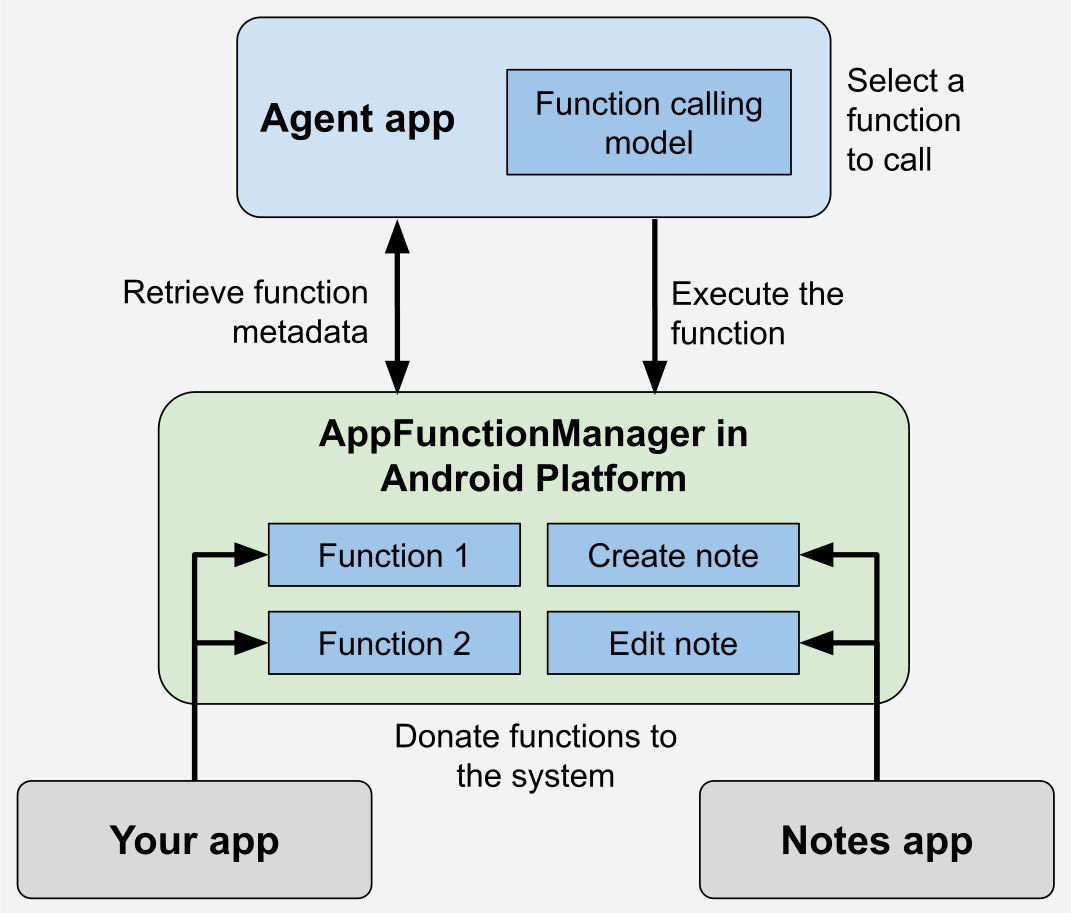
The following diagram illustrates the typical flow of how AppFunctions are shared by apps to an agent and subsequently executed. Agents are likely to consider both server-side remote MCP tools and local AppFunctions together when handling user requests. The detailed flow for using local AppFunctions is as follows:
- AppFunction declaration: The Android app is built to expose its AppFunctions, such as "Create Note" or "Send Message".
- Schema generation: The AppFunctions Jetpack library generates an XML schema file that lists all the declared AppFunctions in the app. This file is used by the Android OS to index the available AppFunctions.
- Metadata retrieval: The agent can retrieve AppFunction metadata by querying it.
- AppFunction selection and execution: Based on user prompts, the agent will select and execute the appropriate AppFunction with the appropriate parameters.
The AppFunctions Jetpack library simplifies exposing your app's functionality.
With the annotation processor, developers annotate the functions they want to
expose. Callers can then discover and invoke these indexed functions using
AppFunctionManager.
Before invoking a function, callers should verify that the device supports the
AppFunctions feature by attempting to retrieve an instance of
AppFunctionManager. Once supported, callers can verify whether a specific
function is enabled within a target app using
isAppFunctionEnabled(packageName, functionId). Querying the status of
functions in other packages requires the
android.permission.EXECUTE_APP_FUNCTIONS permission.
Your app is not required to verify whether the AppFunction feature is supported;
this is automatically handled within the Jetpack library. For example,
AppFunctionManager can verify whether or not the feature is supported.
Here's an example of AppFunctions for a note-taking app with capabilities to create, edit, and list notes:
/** * A note app's [AppFunction]s. */ class NoteFunctions( private val noteRepository: NoteRepository ) { /** * Lists all available notes. * * @param appFunctionContext The context in which the AppFunction is executed. */ @AppFunction(isDescribedByKDoc = true) suspend fun listNotes(appFunctionContext: AppFunctionContext): List<Note>? { return noteRepository.appNotes.ifEmpty { null }?.toList() } /** * Adds a new note to the app. * * @param appFunctionContext The context in which the AppFunction is executed. * @param title The title of the note. * @param content The note's content. */ @AppFunction(isDescribedByKDoc = true) suspend fun createNote( appFunctionContext: AppFunctionContext, title: String, content: String ): Note { return noteRepository.createNote(title, content) } /** * Edits a single note. * * @param appFunctionContext The context in which the AppFunction is executed. * @param noteId The target note's ID. * @param title The note's title if it should be updated. * @param content The new content if it should be updated. */ @AppFunction(isDescribedByKDoc = true) suspend fun editNote( appFunctionContext: AppFunctionContext, noteId: Int, title: String?, content: String?, ): Note? { return noteRepository.updateNote(noteId, title, content) } } /** * A note. */ @AppFunctionSerializable(isDescribedByKDoc = true) data class Note( /** The note's identifier */ val id: Int, /** The note's title */ val title: String, /** The note's content */ val content: String )
FAQs
The following section addresses frequently asked questions about AppFunctions.
Q: I'm an app developer. Can I implement AppFunctions today?
A: Yes, it's possible to implement and test AppFunctions within your app by following the guidance detailed in the preceding sections.
Q: I have implemented AppFunctions in my app. Why can my system agent not access them?
A: AppFunctions are an experimental feature. To carefully evaluate the quality of the overall experience during this experimental phase, only a limited number of apps and system agents can access the entire pipeline.
Q: I'm developing an agent. Can I access AppFunctions provided by apps?
A: Your test agent can access AppFunctions in a development environment. During this experimental phase, only a limited number of system agents can access and execute AppFunctions in production.
Q: Which system agents have access to AppFunctions?
A: Only a limited number of system agents can access the entire pipeline while AppFunctions are experimental.
Q: How can I prepare my app for general availability of AppFunctions?
A: Consider which features of your app you want to expose to agentic
automation. You can implement AppFunctions in your app. To do so, follow the
steps in the preceding sections on this page, and verify that they are
registered on the device by calling adb shell cmd app_function
list-app-functions.
Q: Can I get early access to the end-to-end agentic developer experience?
A: We're conducting an Early Access Program (EAP) to onboard select apps in testing the end-to-end developer experience required to launch AppFunctions to production on Android. You can register your interest in integrating your AppFunctions through this EAP registration up form. By registering your interest, you do NOT automatically obtain access to the full integration. We'll email you if your app is selected for the EAP, or to let you know when AppFunctions become publicly available.
Q: How can I provide feedback on AppFunctions?
A: You can provide feedback on the API by filing an issue and registering your interest in the Early Access Program form.