

Android 16 में डेवलपर के लिए, बेहतरीन नई सुविधाएं और एपीआई उपलब्ध कराए गए हैं. यहां दिए गए सेक्शन में, इन सुविधाओं के बारे में खास जानकारी दी गई है. इससे आपको इनसे जुड़े एपीआई इस्तेमाल करने में मदद मिलेगी.
नए, बदले गए, और हटाए गए एपीआई की पूरी सूची देखने के लिए, एपीआई में हुए बदलावों की रिपोर्ट पढ़ें. नए एपीआई के बारे में जानकारी पाने के लिए, Android API के रेफ़रंस पर जाएं. यहां नए एपीआई को हाइलाइट किया गया है, ताकि वे आसानी से दिख सकें.आपको उन जगहों की भी समीक्षा करनी चाहिए जहां प्लैटफ़ॉर्म में होने वाले बदलावों से आपके ऐप्लिकेशन पर असर पड़ सकता है. ज़्यादा जानकारी के लिए, ये पेज देखें:
- Android 16 को टारगेट करने वाले ऐप्लिकेशन पर असर डालने वाले व्यवहार में बदलाव
- काम करने के तरीके में ऐसे बदलाव जिनका असर सभी ऐप्लिकेशन पर पड़ता है, भले ही
targetSdkVersionकुछ भी हो.
मुख्य फ़ंक्शन
Android में नए एपीआई शामिल हैं. इनसे Android सिस्टम की मुख्य सुविधाओं को बेहतर बनाया जा सकता है.
साल 2025 में Android API की दो रिलीज़
- यह झलक, Android के अगले मेजर वर्शन के लिए है. इसे 2025 की दूसरी तिमाही में लॉन्च किया जाएगा. यह रिलीज़, एपीआई की पिछली सभी रिलीज़ से मिलती-जुलती है. इसमें, व्यवहार में ऐसे बदलाव किए जा सकते हैं जो अक्सर targetSdkVersion से जुड़े होते हैं.
- हम मेजर रिलीज़ को एक तिमाही पहले रिलीज़ करने जा रहे हैं. पिछले सालों में, यह रिलीज़ तीसरी तिमाही में होती थी, लेकिन अब इसे दूसरी तिमाही में रिलीज़ किया जाएगा. ऐसा इसलिए किया जा रहा है, ताकि हमारे पूरे नेटवर्क में डिवाइस लॉन्च करने के शेड्यूल के साथ बेहतर तरीके से अलाइन किया जा सके. इससे ज़्यादा डिवाइसों पर Android का मेजर वर्शन जल्दी रिलीज़ किया जा सकेगा. साल की दूसरी तिमाही में, Android के नए वर्शन की रिलीज़ होने वाली है. इसलिए, आपको सालाना होने वाली, ऐप्लिकेशन के काम करने की जांच को पिछले सालों की तुलना में कुछ महीने पहले करना होगा. इससे यह पक्का किया जा सकेगा कि आपके ऐप्लिकेशन, नए वर्शन के साथ काम कर रहे हैं.
- हम साल 2025 की चौथी तिमाही में एक और रिलीज़ करने वाले हैं. इसमें नए डेवलपर एपीआई भी शामिल होंगे. साल 2025 में, दूसरी तिमाही में होने वाली मेजर रिलीज़ में ही, व्यवहार से जुड़े ऐसे बदलाव शामिल होंगे जिनका ऐप्लिकेशन पर असर पड़ सकता है.
चौथी तिमाही की मामूली रिलीज़ में, डेवलपर के लिए नए एपीआई के साथ-साथ, सुविधाओं के अपडेट, ऑप्टिमाइज़ेशन, और गड़बड़ियों को ठीक करने की सुविधाएं भी शामिल होंगी. हालांकि, इसमें ऐप्लिकेशन के काम करने के तरीके में कोई बदलाव नहीं किया जाएगा.
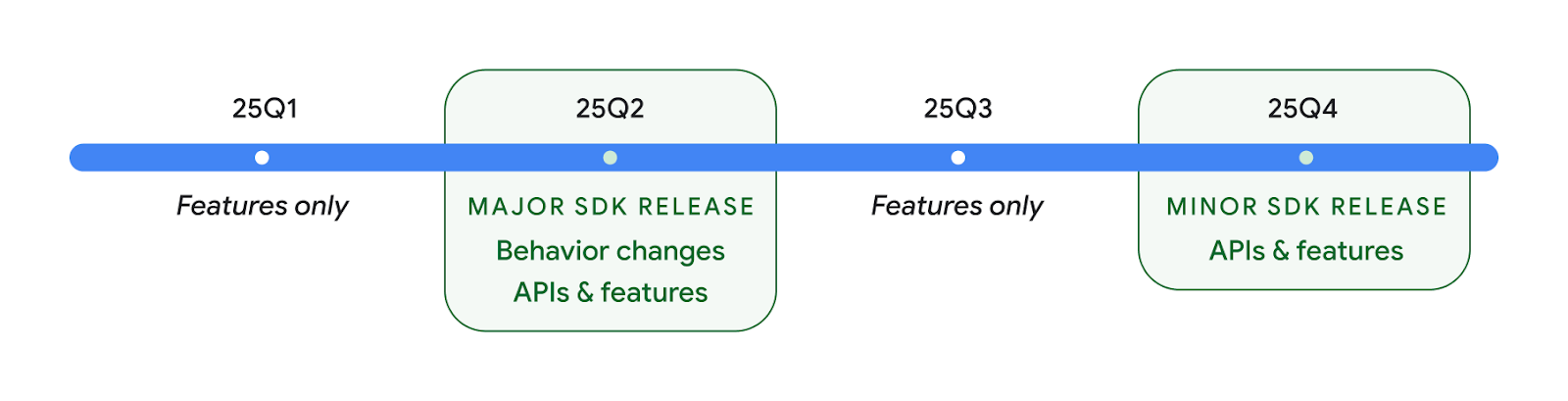
हम हर तीन महीने में Android वर्शन रिलीज़ करते रहेंगे. एपीआई रिलीज़ के बीच में, Q1 और Q3 के अपडेट से क्वालिटी को बेहतर बनाने में मदद मिलेगी. हम डिवाइस पार्टनर के साथ मिलकर, Q2 रिलीज़ को ज़्यादा से ज़्यादा डिवाइसों पर उपलब्ध कराने के लिए काम कर रहे हैं.
मुख्य और मामूली रिलीज़ के साथ नए एपीआई का इस्तेमाल करना
एपीआई लेवल की जांच करके, कोड ब्लॉक को सुरक्षित रखने के लिए, अब SDK_INT कॉन्स्टेंट के साथ VERSION_CODES का इस्तेमाल किया जाता है. यह सुविधा, Android के मुख्य वर्शन के लिए काम करती रहेगी.
if (SDK_INT >= VERSION_CODES.BAKLAVA) {
  // Use APIs introduced in Android 16
}
नए SDK_INT_FULL
कंसटेंट का इस्तेमाल, एपीआई की जांच के लिए किया जा सकता है. यह जांच, नए VERSION_CODES_FULL
एन्यूमरेशन की मदद से, मेजर और माइनर, दोनों वर्शन के लिए की जा सकती है.
if (SDK_INT_FULL >= VERSION_CODES_FULL.[MAJOR or MINOR RELEASE]) {
  // Use APIs introduced in a major or minor release
}
SDK टूल का सिर्फ़ मामूली वर्शन पाने के लिए, Build.getMinorSdkVersion() के तरीके का भी इस्तेमाल किया जा सकता है.
val minorSdkVersion = Build.getMinorSdkVersion(VERSION_CODES_FULL.BAKLAVA)
इन एपीआई को अभी तक फ़ाइनल नहीं किया गया है और इनमें बदलाव हो सकते हैं. इसलिए, अगर आपको कोई समस्या है, तो कृपया हमें सुझाव/राय दें या शिकायत करें.
उपयोगकर्ता अनुभव और सिस्टम यूज़र इंटरफ़ेस (यूआई)
Android 16, ऐप्लिकेशन डेवलपर और उपयोगकर्ताओं को अपने डिवाइस को अपनी ज़रूरतों के हिसाब से कॉन्फ़िगर करने के लिए, ज़्यादा कंट्रोल और सुविधा देता है.
प्रोग्रेस से जुड़ी सूचनाएं
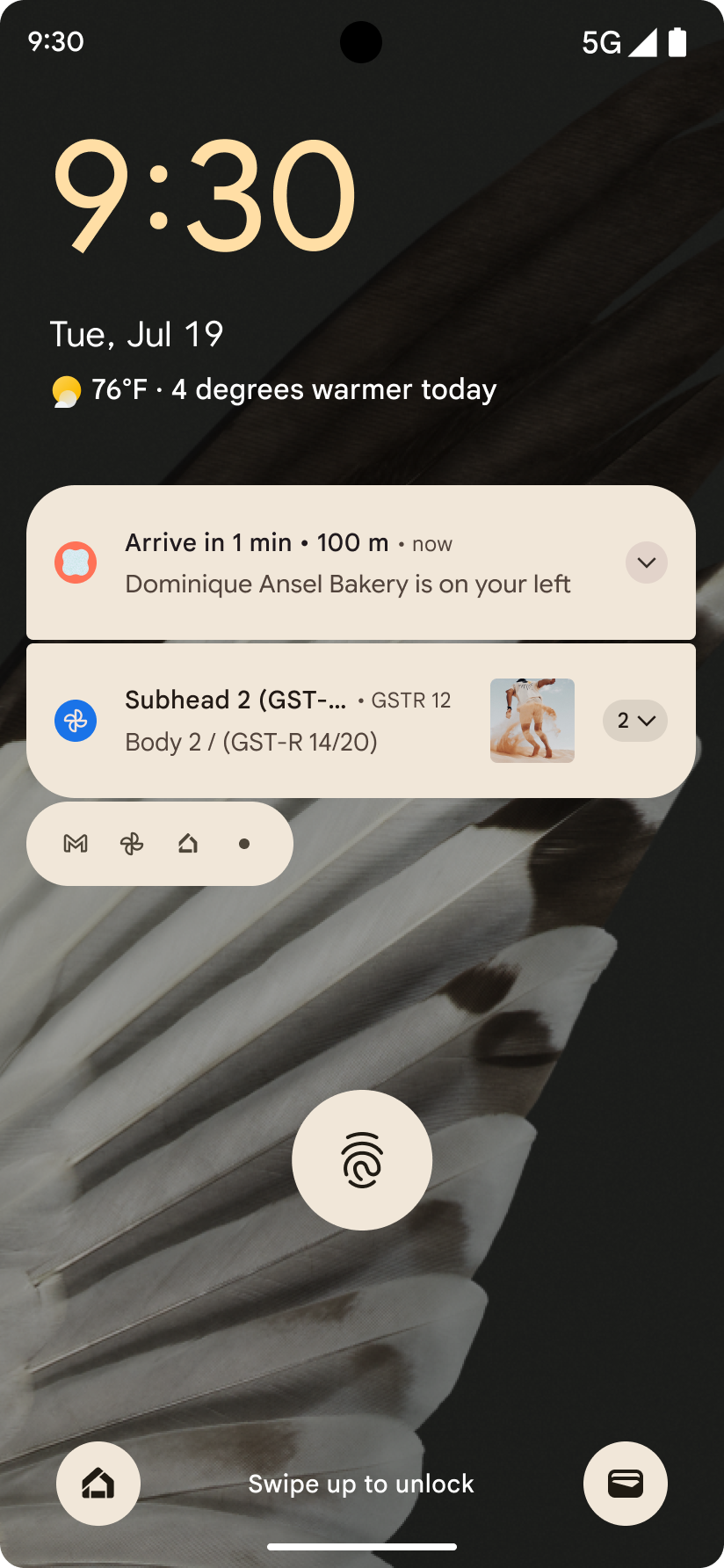
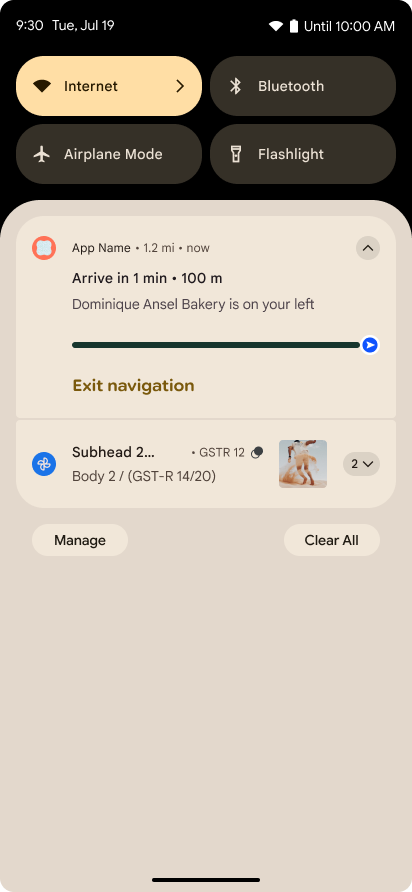
Android 16 introduces progress-centric notifications to help users seamlessly track user-initiated, start-to-end journeys.
Notification.ProgressStyle is a new notification
style that lets you create progress-centric notifications. Key use cases include
rideshare, delivery, and navigation. Within the Notification.ProgressStyle
class, you can denote states and milestones in a user journey using
points and segments.
ज़्यादा जानने के लिए, प्रगति से जुड़ी सूचनाएं दस्तावेज़ पेज देखें.
पीछे जाने पर झलक दिखाने वाले हाथ के जेस्चर से जुड़े अपडेट
Android 16 में नए एपीआई जोड़े गए हैं. इनकी मदद से, जेस्चर नेविगेशन में प्रिडिक्टिव बैक सिस्टम ऐनिमेशन चालू किए जा सकते हैं. जैसे, होम पेज पर वापस जाने के लिए ऐनिमेशन. onBackInvokedCallback को नए PRIORITY_SYSTEM_NAVIGATION_OBSERVER के साथ रजिस्टर करने पर, आपके ऐप्लिकेशन को सामान्य onBackInvoked कॉल तब मिलता है, जब सिस्टम बैक नेविगेशन को मैनेज करता है. इससे, बैक नेविगेशन के सामान्य फ़्लो पर कोई असर नहीं पड़ता.
Android 16 में,
finishAndRemoveTaskCallback() और
moveTaskToBackCallback भी जोड़े गए हैं. OnBackInvokedDispatcher के साथ इन कॉलबैक को रजिस्टर करके, सिस्टम कुछ खास व्यवहार को ट्रिगर कर सकता है. साथ ही, बैक जेस्चर का इस्तेमाल करने पर, उससे जुड़े ऐनिमेशन को पहले से चला सकता है.
बेहतर हैप्टिक
Android has exposed control over the haptic actuator ever since its inception.
Android 11 added support for more complex haptic effects that more advanced
actuators could support through
VibrationEffect.Compositions of device-defined semantic
primitives.
Android 16 adds haptic APIs that let apps define the amplitude and frequency curves of a haptic effect while abstracting away differences between device capabilities.
डेवलपर की प्रोडक्टिविटी और टूल
आपकी प्रॉडक्टिविटी को बेहतर बनाने के लिए, हम ज़्यादातर काम Android Studio, Jetpack Compose, और Android Jetpack लाइब्रेरी जैसे टूल पर करते हैं. हालांकि, हम प्लैटफ़ॉर्म पर हमेशा ऐसे तरीके ढूंढते रहते हैं जिनसे आपको अपने विज़न को पूरा करने में मदद मिल सके.
लाइव वॉलपेपर के लिए कॉन्टेंट हैंडलिंग
In Android 16, the live wallpaper framework is gaining a new content API to
address the challenges of dynamic, user-driven wallpapers. Currently, live
wallpapers incorporating user-provided content require complex, service-specific
implementations. Android 16 introduces
WallpaperDescription and
WallpaperInstance. WallpaperDescription lets you
identify distinct instances of a live wallpaper from the same service. For
example, a wallpaper that has instances on both the home screen and on the lock
screen may have unique content in both places. The wallpaper picker and
WallpaperManager use this metadata to better present
wallpapers to users, streamlining the process for you to create diverse and
personalized live wallpaper experiences.
परफ़ॉर्मेंस और बैटरी
Android 16 में ऐसे एपीआई उपलब्ध कराए गए हैं जिनकी मदद से, आपके ऐप्लिकेशन के बारे में अहम जानकारी इकट्ठा की जा सकती है.
सिस्टम से ट्रिगर की गई प्रोफ़ाइलिंग
ProfilingManager was
added in Android 15, giving apps the ability to
request profiling data collection using Perfetto on public devices in the field.
However, since this profiling must be started from the app, critical flows such
as startups or ANRs would be difficult or impossible for apps to capture.
To help with this, Android 16 introduces system-triggered profiling to
ProfilingManager. Apps can register interest in receiving traces for certain
triggers such as cold start reportFullyDrawn
or ANRs, and then the system starts and stops a trace on the app's behalf. After
the trace completes, the results are delivered to the app's data directory.
ApplicationStartInfo में कॉम्पोनेंट शुरू करना
ApplicationStartInfo was added in Android
15, allowing an app to see reasons
for process start, start type, start times, throttling, and other useful
diagnostic data. Android 16 adds
getStartComponent()
to distinguish what component type triggered the start, which can be helpful for
optimizing the startup flow of your app.
जॉब की बेहतर जानकारी
The JobScheduler#getPendingJobReason() API returns a reason why a job
might be pending. However, a job might be pending for multiple reasons.
In Android 16, we are introducing a new API
JobScheduler#getPendingJobReasons(int jobId), which returns multiple
reasons why a job is pending, due to both explicit constraints set by the
developer and implicit constraints set by the system.
We're also introducing
JobScheduler#getPendingJobReasonsHistory(int jobId), which returns a list
of the most recent constraint changes.
We recommend using the API to help you debug why your jobs may not be executing, especially if you're seeing reduced success rates of certain tasks or have bugs around latency of certain job completion. For example, updating widgets in the background failed to occur or prefetch job failed to be called prior to app start.
This can also better help you understand if certain jobs are not completing due to system defined constraints versus explicitly set constraints.
अडैप्टिव रीफ़्रेश रेट
Adaptive refresh rate (ARR), introduced in Android 15, enables the display refresh rate on supported hardware to adapt to the content frame rate using discrete VSync steps. This reduces power consumption while eliminating the need for potentially jank-inducing mode-switching.
Android 16 introduces hasArrSupport() and
getSuggestedFrameRate(int) while restoring
getSupportedRefreshRates() to make it easier for your apps to take
advantage of ARR. RecyclerView
1.4 internally supports ARR when it is settling from a fling or
smooth scroll, and we're continuing our work to add ARR
support into more Jetpack libraries. This frame rate article covers
many of the APIs you can use to set the frame rate so that your app can directly
use ARR.
एडीपीएफ़ में हेडरूम एपीआई
The SystemHealthManager introduces the
getCpuHeadroom and
getGpuHeadroom APIs, designed to provide games and
resource-intensive apps with estimates of available CPU and GPU resources. These
methods offer a way for you to gauge how your app or game can best improve
system health, particularly when used in conjunction with other Android Dynamic
Performance Framework (ADPF) APIs that detect thermal
throttling.
By using CpuHeadroomParams and
GpuHeadroomParams on supported devices, you can
customize the time window used to compute the headroom and select between
average or minimum resource availability. This can help you reduce your CPU or
GPU resource usage accordingly, leading to better user experiences and improved
battery life.
सुलभता
Android 16 में, सुलभता से जुड़े नए एपीआई और सुविधाएं जोड़ी गई हैं. इनकी मदद से, अपने ऐप्लिकेशन को हर उपयोगकर्ता तक पहुंचाया जा सकता है.
बेहतर Accessibility API
Android 16 adds additional APIs to enhance UI semantics that help improve consistency for users that rely on accessibility services, such as TalkBack.
Outline text for maximum text contrast
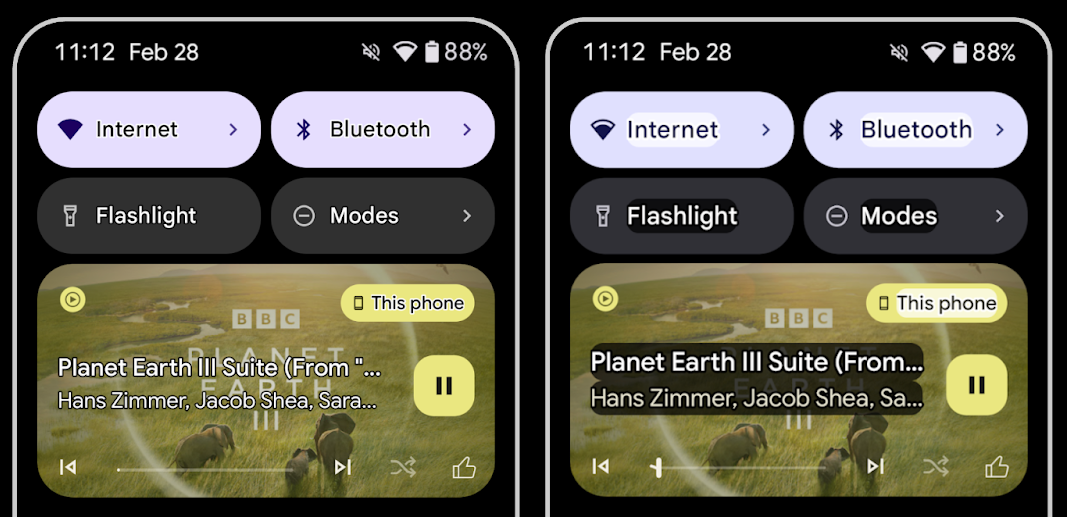
Users with low vision often have reduced contrast sensitivity, making it challenging to distinguish objects from their backgrounds. To help these users, Android 16 introduces outline text, replacing high contrast text, which draws a larger contrasting area around text to greatly improve legibility.
Android 16 contains new AccessibilityManager APIs to let
your apps check or register a listener to
see if this mode is enabled. This is primarily for UI Toolkits like Compose to
offer a similar visual experience. If you maintain a UI Toolkit library or your
app performs custom text rendering that bypasses the
android.text.Layout class then you can use this to know
when outline text is enabled.
Duration added to TtsSpan
Android 16 extends TtsSpan with a TYPE_DURATION,
consisting of ARG_HOURS, ARG_MINUTES,
and ARG_SECONDS. This lets you directly annotate time
duration, ensuring accurate and consistent text-to-speech output with services
like TalkBack.
Support elements with multiple labels
Android currently allows UI elements to derive their accessibility label from
another, and now offers the ability for multiple labels to be associated, a
common scenario in web content. By introducing a list-based API within
AccessibilityNodeInfo, Android can directly support these
multi-label relationships. As part of this change, we've deprecated
AccessibilityNodeInfo#setLabeledBy and
#getLabeledBy in favor of
#addLabeledBy, #removeLabeledBy, and
#getLabeledByList.
Improved support for expandable elements
Android 16 adds accessibility APIs that allow you to convey the expanded or
collapsed state of interactive elements, such as menus and expandable lists. By
setting the expanded state using setExpandedState and
dispatching TYPE_WINDOW_CONTENT_CHANGED AccessibilityEvents
with a CONTENT_CHANGE_TYPE_EXPANDED content change type,
you can ensure that screen readers like TalkBack announce
state changes, providing a more intuitive and inclusive user experience.
Indeterminate ProgressBars
Android 16 adds RANGE_TYPE_INDETERMINATE, giving a way for
you to expose RangeInfo for both determinate and
indeterminate ProgressBar widgets, allowing services like
TalkBack to more consistently provide feedback for progress
indicators.
Tri-state CheckBox
The new AccessibilityNodeInfo
getChecked and setChecked(int)
methods in Android 16 now support a "partially checked" state in addition to
"checked" and "unchecked." This replaces the deprecated boolean
isChecked and setChecked(boolean).
Supplemental descriptions
When an accessibility service describes a ViewGroup, it
combines content labels from its child views. If you provide a
contentDescription for the ViewGroup, accessibility services assume you are
also overriding the description of non-focusable child views. This can be
problematic if you want to label things like a drop-down (for example, "Font
Family") while preserving the current selection for accessibility (for example,
"Roboto"). Android 16 adds setSupplementalDescription so
you can provide text that provides information about a ViewGroup without
overriding information from its children.
Required form fields
Android 16 adds setFieldRequired to
AccessibilityNodeInfo so apps can tell an accessibility
service that input to a form field is required. This is an important scenario
for users filling out many types of forms, even things as simple as a required
terms and conditions checkbox, helping users to consistently identify and
quickly navigate between required fields.
LEA वाली कान की मशीनों के साथ वॉइस कॉल के लिए, फ़ोन को माइक्रोफ़ोन इनपुट के तौर पर इस्तेमाल करना
Android 16 में, LE Audio की सुविधा वाले कान की मशीन के उपयोगकर्ताओं के लिए, वॉइस कॉल के लिए कान की मशीन में पहले से मौजूद माइक्रोफ़ोन और फ़ोन के माइक्रोफ़ोन के बीच स्विच करने की सुविधा जोड़ी गई है. यह सुविधा, शोर वाले माहौल या ऐसी अन्य स्थितियों में मददगार हो सकती है जहां कान की मशीन के माइक्रोफ़ोन ठीक से काम न कर पाएं.
LEA कान की मशीनों के लिए, आस-पास की आवाज़ को कंट्रोल करने की सुविधा
Android 16 adds the capability for users of LE Audio hearing aids to adjust the volume of ambient sound that is picked up by the hearing aid's microphones. This can be helpful in situations where background noise is too loud or too quiet.
कैमरा
Android 16 में, प्रोफ़ेशनल कैमरा इस्तेमाल करने वाले लोगों के लिए बेहतर सुविधाएं उपलब्ध कराई गई हैं. इसमें हाइब्रिड ऑटो एक्सपोज़र के साथ-साथ, कलर टेंपरेचर और टिंट को सटीक तरीके से अडजस्ट करने की सुविधा भी शामिल है. नाइट मोड का नया इंडिकेटर, आपके ऐप्लिकेशन को यह जानने में मदद करता है कि नाइट मोड कैमरा सेशन पर कब स्विच करना है और कब उससे बाहर निकलना है. Intent के नए ऐक्शन की मदद से, मोशन फ़ोटो कैप्चर करना आसान हो गया है.
साथ ही, हम अल्ट्रा एचडीआर इमेज को बेहतर बनाने के लिए लगातार काम कर रहे हैं. इसके लिए, हम HEIC एन्कोडिंग की सुविधा और
ISO 21496-1 ड्राफ़्ट स्टैंडर्ड के नए पैरामीटर जोड़ रहे हैं.
हाइब्रिड ऑटो-एक्सपोज़र
Android 16 adds new hybrid auto-exposure modes to Camera2, allowing you to manually control specific aspects of exposure while letting the auto-exposure (AE) algorithm handle the rest. You can control ISO + AE, and exposure time + AE, providing greater flexibility compared to the current approach where you either have full manual control or rely entirely on auto-exposure.
fun setISOPriority() {
    // ... (Your existing code before the snippet) ...

    val availablePriorityModes = mStaticInfo.characteristics.get(
        CameraCharacteristics.CONTROL_AE_AVAILABLE_PRIORITY_MODES
    )

    // ... (Your existing code between the snippets) ...

    // Turn on AE mode to set priority mode
    reqBuilder.set(
        CaptureRequest.CONTROL_AE_MODE,
        CameraMetadata.CONTROL_AE_MODE_ON
    )
    reqBuilder.set(
        CaptureRequest.CONTROL_AE_PRIORITY_MODE,
        CameraMetadata.CONTROL_AE_PRIORITY_MODE_SENSOR_SENSITIVITY_PRIORITY
    )
    reqBuilder.set(
        CaptureRequest.SENSOR_SENSITIVITY,
        TEST_SENSITIVITY_VALUE
    )
    val request: CaptureRequest = reqBuilder.build()

    // ... (Your existing code after the snippet) ...
}
कलर टेंपरेचर और टिंट को सटीक तरीके से अडजस्ट करने की सुविधा
Android 16 adds camera support for fine color temperature and tint adjustments
to better support professional video recording applications. In previous Android
versions, you could control white balance settings through
CONTROL_AWB_MODE, which contains options limited to a
preset list, such as Incandescent,
Cloudy, and Twilight. The
COLOR_CORRECTION_MODE_CCT enables the use of
COLOR_CORRECTION_COLOR_TEMPERATURE and
COLOR_CORRECTION_COLOR_TINT for precise adjustments of
white balance based on the correlated color temperature.
fun setCCT() {
    // ... (Your existing code before this point) ...

    val colorTemperatureRange: Range<Int> =
        mStaticInfo.characteristics[CameraCharacteristics.COLOR_CORRECTION_COLOR_TEMPERATURE_RANGE]

    // Set to manual mode to enable CCT mode
    reqBuilder[CaptureRequest.CONTROL_AWB_MODE] = CameraMetadata.CONTROL_AWB_MODE_OFF
    reqBuilder[CaptureRequest.COLOR_CORRECTION_MODE] = CameraMetadata.COLOR_CORRECTION_MODE_CCT
    reqBuilder[CaptureRequest.COLOR_CORRECTION_COLOR_TEMPERATURE] = 5000
    reqBuilder[CaptureRequest.COLOR_CORRECTION_COLOR_TINT] = 30

    val request: CaptureRequest = reqBuilder.build()

    // ... (Your existing code after this point) ...
}
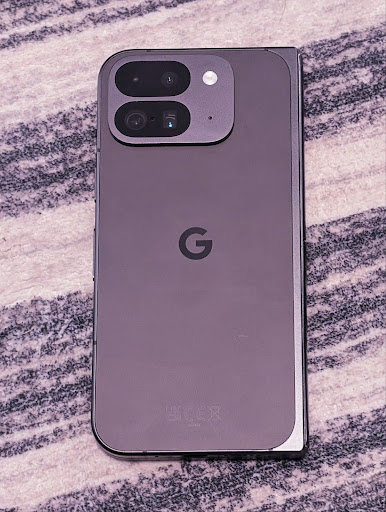
The following examples show how a photo would look after applying different color temperature and tint adjustments:
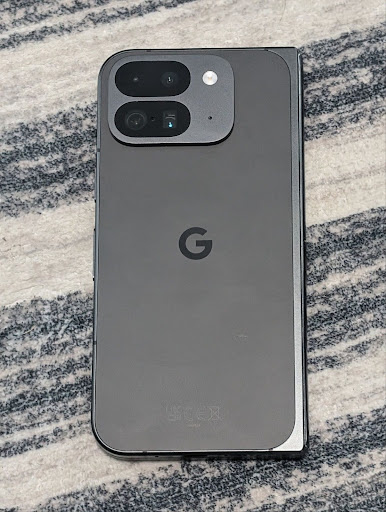
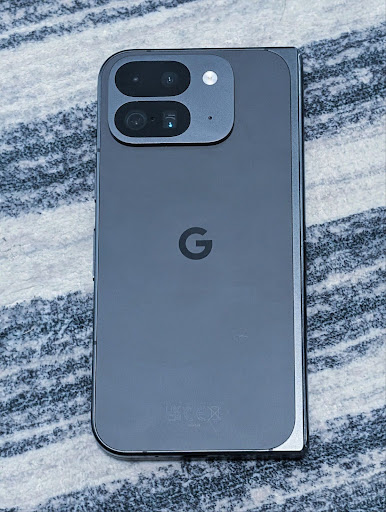
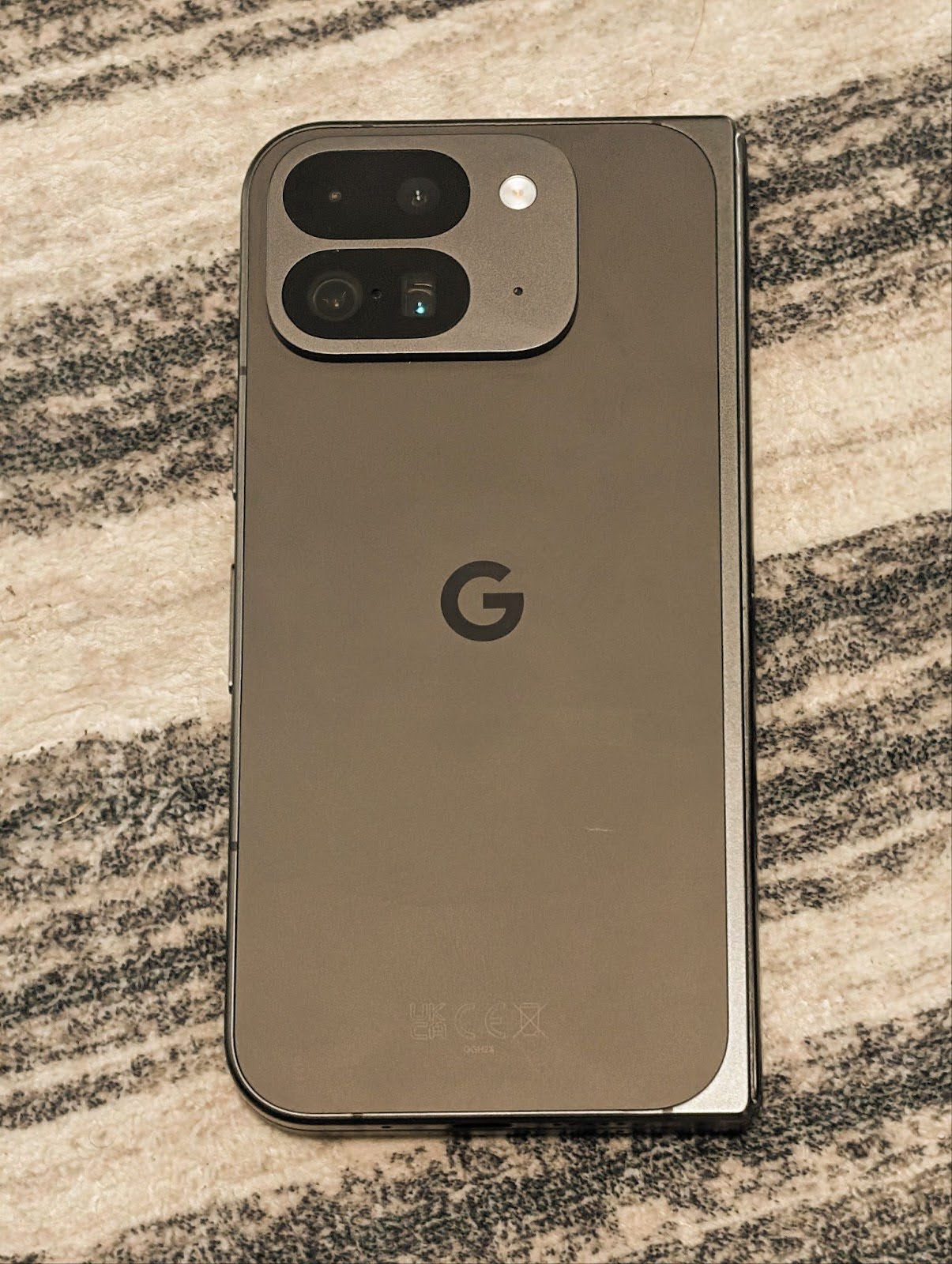
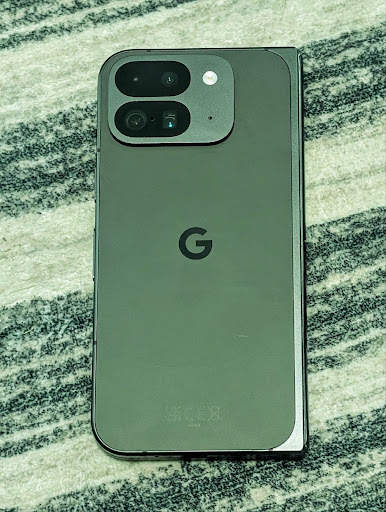
कैमरे के नाइट मोड में सीन की पहचान करने की सुविधा
Android 16 में EXTENSION_NIGHT_MODE_INDICATOR जोड़ा गया है. इससे आपके ऐप्लिकेशन को यह पता चलता है कि नाइट मोड वाले कैमरे के सेशन पर कब स्विच करना है और कब उससे बाहर निकलना है. अगर यह सुविधा काम करती है, तो यह Camera2 में CaptureResult में उपलब्ध होगी.
यह वह एपीआई है जिसके बारे में हमने Instagram ने कम रोशनी में शानदार फ़ोटो लेने की सुविधा कैसे उपलब्ध कराई ब्लॉग पोस्ट में बताया था. इस पोस्ट में, रात मोड को लागू करने का तरीका बताया गया है. साथ ही, एक केस स्टडी भी दी गई है. इसमें, ऐप्लिकेशन में मौजूद कैमरे से शेयर की गई फ़ोटो की संख्या में बढ़ोतरी के साथ-साथ, ऐप्लिकेशन में मौजूद रात मोड की बेहतर क्वालिटी वाली फ़ोटो को जोड़ा गया है.
मोशन फ़ोटो कैप्चर करने के इंटेंट से जुड़ी कार्रवाइयां
Android 16 में स्टैंडर्ड इंटेंट ऐक्शन —
ACTION_MOTION_PHOTO_CAPTURE और
ACTION_MOTION_PHOTO_CAPTURE_SECURE — जोड़े गए हैं. इनसे कैमरा ऐप्लिकेशन को मोशन फ़ोटो कैप्चर करने और उसे दिखाने का अनुरोध किया जाता है.
इमेज को कहां लिखा जाएगा, यह कंट्रोल करने के लिए आपको एक अतिरिक्त EXTRA_OUTPUT पास करना होगा या Intent.setClipData(ClipData) के ज़रिए Uri पास करना होगा. अगर आपने कोई ClipData सेट नहीं किया है, तो Context.startActivity(Intent) को कॉल करते समय वह आपके लिए वहां कॉपी हो जाएगा.
अल्ट्रा एचडीआर इमेज को बेहतर बनाने की सुविधा
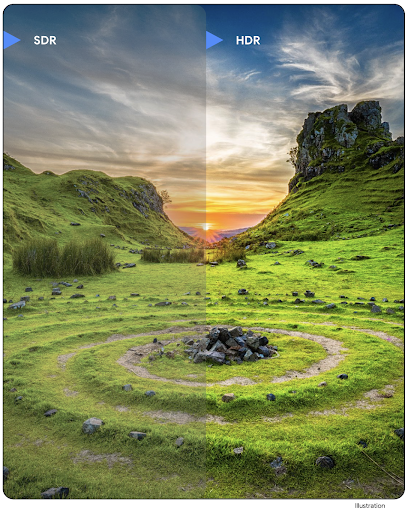
Android 16 में, हमने अल्ट्रा एचडीआर इमेज की मदद से बेहतरीन क्वालिटी वाली इमेज उपलब्ध कराने की सुविधा को जारी रखा है. इससे, HEIC फ़ाइल फ़ॉर्मैट में UltraHDR इमेज के लिए सहायता मिलती है. इन इमेज को ImageFormat टाइप HEIC_ULTRAHDR मिलेगा. साथ ही, इनमें मौजूदा UltraHDR JPEG फ़ॉर्मैट जैसा एम्बेड किया गया गेनमैप होगा. हम UltraHDR के लिए भी AVIF फ़ॉर्मैट की सुविधा उपलब्ध कराने पर काम कर रहे हैं. इसलिए, हमारे साथ बने रहें.
इसके अलावा, Android 16 में ISO 21496-1 ड्राफ़्ट स्टैंडर्ड के आधार पर, अल्ट्रा एचडीआर में कुछ और पैरामीटर लागू किए गए हैं. इनमें, गेनमैप के हिसाब से कलरस्पेस को सेट करने और उसे पाने की सुविधा शामिल है. साथ ही, एसडीआर गेनमैप के साथ एचडीआर में एन्कोड की गई बेस इमेज के लिए भी यह सुविधा काम करती है.
ग्राफ़िक
Android 16 में, ग्राफ़िक्स से जुड़े नए सुधार शामिल हैं. जैसे, एजीएसएल की मदद से कस्टम ग्राफ़िक इफ़ेक्ट.
एजीएसएल की मदद से, कस्टम ग्राफ़िकल इफ़ेक्ट
Android 16 में RuntimeColorFilter और
RuntimeXfermode जोड़े गए हैं. इनकी मदद से, थ्रेशोल्ड, सेपिया, और ह्यू सेचुरेशन जैसे जटिल इफ़ेक्ट बनाए जा सकते हैं. साथ ही, इन्हें ड्रॉ कॉल पर लागू किया जा सकता है. Android 13 के बाद से, AGSL का इस्तेमाल करके, Shader को बढ़ाने वाले कस्टम RuntimeShaders बनाए जा सकते हैं. नया एपीआई, AGSL की मदद से काम करने वाला RuntimeColorFilter जोड़ता है, जो ColorFilter को बढ़ाता है. साथ ही, इसमें Xfermode इफ़ेक्ट भी जोड़ा गया है, जिसकी मदद से सोर्स और डेस्टिनेशन पिक्सल के बीच, AGSL पर आधारित कस्टम कंपोजिटिंग और ब्लेंडिंग लागू की जा सकती है.
private val thresholdEffectString = """
    uniform half threshold;

    half4 main(half4 c) {
        half luminosity = dot(c.rgb, half3(0.2126, 0.7152, 0.0722));
        half bw = step(threshold, luminosity);
        return bw.xxx1 * c.a;
    }"""

fun setCustomColorFilter(paint: Paint) {
   val filter = RuntimeColorFilter(thresholdEffectString)
   filter.setFloatUniform(0.5);
   paint.colorFilter = filter
}
कनेक्टिविटी
Android 16, प्लैटफ़ॉर्म को अपडेट करता है, ताकि आपके ऐप्लिकेशन को कम्यूनिकेशन और वायरलेस टेक्नोलॉजी में हुई नई प्रोग्रेस का ऐक्सेस मिल सके.
बेहतर सुरक्षा के साथ रेंजिंग
Android 16 adds support for robust security features in Wi-Fi location on supported devices with Wi-Fi 6's 802.11az, allowing apps to combine the higher accuracy, greater scalability, and dynamic scheduling of the protocol with security enhancements including AES-256-based encryption and protection against MITM attacks. This allows it to be used more safely in proximity use cases, such as unlocking a laptop or a vehicle door. 802.11az is integrated with the Wi-Fi 6 standard, leveraging its infrastructure and capabilities for wider adoption and easier deployment.
जेनेरिक रेंजिंग एपीआई
Android 16 में नया RangingManager शामिल है. इससे, लोकल डिवाइस और रिमोट डिवाइस के बीच की दूरी और कोण का पता लगाने के लिए, काम करने वाले हार्डवेयर पर तरीके मिलते हैं. RangingManager, रेंजिंग की कई टेक्नोलॉजी का इस्तेमाल करता है. जैसे, बीएलई चैनल साउंडिंग, बीएलई आरएसएसआई पर आधारित रेंजिंग, अल्ट्रा वाइडबैंड, और वाई-फ़ाई राउंड ट्रिप टाइम.
कंपैनियन डिवाइस मैनेजर के डिवाइस की मौजूदगी
In Android 16, new APIs are being introduced for binding your companion app
service. Service will be bound when BLE is in range and Bluetooth is connected
and service will be unbound when BLE is out of range or Bluetooth is
disconnected. App will receives a new
'onDevicePresenceEvent()' callback based on various
of DevicePresenceEvent.
More details can be found in
'startObservingDevicePresence(ObservingDevicePresenceRequest)'.
मीडिया
Android 16 में कई ऐसी सुविधाएं शामिल हैं जिनसे मीडिया का अनुभव बेहतर होता है.
फ़ोटो पिकर में किए गए सुधार
फ़ोटो पिकर की सुविधा, उपयोगकर्ताओं के लिए ऐप्लिकेशन में पहले से मौजूद है. इसकी मदद से, उपयोगकर्ता अपने डिवाइस की पूरी मीडिया लाइब्रेरी के बजाय, ऐप्लिकेशन को सिर्फ़ अपनी चुनी हुई फ़ोटो और वीडियो का ऐक्सेस दे सकते हैं. यह सुविधा सुरक्षित है. Google के सिस्टम अपडेट और Google Play services की मदद से, मॉड्यूलर सिस्टम कॉम्पोनेंट का इस्तेमाल करके, यह सुविधा Android 4.4 (एपीआई लेवल 19) तक के वर्शन पर काम करती है. इंटिग्रेशन के लिए, Android Jetpack लाइब्रेरी के साथ सिर्फ़ कुछ लाइनों का कोड ज़रूरी है.
Android 16 में, फ़ोटो पिकर में ये सुधार किए गए हैं:
- एम्बेड किया गया फ़ोटो पिकर: नए एपीआई, जिनकी मदद से ऐप्लिकेशन, फ़ोटो पिकर को अपने व्यू की हैरारकी में एम्बेड कर सकते हैं. इससे, यह ऐप्लिकेशन के एक बेहतर हिस्से की तरह महसूस होता है. साथ ही, प्रोसेस को अलग रखने की सुविधा का फ़ायदा भी मिलता है. इस सुविधा की मदद से, उपयोगकर्ता ऐप्लिकेशन को ज़्यादा अनुमतियां दिए बिना ही मीडिया चुन सकते हैं. अगर आपको एम्बेड किए गए फ़ोटो पिकर को इंटिग्रेट करना है, तो आपको Android के आने वाले समय में लॉन्च होने वाली Jetpack लाइब्रेरी का इस्तेमाल करना होगा. इससे, सभी प्लैटफ़ॉर्म के वर्शन के साथ काम करने की सुविधा बढ़ेगी और इंटिग्रेशन आसान हो जाएगा.
- फ़ोटो पिकर में क्लाउड सर्च: Android फ़ोटो पिकर के लिए, क्लाउड मीडिया प्रोवाइडर से खोजने की सुविधा देने वाले नए एपीआई. फ़ोटो चुनने वाले टूल में खोजने की सुविधा जल्द ही उपलब्ध होगी.
ऐडवांस प्रोफ़ेशनल वीडियो
Android 16 introduces support for the Advanced Professional Video (APV) codec which is designed to be used for professional level high quality video recording and post production.
The APV codec standard has the following features:
- Perceptually lossless video quality (close to raw video quality)
- Low complexity and high throughput intra-frame-only coding (without pixel domain prediction) to better support editing workflows
- Support for high bit-rate range up to a few Gbps for 2K, 4K and 8K resolution content, enabled by a lightweight entropy coding scheme
- Frame tiling for immersive content and for enabling parallel encoding and decoding
- Support for various chroma sampling formats and bit-depths
- Support for multiple decoding and re-encoding without severe visual quality degradation
- Support multi-view video and auxiliary video like depth, alpha, and preview
- Support for HDR10/10+ and user-defined metadata
A reference implementation of APV is provided through the OpenAPV project. Android 16 will implement support for the APV 422-10 Profile that provides YUV 422 color sampling along with 10-bit encoding and for target bitrates of up to 2Gbps.
निजता
Android 16 में कई ऐसी सुविधाएं शामिल हैं जो ऐप्लिकेशन डेवलपर को उपयोगकर्ता की निजता को सुरक्षित रखने में मदद करती हैं.
Health Connect से जुड़े अपडेट
Health Connect adds ACTIVITY_INTENSITY, a data type defined according to World
Health Organization guidelines around moderate and vigorous activity. Each
record requires the start time, the end time, and whether the activity intensity
is moderate or vigorous.
Health Connect also contains updated APIs supporting medical records. This allows apps to read and write medical records in FHIR format with explicit user consent.
Android पर Privacy Sandbox
Android 16 incorporates the latest version of the Privacy Sandbox on Android, part of our ongoing work to develop technologies where users know their privacy is protected. Our website has more about the Privacy Sandbox on Android developer beta program to help you get started. Check out the SDK Runtime which allows SDKs to run in a dedicated runtime environment separate from the app they are serving, providing stronger safeguards around user data collection and sharing.
सुरक्षा
Android 16 में ऐसी सुविधाएं शामिल हैं जो आपके ऐप्लिकेशन की सुरक्षा को बेहतर बनाने और उसके डेटा को सुरक्षित रखने में मदद करती हैं.
डिजिटल कुंजी शेयर करने की सुविधा देने वाला एपीआई
Android 16 में ऐसे एपीआई जोड़े गए हैं जिनकी मदद से, Android Keystore की कुंजियों का ऐक्सेस दूसरे ऐप्लिकेशन के साथ शेयर किया जा सकता है. नई KeyStoreManager क्लास, ऐप्लिकेशन uid के हिसाब से, पासकोड का ऐक्सेस देने और वापस लेने की सुविधा देती है. साथ ही, इसमें ऐप्लिकेशन के लिए, शेयर की गई पासकोड को ऐक्सेस करने वाला एपीआई भी शामिल है.
डिवाइस के नाप या आकार
Android 16, आपके ऐप्लिकेशन को Android के अलग-अलग फ़ॉर्म फ़ैक्टर का ज़्यादा से ज़्यादा फ़ायदा पाने में मदद करता है.
टीवी के लिए, वीडियो और ऑडियो की क्वालिटी का स्टैंडर्ड फ़्रेमवर्क
The new MediaQuality
package in Android 16 exposes
a set of standardized APIs for access to audio and picture profiles and
hardware-related settings. This allows streaming apps to query profiles and
apply them to media dynamically:
- Movies mastered with a wider dynamic range require greater color accuracy to see subtle details in shadows and adjust to ambient light, so a profile that prefers color accuracy over brightness may be appropriate.
- Live sporting events are often mastered with a narrow dynamic range, but are often watched in daylight, so a profile that preferences brightness over color accuracy can give better results.
- Fully interactive content wants minimal processing to reduce latency, and wants higher frame rates, which is why many TV's ship with a game profile.
The API allows apps to switch between profiles and users to enjoy tuning supported TVs to best suit their content.
इंटरनैशनलाइजेशन
Android 16 में ऐसी सुविधाएं और क्षमताएं जोड़ी गई हैं जो डिवाइस को अलग-अलग भाषाओं में इस्तेमाल करने पर, उपयोगकर्ता के अनुभव को बेहतर बनाती हैं.
वर्टिकल टेक्स्ट
Android 16 में, टेक्स्ट को वर्टिकल तौर पर रेंडर करने और मेज़र करने के लिए, लो-लेवल की सुविधा जोड़ी गई है. इससे लाइब्रेरी डेवलपर को वर्टिकल तौर पर लिखने की बुनियादी सुविधा मिलती है. यह सुविधा, खास तौर पर जैपनीज़ जैसी भाषाओं के लिए काम की है, जिनमें आम तौर पर वर्टिकल लिखने के सिस्टम का इस्तेमाल किया जाता है. Paint क्लास में एक नया फ़्लैग,
VERTICAL_TEXT_FLAG,
जोड़ा गया है. Paint.setFlags का इस्तेमाल करके इस फ़्लैग को सेट करने पर, Paint के टेक्स्ट मेज़रमेंट एपीआई, हॉरिज़ॉन्टल ऐडवांस के बजाय वर्टिकल ऐडवांस की रिपोर्ट करेंगे. साथ ही, Canvas टेक्स्ट को वर्टिकल तौर पर ड्रॉ करेगा.
val text = "「春は、曙。」"
Box(
    Modifier.padding(innerPadding).background(Color.White).fillMaxSize().drawWithContent {
        drawIntoCanvas { canvas ->
            val paint = Paint().apply { textSize = 64.sp.toPx() }
            // Draw text vertically
            paint.flags = paint.flags or VERTICAL_TEXT_FLAG
            val height = paint.measureText(text)
            canvas.nativeCanvas.drawText(
                text,
                0,
                text.length,
                size.width / 2,
                (size.height - height) / 2,
                paint
            )
        }
    }
) {}
मेज़रमेंट सिस्टम को पसंद के मुताबिक बनाना
उपयोगकर्ता अब सेटिंग में जाकर, क्षेत्र के हिसाब से अपनी पसंद के मुताबिक मेज़रमेंट सिस्टम चुन सकते हैं. उपयोगकर्ता की प्राथमिकता को स्थानीय भाषा के कोड के हिस्से के तौर पर शामिल किया जाता है. इसलिए, क्षेत्रीय प्राथमिकताएं बदलने पर, स्थानीय भाषा के कॉन्फ़िगरेशन में होने वाले बदलावों को मैनेज करने के लिए, ACTION_LOCALE_CHANGED पर BroadcastReceiver रजिस्टर किया जा सकता है.
फ़ॉर्मैटर का इस्तेमाल करके, स्थानीय अनुभव को मैच किया जा सकता है. उदाहरण के लिए, अगर किसी उपयोगकर्ता ने अपने फ़ोन पर अंग्रेज़ी (डेनमार्क) भाषा सेट की है या अंग्रेज़ी (अमेरिका) भाषा में, मेज़रमेंट सिस्टम के तौर पर मेट्रिक सिस्टम का इस्तेमाल किया है,तो उसके लिए अंग्रेज़ी (अमेरिका) में "0.5 इंच" का मतलब "12.7 मिमी" होगा.
ये सेटिंग ढूंढने के लिए, Settings ऐप्लिकेशन खोलें और सिस्टम > language & region पर जाएं.