

Android 16 introduce nuove fantastiche funzionalità e API per gli sviluppatori. Le sezioni seguenti riepilogano queste funzionalità per aiutarti a iniziare a utilizzare le API correlate.
Per un elenco dettagliato delle API nuove, modificate e rimosse, leggi il report API diff. Per informazioni dettagliate sulle nuove API, visita il Riferimento API Android. Le nuove API sono evidenziate per una maggiore visibilità.Devi anche esaminare le aree in cui le modifiche alla piattaforma potrebbero influire sulle tue app. Per maggiori informazioni, consulta le seguenti pagine:
- Modifiche al comportamento che interessano le app quando hanno come target Android 16
- Modifiche al comportamento che interessano tutte le app indipendentemente da
targetSdkVersion.
Funzionalità di base
Android include nuove API che espandono le funzionalità di base del sistema Android.
Due release dell'API Android nel 2025
- Questa anteprima riguarda la prossima release principale di Android, il cui lancio è previsto per il secondo trimestre del 2025. Questa release è simile a tutte le release dell'API precedenti, in cui possiamo avere modifiche pianificate del comportamento spesso legate a una versione SDK target.
- Abbiamo in programma di rilasciare la release principale un trimestre prima (secondo trimestre anziché terzo trimestre come negli anni precedenti) per allinearci meglio alla pianificazione dei lanci dei dispositivi nel nostro ecosistema, in modo che un maggior numero di dispositivi possa ricevere prima la release principale di Android. Con la release principale in arrivo nel secondo trimestre, dovrai eseguire i test di compatibilità annuali qualche mese prima rispetto agli anni precedenti per assicurarti che le tue app siano pronte.
- Prevediamo di rilasciare un'altra versione nel quarto trimestre del 2025, che includerà anche nuove API per gli sviluppatori. La release principale del secondo trimestre sarà l'unica release del 2025 a includere modifiche pianificate del comportamento che potrebbero influire sulle app.
Oltre alle nuove API per gli sviluppatori, la release minore del quarto trimestre includerà aggiornamenti delle funzionalità, ottimizzazioni e correzioni di bug. Non includerà modifiche del comportamento che influiscono sulle app.
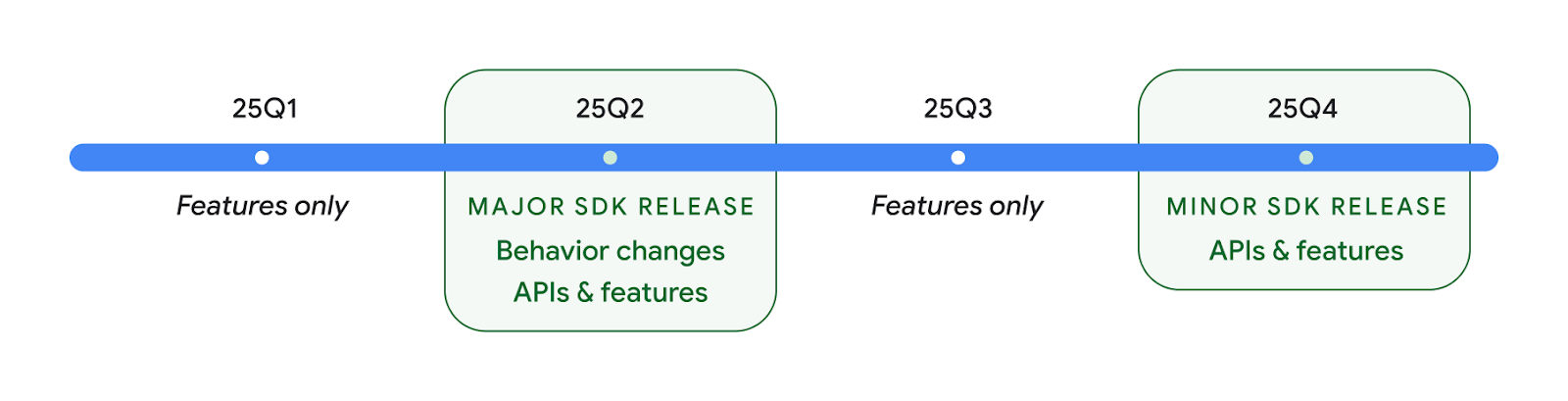
Continueremo a rilasciare Android trimestralmente. Gli aggiornamenti del primo e del terzo trimestre tra le release dell'API forniranno aggiornamenti incrementali per garantire una qualità continua. Stiamo collaborando attivamente con i nostri partner per dispositivi per rendere disponibile la release del secondo trimestre sul maggior numero possibile di dispositivi.
Utilizzare le nuove API con release principali e secondarie
Attualmente, la protezione di un blocco di codice con un controllo del livello API viene eseguita utilizzando la costante SDK_INT con VERSION_CODES. Continuerà
a essere supportato per le release principali di Android.
if (SDK_INT >= VERSION_CODES.BAKLAVA) {
  // Use APIs introduced in Android 16
}
La nuova costante SDK_INT_FULL
può essere utilizzata per i controlli dell'API sia con le versioni principali sia con quelle secondarie con
la nuova enumerazione VERSION_CODES_FULL.
if (SDK_INT_FULL >= VERSION_CODES_FULL.[MAJOR or MINOR RELEASE]) {
  // Use APIs introduced in a major or minor release
}
Puoi anche utilizzare il metodo
Build.getMinorSdkVersion()
per ottenere solo la versione minore dell'SDK.
val minorSdkVersion = Build.getMinorSdkVersion(VERSION_CODES_FULL.BAKLAVA)
Queste API non sono ancora state finalizzate e sono soggette a modifiche, pertanto inviaci un feedback in caso di dubbi.
Esperienza utente e UI di sistema
Android 16 offre a sviluppatori di app e utenti maggiore controllo e flessibilità per configurare il dispositivo in base alle proprie esigenze.
Notifiche incentrate sui progressi
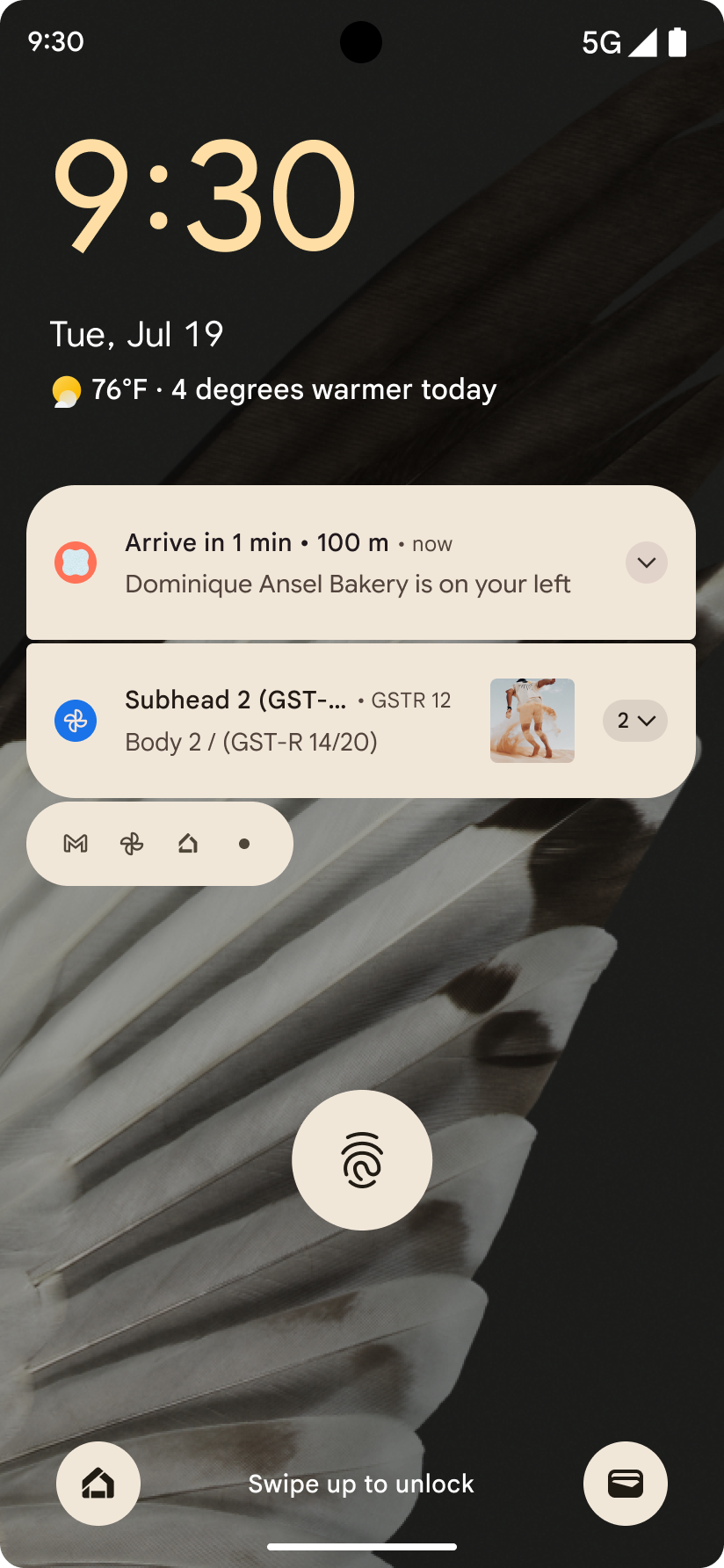
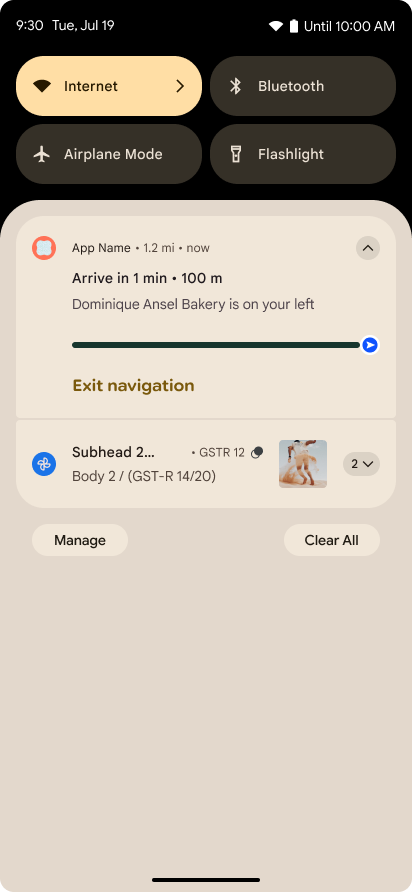
Android 16 introduce notifiche incentrate sul progresso per aiutare gli utenti a monitorare senza problemi i percorsi end-to-end avviati dall'utente.
Notification.ProgressStyle è un nuovo stile di notifica che consente di creare notifiche incentrate sull'avanzamento. I casi d'uso principali includono condivisione di corse, consegna e navigazione. All'interno della classe Notification.ProgressStyle, puoi indicare gli stati e i traguardi di un percorso dell'utente utilizzando punti e segmenti.
Per scoprire di più, consulta la pagina di documentazione relativa alle notifiche incentrate sul progresso.
Aggiornamenti di Indietro predittivo
Android 16 aggiunge nuove API per aiutarti ad attivare le animazioni di sistema per il gesto Indietro predittivo nella navigazione con i gesti, ad esempio l'animazione di ritorno alla schermata Home. La registrazione di onBackInvokedCallback con il nuovo PRIORITY_SYSTEM_NAVIGATION_OBSERVER consente alla tua app di ricevere la normale chiamata onBackInvoked ogni volta che il sistema gestisce una navigazione a ritroso senza influire sul normale flusso di navigazione a ritroso.
Android 16 aggiunge inoltre finishAndRemoveTaskCallback() e moveTaskToBackCallback. Registrando questi callback con OnBackInvokedDispatcher, il sistema può attivare comportamenti specifici e riprodurre le animazioni anticipate corrispondenti quando viene richiamato il gesto Indietro.
Feedback aptico più ricco
Android ha esposto il controllo sull'attuatore aptico fin dalla sua nascita.
Android 11 ha aggiunto il supporto di effetti aptico più complessi che gli attuatori più avanzati potrebbero supportare tramite
VibrationEffect.Compositions di primitive semantiche predefinite dal dispositivo.
Android 16 aggiunge API aptica che consentono alle app di definire le curve di ampiezza e frequenza di un effetto aptico, rimuovendo al contempo le differenze tra le funzionalità dei dispositivi.
Produttività e strumenti per gli sviluppatori
Sebbene la maggior parte del nostro lavoro per migliorare la tua produttività si concentri su strumenti come Android Studio, Jetpack Compose e le librerie Android Jetpack, cerchiamo sempre modi nella piattaforma per aiutarti a realizzare la tua visione.
Gestione dei contenuti per gli sfondi animati
In Android 16, il framework degli sfondi animati acquisirà una nuova API per i contenuti per rispondere alle sfide degli sfondi dinamici basati sugli utenti. Al momento, gli sfondi animati che incorporano contenuti forniti dagli utenti richiedono implementazioni complesse e specifiche per i servizi. Android 16 introduce
WallpaperDescription e
WallpaperInstance. WallpaperDescription consente di identificare istanze distinte di uno sfondo animato dello stesso servizio. Ad esempio, uno sfondo che ha istanze sia nella schermata Home sia nella schermata di blocco può avere contenuti unici in entrambe le posizioni. Il selettore di sfondi e
WallpaperManager utilizzano questi metadati per presentare meglio
gli sfondi agli utenti, semplificando la procedura per creare esperienze diverse e personalizzate con gli sfondi animati.
Prestazioni e batteria
Android 16 introduce API che aiutano a raccogliere informazioni sulle tue app.
Profilazione attivata dal sistema
ProfilingManager è stato
aggiunto in Android 15, consentendo alle app di
richiedere la raccolta dei dati di profilazione utilizzando Perfetto su dispositivi pubblici sul campo.
Tuttavia, poiché questa profilazione deve essere avviata dall'app, i flussi critici come le startup o gli ANR sarebbero difficili o impossibili da acquisire per le app.
Per aiutarti, Android 16 introduce il profiling attivato dal sistema in ProfilingManager. Le app possono registrare l'interesse a ricevere tracce per determinati attivatori, come l'avvio a freddo reportFullyDrawn o gli ANR, dopodiché il sistema avvia e interrompe una traccia per conto dell'app. Al termine della traccia, i risultati vengono inviati alla directory dei dati dell'app.
Avvia componente in ApplicationStartInfo
ApplicationStartInfo è stato aggiunto in Android 15, consentendo a un'app di vedere i motivi dell'avvio del processo, il tipo di avvio, le ore di inizio, la limitazione e altri dati diagnostici utili. Android 16 aggiunge
getStartComponent()
per distinguere il tipo di componente che ha attivato l'avvio, il che può essere utile per
optimizzare il flusso di avvio dell'app.
Migliore introspezione dei job
L'API JobScheduler#getPendingJobReason() restituisce il motivo per cui un job potrebbe essere in attesa. Tuttavia, un job potrebbe essere in attesa per più motivi.
In Android 16, stiamo introducendo una nuova API
JobScheduler#getPendingJobReasons(int jobId), che restituisce più
motivi per cui un job è in attesa, sia a causa di vincoli espliciti impostati dall' sviluppatore sia di vincoli impliciti impostati dal sistema.
Stiamo anche introducendo
JobScheduler#getPendingJobReasonsHistory(int jobId), che restituisce un elenco
delle modifiche ai vincoli più recenti.
Ti consigliamo di utilizzare l'API per aiutarti a eseguire il debug del motivo per cui i job potrebbero non essere eseguiti, soprattutto se riscontri tassi di successo ridotti di determinate attività o hai bug relativi alla latenza del completamento di determinati job. Ad esempio, l'aggiornamento dei widget in background non è andato a buon fine o non è stato possibile chiamare il job di pre-caricamento prima dell'avvio dell'app.
In questo modo puoi anche capire meglio se determinati job non vengono completati a causa di vincoli definiti dal sistema rispetto a vincoli impostati esplicitamente.
Frequenza di aggiornamento adattiva
La frequenza di aggiornamento adattiva (ARR), introdotta in Android 15, consente alla frequenza di aggiornamento del display sull'hardware supportato di adattarsi alla frequenza fotogrammi dei contenuti utilizzando passaggi VSync discreti. In questo modo si riduce il consumo energetico ed elimina la necessità di cambiare modalità, il che potrebbe causare problemi di aggiornamento.
Android 16 introduce hasArrSupport() e
getSuggestedFrameRate(int), ripristinando
getSupportedRefreshRates() per consentire alle tue app di usufruire più facilmente della funzionalità ARR. RecyclerView 1.4 supporta internamente l'ARR quando si stabilizza dopo un movimento brusco o scorrimento fluido e stiamo continuando il nostro lavoro per aggiungere il supporto dell'ARR a più librerie Jetpack. Questo articolo sulla frequenza fotogrammi illustra molte delle API che puoi utilizzare per impostare la frequenza fotogrammi in modo che la tua app possa utilizzare direttamente l'ARR.
API headroom in ADPF
SystemHealthManager introduce le API getCpuHeadroom e getGpuHeadroom, progettate per fornire a giochi e app che richiedono molte risorse stime delle risorse CPU e GPU disponibili. Questi metodi ti consentono di valutare in che modo la tua app o il tuo gioco può migliorare al meglio l'integrità del sistema, in particolare se utilizzati insieme ad altre API Android Dynamic Performance Framework (ADPF) che rilevano il throttling termico.
Utilizzando CpuHeadroomParams e
GpuHeadroomParams sui dispositivi supportati, puoi
personalizzare la finestra temporale utilizzata per calcolare il margine di manovra e scegliere tra
la disponibilità media o minima delle risorse. In questo modo, puoi ridurre l'utilizzo delle risorse della CPU o della GPU, migliorando l'esperienza utente e la durata della batteria.
Accessibilità
Android 16 aggiunge nuove API e funzionalità di accessibilità che possono aiutarti a rendere la tua app disponibile per tutti gli utenti.
API di accessibilità migliorate
Android 16 aggiunge API aggiuntive per migliorare la semantica dell'interfaccia utente, contribuendo a migliorare la coerenza per gli utenti che si affidano a servizi di accessibilità, come TalkBack.
Testo con contorni per il massimo contrasto del testo
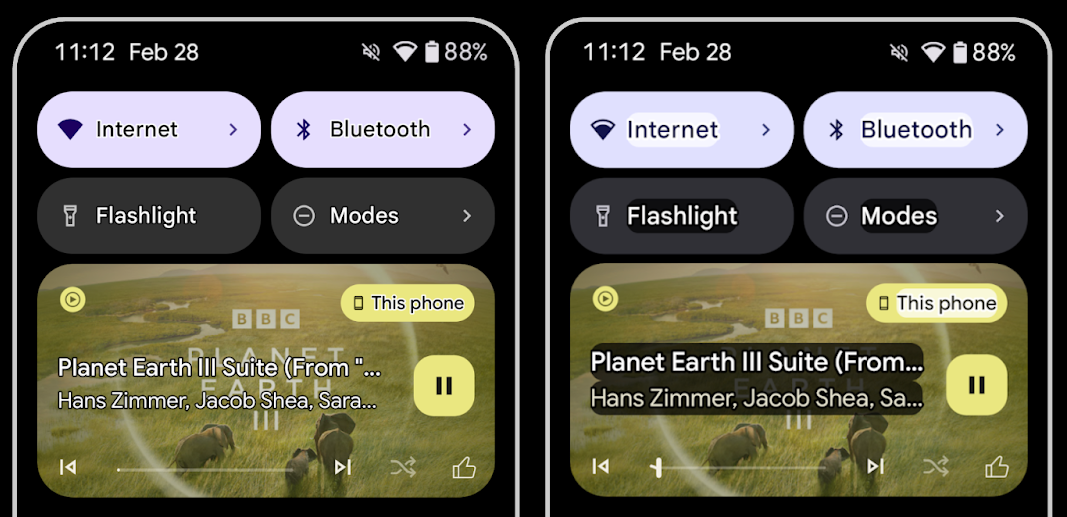
Gli utenti ipovedenti hanno spesso una sensibilità al contrasto ridotta, il che rende difficile distinguere gli oggetti dallo sfondo. Per aiutare questi utenti, Android 16 introduce il testo con contorni, che sostituisce il testo ad alto contrasto e disegna un'area di contrasto più grande intorno al testo per migliorarne notevolmente la leggibilità.
Android 16 contiene nuove API AccessibilityManager che consentono alle tue app di controllare o registrare un ascoltatore per verificare se questa modalità è attivata. Questo è principalmente per i kit di strumenti per l'interfaccia utente come Compose per offrire un'esperienza visiva simile. Se gestisci una libreria UI Toolkit o la tua app esegue il rendering di testo personalizzato che aggira la classe android.text.Layout, puoi utilizzarla per sapere quando è attivato il testo con contorni.
Durata aggiunta a TtsSpan
Android 16 estende TtsSpan con un TYPE_DURATION, costituito da ARG_HOURS, ARG_MINUTES e ARG_SECONDS. In questo modo puoi annotare direttamente la durata del tempo, garantendo un output di sintesi vocale accurato e coerente con servizi come TalkBack.
Supportare elementi con più etichette
Al momento Android consente agli elementi dell'interfaccia utente di ricavare l'etichetta di accessibilità da un'altra e ora offre la possibilità di associare più etichette, uno scenario comune nei contenuti web. Con l'introduzione di un'API basata su elenchi in
AccessibilityNodeInfo, Android può supportare direttamente queste
relazioni con più etichette. Nell'ambito di questa modifica, abbiamo ritirato
AccessibilityNodeInfo#setLabeledBy e
#getLabeledBy in favore di
#addLabeledBy, #removeLabeledBy e
#getLabeledByList.
Supporto migliorato per gli elementi espandibili
Android 16 aggiunge API di accessibilità che consentono di trasmettere lo stato espanso o chiuso degli elementi interattivi, come menu ed elenchi espandibili. Impostando lo stato espanso utilizzando setExpandedState e inviando eventi di accessibilità TYPE_WINDOW_CONTENT_CHANGED con un tipo di modifica dei contenuti CONTENT_CHANGE_TYPE_EXPANDED, puoi assicurarti che gli screen reader come TalkBack annuncino le modifiche dello stato, offrendo un'esperienza utente più intuitiva e inclusiva.
Barre di avanzamento indeterminate
Android 16 aggiunge RANGE_TYPE_INDETERMINATE, che ti consente di esporre RangeInfo sia per i widget ProgressBar determinati che per quelli indeterminati, consentendo a servizi come TalkBack di fornire feedback più coerenti per gli indicatori di avanzamento.
Casella di controllo tri-stato
I nuovi metodi AccessibilityNodeInfo
getChecked e setChecked(int)
in Android 16 ora supportano uno stato "parzialmente selezionato", oltre a "selezionato" e "deselezionato". Questo sostituisce i valori booleani
isChecked e setChecked(boolean) deprecati.
Descrizioni supplementari
Quando un servizio di accessibilità descrive un elemento ViewGroup, combina le etichette dei contenuti delle relative visualizzazioni secondarie. Se fornisci un valore contentDescription per ViewGroup, i servizi di accessibilità presumono che tu stia anche eseguendo l'override della descrizione delle visualizzazioni secondarie non attivabili. Questo può essere problematico se vuoi etichettare elementi come un menu a discesa (ad esempio "Famiglia di caratteri") mantenendo al contempo la selezione corrente per l'accessibilità (ad esempio "Roboto"). Android 16 aggiunge setSupplementalDescription in modo da poter fornire testo che fornisca informazioni su un ViewGroup senza sostituire le informazioni dei relativi elementi secondari.
Campi obbligatori del modulo
Android 16 aggiunge setFieldRequired a
AccessibilityNodeInfo in modo che le app possano comunicare a un servizio di accessibilità
che l'input in un campo del modulo è obbligatorio. Si tratta di uno scenario importante per gli utenti che compilano molti tipi di moduli, anche elementi semplici come una casella di controllo obbligatoria per i termini e le condizioni, che aiutano gli utenti a identificare in modo coerente e a spostarsi rapidamente tra i campi obbligatori.
Smartphone come input del microfono per le chiamate vocali con apparecchi acustici LEA
Android 16 consente agli utenti di apparecchi acustici LE Audio di passare tra i microfoni integrati sugli apparecchi acustici e il microfono sullo smartphone per le chiamate vocali. Questa opzione può essere utile in ambienti rumorosi o in altre situazioni in cui i microfoni dell'apparecchio acustico potrebbero non funzionare bene.
Controlli del volume ambientale per apparecchi acustici LEA
Android 16 consente agli utenti di apparecchi acustici LE Audio di regolare il volume del suono ambientale captato dai microfoni dell'apparecchio acustico. Questa opzione può essere utile in situazioni in cui il rumore di fondo è troppo alto o troppo basso.
Fotocamera
Android 16 migliora il supporto per gli utenti di fotocamere professionali, consentendo l'esposizione automatica ibrida
insieme a regolazioni precise di tinta e temperatura di colore. Un nuovo
indicatore della modalità notturna aiuta l'app a sapere quando passare a una sessione della fotocamera in modalità notturna e viceversa. Le nuove azioni Intent semplificano l'acquisizione di foto in movimento
e continuiamo a migliorare le immagini Ultra HDR con il supporto della codifica HEIC
e di nuovi parametri dello standard ISO 21496-1.
Esposizione automatica ibrida
Android 16 aggiunge nuove modalità di esposizione automatica ibrida a Camera2, consentendo di controllare manualmente aspetti specifici dell'esposizione lasciando che sia l'algoritmo di esposizione automatica (AE) a gestire il resto. Puoi controllare ISO + AE e tempo di esposizione + AE, offrendo una maggiore flessibilità rispetto all'approccio attuale in cui hai il controllo manuale completo o ti basi interamente sull'esposizione automatica.
fun setISOPriority() {
    // ... (Your existing code before the snippet) ...

    val availablePriorityModes = mStaticInfo.characteristics.get(
        CameraCharacteristics.CONTROL_AE_AVAILABLE_PRIORITY_MODES
    )

    // ... (Your existing code between the snippets) ...

    // Turn on AE mode to set priority mode
    reqBuilder.set(
        CaptureRequest.CONTROL_AE_MODE,
        CameraMetadata.CONTROL_AE_MODE_ON
    )
    reqBuilder.set(
        CaptureRequest.CONTROL_AE_PRIORITY_MODE,
        CameraMetadata.CONTROL_AE_PRIORITY_MODE_SENSOR_SENSITIVITY_PRIORITY
    )
    reqBuilder.set(
        CaptureRequest.SENSOR_SENSITIVITY,
        TEST_SENSITIVITY_VALUE
    )
    val request: CaptureRequest = reqBuilder.build()

    // ... (Your existing code after the snippet) ...
}
Regolazioni precise di tinta e temperatura di colore
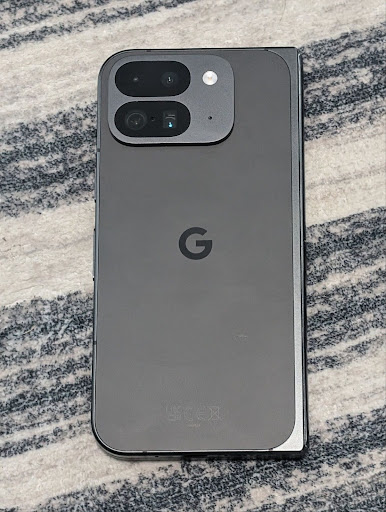
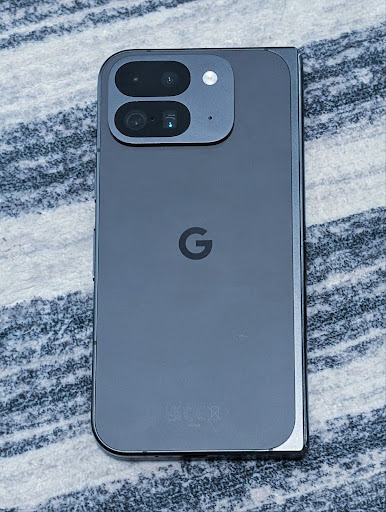
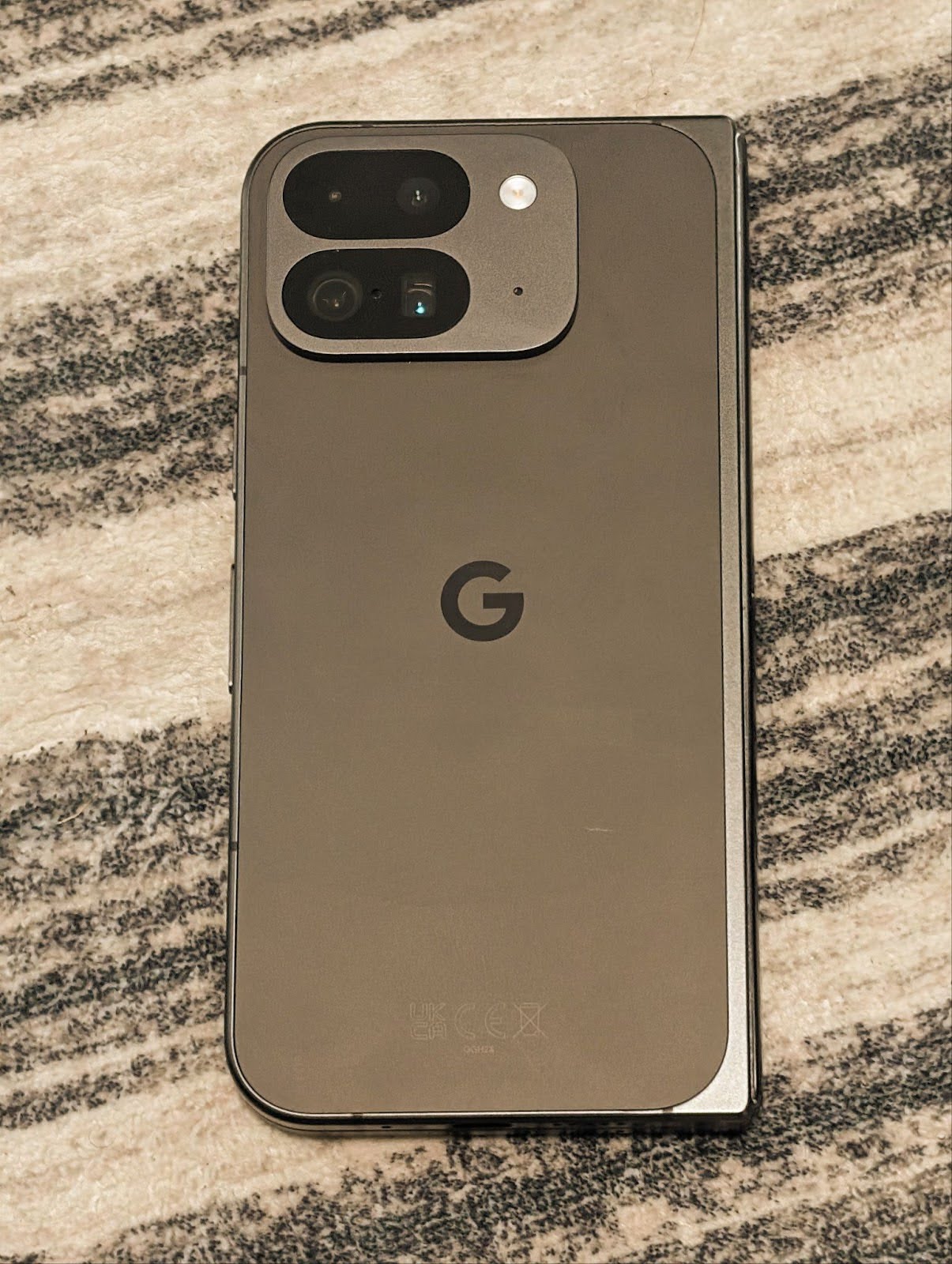
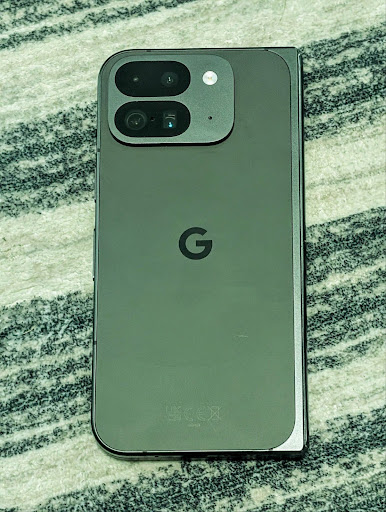
Android 16 aggiunge il supporto della fotocamera per regolazioni precise della temperatura e della tinta del colore per supportare meglio le applicazioni di registrazione video professionali. Nelle versioni precedenti di Android, potevi controllare le impostazioni del bilanciamento del bianco tramite CONTROL_AWB_MODE, che contiene opzioni limitate a un elenco di preset, come Incandescente, Nuvoloso e Crepuscolo. Il pulsante COLOR_CORRECTION_MODE_CCT consente di utilizzare COLOR_CORRECTION_COLOR_TEMPERATURE e COLOR_CORRECTION_COLOR_TINT per regolazioni precise del bilanciamento del bianco in base alla temperatura di colore correlata.
fun setCCT() {
    // ... (Your existing code before this point) ...

    val colorTemperatureRange: Range<Int> =
        mStaticInfo.characteristics[CameraCharacteristics.COLOR_CORRECTION_COLOR_TEMPERATURE_RANGE]

    // Set to manual mode to enable CCT mode
    reqBuilder[CaptureRequest.CONTROL_AWB_MODE] = CameraMetadata.CONTROL_AWB_MODE_OFF
    reqBuilder[CaptureRequest.COLOR_CORRECTION_MODE] = CameraMetadata.COLOR_CORRECTION_MODE_CCT
    reqBuilder[CaptureRequest.COLOR_CORRECTION_COLOR_TEMPERATURE] = 5000
    reqBuilder[CaptureRequest.COLOR_CORRECTION_COLOR_TINT] = 30

    val request: CaptureRequest = reqBuilder.build()

    // ... (Your existing code after this point) ...
}
Gli esempi seguenti mostrano l'aspetto di una foto dopo l'applicazione di diversi aggiustamenti della temperatura e della tinta del colore:
Rilevamento della scena in modalità notturna della fotocamera
Per aiutare la tua app a sapere quando passare da e a una sessione della fotocamera in modalità Notturna, Android 16 aggiunge EXTENSION_NIGHT_MODE_INDICATOR. Se supportato, è disponibile in CaptureResult in Camera2.
Si tratta dell'API che abbiamo brevemente menzionato come disponibile a breve nel post del blog In che modo Instagram ha consentito agli utenti di scattare foto straordinarie in condizioni di scarsa illuminazione. Il post è una guida pratica su come implementare la modalità notturna insieme a un caso di studio che collega le foto in modalità notturna in-app di qualità superiore a un aumento del numero di foto condivise dalla fotocamera in-app.
Azioni intent di acquisizione di foto in movimento
Android 16 aggiunge azioni Intent standard,
ACTION_MOTION_PHOTO_CAPTURE e
ACTION_MOTION_PHOTO_CAPTURE_SECURE, che richiedono all'applicazione della fotocamera di acquisire una foto in movimento e di restituirla.
Devi passare un EXTRA_OUTPUT aggiuntivo per controllare dove verrà scritta l'immagine o un Uri tramite Intent.setClipData(ClipData). Se non imposti un valore per ClipData, verrà copiato lì per te quando chiami Context.startActivity(Intent).
Miglioramenti delle immagini UltraHDR
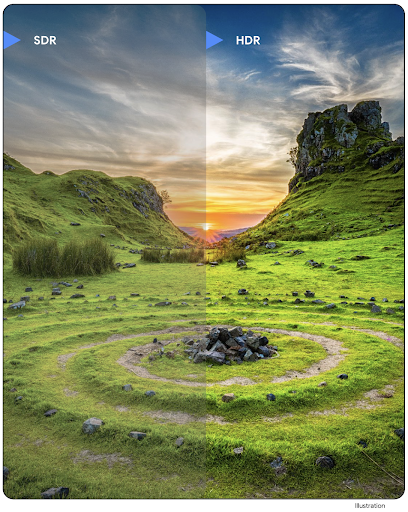
Android 16 prosegue il nostro impegno per offrire una qualità eccezionale delle immagini con le immagini UltraHDR. Aggiunge il supporto per le immagini UltraHDR nel formato di file HEIC. Queste immagini avranno il tipo ImageFormat
HEIC_ULTRAHDR e conterranno una mappa di guadagno incorporata simile
al formato JPEG UltraHDR esistente. Stiamo lavorando anche al supporto di AVIF per UltraHDR, quindi continua a seguirci.
Inoltre, Android 16 implementa in UltraHDR parametri aggiuntivi dello standard ISO 21496-1 in fase di stesura, inclusa la possibilità di recuperare e impostare lo spazio di colore in cui deve essere applicata la matematica della mappa di guadagno, nonché il supporto per le immagini di base codificate HDR con mappe di guadagno SDR.
Grafica
Android 16 include i più recenti miglioramenti grafici, come gli effetti grafici personalizzati con AGSL.
Effetti grafici personalizzati con AGSL
Android 16 aggiunge RuntimeColorFilter e
RuntimeXfermode, che ti consentono di creare effetti complessi come
Soglia, Seppia e Saturazione tonalità e applicarli alle chiamate di disegno. Da Android
13, puoi utilizzare AGSL per creare personalizzati
RuntimeShaders che estendono Shader. La nuova API riflette questo approccio, aggiungendo un RuntimeColorFilter basato su AGSL che estende ColorFilter e un effetto Xfermode che consente di implementare il compositing e l'unione personalizzati basati su AGSL tra i pixel di origine e di destinazione.
private val thresholdEffectString = """
    uniform half threshold;

    half4 main(half4 c) {
        half luminosity = dot(c.rgb, half3(0.2126, 0.7152, 0.0722));
        half bw = step(threshold, luminosity);
        return bw.xxx1 * c.a;
    }"""

fun setCustomColorFilter(paint: Paint) {
   val filter = RuntimeColorFilter(thresholdEffectString)
   filter.setFloatUniform(0.5);
   paint.colorFilter = filter
}
Connettività
Android 16 aggiorna la piattaforma per consentire alla tua app di accedere agli ultimi progressi nelle tecnologie di comunicazione e wireless.
Rilevamento con sicurezza avanzata
Android 16 aggiunge il supporto di funzionalità di sicurezza efficaci nella localizzazione Wi-Fi sui dispositivi supportati con 802.11az di Wi-Fi 6, consentendo alle app di combinare la maggiore precisione, la maggiore scalabilità e la pianificazione dinamica del protocollo con miglioramenti della sicurezza, tra cui la crittografia basata su AES-256 e la protezione contro gli attacchi MITM. Ciò consente di utilizzarlo in modo più sicuro nei casi d'uso di prossimità, ad esempio per sbloccare un laptop o la portiera di un veicolo. 802.11az è integrato con lo standard Wi-Fi 6, sfruttandone l'infrastruttura e le funzionalità per un'adozione più ampia e un deployment più semplice.
API di misurazione generiche
Android 16 include il nuovo RangingManager, che fornisce modi per determinare la distanza e l'angolo sull'hardware supportato tra il dispositivo locale e un dispositivo remoto. RangingManager supporta l'utilizzo di varie tecnologie di misurazione della distanza, come la rilevazione del canale BLE, la misurazione della distanza basata su RSSI BLE, la banda ultralarga e il tempo di viaggio di andata e ritorno del Wi-Fi.
Presenza di dispositivi di Gestione dispositivi companion
In Android 16 vengono introdotte nuove API per il binding del servizio
dell'app complementare. Il servizio verrà associato quando il BLE è in portata e il Bluetooth è connesso
e verrà scollegato quando il BLE non è in portata o il Bluetooth è
scollegato. L'app riceverà un nuovo callback 'onDevicePresenceEvent()' in base a vari valori di DevicePresenceEvent.
Per ulteriori dettagli, consulta
'startObservingDevicePresence(ObservingDevicePresenceRequest)'.
Media
Android 16 include una serie di funzionalità che migliorano l'esperienza multimediale.
Miglioramenti al selettore di foto
Il selettore di foto offre agli utenti un modo integrato e sicuro per concedere alla tua app l'accesso a immagini e video selezionati dallo spazio di archiviazione locale e sul cloud, anziché all'intera raccolta multimediale. Utilizzando una combinazione di componenti di sistema modulari tramite gli aggiornamenti di sistema di Google e Google Play Services, è supportato fino a Android 4.4 (livello API 19). L'integrazione richiede solo alcune righe di codice con la libreria Android Jetpack associata.
Android 16 include i seguenti miglioramenti al selettore di foto:
- Selettore di foto incorporato: nuove API che consentono alle app di incorporare il selettore di foto nella gerarchia delle visualizzazioni. In questo modo, l'utente può percepirla come una parte più integrata dell'app, sfruttando al contempo l'isolamento dei processi che consente agli utenti di selezionare i contenuti multimediali senza che l'app debba richiedere autorizzazioni eccessivamente ampie. Per massimizzare la compatibilità tra le versioni della piattaforma e semplificare l'integrazione, ti consigliamo di utilizzare la futura libreria Android Jetpack se vuoi integrare il selettore di foto incorporato.
- Ricerca sul cloud nel selettore di foto: nuove API che consentono la ricerca dal fornitore di contenuti multimediali sul cloud per il selettore di foto di Android. La funzionalità di ricerca nel selettore di foto sarà disponibile a breve.
Video professionale avanzato
Android 16 introduce il supporto del codec Advanced Professional Video (APV), progettato per essere utilizzato per la registrazione e la post-produzione di video di alta qualità di livello professionale.
Lo standard del codec APV presenta le seguenti funzionalità:
- Qualità video senza perdita di dati percettibili (simile alla qualità video non compressa)
- Codifica solo intra-frame a bassa complessità e ad alto throughput (senza previsione del dominio dei pixel) per supportare meglio i flussi di lavoro di editing
- Supporto di una gamma di larghezza di banda elevata fino a qualche Gbps per contenuti con risoluzione 2K, 4K e 8K, abilitato da uno schema di codifica di entropia leggero
- Matrici di frame per contenuti immersivi e per attivare la codifica e la decodifica parallele
- Supporto di vari formati di campionamento di crominanza e profondità di bit
- Supporto di più decodifica e ricodifica senza un grave peggioramento della qualità visiva
- Supporto di video in multiview e video ausiliari come profondità, alpha e anteprima
- Supporto per HDR10/10+ e metadati definiti dall'utente
Un'implementazione di riferimento dell'APV è fornita tramite il progetto OpenAPV. Android 16 implementerà il supporto per il profilo APV 422-10 che fornisce il campionamento del colore YUV 422 insieme alla codifica a 10 bit e per le larghezza di banda target fino a 2 Gbps.
Privacy
Android 16 include una serie di funzionalità che aiutano gli sviluppatori di app a proteggere la privacy degli utenti.
Aggiornamenti di Health Connect
Connessione Salute aggiunge ACTIVITY_INTENSITY, un tipo di dato definito in base alle linee guida dell'Organizzazione Mondiale della Sanità per le attività moderate e intense. Ogni
record richiede l'ora di inizio, l'ora di fine e se l'intensità dell'attività
è moderata o intensa.
Connessione Salute contiene anche API aggiornate che supportano le cartelle cliniche. In questo modo le app possono leggere e scrivere documenti medici in formato FHIR con il consenso esplicito dell'utente.
Privacy Sandbox su Android
Android 16 integra la versione più recente di Privacy Sandbox su Android, nell'ambito del nostro impegno continuo per sviluppare tecnologie in cui gli utenti sanno che la loro privacy è protetta. Sul nostro sito web puoi trovare ulteriori informazioni sul Programma beta per sviluppatori di Privacy Sandbox su Android per iniziare. Dai un'occhiata a SDK Runtime che consente agli SDK di essere eseguiti in un ambiente di runtime dedicato separato dall' app che stanno pubblicando, offrendo misure di salvaguardia più efficaci per la raccolta e la condivisione dei dati utente.
Sicurezza
Android 16 include funzionalità che ti aiutano a migliorare la sicurezza della tua app e a proteggere i dati dell'app.
API per la condivisione delle chiavi
Android 16 aggiunge API che supportano la condivisione dell'accesso alle chiavi del Keystore di Android con altre app. La nuova classe
KeyStoreManager supporta la concessione e la revoca dell'accesso alle chiavi
in base all'uid dell'app e include un'API per consentire alle app di accedere alle chiavi
condivise.
Fattori di forma dei dispositivi
Android 16 offre alle tue app il supporto per sfruttare al meglio i fattori di forma di Android.
Framework standardizzato per la qualità audio e video per le TV
Il nuovo MediaQuality
package in Android 16 espone
un insieme di API standardizzate per l'accesso ai profili audio e di immagini e alle
impostazioni relative all'hardware. In questo modo, le app di streaming possono eseguire query sui profili e applicarli ai contenuti multimediali in modo dinamico:
- I film masterizzati con una gamma dinamica più ampia richiedono una maggiore accuratezza del colore per vedere dettagli sottili nelle ombre e adattarsi alla luce ambientale, pertanto potrebbe essere appropriato un profilo che preferisca l'accuratezza del colore alla luminosità.
- Gli eventi sportivi dal vivo vengono spesso masterizzati con una gamma dinamica ristretta, ma spesso vengono guardati alla luce del giorno, quindi un profilo che preferisce la luminosità all'accuratezza del colore può dare risultati migliori.
- I contenuti completamente interattivi richiedono un'elaborazione minima per ridurre la latenza e una frequenza frame più elevata, motivo per cui molte TV sono dotate di un profilo di gioco.
L'API consente alle app di passare da un profilo all'altro e agli utenti di regolare le TV supportate in base ai loro contenuti.
Internazionalizzazione
Android 16 aggiunge funzionalità e capacità che completano l'esperienza utente quando un dispositivo viene utilizzato in lingue diverse.
Testo verticale
Android 16 aggiunge il supporto di basso livello per il rendering e la misurazione del testo in verticale per fornire un supporto di base per la scrittura verticale agli sviluppatori di librerie. Questo è particolarmente utile per lingue come il giapponese che utilizzano comunemente sistemi di scrittura verticali. È stato aggiunto un nuovo flag,
VERTICAL_TEXT_FLAG,
alla classe Paint. Quando questo flag viene impostato utilizzando Paint.setFlags, le API di misurazione del testo di Paint segnaleranno gli avanzamenti verticali anziché quelli orizzontali e Canvas disegnerà il testo verticalmente.
val text = "「春は、曙。」"
Box(
    Modifier.padding(innerPadding).background(Color.White).fillMaxSize().drawWithContent {
        drawIntoCanvas { canvas ->
            val paint = Paint().apply { textSize = 64.sp.toPx() }
            // Draw text vertically
            paint.flags = paint.flags or VERTICAL_TEXT_FLAG
            val height = paint.measureText(text)
            canvas.nativeCanvas.drawText(
                text,
                0,
                text.length,
                size.width / 2,
                (size.height - height) / 2,
                paint
            )
        }
    }
) {}
Personalizzazione del sistema di misurazione
Ora gli utenti possono personalizzare il sistema di misurazione nelle preferenze regionali delle Impostazioni. La preferenza dell'utente è inclusa nel codice della lingua, quindi puoi registrare un BroadcastReceiver su ACTION_LOCALE_CHANGED per gestire le modifiche alla configurazione della lingua quando cambiano le preferenze regionali.
L'utilizzo dei formattatori può aiutarti a creare un'esperienza locale. Ad esempio, "0,5 in" in inglese (Stati Uniti) corrisponde a "12,7 mm" per un utente che ha impostato il telefono sull'inglese (Danimarca) o che utilizza lo smartphone in inglese (Stati Uniti) con il sistema metrico come sistema di misurazione preferito.
Per trovare queste impostazioni, apri l'app Impostazioni e vai a Sistema > Lingue e regione.