

Android 14 introduce fantastiche funzionalità e API per gli sviluppatori. Le seguenti risorse ti aiutano a scoprire le funzionalità delle tue app e a iniziare a utilizzare le API correlate.
Per un elenco dettagliato delle API aggiunte, modificate e rimosse, consulta il report API diff. Per informazioni dettagliate sulle API aggiunte, visita il Riferimento API Android. Per Android 14, cerca le API aggiunte nel livello API 34. Per scoprire le aree in cui le modifiche alla piattaforma potrebbero influire sulle tue app, assicurati di consultare le modifiche al comportamento di Android 14 per le app che hanno come target Android 14 e per tutte le app.
Internazionalizzazione
Lingua preferita nelle app
Android 14 espande le funzionalità per lingua per app introdotte in Android 13 (livello API 33) con le seguenti funzionalità aggiuntive:
Genera automaticamente il
localeConfigdi un'app: a partire da Android Studio Giraffe Canary 7 e AGP 8.1.0-alpha07, puoi configurare l'app in modo che supporti automaticamente le preferenze per le lingue per app. In base alle risorse del progetto, il plug-in Android per Gradle genera il fileLocaleConfige aggiunge un riferimento al file manifest finale, quindi non devi più creare o aggiornare il file manualmente. AGP utilizza le risorse nelle cartelleresdei moduli dell'app e eventuali dipendenze dei moduli della libreria per determinare le lingue da includere nel fileLocaleConfig.Aggiornamenti dinamici per il
localeConfigdi un'app: utilizza i metodisetOverrideLocaleConfig()egetOverrideLocaleConfig()inLocaleManagerper aggiornare dinamicamente l'elenco delle lingue supportate della tua app nelle impostazioni di sistema del dispositivo. Utilizza questa flessibilità per personalizzare l'elenco delle lingue supportate per regione, eseguire esperimenti A/B o fornire un elenco aggiornato delle impostazioni internazionali se la tua app utilizza i push lato server per la localizzazione.Visibilità della lingua dell'app per gli editor di metodi di immissione (IME): gli IME possono utilizzare il metodo
getApplicationLocales()per controllare la lingua dell'app corrente e associare la lingua dell'IME a quella lingua.
API Grammatical Inflection
Tre miliardi di persone parlano lingue con genere: lingue in cui le categorie grammaticali, come nomi, verbi, aggettivi e preposizioni, si declinano in base al genere delle persone e degli oggetti di cui parli o a cui ti riferisci. Tradizionalmente, molte lingue con genere grammaticale utilizzano il genere grammaticale maschile come genere predefinito o generico.
Rivolgersi agli utenti con il genere grammaticale sbagliato, ad esempio alle donne con il genere grammaticale maschile, può influire negativamente sul loro rendimento e sul loro atteggiamento. Al contrario, un'interfaccia utente con un linguaggio che riflette correttamente il genere grammaticale dell'utente può migliorare il coinvolgimento dell'utente e offrire un'esperienza utente più personalizzata e dal suono naturale.
Per aiutarti a creare un'interfaccia utente incentrata sull'utente per le lingue con genere, Android 14 introduce l'API di flessione grammaticale, che ti consente di aggiungere il supporto per il genere grammaticale senza eseguire il refactoring dell'app.
Preferenze regionali
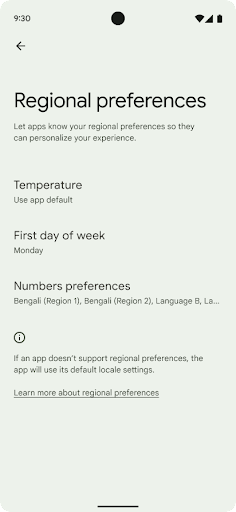
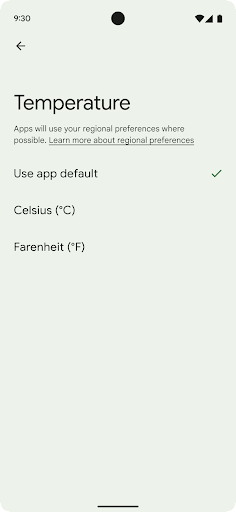
Le preferenze regionali consentono agli utenti di personalizzare le unità di misura della temperatura, il primo giorno della settimana e i sistemi di numerazione. Un europeo che vive negli Stati Uniti potrebbe preferire che le unità di misura della temperatura siano in gradi Celsius anziché Fahrenheit e che le app trattino il lunedì come inizio della settimana anziché la domenica, che è il valore predefinito negli Stati Uniti.
I nuovi menu Impostazioni Android per queste preferenze offrono agli utenti un punto di riferimento rilevabile e centralizzato per modificare le preferenze delle app. Queste preferenze rimangono invariate anche durante il backup e il ripristino. Diverse API e
come intenti,
getTemperatureUnit
e
getFirstDayOfWeek—
Concedi alla tua app l'accesso in lettura alle preferenze dell'utente, in modo che possa regolare il modo in cui
visualizza le informazioni. Puoi anche registrare un
BroadcastReceiver attivo
ACTION_LOCALE_CHANGED
per gestire le modifiche alla configurazione delle impostazioni internazionali quando cambiano le preferenze regionali.
Per trovare queste impostazioni, apri l'app Impostazioni e seleziona Sistema > Lingue e input > Preferenze regionali.
Accessibilità
Ridimensionamento non lineare dei caratteri fino al 200%
A partire da Android 14, il sistema supporta il ridimensionamento dei caratteri fino al 200%, offrendo agli utenti opzioni di accessibilità aggiuntive.
Per evitare che gli elementi di testo di grandi dimensioni sullo schermo vengano ridimensionati in modo eccessivo, il sistema applica una curva di ridimensionamento non lineare. Questa strategia di ridimensionamento fa sì che il testo grande non venga ridimensionato alla stessa velocità del testo più piccolo. Il ridimensionamento non lineare dei caratteri consente di preservare la gerarchia proporzionale tra elementi di dimensioni diverse, riducendo i problemi di ridimensionamento lineare del testo a livelli elevati (ad esempio testo troncato o testo che diventa più difficile da leggere a causa di dimensioni del display estremamente grandi).
Testare l'app con il ridimensionamento non lineare dei caratteri
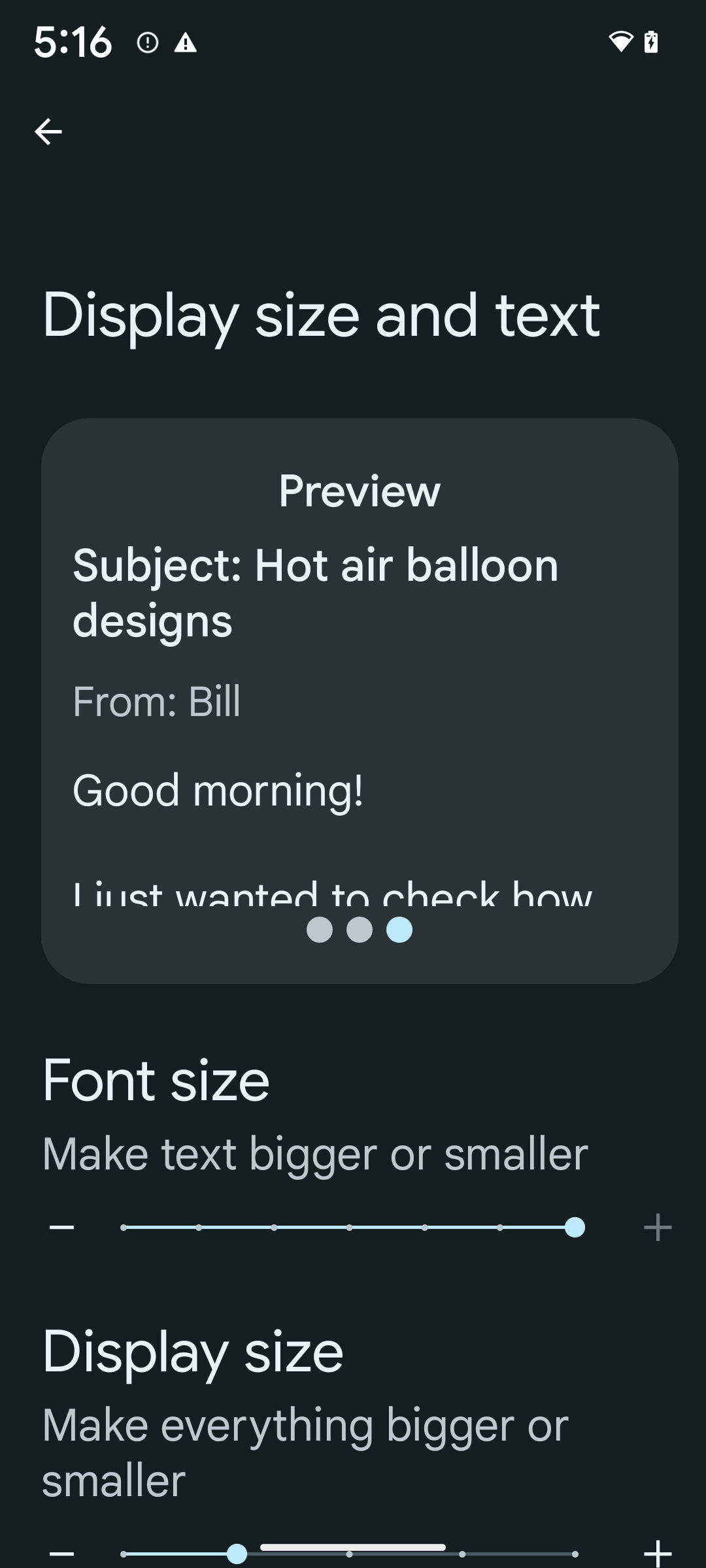
Se utilizzi già le unità di pixel scalabili (sp) per definire le dimensioni del testo, queste opzioni aggiuntive e i miglioramenti del ridimensionamento vengono applicati automaticamente al testo della tua app. Tuttavia, devi comunque eseguire test dell'interfaccia utente con le dimensioni del carattere massime abilitate (200%) per assicurarti che la tua app applichi correttamente le dimensioni del carattere e possa ospitare dimensioni del carattere più grandi senza influire sull'usabilità.
Per attivare le dimensioni del carattere al 200%:
- Apri l'app Impostazioni e vai a Accessibilità > Dimensioni visualizzazione e testo.
- Per l'opzione Dimensioni carattere, tocca l'icona Più (+) finché non viene attivata l'impostazione delle dimensioni massime del carattere, come mostrato nell'immagine che accompagna questa sezione.
Utilizzare unità di pixel scalati (sp) per le dimensioni del testo
Ricorda di specificare sempre le dimensioni del testo in unità sp. Quando la tua app utilizza le unità sp, Android può applicare la dimensione del testo preferita dall'utente e ridimensionarla in modo appropriato.
Non utilizzare unità sp per la spaziatura interna o definire le altezze delle visualizzazioni presupponendo una spaziatura interna implicita: con il ridimensionamento non lineare dei caratteri, le dimensioni sp potrebbero non essere proporzionali, quindi 4 sp + 20 sp potrebbero non essere uguali a 24 sp.
Convertire le unità di pixel scalabili (sp)
Utilizza TypedValue.applyDimension() per convertire le unità sp in pixel e TypedValue.deriveDimension() per convertire i pixel in sp. Questi metodi applicano automaticamente la curva di scalabilità non lineare appropriata.
Evita di codificare le equazioni utilizzando
Configuration.fontScale o
DisplayMetrics.scaledDensity. Poiché il ridimensionamento dei caratteri non è lineare, il campo scaledDensity non è più preciso. Il campo fontScale
deve essere utilizzato solo a scopo informativo perché i caratteri non vengono più
scalati con un singolo valore scalare.
Utilizza le unità sp per lineHeight
Definisci sempre android:lineHeight utilizzando le unità sp anziché dp, in modo che l'altezza della riga venga scalata insieme al testo. In caso contrario, se il testo
è in sp, ma il lineHeight è in dp o px, non viene scalato e appare compresso.
TextView corregge automaticamente lineHeight in modo che le proporzioni che intendi utilizzare vengano mantenute, ma solo se sia textSize sia lineHeight sono definiti in unità sp.
Fotocamera e contenuti multimediali
Ultra HDR per le immagini
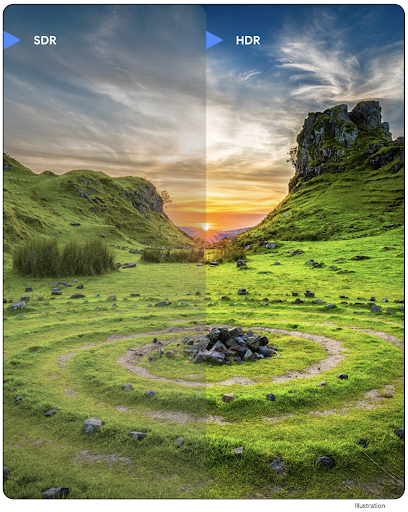
Android 14 aggiunge il supporto per le immagini HDR (High Dynamic Range) che mantengono più informazioni del sensore quando scatti una foto, il che consente di ottenere colori vivaci e un maggiore contrasto. Android utilizza il formato Ultra HDR, che è completamente compatibile con le immagini JPEG, consentendo alle app di dialogare senza problemi con le immagini HDR, visualizzandole in Standard Dynamic Range (SDR) se necessario.
Il rendering di queste immagini nell'interfaccia utente in HDR viene eseguito automaticamente dal framework quando l'app attiva l'utilizzo dell'interfaccia utente HDR per la finestra di attività tramite una voce del manifest o in fase di esecuzione tramite chiamata di Window.setColorMode(). Puoi anche acquisire immagini statiche Ultra HDR compresse sui dispositivi supportati. Con un maggior numero di colori recuperati
dal sensore, la modifica in post può essere più flessibile. Il valore Gainmap associato alle immagini Ultra HDR può essere utilizzato per eseguire il rendering utilizzando OpenGL o Vulkan.
Zoom, messa a fuoco, post-visualizzazione e altro ancora nelle estensioni della fotocamera
Android 14 esegue l'upgrade e migliora le estensioni della fotocamera, consentendo alle app di gestire tempi di elaborazione più lunghi, il che consente di migliorare le immagini utilizzando algoritmi ad alta intensità di calcolo come la fotografia in condizioni di scarsa illuminazione su supportati dispositivi. Queste funzionalità offrono agli utenti un'esperienza ancora più solida quando utilizzano le funzionalità di estensione della videocamera. Ecco alcuni esempi di questi miglioramenti:
- La stima della latenza di elaborazione delle foto dinamiche fornisce stime della latenza di acquisizione delle foto molto più accurate in base alle condizioni ambientali e della scena attuali. Chiama
CameraExtensionSession.getRealtimeStillCaptureLatency()per ottenere un oggettoStillCaptureLatencycon due metodi di stima della latenza. Il metodogetCaptureLatency()restituisce la latenza stimata traonCaptureStartedeonCaptureProcessStarted(), mentre il metodogetProcessingLatency()restituisce la latenza stimata traonCaptureProcessStarted()e il frame elaborato finale disponibile. - Supporto per i callback relativi all'avanzamento dell'acquisizione in modo che le app possano mostrare l'avanzamento corrente delle operazioni di elaborazione di acquisizioni di foto ancora in corso. Puoi verificare se questa funzionalità è disponibile con
CameraExtensionCharacteristics.isCaptureProcessProgressAvailablee, in questo caso, implementare il callbackonCaptureProcessProgressed(), a cui viene passato come parametro il progresso (da 0 a 100). Metadati specifici per le estensioni, ad esempio
CaptureRequest.EXTENSION_STRENGTHper regolare l'intensità di un effetto dell'estensione, ad esempio la quantità di sfocatura dello sfondo conEXTENSION_BOKEH.Funzionalità Postview per l'acquisizione di foto nelle estensioni della fotocamera, che fornisce un'immagine meno elaborata più rapidamente rispetto all'immagine finale. Se un'estensione ha aumentato la latenza di elaborazione, è possibile fornire un'immagine post-visualizzazione come segnaposto per migliorare l'esperienza utente e sostituirla in un secondo momento con l'immagine finale. Puoi verificare se questa funzionalità è disponibile con
CameraExtensionCharacteristics.isPostviewAvailable. Dopodiché puoi passare unOutputConfigurationaExtensionSessionConfiguration.setPostviewOutputConfiguration.Supporto di
SurfaceViewche consente un percorso di rendering dell'anteprima più ottimizzato e a basso consumo energetico.Supporto per il tocco per mettere a fuoco e lo zoom durante l'utilizzo dell'estensione.
Zoom nel sensore
Quando REQUEST_AVAILABLE_CAPABILITIES_STREAM_USE_CASE in
CameraCharacteristics contiene
SCALER_AVAILABLE_STREAM_USE_CASES_CROPPED_RAW, la tua app
puoi utilizzare le funzionalità avanzate del sensore per assegnare a uno stream RAW ritagliata gli stessi
pixel del campo visivo completo utilizzando un CaptureRequest
con un target RAW con il caso d'uso dello stream impostato su
CameraMetadata.SCALER_AVAILABLE_STREAM_USE_CASES_CROPPED_RAW.
Grazie all'implementazione dei controlli di override della richiesta, la videocamera aggiornata offre agli utenti il controllo dello zoom anche prima che gli altri controlli della videocamera siano pronti.
Audio USB lossless
Android 14 supporta i formati audio lossless per esperienze di livello audiophile tramite cuffie con cavo USB. Puoi eseguire query su un dispositivo USB per gli attributi del mixer preferiti, registrare un ascoltatore per le modifiche agli attributi del mixer preferiti e configurare gli attributi del mixer utilizzando la classe AudioMixerAttributes. Questa classe rappresenta il formato, ad esempio la maschera del canale, la frequenza di campionamento e il comportamento del mixer audio. La classe consente di inviare l'audio direttamente, senza miscelazione, regolazione del volume o effetti di elaborazione.
Produttività e strumenti per gli sviluppatori
Gestore delle credenziali
Android 14 aggiunge Gestore delle credenziali come API della piattaforma, con ulteriore supporto per i dispositivi con Android 4.4 (livello API 19) tramite una libreria Jetpack che utilizza Google Play Services. Credential Manager ha lo scopo di semplificare l'accesso per gli utenti con API che recuperano e archiviano le credenziali con i provider di credenziali configurati dall'utente. Credential Manager supporta più metodi di accesso, tra cui nome utente e password, passkey e soluzioni di accesso federato (come Accedi con Google) in una singola API.
Le passkey offrono molti vantaggi. Ad esempio, le passkey sono basate su standard di settore, possono funzionare su diversi sistemi operativi ed ecosistemi dei browser e possono essere utilizzate con siti web e app.
Per saperne di più, consulta la documentazione di Gestore delle credenziali e delle passkey e il post del blog su Gestore delle credenziali e passkey.
Health Connect
Connessione Salute è un repository on-device per i dati relativi a salute e attività fisica degli utenti. Consente agli utenti di condividere dati tra le loro app preferite, con un unico punto di controllo per i dati che vogliono condividere con queste app.
Sui dispositivi con versioni precedenti ad Android 14, Health Connect è disponibile come app scaricabile dal Google Play Store. A partire da Android 14, Connessione Salute fa parte della piattaforma e riceve aggiornamenti tramite gli aggiornamenti di sistema Google Play senza richiedere un download separato. In questo modo, Connessione Salute può essere aggiornata di frequente e le tue app possono fare affidamento sulla disponibilità di Connessione Salute sui dispositivi con Android 14 o versioni successive. Gli utenti possono accedere a Connessione Salute dalle impostazioni del proprio dispositivo, con i controlli della privacy integrati nelle impostazioni di sistema.
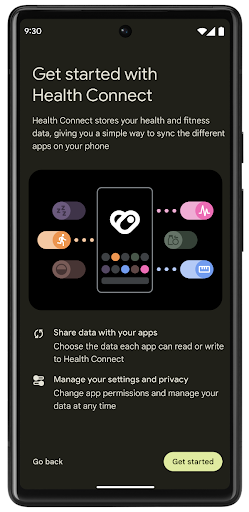
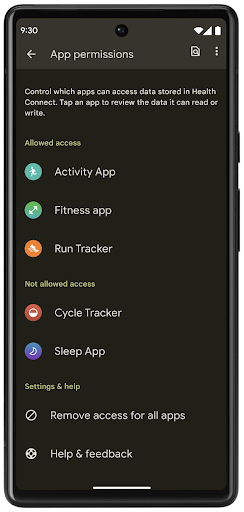
Connessione Salute include diverse nuove funzionalità in Android 14, come i percorsi di allenamento, che consentono agli utenti di condividere un percorso del loro allenamento che può essere visualizzato su una mappa. Un percorso è definito come un elenco di località salvate in un determinato periodo di tempo e la tua app può inserire percorsi nelle sessioni di allenamento, collegandoli tra loro. Per garantire che gli utenti abbiano il controllo completo su questi dati sensibili, devono consentire la condivisione di singoli percorsi con altre app.
Per ulteriori informazioni, consulta la documentazione di Connessione Salute e il post del blog sulle novità di Android Salute.
Aggiornamenti di OpenJDK 17
Android 14 continua l'opera di aggiornamento delle librerie di base di Android per allinearsi alle funzionalità delle ultime release OpenJDK LTS, inclusi gli aggiornamenti delle librerie e il supporto del linguaggio Java 17 per gli sviluppatori di app e piattaforme.
Sono incluse le seguenti funzionalità e i seguenti miglioramenti:
- Sono stati aggiornati circa 300 corsi
java.baseper il supporto di Java 17. - Blocchi di testo, che introducono stringhe letterali su più righe nel linguaggio di programmazione Java.
- Corrispondenza pattern per instanceof, che consente di trattare un oggetto come se avesse un tipo specifico in un
instanceofsenza variabili aggiuntive. - Classi sigillate, che ti consentono di limitare le classi e le interfacce che possono estenderle o implementarle.
Grazie agli aggiornamenti di sistema Google Play (Project Mainline), oltre 600 milioni di dispositivi sono abilitati a ricevere gli aggiornamenti più recenti di Android Runtime (ART) che includono queste modifiche. Ciò fa parte del nostro impegno a offrire alle app un ambiente più coerente e sicuro su tutti i dispositivi e a fornire nuove funzionalità e capacità agli utenti indipendentemente dalle release della piattaforma.
Java e OpenJDK sono marchi o marchi registrati di Oracle e/o delle sue società consociate.
Miglioramenti per gli store
Android 14 introduce diverse API PackageInstaller che consentono agli store di app di migliorare l'esperienza utente.
Richiedere l'approvazione dell'installazione prima del download
L'installazione o l'aggiornamento di un'app potrebbe richiedere l'approvazione dell'utente.
Ad esempio, quando un programma di installazione che utilizza l'autorizzazione REQUEST_INSTALL_PACKAGES tenta di installare una nuova app. Nelle versioni precedenti di Android, gli store possono richiedere l'approvazione dell'utente solo dopo che gli APK sono stati scritti nella sessione di installazione e la sessione è stata committata.
A partire da Android 14, il metodo requestUserPreapproval() consente agli installatori di richiedere l'approvazione dell'utente prima di confermare la sessione di installazione. Questo miglioramento consente a un negozio di app di posticipare il download di eventuali APK fino a quando l'installazione non è stata approvata dall'utente. Inoltre, una volta che un utente ha approvato l'installazione, l'app store può scaricare e installare l'app in background senza interrompere l'utente.
Richiedere la responsabilità per gli aggiornamenti futuri
Il metodo setRequestUpdateOwnership() consente a un installatore di indicare al sistema che intende essere responsabile degli aggiornamenti futuri di un'app che sta installando. Questa funzionalità consente l'applicazione della proprietà degli aggiornamenti, il che significa che solo il proprietario dell'aggiornamento è autorizzato a installare aggiornamenti automatici dell'app. L'applicazione della proprietà degli aggiornamenti contribuisce a garantire che gli utenti ricevano gli aggiornamenti solo dall'app store previsto.
Qualsiasi altro programma di installazione, inclusi quelli che utilizzano l'autorizzazione INSTALL_PACKAGES, deve ricevere l'approvazione esplicita dell'utente per installare un aggiornamento. Se un utente decide di procedere con un
aggiornamento da un'altra origine, la proprietà dell'aggiornamento viene persa.
Aggiornare le app in orari meno critici
In genere, gli store per app vogliono evitare di aggiornare un'app in uso attivo perché questo comporta l'interruzione dei processi in esecuzione dell'app, il che potrebbe interrompere l'attività dell'utente.
A partire da Android 14, l'API InstallConstraints offre ai programmatori di installazioni un modo per assicurarsi che gli aggiornamenti delle app vengano eseguiti al momento opportuno. Ad esempio, un app store può chiamare il metodo
commitSessionAfterInstallConstraintsAreMet() per
assicurarsi che un aggiornamento venga eseguito solo quando l'utente non interagisce più con l'app in questione.
Installare facilmente le suddivisioni facoltative
Con gli APK divisi, le funzionalità di un'app possono essere pubblicate in file APK separati,
invece che come APK monolitico. Gli APK suddivisi consentono agli store di app di ottimizzare la distribuzione di diversi componenti dell'app. Ad esempio, gli store di app potrebbero eseguire l'ottimizzazione in base alle proprietà del dispositivo di destinazione. L'API
PackageInstaller supporta le suddivisioni dalla sua
introduzione nel livello API 22.
In Android 14, il metodo setDontKillApp() consente a un installatore di indicare che i processi in esecuzione dell'app non devono essere interrotti quando vengono installati nuovi split. Gli store possono utilizzare questa funzionalità per installare senza problemi nuove funzionalità di un'app mentre l'utente la utilizza.
Bundle di metadati dell'app
A partire da Android 14, il programma di installazione del pacchetto Android ti consente di specificare i metadati dell'app, ad esempio le prassi di sicurezza dei dati, da includere nelle pagine dello store come Google Play.
Rilevare quando gli utenti acquisiscono screenshot del dispositivo
Per creare un'esperienza più standardizzata per il rilevamento degli screenshot, Android 14 introduce un'API per il rilevamento degli screenshot che tutela la privacy. Questa API consente alle app di registrare callback in base all'attività. Questi callback vengono richiamati e l'utente riceve una notifica quando acquisisce uno screenshot mentre l'attività è visibile.
Esperienza utente
Azioni personalizzate del foglio di condivisione e ranking migliorato
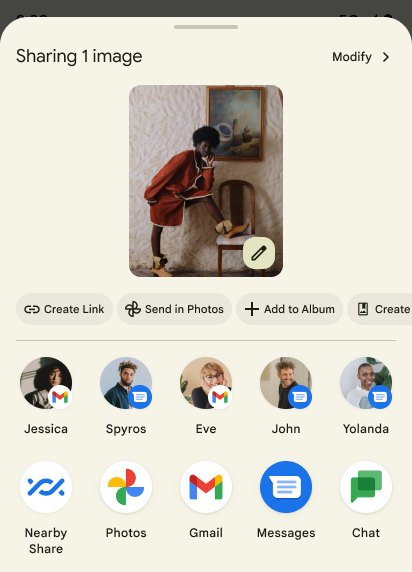
Android 14 aggiorna la scheda di condivisione di sistema per supportare azioni di app personalizzate e risultati di anteprima più informativi per gli utenti.
Aggiungere azioni personalizzate
Con Android 14, la tua app può aggiungere azioni personalizzate alla scheda di condivisione di sistema che richiama.
Migliorare il ranking dei target di condivisione diretta
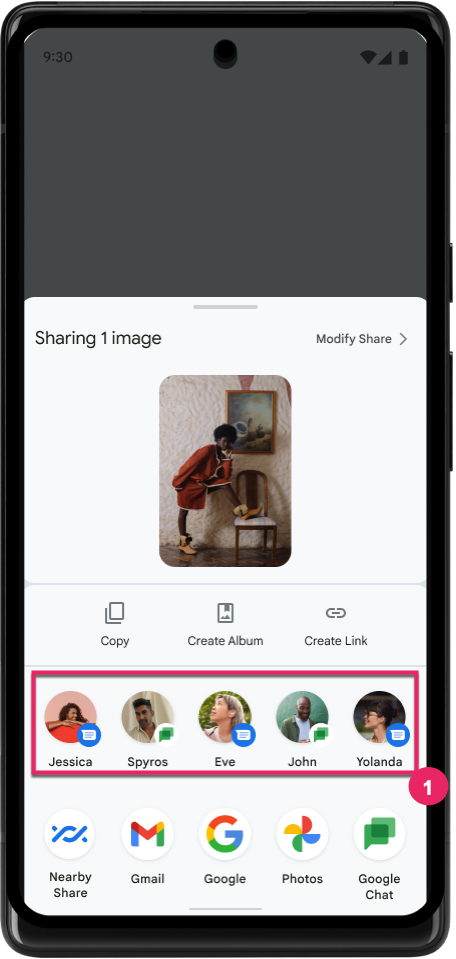
Android 14 utilizza più indicatori delle app per determinare il ranking dei target di condivisione diretta al fine di fornire risultati più utili all'utente. Per fornire l'indicatore più utile per il ranking, segui le indicazioni per migliorare i ranking dei target di condivisione diretta. Le app di comunicazione possono anche segnalare l'utilizzo delle scorciatoie per i messaggi in uscita e in entrata.
Supporto di animazioni integrate e personalizzate per Indietro predittivo
Android 13 ha introdotto l'animazione di ritorno alla schermata Home predittiva come opzione per gli sviluppatori. Se viene utilizzato in un'app supportata con l'opzione per gli sviluppatori attivata, lo scorrimento indietro mostra un'animazione che indica che il gesto di ritorno all'indietro fa uscire dall'app e torna alla schermata Home.
Android 14 include diversi miglioramenti e nuove indicazioni per il pulsante Indietro predittivo:
- Puoi impostare
android:enableOnBackInvokedCallback=trueper attivare le animazioni di sistema Indietro predittive per ogni attività anziché per l'intera app. - Abbiamo aggiunto nuove animazioni di sistema per accompagnare l'animazione di ritorno alla home page di Android 13. Le nuove animazioni di sistema sono interattive e inter-attività e vengono visualizzate automaticamente dopo la migrazione a Indietro predittivo.
- Abbiamo aggiunto nuove animazioni dei componenti Material per schede inferiori, schede laterali e Ricerca.
- Abbiamo creato linee guida per il design per la creazione di animazioni e transizioni in-app personalizzate.
- Abbiamo aggiunto nuove API per supportare le animazioni di transizione in-app personalizzate:
handleOnBackStarted,handleOnBackProgressed,handleOnBackCancelledinOnBackPressedCallbackonBackStarted,onBackProgressed,onBackCancelledinOnBackAnimationCallback- Utilizza
overrideActivityTransitionanzichéoverridePendingTransitionper le transizioni che rispondono quando l'utente scorri indietro.
Con questa release di anteprima di Android 14, tutte le funzionalità di Indietro predittivo rimangono nascoste dietro un'opzione per sviluppatori. Consulta la guida per gli sviluppatori per eseguire la migrazione della tua app al flusso di ritorno predittivo, nonché la guida per gli sviluppatori per creare transizioni in-app personalizzate.
Override per app del produttore di dispositivi con schermo grande
Gli override per app consentono ai produttori di modificare il comportamento delle app sui dispositivi con schermi grandi. Ad esempio, l'override FORCE_RESIZE_APP indica al sistema di ridimensionare l'app in base alle dimensioni del display (evitando la modalità di compatibilità delle dimensioni) anche se resizeableActivity="false" è impostato nel file manifest dell'app.
Le sostituzioni hanno lo scopo di migliorare l'esperienza utente su schermi di grandi dimensioni.
Le nuove proprietà del file manifest ti consentono di disattivare alcuni override del produttore del dispositivo per la tua app.
Override per app per utenti con schermi grandi
Le sostituzioni per app modificano il comportamento delle app sui dispositivi con schermi grandi. Ad esempio, l'override del produttore del dispositivo OVERRIDE_MIN_ASPECT_RATIO_LARGE imposta le proporzioni dell'app su 16:9 indipendentemente dalla configurazione dell'app.
Android 14 QPR1 consente agli utenti di applicare sostituzioni per app tramite un nuovo menu delle impostazioni sui dispositivi con schermi di grandi dimensioni.
Condivisione della schermata dell'app
La condivisione dello schermo dell'app consente agli utenti di condividere una finestra dell'app anziché l'intero schermo del dispositivo durante la registrazione dei contenuti dello schermo.
Con la condivisione schermo dell'app, la barra di stato, la barra di navigazione, le notifiche e altri elementi dell'interfaccia utente di sistema sono esclusi dalla visualizzazione condivisa. Vengono condivisi solo i contenuti dell'app selezionata.
La condivisione dello schermo dell'app migliora la produttività e la privacy consentendo agli utenti di eseguire più app, ma limitando la condivisione dei contenuti a una singola app.
Risposta rapida basata su LLM in Gboard su Pixel 8 Pro
Sui dispositivi Pixel 8 Pro con il Feature Drop di dicembre, gli sviluppatori possono provare risposte rapide di qualità superiore in Gboard grazie ai modelli linguistici di grandi dimensioni (LLM) on-device in esecuzione su Google Tensor.
Questa funzionalità è disponibile come anteprima limitata per l'inglese americano in WhatsApp, Line e KakaoTalk. Richiede l'utilizzo di un Pixel 8 Pro con Gboard come tastiera.
Per provarla, attiva prima la funzionalità in Impostazioni > Opzioni sviluppatore > Impostazioni AICore > Attiva AiCore persistente.
Quindi, apri una conversazione in un'app supportata per visualizzare la Risposta rapida basata su LLM nella barra dei suggerimenti di Gboard in risposta ai messaggi in arrivo.
Grafica
I percorsi sono interrogabili e interpolabili
L'API Path di Android è un meccanismo potente e flessibile per la creazione e il rendering di grafica vettoriale. Consente di tracciare o riempire un percorso, di creare un percorso da segmenti di linea o di curve quadratiche o cubiche, eseguire operazioni booleane per ottenere forme ancora più complesse o tutte contemporaneamente. Un limite è la capacità di scoprire cosa si trova effettivamente in un
oggetto Path. I componenti interni dell'oggetto sono opachi per i chiamanti dopo la creazione.
Per creare un Path, chiami metodi come
moveTo(), lineTo() e
cubicTo() per aggiungere segmenti di percorso. Tuttavia, non è stato possibile chiedere a quel percorso quali sono i segmenti, quindi devi conservare queste informazioni al momento della creazione.
A partire da Android 14, puoi eseguire query sui percorsi per scoprire i contenuti al loro interno.
Innanzitutto, devi ottenere un oggetto PathIterator utilizzando l'API
Path.getPathIterator:
Kotlin
val path = Path().apply {
    moveTo(1.0f, 1.0f)
    lineTo(2.0f, 2.0f)
    close()
}
val pathIterator = path.pathIterator
Java
Path path = new Path();
path.moveTo(1.0F, 1.0F);
path.lineTo(2.0F, 2.0F);
path.close();
PathIterator pathIterator = path.getPathIterator();
Successivamente, puoi chiamare PathIterator per ripetere i segmenti uno alla volta, recuperando tutti i dati necessari per ciascun segmento. Questo esempio utilizza oggetti PathIterator.Segment, che pacchettizzano i dati per te:
Kotlin
for (segment in pathIterator) {
    println("segment: ${segment.verb}, ${segment.points}")
}
Java
while (pathIterator.hasNext()) {
    PathIterator.Segment segment = pathIterator.next();
    Log.i(LOG_TAG, "segment: " + segment.getVerb() + ", " + segment.getPoints());
}
PathIterator ha anche una versione non allocabile di next() in cui puoi passare
in un buffer per contenere i dati dei punti.
Uno dei casi d'uso importanti dell'esecuzione di query sui dati di Path è l'interpolazione. Ad esempio, potresti voler creare un'animazione (o morph) tra due percorsi diversi. Per
semplificare ulteriormente questo caso d'uso, Android 14 include anche il
metodo interpolate() su Path. Supponendo che i due percorsi abbiano la stessa struttura interna, il metodo interpolate() crea un nuovo Path con il risultato interpolato. Questo esempio restituisce un percorso la cui forma è intermedia (un'interpolazione lineare di 0,5) tra path e otherPath:
Kotlin
val interpolatedResult = Path()
if (path.isInterpolatable(otherPath)) {
    path.interpolate(otherPath, .5f, interpolatedResult)
}
Java
Path interpolatedResult = new Path();
if (path.isInterpolatable(otherPath)) {
    path.interpolate(otherPath, 0.5F, interpolatedResult);
}
La libreria graphics-path di Jetpack abilita API simili anche per le versioni precedenti di Android.
Mesh personalizzate con shader di vertici e frammenti
Android supporta da tempo il disegno di mesh triangolari con ombreggiatura personalizzata, ma il formato della mesh di input è stato limitato a poche combinazioni di attributi predefinite. Android 14 aggiunge il supporto per le matrici personalizzate, che possono essere definite come triangoli o strisce di triangoli, e possono, facoltativamente, essere indicizzate. Questi mesh sono specificati con attributi personalizzati, passi di vertice, variabili e shader di vertici e frammenti scritti in AGSL.
Lo shader vertex definisce le varianti, come posizione e colore, mentre lo shader fragment può facoltativamente definire il colore del pixel, in genere utilizzando le varianti create dallo shader vertex. Se il colore viene fornito dall'shader frammento, viene mischiato con il colore Paint corrente utilizzando la modalità di miscela selezionata durante il disegno del mesh. Le uniformi possono essere passate agli shader di frammento e vertice per una maggiore flessibilità.
Renderer del buffer hardware per Canvas
Per facilitare l'utilizzo dell'API Canvas di Android per disegnare con accelerazione hardware in un HardwareBuffer, Android 14 introduce HardwareBufferRenderer. Questa API è particolarmente utile quando il caso d'uso prevede la comunicazione con il compositore di sistema tramite SurfaceControl per il disegno con bassa latenza.