

앱의 보안은 기본 OS의 보안에 따라 달라집니다. 위험을 완화하려면 앱에서 기기의 보안 상태를 실시간으로 평가하여 보안에 민감한 작업을 제한해야 합니다. 특히 핵심 시스템 구성요소가 완전히 업데이트되었는지, Android 보안 게시판에 게시된 취약점으로부터 보호되는지 확인해야 합니다. 기기 보안 상태를 파악하면 앱이 위험도가 높은 작업을 실행하기 전에 보호 조치를 설정할 수 있습니다.
AndroidX Security State는 Android 기반 기기의 보안 상태에 대한 통합 액세스를 제공하는 Jetpack 라이브러리입니다. AOSP API와 Android 공개 취약점 피드를 결합하여 보안 패치 수준 (SPL)을 넘어 포괄적이고 정확하며 실행 가능한 기기 보안 상태를 제공합니다.
아키텍처 개요
다음 다이어그램은 AndroidX 보안 상태 라이브러리가 온디바이스 플랫폼 속성, 프로세스 간 통신 (IPC) 업데이트 제공자, 공개 취약점 피드를 일관된 단일 API 세트로 통합하는 방법을 보여줍니다.
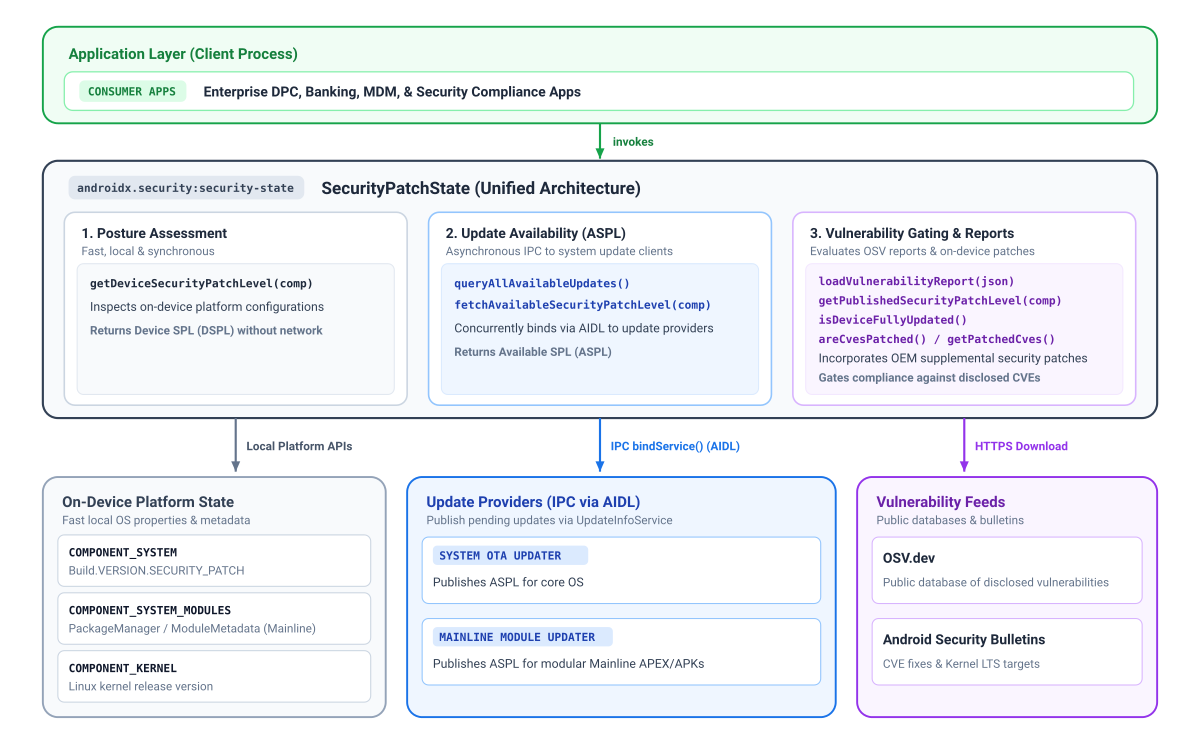
보안 패치 상태 및 구성요소
보안 상태 라이브러리를 사용하는 주요 이점은 세부적인 구성요소 수준에서 보안 패치 수준 (SPL)을 제공할 수 있다는 점입니다. 수년에 걸쳐 Android에서는 표준 시스템 무선 업데이트(OTA)와는 별도로 Google Play를 사용하여 업데이트되는 Google Play 시스템 업데이트 (Project Mainline)에 더 많은 모듈을 도입하여 다른 주기로 중요한 보안 수정사항을 제공했습니다.
마찬가지로 보안 패치 수준은 일반적으로 필요한 최소 일반 커널 이미지 (GKI) 버전을 요구하지만 커널 업데이트는 실제로 시스템 일정보다 앞서 진행될 수 있습니다. 이러한 커널 관련 수정사항은 시스템의 기본 SPL 문자열로 완전히 포착되지 않을 수 있습니다.
투명성을 개선하기 위해 보안 상태 라이브러리는 다음 세 구성요소 각각에 대해 유효한 패치 수준을 제공합니다.
- 시스템 (
COMPONENT_SYSTEM): 표준 보안 패치 수준 필드에서 파생된 표준 OS 및 시스템 보안 상태를 나타냅니다. - 시스템 Mainline 모듈 (
COMPONENT_SYSTEM_MODULES): 특정 모듈 출시 버전에서 파생된 모듈식 시스템 구성요소(Google Play 시스템 업데이트)의 보안 상태를 나타냅니다. - 커널 (
COMPONENT_KERNEL): 커널 버전 문자열에서 직접 파생된 기기 커널의 보안 상태를 나타냅니다.
구성요소에 따라 라이브러리는 최대 3개의 패치 수준 정보를 제공합니다.
- 기기 SPL (DSPL): 기기에서 실행되는 개별 구성요소의 현재 패치 수준으로, 네트워크 요청 없이 동기식으로 쿼리됩니다. 시스템과 Mainline은 캘린더 날짜 (
DateBasedSecurityPatchLevel)를 보고하는 반면 커널은 출시 버전(VersionedSecurityPatchLevel, 예:5.15.148)을 보고합니다. - 게시된 SPL (PSPL): Android 보안 게시판 및 오픈소스 취약점 (OSV) 데이터베이스 보고서에 공식적으로 게시된 기준입니다. 앱은 기기 SPL에서 제공하는 날짜 또는 버전 문자열을 비교하여 규정 준수를 평가할 수 있습니다.
- 사용 가능한 SPL (ASPL): 기기에 업데이트 제공자로부터 제공되는 대기 중인 업데이트가 있는지 나타냅니다. 업데이트 제공자는 IPC를 사용하여 비동기식으로 쿼리됩니다. Android Google Play 시스템 업데이트 기능은 Mainline 모듈의 가용성을 제공하고 OEM OTA 클라이언트는 시스템 업데이트의 가용성을 제공합니다. 커널 업데이트는 운영체제 이미지에 번들로 제공되므로 커널 업데이트 사용 가능 여부는
COMPONENT_SYSTEM를 사용하여 평가됩니다.
보안에 민감한 기능 게이트
기기 SPL (DSPL), 사용 가능한 SPL (ASPL), 게시된 SPL (PSPL)의 정보를 결합하여 보안에 민감한 기능을 제한하는 상황별 결정을 내릴 수 있습니다. 예를 들어 DSPL을 ASPL과 비교하여 사용자가 아직 설치하지 않은 최신 보안 패치가 있는지 확인하고 결제나 사용자 인증 정보 등록과 같은 민감한 작업을 시작하기 전에 업데이트하라는 메시지를 표시할 수 있습니다. areCvesPatched()를 사용하여 근접 기반 결제나 데이터 공유를 승인하기 전에 심각한 NFC나 블루투스 취약점을 확인하는 등 취약한 하위 시스템을 호출하기 전에 특정 고위험 취약점이 기기에서 수정되었는지 확인할 수도 있습니다.
플랫폼 버전 고려사항
특정 보안 상태 기능은 기본 플랫폼 아키텍처에 따라 다르며 하위 버전의 Android에서는 사용할 수 없습니다.
- Android 11 (API 수준 30 이상): 공지사항에 게시된 커널 LTS 버전 및 업데이트 가능 여부(ASPL) 쿼리를 비롯한 모든 구성요소를 완전히 지원합니다.
- Android 10 (API 수준 29): 시스템 및 시스템 모듈 패치 수준을 지원합니다. 하지만 Android 보안 게시판의 일반 커널 이미지 (GKI) 추적 및 커널 LTS 타겟이 Android 11에서 시작되었기 때문에 게시판에 게시된 커널 버전을 사용할 수 없습니다. 온디바이스 커널 버전은 로컬에서 계속 읽을 수 있습니다.
- Android 9 (API 수준 28) 이하: Android 10 제한사항 외에도 Android 10 이전에는 모듈식 시스템 구성요소 (Project Mainline)가 존재하지 않았습니다.
getDeviceSecurityPatchLevel(COMPONENT_SYSTEM_MODULES)호출은 시스템 모듈 SPL을 사용할 수 없는 경우 기준 Unix 에포크 날짜 (1970-01-01)로 안전하게 대체됩니다.
업데이트 사용 가능 여부 및 사용 가능한 SPL (ASPL) 이해
기기의 보안 상황을 확인하려면 개별 구성요소에 대기 중인 보안 업데이트가 있는지 알아야 합니다. Android 기기는 시스템 무선 업데이트 (OTA) 및 모듈식 구성요소용 Google Play 시스템 업데이트와 같은 여러 가지 고유한 전송 메커니즘을 통해 보안 업데이트를 수신합니다.
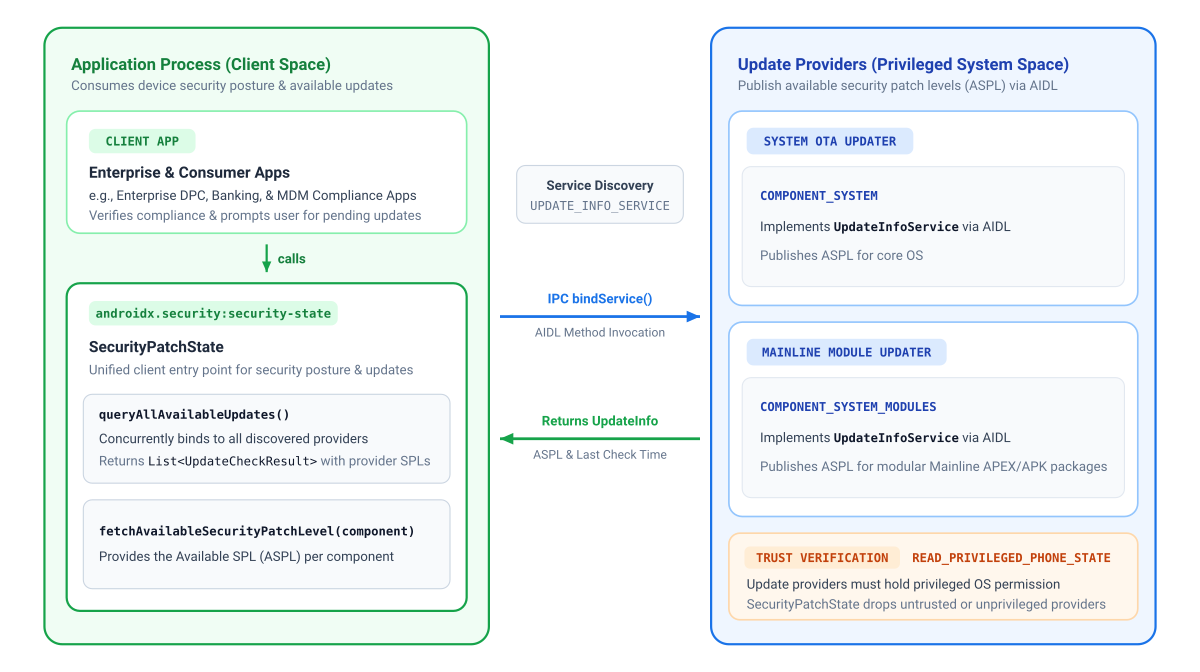
앱이 특정 구성요소의 ASPL을 가져오려면 해당 업데이트 제공자가 이 정보를 게시해야 합니다. 이러한 다양한 업데이트 소스를 조정하기 위해 클라이언트 애플리케이션은 AndroidX 보안 상태 라이브러리를 사용하여 보안 상태를 쿼리하고 온디바이스 업데이트 클라이언트는 동반 AndroidX 보안 상태 제공자 라이브러리를 사용하여 사용 가능한 보안 패치 수준 (ASPL)을 게시합니다.
Google은 모든 GMS Android 기기에 Mainline 모듈 업데이트 정보를 제공하고 Google OTA 클라이언트 (GOTA)를 사용하는 기기에 시스템 OTA 정보를 제공합니다.
다음 다이어그램은 클라이언트 애플리케이션이 AndroidX 보안 상태 라이브러리를 사용하여 Google Play 시스템 업데이트와 시스템 OTA 업데이트 모두에서 보안 상황을 쿼리하는 방법을 보여줍니다.
종속 항목 추가
AndroidX Security State의 종속 항목을 추가하려면 프로젝트에 Google Maven 저장소를 포함해야 합니다. 앱의 build.gradle.kts 또는 build.gradle 파일에 종속 항목을 추가합니다.
Kotlin
// Kotlin DSL (build.gradle.kts)
dependencies {
    implementation("androidx.security:security-state:1.1.0")
}
Groovy
// Groovy DSL (build.gradle)
dependencies {
    implementation "androidx.security:security-state:1.1.0"
}
선언된 권한 매트릭스
| 타겟 API | AndroidManifest.xml에 필요한 권한 |
운영 참고사항 |
|---|---|---|
getDeviceSecurityPatchLevel() |
없음 | 로컬 네이티브 시스템 속성과 패키지 메타데이터를 동기식으로 읽습니다. |
fetchAvailableSecurityPatchLevel()queryAllAvailableUpdates() |
없음 | 온디바이스 IPC를 사용하여 통신합니다. 이 라이브러리는 기기의 신뢰할 수 있는 구성요소만 쿼리하므로 (업데이트 제공자가 권한 있는 READ_PRIVILEGED_PHONE_STATE 권한을 보유해야 함) 앱이 수신하는 정보의 진위성을 신뢰할 수 있습니다. |
createVulnerabilityReportUrl()loadVulnerabilityReport()getPublishedSecurityPatchLevel()areCvesPatched()isDeviceFullyUpdated() |
android.permission.INTERNET |
공개 OSV 보고서를 가져오는 데 필요합니다. loadVulnerabilityReport()를 사용하여 메모리에 로드되면 쿼리 메서드가 네트워크 액세스 없이 로컬로 실행됩니다. |
라이브러리 초기화
Android Context로 SecurityPatchState을 초기화합니다.
Kotlin
import androidx.security.state.SecurityPatchState

val securityPatchState = SecurityPatchState(context)
자바
import androidx.security.state.SecurityPatchState;

SecurityPatchState securityPatchState = new SecurityPatchState(context);
context만으로 초기화하면 네트워크 종속성 없이 오프라인 기기 패치 수준에 즉시 액세스할 수 있습니다. (가용성 쿼리를 업데이트하여 온디바이스 제공자와 비동기식으로 통신)
앱이 CVE 규정 준수를 평가하고 이미 OSV 취약점 보고서를 메모리에 로드한 경우 Kotlin 호출자는 JSON 문자열을 Kotlin의 생성자에 직접 전달할 수 있습니다.
val securityPatchState = SecurityPatchState(context, vulnerabilityReportJsonString = jsonString)
Java에서 또는 시작 후 비동기식으로 보고서를 로드할 때는 컨텍스트로 초기화하고 securityPatchState.loadVulnerabilityReport(jsonString)를 호출합니다.
기기 패치 수준 확인
온디바이스 패치 수준을 동기식으로 쿼리합니다.
Kotlin
val deviceSpl = securityPatchState.getDeviceSecurityPatchLevel(SecurityPatchState.COMPONENT_SYSTEM)
val mainlineSpl = securityPatchState.getDeviceSecurityPatchLevel(SecurityPatchState.COMPONENT_SYSTEM_MODULES)
val kernelVersion = securityPatchState.getDeviceSecurityPatchLevel(SecurityPatchState.COMPONENT_KERNEL)

// Gatekeeping check: compare against a required baseline patch date
val requiredSpl = SecurityPatchState.DateBasedSecurityPatchLevel.fromString("2026-01-01")
if (deviceSpl < requiredSpl) {
    // Restrict access to sensitive features or guide user to update
}
자바
SecurityPatchState.SecurityPatchLevel deviceSpl = securityPatchState.getDeviceSecurityPatchLevel(SecurityPatchState.COMPONENT_SYSTEM);
SecurityPatchState.SecurityPatchLevel mainlineSpl = securityPatchState.getDeviceSecurityPatchLevel(SecurityPatchState.COMPONENT_SYSTEM_MODULES);
SecurityPatchState.SecurityPatchLevel kernelVersion = securityPatchState.getDeviceSecurityPatchLevel(SecurityPatchState.COMPONENT_KERNEL);

// Gatekeeping check: compare against a required baseline patch date
SecurityPatchState.SecurityPatchLevel requiredSpl = SecurityPatchState.DateBasedSecurityPatchLevel.fromString("2026-01-01");
if (deviceSpl.compareTo(requiredSpl) < 0) {
    // Restrict access to sensitive features or guide user to update
}
대기 중인 시스템 업데이트 확인
앱은 신뢰할 수 있는 기기 내 업데이트 제공자(일반적으로 Google Play 시스템 업데이트 및 OEM OTA 클라이언트)와 비동기식으로 통신하여 대기 중인 업데이트 사용 가능 여부를 평가할 수 있습니다.
fetchAvailableSecurityPatchLevel(): 기기 SPL 및 게시된 SPL과 비교하는 데 사용할 수 있는 지정된 구성요소의 유효한 사용 가능한 SPL을 반환합니다 (새로운 업데이트가 없는 경우 현재 기기 SPL로 대체).queryAllAvailableUpdates(): 기기에서 신뢰할 수 있는 모든 업데이트 제공자를 검색하고 데이터의 소스 및 최신성에 관한 메타데이터와 함께 세부적인UpdateCheckResult를 반환합니다.
예 1: 사용자에게 대기 중인 업데이트 메시지 표시
보안 업데이트가 제공될 때 사용자에게 메시지를 표시하려면 fetchAvailableSecurityPatchLevel()을 사용하세요 (예: Settings.ACTION_SYSTEM_UPDATE_SETTINGS 실행).
Kotlin
import androidx.lifecycle.lifecycleScope
import androidx.security.state.SecurityPatchState
import kotlinx.coroutines.launch

// Pattern A: Prompt users for pending updates (with automatic offline fallback)
lifecycleScope.launch {
    val currentSpl = securityPatchState.getDeviceSecurityPatchLevel(SecurityPatchState.COMPONENT_SYSTEM)
    val availableSpl = securityPatchState.fetchAvailableSecurityPatchLevel(SecurityPatchState.COMPONENT_SYSTEM)
    if (availableSpl > currentSpl) {
        // Prompt the user to install pending updates in system settings
    }
}
자바
Java에서 비동기 메서드는 ListenableFuture를 반환하고 ContextCompat.getMainExecutor()를 사용하여 콜백을 라우팅합니다.
import androidx.core.content.ContextCompat;
import androidx.security.state.SecurityPatchState;
import androidx.security.state.SecurityPatchState.SecurityPatchLevel;
import com.google.common.util.concurrent.FutureCallback;
import com.google.common.util.concurrent.Futures;
import com.google.common.util.concurrent.ListenableFuture;

// Pattern A: Prompt users for pending updates (with automatic offline fallback)
SecurityPatchLevel currentSpl = securityPatchState.getDeviceSecurityPatchLevel(SecurityPatchState.COMPONENT_SYSTEM);
ListenableFuture<SecurityPatchLevel> availableSpl = securityPatchState.fetchAvailableSecurityPatchLevelAsync(
    SecurityPatchState.COMPONENT_SYSTEM,
    SecurityPatchState.UPDATE_INFO_SERVICE_BINDING_TIMEOUT_MS
);

Futures.addCallback(availableSpl, new FutureCallback<SecurityPatchLevel>() {
    @Override
    public void onSuccess(SecurityPatchLevel available) {
        if (available.compareTo(currentSpl) > 0) {
            // Prompt the user to install pending updates in system settings
        }
    }

    @Override
    public void onFailure(Throwable t) {
        // Handle timeout or IPC communication error
    }
}, ContextCompat.getMainExecutor(context));
예 2: 상세 제공업체 상태 검사
queryAllAvailableUpdates()를 사용하여 개별 제공자, 타임스탬프, UpdateInfo 레코드를 검사합니다.
Kotlin
import androidx.lifecycle.lifecycleScope
import androidx.security.state.SecurityPatchState
import kotlinx.coroutines.launch

// Pattern B: Inspect detailed provider status
lifecycleScope.launch {
    val updateResults = securityPatchState.queryAllAvailableUpdates()
    for (result in updateResults) {
        val provider = result.providerPackageName
        val lastCheck = result.lastCheckTimeMillis
        val updates = result.updates // List<UpdateInfo>
    }
}
자바
import androidx.core.content.ContextCompat;
import androidx.security.state.SecurityPatchState;
import androidx.security.state.UpdateCheckResult;
import androidx.security.state.UpdateInfo;
import com.google.common.util.concurrent.FutureCallback;
import com.google.common.util.concurrent.Futures;
import com.google.common.util.concurrent.ListenableFuture;
import java.util.List;

// Pattern B: Inspect detailed provider status
ListenableFuture<List<UpdateCheckResult>> updateResults = securityPatchState.queryAllAvailableUpdatesAsync(
    SecurityPatchState.UPDATE_INFO_SERVICE_BINDING_TIMEOUT_MS
);

Futures.addCallback(updateResults, new FutureCallback<List<UpdateCheckResult>>() {
    @Override
    public void onSuccess(List<UpdateCheckResult> results) {
        for (UpdateCheckResult result : results) {
            String provider = result.getProviderPackageName();
            long lastCheck = result.getLastCheckTimeMillis();
            List<UpdateInfo> updates = result.getUpdates();
        }
    }

    @Override
    public void onFailure(Throwable t) {
        // Handle error
    }
}, ContextCompat.getMainExecutor(context));
취약점 해결 확인 및 CVE 확인
CVE 완화 조치를 평가하거나, 전반적인 업데이트 규정 준수를 확인하거나, 게시된 보안 패치 수준 (PSPL)을 검사하려면 앱이 먼저 SecurityPatchState API 참조에 설명된 대로 OSV 취약점 보고서를 획득하고 로드해야 합니다.
Kotlin
// Load vulnerability report
val reportUrl = SecurityPatchState.createVulnerabilityReportUrl()
// ... download JSON string from reportUrl ...
securityPatchState.loadVulnerabilityReport(jsonString)

// Check overall update compliance against published bulletin
val isFullyUpdated = securityPatchState.isDeviceFullyUpdated()

val cves = listOf("CVE-2019-9501", "CVE-2020-3699", "CVE-2024-0016")
val isPatched = securityPatchState.areCvesPatched(cves)

// Get a list of all patched CVEs for a specific component and SPL
val deviceSpl = securityPatchState.getDeviceSecurityPatchLevel(SecurityPatchState.COMPONENT_SYSTEM)
val patchedSystemCVEs = securityPatchState.getPatchedCves(SecurityPatchState.COMPONENT_SYSTEM, deviceSpl)

// Inspect published SPL and kernel LTS target versions from the bulletin
val publishedSystemSpl = securityPatchState.getPublishedSecurityPatchLevel(SecurityPatchState.COMPONENT_SYSTEM)
val kernelLtsTargets = securityPatchState.getPublishedSecurityPatchLevel(SecurityPatchState.COMPONENT_KERNEL)
자바
// Load vulnerability report
Uri reportUrl = SecurityPatchState.createVulnerabilityReportUrl();
// ... download JSON string from reportUrl ...
securityPatchState.loadVulnerabilityReport(jsonString);

// Check overall update compliance against published bulletin
boolean isFullyUpdated = securityPatchState.isDeviceFullyUpdated();

List<String> cves = Arrays.asList("CVE-2019-9501", "CVE-2020-3699", "CVE-2024-0016");
boolean isPatched = securityPatchState.areCvesPatched(cves);

// Get a list of all patched CVEs for a specific component and SPL
SecurityPatchState.SecurityPatchLevel deviceSpl = securityPatchState.getDeviceSecurityPatchLevel(SecurityPatchState.COMPONENT_SYSTEM);
Map<SecurityPatchState.Severity, Set<String>> patchedSystemCVEs =
    securityPatchState.getPatchedCves(SecurityPatchState.COMPONENT_SYSTEM, deviceSpl);

// Inspect published SPL and kernel LTS target versions from the bulletin
List<SecurityPatchState.SecurityPatchLevel> publishedSystemSpl =
    securityPatchState.getPublishedSecurityPatchLevel(SecurityPatchState.COMPONENT_SYSTEM);
List<SecurityPatchState.SecurityPatchLevel> kernelLtsTargets =
    securityPatchState.getPublishedSecurityPatchLevel(SecurityPatchState.COMPONENT_KERNEL);
취약점 보고서 로드
- 로컬 캐싱 및 WorkManager 새로고침: Android 보안 게시판은 매월 게시되므로 다운로드한 JSON을 내부 저장소(
context.filesDir)에 캐시하고WorkManager를 사용하여 주기적인 백그라운드 작업을 예약하여 (24~48시간마다 권장) 앱 실행 시 로컬 캐시에서 동기적으로 읽어 보고서를 새로고침합니다. - 백그라운드 스레딩: CVE 레코드를 파싱하는 동안 기본 UI 스레드가 차단되지 않도록 백그라운드 스레드 (Kotlin의 경우
Dispatchers.IO, Java의 경우Executor)에서loadVulnerabilityReport()를 호출합니다. - 커널 LTS 평가:
getPatchedCves(COMPONENT_KERNEL, ...)호출 시IllegalArgumentException가 발생하고areCvesPatched()은 커널 CVE를 평가하지 않습니다. 대신 기기의 커널 버전을getPublishedSecurityPatchLevel(COMPONENT_KERNEL)에서 반환하는 Android 공통 커널 LTS 타겟과 비교하여 커널 보안을 평가합니다. 이때 주요 브랜치와 부 브랜치가 일치해야 합니다 (예:5.15.140커널을5.15.159타겟과 비교).
추가 리소스
기기 보안 상태에 관한 자세한 내용은 다음 리소스를 참고하세요.
문서
- 기기 보안 상태 게시
- Android 보안 게시판
- 모듈식 시스템 구성요소
- GKI(Generic Kernel Image)
- 추가 보안 패치
- Play Integrity API
- 오픈소스 취약점 (OSV) 데이터베이스
- 보안 상태 1.1.0 출시 노트