

इस गाइड में, DigitalCredential API का इस्तेमाल करके, उपयोगकर्ताओं के पुष्टि किए गए फ़ोन नंबर पाने का तरीका बताया गया है. इस प्रोसेस में दो चरण शामिल हैं:
- पहले से जांच करना: Android Telephony API से क्वेरी करके देखें कि उपयोगकर्ता की मोबाइल और इंटरनेट सेवा देने वाली कंपनी, इस एपीआई के साथ काम करती है या नहीं. अगर मोबाइल और इंटरनेट सेवा देने वाली कंपनी, आरसीएस की सुविधा नहीं देती है, तो सामान्य एसएमएस की सुविधा का इस्तेमाल करें.
TS.43 tokenका अनुरोध करना: आपका क्लाइंट ऐप्लिकेशन ("पुष्टि करने वाला"), उपयोगकर्ता के डिवाइस से कुछ समय के लिए TS.43 टोकन का अनुरोध करता है.TS.43 token, मोबाइल और इंटरनेट सेवा देने वाली कंपनी की ओर से जारी किया गया क्रेडेंशियल है. इससे उपयोगकर्ता की पहचान की पुष्टि होती है.- फ़ोन नंबर के लिए टोकन को एक्सचेंज करना: आपके ऐप्लिकेशन का बैकएंड, उपयोगकर्ता के पुष्टि किए गए फ़ोन नंबर के लिए, एग्रीगेटर या मोबाइल और इंटरनेट सेवा देने वाली कंपनी के साथ
TS.43 tokenको एक्सचेंज करता है.
Android वर्शन के साथ काम करने की सुविधा
फ़ोन नंबर की पुष्टि करने की सुविधा एपीआई, Android 10 (एपीआई लेवल 29) और इसके बाद के वर्शन पर काम करता है.
ज़रूरी शर्तें
DigitalCredential API की मदद से फ़ोन नंबर की पुष्टि करने की सुविधा लागू करने के लिए, आपके पास एग्रीगेटर या मोबाइल और इंटरनेट सेवा देने वाली कंपनी के साथ रजिस्टर किया गया खाता होना चाहिए. एग्रीगेटर, मोबाइल और इंटरनेट सेवा देने वाली कंपनियों के साथ इंटरैक्ट करता है. साथ ही, आपके ऐप्लिकेशन के लिए ज़रूरी एपीआई उपलब्ध कराता है. आम तौर पर, यह एपीआई बिल किए जा सकने वाले क्लाउड एपीआई एंडपॉइंट के तौर पर उपलब्ध कराया जाता है. इस गाइड में, एग्रीगेटर और कैरियर, दोनों को एक साथ एग्रीगेटर कहा गया है.
आपको अपनी Gradle बिल्ड स्क्रिप्ट में ये डिपेंडेंसी भी जोड़नी होंगी:
Kotlin
dependencies {
    implementation("androidx.credentials:credentials:1.7.0-alpha02")
    implementation("androidx.credentials:credentials-play-services-auth:1.7.0-alpha02")
}
Groovy
dependencies {
    implementation "androidx.credentials:credentials:1.7.0-alpha02"
    implementation "androidx.credentials:credentials-play-services-auth:1.7.0-alpha02"
}
लागू करना
Digital Credentials API को कॉल करने से पहले, यह देख लें कि उपयोगकर्ता को मोबाइल और इंटरनेट सेवा देने वाली कंपनी, इस सुविधा के साथ काम करती है या नहीं. इसके लिए, Android Telephony API का इस्तेमाल करें.
अपनी AndroidManifest.xml फ़ाइल में READ_PHONE_STATE अनुमति जोड़ें.
val telephonyManager = context.getSystemService(Context.TELEPHONY_SERVICE) as TelephonyManager
val carrierId = telephonyManager.getSimCarrierId()
इस आईडी की मदद से, अपने एग्रीगेटर बैकएंड के साथ TS.43 की सुविधा की पुष्टि करें. अगर इस उपयोगकर्ता को मोबाइल और इंटरनेट सेवा देने वाली कंपनी, इस सुविधा के साथ काम नहीं करती है, तो आपके पास एसएमएस जैसे किसी अन्य तरीके का इस्तेमाल करने का विकल्प होता है. ऐसा इसलिए, क्योंकि Digital Credentials API को कॉल करने पर कोई नतीजा नहीं मिलता. अगर ऐसा नहीं है, तो डिजिटल क्रेडेंशियल फ़्लो का इस्तेमाल करें.
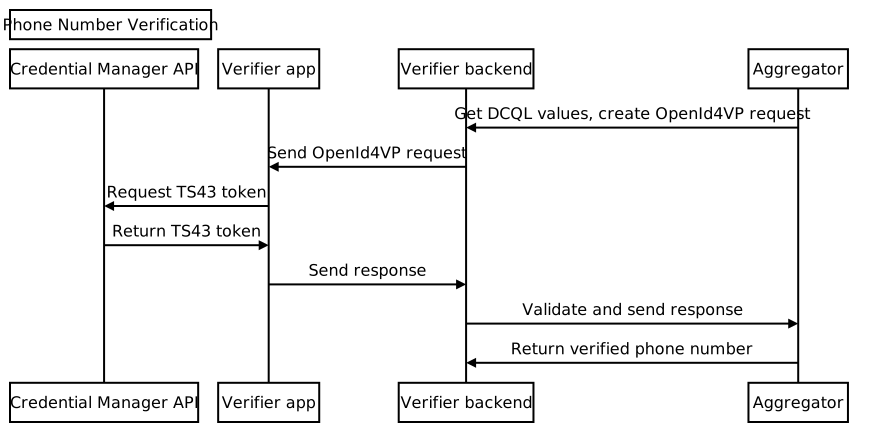
आम तौर पर, इस प्रोसेस में ये चरण शामिल होते हैं:
- किसी एग्रीगेटर से DCQL (डिजिटल क्रेडेंशियल क्वेरी लैंग्वेज) पैरामीटर का अनुरोध करना: एक या उससे ज़्यादा एग्रीगेटर को कॉल करें और DCQL पैरामीटर के सेट का अनुरोध करें. DCQL की मदद से, यह तय किया जा सकता है कि आपको हर एग्रीगेटर से कौनसे डिजिटल क्रेडेंशियल चाहिए.
OpenID4VP अनुरोध बनाना: अपने ऐप्लिकेशन के बैकएंड से, OpenID4VP अनुरोध बनाएं. साथ ही, एग्रीगेटर से मिले DCQL पैरामीटर शामिल करें. इसके बाद, अपने क्लाइंट ऐप्लिकेशन को OpenID4VP अनुरोध भेजें.
Credential Manager API को कॉल करना: अपने क्लाइंट ऐप्लिकेशन में, Credential Manager API का इस्तेमाल करके, ऑपरेटिंग सिस्टम को OpenID4VP अनुरोध भेजें. रिस्पॉन्स के तौर पर, आपको OpenID4VP रिस्पॉन्स ऑब्जेक्ट मिलता है. इसमें
TS.43 Digital Credentialशामिल होता है. यह क्रेडेंशियल एन्क्रिप्ट (सुरक्षित) किया गया है. इसे सिर्फ़ इससे जुड़ा एग्रीगेटर डिक्रिप्ट कर सकता है. कैरियर टोकन मिलने के बाद, अपने क्लाइंट ऐप्लिकेशन से ऐप्लिकेशन के बैकएंड पर जवाब भेजें.जवाब की पुष्टि करना: अपने ऐप्लिकेशन के बैकएंड में, OpenID4VP के जवाब की पुष्टि करें.
फ़ोन नंबर के लिए एक्सचेंज करना: अपने ऐप्लिकेशन के बैकएंड से, एग्रीगेटर को
TS.43 Digital Credentialभेजें. एग्रीगेटर, क्रेडेंशियल की पुष्टि करता है और पुष्टि किया गया फ़ोन नंबर दिखाता है.
किसी एग्रीगेटर से DCQL पैरामीटर का अनुरोध करना
अपने ऐप्लिकेशन के बैकएंड से, एग्रीगेटर को डिजिटल क्रेडेंशियल क्वेरी लैंग्वेज (डीसीक्यूएल) क्रेडेंशियल ऑब्जेक्ट के लिए अनुरोध भेजें. अपने अनुरोध में, नॉन्स और अनुरोध आईडी ज़रूर दें. एग्रीगेटर, DCQL क्रेडेंशियल ऑब्जेक्ट दिखाता है. इसका स्ट्रक्चर कुछ इस तरह का होता है:
{
  // The credential ID is mapped to the request ID that is sent in your request to the aggregator.
  "id": "aggregator1",
  "format": "dc-authorization+sd-jwt",
  "meta": {
    "vct_values": [
      "number-verification/device-phone-number/ts43"
    ],
    "credential_authorization_jwt": "..."
  },
  "claims": [
    {
      "path": ["subscription_hint"],
      "values": [1]
    },
    {
      "path": ["phone_number_hint"],
      "values": ["+14155552671"]
    }
  ]
}
OpenID4VP अनुरोध बनाना
सबसे पहले, अपने ऐप्लिकेशन के बैकएंड से, dcql_query ऑब्जेक्ट बनाएं. इसके लिए, DCQL क्रेडेंशियल ऑब्जेक्ट को dcql_query ऑब्जेक्ट में नेस्ट किए गए credentials कलेक्शन में रखें. इसके बारे में यहां दिए गए उदाहरण में बताया गया है:
"dcql_query": {
  "credentials": [
      "id": "aggregator1",
      "format": "dc-authorization+sd-jwt",
      "meta": {
        "vct_values": [
          "number-verification/device-phone-number/ts43"
        ],
        "credential_authorization_jwt": "..."
      },
      "claims": [
        {
          "path": ["subscription_hint"],
          "values": [1]
        },
        {
          "path": ["phone_number_hint"],
          "values": ["+14155552671"]
        }
      ]
  ]
}
इसके बाद, इस स्ट्रक्चर के साथ OpenID4VP अनुरोध बनाएं:
{
  "protocol": "openid4vp-v1-unsigned",
  "data": {
    "response_type": "vp_token",
    "response_mode": "dc_api",
    "nonce": "...",
    "dcql_query": { ... }
  }
}
protocol: फ़ोन नंबर की पुष्टि करने के अनुरोधों के लिए, इसेopenid4vp-v1-unsignedपर सेट करना ज़रूरी है.response_typeऔरresponse_mode: ये कॉन्स्टेंट, अनुरोध के फ़ॉर्मैट के बारे में बताते हैं. इनकी वैल्यू, क्रमशःvp_tokenऔरdc_apiहोती हैं.nonce: हर अनुरोध के लिए, आपके बैकएंड से जनरेट की गई यूनीक वैल्यू. एग्रीगेटर DCQL क्रेडेंशियल ऑब्जेक्ट में मौजूद नॉन्स, इस नॉन्स से मैच होना चाहिए.dcql_query: इस मामले में,dcql_queryका इस्तेमाल करके बताएं किTS.43 Digital Credentialका अनुरोध किया जा रहा है. यहां अन्य डिजिटल क्रेडेंशियल का भी अनुरोध किया जा सकता है.
इसके बाद, OpenID4VP अनुरोध को DigitalCredential API अनुरोध ऑब्जेक्ट में रैप करें और उसे क्लाइंट ऐप्लिकेशन पर भेजें.
{
  "requests":
    [
      {
        "protocol": "openid4vp-v1-unsigned",
        "data": {
          "response_type": "vp_token",
          "response_mode": "dc_api",
          "nonce": "...",
          "dcql_query": { ... }
        }
      }
    ]
}
यहां दिए गए स्निपेट में, DigitalCredential API अनुरोध जनरेट करने का तरीका बताया गया है:
def GenerateDCRequest():
    credentials = []
    aggregator1_dcql = call_aggregator_endpoint(nonce, "aggregator1", additional_params)
    credentials.append(aggregator1_dcql) # You can optionally work with multiple
    # aggregators, or request other types of credentials

    val dc_request =
    {
      "requests":
        [
          {
            "protocol": "openid4vp-v1-unsigned",
            "data": {
              "response_type": "vp_token",
              "response_mode": "dc_api",
              "nonce": "...",
              "dcql_query": {"credentials": credentials}
            }
          }
        ]
    }
    return dc_request
Credential Manager API को कॉल करना
अपने क्लाइंट ऐप्लिकेशन में, Credential Manager API को कॉल करें. इसके लिए, अपने ऐप्लिकेशन के बैकएंड से मिले DigitalCredential API अनुरोध का इस्तेमाल करें.
val requestJson = generateTs43DigitalCredentialRequestFromServer()
val digiCredOption = GetDigitalCredentialOption(requestJson = requestJson)
val getCredRequest = GetCredentialRequest(
    listOf(digiCredOption)
)

coroutineScope.launch {
  try {
    val response = credentialManager.getCredential(
      context = activityContext,
      request = getCredRequest
    )
    val credential = response.credential
    when (credential) {
      is DigitalCredential -> {
        val responseJson = credential.credentialJson
        validateResponseOnServer(responseJson)
      }
      else -> {
        // Catch any unrecognized credential type here.
        Log.e(TAG, "Unexpected type of credential ${credential.type}")
      }
    }
  } catch (e : GetCredentialException) {
      // If user cancels the operation, the feature isn't available, or the
      // SIM doesn't support the feature, a GetCredentialCancellationException
      // will be returned. Otherwise, a GetCredentialUnsupportedException will
      // be returned with details in the exception message.
      handleFailure(e)
  }
}
DigitalCredential API से मिले जवाब में, OpenID4VP से मिला जवाब शामिल होता है. DigitalCredential के नतीजे से मिला क्रेडेंशियल JSON, आम तौर पर इस तरह का होता है:
{
  "protocol": "openid4vp-v1-unsigned",

  "data": {
    "vp_token": {
      "aggregator1": ["eyJhbGciOiAiRVMy..."] # The encrypted TS.43 Digital
                                             # Credential in an array structure.
    }
  }
}
अपने क्लाइंट ऐप्लिकेशन से, DigitalCredential API से मिला रिस्पॉन्स, बैकएंड सर्वर पर वापस भेजें. यहां इसकी पुष्टि की जा सकती है. साथ ही, इसका इस्तेमाल एग्रीगेटर के साथ, पुष्टि किए गए फ़ोन नंबर को एक्सचेंज करने के लिए किया जा सकता है.
कुछ मामलों में, जवाब में TS.43 गड़बड़ी दिख सकती है. गड़बड़ी का रिस्पॉन्स, OpenID4VP के गड़बड़ी के रिस्पॉन्स फ़ॉर्मैट के मुताबिक एक JSON ऑब्जेक्ट होता है:
{
  "protocol": "openid4vp-v1-unsigned",

  "data": {
    "error": "<error_code>",
    "error_description": "<Human-readable description of the error>",
  }
}
error_code की दो वैल्यू हो सकती हैं:
invalid_request: इससे पता चलता है कि अनुरोध गलत तरीके से किया गया था.server_error: इससे पता चलता है कि अनुरोध को प्रोसेस करते समय गड़बड़ियां हुई थीं. यह स्थानीय गड़बड़ी या TS.43 से जुड़ी समस्या हो सकती है.
error_description फ़ील्ड में, समस्या के बारे में ज़्यादा जानकारी दी जाती है.
डिजिटल क्रेडेंशियल के रिस्पॉन्स की पुष्टि करना
यहां दिए गए उदाहरण में, जवाब को पार्स करने और अपने ऐप्लिकेशन के बैकएंड में पुष्टि करने का तरीका बताया गया है:
def processDigitalCredentialsResponse(response):
  # Step 1: Parse out the TS.43 Digital Credential from the response
  openId4VpResponse = response['data']

  ts43_digital_credential = response['vp_token']["aggregator1"][0]

  # Step 2: Perform response validation
  verifyResponse(ts43_digital_credential)

def verifyResponse(ts43_digital_credential):
  # The returned ts43_digital_credential is an SD-JWT-based Verifiable Credentials
  # (SD-JWT VC) as defined in this IETF spec. The section 3.4 of the specification
  # outlines how to validate the credential. At a high level, the steps involves
  # validating (1) the nonce in the response credential matches the one in the
  # request, (2) the integrity of the credential by checking the credential is
  # signed by the trusted issuer Android Telephony, and (3) other validity
  # properties associated with this credential, such as issue time and expiration
  # time

  # In most cases, you can use an SD-JWT VC library to perform these validations.

  # Some aggregators may also perform the validation logic for you. Check with your
  # aggregator to decide the exact scope of the validation required.
फ़ोन नंबर के बदले एक्सचेंज करना
अपने ऐप्लिकेशन के बैकएंड से, पुष्टि किए गए TS.43 Digital Credential को एग्रीगेटर के एंडपॉइंट पर भेजें. इससे क्रेडेंशियल की पुष्टि की जा सकेगी और पुष्टि किया गया फ़ोन नंबर मिल सकेगा.
def processDigitalCredentialsResponse(response):
  # ... prior steps

  # Step 3: Call aggregator endpoint to exchange the verified phone number
  callAggregatorPnvEndpoint(ts43_digital_credential)