

The Jetpack Compose November ‘26 release is stable! This release brings version 1.13 across core Compose modules (see the full BOM mapping), introducing updates to text, graphics, layouts, performance, and more—along with a few important deprecations and behavior changes to be aware of.
To update your project to this release, upgrade your Compose BOM version to 2026.11.01. Note that this upgrade requires Kotlin 2.2 (or newer) and compileSdk 37.1.
implementation(platform("androidx.compose:compose-bom:2026.11.01"))
Graphics
We continue to add many new graphics features into Compose. Compose 1.13 introduced polygon shapes, progressive blur, and the ability to configure blur properties directly on Dialogs and Popups.
Progressive blur
Jetpack Compose 1.13 introduces progressive blur, letting you transition elements from sharp to blurred seamlessly. Progressive blur is built on a draw-phase lambda using Modifier.blur { ... } and BlurRadiusSpec. You can implement linear gradients (such as vertical or horizontal transitions), radial gradients for focal spotlight effects, or even pass custom AGSL RuntimeShaders to drive dynamic, procedural blur maps.
Whether you're blending the bottom edge of a header image into a background using BlurredEdgeTreatment.Unbounded, or tracking touch coordinates with a radial spotlight, progressive blurs make premium, tactile depth-of-field effects incredibly straightforward to implement on Android.
Modifier.blur {
    blurRadiusSpec = BlurRadiusSpec.linearGradient(
        start = DpOffset.Zero,
        end = DpOffset(size.width, size.height),
        stops = listOf(
            BlurStop(fraction = 0f, radius = 0.dp),
            BlurStop(fraction = 0.5f, radius = 0.dp),
            BlurStop(fraction = 0.75f, radius = 14.dp),
            BlurStop(fraction = 1f, radius = 28.dp),
        ),
    )
}

Polygon shapes and morphing
Compose 1.13 adds PolygonShape and MorphPolygonShape to androidx.compose.foundation:foundation. Until now, rounded polygons, stars, and shape morphing in Compose required using androidx.graphics:graphics-shapes directly — adding the dependency, creating a RoundedPolygon at the right pixel size, converting it to a Path, and writing your own Shape to fit it to the layout bounds.
PolygonShape is a regular Compose Shape, so it works with Modifier.clip or any component's shape parameter, and it resolves to the layout size automatically. MorphPolygonShape animates between two polygon shapes by reading a progress lambda at draw time, without recomposition. Use graphics-shapes directly only when you're outside Compose UI or need the raw RoundedPolygon geometry. You don’t need to add graphics-shapes to use PolygonShape, as foundation already depends on it.
var recording by remember { mutableStateOf(false) }
val progress by animateFloatAsState(if (recording) 1f else 0f)
val shape = remember {
   MorphPolygonShape(
       start = PolygonShape.circle(),
       end = PolygonShape.star(
           numPoints = 9,
           innerRadiusRatio = 0.8f,
           outerRounding = CornerRounding.fraction(0.5f),
       ),
       progress = { progress },
   )
}
Box(
   Modifier
       .size(96.dp)
       .clip(shape)
       .background(MaterialTheme.colorScheme.primary)
       .clickable { recording = !recording }
)

Background blur and pop up properties
You can now configure blurBehindRadius, backgroundBlurRadius, scrimAlpha, and windowShape (to clip dialog background blurs to rounded corners) directly on DialogProperties (and blurBehindRadius/scrimAlpha on PopupProperties).
You can also query system cross-window blur state via WindowInfo.isCrossWindowBlurEnabled.
Graphics performance improvements
Caching improvements
In Compose 1.13, rendering static icons is more efficient. VectorPainter automatically shares and reuses rasterized draw caches across painters rendering the same static ImageVector at the same size and configuration, eliminating redundant bitmap allocations and rasterization. To maximize caching, reuse ImageVector instances across composition instead of recreating them. This optimization is enabled by default via ComposeUiFlags.isVectorDrawCacheSharingEnabled.
Modifier border improvements
Modifier.border now features a faster, more performant implementation, adds support for runtime shaders (ShaderBrush with a RuntimeShader) across all shape types, and consistently uses the outline size when rendering borders.
To learn more about all the new graphics features in Compose and on the Android Platform, check out the talk from Android Dev Summit 2026:
Material 3 1.5.0
Compose Material 3 version 1.5.0 is now stable and introduces the following:
SliderandRangeSliderhave migrated to a stateful model withSliderState.- New expressive components including
ToggleButtons,WavyProgressIndicators, andTimePickers. - APIs including
BottomAppBar,TopAppBar variants, andBasicAlertDialoggraduated to stable. - The
material3-rippleartifact with inset focus rings.
In this release, we cut experimental annotations by 52 percent—dropping from 120 down to 58. We've also graduated almost every new expressive component to stable. As Material 3 enters its sixth year of availability, the Compose Material 2 library is deprecated and no longer actively maintained. We recommend migrating from Material 2 to Material 3 to get the latest bug fixes and design language for Android. Upgrade your dependencies to Material 3 1.5.0 today to bring these new expressive components to your apps. Learn more about all the new components, performance updates, and behavior changes in the blog post.
Text
Migrate to state-based BasicTextField
The value-based BasicTextField and Material 2 TextField are officially deprecated. This shift directs you to transition to the more robust state-based BasicTextField and TextFieldState APIs.
If you're using Material 3, your existing value-based TextField overloads are not deprecated yet in 1.5.0, but we recommend migrating to the state-based TextField and OutlinedTextField overloads to take full advantage of synchronous state, improved performance, and upcoming features. If you are still on Material 2, migrate directly to Material 3's state-based text fields.
By migrating to TextFieldState, which natively supports saving and restoring formatted styles, you gain improved, out-of-the-box performance and a safer, synchronous state model. This release also removes experimental annotations from undo/redo history and change tracking buffers. Legacy utilities like VisualTransformation are deprecated in this release, making way for streamlined alternatives like OutputTransformation and InputTransformation, including its built-in length-limit filters.
To learn more about how to migrate to state-based text fields, check out this talk from Android Dev Summit 2026:
Per-line line height
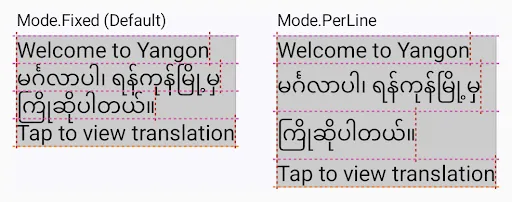
When displaying multilingual text or mixed font sizes within a single paragraph, uniform line spacing can cause tall scripts (such as Burmese, Khmer, or Thai) to collide with adjacent lines. Compose 1.13 introduces LineHeightStyle.Mode.PerLine, which calculates line height independently for each line. This allows lines with taller glyphs or larger spans to dynamically expand to fit their natural bounds without clipping or disrupting the rest of the paragraph.
Mergeable FontVariation.Settings
Compose 1.13 adds merge overloads to FontVariation.Settings, making it easy to define base variable font configurations and dynamically override specific axes (like weight, slant, or width) without re-allocating or rebuilding the entire settings list.
// Define a shared base configuration for your variable font
val baseVariation = FontVariation.Settings(FontVariation.weight(400), FontVariation.width(100f))


// Easily override or combine specific axes inline
val boldVariation = baseVariation.merge(FontVariation.weight(700))
val condensedVariation = baseVariation.merge(FontVariation.width(85f))
Performance
Performance static analysis skill
We’ve added a new Jetpack Compose performance static analysis skill that provides zero-setup code auditing and generation across seven key categories—state and stability, lazy layouts, layouts, graphics, animation, effects and threading, and Modifier.Node migrations—allowing you to run standalone checks on any PR, file, or screen to comply with current best practices. Try it out today through the Android CLI!

computedStateOf
A new mechanism for state computation, computedStateOf, has been introduced in 1.13. It provides a lightweight alternative to derivedStateOf, and is intended for condition checks and filtered state calculated from other frequently-changing states (like scroll position and animation thresholds). By not caching calculation results, it has less overhead than derivedStateOf—especially when the calculation is invalidated by one of its referenced states changing.
Both state variations invalidate composition when the result of the calculation changes, not when their input states change. They are commonly applied to convert frequently changing states into infrequently changing states, preventing invalidations in your composition hierarchy for unimpactful state changes. You should reserve derivedStateOf for heavy calculations or where caching is otherwise necessary. In general, we recommend using computedStateOf instead of derivedStateOf for state computation.
Recomposition tracing in Perfetto
Recomposition tracing is a new way to augment existing composition tracing with new information about state reads and state writes, providing you with a full overview of the state changes that caused recompositions. For each read and write affecting composition, it records the state’s string representation and stack trace to pinpoint the exact line of code where the change occurred.
Note that recording additional data for recomposition tracing adds overhead, so make sure to disable it when investigating your app’s performance.
Hero benchmarks
Compose 1.13 matches Compose 1.12.1 across all our baseline startup and scrolling benchmarks with a 0% jank rate on Pixel 6. On cold startups, Compose 1.13 still achieves a faster Time to Initial Display (147.65 ms) than Views (152.87 ms)
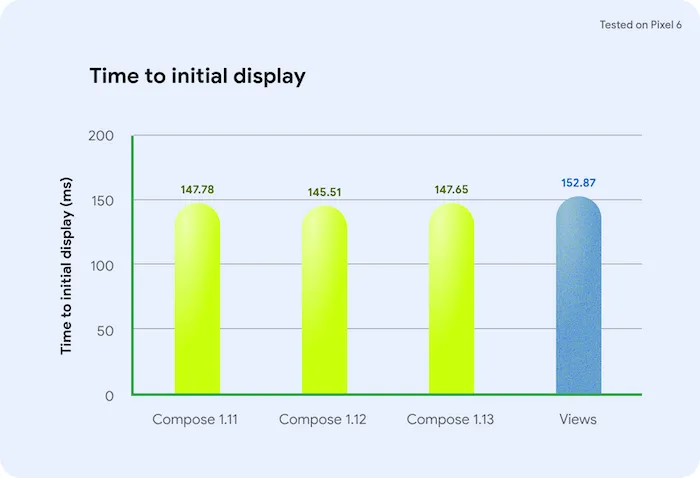
Views remain faster on Time to Full Display (180.32 ms versus 202.79 ms for Compose) due to differences in data flow starts and GPU shader work. Scrolling frame duration (P50) sits at 3.51 ms for Compose compared to 3.06 ms for Views, with overall performance remaining stable and consistent across valid test runs. We continue to invest heavily in improving performance across all performance metrics, with a focus on startup metrics. For the full results, check out the documentation.
To learn more about performance, check out the talk from Android Dev Summit 2026:
Layouts
Stable FlexBox and Grid
FlexBox and Grid layouts (announced in Compose 1.11) are officially graduating from experimental to stable. These APIs are production-ready, highly performant alternatives for wrapped grids and responsive designs. FlexBox also gains a new configuration maxItemsInEachLine that lets you limit the number of items in a line when wrapping is enabled.
FlexBox supersedes the Flow layouts (FlowRow and FlowColumn), and we recommend using FlexBox instead of Flow layouts for new code. For a detailed comparison of the layout containers, see layout containers.
ConstraintLayout and MotionLayout deprecation
With the introduction of more modern layout and animation tooling in Compose and new Shared Element APIs—we are officially deprecating ConstraintLayout and MotionLayout in Compose (androidx.constraintlayout:constraintlayout-compose artifact).
These newer alternatives provide performant solutions, offering a streamlined approach to building complex user interfaces native to Compose. We recommend migrating your ConstraintLayout Compose usages to the alternatives above.
Stable LazyLayoutCacheWindow
Stabilization of LazyLayoutCacheWindow brings robust caching and window-based prefetching directly to all primary lazy collection families—lists, grids, and staggered grids. This functionality improves performance of lazy layouts for off-screen compositions.
Key highlights in this release include:
- Simplified API configuration: Cache window settings have moved from the scroll state holder (such as
rememberLazyListState) directly into the layout composables (LazyColumn, LazyVerticalGrid, etc.), making prefetching and caching a direct layout concern. - Window-based prefetching: Replaces legacy item-based prefetching with a default window-based prefetch engine that dynamically calculates an ahead window based on viewport metrics, with the option to customize both ahead and behind windows to retain off-screen compositions.
Learn how Instagram Direct benefited from using LazyLayoutCacheWindow in the case study blog post, and check out the documentation to learn more.
Animation
Compose 1.13 stabilizes DeferredTransition and introduces a new composable, CapturedAnimatedVisibility.
CapturedAnimatedVisibility
AnimatedVisibility requires the outgoing content and states to be retained during the exit animation, as it continues to compose its content until the exit animation finishes. When the content depends on the state that's already gone, it can cause visible flickering. For example, when closing a details pane sets the selected item to null, the existing content has nothing left to show. You either see a blank or a flicker mid-animation, a crash if you used !!, or you have to hold on to the old value yourself.
Compose 1.13 introduces CapturedAnimatedVisibility. This composable does not require the caller to manage states during the exit because it captures a snapshot of the last frame instead when visible becomes false. You can clear your state immediately, and the exit animation still shows what was on screen.
@Composable
fun TrackDetails(track: Track?) {
    // `track` becomes null as soon as the details are closed. CapturedAnimatedVisibility
    // removes the content right away and animates a snapshot of its last frame instead.
    CapturedAnimatedVisibility(
        visible = track != null,
        enter = fadeIn() + expandVertically(),
        exit = fadeOut(tween(800)) + shrinkVertically(tween(800)),
    ) {
        if (track != null) {
            TrackCard(track)
        }
    }
}
Releasing state immediately also makes exits cheaper: in our benchmarks, performance during exit is 7–8% faster in terms of frame time than with AnimatedVisibility. Keep using AnimatedVisibility when the exiting content needs to stay live, or when you need to use Modifier.animateEnterExit() on its children, otherwise prefer CapturedAnimatedVisibility.
Custom failure handling in tests
Debugging failing UI tests, especially in CI environments, often requires inspecting the screen state and semantics hierarchy at the exact moment an assertion fails. Compose 1.13 introduces a native failure handling pipeline via TestFailurePolicy in ComposeUiTestConfig to automate test diagnostics.
With TestFailurePolicy, you can:
- Capture built-in artifacts: Set
screenshotCaptureModeanduiHierarchyCaptureModetoCaptureMode.Enabledto automatically dump a visual screenshot and the UI semantics tree whenever a test fails. - Run custom failure handlers: Register one or more
TestFailureHandlerinstances to process theFailureContext, which provides the rooterrorand any generatedartifacts. This allows you to upload screenshots or forward failure telemetry to external reporting tools. - Configure captures across an entire test suite: Enable screenshot and UI hierarchy captures globally in your
build.gradle.ktsviatestInstrumentationRunnerArguments(androidx.compose.ui.test.failure.isScreenshotCaptureEnabledandandroidx.compose.ui.test.failure.isUiHierarchyCaptureEnabled) without modifying individual test files, while retaining the ability to override them per test.
val customConfig = ComposeUiTestConfig(
   failurePolicy = TestFailurePolicy(
       screenshotCaptureMode = TestFailurePolicy.CaptureMode.Enabled,
       uiHierarchyCaptureMode = TestFailurePolicy.CaptureMode.Enabled,
       failureHandlers = listOf(
           TestFailureHandler { context ->
               val screenshot = context.artifacts.firstOrNull {
                   it.type == FailureArtifact.Type.Screenshot
               }
               // Process or upload the artifact and context.error
           }
       )
   )
)
@Test
fun myTest() = runComposeUiTest(config = customConfig) {
   // Test content
}
Adaptive Skill
Use the updated Adaptive Skill to optimize your Compose UI for foldables and desktop!
Build hands-free tabletop experiences on foldables by rendering content on the upright screen and placing controls on the flat bottom half, keeping fingers off the view.
The skill will also help to make your app feel native on desktop with keyboard shortcuts, tooltips, and custom cursors, plus proven patterns to prevent state loss when users rotate or unfold their devices. Try it out today through the Android CLI!

Watch this Android Dev Summit talk to see how you can level up your foldable and desktop support:
Accurate nested scroll velocity calculation
For apps with hybrid UI architectures, we resolved an issue where fast scrolling in Compose nested inside Android View scroll containers (such as ScrollView, NestedScrollView, or CoordinatorLayout) would sometimes calculate incorrect velocity. Velocity handoffs are now accurately computed, preventing abrupt stops or jumpy scroll physics and ensuring a smooth, fluid fling experience across View and Compose boundaries.
Behavior change:
Modifier.onFocusedBoundsChanged is now deprecated
Modifier.onFocusedBoundsChanged was deprecated in Compose 1.12, and in 1.13 its implementation has been removed, meaning it has no effect if the modifier is run. The old implementation didn't report focus bounds reliably in many situations and had performance issues.
Built-in scrolling containers such as LazyColumn and Modifier.verticalScroll already bring focused content into view without this API, so they aren't affected.
To get the focused element's bounds, call FocusTargetModifierNode.getFocusedRect() from a custom Modifier.Node. It returns the bounds when you ask for them, rather than reporting every change through a callback. To react to focus changes, use Modifier.onFocusChanged. To scroll a focused item into view in a custom container, pair onFocusChanged with BringIntoViewRequester.
Behavior change: Platform interaction sound effects on Android
Clickable elements configured with Modifier.clickable (or components built on top of it) now automatically play standard Android interaction sound effects, respecting the user's system sound settings. Previously, Compose clickable elements required manually invoking sound effects to achieve parity with traditional Android Views. This update ensures interactive elements provide immediate audio feedback and feel native to the Android platform out of the box.
An update on Styles
At Google I/O, we previewed a new way to customize components without forking source code. In Compose 1.13, this foundational architecture has evolved into an unopinionated styling engine. Instead of the framework hardcoding visual properties, property definitions have moved to the design system layer—enabling teams to declare custom brand tokens (stylePropertyOf / styleLocalOf) with total autonomy.
Because of this architectural shift, the Styles API remains experimental in Compose 1.13. We are actively working with partners and Material 3 to refine style merging and developer ergonomics before general availability. We’ve removed the documentation and skill for Styles during this transition.
New Compose Web library for easier WebView migration (alpha)
Embedding web content inside Compose is one of the final migration friction points for apps. Legacy implementations using AndroidView can introduce scroll stutter, state loss during configuration changes or navigation, and interop rendering overhead.
To eliminate this friction, we’re launching in two libraries built on two complementary primitives across androidx.web:
WebContent(Available now inandroidx.web:web:1.0.0-alpha01): A state holder that decouples web state (including scroll position, form inputs, navigation history, and JavaScript state) from the view hierarchy so it outlives configuration changes and navigation without leaking yourActivity.
@Composable
// Assumes `webContent` is already created and retained (e.g., in a ViewModel or via `retain`)
fun WebContentPage(webContent: WebContent, startUrl: String, modifier: Modifier = Modifier) {
   key(webContent) {
       AndroidView(
           factory = { context ->
               webContent.attach(context, ::WebContentView).apply {
                   settings.javaScriptEnabled = true
                   if (url == null) loadUrl(startUrl)
               }
           },
           modifier = modifier,
           onRelease = { view ->
               // The view must leave the hierarchy before WebContent is detached.
               (view.parent as? ViewGroup)?.removeView(view)
               webContent.detach()
           },
       )
   }
}
WebSurface(Available soon): A dedicated composable optimized forWebContentthat bypassesAndroidViewinterop overhead.
Try out the APIs today by importing androidx.web:web:1.0.0-alpha01, and stay tuned for WebSurface alpha release in the near future.
New Jetpack Compose A2UI renderer
Runtime LLM responses shouldn't be limited to plain text. The new Jetpack Compose A2UI Renderer implements the open Agent-to-UI (A2UI) protocol.
implementation("androidx.compose.material3:material3-a2ui:1.0.0-alpha02")
AI agents can create rich, interactive UIs at runtime, which render as native Compose components without executing arbitrary code. The renderer handles message parsing and schema validation and feeds agent data into Compose snapshot state. Use the ready-made Basic Catalog, or plug in your own composables and design system. Get started with the documentation, or check out the talk from Android DevSummit.
Documentation updates
We have new documentation available, covering Anchored draggable, Navigation3 Deep Links, and AppState.
Happy Composing!
Compose 1.13 makes app development easier and more expressive than ever with updates to text, graphics, layouts, performance and more! To see the full set of changes between BOM versions, take a look at the BOM comparison tool to see the difference.
To learn more about what’s new for Compose, watch the latest talks from the Android Dev Summit.
As always, we value your input, so please share your feedback on these changes or what you'd like to see next on our issue tracker. Happy composing!
-

 Product News
Today, the games category for Android Auto and cars powered by Android Automotive OS with Google built-in is officially graduating from beta to general availability.
-
 Product News
We're thrilled to see developers continuing to bring their apps and experiences to Android for Cars! Over the past year, we've continued to see strong growth and momentum in the app ecosystem on Android Auto and cars with Google built-in.
Jan Kleinert, Noam Gefen, Thomas Weathers • 3 min read -

 Product News
In the almost-5-years since Jetpack Compose launched, we've invested in bringing you all the features, performance and tools that you need to build amazing UIs across the variety of Android devices.
Nick Butcher • 2 min read
Get the latest Android development insights delivered to your inbox weekly.