

Android 16 memperkenalkan fitur dan API baru yang hebat bagi para developer. Bagian berikut merangkum fitur-fitur ini untuk membantu Anda memulai API terkait.
Untuk melihat daftar mendetail tentang API yang baru, diubah, dan dihapus, baca laporan perbedaan API. Untuk mengetahui detail tentang API baru, buka referensi API Android — API baru ditandai agar lebih mudah dilihat.Anda juga harus meninjau area yang mungkin terpengaruh oleh perubahan platform. Untuk mengetahui informasi selengkapnya, lihat halaman berikut:
- Perubahan perilaku yang memengaruhi aplikasi saat menargetkan Android 16
- Perubahan perilaku yang memengaruhi semua aplikasi, terlepas dari
targetSdkVersion.
Fungsi inti
Android menyertakan API baru yang memperluas kemampuan inti sistem Android.
Dua rilis Android API pada tahun 2025
- This preview is for the next major release of Android with a planned launch in Q2 of 2025. This release is similar to all of our API releases in the past, where we can have planned behavior changes that are often tied to a targetSdkVersion.
- We're planning the major release a quarter earlier (Q2 rather than Q3 in prior years) to better align with the schedule of device launches across our ecosystem, so more devices can get the major release of Android sooner. With the major release coming in Q2, you'll need to do your annual compatibility testing a few months earlier than in previous years to make sure your apps are ready.
- We plan to have another release in Q4 of 2025 which also will include new developer APIs. The Q2 major release will be the only release in 2025 to include planned behavior changes that could affect apps.
In addition to new developer APIs, the Q4 minor release will pick up feature updates, optimizations, and bug fixes; it will not include any app-impacting behavior changes.
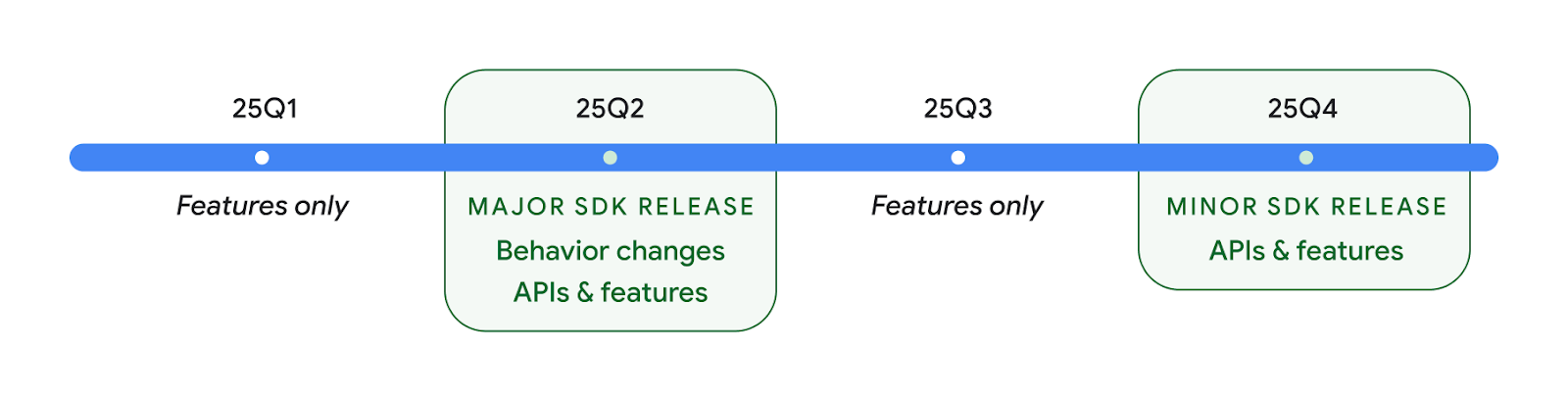
We'll continue to have quarterly Android releases. The Q1 and Q3 updates in-between the API releases will provide incremental updates to help ensure continuous quality. We're actively working with our device partners to bring the Q2 release to as many devices as possible.
Using new APIs with major and minor releases
Guarding a code block with a check for API level is done today using
the SDK_INT constant with
VERSION_CODES. This will continue
to be supported for major Android releases.
if (SDK_INT >= VERSION_CODES.BAKLAVA) {
  // Use APIs introduced in Android 16
}
The new SDK_INT_FULL
constant can be used for API checks against both major and minor versions with
the new VERSION_CODES_FULL
enumeration.
if (SDK_INT_FULL >= VERSION_CODES_FULL.[MAJOR or MINOR RELEASE]) {
  // Use APIs introduced in a major or minor release
}
You can also use the
Build.getMinorSdkVersion()
method to get just the minor SDK version.
val minorSdkVersion = Build.getMinorSdkVersion(VERSION_CODES_FULL.BAKLAVA)
These APIs have not yet been finalized and are subject to change, so please send us feedback if you have any concerns.
Pengalaman pengguna dan UI sistem
Android 16 memberi developer aplikasi dan pengguna lebih banyak kontrol dan fleksibilitas untuk mengonfigurasi perangkat agar sesuai dengan kebutuhan mereka.
Notifikasi berpusat pada progres
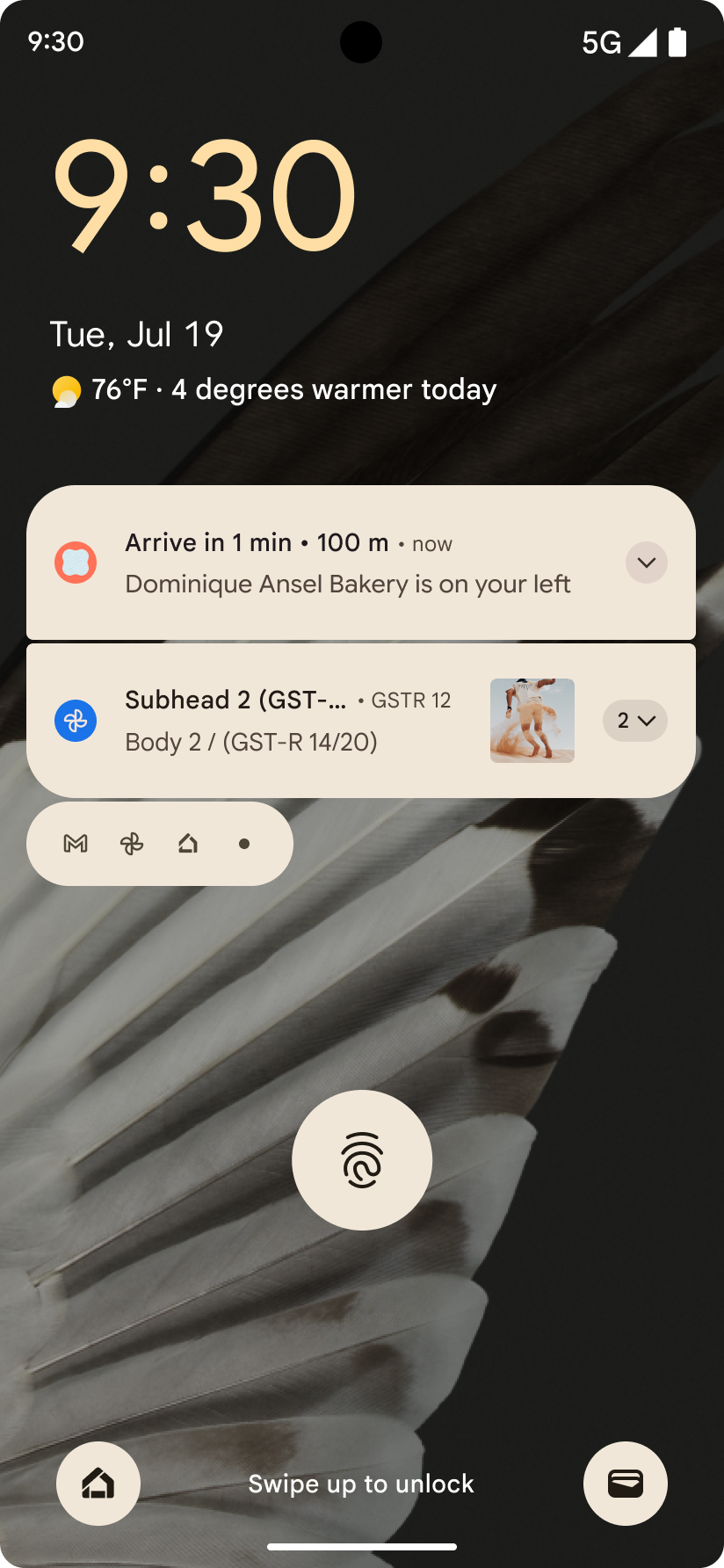
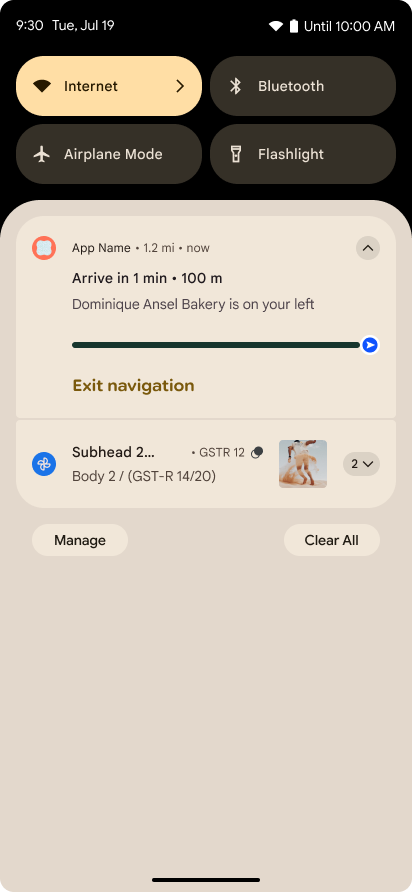
Android 16 introduces progress-centric notifications to help users seamlessly track user-initiated, start-to-end journeys.
Notification.ProgressStyle is a new notification
style that lets you create progress-centric notifications. Key use cases include
rideshare, delivery, and navigation. Within the Notification.ProgressStyle
class, you can denote states and milestones in a user journey using
points and segments.
To learn more, see the Progress-centric notifications documentation page.
Update kembali prediktif
Android 16 adds new APIs to help you enable predictive back system animations in
gesture navigation such as the back-to-home animation. Registering the
onBackInvokedCallback with the new
PRIORITY_SYSTEM_NAVIGATION_OBSERVER allows your app to
receive the regular onBackInvoked call whenever the
system handles a back navigation without impacting the normal back navigation
flow.
Android 16 additionally adds the
finishAndRemoveTaskCallback() and
moveTaskToBackCallback. By registering these callbacks
with the OnBackInvokedDispatcher, the system can trigger
specific behaviors and play corresponding ahead-of-time animations when the back
gesture is invoked.
Haptik yang lebih lengkap
Android has exposed control over the haptic actuator ever since its inception.
Android 11 added support for more complex haptic effects that more advanced
actuators could support through
VibrationEffect.Compositions of device-defined semantic
primitives.
Android 16 adds haptic APIs that let apps define the amplitude and frequency curves of a haptic effect while abstracting away differences between device capabilities.
Alat dan produktivitas developer
Meskipun sebagian besar upaya kami untuk meningkatkan produktivitas Anda berpusat pada alat seperti Android Studio, Jetpack Compose, dan library Android Jetpack, kami selalu mencari cara di platform untuk membantu Anda mewujudkan visi.
Penanganan konten untuk wallpaper animasi
In Android 16, the live wallpaper framework is gaining a new content API to
address the challenges of dynamic, user-driven wallpapers. Currently, live
wallpapers incorporating user-provided content require complex, service-specific
implementations. Android 16 introduces
WallpaperDescription and
WallpaperInstance. WallpaperDescription lets you
identify distinct instances of a live wallpaper from the same service. For
example, a wallpaper that has instances on both the home screen and on the lock
screen may have unique content in both places. The wallpaper picker and
WallpaperManager use this metadata to better present
wallpapers to users, streamlining the process for you to create diverse and
personalized live wallpaper experiences.
Performa dan baterai
Android 16 memperkenalkan API yang membantu mengumpulkan insight tentang aplikasi Anda.
Pembuatan profil yang dipicu sistem
ProfilingManager was
added in Android 15, giving apps the ability to
request profiling data collection using Perfetto on public devices in the field.
However, since this profiling must be started from the app, critical flows such
as startups or ANRs would be difficult or impossible for apps to capture.
To help with this, Android 16 introduces system-triggered profiling to
ProfilingManager. Apps can register interest in receiving traces for certain
triggers such as cold start reportFullyDrawn
or ANRs, and then the system starts and stops a trace on the app's behalf. After
the trace completes, the results are delivered to the app's data directory.
Memulai komponen di ApplicationStartInfo
ApplicationStartInfo was added in Android
15, allowing an app to see reasons
for process start, start type, start times, throttling, and other useful
diagnostic data. Android 16 adds
getStartComponent()
to distinguish what component type triggered the start, which can be helpful for
optimizing the startup flow of your app.
Introspeksi tugas yang lebih baik
The JobScheduler#getPendingJobReason() API returns a reason why a job
might be pending. However, a job might be pending for multiple reasons.
In Android 16, we are introducing a new API
JobScheduler#getPendingJobReasons(int jobId), which returns multiple
reasons why a job is pending, due to both explicit constraints set by the
developer and implicit constraints set by the system.
We're also introducing
JobScheduler#getPendingJobReasonsHistory(int jobId), which returns a list
of the most recent constraint changes.
We recommend using the API to help you debug why your jobs may not be executing, especially if you're seeing reduced success rates of certain tasks or have bugs around latency of certain job completion. For example, updating widgets in the background failed to occur or prefetch job failed to be called prior to app start.
This can also better help you understand if certain jobs are not completing due to system defined constraints versus explicitly set constraints.
Kecepatan refresh adaptif
Kecepatan refresh adaptif (ARR), yang diperkenalkan di Android 15, memungkinkan kecepatan refresh layar pada hardware yang didukung untuk beradaptasi dengan kecepatan frame konten menggunakan langkah VSync terpisah. Hal ini mengurangi konsumsi daya sekaligus menghilangkan kebutuhan untuk beralih mode yang berpotensi menyebabkan jank.
Android 16 memperkenalkan hasArrSupport() dan
getSuggestedFrameRate(int) saat memulihkan
getSupportedRefreshRates() untuk memudahkan aplikasi Anda memanfaatkan
ARR. RecyclerView
1.4 secara internal mendukung ARR saat berhenti dari ayun atau
scroll halus, dan kami melanjutkan upaya untuk menambahkan dukungan
ARR ke lebih banyak library Jetpack. Artikel kecepatan frame ini membahas
banyak API yang dapat Anda gunakan untuk menetapkan kecepatan frame sehingga aplikasi Anda dapat langsung
menggunakan ARR.
API headroom di ADPF
SystemHealthManager memperkenalkan
getCpuHeadroom dan
getGpuHeadroom API, yang dirancang untuk menyediakan game dan
aplikasi yang intensif resource dengan estimasi resource CPU dan GPU yang tersedia. Metode
ini menawarkan cara bagi Anda untuk mengukur cara terbaik aplikasi atau game Anda meningkatkan
kesehatan sistem, terutama jika digunakan bersama dengan Android Dynamic
Performance Framework (ADPF) API lainnya yang mendeteksi throttling
termal.
Dengan menggunakan CpuHeadroomParams dan
GpuHeadroomParams di perangkat yang didukung, Anda dapat
menyesuaikan periode waktu yang digunakan untuk menghitung headroom dan memilih antara
ketersediaan resource rata-rata atau minimum. Hal ini dapat membantu Anda mengurangi penggunaan resource CPU atau
GPU dengan semestinya, sehingga menghasilkan pengalaman pengguna yang lebih baik dan meningkatkan
masa pakai baterai.
Aksesibilitas
Android 16 menambahkan API dan fitur aksesibilitas baru yang dapat membantu Anda menghadirkan aplikasi kepada setiap pengguna.
API aksesibilitas yang ditingkatkan
Android 16 adds additional APIs to enhance UI semantics that help improve consistency for users that rely on accessibility services, such as TalkBack.
Outline text for maximum text contrast
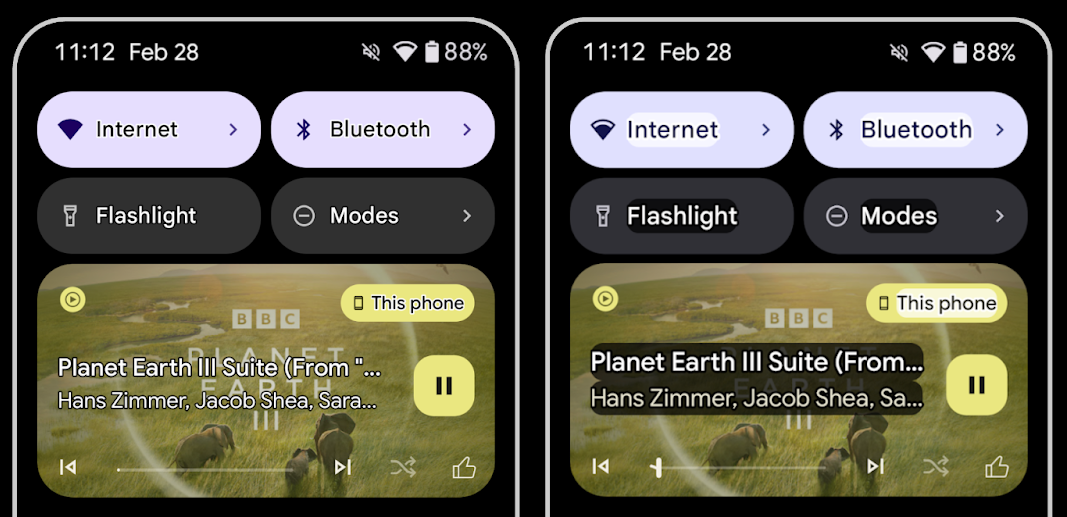
Users with low vision often have reduced contrast sensitivity, making it challenging to distinguish objects from their backgrounds. To help these users, Android 16 introduces outline text, replacing high contrast text, which draws a larger contrasting area around text to greatly improve legibility.
Android 16 contains new AccessibilityManager APIs to let
your apps check or register a listener to
see if this mode is enabled. This is primarily for UI Toolkits like Compose to
offer a similar visual experience. If you maintain a UI Toolkit library or your
app performs custom text rendering that bypasses the
android.text.Layout class then you can use this to know
when outline text is enabled.
Duration added to TtsSpan
Android 16 extends TtsSpan with a TYPE_DURATION,
consisting of ARG_HOURS, ARG_MINUTES,
and ARG_SECONDS. This lets you directly annotate time
duration, ensuring accurate and consistent text-to-speech output with services
like TalkBack.
Support elements with multiple labels
Android currently allows UI elements to derive their accessibility label from
another, and now offers the ability for multiple labels to be associated, a
common scenario in web content. By introducing a list-based API within
AccessibilityNodeInfo, Android can directly support these
multi-label relationships. As part of this change, we've deprecated
AccessibilityNodeInfo#setLabeledBy and
#getLabeledBy in favor of
#addLabeledBy, #removeLabeledBy, and
#getLabeledByList.
Improved support for expandable elements
Android 16 adds accessibility APIs that allow you to convey the expanded or
collapsed state of interactive elements, such as menus and expandable lists. By
setting the expanded state using setExpandedState and
dispatching TYPE_WINDOW_CONTENT_CHANGED AccessibilityEvents
with a CONTENT_CHANGE_TYPE_EXPANDED content change type,
you can ensure that screen readers like TalkBack announce
state changes, providing a more intuitive and inclusive user experience.
Indeterminate ProgressBars
Android 16 adds RANGE_TYPE_INDETERMINATE, giving a way for
you to expose RangeInfo for both determinate and
indeterminate ProgressBar widgets, allowing services like
TalkBack to more consistently provide feedback for progress
indicators.
Tri-state CheckBox
The new AccessibilityNodeInfo
getChecked and setChecked(int)
methods in Android 16 now support a "partially checked" state in addition to
"checked" and "unchecked." This replaces the deprecated boolean
isChecked and setChecked(boolean).
Supplemental descriptions
When an accessibility service describes a ViewGroup, it
combines content labels from its child views. If you provide a
contentDescription for the ViewGroup, accessibility services assume you are
also overriding the description of non-focusable child views. This can be
problematic if you want to label things like a drop-down (for example, "Font
Family") while preserving the current selection for accessibility (for example,
"Roboto"). Android 16 adds setSupplementalDescription so
you can provide text that provides information about a ViewGroup without
overriding information from its children.
Required form fields
Android 16 adds setFieldRequired to
AccessibilityNodeInfo so apps can tell an accessibility
service that input to a form field is required. This is an important scenario
for users filling out many types of forms, even things as simple as a required
terms and conditions checkbox, helping users to consistently identify and
quickly navigate between required fields.
Ponsel sebagai input mikrofon untuk panggilan suara dengan alat bantu dengar LEA
Android 16 adds the capability for users of LE Audio hearing aids to switch between the built-in microphones on the hearing aids and the microphone on their phone for voice calls. This can be helpful in noisy environments or other situations where the hearing aid's microphones might not perform well.
Kontrol volume sekitar untuk alat bantu dengar LEA
Android 16 adds the capability for users of LE Audio hearing aids to adjust the volume of ambient sound that is picked up by the hearing aid's microphones. This can be helpful in situations where background noise is too loud or too quiet.
Kamera
Android 16 meningkatkan dukungan untuk pengguna kamera profesional, sehingga memungkinkan eksposur otomatis hybrid bersama dengan penyesuaian suhu warna dan tint yang akurat. Indikator mode malam baru membantu aplikasi Anda mengetahui kapan harus beralih ke dan dari sesi kamera mode malam. Tindakan Intent baru memudahkan pengambilan foto gerakan, dan kami terus meningkatkan gambar UltraHDR dengan dukungan untuk encoding HEIC dan parameter baru dari standar draf ISO 21496-1.
Eksposur otomatis hybrid
Android 16 adds new hybrid auto-exposure modes to Camera2, allowing you to manually control specific aspects of exposure while letting the auto-exposure (AE) algorithm handle the rest. You can control ISO + AE, and exposure time + AE, providing greater flexibility compared to the current approach where you either have full manual control or rely entirely on auto-exposure.
fun setISOPriority() {
    // ... (Your existing code before the snippet) ...

    val availablePriorityModes = mStaticInfo.characteristics.get(
        CameraCharacteristics.CONTROL_AE_AVAILABLE_PRIORITY_MODES
    )

    // ... (Your existing code between the snippets) ...

    // Turn on AE mode to set priority mode
    reqBuilder.set(
        CaptureRequest.CONTROL_AE_MODE,
        CameraMetadata.CONTROL_AE_MODE_ON
    )
    reqBuilder.set(
        CaptureRequest.CONTROL_AE_PRIORITY_MODE,
        CameraMetadata.CONTROL_AE_PRIORITY_MODE_SENSOR_SENSITIVITY_PRIORITY
    )
    reqBuilder.set(
        CaptureRequest.SENSOR_SENSITIVITY,
        TEST_SENSITIVITY_VALUE
    )
    val request: CaptureRequest = reqBuilder.build()

    // ... (Your existing code after the snippet) ...
}
Penyesuaian suhu warna dan tint yang akurat
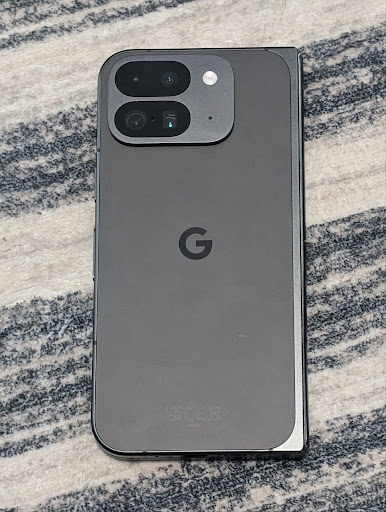
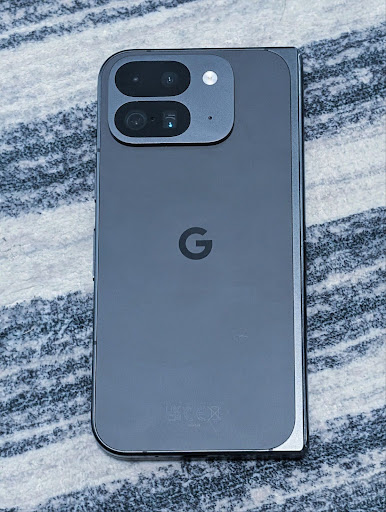
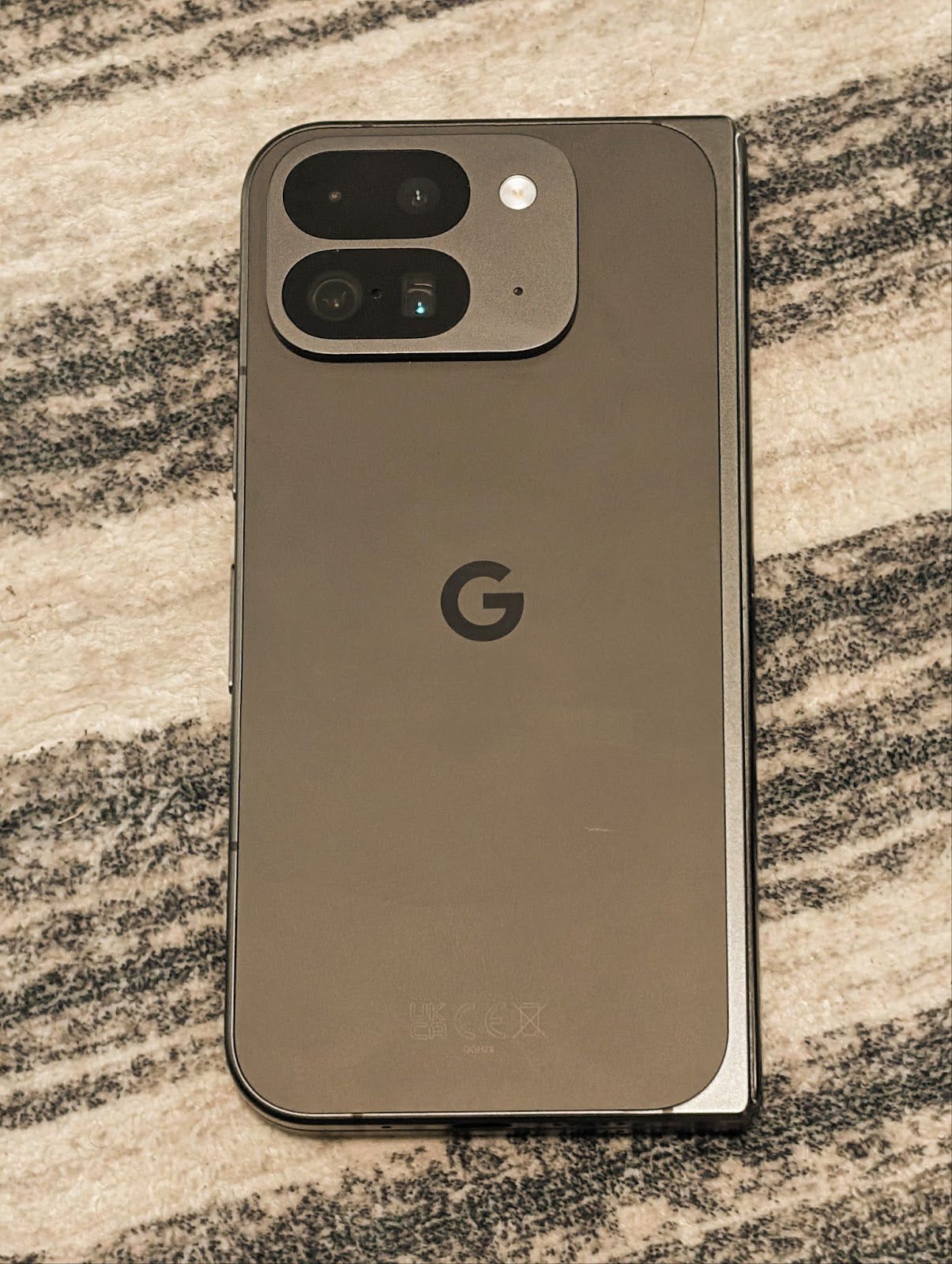
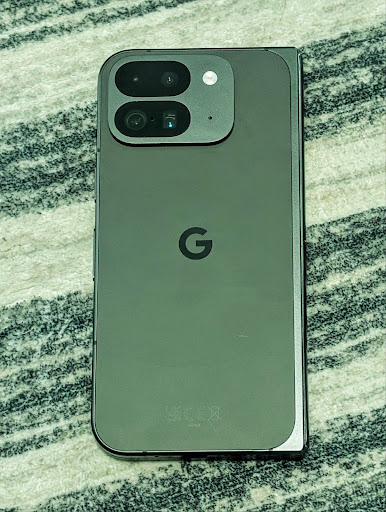
Android 16 adds camera support for fine color temperature and tint adjustments
to better support professional video recording applications. In previous Android
versions, you could control white balance settings through
CONTROL_AWB_MODE, which contains options limited to a
preset list, such as Incandescent,
Cloudy, and Twilight. The
COLOR_CORRECTION_MODE_CCT enables the use of
COLOR_CORRECTION_COLOR_TEMPERATURE and
COLOR_CORRECTION_COLOR_TINT for precise adjustments of
white balance based on the correlated color temperature.
fun setCCT() {
    // ... (Your existing code before this point) ...

    val colorTemperatureRange: Range<Int> =
        mStaticInfo.characteristics[CameraCharacteristics.COLOR_CORRECTION_COLOR_TEMPERATURE_RANGE]

    // Set to manual mode to enable CCT mode
    reqBuilder[CaptureRequest.CONTROL_AWB_MODE] = CameraMetadata.CONTROL_AWB_MODE_OFF
    reqBuilder[CaptureRequest.COLOR_CORRECTION_MODE] = CameraMetadata.COLOR_CORRECTION_MODE_CCT
    reqBuilder[CaptureRequest.COLOR_CORRECTION_COLOR_TEMPERATURE] = 5000
    reqBuilder[CaptureRequest.COLOR_CORRECTION_COLOR_TINT] = 30

    val request: CaptureRequest = reqBuilder.build()

    // ... (Your existing code after this point) ...
}
The following examples show how a photo would look after applying different color temperature and tint adjustments:
Deteksi adegan mode malam kamera
To help your app know when to switch to and from a night mode camera session,
Android 16 adds EXTENSION_NIGHT_MODE_INDICATOR. If
supported, it's available in the CaptureResult within
Camera2.
This is the API we briefly mentioned as coming soon in the How Instagram enabled users to take stunning low light photos blog post. That post is a practical guide on how to implement night mode together with a case study that links higher-quality in-app night mode photos with an increase in the number of photos shared from the in-app camera.
Tindakan intent pengambilan foto gerakan
Android 16 adds standard Intent actions —
ACTION_MOTION_PHOTO_CAPTURE, and
ACTION_MOTION_PHOTO_CAPTURE_SECURE — which request that
the camera application capture a motion photo and return
it.
You must either pass an extra EXTRA_OUTPUT to control
where the image will be written, or a Uri through
Intent.setClipData(ClipData). If you don't set a
ClipData, it will be copied there for you when calling
Context.startActivity(Intent).
Peningkatan gambar UltraHDR
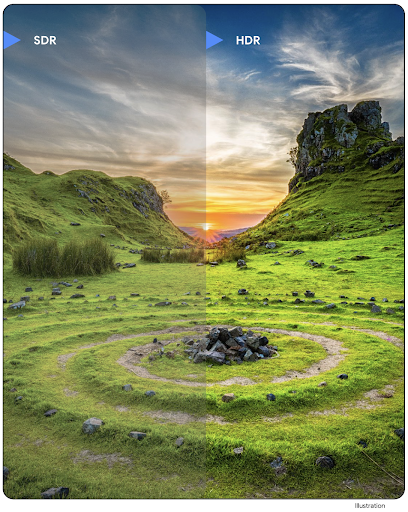
Android 16 continues our work to deliver dazzling image quality with UltraHDR
images. It adds support for UltraHDR images in the HEIC file
format. These images will get ImageFormat type
HEIC_ULTRAHDR and will contain an embedded gainmap similar
to the existing UltraHDR JPEG format. We're working on AVIF support for UltraHDR
as well, so stay tuned.
In addition, Android 16 implements additional parameters in UltraHDR from the ISO 21496-1 draft standard, including the ability to get and set the colorspace that gainmap math should be applied in, as well as support for HDR encoded base images with SDR gainmaps.
Grafik
Android 16 menyertakan peningkatan grafis terbaru, seperti efek grafis kustom dengan AGSL.
Efek grafis kustom dengan AGSL
Android 16 menambahkan RuntimeColorFilter dan
RuntimeXfermode, yang memungkinkan Anda menulis efek kompleks seperti
Threshold, Sepia, dan Hue Saturation, serta menerapkannya untuk menggambar panggilan. Sejak Android
13, Anda dapat menggunakan AGSL untuk membuat
RuntimeShaders kustom yang memperluas Shader. API baru
mencerminkan hal ini, dengan menambahkan RuntimeColorFilter yang didukung AGSL yang
memperluas ColorFilter, dan efek Xfermode yang
memungkinkan Anda menerapkan komposisi dan penggabungan kustom berbasis AGSL antara piksel sumber dan
tujuan.
private val thresholdEffectString = """
    uniform half threshold;

    half4 main(half4 c) {
        half luminosity = dot(c.rgb, half3(0.2126, 0.7152, 0.0722));
        half bw = step(threshold, luminosity);
        return bw.xxx1 * c.a;
    }"""

fun setCustomColorFilter(paint: Paint) {
   val filter = RuntimeColorFilter(thresholdEffectString)
   filter.setFloatUniform(0.5);
   paint.colorFilter = filter
}
Konektivitas
Android 16 mengupdate platform untuk memberi aplikasi Anda akses ke kemajuan terbaru dalam teknologi komunikasi dan nirkabel.
Rentang dengan keamanan yang ditingkatkan
Android 16 menambahkan dukungan untuk fitur keamanan yang andal di lokasi Wi-Fi pada perangkat yang didukung dengan 802.11az Wi-Fi 6, yang memungkinkan aplikasi menggabungkan akurasi yang lebih tinggi, skalabilitas yang lebih besar, dan penjadwalan dinamis protokol dengan peningkatan keamanan termasuk enkripsi berbasis AES-256 dan perlindungan terhadap serangan MITM. Hal ini memungkinkannya digunakan dengan lebih aman dalam kasus penggunaan kedekatan, seperti membuka kunci laptop atau pintu kendaraan. 802.11az terintegrasi dengan standar Wi-Fi 6, yang memanfaatkan infrastruktur dan kemampuannya untuk adopsi yang lebih luas dan deployment yang lebih mudah.
API rentang generik
Android 16 includes the new RangingManager, which provides
ways to determine the distance and angle on supported hardware between the local
device and a remote device. RangingManager supports the usage of a variety of
ranging technologies such as BLE channel sounding, BLE RSSI-based ranging, Ultra
Wideband, and Wi-Fi round trip time.
Kehadiran perangkat pengelola perangkat pendamping
In Android 16, new APIs are being introduced for binding your companion app
service. Service will be bound when BLE is in range and Bluetooth is connected
and service will be unbound when BLE is out of range or Bluetooth is
disconnected. App will receives a new
'onDevicePresenceEvent()' callback based on various
of DevicePresenceEvent.
More details can be found in
'startObservingDevicePresence(ObservingDevicePresenceRequest)'.
Media
Android 16 menyertakan berbagai fitur yang meningkatkan pengalaman media.
Peningkatan pemilih foto
The photo picker provides a safe, built-in way for users to grant your app access to selected images and videos from both local and cloud storage, instead of their entire media library. Using a combination of Modular System Components through Google System Updates and Google Play services, it's supported back to Android 4.4 (API level 19). Integration requires just a few lines of code with the associated Android Jetpack library.
Android 16 includes the following improvements to the photo picker:
- Embedded photo picker: New APIs that enable apps to embed the photo picker into their view hierarchy. This allows it to feel like a more integrated part of the app while still leveraging the process isolation that allows users to select media without the app needing overly broad permissions. To maximize compatibility across platform versions and simplify your integration, you'll want to use the forthcoming Android Jetpack library if you want to integrate the embedded photo picker.
- Cloud search in photo picker: New APIs that enable searching from the cloud media provider for the Android photo picker. Search functionality in the photo picker is coming soon.
Video Profesional Lanjutan
Android 16 introduces support for the Advanced Professional Video (APV) codec which is designed to be used for professional level high quality video recording and post production.
The APV codec standard has the following features:
- Perceptually lossless video quality (close to raw video quality)
- Low complexity and high throughput intra-frame-only coding (without pixel domain prediction) to better support editing workflows
- Support for high bit-rate range up to a few Gbps for 2K, 4K and 8K resolution content, enabled by a lightweight entropy coding scheme
- Frame tiling for immersive content and for enabling parallel encoding and decoding
- Support for various chroma sampling formats and bit-depths
- Support for multiple decoding and re-encoding without severe visual quality degradation
- Support multi-view video and auxiliary video like depth, alpha, and preview
- Support for HDR10/10+ and user-defined metadata
A reference implementation of APV is provided through the OpenAPV project. Android 16 will implement support for the APV 422-10 Profile that provides YUV 422 color sampling along with 10-bit encoding and for target bitrates of up to 2Gbps.
Privasi
Android 16 menyertakan berbagai fitur yang membantu developer aplikasi melindungi privasi pengguna.
Update Health Connect
Health Connect menambahkan ACTIVITY_INTENSITY, jenis data yang ditentukan sesuai dengan pedoman
Organisasi Kesehatan Dunia terkait aktivitas sedang dan berat. Setiap
data memerlukan waktu mulai, waktu berakhir, dan apakah intensitas aktivitas
sedang atau berat.
Health Connect juga berisi API yang diperbarui yang mendukung rekam medis. Hal ini memungkinkan aplikasi membaca dan menulis catatan medis dalam format FHIR dengan izin pengguna yang eksplisit.
Privacy Sandbox di Android
Android 16 incorporates the latest version of the Privacy Sandbox on Android, part of our ongoing work to develop technologies where users know their privacy is protected. Our website has more about the Privacy Sandbox on Android developer beta program to help you get started. Check out the SDK Runtime which allows SDKs to run in a dedicated runtime environment separate from the app they are serving, providing stronger safeguards around user data collection and sharing.
Keamanan
Android 16 menyertakan fitur yang membantu Anda meningkatkan keamanan aplikasi dan melindungi data aplikasi.
API berbagi kunci
Android 16 menambahkan API yang mendukung berbagi akses ke
kunci Android Keystore dengan aplikasi lain. Class
KeyStoreManager baru mendukung
pemberian dan pencabutan akses ke kunci
oleh uid aplikasi, dan menyertakan API untuk aplikasi agar dapat mengakses kunci
yang dibagikan.
Faktor bentuk perangkat
Android 16 memberi aplikasi Anda dukungan untuk memaksimalkan faktor bentuk Android.
Framework kualitas gambar dan audio standar untuk TV
The new MediaQuality
package in Android 16 exposes
a set of standardized APIs for access to audio and picture profiles and
hardware-related settings. This allows streaming apps to query profiles and
apply them to media dynamically:
- Movies mastered with a wider dynamic range require greater color accuracy to see subtle details in shadows and adjust to ambient light, so a profile that prefers color accuracy over brightness may be appropriate.
- Live sporting events are often mastered with a narrow dynamic range, but are often watched in daylight, so a profile that preferences brightness over color accuracy can give better results.
- Fully interactive content wants minimal processing to reduce latency, and wants higher frame rates, which is why many TV's ship with a game profile.
The API allows apps to switch between profiles and users to enjoy tuning supported TVs to best suit their content.
Internasionalisasi
Android 16 menambahkan fitur dan kemampuan yang melengkapi pengalaman pengguna saat perangkat digunakan dalam berbagai bahasa.
Teks vertikal
Android 16 menambahkan dukungan tingkat rendah untuk merender dan mengukur teks secara vertikal guna
memberikan dukungan penulisan vertikal dasar bagi developer library. Hal ini
sangat berguna untuk bahasa seperti Jepang yang biasanya menggunakan sistem
tulisan vertikal. Flag baru,
VERTICAL_TEXT_FLAG,
telah ditambahkan ke class Paint. Saat
tanda ini ditetapkan menggunakan
Paint.setFlags, API
pengukuran teks Paint akan melaporkan progres vertikal, bukan progres
horizontal, dan Canvas akan menggambar teks
secara vertikal.
val text = "「春は、曙。」"
Box(
    Modifier.padding(innerPadding).background(Color.White).fillMaxSize().drawWithContent {
        drawIntoCanvas { canvas ->
            val paint = Paint().apply { textSize = 64.sp.toPx() }
            // Draw text vertically
            paint.flags = paint.flags or VERTICAL_TEXT_FLAG
            val height = paint.measureText(text)
            canvas.nativeCanvas.drawText(
                text,
                0,
                text.length,
                size.width / 2,
                (size.height - height) / 2,
                paint
            )
        }
    }
) {}
Penyesuaian sistem pengukuran
Pengguna kini dapat menyesuaikan sistem pengukuran mereka di preferensi regional dalam
Setelan. Preferensi pengguna disertakan sebagai bagian dari kode lokalitas, sehingga Anda dapat
mendaftarkan BroadcastReceiver di
ACTION_LOCALE_CHANGED untuk menangani perubahan konfigurasi lokalitas saat
preferensi regional berubah.
Menggunakan formator dapat membantu mencocokkan pengalaman lokal. Misalnya, "0,5 in" dalam bahasa Inggris (Amerika Serikat), adalah "12,7 mm" untuk pengguna yang telah menyetel ponsel ke bahasa Inggris (Denmark) atau yang menggunakan ponsel dalam bahasa Inggris (Amerika Serikat) dengan sistem metrik sebagai preferensi sistem pengukuran.
Untuk menemukan setelan ini, buka aplikasi Setelan, lalu buka Sistem > Bahasa & wilayah.