
Android 16 memperkenalkan fitur dan API baru yang hebat untuk para developer. Bagian berikut merangkum fitur ini untuk membantu Anda mulai menggunakan API terkait.
Untuk melihat daftar mendetail tentang API yang baru, diubah, dan dihapus, baca laporan perbedaan API. Untuk mengetahui detail tentang API baru, buka referensi API Android — API baru ditandai agar lebih mudah dilihat.Anda juga harus meninjau area tempat perubahan platform dapat memengaruhi aplikasi Anda. Untuk informasi selengkapnya, lihat halaman berikut:
- Perubahan perilaku yang memengaruhi aplikasi saat menargetkan Android 16
- Perubahan perilaku yang memengaruhi semua aplikasi terlepas dari
targetSdkVersion.
Fungsi inti
Android menyertakan API baru yang memperluas kemampuan inti sistem Android.
Dua rilis Android API pada tahun 2025
- Pratinjau ini ditujukan untuk rilis utama Android berikutnya dengan peluncuran yang direncanakan pada Kuartal 2 2025. Rilis ini mirip dengan semua rilis API kami sebelumnya, yang memungkinkan kita memiliki perubahan perilaku terencana yang sering kali terkait dengan targetSdkVersion.
- Kami merencanakan rilis utama satu kuartal lebih awal (K2, bukan K3 pada tahun sebelumnya) agar lebih selaras dengan jadwal peluncuran perangkat di seluruh ekosistem kami, sehingga lebih banyak perangkat dapat mendapatkan rilis utama Android lebih cepat. Dengan rilis utama yang akan datang pada Kuartal 2, Anda harus melakukan pengujian kompatibilitas tahunan beberapa bulan lebih awal dari tahun-tahun sebelumnya untuk memastikan aplikasi Anda siap.
- Kami berencana untuk merilis versi lain pada Kuartal 4 tahun 2025 yang juga akan menyertakan API developer baru. Rilis utama K2 akan menjadi satu-satunya rilis pada tahun 2025 yang menyertakan perubahan perilaku terencana yang dapat memengaruhi aplikasi.
Selain API developer baru, rilis minor K4 akan mengambil update fitur, pengoptimalan, dan perbaikan bug; rilis ini tidak akan menyertakan perubahan perilaku yang memengaruhi aplikasi.
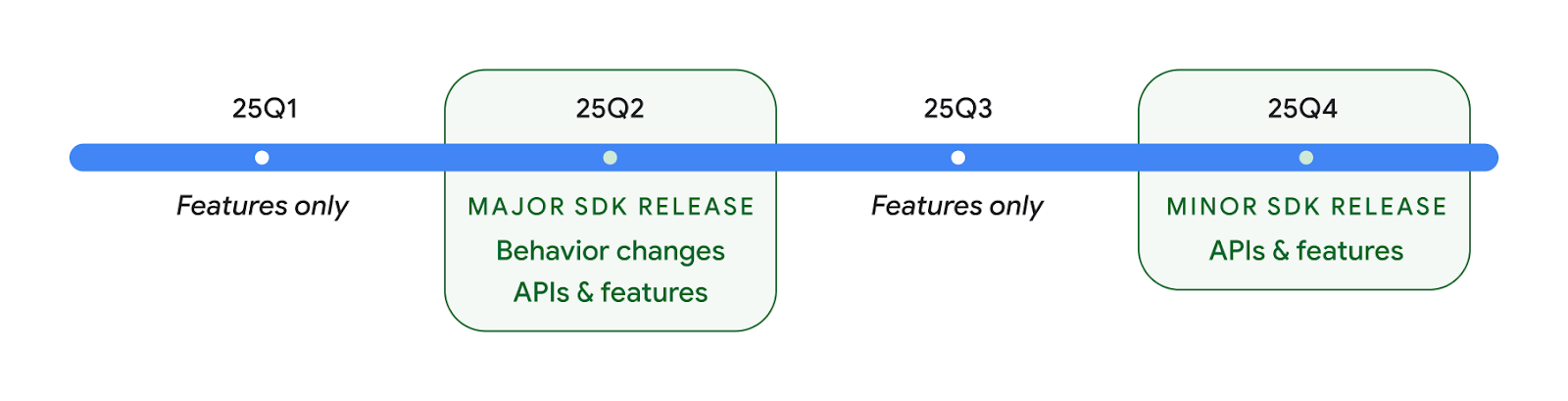
Kami akan terus merilis Android setiap tiga bulan sekali. Update Kuartal 1 dan Kuartal 3 di antara rilis API akan memberikan update inkremental untuk membantu memastikan kualitas yang berkelanjutan. Kami secara aktif bekerja sama dengan partner perangkat untuk menghadirkan rilis Q2 ke sebanyak mungkin perangkat.
Menggunakan API baru dengan rilis utama dan minor
Melindungi blok kode dengan pemeriksaan API level dilakukan saat ini menggunakan
konstanta SDK_INT dengan
VERSION_CODES. Fitur ini akan terus
didukung untuk rilis Android utama.
if (SDK_INT >= VERSION_CODES.BAKLAVA) {
  // Use APIs introduced in Android 16
}
Konstanta SDK_INT_FULL
baru dapat digunakan untuk pemeriksaan API terhadap versi utama dan minor dengan
enumerasi VERSION_CODES_FULL
baru.
if (SDK_INT_FULL >= VERSION_CODES_FULL.[MAJOR or MINOR RELEASE]) {
  // Use APIs introduced in a major or minor release
}
Anda juga dapat menggunakan metode
Build.getMinorSdkVersion()
untuk mendapatkan versi SDK minor saja.
val minorSdkVersion = Build.getMinorSdkVersion(VERSION_CODES_FULL.BAKLAVA)
API ini belum selesai dan dapat berubah sewaktu-waktu. Jadi, kirimkan masukan kepada kami jika Anda memiliki masalah.
Pengalaman pengguna dan UI sistem
Android 16 memberi developer dan pengguna aplikasi kontrol dan fleksibilitas yang lebih besar untuk mengonfigurasi perangkat agar sesuai dengan kebutuhan mereka.
Notifikasi yang berfokus pada progres
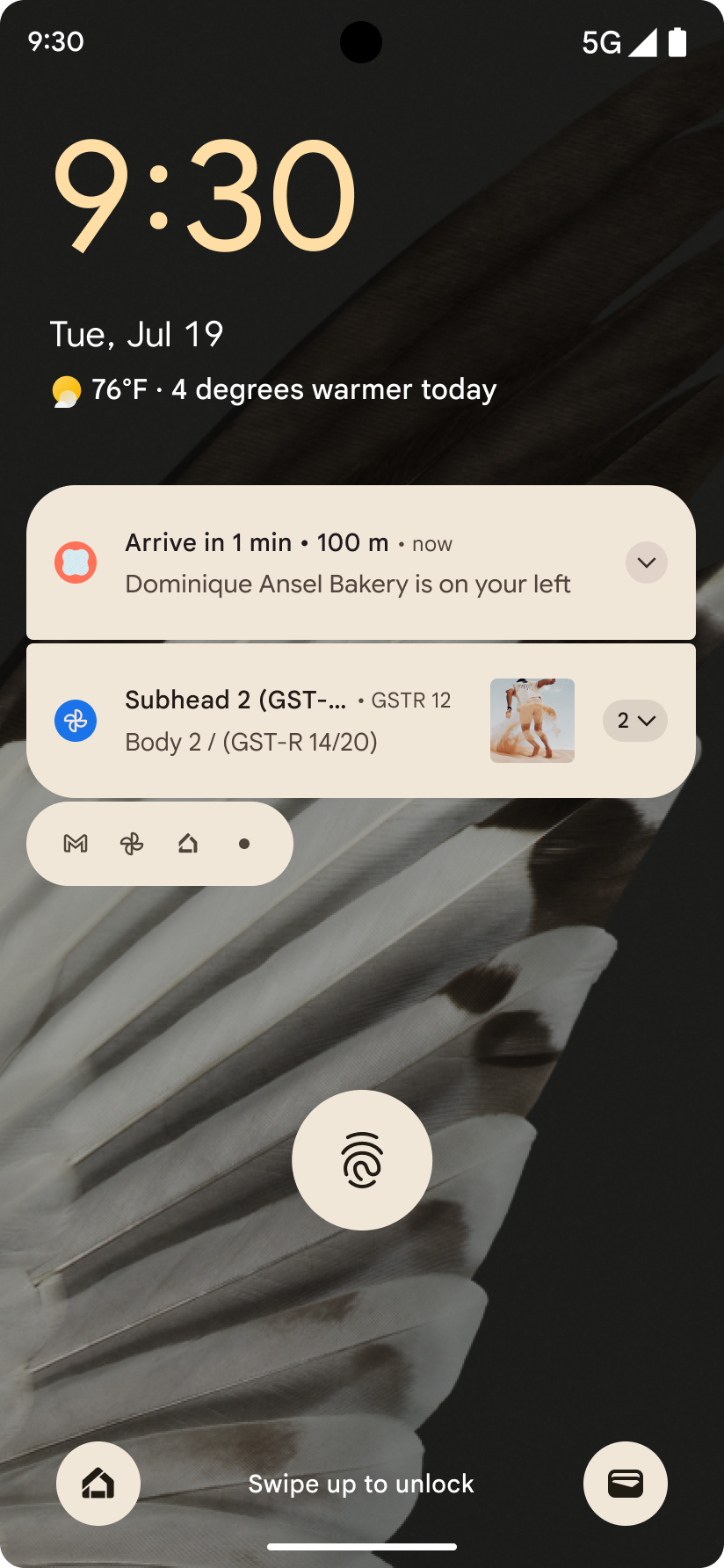
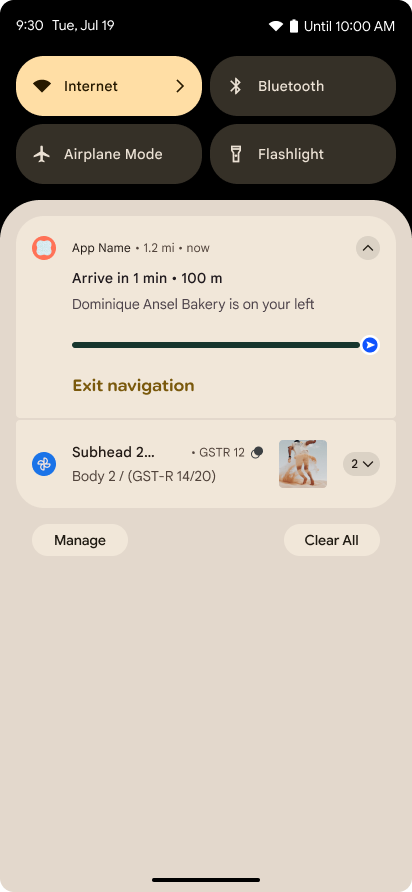
Android 16 memperkenalkan notifikasi yang berfokus pada progres untuk membantu pengguna melacak perjalanan awal hingga akhir yang dimulai pengguna dengan lancar.
Notification.ProgressStyle adalah gaya notifikasi
baru yang memungkinkan Anda membuat notifikasi yang berfokus pada progres. Kasus penggunaan utama mencakup
transportasi online, pengiriman, dan navigasi. Dalam class Notification.ProgressStyle, Anda dapat menunjukkan status dan tonggak pencapaian dalam perjalanan pengguna menggunakan
titik dan segmen.
Untuk mempelajari lebih lanjut, lihat halaman dokumentasi Notifikasi yang berfokus pada progres.
Pembaruan kembali prediktif
Android 16 menambahkan API baru untuk membantu Anda mengaktifkan animasi sistem kembali prediktif dalam
navigasi gestur seperti animasi kembali ke layar utama. Dengan mendaftarkan
onBackInvokedCallback ke
PRIORITY_SYSTEM_NAVIGATION_OBSERVER baru, aplikasi Anda dapat
menerima panggilan onBackInvoked reguler setiap kali
sistem menangani navigasi kembali tanpa memengaruhi alur
navigasi kembali normal.
Android 16 juga menambahkan
finishAndRemoveTaskCallback() dan
moveTaskToBackCallback. Dengan mendaftarkan callback ini
dengan OnBackInvokedDispatcher, sistem dapat memicu
perilaku tertentu dan memutar animasi yang sesuai sebelumnya saat gestur
kembali dipanggil.
Haptik yang lebih kaya
Android telah mengekspos kontrol atas aktuator haptic sejak awal.
Android 11 menambahkan dukungan untuk efek haptik yang lebih kompleks yang dapat didukung oleh aktuator
yang lebih canggih melalui
VibrationEffect.Compositions dari primitif
semantik yang ditentukan perangkat.
Android 16 menambahkan API haptik yang memungkinkan aplikasi menentukan kurva amplitudo dan frekuensi efek haptik sekaligus memisahkan perbedaan antara kemampuan perangkat.
Alat dan produktivitas developer
Meskipun sebagian besar upaya kami untuk meningkatkan produktivitas Anda berpusat pada alat seperti Android Studio, Jetpack Compose, dan library Android Jetpack, kami selalu mencari cara di platform untuk membantu Anda mewujudkan visi Anda.
Penanganan konten untuk wallpaper animasi
Di Android 16, framework wallpaper animasi mendapatkan API konten baru untuk
mengatasi tantangan wallpaper dinamis yang didorong pengguna. Saat ini, wallpaper
live yang menggabungkan konten yang disediakan pengguna memerlukan penerapan
khusus layanan yang kompleks. Android 16 memperkenalkan
WallpaperDescription dan
WallpaperInstance. WallpaperDescription memungkinkan Anda
mengidentifikasi instance wallpaper animasi yang berbeda dari layanan yang sama. Misalnya, wallpaper yang memiliki instance di layar utama dan layar
kunci mungkin memiliki konten unik di kedua tempat tersebut. Pemilih wallpaper dan
WallpaperManager menggunakan metadata ini untuk menampilkan
wallpaper dengan lebih baik kepada pengguna, sehingga menyederhanakan proses bagi Anda untuk membuat pengalaman wallpaper hidup yang beragam dan
dipersonalisasi.
Performa dan baterai
Android 16 memperkenalkan API yang membantu mengumpulkan insight tentang aplikasi Anda.
Pembuatan profil yang dipicu sistem
ProfilingManager
ditambahkan di Android 15, yang memberi aplikasi kemampuan untuk
meminta pengumpulan data pembuatan profil menggunakan Perfetto di perangkat publik di lapangan.
Namun, karena pembuatan profil ini harus dimulai dari aplikasi, alur penting seperti
startup atau ANR akan sulit atau tidak dapat direkam oleh aplikasi.
Untuk membantu hal ini, Android 16 memperkenalkan pembuatan profil yang dipicu sistem ke
ProfilingManager. Aplikasi dapat mendaftarkan minat untuk menerima rekaman aktivitas untuk pemicu
tertentu seperti cold start reportFullyDrawn
atau ANR, lalu sistem akan memulai dan menghentikan rekaman aktivitas atas nama aplikasi. Setelah
pelacakan selesai, hasilnya akan dikirim ke direktori data aplikasi.
Komponen awal di ApplicationStartInfo
ApplicationStartInfo ditambahkan di Android
15, yang memungkinkan aplikasi melihat alasan
awal proses, jenis awal, waktu mulai, throttling, dan data diagnostik
berguna lainnya. Android 16 menambahkan
getStartComponent()
untuk membedakan jenis komponen yang memicu awal, yang dapat membantu
mengoptimalkan alur startup aplikasi Anda.
Introspeksi tugas yang lebih baik
JobScheduler#getPendingJobReason() API menampilkan alasan mengapa tugas
mungkin tertunda. Namun, tugas mungkin tertunda karena beberapa alasan.
Di Android 16, kami memperkenalkan API
JobScheduler#getPendingJobReasons(int jobId) baru, yang menampilkan beberapa
alasan mengapa tugas tertunda, karena batasan eksplisit yang ditetapkan oleh
developer dan batasan implisit yang ditetapkan oleh sistem.
Kami juga memperkenalkan
JobScheduler#getPendingJobReasonsHistory(int jobId), yang menampilkan daftar
perubahan batasan terbaru.
Sebaiknya gunakan API untuk membantu Anda men-debug alasan tugas Anda mungkin tidak dieksekusi, terutama jika Anda melihat penurunan rasio keberhasilan tugas tertentu atau memiliki bug di sekitar latensi penyelesaian tugas tertentu. Misalnya, pembaruan widget di latar belakang gagal terjadi atau tugas pengambilan data gagal dipanggil sebelum aplikasi dimulai.
Hal ini juga dapat membantu Anda lebih memahami apakah tugas tertentu tidak selesai karena batasan yang ditentukan sistem dibandingkan batasan yang ditetapkan secara eksplisit.
Kecepatan refresh adaptif
Kecepatan refresh adaptif (ARR), yang diperkenalkan di Android 15, memungkinkan kecepatan refresh layar pada hardware yang didukung untuk beradaptasi dengan kecepatan frame konten menggunakan langkah VSync terpisah. Hal ini mengurangi konsumsi daya sekaligus menghilangkan kebutuhan untuk beralih mode yang berpotensi menyebabkan jank.
Android 16 memperkenalkan hasArrSupport() dan
getSuggestedFrameRate(int) saat memulihkan
getSupportedRefreshRates() untuk memudahkan aplikasi Anda memanfaatkan
ARR. RecyclerView
1.4 secara internal mendukung ARR saat berhenti dari ayun atau
scroll halus, dan kami melanjutkan upaya untuk menambahkan dukungan
ARR ke lebih banyak library Jetpack. Artikel kecepatan frame ini membahas
banyak API yang dapat Anda gunakan untuk menetapkan kecepatan frame sehingga aplikasi Anda dapat langsung
menggunakan ARR.
API ruang kosong di ADPF
SystemHealthManager memperkenalkan
getCpuHeadroom dan
getGpuHeadroom API, yang dirancang untuk menyediakan game dan
aplikasi yang intensif resource dengan estimasi resource CPU dan GPU yang tersedia. Metode
ini menawarkan cara bagi Anda untuk mengukur cara terbaik aplikasi atau game Anda meningkatkan
kesehatan sistem, terutama jika digunakan bersama dengan Android Dynamic
Performance Framework (ADPF) API lainnya yang mendeteksi throttling
termal.
Dengan menggunakan CpuHeadroomParams dan
GpuHeadroomParams di perangkat yang didukung, Anda dapat
menyesuaikan periode waktu yang digunakan untuk menghitung headroom dan memilih antara
ketersediaan resource rata-rata atau minimum. Hal ini dapat membantu Anda mengurangi penggunaan resource CPU atau
GPU dengan semestinya, sehingga menghasilkan pengalaman pengguna yang lebih baik dan meningkatkan
masa pakai baterai.
Aksesibilitas
Android 16 menambahkan API dan fitur aksesibilitas baru yang dapat membantu Anda menghadirkan aplikasi kepada setiap pengguna.
API aksesibilitas yang ditingkatkan
Android 16 menambahkan API tambahan untuk meningkatkan semantik UI yang membantu meningkatkan konsistensi bagi pengguna yang mengandalkan layanan aksesibilitas, seperti TalkBack.
Membuat garis tepi teks untuk kontras teks maksimum
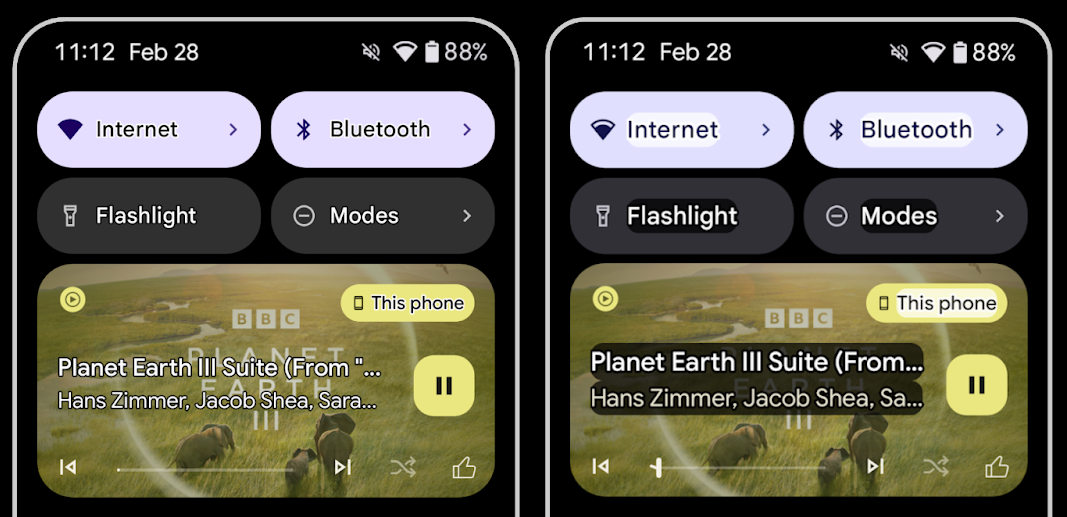
Pengguna dengan gangguan penglihatan sering kali memiliki sensitivitas kontras yang berkurang, sehingga sulit untuk membedakan objek dari latar belakangnya. Untuk membantu pengguna ini, Android 16 memperkenalkan teks garis batas, yang menggantikan teks kontras tinggi, yang menggambar area kontras yang lebih besar di sekitar teks untuk sangat meningkatkan keterbacaan.
Android 16 berisi API AccessibilityManager baru untuk memungkinkan
aplikasi Anda memeriksa atau mendaftarkan pemroses untuk
melihat apakah mode ini diaktifkan. Hal ini terutama untuk Toolkit UI seperti Compose untuk
menawarkan pengalaman visual yang serupa. Jika Anda mengelola library UI Toolkit atau
aplikasi Anda melakukan rendering teks kustom yang mengabaikan
class android.text.Layout, Anda dapat menggunakannya untuk mengetahui
saat teks garis batas diaktifkan.
Durasi ditambahkan ke TtsSpan
Android 16 memperluas TtsSpan dengan TYPE_DURATION,
yang terdiri dari ARG_HOURS, ARG_MINUTES,
dan ARG_SECONDS. Hal ini memungkinkan Anda menganotasi durasi
waktu secara langsung, sehingga memastikan output text-to-speech yang akurat dan konsisten dengan layanan
seperti TalkBack.
Mendukung elemen dengan beberapa label
Android saat ini memungkinkan elemen UI untuk memperoleh label aksesibilitas dari
elemen lain, dan kini menawarkan kemampuan untuk mengaitkan beberapa label, sebuah skenario umum dalam konten web. Dengan memperkenalkan API berbasis daftar dalam
AccessibilityNodeInfo, Android dapat langsung mendukung
hubungan multi-label ini. Sebagai bagian dari perubahan ini, kami telah menghentikan
AccessibilityNodeInfo#setLabeledBy dan
#getLabeledBy dan menggantinya dengan
#addLabeledBy, #removeLabeledBy, dan
#getLabeledByList.
Dukungan yang lebih baik untuk elemen yang dapat diluaskan
Android 16 menambahkan API aksesibilitas yang memungkinkan Anda menyampaikan status elemen interaktif yang diperluas atau
ditutup, seperti menu dan daftar yang dapat diluaskan. Dengan
menetapkan status yang diperluas menggunakan setExpandedState dan
mengirim TYPE_WINDOW_CONTENT_CHANGED AccessibilityEvents
dengan jenis perubahan konten CONTENT_CHANGE_TYPE_EXPANDED,
Anda dapat memastikan bahwa pembaca layar seperti TalkBack mengumumkan
perubahan status, sehingga memberikan pengalaman pengguna yang lebih intuitif dan inklusif.
Status Progres Tidak Pasti
Android 16 menambahkan RANGE_TYPE_INDETERMINATE, yang memberi Anda cara
untuk mengekspos RangeInfo untuk widget ProgressBar determinate dan
indeterminate, sehingga layanan seperti
TalkBack dapat memberikan masukan secara lebih konsisten untuk indikator
progres.
CheckBox tiga status
Metode AccessibilityNodeInfo
getChecked dan setChecked(int)
baru di Android 16 kini mendukung status "sebagian dicentang" selain
" dicentang" dan "tidak dicentang". Ini menggantikan boolean
isChecked dan setChecked(boolean) yang tidak digunakan lagi.
Deskripsi tambahan
Saat menjelaskan ViewGroup, layanan aksesibilitas
akan menggabungkan label konten dari tampilan turunannya. Jika Anda memberikan
contentDescription untuk ViewGroup, layanan aksesibilitas akan menganggap Anda
juga mengganti deskripsi tampilan turunan yang tidak dapat difokuskan. Hal ini dapat
menjadi masalah jika Anda ingin memberi label pada hal-hal seperti drop-down (misalnya, "Font
Family") sekaligus mempertahankan pilihan saat ini untuk aksesibilitas (misalnya,
"Roboto"). Android 16 menambahkan setSupplementalDescription sehingga
Anda dapat memberikan teks yang memberikan informasi tentang ViewGroup tanpa
mengganti informasi dari turunannya.
Kolom formulir wajib diisi
Android 16 menambahkan setFieldRequired ke
AccessibilityNodeInfo sehingga aplikasi dapat memberi tahu layanan
aksesibilitas bahwa input ke kolom formulir diperlukan. Ini adalah skenario penting
bagi pengguna yang mengisi banyak jenis formulir, bahkan hal-hal sepele seperti kotak centang
persyaratan dan ketentuan yang diperlukan, yang membantu pengguna untuk secara konsisten mengidentifikasi dan
berpindah dengan cepat di antara kolom yang diperlukan.
Ponsel sebagai input mikrofon untuk panggilan suara dengan alat bantu dengar LEA
Android 16 menambahkan kemampuan bagi pengguna alat bantu dengar LE Audio untuk beralih antara mikrofon bawaan di alat bantu dengar dan mikrofon di ponsel mereka untuk panggilan suara. Hal ini dapat membantu di lingkungan yang bising atau situasi lain saat mikrofon alat bantu dengar mungkin tidak berperforma baik.
Kontrol volume sekitar untuk alat bantu dengar LEA
Android 16 menambahkan kemampuan bagi pengguna alat bantu dengar LE Audio untuk menyesuaikan volume suara sekitar yang ditangkap oleh mikrofon alat bantu dengar. Hal ini dapat membantu dalam situasi saat suara bising di latar belakang terlalu keras atau terlalu pelan.
Kamera
Android 16 meningkatkan dukungan untuk pengguna kamera profesional, sehingga memungkinkan eksposur otomatis hybrid bersama dengan penyesuaian suhu warna dan tint yang akurat. Indikator mode malam baru membantu aplikasi Anda mengetahui kapan harus beralih ke dan dari sesi kamera mode malam. Tindakan Intent baru mempermudah pengambilan foto bergerak, dan kami terus meningkatkan kualitas gambar UltraHDR dengan dukungan untuk encoding HEIC dan parameter baru dari draf standar ISO 21496-1.
Eksposur otomatis hybrid
Android 16 menambahkan mode eksposur otomatis hibrida baru ke Camera2, yang memungkinkan Anda mengontrol aspek eksposur tertentu secara manual sekaligus membiarkan algoritma eksposur otomatis (AE) menangani sisanya. Anda dapat mengontrol ISO + AE, dan exposure time + AE, yang memberikan fleksibilitas yang lebih besar dibandingkan dengan pendekatan saat ini, yaitu Anda memiliki kontrol manual penuh atau sepenuhnya mengandalkan eksposur otomatis.
fun setISOPriority() {
    // ... (Your existing code before the snippet) ...

    val availablePriorityModes = mStaticInfo.characteristics.get(
        CameraCharacteristics.CONTROL_AE_AVAILABLE_PRIORITY_MODES
    )

    // ... (Your existing code between the snippets) ...

    // Turn on AE mode to set priority mode
    reqBuilder.set(
        CaptureRequest.CONTROL_AE_MODE,
        CameraMetadata.CONTROL_AE_MODE_ON
    )
    reqBuilder.set(
        CaptureRequest.CONTROL_AE_PRIORITY_MODE,
        CameraMetadata.CONTROL_AE_PRIORITY_MODE_SENSOR_SENSITIVITY_PRIORITY
    )
    reqBuilder.set(
        CaptureRequest.SENSOR_SENSITIVITY,
        TEST_SENSITIVITY_VALUE
    )
    val request: CaptureRequest = reqBuilder.build()

    // ... (Your existing code after the snippet) ...
}
Penyesuaian tint dan color temperature yang presisi
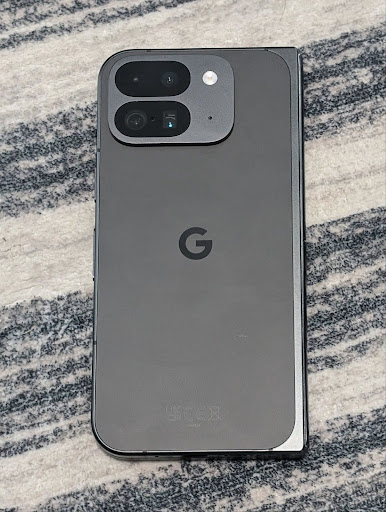
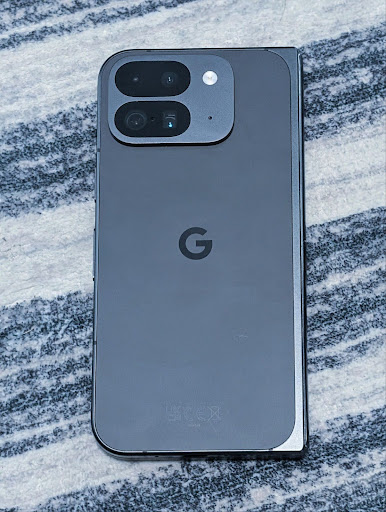
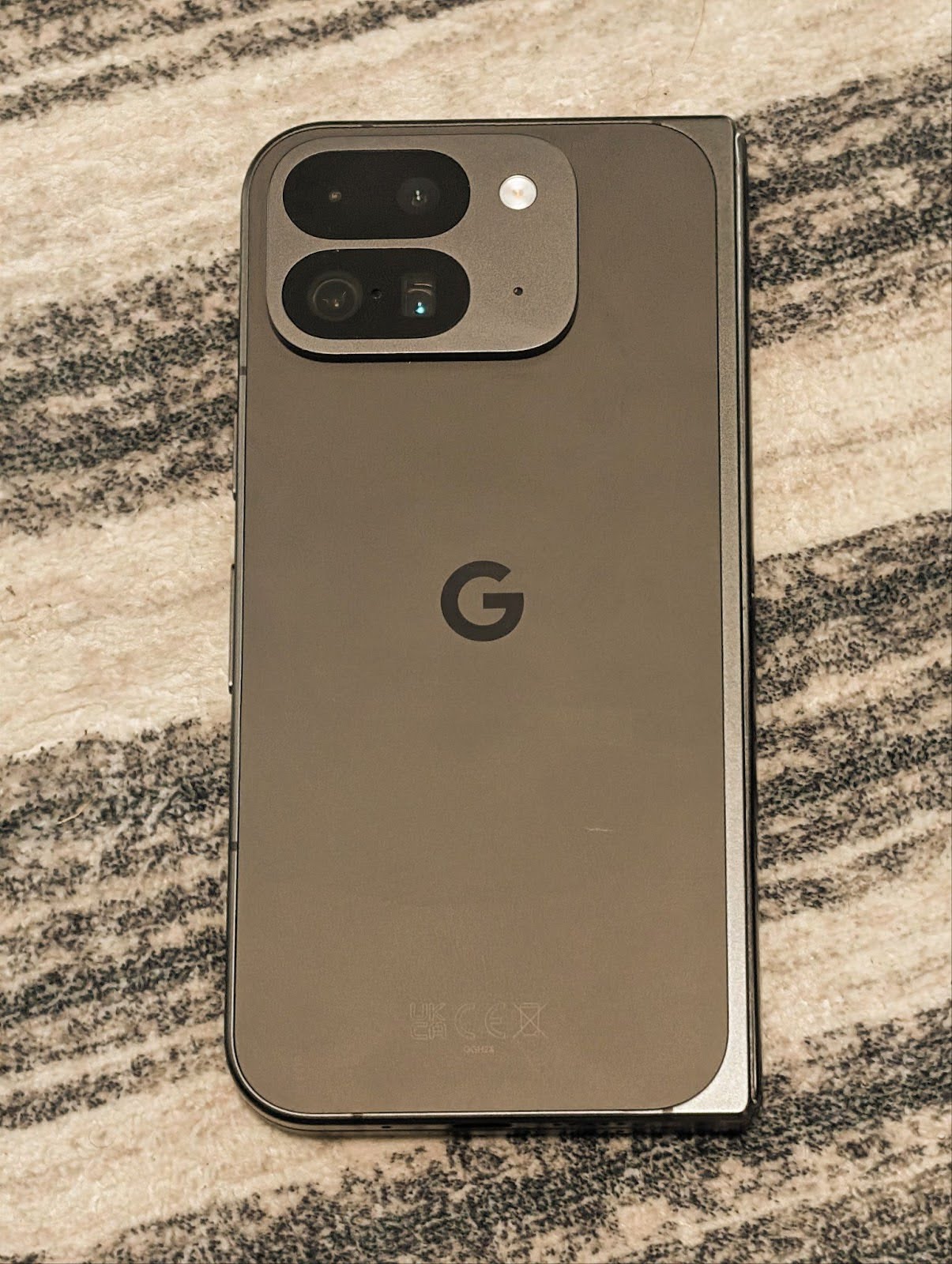
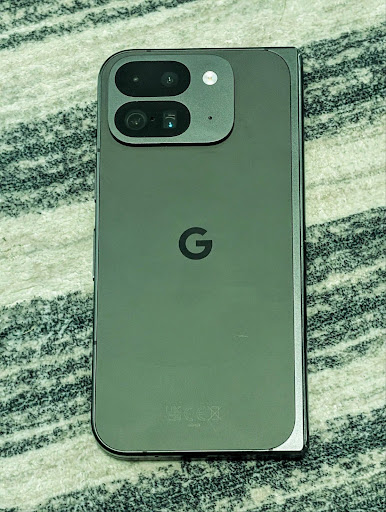
Android 16 menambahkan dukungan kamera untuk penyesuaian tint dan suhu warna yang halus
untuk mendukung aplikasi perekaman video profesional dengan lebih baik. Di versi Android
sebelumnya, Anda dapat mengontrol setelan white balance melalui
CONTROL_AWB_MODE, yang berisi opsi yang terbatas pada
daftar preset, seperti Incandescent,
Cloudy, dan Twilight. COLOR_CORRECTION_MODE_CCT memungkinkan penggunaan
COLOR_CORRECTION_COLOR_TEMPERATURE dan
COLOR_CORRECTION_COLOR_TINT untuk penyesuaian
white balance yang akurat berdasarkan color temperature yang berkorelasi.
fun setCCT() {
    // ... (Your existing code before this point) ...

    val colorTemperatureRange: Range<Int> =
        mStaticInfo.characteristics[CameraCharacteristics.COLOR_CORRECTION_COLOR_TEMPERATURE_RANGE]

    // Set to manual mode to enable CCT mode
    reqBuilder[CaptureRequest.CONTROL_AWB_MODE] = CameraMetadata.CONTROL_AWB_MODE_OFF
    reqBuilder[CaptureRequest.COLOR_CORRECTION_MODE] = CameraMetadata.COLOR_CORRECTION_MODE_CCT
    reqBuilder[CaptureRequest.COLOR_CORRECTION_COLOR_TEMPERATURE] = 5000
    reqBuilder[CaptureRequest.COLOR_CORRECTION_COLOR_TINT] = 30

    val request: CaptureRequest = reqBuilder.build()

    // ... (Your existing code after this point) ...
}
Contoh berikut menunjukkan tampilan foto setelah menerapkan penyesuaian suhu warna dan tint yang berbeda:
Deteksi adegan mode malam kamera
Untuk membantu aplikasi Anda mengetahui kapan harus beralih ke dan dari sesi kamera mode malam,
Android 16 menambahkan EXTENSION_NIGHT_MODE_INDICATOR. Jika
didukung, fitur ini tersedia di CaptureResult dalam
Camera2.
Ini adalah API yang kami sebutkan secara singkat sebagai segera hadir dalam postingan blog Cara Instagram memungkinkan pengguna mengambil foto cahaya redup yang menakjubkan. Postingan tersebut adalah panduan praktis tentang cara menerapkan mode malam bersama dengan studi kasus yang mengaitkan foto mode malam dalam aplikasi berkualitas lebih tinggi dengan peningkatan jumlah foto yang dibagikan dari kamera dalam aplikasi.
Tindakan intent pengambilan foto motion
Android 16 menambahkan tindakan Intent standar —
ACTION_MOTION_PHOTO_CAPTURE, dan
ACTION_MOTION_PHOTO_CAPTURE_SECURE — yang meminta
aplikasi kamera mengambil foto gerakan dan menampilkannya.
Anda harus meneruskan EXTRA_OUTPUT tambahan untuk mengontrol
tempat gambar akan ditulis, atau Uri melalui
Intent.setClipData(ClipData). Jika Anda tidak menetapkan
ClipData, nilai tersebut akan disalin ke sana untuk Anda saat memanggil
Context.startActivity(Intent).
Peningkatan gambar UltraHDR
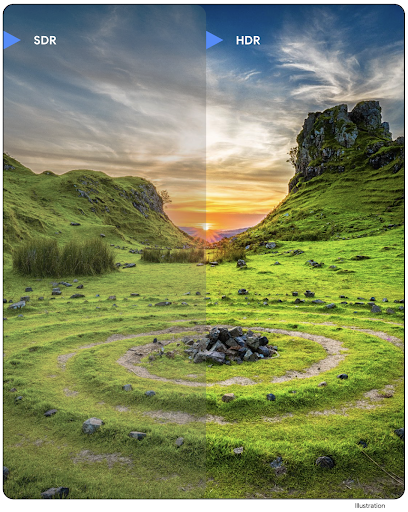
Android 16 merupakan lanjutan upaya kami untuk menghadirkan kualitas gambar yang memukau dengan gambar
UltraHDR. Versi ini menambahkan dukungan untuk gambar UltraHDR dalam format file
HEIC. Gambar ini akan mendapatkan jenis ImageFormat
HEIC_ULTRAHDR dan akan berisi peta gain tersemat yang mirip
dengan format JPEG UltraHDR yang ada. Kami juga sedang mengerjakan dukungan AVIF untuk UltraHDR, jadi nantikan kabar terbarunya.
Selain itu, Android 16 menerapkan parameter tambahan di UltraHDR dari standar draf ISO 21496-1, termasuk kemampuan untuk mendapatkan dan menetapkan ruang warna tempat matematika gainmap harus diterapkan, serta dukungan untuk gambar dasar yang dienkode HDR dengan gainmap SDR.
Grafik
Android 16 menyertakan peningkatan grafis terbaru, seperti efek grafis kustom dengan AGSL.
Efek grafis kustom dengan AGSL
Android 16 menambahkan RuntimeColorFilter dan
RuntimeXfermode, yang memungkinkan Anda menulis efek kompleks seperti
Threshold, Sepia, dan Hue Saturation, serta menerapkannya untuk menggambar panggilan. Sejak Android
13, Anda dapat menggunakan AGSL untuk membuat
RuntimeShaders kustom yang memperluas Shader. API baru
mencerminkan hal ini, dengan menambahkan RuntimeColorFilter yang didukung AGSL yang
memperluas ColorFilter, dan efek Xfermode yang
memungkinkan Anda menerapkan komposisi dan penggabungan kustom berbasis AGSL antara piksel sumber dan
tujuan.
private val thresholdEffectString = """
    uniform half threshold;

    half4 main(half4 c) {
        half luminosity = dot(c.rgb, half3(0.2126, 0.7152, 0.0722));
        half bw = step(threshold, luminosity);
        return bw.xxx1 * c.a;
    }"""

fun setCustomColorFilter(paint: Paint) {
   val filter = RuntimeColorFilter(thresholdEffectString)
   filter.setFloatUniform(0.5);
   paint.colorFilter = filter
}
Konektivitas
Android 16 mengupdate platform untuk memberi aplikasi Anda akses ke kemajuan terbaru dalam teknologi nirkabel dan komunikasi.
Pengukuran jarak dengan keamanan yang ditingkatkan
Android 16 menambahkan dukungan untuk fitur keamanan yang andal di lokasi Wi-Fi pada perangkat yang didukung dengan 802.11az Wi-Fi 6, yang memungkinkan aplikasi menggabungkan akurasi yang lebih tinggi, skalabilitas yang lebih besar, dan penjadwalan dinamis protokol dengan peningkatan keamanan termasuk enkripsi berbasis AES-256 dan perlindungan terhadap serangan MITM. Hal ini memungkinkannya digunakan dengan lebih aman dalam kasus penggunaan kedekatan, seperti membuka kunci laptop atau pintu kendaraan. 802.11az terintegrasi dengan standar Wi-Fi 6, yang memanfaatkan infrastruktur dan kemampuannya untuk adopsi yang lebih luas dan deployment yang lebih mudah.
API pengukuran jarak generik
Android 16 menyertakan RangingManager baru, yang menyediakan
cara untuk menentukan jarak dan sudut pada hardware yang didukung antara perangkat
lokal dan perangkat jarak jauh. RangingManager mendukung penggunaan berbagai
teknologi pengukuran jarak seperti sounding saluran BLE, pengukuran jarak berbasis RSSI BLE, Ultra
Wideband, dan waktu perjalanan bolak-balik Wi-Fi.
Kehadiran perangkat pengelola perangkat pendamping
Di Android 16, API baru diperkenalkan untuk mengikat layanan aplikasi
pendamping Anda. Layanan akan terikat saat BLE berada dalam jangkauan dan Bluetooth terhubung
dan layanan akan dibatalkan ikatannya saat BLE berada di luar jangkauan atau Bluetooth
terputus. Aplikasi akan menerima callback
'onDevicePresenceEvent()' baru berdasarkan berbagai
DevicePresenceEvent.
Detail selengkapnya dapat ditemukan di
'startObservingDevicePresence(ObservingDevicePresenceRequest)'.
Media
Android 16 menyertakan berbagai fitur yang meningkatkan pengalaman media.
Peningkatan pemilih foto
Pemilih foto menyediakan cara bawaan yang aman bagi pengguna untuk memberikan akses aplikasi Anda ke gambar dan video yang dipilih dari penyimpanan lokal dan cloud, bukan seluruh koleksi media mereka. Dengan menggunakan kombinasi Komponen Sistem Modular melalui Update Sistem Google dan layanan Google Play, fitur ini didukung kembali ke Android 4.4 (API level 19). Integrasi hanya memerlukan beberapa baris kode dengan library Android Jetpack terkait.
Android 16 menyertakan peningkatan berikut pada pemilih foto:
- Alat pilih foto tersemat: API baru yang memungkinkan aplikasi menyertakan alat pilih foto ke dalam hierarki tampilannya. Hal ini memungkinkannya merasa seperti bagian aplikasi yang lebih terintegrasi sekaligus masih memanfaatkan isolasi proses yang memungkinkan pengguna memilih media tanpa memerlukan izin yang terlalu luas. Untuk memaksimalkan kompatibilitas di seluruh versi platform dan menyederhanakan integrasi, sebaiknya gunakan library Android Jetpack mendatang jika Anda ingin mengintegrasikan alat pilih foto tersemat.
- Cloud Search di pemilih foto: API baru yang memungkinkan penelusuran dari penyedia media cloud untuk pemilih foto Android. Fungsi penelusuran di pemilih foto akan segera hadir.
Video Profesional Lanjutan
Android 16 memperkenalkan dukungan untuk codec Advanced Professional Video (APV) yang dirancang untuk digunakan dalam proses perekaman dan pascaproduksi video berkualitas tinggi tingkat profesional.
Standar codec APV memiliki fitur berikut:
- Kualitas video yang tidak mengalami kompresi secara persepsi (hampir sama dengan kualitas video mentah)
- Kompleksitas rendah dan coding intra-frame-only throughput tinggi (tanpa prediksi domain piksel) untuk mendukung alur kerja pengeditan dengan lebih baik
- Dukungan untuk rentang kecepatan bit tinggi hingga beberapa Gbps untuk konten resolusi 2K, 4K, dan 8K, yang diaktifkan oleh skema coding entropi ringan
- Pemasangan ubin frame untuk konten imersif dan untuk mengaktifkan encoding dan decoding paralel
- Dukungan untuk berbagai format sampling kromatik dan kedalaman bit
- Dukungan untuk beberapa decoding dan encoding ulang tanpa penurunan kualitas visual yang parah
- Mendukung video multi-tampilan dan video tambahan seperti kedalaman, alfa, dan pratinjau
- Dukungan untuk HDR10/10+ dan metadata yang ditentukan pengguna
Implementasi referensi APV disediakan melalui project OpenAPV. Android 16 akan menerapkan dukungan untuk Profil APV 422-10 yang menyediakan sampling warna YUV 422 bersama dengan encoding 10-bit dan untuk target kecepatan bit hingga 2 Gbps.
Privasi
Android 16 menyertakan berbagai fitur yang membantu developer aplikasi melindungi privasi pengguna.
Update Health Connect
Health Connect menambahkan ACTIVITY_INTENSITY, jenis data yang ditentukan sesuai dengan pedoman
Organisasi Kesehatan Dunia terkait aktivitas sedang dan berat. Setiap
data memerlukan waktu mulai, waktu berakhir, dan apakah intensitas aktivitas
sedang atau berat.
Health Connect juga berisi API yang diperbarui yang mendukung rekam medis. Hal ini memungkinkan aplikasi membaca dan menulis catatan medis dalam format FHIR dengan izin pengguna yang eksplisit.
Privacy Sandbox di Android
Android 16 menggabungkan versi terbaru Privacy Sandbox di Android, yang merupakan bagian dari upaya berkelanjutan kami untuk mengembangkan teknologi yang memungkinkan pengguna mengetahui bahwa privasi mereka dilindungi. Situs kami memiliki informasi selengkapnya tentang program beta developer Privacy Sandbox di Android untuk membantu Anda memulai. Lihat Runtime SDK yang memungkinkan SDK berjalan di lingkungan runtime khusus yang terpisah dari aplikasi yang ditayangkan, sehingga memberikan pengamanan yang lebih kuat seputar pengumpulan dan pembagian data pengguna.
Keamanan
Android 16 menyertakan fitur yang membantu Anda meningkatkan keamanan aplikasi dan melindungi data aplikasi Anda.
API berbagi kunci
Android 16 menambahkan API yang mendukung berbagi akses ke
kunci Android Keystore dengan aplikasi lain. Class
KeyStoreManager baru mendukung
pemberian dan pencabutan akses ke kunci
oleh uid aplikasi, dan menyertakan API untuk aplikasi agar dapat mengakses kunci
yang dibagikan.
Faktor bentuk perangkat
Android 16 memberikan dukungan bagi aplikasi Anda untuk mendapatkan manfaat maksimal dari faktor bentuk Android.
Framework kualitas gambar dan audio standar untuk TV
Paket
MediaQuality baru di Android 16 mengekspos
serangkaian API standar untuk akses ke profil audio dan gambar serta
setelan terkait hardware. Hal ini memungkinkan aplikasi streaming membuat kueri profil dan
menerapkan profil tersebut ke media secara dinamis:
- Film yang dimaster dengan rentang dinamis yang lebih luas memerlukan akurasi warna yang lebih tinggi untuk melihat detail halus dalam bayangan dan menyesuaikan dengan cahaya sekitar, sehingga profil yang memilih akurasi warna daripada kecerahan mungkin sesuai.
- Acara olahraga live sering kali dimaster dengan rentang dinamis yang sempit, tetapi sering ditonton di siang hari, sehingga profil yang lebih mengutamakan kecerahan daripada akurasi warna dapat memberikan hasil yang lebih baik.
- Konten yang sepenuhnya interaktif menginginkan pemrosesan minimal untuk mengurangi latensi, dan menginginkan kecepatan frame yang lebih tinggi, itulah sebabnya banyak TV dilengkapi dengan profil game.
API ini memungkinkan aplikasi beralih antar-profil dan pengguna untuk menikmati penyesuaian TV yang didukung agar sesuai dengan konten mereka.
Internasionalisasi
Android 16 menambahkan fitur dan kemampuan yang melengkapi pengalaman pengguna saat perangkat digunakan dalam bahasa yang berbeda.
Teks vertikal
Android 16 menambahkan dukungan tingkat rendah untuk merender dan mengukur teks secara vertikal guna
memberikan dukungan penulisan vertikal dasar bagi developer library. Hal ini
sangat berguna untuk bahasa seperti Jepang yang biasanya menggunakan sistem
tulisan vertikal. Flag baru,
VERTICAL_TEXT_FLAG,
telah ditambahkan ke class Paint. Saat
tanda ini ditetapkan menggunakan
Paint.setFlags, API
pengukuran teks Paint akan melaporkan progres vertikal, bukan progres
horizontal, dan Canvas akan menggambar teks
secara vertikal.
val text = "「春は、曙。」"
Box(
    Modifier.padding(innerPadding).background(Color.White).fillMaxSize().drawWithContent {
        drawIntoCanvas { canvas ->
            val paint = Paint().apply { textSize = 64.sp.toPx() }
            // Draw text vertically
            paint.flags = paint.flags or VERTICAL_TEXT_FLAG
            val height = paint.measureText(text)
            canvas.nativeCanvas.drawText(
                text,
                0,
                text.length,
                size.width / 2,
                (size.height - height) / 2,
                paint
            )
        }
    }
) {}
Penyesuaian sistem pengukuran
Pengguna kini dapat menyesuaikan sistem pengukuran mereka di preferensi regional dalam
Setelan. Preferensi pengguna disertakan sebagai bagian dari kode lokalitas, sehingga Anda dapat
mendaftarkan BroadcastReceiver di
ACTION_LOCALE_CHANGED untuk menangani perubahan konfigurasi lokalitas saat
preferensi regional berubah.
Menggunakan formator dapat membantu mencocokkan pengalaman lokal. Misalnya, "0,5 in" dalam bahasa Inggris (Amerika Serikat), adalah "12,7 mm" untuk pengguna yang telah menyetel ponsel ke bahasa Inggris (Denmark) atau yang menggunakan ponsel dalam bahasa Inggris (Amerika Serikat) dengan sistem metrik sebagai preferensi sistem pengukuran.
Untuk menemukan setelan ini, buka aplikasi Setelan, lalu buka Sistem > Bahasa & wilayah.