

يقدّم نظام التشغيل Android 15 ميزات وواجهات برمجة تطبيقات رائعة للمطوّرين. توضّح الأقسام التالية هذه الميزات لمساعدتك على البدء في استخدام واجهات برمجة التطبيقات ذات الصلة.
للحصول على قائمة مفصّلة بواجهات برمجة التطبيقات التي تمت إضافتها وتعديلها وإزالتها، يُرجى الاطّلاع على تقرير الاختلافات في واجهات برمجة التطبيقات. للحصول على تفاصيل حول واجهات برمجة التطبيقات المضافة، يُرجى الانتقال إلى مرجع واجهة برمجة تطبيقات Android. بالنسبة إلى Android 15، ابحث عن واجهات برمجة التطبيقات التي تمت إضافتها في المستوى 35 لواجهة برمجة التطبيقات. للتعرّف على المجالات التي قد تؤثّر فيها تغييرات النظام الأساسي في تطبيقاتك، احرص على الاطّلاع على التغييرات في سلوك Android 15 للتطبيقات التي تستهدف Android 15 ولجميع التطبيقات.
الكاميرا والوسائط
يتضمّن Android 15 مجموعة متنوعة من الميزات التي تحسّن تجربة استخدام الكاميرا والوسائط، وتتيح لك الوصول إلى الأدوات والأجهزة التي تساعد صنّاع المحتوى في تنفيذ أفكارهم الإبداعية على Android.
لمزيد من المعلومات حول أحدث الميزات والحلول المتاحة للمطوّرين في ما يتعلّق بالوسائط والكاميرا على Android، يمكنك مشاهدة جلسة إنشاء تجارب حديثة في مجال الوسائط والكاميرا على Android من مؤتمر Google I/O.
تحسين الإضاءة المنخفضة
يقدّم نظام التشغيل Android 15 ميزة تحسين الإضاءة المنخفضة، وهو وضع للتعرّض التلقائي للضوء متاح في كلاً من الكاميرا 2 وإضافة "الوضع الليلي" في الكاميرا. تعمل ميزة "تحسين الإضاءة المنخفضة" على تعديل مستوى تعريض المعاينة المباشرة للشاشة في ظروف الإضاءة المنخفضة. يختلف ذلك عن طريقة إنشاء الصور الثابتة من خلال إضافة الكاميرا في "الوضع الليلي"، لأنّ "الوضع الليلي" يجمع سلسلة من الصور لإنشاء صورة واحدة محسّنة. على الرغم من أنّ وضع "الإضاءة المنخفضة" يعمل بشكلٍ جيد جدًا لإنشاء صورة ثابتة، إلا أنّه لا يمكنه إنشاء بثٍ متواصلٍ من اللقطات، ولكن يمكن لميزة "تحسين الإضاءة المنخفضة" فعل ذلك. وبالتالي، توفّر ميزة "تحسين الإضاءة المنخفضة" ميزات كاميرا ، مثل:
- توفير معاينة محسّنة للصور، ما يتيح للمستخدمين ضبط عناصر الصور المنخفضة الإضاءة بشكلٍ أفضل
- مسح رموز الاستجابة السريعة ضوئيًا في الإضاءة المنخفضة
في حال تفعيل ميزة "تحسين الإضاءة المنخفضة"، يتم تفعيلها تلقائيًا عند انخفاض مستوى الإضاءة، ويتم إيقافها عند زيادة الإضاءة.
يمكن للتطبيقات تسجيل فيديو من المعاينة المباشرة على الشاشة في ظروف الإضاءة المنخفضة لحفظه بدرجة سطوع أفضل.
لمزيد من المعلومات، يُرجى الاطّلاع على تحسين الإضاءة المنخفضة.
عناصر التحكّم في الكاميرا داخل التطبيق
Android 15 adds an extension for more control over the camera hardware and its algorithms on supported devices:
- Advanced flash strength adjustments enabling precise control of flash
intensity in both
SINGLEandTORCHmodes while capturing images.
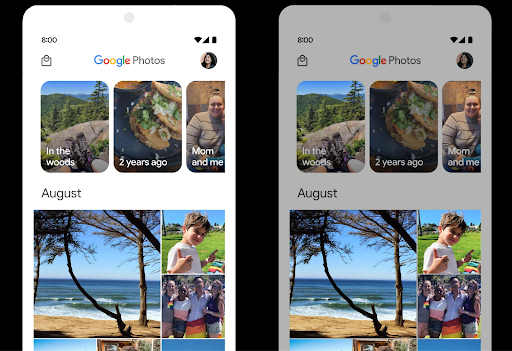
التحكّم في مساحة HDR
Android 15 chooses HDR headroom that is appropriate for the underlying device
capabilities and bit-depth of the panel. For pages that have lots of SDR
content, such as a messaging app displaying a single HDR thumbnail, this
behavior can end up adversely influencing the perceived brightness of the SDR
content. Android 15 lets you control the HDR headroom with
setDesiredHdrHeadroom to strike a balance between SDR
and HDR content.
التحكّم في مستوى الصوت

يتيح نظام التشغيل Android 15 معيار CTA-2075 لمساعدتك في معرفة تجنب تناقضات ارتفاع الصوت والتأكد من عدم اضطرار المستخدمين إلى ضبط مستوى الصوت عند التبديل بين المحتوى. يستفيد النظام من البيانات خصائص أجهزة الإخراج (سماعات الرأس ومكبرات الصوت) إلى جانب البيانات الوصفية لارتفاع الصوت المتوفرة في محتوى الصوت بتنسيق AAC لضبط ارتفاع الصوت ومستويات ضغط النطاق الديناميكي
لتفعيل هذه الميزة، عليك التأكّد من توفّر البيانات الوصفية لمستوى الصوت في
محتوى AAC وتفعيل ميزة النظام الأساسي في تطبيقك. ولإجراء ذلك، عليك
إنشاء عنصر LoudnessCodecController من خلال
استدعاء طريقة المصنع create مع معرّف جلسة المحتوى الصوتي من AudioTrack المرتبط، ما يؤدي بدوره إلى
بدء تطبيق تعديلات الصوت تلقائيًا. يمكنك تمرير
OnLoudnessCodecUpdateListener لتعديله أو فلترته
معاملات ارتفاع الصوت قبل تطبيقها
MediaCodec
// Media contains metadata of type MPEG_4 OR MPEG_D
val mediaCodec = …
val audioTrack = AudioTrack.Builder()
                                .setSessionId(sessionId)
                                .build()
...
// Create new loudness controller that applies the parameters to the MediaCodec
try {
   val lcController = LoudnessCodecController.create(mSessionId)
   // Starts applying audio updates for each added MediaCodec
}
سيتم أيضًا تحديث AndroidX media3 ExoPlayer لاستخدام
واجهات برمجة تطبيقات LoudnessCodecController من أجل دمج سلس للتطبيقات
أجهزة MIDI 2.0 الافتراضية
Android 13 added support for connecting to MIDI 2.0 devices using USB, which communicate using Universal MIDI Packets (UMP). Android 15 extends UMP support to virtual MIDI apps, enabling composition apps to control synthesizer apps as a virtual MIDI 2.0 device just like they would with an USB MIDI 2.0 device.
فك تشفير برامج AV1 بشكل أكثر كفاءة

dav1d هو برنامج فك ترميز AV1 الرائج من VideoLAN، وهو متاح لأجهزة Android التي لا تتيح فك ترميز AV1 في الأجهزة. ويحقّق برنامج dav1d أداءً أفضل بثلاث مرات مقارنةً ببرنامج فك ترميز AV1 القديم، ما يتيح تشغيل محتوى AV1 بدقة عالية لعدد أكبر من المستخدمين، بما في ذلك بعض الأجهزة المنخفضة ومتوسطة المستوى.
يجب أن يوافق تطبيقك على استخدام dav1d من خلال استدعائه بالاسم
"c2.android.av1-dav1d.decoder". سيتم استخدام dav1d كبرنامج الترميز والترميز التلقائي لبرنامج AV1 في تحديث لاحق. وتمّت إتاحة هذه الميزة بشكل موحّد ونشرها على
أجهزة Android 11 التي تتلقّى تحديثات نظام Google Play.
إنتاجية المطوّرين وأدواتهم
مع أنّ معظم جهودنا لتحسين إنتاجيتك تركّز على أدوات مثل استوديو Android وJetpack Compose ومكتبات Android Jetpack، نسعى دائمًا إلى إيجاد طرق في المنصة لمساعدتك في تنفيذ أفكارك بسهولة أكبر.
تعديلات OpenJDK 17
يواصل نظام التشغيل Android 15 العمل على إعادة تحميل المكتبات الأساسية لنظام التشغيل Android لمواءمتها مع الميزات في أحدث إصدارات OpenJDK LTS.
في ما يلي الميزات والتحسينات الرئيسية:
- تحسينات على مستوى الأداء في ما يتعلّق بمخازن NIO
- البث المباشر
- طرق
mathوstrictmathالإضافية - تحديثات حِزم
util، بما في ذلك الحِزم التي تتضمّن تسلسلاًcollectionوmapوset - إتاحة
ByteBufferفيDeflater - تحديثات الأمان، مثل
X500PrivateCredentialو تحديثات مفتاح الأمان
يتم تحديث واجهات برمجة التطبيقات هذه على أكثر من مليار جهاز يعمل بالإصدار 12 من نظام التشغيل Android (المستوى 31 لواجهة برمجة التطبيقات) والإصدارات الأحدث من خلال تحديثات نظام Google Play، ما يتيح لك استخدام أحدث الميزات البرمجية.
تحسينات على ملفات PDF
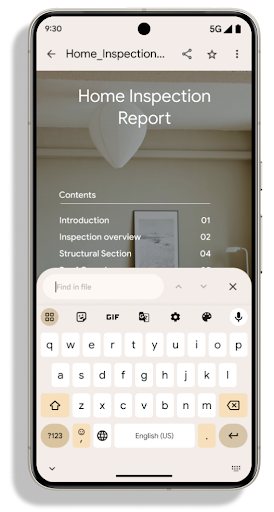
Android 15 includes substantial improvements to the PdfRenderer
APIs. Apps can incorporate advanced features such as rendering
password-protected files, annotations, form editing,
searching, and selection with copy. Linearized PDF
optimizations are supported to speed local PDF viewing and reduce resource use.
The Jetpack PDF library uses these APIs to simplify adding PDF
viewing capabilities to your app.
The PdfRenderer has been moved to a module that can be updated using Google
Play system updates independent of the platform release, and we're supporting
these changes back to Android 11 (API level 30) by creating a compatible
pre-Android 15 version of the API surface, called
PdfRendererPreV.
تحسينات على التبديل التلقائي للغات
Android 14 added on-device, multi-language recognition in audio with automatic
switching between languages, but this can cause words to get dropped,
especially when languages switch with less of a pause between the two
utterances. Android 15 adds additional controls to help apps tune this switching
to their use case.
EXTRA_LANGUAGE_SWITCH_INITIAL_ACTIVE_DURATION_TIME_MILLIS
confines the automatic switching to the beginning of the audio session, while
EXTRA_LANGUAGE_SWITCH_MATCH_SWITCHES deactivates the
language switching after a defined number of switches. These options are
particularly useful if you expect that there will be a single language spoken
during the session that should be autodetected.
تحسين واجهة برمجة التطبيقات للخطوط المتغيّرة OpenType
يعمل نظام التشغيل Android 15 على تحسين سهولة استخدام الخط المتغيّر OpenType. يمكنك إنشاء
مثيل FontFamily من خط متغيّر بدون تحديد محاور الوزن
باستخدام واجهة برمجة التطبيقات buildVariableFamily. يلغي عارض النص القيمة
من المحور wght لمطابقة النص المعروض.
يؤدي استخدام واجهة برمجة التطبيقات إلى تبسيط الرمز البرمجي لإنشاء Typeface بشكل كبير:
Kotlin
val newTypeface = Typeface.CustomFallbackBuilder(
            FontFamily.Builder(
                Font.Builder(assets, "RobotoFlex.ttf").build())
                    .buildVariableFamily())
    .build()
Java
Typeface newTypeface = Typeface.CustomFallbackBuilder(
            new FontFamily.Builder(
                new Font.Builder(assets, "RobotoFlex.ttf").build())
                    .buildVariableFamily())
    .build();
في السابق، لكي تتمكّن من إنشاء Typeface نفسها، كنت تحتاج إلى مزيد من الرموز البرمجية:
Kotlin
val oldTypeface = Typeface.CustomFallbackBuilder(
            FontFamily.Builder(
                Font.Builder(assets, "RobotoFlex.ttf")
                    .setFontVariationSettings("'wght' 400")
                    .setWeight(400)
                    .build())
                .addFont(
                    Font.Builder(assets, "RobotoFlex.ttf")
                        .setFontVariationSettings("'wght' 100")
                        .setWeight(100)
                        .build()
                )
                .addFont(
                    Font.Builder(assets, "RobotoFlex.ttf")
                        .setFontVariationSettings("'wght' 200")
                        .setWeight(200)
                        .build()
                )
                .addFont(
                    Font.Builder(assets, "RobotoFlex.ttf")
                        .setFontVariationSettings("'wght' 300")
                        .setWeight(300)
                        .build()
                )
                .addFont(
                    Font.Builder(assets, "RobotoFlex.ttf")
                        .setFontVariationSettings("'wght' 500")
                        .setWeight(500)
                        .build()
                )
                .addFont(
                    Font.Builder(assets, "RobotoFlex.ttf")
                        .setFontVariationSettings("'wght' 600")
                        .setWeight(600)
                        .build()
                )
                .addFont(
                    Font.Builder(assets, "RobotoFlex.ttf")
                        .setFontVariationSettings("'wght' 700")
                        .setWeight(700)
                        .build()
                )
                .addFont(
                    Font.Builder(assets, "RobotoFlex.ttf")
                        .setFontVariationSettings("'wght' 800")
                        .setWeight(800)
                        .build()
                )
                .addFont(
                    Font.Builder(assets, "RobotoFlex.ttf")
                        .setFontVariationSettings("'wght' 900")
                        .setWeight(900)
                        .build()
                ).build()
        ).build()
Java
Typeface oldTypeface = new Typeface.CustomFallbackBuilder(
    new FontFamily.Builder(
        new Font.Builder(assets, "RobotoFlex.ttf")
            .setFontVariationSettings("'wght' 400")
            .setWeight(400)
            .build()
    )
    .addFont(
        new Font.Builder(assets, "RobotoFlex.ttf")
            .setFontVariationSettings("'wght' 100")
            .setWeight(100)
            .build()
    )
    .addFont(
        new Font.Builder(assets, "RobotoFlex.ttf")
            .setFontVariationSettings("'wght' 200")
            .setWeight(200)
            .build()
    )
    .addFont(
        new Font.Builder(assets, "RobotoFlex.ttf")
            .setFontVariationSettings("'wght' 300")
            .setWeight(300)
            .build()
    )
    .addFont(
        new Font.Builder(assets, "RobotoFlex.ttf")
            .setFontVariationSettings("'wght' 500")
            .setWeight(500)
            .build()
    )
    .addFont(
        new Font.Builder(assets, "RobotoFlex.ttf")
            .setFontVariationSettings("'wght' 600")
            .setWeight(600)
            .build()
    )
    .addFont(
        new Font.Builder(assets, "RobotoFlex.ttf")
            .setFontVariationSettings("'wght' 700")
            .setWeight(700)
            .build()
    )
    .addFont(
        new Font.Builder(assets, "RobotoFlex.ttf")
            .setFontVariationSettings("'wght' 800")
            .setWeight(800)
            .build()
    )
    .addFont(
        new Font.Builder(assets, "RobotoFlex.ttf")
            .setFontVariationSettings("'wght' 900")
            .setWeight(900)
            .build()
    )
    .build()
).build();
في ما يلي مثال على كيفية عرض Typeface تم إنشاؤه باستخدام كلّ من واجهتَي برمجة التطبيقات القديمة والجديدة:
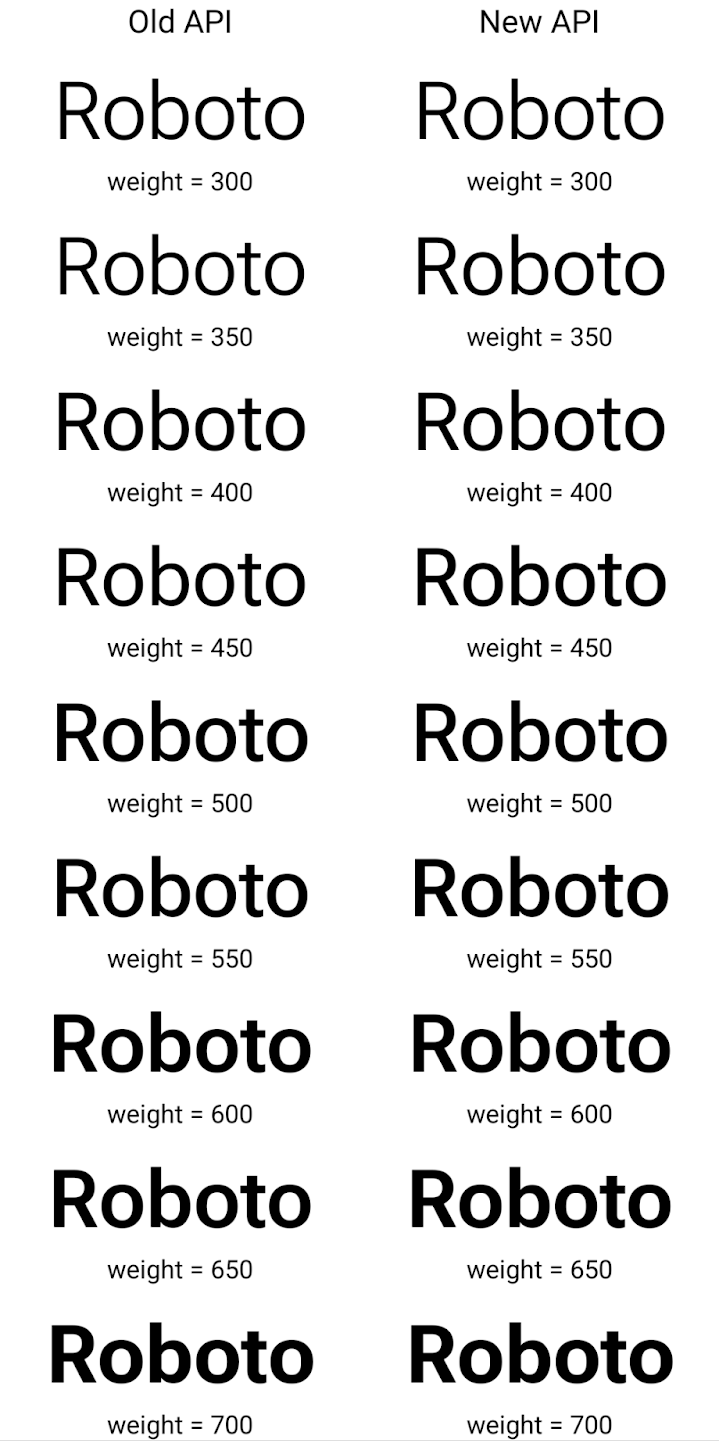
في هذا المثال، لا تملك Typeface التي تم إنشاؤها باستخدام واجهة برمجة التطبيقات القديمة
القدرة على إنشاء قيم دقيقة لوزن الخط لحالات Font التي تبلغ 350 و450 و550 و650
، لذا يعود مُنشئ العرض إلى أقرب قيمة لوزن الخط. ففي
في هذه الحالة، يتم عرض العدد 300 بدلاً من 350، ويتم عرض 400 بدلاً من 450،
وهكذا. في المقابل، فإنّ Typeface الذي تم إنشاؤه باستخدام واجهات برمجة التطبيقات الجديدة ينشئ ديناميكيًا
مثيل Font لوزن معين، لذا يتم عرض الترجيحات الدقيقة بقيمة 350،
450 و550 و650 أيضًا.
عناصر تحكّم دقيقة في فواصل الأسطر
بدءًا من Android 15، يمكن لرمز TextView وفاصل السطر الأساسي
الحفاظ على الجزء المحدّد من النص في السطر نفسه لتحسين قراءة النص. يمكنك الاستفادة من هذا التخصيص لفاصل السطر باستخدام علامة
<nobreak> في موارد السلاسل أو
createNoBreakSpan. بالمثل، يمكنك منع الواصلة بين الكلمات باستخدام العلامة <nohyphen> أو العلامة createNoHyphenationSpan.
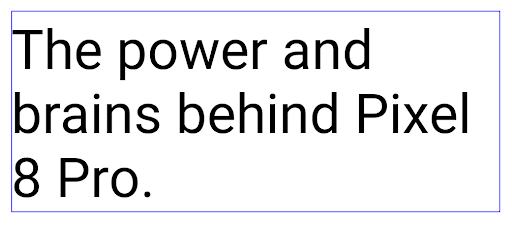
على سبيل المثال، لا يتضمّن مورد السلسلة التالي فاصل سطر، ويؤدي إلى عرض النص "Pixel 8 Pro" مقطوعًا في مكان غير مرغوب فيه:
<resources>
    <string name="pixel8pro">The power and brains behind Pixel 8 Pro.</string>
</resources>
في المقابل، يتضمّن مورد السلسلة هذا العلامة <nobreak> التي تلتف حول العبارة "Pixel 8 Pro" وتمنع استخدام فواصل الأسطر:
<resources>
    <string name="pixel8pro">The power and brains behind <nobreak>Pixel 8 Pro.</nobreak></string>
</resources>
يظهر الفرق في طريقة عرض هذه السلاسل في الصور التالية:
<nobreak>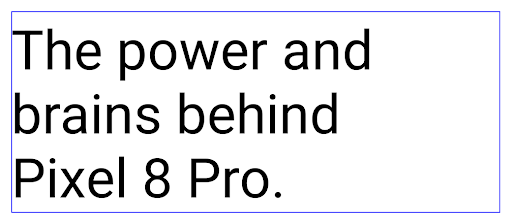
<nobreak>أرشفة التطبيقات
Android and Google Play announced support for app archiving last year, allowing users to free up space by partially removing infrequently used apps from the device that were published using Android App Bundle on Google Play. Android 15 includes OS level support for app archiving and unarchiving, making it easier for all app stores to implement it.
Apps with the REQUEST_DELETE_PACKAGES permission can call the
PackageInstaller requestArchive method to request archiving an
installed app package, which removes the APK and any cached files, but persists
user data. Archived apps are returned as displayable apps through the
LauncherApps APIs; users will see a UI treatment to highlight that those
apps are archived. If a user taps on an archived app, the responsible installer
will get a request to unarchive it, and the restoration process can be
monitored by the ACTION_PACKAGE_ADDED broadcast.
تفعيل الوضع 16 كيلوبايت على جهاز باستخدام خيارات المطوّرين
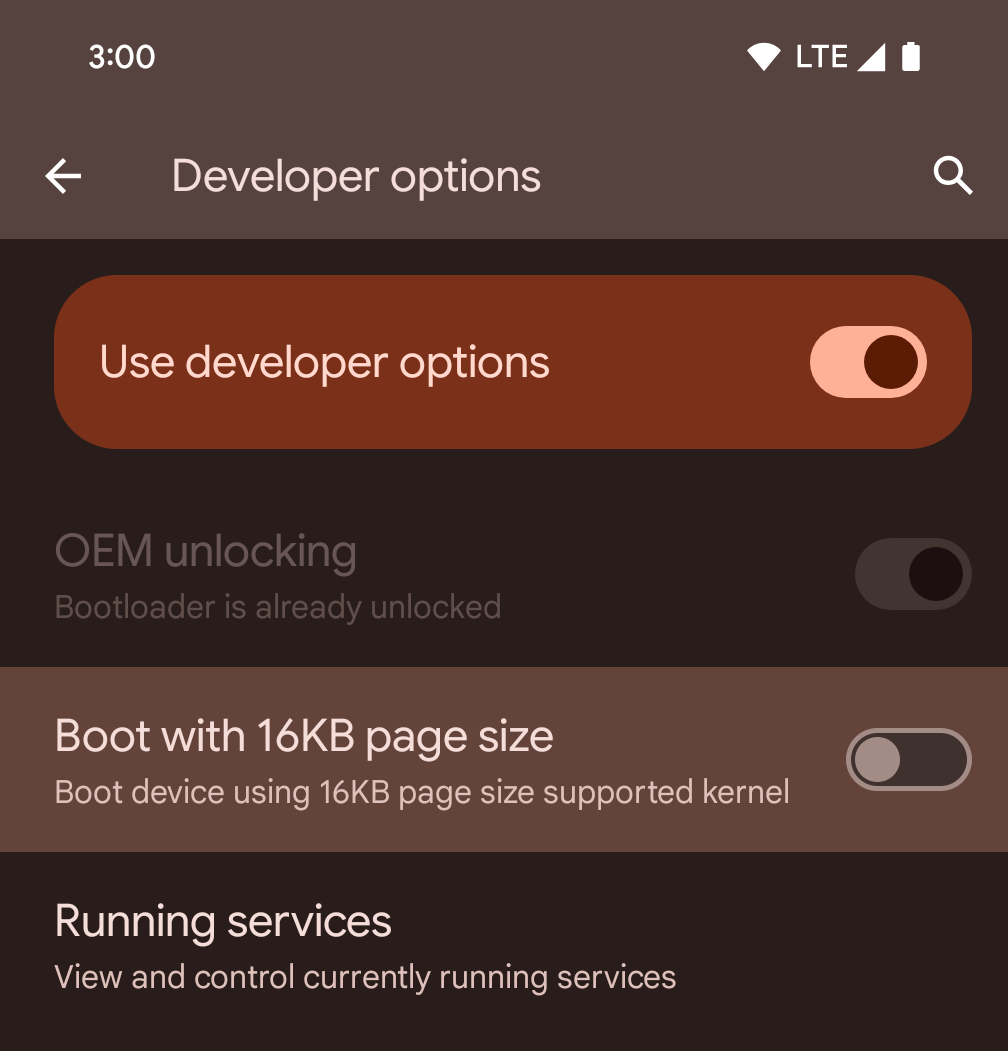
فعِّل خيار المطوّر التشغيل مع صفحات حجمها 16 كيلوبايت لتشغيل الجهاز في وضع 16 كيلوبايت.
في إصدارات QPR من نظام التشغيل Android 15، يمكنك استخدام خيار المطوّرين المتاح على أجهزة معيّنة لإعادة تشغيل الجهاز في وضع 16 كيلوبايت وإجراء اختبار على الجهاز فقط. قبل استخدام خيار المطوّرين، انتقِل إلى الإعدادات > النظام > تحديثات البرامج وطبِّق أي تحديثات متوفّرة.
يتوفّر خيار المطوّرين هذا على الأجهزة التالية:
Pixel 8 وPixel 8 Pro (مع الإصدار 1 من حزمة إصلاح الأخطاء في نظام Android 15 أو إصدار أحدث)
Pixel 8a (مع الإصدار 1 من حزمة إصلاح الأخطاء في نظام Android 15 أو إصدار أحدث)
Pixel 9 و9 Pro و9 Pro XL (مع الإصدار الثاني من حزمة Android 15 QPR أو إصدار أحدث)
Pixel 9a (مع نظام التشغيل Android 16 أو إصدار أحدث)
الرسومات
يوفّر Android 15 أحدث التحسينات على الرسومات، بما في ذلك ANGLE وإضافات إلى نظام رسومات Canvas.
تحديث طريقة وصول Android إلى وحدة معالجة الرسومات

لقد تطورت أجهزة Android كثيرًا منذ الأيام الأولى التي كان فيها تشغيل نظام التشغيل الأساسي على وحدة معالجة مركزية واحدة والوصول إلى وحدات معالجة الرسومات باستخدام واجهات برمجة التطبيقات المستندة إلى قنوات معالجة الوظائف الثابتة. أصبحت واجهة برمجة تطبيقات الرسومات Vulkan® متاحة في حزمة تطوير البرامج (NDK) منذ الإصدار 7.0 من نظام Android (المستوى 24 لواجهة برمجة التطبيقات) مع توفير مستوى أدنى من التجريد الذي يعكس بشكل أفضل الأجهزة الحديثة لوحدة معالجة الرسومات، ويتوافق بشكل أفضل مع وحدات المعالجة المركزية المتعدّدة، ويقلّل من وقت استجابة برنامج تشغيل وحدة المعالجة المركزية، ما يؤدي إلى تحسين أداء التطبيق. يتوافق Vulkan مع جميع محرّكات الألعاب الحديثة.
Vulkan هي واجهة Android المفضّلة لوحدة معالجة الرسومات. لذلك، يتضمّن الإصدار 15 من Android ANGLE كطبقة اختيارية لتشغيل OpenGL® ES على Vulkan. سيؤدي الانتقال إلى ANGLE إلى توحيد تنفيذ OpenGL في Android لتحسين التوافق، وفي بعض الحالات، تحسين الأداء. يمكنك اختبار ثبات تطبيق OpenGL ES وأدائه باستخدام ANGLE من خلال تفعيل خيار المطوّر في الإعدادات -> النظام -> خيارات المطوّرين -> ميزة تجريبية: تفعيل ANGLE على Android 15.
خارطة طريق Android ANGLE على Vulkan
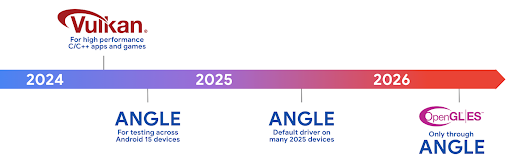
كجزء من عملية تبسيط حِزم وحدة معالجة الرسومات، سنطرح من الآن فصاعدًا ANGLE كبرنامج تشغيل نظام GL على المزيد من الأجهزة الجديدة، مع توقّع أن يكون OpenGL/ES متاحًا في المستقبل من خلال ANGLE فقط. ومع ذلك، نخطّط ل مواصلة توفير OpenGL ES على جميع الأجهزة.
الخطوات التالية المقترحة
استخدِم خيارات المطوّر لاختيار برنامج تشغيل ANGLE لـ OpenGL ES واختبار تطبيقك. بالنسبة إلى المشاريع الجديدة، ننصحك بشدة باستخدام Vulkan لـ C/C++.
تحسينات على Canvas
Android 15 continues our modernization of Android's Canvas graphics system with additional capabilities:
Matrix44provides a 4x4 matrix for transforming coordinates that should be used when you want to manipulate the canvas in 3D.clipShaderintersects the current clip with the specified shader, whileclipOutShadersets the clip to the difference of the current clip and the shader, each treating the shader as an alpha mask. This supports the drawing of complex shapes efficiently.
الأداء والبطارية
يواصل نظام التشغيل Android التركيز على مساعدتك في تحسين أداء تطبيقاتك وجودتها. يقدّم نظام التشغيل Android 15 واجهات برمجة تطبيقات تساعد في تنفيذ المهام في تطبيقك بكفاءة أكبر، وتحسين أداء التطبيق، وجمع إحصاءات حول تطبيقاتك.
للاطّلاع على أفضل الممارسات التي تساهم في الحفاظ على البطارية وتصحيح أخطاء استخدام الشبكة والطاقة، بالإضافة إلى تفاصيل حول كيفية تحسين كفاءة البطارية عند تنفيذ العمليات في الخلفية في Android 15 والإصدارات الحديثة من Android، يمكنك مشاهدة جلسة تحسين كفاءة البطارية عند تنفيذ العمليات في الخلفية على Android من مؤتمر Google I/O.
ApplicationStartInfo API
في الإصدارات السابقة من Android، كان تشغيل التطبيقات عملية غير معروفة إلى حدٍ ما. كان من الصعوبة تحديد ما إذا كان تطبيقك قد بدأ من حالة التشغيل على البارد أو إعادة التشغيل البطيء
أو إعادة التشغيل السريع. كان من الصعب أيضًا معرفة المدة التي استغرقها تطبيقك أثناء
مراحل الإطلاق المختلفة: إنشاء نسخة من العملية، واستدعاء onCreate، ورسم
الإطار الأول، وغير ذلك. عند إنشاء مثيل لفئة Application، لم يكن لديك
طريقة لمعرفة ما إذا كان التطبيق قد بدأ من بث أو مقدّم محتوى أو
عملية أو خدمة احتياطية أو اكتمال عملية التمهيد أو منبّه أو Activity.
توفّر واجهة برمجة التطبيقات ApplicationStartInfo على Android 15 كل هذه الميزات والمزيد. يمكنك أيضًا اختيار إضافة الطوابع الزمنية الخاصة بك إلى السلسلة للمساعدة في جمع بيانات التوقيت في مكان واحد. بالإضافة إلى جمع القياسات، يمكنك استخدام ApplicationStartInfo للمساعدة في تحسين بدء تشغيل التطبيق مباشرةً. على سبيل المثال، يمكنك إزالة عمليات إنشاء المثيلات المكلّفة للمكتبات ذات الصلة بواجهة المستخدم ضمن فئة Application عند بدء تشغيل تطبيقك بسبب بث.
معلومات مفصّلة عن حجم التطبيق
منذ الإصدار 8.0 من Android (المستوى 26 لواجهة برمجة التطبيقات)، يتضمّن Android واجهة برمجة التطبيقات
StorageStats.getAppBytes التي تلخّص حجم التطبيق المثبَّت كعدد واحد من البايتات، وهو مجموع حجم حزمة APK وحجم الملفات المستخرَجة من حزمة APK والملفات التي تم إنشاؤها على
الجهاز، مثل الرموز البرمجية المجمَّعة مسبقًا (AOT). لا يقدّم هذا الرقم معلومات مفيدة بشأن كيفية استخدام تطبيقك لمساحة التخزين.
يضيف نظام التشغيل Android 15 واجهة برمجة التطبيقات
StorageStats.getAppBytesByDataType([type])، التي تتيح
لك الحصول على إحصاءات عن كيفية استخدام تطبيقك لكل هذه المساحة، بما في ذلك عمليات تقسيم ملف APK، والرموز البرمجية ذات الصلة بميزة AOT والتسريع، والبيانات الوصفية لملف dex، والمكتبات، والملفات الشخصية الإرشادية.
تحديد المواصفات الشخصية لصاحب البيانات الذي يديره التطبيق
Android 15 includes the ProfilingManager class,
which lets you collect profiling information from within your app such as heap
dumps, heap profiles, stack sampling, and more. It provides a callback to your
app with a supplied tag to identify the output file, which is delivered to your
app's files directory. The API does rate limiting to minimize the performance
impact.
To simplify constructing profiling requests in your app, we recommend using the
corresponding Profiling AndroidX API, available
in Core 1.15.0-rc01 or higher.
تحسينات على قاعدة بيانات SQLite
Android 15 introduces SQLite APIs that expose advanced features from the underlying SQLite engine that target specific performance issues that can manifest in apps. These APIs are included with the update of SQLite to version 3.44.3.
Developers should consult best practices for SQLite performance to get the most out of their SQLite database, especially when working with large databases or when running latency-sensitive queries.
- Read-only deferred transactions: when issuing transactions that are
read-only (don't include write statements), use
beginTransactionReadOnly()andbeginTransactionWithListenerReadOnly(SQLiteTransactionListener)to issue read-onlyDEFERREDtransactions. Such transactions can run concurrently with each other, and if the database is in WAL mode, they can run concurrently withIMMEDIATEorEXCLUSIVEtransactions. - Row counts and IDs: APIs were added to retrieve the count of changed
rows or the last inserted row ID without issuing an additional query.
getLastChangedRowCount()returns the number of rows that were inserted, updated, or deleted by the most recent SQL statement within the current transaction, whilegetTotalChangedRowCount()returns the count on the current connection.getLastInsertRowId()returns therowidof the last row to be inserted on the current connection. - Raw statements: issue a raw SQlite statement, bypassing convenience wrappers and any additional processing overhead that they may incur.
تحديثات "إطار عمل الأداء الديناميكي في Android"
يواصل الإصدار 15 من Android استثماراتنا في إطار عمل الأداء الديناميكي (ADPF) في Android، وهو مجموعة من واجهات برمجة التطبيقات التي تتيح للألعاب والتطبيقات التي تتطلب أداءً عاليًا التفاعل بشكل مباشر أكثر مع أنظمة الطاقة والحرارة في أجهزة Android. على الأجهزة المتوافقة، يضيف نظام التشغيل Android 15 ميزات ADPF التالية:
- وضع توفير الطاقة لجلسات التلميح لتحديد أنّ سلاسل المحادثات المرتبطة بها يجب أن تفضّل توفير الطاقة على الأداء، وهو أمر رائع لأحمال العمل التي تعمل في الخلفية لفترة طويلة
- يمكن تسجيل مدّة عمل كلّ من وحدة معالجة الرسومات ووحدة المعالجة المركزية في جلسات التلميح، ما يسمح للنظام بتعديل معدّلات تكرار وحدة المعالجة المركزية ووحدة معالجة الرسومات معًا لتلبية متطلبات حمولة العمل على أفضل نحو.
- حدود الحد الأقصى للطاقة الحرارية لتفسير حالة الحد الأقصى للطاقة الحرارية المحتملة استنادًا إلى توقّعات الحد الأقصى للطاقة الحرارية
للاطّلاع على مزيد من المعلومات عن كيفية استخدام ميزة "الإعلانات الديناميكية على شبكة البحث" في تطبيقاتك وألعابك، يمكنك الانتقال إلى مستندات المساعدة.
الخصوصية
يتضمّن Android 15 مجموعة متنوّعة من الميزات التي تساعد مطوّري التطبيقات في حماية خصوصية المستخدمين.
رصد تسجيل الشاشة
Android 15 adds support for apps to detect that they are being recorded. A callback is invoked whenever the app transitions between being visible or invisible within a screen recording. An app is considered visible if activities owned by the registering process's UID are being recorded. This way, if your app is performing a sensitive operation, you can inform the user that they're being recorded.
val mCallback = Consumer<Int> { state ->
  if (state == SCREEN_RECORDING_STATE_VISIBLE) {
    // We're being recorded
  } else {
    // We're not being recorded
  }
}

override fun onStart() {
   super.onStart()
   val initialState =
      windowManager.addScreenRecordingCallback(mainExecutor, mCallback)
   mCallback.accept(initialState)
}

override fun onStop() {
    super.onStop()
    windowManager.removeScreenRecordingCallback(mCallback)
}
إمكانات IntentFilter الموسّعة
Android 15 builds in support for more precise Intent resolution through
UriRelativeFilterGroup, which contains a set of
UriRelativeFilter objects that form a set of Intent
matching rules that must each be satisfied, including URL query parameters, URL
fragments, and blocking or exclusion rules.
These rules can be defined in the AndroidManifest XML file with the
<uri-relative-filter-group> tag, which can optionally include an
android:allow tag. These tags can contain <data> tags that use existing data
tag attributes as well as the android:query and android:fragment
attributes.
Here's an example of the AndroidManifest syntax:
<intent-filter android:autoVerify="true">
  <action android:name="android.intent.action.VIEW" />
  <category android:name="android.intent.category.BROWSABLE" />
  <category android:name="android.intent.category.DEFAULT" />
  <data android:scheme="http" />
  <data android:scheme="https" />
  <data android:host="astore.com" />
  <uri-relative-filter-group>
    <data android:pathPrefix="/auth" />
    <data android:query="region=na" />
  </uri-relative-filter-group>
  <uri-relative-filter-group android:allow="false">
    <data android:pathPrefix="/auth" />
    <data android:query="mobileoptout=true" />
  </uri-relative-filter-group>
  <uri-relative-filter-group android:allow="false">
    <data android:pathPrefix="/auth" />
    <data android:fragmentPrefix="faq" />
  </uri-relative-filter-group>
</intent-filter>
المساحة الخاصّة
Private space lets users create a separate space on their device where they can keep sensitive apps away from prying eyes, under an additional layer of authentication. The private space uses a separate user profile. The user can choose to use the device lock or a separate lock factor for the private space.
Apps in the private space show up in a separate container in the launcher, and are hidden from the recents view, notifications, settings, and from other apps when the private space is locked. User-generated and downloaded content (such as media or files) and accounts are separated between the private space and the main space. The system sharesheet and the photo picker can be used to give apps access to content across spaces when the private space is unlocked.
Users can't move existing apps and their data into the private space. Instead, users select an install option in the private space to install an app using whichever app store they prefer. Apps in the private space are installed as separate copies from any apps in the main space (new copies of the same app).
When a user locks the private space, the profile is stopped. While the profile is stopped, apps in the private space are no longer active and can't perform foreground or background activities, including showing notifications.
We recommend that you test your app with private space to make sure your app works as expected, especially if your app falls into one of the following categories:
- Apps with logic for work profiles that assumes that any installed copies of their app that aren't in the main profile are in the work profile.
- Medical apps
- Launcher apps
- App store apps
طلب آخر اختيار للمستخدم بشأن إذن الوصول إلى "الصور المحدّدة"
يمكن للتطبيقات الآن إبراز الصور والفيديوهات التي تم اختيارها مؤخرًا فقط عند منح التطبيقات
إذن وصول جزئي إلى أذونات الوصول إلى الوسائط. يمكن أن تحسِّن هذه الميزة
تجربة المستخدم للتطبيقات التي تطلب الوصول إلى الصور
والفيديوهات بشكل متكرر. لاستخدام هذه الميزة في تطبيقك، فعِّل الوسيطة
QUERY_ARG_LATEST_SELECTION_ONLY عند طلب MediaStore
من خلال ContentResolver.
Kotlin
val externalContentUri = MediaStore.Files.getContentUri("external")

val mediaColumns = arrayOf(
   FileColumns._ID,
   FileColumns.DISPLAY_NAME,
   FileColumns.MIME_TYPE,
)

val queryArgs = bundleOf(
   // Return only items from the last selection (selected photos access)
   QUERY_ARG_LATEST_SELECTION_ONLY to true,
   // Sort returned items chronologically based on when they were added to the device's storage
   QUERY_ARG_SQL_SORT_ORDER to "${FileColumns.DATE_ADDED} DESC",
   QUERY_ARG_SQL_SELECTION to "${FileColumns.MEDIA_TYPE} = ? OR ${FileColumns.MEDIA_TYPE} = ?",
   QUERY_ARG_SQL_SELECTION_ARGS to arrayOf(
       FileColumns.MEDIA_TYPE_IMAGE.toString(),
       FileColumns.MEDIA_TYPE_VIDEO.toString()
   )
)
Java
Uri externalContentUri = MediaStore.Files.getContentUri("external");

String[] mediaColumns = {
    FileColumns._ID,
    FileColumns.DISPLAY_NAME,
    FileColumns.MIME_TYPE
};

Bundle queryArgs = new Bundle();
queryArgs.putBoolean(MediaStore.QUERY_ARG_LATEST_SELECTION_ONLY, true);
queryArgs.putString(MediaStore.QUERY_ARG_SQL_SORT_ORDER, FileColumns.DATE_ADDED + " DESC");
queryArgs.putString(MediaStore.QUERY_ARG_SQL_SELECTION, FileColumns.MEDIA_TYPE + " = ? OR " + FileColumns.MEDIA_TYPE + " = ?");
queryArgs.putStringArray(MediaStore.QUERY_ARG_SQL_SELECTION_ARGS, new String[] {
    String.valueOf(FileColumns.MEDIA_TYPE_IMAGE),
    String.valueOf(FileColumns.MEDIA_TYPE_VIDEO)
});
"مبادرة حماية الخصوصية" على Android
Android 15 includes the latest Android Ad Services extensions, incorporating the latest version of the Privacy Sandbox on Android. This addition is part of our work to develop technologies that improve user privacy and enable effective, personalized advertising experiences for mobile apps. Our privacy sandbox page has more information about the Privacy Sandbox on Android developer preview and beta programs to help you get started.
Health Connect
Android 15 integrates the latest extensions around Health Connect by Android, a secure and centralized platform to manage and share app-collected health and fitness data. This update adds support for additional data types across fitness, nutrition, skin temperature, training plans, and more.
Skin temperature tracking allows users to store and share more accurate temperature data from a wearable or other tracking device.
Training plans are structured workout plans to help a user achieve their fitness goals. Training plans support includes a variety of completion and performance goals:
- Completion goals around calories burned, distance, duration, repetition, and steps.
- Performance goals around as many repetitions as possible (AMRAP), cadence, heart rate, power, perceived rate of exertion, and speed.
Learn more about the latest updates to Health Connect in Android in the Building adaptable experiences with Android Health talk from Google I/O.
مشاركة شاشة التطبيق
Android 15 supports app screen sharing so users can share or record just an
app window rather than the entire device screen. This feature, first enabled in
Android 14 QPR2, includes
MediaProjection callbacks that allow your app
to customize the app screen sharing experience. Note that for apps targeting
Android 14 (API level 34) or higher,
user consent is required for each
MediaProjection capture session.
تجربة المستخدم وواجهة مستخدم النظام
يمنح نظام التشغيل Android 15 مطوّري التطبيقات والمستخدمين المزيد من التحكّم والمرونة في إعداد أجهزتهم بما يتناسب مع احتياجاتهم.
لمزيد من المعلومات حول كيفية استخدام أحدث التحسينات في Android 15 لتحسين تجربة المستخدم في تطبيقك، يمكنك الاطّلاع على جلسة تحسين تجربة المستخدم في تطبيق Android من مؤتمر Google I/O.
معاينات تطبيقات مصغّرة أكثر تفصيلاً باستخدام Generated Previews API
قبل الإصدار 15 من Android، كانت الطريقة الوحيدة لتقديم معاينات لأداة اختيار التطبيقات المصغّرة هي تحديد مصدر صورة أو تنسيق ثابت. غالبًا ما تختلف هذه المعاينات عن شكل التطبيق المصغّر الفعلي عند وضعه على الشاشة الرئيسية. بالإضافة إلى ذلك، لا يمكن إنشاء موارد ثابتة باستخدام Jetpack Glance، لذا كان على مطوّر Glance التقاط لقطة شاشة لأداة العرض أو إنشاء تنسيق XML للحصول على معاينة لأداة العرض.
يتيح نظام Android 15 استخدام معاينات تم إنشاؤها. وهذا يعني أنّه يمكن لموفّري التطبيقات المصغرة
إنشاء RemoteViews لاستخدامها كمعاينة لأداة الاختيار، بدلاً من
مورد ثابت.
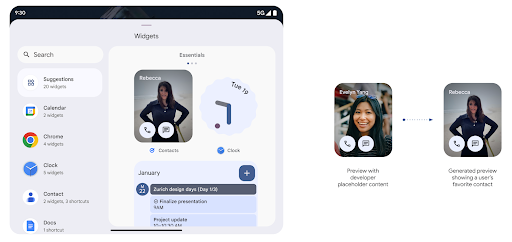
واجهة برمجة تطبيقات Push
يمكن للتطبيقات تقديم معاينات تم إنشاؤها من خلال واجهة برمجة تطبيقات Push. يمكن للتطبيقات تقديم
معاينات في أي مرحلة من مراحل نشاطها، وعدم تلقّي طلب صريح
من المضيف لتقديم معاينات. يتم الاحتفاظ بالمعاينات في AppWidgetService،
ويمكن للمضيفين طلبها عند الطلب. المثال التالي يحمّل تطبيق مصغّر بتنسيق XML
تنسيق موارد التنسيق وتعيينه كمعاينة:
AppWidgetManager.getInstance(appContext).setWidgetPreview(
   ComponentName(
       appContext,
       SociaLiteAppWidgetReceiver::class.java
   ),
   AppWidgetProviderInfo.WIDGET_CATEGORY_HOME_SCREEN,
   RemoteViews("com.example", R.layout.widget_preview)
)
التدفق المتوقع هو:
- في أي وقت، يستدعي موفّر التطبيق المصغّر
setWidgetPreview. يتم الاحتفاظ بالمعاينات التي تم تقديمها فيAppWidgetServiceمع معلومات مقدّم الخدمة الأخرى. - يرسل "
setWidgetPreview" إشعارًا إلى المضيفين بمعاينة محدَّثة من خلالAppWidgetHost.onProvidersChangedمعاودة الاتصال. استجابةً لذلك، يُعيد مضيف التطبيقات المصغّرة تحميل جميع معلومات مقدّم الخدمة. - عند عرض معاينة التطبيق المصغّر، يتحقق المضيف من العنصر
AppWidgetProviderInfo.generatedPreviewCategories، وإذا كانت الفئة التي تم اختيارها متوفرة، يتصل بالعنصرAppWidgetManager.getWidgetPreviewلعرض المعاينة المحفوظة لهذا الموفِّر.
حالات الاتصال بـ setWidgetPreview
وبما أنّه لا تتوفّر طلبات إعادة اتصال لتقديم المعاينات، يمكن للتطبيقات اختيار إرسال المعاينات في أي وقت أثناء تشغيلها. عدد مرات تعديل المعاينة على حالة استخدام الأداة.
توضِّح القائمة التالية الفئتَين الرئيسيتَين لحالات استخدام المعاينة:
- مقدمو الخدمات الذين يعرضون بيانات فعلية في معاينات الأدوات، مثل أو معلومات حديثة. يمكن لموفّري المحتوى هؤلاء ضبط المعاينة بعد تسجيل دخول المستخدم أو إجراء الإعدادات الأولية في تطبيقه. وبعد ذلك، يمكنهم إعداد مهمة دورية لتعديل المعاينات بالوتيرة التي يختارونها. ومن الأمثلة على هذا النوع من التطبيقات المصغّرة أداة مصوّرة أو أداة تقويم أو أداة طقس أو أداة أخبار.
- مقدّمو الخدمات الذين يعرضون معلومات ثابتة في معاينات التطبيقات المصغّرة أو التطبيقات المصغّرة للإجراءات السريعة ولا يعرضون أي بيانات يمكن لموفّري المحتوى هؤلاء ضبط المعاينات مرة واحدة عند بدء تشغيل التطبيق لأول مرة. تتضمن أمثلة هذا النوع من التطبيقات المصغّرة محرك أقراص تطبيق "الإجراءات" المصغّر أو تطبيق "اختصارات Chrome" المصغّر.
قد يعرض بعض مزوّدي الخدمة معاينات ثابتة في منتقي وضع الإرساء، ولكنّها في الواقع المعلومات الموجودة في منتقي الشاشة الرئيسية. على مقدّمي هذه الخدمات اتّباع الإرشادات لكلتا حالتَي الاستخدام هاتين لضبط المعاينات.
نافذة ضمن النافذة
Android 15 introduces changes in Picture-in-Picture (PiP) ensuring an even smoother transition when entering into PiP mode. This will be beneficial for apps having UI elements overlaid on top of their main UI, which goes into PiP.
Developers use the onPictureInPictureModeChanged callback to define logic
that toggles the visibility of the overlaid UI elements. This callback is
triggered when the PiP enter or exit animation is completed. Beginning in
Android 15, the PictureInPictureUiState class includes another state.
With this UI state, apps targeting Android 15 (API level 35) will observe the
Activity#onPictureInPictureUiStateChanged callback being invoked with
isTransitioningToPip() as soon as the PiP animation starts. There are
many UI elements that are not relevant for the app when it is in PiP mode, for
example views or layout that include information such as suggestions, upcoming
video, ratings, and titles. When the app goes to PiP mode, use the
onPictureInPictureUiStateChanged callback to hide these UI elements. When the
app goes to full screen mode from the PiP window, use
onPictureInPictureModeChanged callback to unhide these elements, as shown in
the following examples:
override fun onPictureInPictureUiStateChanged(pipState: PictureInPictureUiState) {
        if (pipState.isTransitioningToPip()) {
          // Hide UI elements
        }
    }
override fun onPictureInPictureModeChanged(isInPictureInPictureMode: Boolean) {
        if (isInPictureInPictureMode) {
          // Unhide UI elements
        }
    }
This quick visibility toggle of irrelevant UI elements (for a PiP window) helps ensure a smoother and flicker-free PiP enter animation.
قواعد محسّنة لميزة "عدم الإزعاج"
AutomaticZenRule lets apps customize Attention
Management (Do Not Disturb) rules and decide when to activate or deactivate
them. Android 15 greatly enhances these rules with the goal of improving the
user experience. The following enhancements are included:
- Adding types to
AutomaticZenRule, allowing the system to apply special treatment to some rules. - Adding an icon to
AutomaticZenRule, helping to make the modes be more recognizable. - Adding a
triggerDescriptionstring toAutomaticZenRulethat describes the conditions on which the rule should become active for the user. - Added
ZenDeviceEffectstoAutomaticZenRule, allowing rules to trigger things like grayscale display, night mode, or dimming the wallpaper.
ضبط VibrationEffect لقنوات الإشعارات
يتيح Android 15 ضبط اهتزازات تفاعلية للإشعارات الواردة من خلال
قناة تستخدم NotificationChannel.setVibrationEffect، لذلك
يستطيع المستخدمون التمييز بين الأنواع المختلفة من الإشعارات بدون
الاضطرار إلى النظر إلى أجهزتهم.
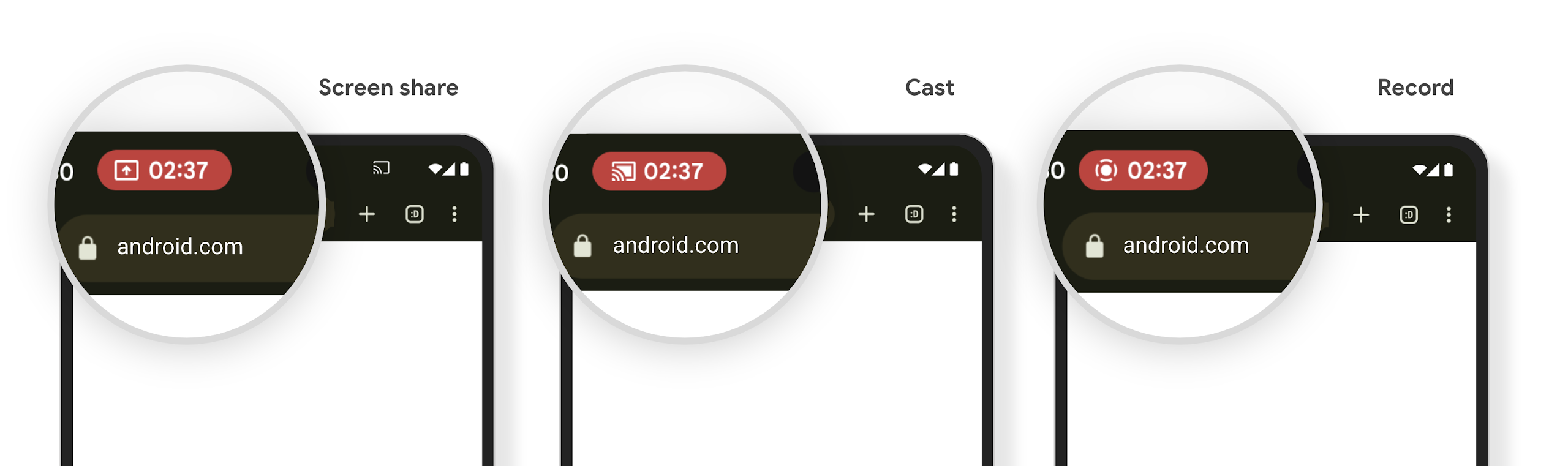
شريحة شريط الحالة لبث محتوى الشاشة والإيقاف التلقائي
Media projection can expose private user information. A new, prominent status bar chip makes users aware of any ongoing screen projection. Users can tap the chip to stop screen casting, sharing, or recording. Also, for a more intuitive user experience, any in‑progress screen projection now automatically stops when the device screen is locked.
الشاشات الكبيرة وأشكال الأجهزة
يوفّر نظام التشغيل Android 15 لتطبيقاتك إمكانية الاستفادة إلى أقصى حدّ من عوامل الشكل في Android، بما في ذلك الشاشات الكبيرة والأجهزة القابلة للطي أو الطي والفتح.
تحسين تعدُّد المهام على الشاشات الكبيرة
Android 15 gives users better ways to multitask on large screen devices. For example, users can save their favorite split-screen app combinations for quick access and pin the taskbar on screen to quickly switch between apps. This means that making sure your app is adaptive is more important than ever.
Google I/O has sessions on Building adaptive Android apps and Building UI with the Material 3 adaptive library that can help, and our documentation has more to help you Design for large screens.
إمكانية استخدام الشاشة الخارجية
Your app can declare a property that Android 15 uses to
allow your Application or Activity to be presented on the small cover
screens of supported flippable devices. These screens are too small to be
considered as compatible targets for Android apps to run on, but your app can
opt in to supporting them, making your app available in more places.
إمكانية الاتصال
يعدّل Android 15 النظام الأساسي لمنح تطبيقك إمكانية الوصول إلى أحدث التطورات في تكنولوجيات الاتصال والشبكات اللاسلكية.
التوافق مع الأقمار الصناعية
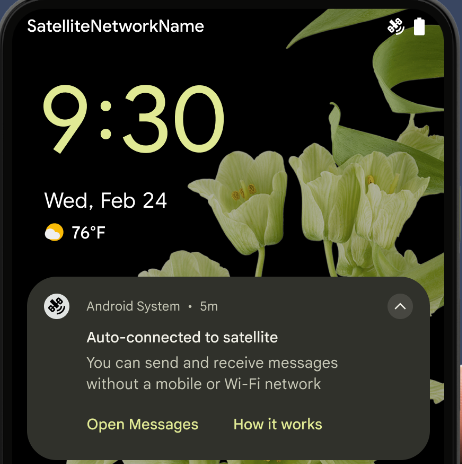
يواصل نظام Android 15 توسيع نطاق توفّر المنصة للاتصال عبر الأقمار الصناعية ويضمّ بعض عناصر واجهة المستخدم لضمان تجربة مستخدم متّسقة على مستوى منظومة الاتصال عبر الأقمار الصناعية.
يمكن للتطبيقات استخدام ServiceState.isUsingNonTerrestrialNetwork() لرصد الحالات التي يكون فيها الجهاز متصلاً بأحد الأقمار الصناعية، ما يمنح التطبيقات المزيد من المعلومات عن سبب عدم توفّر خدمات الشبكة الكاملة. بالإضافة إلى ذلك، يقدّم الإصدار 15 من Android
توافقًا مع تطبيقات الرسائل القصيرة ورسائل الوسائط المتعددة، بالإضافة إلى تطبيقات RCS المحمَّلة مسبقًا لاستخدام
الاتصال عبر الأقمار الصناعية لإرسال الرسائل واستلامها.
تجارب أكثر سلاسة باستخدام تقنية NFC
يعمل نظام التشغيل Android 15 على تحسين تجربة الدفع بدون تلامس الأجهزة وجعلها أكثر سلاسة وموثوقية، مع مواصلة توفير منظومة التطبيقات المتكاملة لتقنية NFC القوية في Android. على
الأجهزة المتوافقة، يمكن للتطبيقات أن تطلب من NfcAdapter الدخول إلى
وضع المراقبة، حيث يستمع الجهاز إلى قراء
NFC ولكنه لا يستجيب لهم، ويرسل خدمة NFC الخاصة بالتطبيق PollingFrame
العناصر لمعالجتها. يمكن استخدام عناصر PollingFrame لمنح الإذن
قبل إجراء عملية التواصل الأولى مع قارئ NFC، ما يتيح إجراء معاملة
بنقرة واحدة في العديد من الحالات.
بالإضافة إلى ذلك، يمكن للتطبيقات تسجيل فلتر على الأجهزة المتوافقة لكي تتم إعلامها بنشاط حلقة الاستطلاع، ما يتيح التشغيل السلس مع تطبيقات متعددة متوافقة مع NFC.
دور المحفظة
Android 15 introduces a Wallet role that allows tighter integration with the user's preferred wallet app. This role replaces the NFC default contactless payment setting. Users can manage the Wallet role holder by navigating to Settings > Apps > Default Apps.
The Wallet role is used when routing NFC taps for AIDs registered in the payment category. Taps always go to the Wallet role holder unless another app that is registered for the same AID is running in the foreground.
This role is also used to determine where the Wallet Quick Access tile should go when activated. When the role is set to "None", the Quick Access tile isn't available and payment category NFC taps are only delivered to the foreground app.
الأمان
يساعدك نظام التشغيل Android 15 في تعزيز أمان تطبيقك وحماية بياناته، كما يتيح للمستخدمين المزيد من الشفافية والتحكّم في بياناتهم. يمكنك مشاهدة جلسة الحفاظ على أمان المستخدمين على Android من مؤتمر Google I/O للتعرّف على المزيد من الإجراءات التي نتّخذها لتحسين وسائل حماية المستخدمين وحماية تطبيقك من التهديدات الجديدة.
دمج Credential Manager مع ميزة "الملء التلقائي"
بدءًا من الإصدار 15 من نظام التشغيل Android، يمكن للمطوّرين ربط طرق عرض معيّنة، مثل حقل اسم المستخدم أو حقل كلمة المرور بطلبات "مدير بيانات الاعتماد"، ما يسهّل تقديم تجربة مخصّصة للمستخدم أثناء عملية تسجيل الدخول. عندما يركز المستخدم على أحد هذه العروض، يتم إرسال طلب مقابل إلى مدير بيانات الاعتماد. يتم تجميع بيانات الاعتماد الناتجة على مستوى جميع مقدّمي الخدمات وعرضها في واجهات مستخدم النسخ الاحتياطي لملء البيانات تلقائيًا، مثل الاقتراحات المضمّنة أو الاقتراحات في القوائم المنسدلة. مكتبة Jetpack androidx.credentials هي نقطة النهاية المفضّلة للمطوّرين لاستخدامها، وستتوفّر قريبًا لتحسين هذه الميزة بشكلٍ أكبر في Android 15 والإصدارات الأحدث.
دمج ميزة "نقرة واحدة لتسجيل الدخول أو إنشاء حساب" مع طلبات المقاييس الحيوية
Credential Manager integrates biometric prompts into the credential creation and sign-in processes, eliminating the need for providers to manage biometric prompts. As a result, credential providers only need to focus on the results of the create and get flows, augmented with the biometric flow result. This simplified process creates a more efficient and streamlined credential creation and retrieval process.
إدارة المفاتيح للتشفير التام بين الأطراف
We are introducing the E2eeContactKeysManager in Android 15, which
facilitates end-to-end encryption (E2EE) in your Android apps by providing an
OS-level API for the storage of cryptographic public keys.
The E2eeContactKeysManager is designed to integrate with the platform
contacts app to give users a centralized way to manage and verify their
contacts' public keys.
عمليات التحقّق من الأذونات على معرّفات الموارد المنتظمة للمحتوى
Android 15 introduces a set of APIs that perform permission checks on content URIs:
Context.checkContentUriPermissionFull: This performs a full permission check on content URIs.Activitymanifest attributerequireContentUriPermissionFromCaller: This enforces specified permissions on the provided content URIs at activity launch.ComponentCallerclass forActivitycallers: This represents the app that launched the activity.
تسهيل الاستخدام
يضيف Android 15 ميزات تعمل على تحسين إمكانية الوصول للمستخدمين.
تحسينات على لغة برايل
In Android 15, we've made it possible for TalkBack to support Braille displays that are using the HID standard over both USB and secure Bluetooth.
This standard, much like the one used by mice and keyboards, will help Android support a wider range of Braille displays over time.
التوافق مع أسواق عالمية
يضيف Android 15 ميزات وإمكانات تكمل تجربة المستخدم عند استخدام الجهاز بلغات مختلفة.
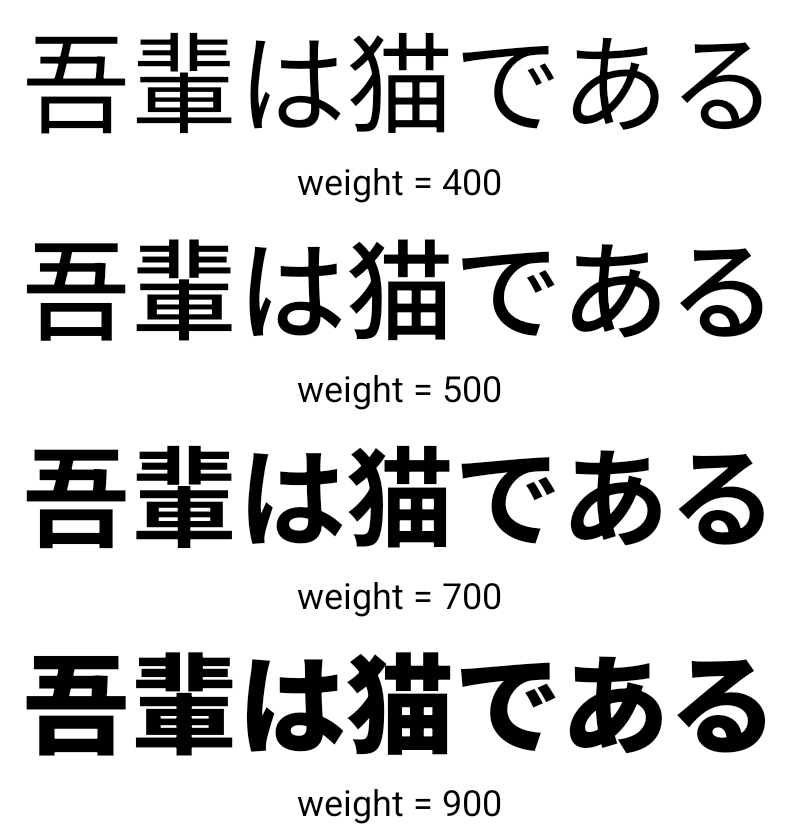
خط CJK متغيّر
Starting with Android 15, the font file for Chinese, Japanese, and Korean (CJK) languages, NotoSansCJK, is now a variable font. Variable fonts open up possibilities for creative typography in CJK languages. Designers can explore a broader range of styles and create visually striking layouts that were previously difficult or impossible to achieve.
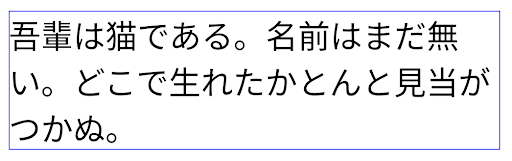
ضبط المسافة بين الأحرف
بدءًا من الإصدار 15 من Android، يمكن ضبط النص على الاتّجاه الأيمن باستخدام ميزة "محوّر المسافة بين الأحرف" من خلال
استخدام JUSTIFICATION_MODE_INTER_CHARACTER. كان التبرير بين الكلمات
تم تقديمه لأول مرة في Android 8.0 (المستوى 26 من واجهة برمجة التطبيقات)، وبين الأحرف
التبرير إمكانات مماثلة للغات التي تستخدم
حرف المسافة البيضاء للتقسيم، مثل الصينية واليابانية وغيرها.
JUSTIFICATION_MODE_NONE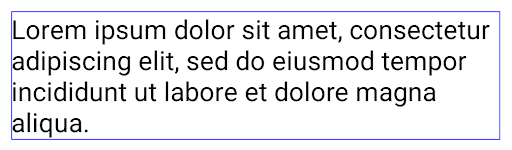
JUSTIFICATION_MODE_NONE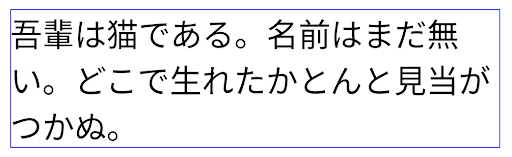
JUSTIFICATION_MODE_INTER_WORD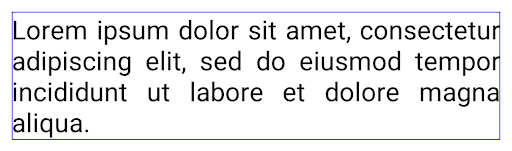
JUSTIFICATION_MODE_INTER_WORD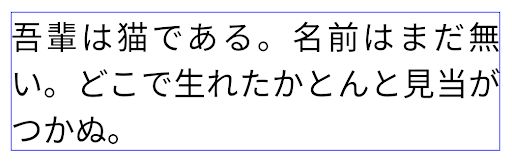
JUSTIFICATION_MODE_INTER_CHARACTER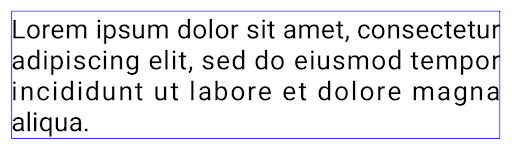
JUSTIFICATION_MODE_INTER_CHARACTERإعدادات الفواصل التلقائية بين الأسطر
Android started supporting phrase-based line breaks for Japanese and Korean in
Android 13 (API level 33). However, while phrase-based line breaks improve the
readability of short lines of text, they don't work well for long lines of text.
In Android 15, apps can apply phrase-based line breaks only for short lines
of text, using the LINE_BREAK_WORD_STYLE_AUTO
option. This option selects the best word style option for the text.
For short lines of text, phrase-based line breaks are used, functioning the same
as LINE_BREAK_WORD_STYLE_PHRASE, as shown in the
following image:
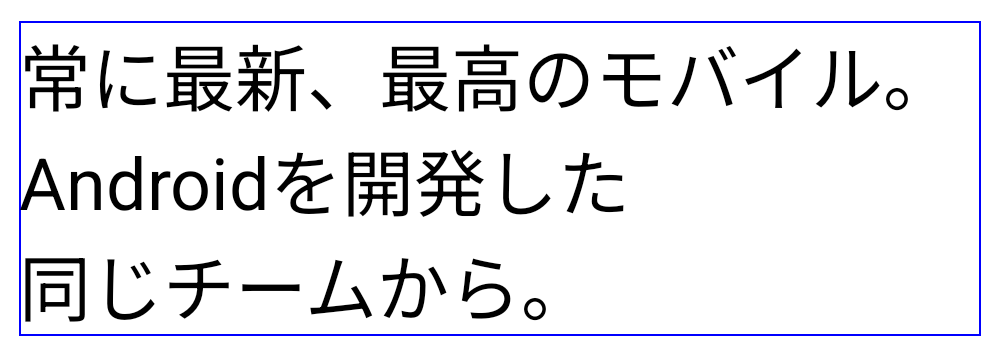
LINE_BREAK_WORD_STYLE_AUTO
applies phrase-based line breaks to improve the readability of the text.
This is the same as applying
LINE_BREAK_WORD_STYLE_PHRASE.For longer lines of text, LINE_BREAK_WORD_STYLE_AUTO uses a no
line-break word style, functioning the same as
LINE_BREAK_WORD_STYLE_NONE, as shown in the
following image:
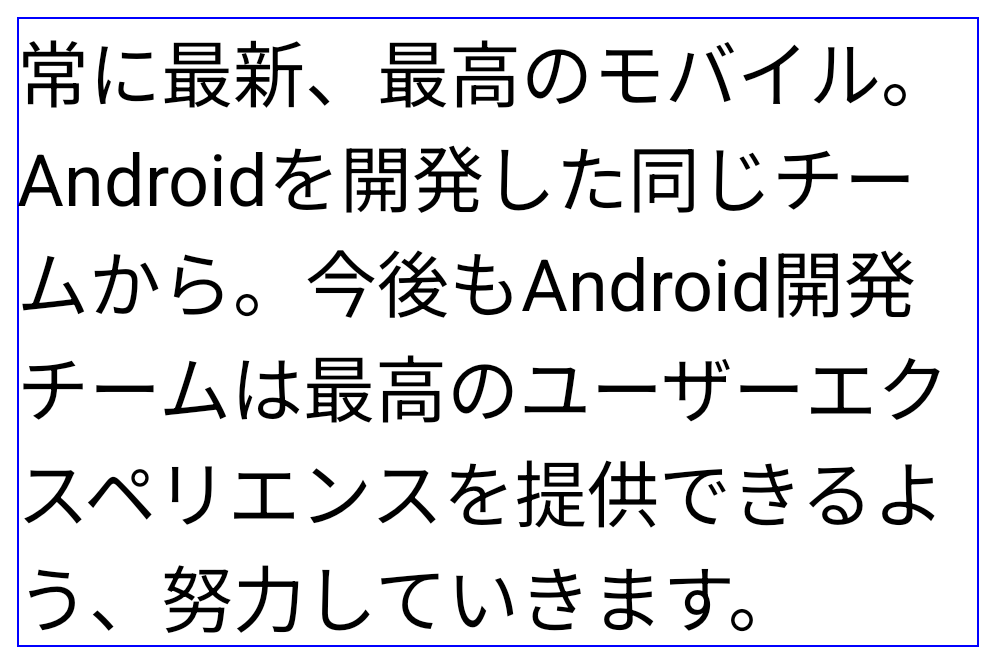
LINE_BREAK_WORD_STYLE_AUTO
applies no line-break word style to improve the readability of the text.
This is the same as applying
LINE_BREAK_WORD_STYLE_NONE.خط إضافي للغة اليابانية Hentaigana
In Android 15, a font file for old Japanese Hiragana (known as Hentaigana) is bundled by default. The unique shapes of Hentaigana characters can add a distinctive flair to artwork or design while also helping to preserve accurate transmission and understanding of ancient Japanese documents.
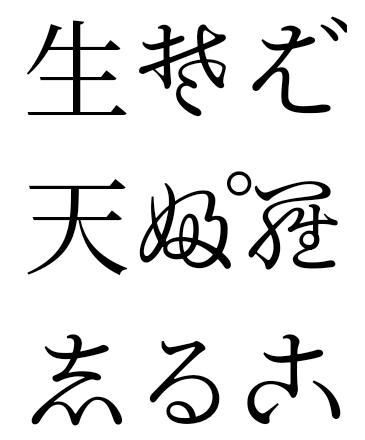
VideoLAN cone Copyright (c) 1996-2010 VideoLAN. This logo or a modified version may be used or modified by anyone to refer to the VideoLAN project or any product developed by the VideoLAN team, but does not indicate endorsement by the project.
Vulkan and the Vulkan logo are registered trademarks of the Khronos Group Inc.
OpenGL is a registered trademark and the OpenGL ES logo is a trademark of Hewlett Packard Enterprise used by permission by Khronos.