

במדריך הזה מוסבר איך להשתמש ב-DigitalCredential API כדי לקבל מספרי טלפון מאומתים של המשתמשים. התהליך כולל שני שלבים:
- בדיקה מקדימה: בודקים אם ספק הסלולר של המשתמש תומך ב-API הזה באמצעות שליחת שאילתה ל-Android Telephony API. אם הספק לא נתמך, צריך לחזור לתהליך הרגיל של שליחת SMS.
- בקשת
TS.43 token: אפליקציית הלקוח (המאמת) מבקשת טוקן זמני של TS.43 מהמכשיר של המשתמש. TS.43 tokenהוא פרטי כניסה שהספק מנפיק ומייצגים את זהות המשתמש. - החלפת הטוקן במספר טלפון: הקצה העורפי של האפליקציה מחליף את ה-
TS.43 tokenבמספר הטלפון המאומת של המשתמש באמצעות אגרגטור או ספק.
תאימות לגרסת Android
Phone Number Verification API נתמך ב-Android מגרסה 10 (רמת API 29) ומעלה.
דרישות מוקדמות
כדי להטמיע אימות של מספר טלפון באמצעות DigitalCredential API, צריך חשבון אצל אגרגטור או ספק סלולר. אגרגטור יוצר אינטראקציה עם ספקים ומספק את ממשק ה-API הנדרש לאפליקציה, בדרך כלל כנקודת קצה ל-API שניתן לחייב בענן. במדריך הזה, גם אגרגטורים וגם ספקים נקראים ביחד אגרגטורים.
צריך גם להוסיף את יחסי התלות הבאים לסקריפט ה-build של Gradle:
Kotlin
dependencies {
    implementation("androidx.credentials:credentials:1.7.0-alpha02")
    implementation("androidx.credentials:credentials-play-services-auth:1.7.0-alpha02")
}
Groovy
dependencies {
    implementation "androidx.credentials:credentials:1.7.0-alpha02"
    implementation "androidx.credentials:credentials-play-services-auth:1.7.0-alpha02"
}
הטמעה
לפני ששולחים קריאה ל-Digital Credentials API, צריך לבדוק אם ספק הסלולר של המשתמש תומך בתכונה הזו באמצעות Android Telephony API.
מוסיפים את ההרשאה READ_PHONE_STATE לקובץ AndroidManifest.xml.
val telephonyManager = context.getSystemService(Context.TELEPHONY_SERVICE) as TelephonyManager
val carrierId = telephonyManager.getSimCarrierId()
באמצעות המזהה הזה, מאמתים את התמיכה ב-TS.43 עם ה-backend של האגרגטור. אם הספק של המשתמש לא נתמך, אפשר לחזור לשיטה חלופית כמו SMS, כי קריאה ל-Digital Credentials API מחזירה תוצאה ריקה. אחרת, ממשיכים בתהליך של התעודה המזהה הדיגיטלית.
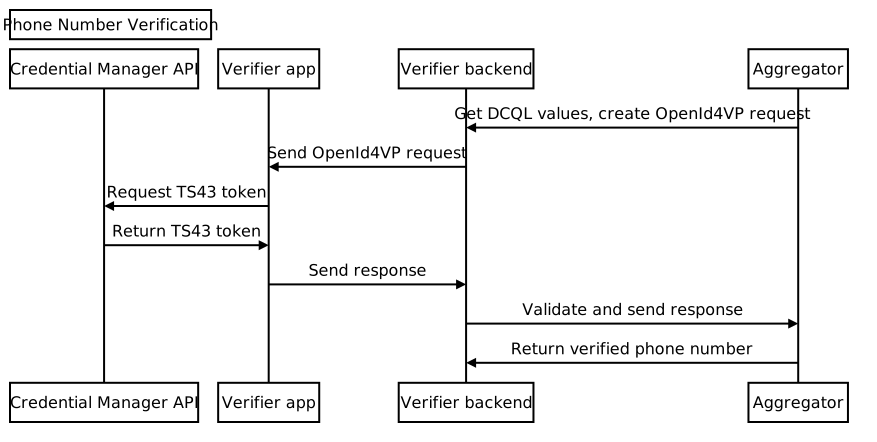
התהליך כולו כולל בדרך כלל את השלבים הבאים:
- בקשת פרמטרים של DCQL (שפת שאילתות לאישורים דיגיטליים) מאגרגטור: קוראים לאגרגטור אחד או יותר ומבקשים קבוצה של פרמטרים של DCQL. באמצעות DCQL אתם יכולים לציין את פרטי הכניסה הדיגיטליים המדויקים שאתם צריכים מכל אתר אגרגטור.
יוצרים את בקשת OpenID4VP: מה-backend של האפליקציה, יוצרים את בקשת OpenID4VP וכוללים את הפרמטרים של DCQL מהאגרגטור. לאחר מכן, שולחים את בקשת OpenID4VP לאפליקציית הלקוח.
שליחת קריאה ל-Credential Manager API: באפליקציית הלקוח, משתמשים ב-Credential Manager API כדי לשלוח את בקשת OpenID4VP למערכת ההפעלה. בתגובה, תקבלו אובייקט תגובה של OpenID4VP שמכיל את
TS.43 Digital Credential. פרטי הכניסה האלה מוצפנים ורק האגרגטור המשויך יכול לפענח אותם. אחרי שמקבלים את הטוקן של הספק, שולחים את התגובה מאפליקציית הלקוח לקצה העורפי של האפליקציה.אימות התגובה: מאמתים את התגובה של OpenID4VP בקצה העורפי של האפליקציה.
החלפה במספר טלפון: מהקצה העורפי של האפליקציה, שולחים את ה-
TS.43 Digital Credentialלאגרגטור. האגרגטור מאמת את פרטי הכניסה ומחזיר את מספר הטלפון המאומת.
בקשת פרמטרים של DCQL מאגרגטור
מהקצה העורפי של האפליקציה, שולחים בקשה לאגרגטור לאובייקט של פרטי כניסה ב-Digital Credential Query Language (DCQL). חשוב לוודא שאתם מספקים צופן חד-פעמי (nonce) ומזהה בקשה בבקשה שלכם. האגרגטור מחזיר את אובייקט פרטי הכניסה של DCQL, שהמבנה שלו דומה לזה:
{
  // The credential ID is mapped to the request ID that is sent in your request to the aggregator.
  "id": "aggregator1",
  "format": "dc-authorization+sd-jwt",
  "meta": {
    "vct_values": [
      "number-verification/device-phone-number/ts43"
    ],
    "credential_authorization_jwt": "..."
  },
  "claims": [
    {
      "path": ["subscription_hint"],
      "values": [1]
    },
    {
      "path": ["phone_number_hint"],
      "values": ["+14155552671"]
    }
  ]
}
יצירת בקשת OpenID4VP
קודם כל, מה-backend של האפליקציה, יוצרים אובייקט dcql_query על ידי הצבת אובייקט פרטי הכניסה של DCQL במערך credentials שמוטמע בתוך אובייקט dcql_query, כמו בדוגמה הבאה:
"dcql_query": {
  "credentials": [
      "id": "aggregator1",
      "format": "dc-authorization+sd-jwt",
      "meta": {
        "vct_values": [
          "number-verification/device-phone-number/ts43"
        ],
        "credential_authorization_jwt": "..."
      },
      "claims": [
        {
          "path": ["subscription_hint"],
          "values": [1]
        },
        {
          "path": ["phone_number_hint"],
          "values": ["+14155552671"]
        }
      ]
  ]
}
לאחר מכן, יוצרים בקשת OpenID4VP במבנה הבא:
{
  "protocol": "openid4vp-v1-unsigned",
  "data": {
    "response_type": "vp_token",
    "response_mode": "dc_api",
    "nonce": "...",
    "dcql_query": { ... }
  }
}
-
protocol: צריך להגדיר את הערךopenid4vp-v1-unsignedלבקשות אימות של מספר טלפון. -
response_typeו-response_mode: קבועים שמציינים את הפורמט של הבקשה עם הערכים הקבועיםvp_tokenו-dc_api, בהתאמה. -
nonce: ערך ייחודי שנוצר על ידי ה-backend לכל בקשה. ה-nonce באובייקט פרטי הכניסה של DCQL של האגרגטור חייב להתאים ל-nonce הזה. -
dcql_query: במקרה כזה, משתמשים ב-dcql_queryכדי לציין שמתבצעת בקשה ל-TS.43 Digital Credential. אתם יכולים גם לבקש כאן אישורים דיגיטליים אחרים.
לאחר מכן, עוטפים את בקשת OpenID4VP באובייקט בקשה של DigitalCredential API ושולחים אותה לאפליקציית הלקוח.
{
  "requests":
    [
      {
        "protocol": "openid4vp-v1-unsigned",
        "data": {
          "response_type": "vp_token",
          "response_mode": "dc_api",
          "nonce": "...",
          "dcql_query": { ... }
        }
      }
    ]
}
בקטע הקוד הבא אפשר לראות איך יוצרים את בקשת ה-API של DigitalCredential:
def GenerateDCRequest():
    credentials = []
    aggregator1_dcql = call_aggregator_endpoint(nonce, "aggregator1", additional_params)
    credentials.append(aggregator1_dcql) # You can optionally work with multiple
    # aggregators, or request other types of credentials

    val dc_request =
    {
      "requests":
        [
          {
            "protocol": "openid4vp-v1-unsigned",
            "data": {
              "response_type": "vp_token",
              "response_mode": "dc_api",
              "nonce": "...",
              "dcql_query": {"credentials": credentials}
            }
          }
        ]
    }
    return dc_request
שליחת קריאה ל-Credential Manager API
באפליקציית הלקוח, שולחים קריאה ל-Credential Manager API, עם בקשת DigitalCredential API שסופקה על ידי הקצה העורפי של האפליקציה.
val requestJson = generateTs43DigitalCredentialRequestFromServer()
val digiCredOption = GetDigitalCredentialOption(requestJson = requestJson)
val getCredRequest = GetCredentialRequest(
    listOf(digiCredOption)
)

coroutineScope.launch {
  try {
    val response = credentialManager.getCredential(
      context = activityContext,
      request = getCredRequest
    )
    val credential = response.credential
    when (credential) {
      is DigitalCredential -> {
        val responseJson = credential.credentialJson
        validateResponseOnServer(responseJson)
      }
      else -> {
        // Catch any unrecognized credential type here.
        Log.e(TAG, "Unexpected type of credential ${credential.type}")
      }
    }
  } catch (e : GetCredentialException) {
      // If user cancels the operation, the feature isn't available, or the
      // SIM doesn't support the feature, a GetCredentialCancellationException
      // will be returned. Otherwise, a GetCredentialUnsupportedException will
      // be returned with details in the exception message.
      handleFailure(e)
  }
}
התגובה מ-DigitalCredential API מכילה את התגובה מ-OpenID4VP. קובץ JSON אופייני של פרטי כניסה מהתוצאה של DigitalCredential נראה כך:
{
  "protocol": "openid4vp-v1-unsigned",

  "data": {
    "vp_token": {
      "aggregator1": ["eyJhbGciOiAiRVMy..."] # The encrypted TS.43 Digital
                                             # Credential in an array structure.
    }
  }
}
מאפליקציית הלקוח, שולחים את התגובה מה-DigitalCredential API בחזרה לשרת הבק-אנד, שבו אפשר לאמת אותה ולהשתמש בה כדי להחליף את מספר הטלפון המאומת עם אגרגטור.
במקרים מסוימים, התגובה עשויה להכיל את השגיאה TS.43. תגובת השגיאה היא אובייקט JSON בפורמט של תגובת שגיאה של OpenID4VP:
{
  "protocol": "openid4vp-v1-unsigned",

  "data": {
    "error": "<error_code>",
    "error_description": "<Human-readable description of the error>",
  }
}
יש 2 ערכים אפשריים של error_code:
-
invalid_request: מציין שהבקשה הייתה בפורמט שגוי. -
server_error: מציין שהיו כשלים בעיבוד הבקשה. הסיבה לכך יכולה להיות שגיאות מקומיות או בעיות שקשורות ל-TS.43.
בשדה error_description יש פרטים נוספים על הבעיה.
אימות התשובה של המסמך לאימות דיגיטלי
הדוגמה הבאה מראה איך לנתח את התגובה ולבצע את שלב האימות בבק-אנד של האפליקציה:
def processDigitalCredentialsResponse(response):
  # Step 1: Parse out the TS.43 Digital Credential from the response
  openId4VpResponse = response['data']

  ts43_digital_credential = response['vp_token']["aggregator1"][0]

  # Step 2: Perform response validation
  verifyResponse(ts43_digital_credential)

def verifyResponse(ts43_digital_credential):
  # The returned ts43_digital_credential is an SD-JWT-based Verifiable Credentials
  # (SD-JWT VC) as defined in this IETF spec. The section 3.4 of the specification
  # outlines how to validate the credential. At a high level, the steps involves
  # validating (1) the nonce in the response credential matches the one in the
  # request, (2) the integrity of the credential by checking the credential is
  # signed by the trusted issuer Android Telephony, and (3) other validity
  # properties associated with this credential, such as issue time and expiration
  # time

  # In most cases, you can use an SD-JWT VC library to perform these validations.

  # Some aggregators may also perform the validation logic for you. Check with your
  # aggregator to decide the exact scope of the validation required.
החלפה למספר טלפון
מה-backend של האפליקציה, שולחים את ה-TS.43 Digital Credential המאומת לנקודת הקצה של האגרגטור כדי לאמת את פרטי הכניסה ולקבל את מספר הטלפון המאומת.
def processDigitalCredentialsResponse(response):
  # ... prior steps

  # Step 3: Call aggregator endpoint to exchange the verified phone number
  callAggregatorPnvEndpoint(ts43_digital_credential)