

يمكن استخدام ميزة التحقّق من بيانات الاعتماد الرقمية في تطبيقات Android للمصادقة على هوية المستخدم وتفويضها (مثل مستند تعريف صادر عن جهة حكومية) أو سمات هذا المستخدم (مثل رخصة القيادة أو الدرجة الأكاديمية أو سمات مثل العمر أو العنوان) أو سيناريوهات أخرى يلزم فيها إصدار بيانات الاعتماد والتحقّق منها لتأكيد صحة الكيان.
تتوفّر واجهة Verifier API على الإصدار 9 من نظام التشغيل Android (المستوى 28 من واجهة برمجة التطبيقات) والإصدارات الأحدث.
التنفيذ
للتحقّق من بيانات الاعتماد الرقمية في مشروع Android، اتّبِع الخطوات التالية:
- أضِف التبعيات إلى نص إنشاء تطبيقك وابدأ فئة
CredentialManager. - أنشئ طلبًا لبيانات الاعتماد الرقمية واستخدِمه لإعداد
DigitalCredentialOption، ثم أنشئGetCredentialRequest. - ابدأ مسار
getCredentialباستخدام الطلب الذي تم إنشاؤه لتلقّيGetCredentialResponseناجح أو معالجة أي استثناءات قد تحدث. بعد استرداد الردّ بنجاح، تحقَّق من صحته.
إضافة التبعيات والبدء
أضِف التبعيات التالية إلى نص Gradle البرمجي للإصدار:
dependencies {
    implementation("androidx.credentials:credentials:1.6.0-beta01")
    implementation("androidx.credentials:credentials-play-services-auth:1.6.0-beta01")
}
بعد ذلك، عليك إعداد مثيل من فئة CredentialManager.
val credentialManager = CredentialManager.create(context)
إنشاء طلب مستند تعريف رقمي
أنشئ طلبًا لبيانات الاعتماد الرقمية واستخدِمه لإعداد
DigitalCredentialOption.
// The request in the JSON format to conform with
// the JSON-ified Credential Manager - Verifier API request definition.
val requestJson = generateRequestFromServer()
val digitalCredentialOption =
    GetDigitalCredentialOption(requestJson = requestJson)

// Use the option from the previous step to build the `GetCredentialRequest`.
val getCredRequest = GetCredentialRequest(
    listOf(digitalCredentialOption)
)
يوضّح المثال التالي طلب OpenId4Vp1. للحصول على تفاصيل حول الحقول في هذا الطلب، يُرجى الاطّلاع على مستندات OpenID.
{
  "requests": [
    {
      "protocol": "openid4vp-v1-unsigned",
      "data": {
        "response_type": "vp_token",
        "response_mode": "dc_api",
        "nonce": "OD8eP8BYfr0zyhgq4QCVEGN3m7C1Ht_No9H5fG5KJFk",
        "dcql_query": {
          "credentials": [
            {
              "id": "cred1",
              "format": "mso_mdoc",
              "meta": {
                "doctype_value": "org.iso.18013.5.1.mDL"
              },
              "claims": [
                {
                  "path": [
                    "org.iso.18013.5.1",
                    "family_name"
                  ]
                },
                {
                  "path": [
                    "org.iso.18013.5.1",
                    "given_name"
                  ]
                },
                {
                  "path": [
                    "org.iso.18013.5.1",
                    "age_over_21"
                  ]
                }
              ]
            }
          ]
        }
      }
    }
  ]
}
الحصول على بيانات الاعتماد
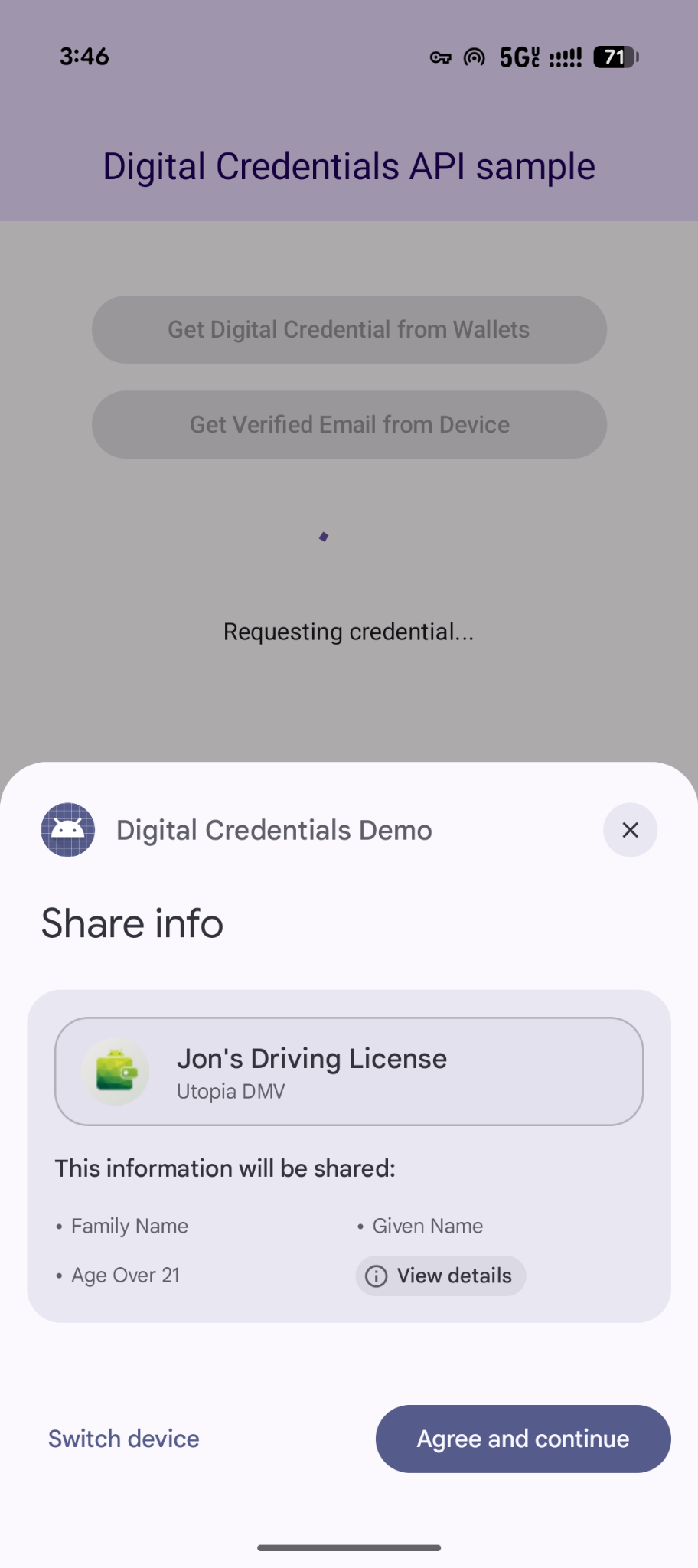
ابدأ عملية getCredential باستخدام الطلب الذي تم إنشاؤه. ستتلقّى إما GetCredentialResponse ناجحًا أو GetCredentialException إذا تعذّر تنفيذ الطلب.
يؤدي مسار getCredential إلى تشغيل مربّعات حوار نظام Android لعرض خيارات بيانات الاعتماد المتاحة للمستخدم وجمع اختياراته. بعد ذلك، سيعرض تطبيق المحفظة الذي يتضمّن خيار بيانات الاعتماد المحدّد واجهات مستخدم لجمع الموافقة وتنفيذ الإجراءات اللازمة لإنشاء ردّ يتضمّن بيانات الاعتماد الرقمية.
coroutineScope.launch {
    try {
        val result = credentialManager.getCredential(
            context = activityContext,
            request = getCredRequest
        )
        verifyResult(result)
    } catch (e : GetCredentialException) {
        handleFailure(e)
    }
}

// Handle the successfully returned credential.
fun verifyResult(result: GetCredentialResponse) {
    val credential = result.credential
    when (credential) {
        is DigitalCredential -> {
            val responseJson = credential.credentialJson
            validateResponseOnServer(responseJson)
        }
        else -> {
            // Catch any unrecognized credential type here.
            Log.e(TAG, "Unexpected type of credential ${credential.type}")
        }
    }
}

// Handle failure.
fun handleFailure(e: GetCredentialException) {
  when (e) {
        is GetCredentialCancellationException -> {
            // The user intentionally canceled the operation and chose not
            // to share the credential.
        }
        is GetCredentialInterruptedException -> {
            // Retry-able error. Consider retrying the call.
        }
        is NoCredentialException -> {
            // No credential was available.
        }
        else -> Log.w(TAG, "Unexpected exception type ${e::class.java}")
    }
}
طلبات مرنة لبيانات اعتماد متعددة
تتيح واجهة Digital Credentials API أيضًا طلب أنواع متعددة من بيانات الاعتماد في الوقت نفسه باستخدام OpenID4VP:
- الطلبات المتزامنة: يمكنك طلب بيانات اعتماد متعددة في معاملة مستخدم واحدة. على سبيل المثال، يمكن لتطبيق سفر طلب بطاقة صعود الطائرة ومستند تعريف صادر عن جهة حكومية في الوقت نفسه، ما يتيح للمستخدم مراجعة كليهما والموافقة عليهما بنقرة واحدة.
- المرونة في التنفيذ: يمكنك قبول أي نوع من أنواع بيانات الاعتماد أو جهات إصدارها. على سبيل المثال، يمكن أن تقبل عملية التحقّق من العمر إما رخصة قيادة أو جواز سفر، ما يتيح للمستخدمين تلبية الطلب باستخدام أي بيانات اعتماد مخزّنة في الحافظة.
في ما يلي مثال على طلب بيانات اعتماد متعددة في طلب واحد:
{
  "credentials": [
    {
      "id": "gov_id1",
      "format": "mso_mdoc",
      "meta": {
        "doctype_value": "org.iso.18013.5.1.mDL"
      },
      "claims": [
        {
          "path": [
            "org.iso.18013.5.1",
            "age_over_21"
          ]
        }
      ]
    },
    {
      "id": "boarding_pass1",
      "format": "dc+sd-jwt",
      "meta": {
        "vct_values": [
          "https://credentials.example.airline/boarding-pass"
        ]
      },
      "claims": [
        {
          "path": [
            "flight_number"
          ]
        },
        {
          "path": [
            "seat"
          ]
        }
      ]
    }
  ]
}
معالجة الردّ
بعد تقديم طلب بيانات الاعتماد، يمكنك معالجة GetCredentialResponse
التي تم عرضها من CredentialManager.
// Handle the successfully returned credential.
fun verifyResult(result: GetCredentialResponse) {
    val credential = result.credential
    when (credential) {
        is DigitalCredential -> {
            val responseJson = credential.credentialJson
            validateResponseOnServer(responseJson)
        }
        else -> {
            // Catch any unrecognized credential type here.
            Log.e(TAG, "Unexpected type of credential ${credential.type}")
        }
    }
}
التعامل مع الاستثناءات
يجب أن يتعامل تطبيقك مع الأخطاء التي يمكن أن تحدث، بما في ذلك عدم توفّر بيانات اعتماد على الجهاز أو إلغاء المستخدم للعملية:
// Handle failure.
fun handleFailure(e: GetCredentialException) {
    when (e) {
        is GetCredentialCancellationException -> {
            // The user intentionally canceled the operation and chose not
            // to share the credential.
        }
        is GetCredentialInterruptedException -> {
            // Retry-able error. Consider retrying the call.
        }
        is NoCredentialException -> {
            // No credential was available.
        }
        is CreateCredentialUnknownException -> {
            // An unknown, usually unexpected, error has occurred. Check the
            // message error for any additional debugging information.
        }
        is CreateCredentialCustomException -> {
            // You have encountered a custom error thrown by the wallet.
            // If you made the API call with a request object that's a
            // subclass of CreateCustomCredentialRequest using a 3rd-party SDK,
            // then you should check for any custom exception type constants
            // within that SDK to match with e.type. Otherwise, drop or log the
            // exception.
        }
        else -> Log.w(TAG, "Unexpected exception type ${e::class.java}")
    }
}