Улучшите свои навыки разработки Android с помощью 6 экспертных советов для Близнецов в Android Studio.
4 минуты чтения

In January we announced Android Studio Otter 3 Feature Drop in stable, including Agent Mode enhancements and many other updates to provide more control and flexibility over using AI to help you build high quality Android apps. To help you get the most out of Gemini in Android Studio and all the new capabilities, we sat down with Google engineers and Google Developer Experts to gather their best practices for working with the latest features—including Agent mode and the New Project Assistant. Here are some useful insights to help you get the best out of your development:
1. Создавайте приложения с нуля с помощью нового помощника по проектам.
Новый помощник проекта, теперь доступный в последних сборках Canary, интегрирует Gemini с мастером создания нового проекта в Studio. Просто предоставляя подсказки и (по желанию) макеты дизайна, вы можете создавать целые приложения с нуля, включая структуру, архитектуру и макеты Jetpack Compose.
Интегрированный с эмулятором Android, он может развернуть вашу сборку и «проверить» приложение, убедившись, что оно работает правильно и что отображаемые экраны действительно соответствуют вашему видению. Кроме того, вы можете использовать режим агента, чтобы продолжить работу над приложением и вносить итерации, используя Gemini для доработки вашего приложения в соответствии с вашим видением.
Also, while this feature works with the default (no-cost) model, we highly recommend using this feature with an AI Studio API Key to access the latest models — like Gemini 3.1 Pro or 3.0 Flash — which excel at agentic workflows. Additionally, adding your API Key allows the New Project Assistant to use Nano Banana behind the scenes to help with ideating on UI design, improving the visual fidelity of the generated application! - Trevor Johns, Developer Relations Engineer.
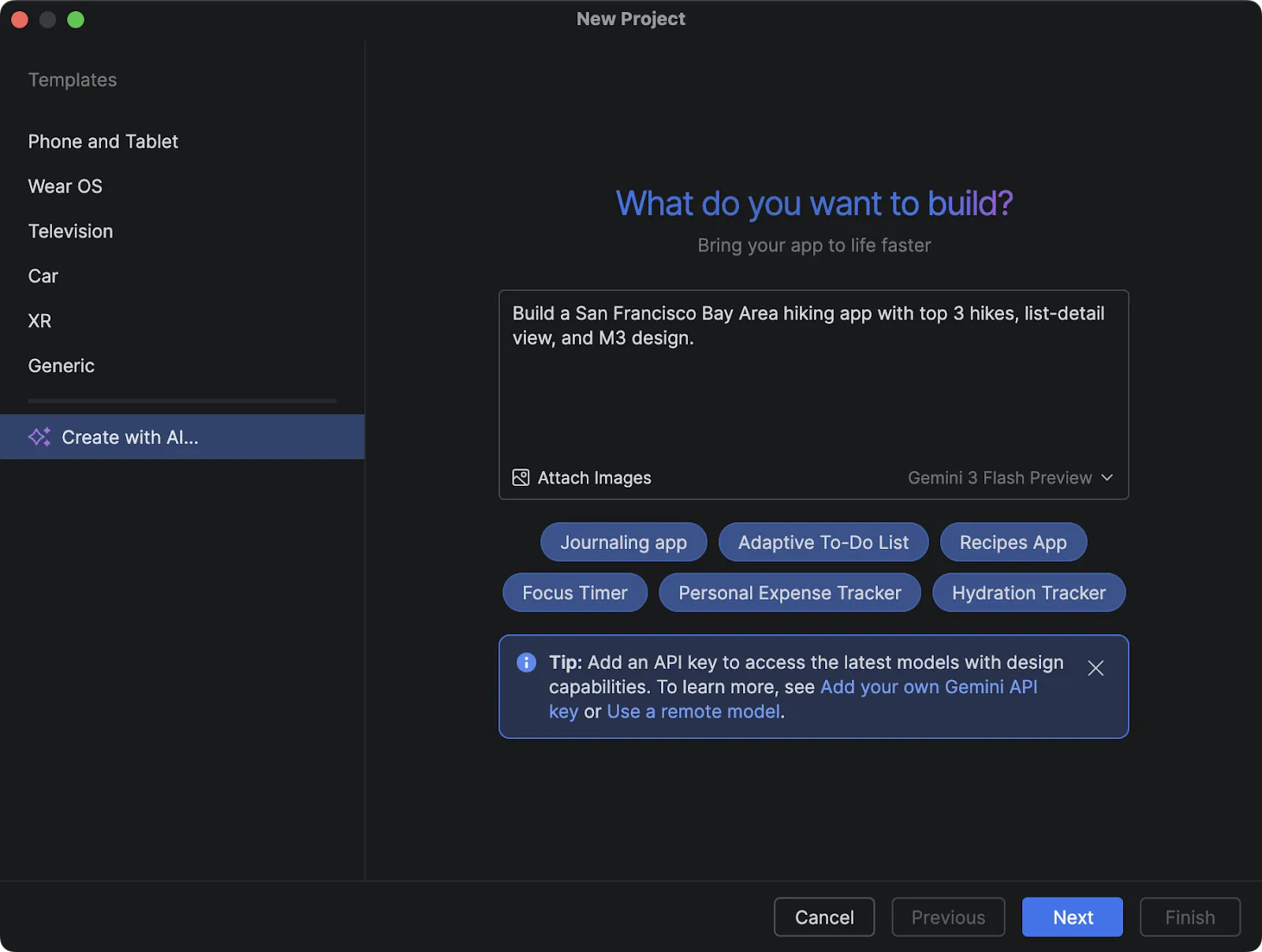
Диалоговое окно для создания нового проекта.
2. Попросите Агента доработать ваш код, предоставив ему «преднамеренные» контексты.
При использовании Gemini Agents качество выходных данных напрямую зависит от установленных вами ограничений. Не ограничивайтесь просьбой «исправить этот код» — тщательно продумайте контекст, который вы предоставляете, и четко укажите, чего вы хотите (и чего не хотите). Улучшите результат, предоставив ссылки на свежие публикации в блогах или документации, чтобы модель могла давать точные рекомендации на их основе.
Ask the Agent to simplify complex logic, or if it see's any fundamental problems with it, or even ask it to scan for security risks in areas where you feel uncertain. Being firm with your instructions—even telling the model "please do not invent things" in instances where you are using very new or experimental APIs—helps keep the AI focused on the outputs you are trying to achieve. - Alejandra Stamato, Android Google Developer Expert and Android Engineer at HubSpot.
3. Используйте документацию в режиме агента для предоставления контекста для новых библиотек.
Чтобы предотвратить появление в модели кода, генерирующего нестандартные или совершенно новые библиотеки, используйте инструменты Agent в Android Studio. Доступ к документации: поиск по документации Android и получение документации Android. Вы можете указать Gemini выполнить поиск в базе знаний Android или в конкретных статьях документации. Модель может использовать этот способ, если посчитает, что ей не хватает какой-либо информации, что особенно полезно при использовании нишевых или нечасто встречающихся API.
If you are certain you want the model to consult the documentation and to make sure those tools are triggered, a good trick is to add something like 'search the official documentation' or 'check the docs' to your prompts. And for documentation on different libraries which aren't Android specific, install a MCP Server that lets you access documentation like Context7 (or something similar). - Jose Alcérreca, Android Developer Relations Engineer, Google.
4. Используйте ИИ для создания файлов Agents.md , предназначенных для работы с пользовательскими фреймворками, библиотеками и системами проектирования.
To make sure Agent uses custom frameworks, libraries and design systems you have two options 1) In settings, Android Studio allows you to specify rules to be followed when Gemini is performing these actions for you. Or 2) Create Agents.md files in your application and specify how things should be done or act as guidance for when AI is performing a task, specific frameworks, design systems, or specific ways of doing things (such as the exact architecture, things to do or what not to do), in a standard bullet point way to give AI clear instructions.
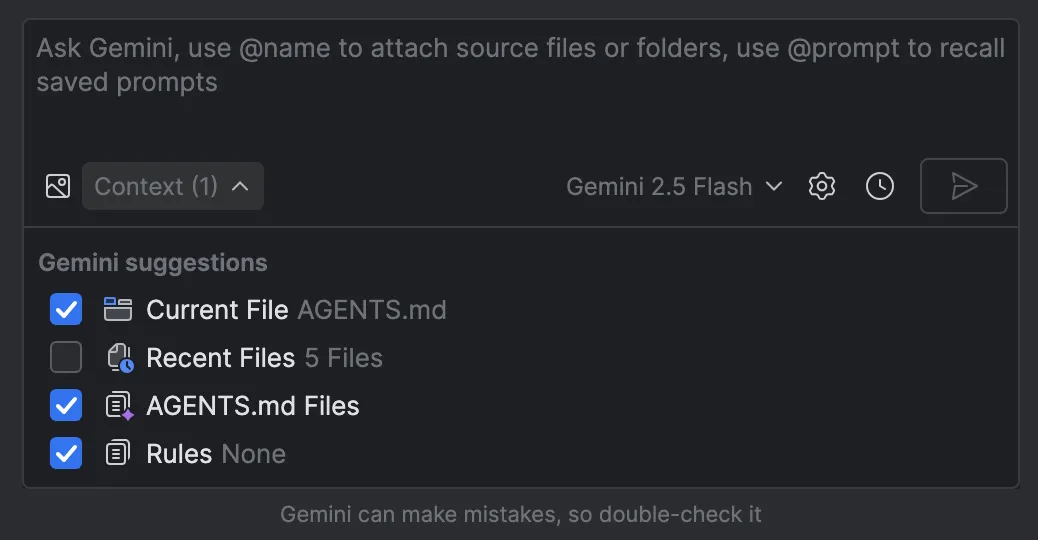
Управление файлами AGENTS.md в качестве контекста.
You can also use Agents.md file at the root of the project, and can have them in different modules (or even subdirectories) of your project as well! The more context you have or the more guidance available when you're working, that will be available for AI to access. If you get stuck creating these Agents.md files you can use AI to help build them, or give you foundations based on the projects you have and then edit them so you don't have to start from scratch. - Joe Birch, Android Google Developer Expert and Staff Engineer at Buffer.
5. Переложите рутинные задачи на Агента и сэкономьте себе время.
You can get Gemini in Android Studio agent to help you make tasks such as writing and reviewing faster. For example it can help writing commit messages, giving you a good summary which you can then review and save yourself time. Additionally, get it to write tests; under your direction the Agent can look at the other tests in your project and write a good test for you to run following best practices just by looking at them. Another good example of a tedious task is writing a new parser for a certain JSON format. Just give Gemini a few examples and it will get you started very quickly. - Diego Perez, Android Software Engineer, Google
6. Контролируйте, чем вы делитесь с ИИ, используя простые способы отказа или команды, а также платные модели.
If you want to control what is shared with AI whilst on the no-cost plans, you can opt out some or all your code from model training by adding an AI exclusions file ('.aiexclude') to your project. This file uses glob pattern matching similar to a .gitignore file, specifying sensitive directories or files that should be hidden from the AI. You can place .aiexclude files anywhere within the project and its VCS roots to control which files AI features are allowed to access.
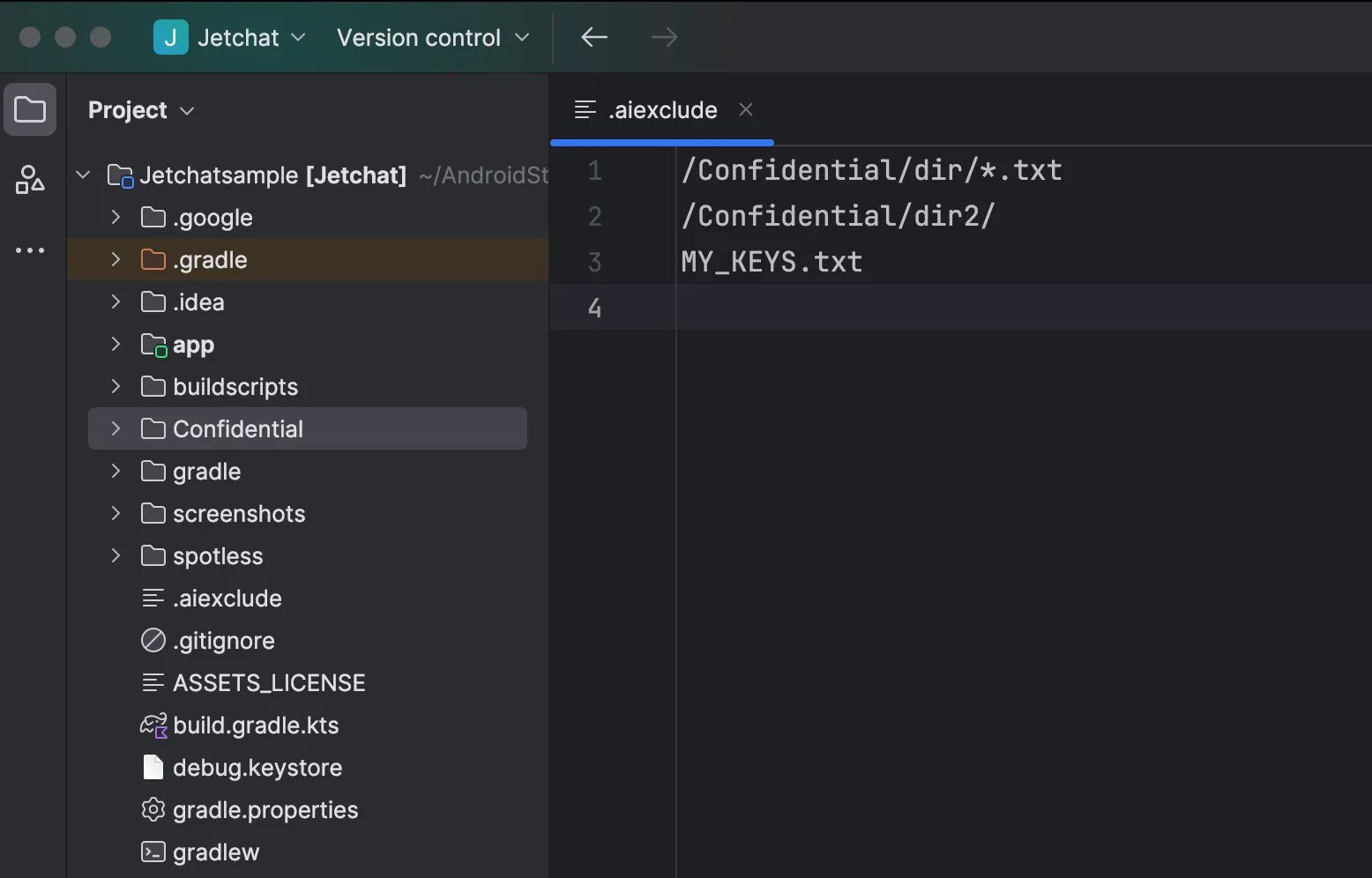
Пример файла `.aiexclude` в Android Studio.
В качестве альтернативы, в настройках Android Studio вы также можете отключить обмен контекстом либо для каждого проекта, либо для каждого пользователя (хотя этот метод ограничивает функциональность ряда функций, поскольку ИИ не будет видеть ваш код).
Помните, что платные тарифные планы никогда не используют ваш код для обучения моделей. Это касается как пользователей, использующих ключ API AI Studio, так и компаний, подписанных на Gemini Code Assist. - Тревор Джонс, инженер по связям с разработчиками.
Узнайте больше от команды Android и экспертов Google Developer Experts о Gemini в Android Studio на нашей недавней неформальной беседе и скачайте Android Studio , чтобы начать работу.

 Новости о продуктах
Мы рады сообщить, что обновление Android Studio Otter 3 Feature Drop теперь стабильно! Этот насыщенный функциями релиз значительно улучшает ваши рабочие процессы в Android Studio и предоставляет вам больше гибкости и контроля над использованием ИИ для создания приложений Android.
Sandhya Mohan , Trevor Johns • 9 мин чтения-
 Новости о продуктах
В Android Studio Otter 2 Feature Drop вас ждет мощный импульс для повышения производительности.
Sandhya Mohan , Trevor Johns • 3 мин чтения 
 Новости о продуктах
В Google Play мы постоянно расширяем нашу платформу подписки, чтобы помочь вам стимулировать рост, адаптироваться к новым бизнес-моделям и взаимодействовать с вашими пользователями именно там, где они находятся.
Sheenam Mittal • 4 мин чтения
Получайте еженедельно самые свежие новости о разработке Android прямо на свою электронную почту.