
LiteRT on Android provides the essentials for deploying high-performance, custom ML features into your Android app.
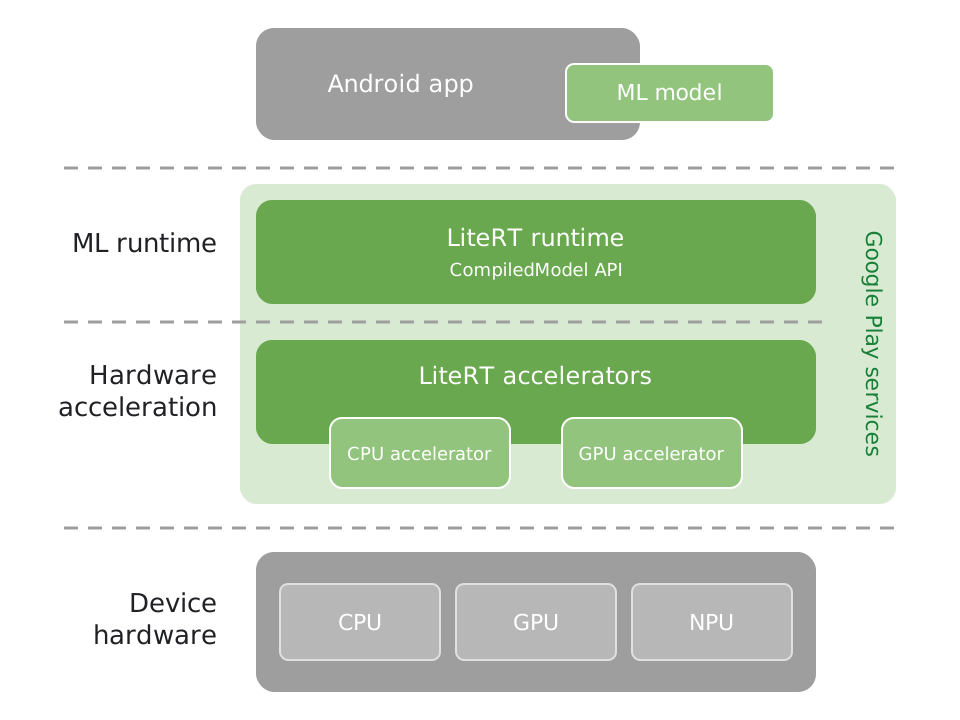
LiteRT for ML runtime
Use LiteRT in Google Play services, Android's official ML inference runtime, to
run high-performance ML inference in your app with the CompiledModel API.
Learn more
Hardware acceleration with LiteRT accelerators
Use LiteRT accelerators to run your models on the CPU or GPU. The GPU accelerator runs models up to 1.4 times faster than the previous TensorFlow Lite GPU delegate, so you can deliver more fluid, lower-latency experiences to your users. Learn more
NPU acceleration is available today in standalone LiteRT, and NPU support in Google Play services is coming soon. Learn more
Enabled by Google Play services
Google Play services delivers the LiteRT runtime and accelerators, so you don't bundle them in your APK. Removing the bundled LiteRT runtime and GPU accelerator saves up to ~8 MB of app size. Google Play services also keeps the runtime up to date without an app release. Learn more
Build with your AI coding agent
Use the LiteRT runtime skill with your coding agent, such as Agent Mode in Android Studio, to add LiteRT to your app, run a model on the CPU or GPU, or migrate an existing TensorFlow Lite app to LiteRT in Google Play services. Learn more
Code samples
Explore the LiteRT Android code samples and test ML features on your device. Learn more
Get started with LiteRT
Add LiteRT in Google Play services to your app and run your first model. Learn more