

Al igual que las versiones anteriores, Android 16 incluye cambios de comportamiento que podrían afectar tu app. Los siguientes cambios se aplican exclusivamente a las apps orientadas a Android 16 o versiones posteriores. Si tu app está orientada a Android 16 o versiones posteriores, debes modificarla para que admita estos comportamientos, cuando corresponda.
Asegúrate de revisar también la lista de cambios en el comportamiento que afectan a todas las apps
que se ejecutan en Android 16, independientemente de targetSdkVersion de la app.
Experiencia del usuario y la IU del sistema
Android 16 (nivel de API 36) incluye los siguientes cambios que tienen como objetivo crear una experiencia del usuario más coherente e intuitiva.
Se quita la inhabilitación de borde a borde
Android 15 enforced edge-to-edge for apps targeting Android 15 (API
level 35), but your app could opt-out by setting
R.attr#windowOptOutEdgeToEdgeEnforcement to true. For apps
targeting Android 16 (API level 36),
R.attr#windowOptOutEdgeToEdgeEnforcement is deprecated and disabled, and your
app can't opt-out of going edge-to-edge.
- If your app targets Android 16 (API level 36) and is running on an
Android 15 device,
R.attr#windowOptOutEdgeToEdgeEnforcementcontinues to work. - If your app targets Android 16 (API level 36) and is running on an
Android 16 device,
R.attr#windowOptOutEdgeToEdgeEnforcementis disabled.
For testing in Android 16, ensure your app supports edge-to-edge and
remove any use of R.attr#windowOptOutEdgeToEdgeEnforcement so that your app
also supports edge-to-edge on an Android 15 device. To support edge-to-edge,
see the Compose and Views guidance.
Se requiere migración o inhabilitación para el botón Atrás predictivo
En el caso de las apps que se segmentan para Android 16 (nivel de API 36) o versiones posteriores y que se ejecutan en un dispositivo con Android 16 o una versión posterior, las animaciones del sistema de atrás predictivo (volver a la pantalla principal, entre tareas y entre actividades) están habilitadas de forma predeterminada.
Además, no se llama a onBackPressed y ya no se envía KeyEvent.KEYCODE_BACK.
Si tu app intercepta el evento de atrás y aún no migraste al gesto atrás predictivo, actualiza tu app para que use las APIs de navegación hacia atrás compatibles o inhabilita temporalmente la función configurando el atributo android:enableOnBackInvokedCallback como false en la etiqueta <application> o <activity> del archivo AndroidManifest.xml de tu app.
APIs de fuentes elegantes obsoletas e inhabilitadas
Las apps segmentadas para Android 15 (nivel de API 35) tienen el atributo elegantTextHeight
TextView establecido en true de forma predeterminada, lo que reemplaza la fuente compacta por una que es mucho más legible. Puedes anular este comportamiento si estableces el atributo elegantTextHeight en false.
Android 16 dejó de admitir el atributo elegantTextHeight, y se ignorará una vez que tu app se oriente a Android 16. Las "fuentes de IU" controladas por estas APIs se descontinuarán, por lo que debes adaptar los diseños para garantizar una renderización de texto coherente y a prueba de futuro en árabe, laosiano, birmano, tamil, gujarati, kannada, malayalam, odia, telugu o tailandés.
 Comportamiento de
 elegantTextHeight para las apps que se segmentan para Android
14 (nivel de API 34) y versiones anteriores, o para las apps que se segmentan para Android 15 (nivel de API 35)
que anularon el valor predeterminado estableciendo el atributo elegantTextHeight
en false.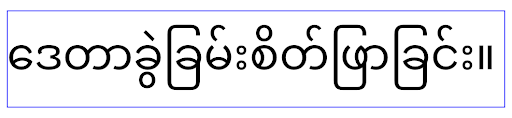 Comportamiento de
 elegantTextHeight para las apps que se segmentan para Android
16 (nivel de API 36) o para las apps que se segmentan para Android 15 (nivel de API 35) que no
anularon el valor predeterminado estableciendo el atributo elegantTextHeight
en false.Funcionalidad principal
Android 16 (nivel de API 36) incluye los siguientes cambios que modifican o expanden varias capacidades principales del sistema Android.
Optimización de la programación de trabajo de tasa fija
Antes de orientarse a Android 16, cuando scheduleAtFixedRate omitía la ejecución de una tarea debido a que estaba fuera de un ciclo de vida del proceso válido, todas las ejecuciones omitidas se ejecutaban de inmediato cuando la app regresaba a un ciclo de vida válido.
Cuando se orienta a Android 16, se ejecuta de inmediato una ejecución perdida de scheduleAtFixedRate cuando la app vuelve a un ciclo de vida válido. Se espera que este cambio de comportamiento mejore el rendimiento de la app. Prueba este comportamiento en tu app para verificar si se ve afectada.
También puedes realizar pruebas con el marco de compatibilidad de apps y habilitar la marca de compatibilidad STPE_SKIP_MULTIPLE_MISSED_PERIODIC_TASKS.
Factores de forma del dispositivo
Android 16 (nivel de API 36) incluye los siguientes cambios para las apps cuando se muestran en dispositivos de pantalla grande.
Diseños adaptables
Ahora que las apps para Android se ejecutan en una variedad de dispositivos (como teléfonos, tablets, plegables, computadoras de escritorio, automóviles y TVs) y modos de ventanas en pantallas grandes (como pantalla dividida y modo de ventanas de escritorio), los desarrolladores deben compilar apps para Android que se adapten a cualquier tamaño de pantalla y ventana, independientemente de la orientación del dispositivo. Los paradigmas como la restricción de la orientación y el cambio de tamaño son demasiado restrictivos en el mundo actual de múltiples dispositivos.
Ignora las restricciones de orientación, cambio de tamaño y relación de aspecto
En el caso de las apps orientadas a Android 16 (nivel de API 36), las restricciones de orientación, cambio de tamaño y relación de aspecto ya no se aplican en pantallas con un ancho más pequeño >= 600 dp. Las apps ocupan toda la ventana de visualización, independientemente de la relación de aspecto o la orientación preferida del usuario, y no se usa el formato pillarbox.
Este cambio introduce un nuevo comportamiento estándar de la plataforma. Android se está moviendo hacia un modelo en el que se espera que las apps se adapten a varias orientaciones, tamaños de pantalla y relaciones de aspecto. Las restricciones como la orientación fija o el cambio de tamaño limitado dificultan la adaptabilidad de la app. Haz que tu app adaptable para ofrecer la mejor experiencia de usuario posible.
También puedes probar este comportamiento con el
framework de compatibilidad de apps y habilitando la
UNIVERSAL_RESIZABLE_BY_DEFAULT marca de compatibilidad.
Cambios rotundos comunes
Ignorar las restricciones de orientación, cambio de tamaño y relación de aspecto podría afectar la IU de tu app en algunos dispositivos, en especial los elementos diseñados para diseños pequeños bloqueados en orientación vertical. Por ejemplo, problemas como diseños estirados y animaciones y componentes fuera de la pantalla. Cualquier suposición sobre la relación de aspecto o la orientación puede causar problemas visuales con tu app. Obtén más información para evitarlos y mejorar el comportamiento adaptable de tu app.
Permitir la rotación del dispositivo genera más recreación de la actividad, lo que puede provocar la pérdida del estado del usuario si no se conserva correctamente. Obtén información para guardar correctamente el estado de la IU en Cómo guardar estados de la IU.
Detalles de la implementación
Se ignoran los siguientes atributos del manifiesto y las APIs de tiempo de ejecución en dispositivos con pantalla grande en los modos de pantalla completa y multiventana:
screenOrientationresizableActivityminAspectRatiomaxAspectRatiosetRequestedOrientation()getRequestedOrientation()
Se ignoran los siguientes valores para screenOrientation, setRequestedOrientation() y getRequestedOrientation():
portraitreversePortraitsensorPortraituserPortraitlandscapereverseLandscapesensorLandscapeuserLandscape
En cuanto al cambio de tamaño de la pantalla, android:resizeableActivity="false",
android:minAspectRatio y android:maxAspectRatio no tienen ningún efecto.
En el caso de las apps orientadas a Android 16 (nivel de API 36), la orientación, el cambio de tamaño y las restricciones de relación de aspecto de la app se ignoran de forma predeterminada en pantallas grandes. Cada app que no esté completamente lista puede anular temporalmente este comportamiento inhabilitándolo, lo que da como resultado el comportamiento anterior de colocarse en el modo de compatibilidad.
Excepciones
Las restricciones de orientación, cambio de tamaño y relación de aspecto de Android 16 no se aplican en las siguientes situaciones:
- Juegos (según la marca
android:appCategory) - Usuarios que habilitan explícitamente el comportamiento predeterminado de la app en la configuración de relación de aspecto del dispositivo
- Pantallas más pequeñas que
sw600dp
Inhabilitación temporal
Para inhabilitar una actividad específica, declara la propiedad del manifiesto PROPERTY_COMPAT_ALLOW_RESTRICTED_RESIZABILITY:
<activity ...>
  <property android:name="android.window.PROPERTY_COMPAT_ALLOW_RESTRICTED_RESIZABILITY" android:value="true" />
  ...
</activity>
Si demasiadas partes de tu app no están listas para Android 16, puedes inhabilitarla por completo aplicando la misma propiedad a nivel de la aplicación:
<application ...>
  <property android:name="android.window.PROPERTY_COMPAT_ALLOW_RESTRICTED_RESIZABILITY" android:value="true" />
</application>
Salud y fitness
Android 16 (nivel de API 36) incluye los siguientes cambios relacionados con los datos de salud y fitness.
Permisos de salud y fitness
For apps targeting Android 16 (API level 36) or higher,
BODY_SENSORS permissions use more granular permissions
under android.permissions.health, which Health Connect
also uses. As of Android 16, any API previously requiring BODY_SENSORS
or BODY_SENSORS_BACKGROUND requires the corresponding
android.permissions.health permission instead. This affects the following data
types, APIs, and foreground service types:
HEART_RATE_BPMfrom Health Services on Wear OSSensor.TYPE_HEART_RATEfrom Android Sensor ManagerheartRateAccuracyandheartRateBpmfromProtoLayouton Wear OSFOREGROUND_SERVICE_TYPE_HEALTHwhere the respectiveandroid.permission.healthpermission is needed in place ofBODY_SENSORS
If your app uses these APIs, it should request the respective granular permissions:
- For while-in-use monitoring of Heart Rate, SpO2, or Skin Temperature:
request the granular permission under
android.permissions.health, such asREAD_HEART_RATEinstead ofBODY_SENSORS. - For background sensor access: request
READ_HEALTH_DATA_IN_BACKGROUNDinstead ofBODY_SENSORS_BACKGROUND.
These permissions are the same as those that guard access to reading data from Health Connect, the Android datastore for health, fitness, and wellness data.
Mobile apps
Mobile apps migrating to use the READ_HEART_RATE and other granular
permissions must also declare an activity to display
the app's privacy policy. This is the same requirement as Health Connect.
Conectividad
Android 16 (nivel de API 36) incluye los siguientes cambios en la pila de Bluetooth para mejorar la conectividad con dispositivos periféricos.
Nuevos intents para controlar la pérdida de vinculación y los cambios de encriptación
As part of the Improved bond loss handling, Android 16 also introduces 2 new intents to provide apps with greater awareness of bond loss and encryption changes.
Apps targeting Android 16 can now:
- Receive an
ACTION_KEY_MISSINGintent when remote bond loss is detected, allowing them to provide more informative user feedback and take appropriate actions. - Receive an
ACTION_ENCRYPTION_CHANGEintent whenever encryption status of the link changes. This includes encryption status change, encryption algorithm change, and encryption key size change. Apps must consider the bond restored if the link is successfully encrypted upon receivingACTION_ENCRYPTION_CHANGEintent later.
Adapting to varying OEM implementations
While Android 16 introduces these new intents, their implementation and broadcasting can vary across different device manufacturers (OEMs). To ensure your app provides a consistent and reliable experience across all devices, developers should design their bond loss handling to gracefully adapt to these potential variations.
We recommend the following app behaviors:
If the
ACTION_KEY_MISSINGintent is broadcast:The ACL (Asynchronous Connection-Less) link will be disconnected by the system, but the bond information for the device will be retained (as described here).
Your app should use this intent as the primary signal for bond loss detection and guiding the user to confirm the remote device is in range before initiating device forgetting or re-pairing.
If a device disconnects after
ACTION_KEY_MISSINGis received, your app should be cautious about reconnecting, as the device may no longer be bonded with the system.If the
ACTION_KEY_MISSINGintent is NOT broadcast:The ACL link will remain connected, and the bond information for the device will be removed by the system, same to behavior in Android 15.
In this scenario, your app should continue its existing bond loss handling mechanisms as in previous Android releases, to detect and manage bond loss events.
Nueva forma de quitar la vinculación de Bluetooth
All apps targeting Android 16 are now able to unpair bluetooth devices using a
public API in CompanionDeviceManager. If a companion device is
being managed as a CDM association, then the app can trigger
bluetooth bond removal by using the new removeBond(int) API
on the associated device. The app can monitor the bond state changes by
listening to the bluetooth device broadcast event
ACTION_BOND_STATE_CHANGED.
Seguridad
Android 16 (nivel de API 36) incluye los siguientes cambios de seguridad.
Bloqueo de la versión de MediaStore
For apps targeting Android 16 or higher, MediaStore#getVersion() will now
be unique to each app. This eliminates identifying properties from the version
string to prevent abuse and usage for fingerprinting techniques. Apps shouldn't
make any assumptions around the format of this version. Apps should already
handle version changes when using this API and in most cases shouldn't need to
change their current behavior, unless the developer has attempted to infer
additional information that is beyond the intended scope of this API.
Intents más seguros
The Safer Intents feature is a multi-phase security initiative designed to improve the security of Android's intent resolution mechanism. The goal is to protect apps from malicious actions by adding checks during intent processing and filtering intents that don't meet specific criteria.
In Android 15 the feature focused on the sending app. Now with Android 16, control shifts to the receiving app, allowing developers to opt-in to strict intent resolution using their app manifest.
Two key changes are being implemented:
Explicit Intents Must Match the Target Component's Intent Filter: If an intent explicitly targets a component, it should match that component's intent filter.
Intents Without an Action Cannot Match any Intent Filter: Intents that don't have an action specified shouldn't be resolved to any intent filter.
These changes only apply when multiple apps are involved and don't affect intent handling within a single app.
Impact
The opt-in nature means that developers must explicitly enable it in their app manifest for it to take effect. As a result, the feature's impact will be limited to apps whose developers:
- Are aware of the Safer Intents feature and its benefits.
- Actively choose to incorporate stricter intent handling practices into their apps.
This opt-in approach minimizes the risk of breaking existing apps that may rely on the current less-secure intent resolution behavior.
While the initial impact in Android 16 may be limited, the Safer Intents initiative has a roadmap for broader impact in future Android releases. The plan is to eventually make strict intent resolution the default behavior.
The Safer Intents feature has the potential to significantly enhance the security of the Android ecosystem by making it more difficult for malicious apps to exploit vulnerabilities in the intent resolution mechanism.
However, the transition to opt-out and mandatory enforcement must be carefully managed to address potential compatibility issues with existing apps.
Implementation
Developers need to explicitly enable stricter intent matching using the
intentMatchingFlags attribute in their app manifest.
Here is an example where the feature is opt-in for the entire app,
but disabled/opt-out on a receiver:
<application android:intentMatchingFlags="enforceIntentFilter">
    <receiver android:name=".MyBroadcastReceiver" android:exported="true" android:intentMatchingFlags="none">
        <intent-filter>
            <action android:name="com.example.MY_CUSTOM_ACTION" />
        </intent-filter>
        <intent-filter>
            <action android:name="com.example.MY_ANOTHER_CUSTOM_ACTION" />
        </intent-filter>
    </receiver>
</application>
More on the supported flags:
| Flag Name | Description |
|---|---|
| enforceIntentFilter | Enforces stricter matching for incoming intents |
| none | Disables all special matching rules for incoming intents. When specifying multiple flags, conflicting values are resolved by giving precedence to the "none" flag |
| allowNullAction | Relaxes the matching rules to allow intents without an action to match. This flag to be used in conjunction with "enforceIntentFilter" to achieve a specific behavior |
Testing and Debugging
When the enforcement is active, apps should function correctly if the intent
caller has properly populated the intent.
However, blocked intents will trigger warning log messages like
"Intent does not match component's intent filter:" and "Access blocked:"
with the tag "PackageManager."
This indicates a potential issue that could impact the app and requires
attention.
Logcat filter:
tag=:PackageManager & (message:"Intent does not match component's intent filter:" | message: "Access blocked:")
Filtrado de llamadas al sistema de GPU
Para proteger la superficie de la GPU Mali, se bloquearon en las compilaciones de producción las IOCTL de la GPU Mali que se dejaron de usar o que están destinadas únicamente al desarrollo de la GPU. Además, las IOCTL que se usan para la generación de perfiles de la GPU se restringieron al proceso de shell o a las aplicaciones depurables. Consulta la actualización de SAC para obtener más detalles sobre la política a nivel de la plataforma.
Este cambio se realiza en dispositivos Pixel que usan la GPU Mali (Pixel 6-9). Arm
proporcionó la categorización oficial de sus IOCTL en
Documentation/ioctl-categories.rst de su versión r54p2. Esta lista se seguirá manteniendo en futuras versiones del controlador.
Este cambio no afecta a las APIs de gráficos compatibles (incluidas Vulkan y OpenGL) y no se espera que afecte a los desarrolladores ni a las aplicaciones existentes. Las herramientas de generación de perfiles de GPU, como Streamline Performance Analyzer y el Inspector de GPU para Android, no se verán afectadas.
Prueba
Si ves una denegación de SELinux similar a la siguiente, es probable que este cambio haya afectado a tu aplicación:
06-30 10:47:18.617 20360 20360 W roidJUnitRunner: type=1400 audit(0.0:85): avc:  denied  { ioctl }
for  path="/dev/mali0" dev="tmpfs" ino=1188 ioctlcmd=0x8023
scontext=u:r:untrusted_app_25:s0:c512,c768 tcontext=u:object_r:gpu_device:s0 tclass=chr_file
permissive=0 app=com.google.android.selinux.pts
Si tu aplicación necesita usar IOCTL bloqueadas, informa un error y asígnalo a android-partner-security@google.com.
Preguntas frecuentes
¿Este cambio de política se aplica a todos los OEMs? Este cambio será opcional, pero estará disponible para cualquier OEM que desee usar este método de endurecimiento. Puedes encontrar instrucciones para implementar el cambio en la documentación de implementación.
¿Es obligatorio realizar cambios en la base de código del OEM para implementar esto, o viene con una nueva versión de AOSP de forma predeterminada? El cambio a nivel de la plataforma vendrá con una nueva versión de AOSP de forma predeterminada. Los proveedores pueden habilitar este cambio en su base de código si desean aplicarlo.
¿Son los SoCs responsables de mantener actualizada la lista de IOCTL? Por ejemplo, si mi dispositivo usa una GPU Mali de ARM, ¿debería comunicarme con ARM para realizar alguno de los cambios? Los SoCs individuales deben actualizar sus listas de IOCTL por dispositivo cuando se lance el controlador. Por ejemplo, ARM actualizará su lista de IOCTL publicada cuando se actualicen los controladores. Sin embargo, los OEMs deben asegurarse de incorporar las actualizaciones en su SEPolicy y agregar las IOCTL personalizadas seleccionadas a las listas según sea necesario.
¿Este cambio se aplica automáticamente a todos los dispositivos Pixel disponibles en el mercado, o se requiere una acción del usuario para activar algo y aplicar este cambio? Este cambio se aplica a todos los dispositivos Pixel disponibles en el mercado que usan la GPU Mali (Pixel 6-9). No se requiere ninguna acción del usuario para aplicar este cambio.
¿El uso de esta política afectará el rendimiento del controlador del kernel? Esta política se probó en la GPU Mali con GFXBench y no se observó ningún cambio medible en el rendimiento de la GPU.
¿Es necesario que la lista de IOCTL se alinee con las versiones actuales del espacio de usuario y del controlador del kernel? Sí, la lista de IOCTL permitidas debe sincronizarse con las IOCTL compatibles con el espacio de usuario y los controladores del kernel. Si se actualizan las IOCTL en el espacio de usuario o el controlador del kernel, se debe actualizar la lista de IOCTL de SEPolicy para que coincida.
ARM categorizó las IOCTL como "restringidas" o "instrumentación", pero queremos usar algunas de ellas en casos de uso de producción o denegar otras. Los OEMs o SoCs individuales son responsables de decidir cómo categorizar las IOCTL que usan, según la configuración de sus bibliotecas Mali del espacio de usuario. La lista de ARM se puede usar para ayudar a decidir sobre estas, pero el caso de uso de cada OEM o SoC puede ser diferente.
Privacidad
Android 16 (nivel de API 36) incluye los siguientes cambios de privacidad.
Permiso de red local
Cualquier app que tenga el permiso INTERNET puede acceder a los dispositivos de la LAN.
Esto facilita que las apps se conecten a dispositivos locales, pero también tiene implicaciones para la privacidad, como la formación de una huella digital del usuario y la posibilidad de servir como proxy de la ubicación.
El proyecto de Protecciones de red local tiene como objetivo proteger la privacidad del usuario limitando el acceso a la red local detrás de un nuevo permiso de tiempo de ejecución.
Plan de lanzamiento
Este cambio se implementará entre dos versiones, 25Q2 y 26Q2, respectivamente. Es fundamental que los desarrolladores sigan esta guía para el 25Q2 y compartan sus comentarios, ya que estas protecciones se aplicarán en una versión posterior de Android. Además, deberán actualizar las situaciones que dependen del acceso implícito a la red local siguiendo las instrucciones que se indican a continuación y prepararse para el rechazo y la revocación del nuevo permiso por parte del usuario.
Impacto
En la etapa actual, la LNP es una función opcional, lo que significa que solo se verán afectadas las apps que la habiliten. El objetivo de la fase de participación es que los desarrolladores de apps comprendan qué partes de sus apps dependen del acceso implícito a la red local para que puedan prepararse para protegerlas con permisos en la próxima versión.
Las apps se verán afectadas si acceden a la red local del usuario con los siguientes métodos:
- Uso directo o de biblioteca de sockets sin procesar en direcciones de red locales (p.ej., protocolo de descubrimiento de servicios mDNS o SSDP)
- Uso de clases a nivel del framework que acceden a la red local (p.ej., NsdManager)
El tráfico hacia y desde una dirección de red local requiere permiso de acceso a la red local. En la siguiente tabla, se enumeran algunos casos comunes:
| Operación de red de bajo nivel de la app | Se requiere permiso de red local |
|---|---|
| Cómo realizar una conexión TCP saliente | sí |
| Aceptar conexiones TCP entrantes | sí |
| Envía una transmisión unidifusión, multidifusión o difusión de UDP | sí |
| Recepción de unidifusión, multidifusión y difusión de UDP entrantes | sí |
Estas restricciones se implementan en lo más profundo de la pila de redes y, por lo tanto, se aplican a todas las APIs de redes. Esto incluye los sockets creados en código nativo o administrado, las bibliotecas de redes como Cronet y OkHttp, y cualquier API implementada sobre ellos. Intentar resolver servicios en la red local (es decir, aquellos con un sufijo .local) requerirá permiso de red local.
Excepciones a las reglas anteriores:
- Si el servidor DNS de un dispositivo está en una red local, el tráfico hacia él o desde él (en el puerto 53) no requiere permiso de acceso a la red local.
- Las aplicaciones que usen el Selector de salida como selector integrado en la app no necesitarán permisos de red local (se publicará más orientación en el cuarto trimestre de 2025).
Orientación para desarrolladores (opcional)
Para habilitar las restricciones de red local, haz lo siguiente:
- Escribe en la memoria flash del dispositivo una compilación con la versión beta 3 de 25Q2 o una posterior.
- Instala la app que se probará.
Activa o desactiva la marca de Appcompat en adb:
adb shell am compat enable RESTRICT_LOCAL_NETWORK <package_name>Reinicia el dispositivo
Ahora, el acceso de tu app a la red local está restringido, y cualquier intento de acceder a la red local generará errores de socket. Si usas APIs que realizan operaciones de red local fuera del proceso de tu app (p. ej., NsdManager), no se verán afectadas durante la fase de habilitación.
Para restablecer el acceso, debes otorgarle permiso a tu app para NEARBY_WIFI_DEVICES.
- Asegúrate de que la app declare el permiso
NEARBY_WIFI_DEVICESen su manifiesto. - Ve a Configuración > Apps > [Nombre de la aplicación] > Permisos > Dispositivos cercanos > Permitir.
Ahora se debería restablecer el acceso de tu app a la red local, y todos tus casos de uso deberían funcionar como lo hacían antes de habilitar la app.
Una vez que comience la aplicación de la protección de red local, el tráfico de red de la app se verá afectado de la siguiente manera.
| Permiso | Solicitud de LAN saliente | Solicitud de Internet entrante o saliente | Solicitud de LAN entrante |
|---|---|---|---|
| Otorgado | Works | Works | Works |
| Sin otorgar | Errores | Works | Errores |
Usa el siguiente comando para desactivar la marca de App-Compat.
adb shell am compat disable RESTRICT_LOCAL_NETWORK <package_name>
Errores
Los errores que surjan de estas restricciones se devolverán al socket de llamada cada vez que invoque send o una variante de send a una dirección de red local.
Errores de ejemplo:
sendto failed: EPERM (Operation not permitted)

sendto failed: ECONNABORTED (Operation not permitted)
Definición de red local
Una red local en este proyecto hace referencia a una red IP que utiliza una interfaz de red compatible con la transmisión, como Wi-Fi o Ethernet, pero excluye las conexiones celulares (WWAN) o VPN.
Las siguientes se consideran redes locales:
IPv4:
- 169.254.0.0/16 // Link Local
- 100.64.0.0/10 // CGNAT
- 10.0.0.0/8 // RFC1918
- 172.16.0.0/12 // RFC1918
- 192.168.0.0/16 // RFC1918
IPv6:
- Vínculo local
- Rutas conectadas directamente
- Redes stub como Thread
- Varias subredes (por definir)
Además, tanto las direcciones de multidifusión (224.0.0.0/4, ff00::/8) como la dirección de transmisión IPv4 (255.255.255.255) se clasifican como direcciones de red local.
Fotos propiedad de la app
When prompted for photo and video permissions by an app targeting SDK 36 or higher on devices running Android 16 or higher, users who choose to limit access to selected media will see any photos owned by the app pre-selected in the photo picker. Users can deselect any of these pre-selected items, which will revoke the app's access to those photos and videos.