

בדומה לגרסאות קודמות, Android 16 כולל שינויים בהתנהגות שעשויים להשפיע על האפליקציה שלכם. שינויי ההתנהגות הבאים רלוונטיים רק לאפליקציות שמטרגטות את Android 16 ואילך. אם האפליקציה שלכם מטרגטת את Android מגרסה 16 ואילך, אתם צריכים לשנות את האפליקציה כדי שהיא תתמוך בהתנהגויות האלה, במקרים הרלוונטיים.
חשוב גם לבדוק את רשימת השינויים בהתנהגות שמשפיעים על כל האפליקציות שפועלות ב-Android 16, בלי קשר ל-targetSdkVersion של האפליקציה.
חוויית המשתמש וממשק המשתמש של המערכת
Android 16 (API ברמה 36) כוללת את השינויים הבאים, שנועדו ליצור חוויית משתמש עקבית ואינטואיטיבית יותר.
האפשרות להסיר את התצוגה מקצה לקצה תבוטל
ב-Android 15, התצוגה מקצה לקצה נאכפת באפליקציות שמטרגטות ל-Android 15 (רמת API 35), אבל אפשר לבטל את ההסכמה באפליקציה על ידי הגדרת R.attr#windowOptOutEdgeToEdgeEnforcement ל-true. באפליקציות שמטרגטות ל-Android 16 (רמת API 36), התכונה R.attr#windowOptOutEdgeToEdgeEnforcement הוצאה משימוש והושבתה, ואי אפשר לבטל את ההסכמה לתצוגה מקצה לקצה.
- אם האפליקציה מטרגטת ל-Android 16 (רמת API 36) ופועלת במכשיר עם Android 15, הפונקציה
R.attr#windowOptOutEdgeToEdgeEnforcementממשיכה לפעול. - אם האפליקציה מטרגטת ל-Android 16 (רמת API 36) ופועלת במכשיר עם Android 16, התכונה
R.attr#windowOptOutEdgeToEdgeEnforcementמושבתת.
כדי לבדוק את האפליקציה ב-Android 16, ודאו שהיא תומכת בפריסה מקצה לקצה והסירו כל שימוש ב-R.attr#windowOptOutEdgeToEdgeEnforcement כדי שהאפליקציה תתמוך בפריסה מקצה לקצה גם במכשיר עם Android 15. כדי לתמוך בפריסה מקצה לקצה, עיינו בהנחיות בנושא Compose ותצוגות.
כדי להשתמש בתכונה "חיזוי החזרה", צריך לבצע העברה או לבטל את ההסכמה
באפליקציות שמטרגטות ל-Android 16 (רמת API 36) ומעלה ופועלות במכשיר עם Android 16 ומעלה, האנימציות של מערכת חיזוי החזרה (חזרה למסך הבית, מעבר בין משימות ומעבר בין פעילויות) מופעלות כברירת מחדל.
בנוסף, לא מתבצעת קריאה ל-onBackPressed ו-KeyEvent.KEYCODE_BACK לא נשלח יותר.
אם האפליקציה שלכם מיירטת את אירוע החזרה ועדיין לא עברתם לחיזוי החזרה, עדכנו את האפליקציה כך שתשתמש בממשקי API נתמכים של ניווט לאחור, או בטלו זמנית את ההצטרפות על ידי הגדרת המאפיין android:enableOnBackInvokedCallback לערך false בתג <application> או <activity> של קובץ AndroidManifest.xml של האפליקציה.
הוצאה משימוש והשבתה של ממשקי API אלגנטיים לגופנים
באפליקציות שמטרגטות ל-Android 15 (רמת API 35), מאפיין elegantTextHeight TextView מוגדר כ-true כברירת מחדל, והגופן הקומפקטי מוחלף בגופן קריא הרבה יותר. אפשר לשנות את ההגדרה הזו על ידי הגדרת המאפיין elegantTextHeight לערך false.
ב-Android 16, המאפיין elegantTextHeight הוצא משימוש. המערכת תתעלם מהמאפיין הזה ברגע שהאפליקציה תטרגט ל-Android 16. ממשקי ה-API האלה שולטים ב'גופנים של ממשק המשתמש', אבל הם יוצאים משימוש. לכן, צריך להתאים את הפריסות כדי להבטיח עיבוד עקבי של טקסט בעברית, בלאית, במיאנמר, בטמילית, בגוג'ראטית, בקנאדה, במלאיאלאם, באודיה, בטלוגו או בתאילנדית.
 ההתנהגות של
 elegantTextHeight באפליקציות שמטרגטות ל-Android
14 (רמת API 34) ומטה, או באפליקציות שמטרגטות ל-Android 15 (רמת API 35) ששינו את ברירת המחדל על ידי הגדרת המאפיין elegantTextHeight ל-false.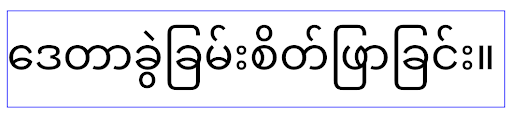 התנהגות
 elegantTextHeight באפליקציות שמטרגטות ל-Android
16 (רמת API 36), או באפליקציות שמטרגטות ל-Android 15 (רמת API 35) שלא
ביטלו את ברירת המחדל על ידי הגדרת המאפיין elegantTextHeight לערך false.פונקציונליות עיקרית
Android 16 (API ברמה 36) כוללת את השינויים הבאים, שמשנים או מרחיבים יכולות ליבה שונות של מערכת Android.
אופטימיזציה של תזמון פעולה בקצב קבוע
לפני הטירגוט ל-Android 16, אם scheduleAtFixedRate החמיץ ביצוע של משימה כי הוא לא היה במחזור חיים תקין של תהליך, כל הביצועים שהוחמצו מתבצעים באופן מיידי כשהאפליקציה חוזרת למחזור חיים תקין.
כשמטרגטים ל-Android 16, פעולה אחת שהוחמצה של scheduleAtFixedRate תושלם באופן מיידי כשהאפליקציה תחזור למחזור חיים תקין. שינוי ההתנהגות הזה צפוי לשפר את ביצועי האפליקציה. כדאי לבדוק את ההתנהגות הזו באפליקציה כדי לראות אם היא מושפעת.
אפשר גם לבדוק באמצעות מסגרת התאימות לאפליקציות ולהפעיל את הדגל STPE_SKIP_MULTIPLE_MISSED_PERIODIC_TASKS compat.
גורמי צורה של מכשירים
Android 16 (רמת API 36) כוללת את השינויים הבאים באפליקציות כשהן מוצגות במכשירים עם מסך גדול.
פריסות מותאמות
אפליקציות ל-Android פועלות עכשיו במגוון מכשירים (כמו טלפונים, טאבלטים, מכשירים מתקפלים, מחשבים, מכוניות וטלוויזיות) ובמצבי תצוגת חלונות במסכים גדולים (כמו מסך מפוצל וממשק מחשב). לכן, מפתחים צריכים ליצור אפליקציות ל-Android שמותאמות לכל גודל מסך וחלון, בלי קשר לכיוון המסך במכשיר. פרדיגמות כמו הגבלת כיוון המסך והגבלת שינוי הגודל כבר לא מתאימות לעולם של היום, שבו משתמשים במספר מכשירים.
התעלמות מהגבלות על כיוון, שינוי גודל ויחס גובה-רוחב
באפליקציות שמטרגטות ל-Android 16 (רמת API 36), ההגבלות על כיוון, שינוי גודל ויחס גובה-רוחב לא חלות יותר על מסכים עם רוחב מינימלי של 600dp ומעלה. האפליקציות ממלאות את חלון התצוגה, בלי קשר ליחס הגובה-רוחב או להעדפת הכיוון של המשתמש, ולא נעשה שימוש בבפורמט pillarbox.
השינוי הזה מציג התנהגות חדשה של הפלטפורמה. מערכת Android עוברת למודל שבו האפליקציות צריכות להתאים את עצמן לכיוונים, לגדלים של מסכים וליחסי גובה-רוחב שונים. כיוון מסך קבוע או שינוי גודל מוגבל מקשים על התאמת האפליקציה. כדי לספק את חוויית המשתמש הטובה ביותר, צריך להתאים את האפליקציה למצבים שונים.
אתם יכולים גם לבדוק את ההתנהגות הזו באמצעות מסגרת התאימות של האפליקציה ולהפעיל את דגל התאימות UNIVERSAL_RESIZABLE_BY_DEFAULT.
שינויים נפוצים בתוכנה שעלולים לגרום לכשלים
התעלמות מהגבלות על כיוון, שינוי גודל ויחס גובה-רוחב עלולה להשפיע על ממשק המשתמש של האפליקציה במכשירים מסוימים, במיוחד על רכיבים שנועדו לפריסות קטנות שמוגבלות לכיוון לאורך: לדוגמה, בעיות כמו פריסות מתוחות ואנימציות ורכיבים מחוץ למסך. הנחות לגבי יחס הגובה-רוחב או הכיוון עלולות לגרום לבעיות חזותיות באפליקציה. מידע נוסף על איך להימנע מבעיות כאלה ולשפר את יכולת ההתאמה של האפליקציה למצבים שונים.
כשמאפשרים סיבוב מכשיר, מתבצעות יותר יצירות מחדש של פעילויות, וזה עלול להוביל לאובדן מצב המשתמש אם הוא לא נשמר כראוי. במאמר שמירת מצבי ממשק המשתמש מוסבר איך לשמור אותם נכון.
פרטי ההטמעה
במכשירים עם מסך גדול במצב מסך מלא ובמצב ריבוי חלונות, המערכת מתעלמת ממאפייני המניפסט וממשקי ה-API של זמן הריצה הבאים:
screenOrientationresizableActivityminAspectRatiomaxAspectRatiosetRequestedOrientation()getRequestedOrientation()
המערכת מתעלמת מהערכים הבאים של screenOrientation, setRequestedOrientation() ו-getRequestedOrientation():
portraitreversePortraitsensorPortraituserPortraitlandscapereverseLandscapesensorLandscapeuserLandscape
לגבי שינוי הגודל של התצוגה, הערכים הבאים לא מושפעים: android:resizeableActivity="false", android:minAspectRatio ו-android:maxAspectRatio.
באפליקציות שמטרגטות ל-Android 16 (רמת API 36), המערכת מתעלמת כברירת מחדל מההגבלות של האפליקציה על כיוון, שינוי גודל ויחס גובה-רוחב במסכים גדולים. כל אפליקציה שלא מוכנה לגמרי יכולה לבטל זמנית את ההתנהגות הזו, וכתוצאה מכך היא תעבור למצב תאימות.
חריגים
ההגבלות של Android 16 על כיוון, שינוי גודל ויחס גובה-רוחב לא חלות במצבים הבאים:
- משחקים (על סמך הדגל
android:appCategory) - משתמשים שמביעים הסכמה מפורשת לפעולת ברירת המחדל של האפליקציה בהגדרות יחס הגובה-רוחב של המכשיר
- מסכים שקטנים מ-
sw600dp
ביטול זמני של ההצטרפות
כדי לבטל את ההסכמה לפעילות ספציפית, צריך להצהיר על המאפיין PROPERTY_COMPAT_ALLOW_RESTRICTED_RESIZABILITY במניפסט:
<activity ...>
  <property android:name="android.window.PROPERTY_COMPAT_ALLOW_RESTRICTED_RESIZABILITY" android:value="true" />
  ...
</activity>
אם יותר מדי חלקים באפליקציה לא מוכנים ל-Android 16, אפשר לבטל את ההסכמה באופן מלא על ידי החלת אותו מאפיין ברמת האפליקציה:
<application ...>
  <property android:name="android.window.PROPERTY_COMPAT_ALLOW_RESTRICTED_RESIZABILITY" android:value="true" />
</application>
בריאות וכושר
Android 16 (API ברמה 36) כוללת את השינויים הבאים שקשורים לנתוני בריאות וכושר.
הרשאות ל"בריאות וכושר"
באפליקציות שמטרגטות ל-Android 16 (רמת API 36) ומעלה, ההרשאות של BODY_SENSORS משתמשות בהרשאות מפורטות יותר ב-android.permissions.health, שגם Health Connect משתמש בהן. החל מ-Android 16, כל API שדרש בעבר את ההרשאה BODY_SENSORS או BODY_SENSORS_BACKGROUND דורש במקום זאת את ההרשאה התואמת android.permissions.health. השינוי משפיע על סוגי הנתונים, ממשקי ה-API וסוגי השירותים הבאים שפועלים בחזית:
-
HEART_RATE_BPMמ-Health Services ב-Wear OS -
Sensor.TYPE_HEART_RATEממנהל החיישנים של Android -
heartRateAccuracyו-heartRateBpmשלProtoLayoutב-Wear OS -
FOREGROUND_SERVICE_TYPE_HEALTH, שבה נדרשת ההרשאה המתאימהandroid.permission.healthבמקוםBODY_SENSORS
אם האפליקציה משתמשת בממשקי ה-API האלה, היא צריכה לבקש את ההרשאות הפרטניות המתאימות:
- כדי לנטר את הדופק, רמת החמצן בדם או טמפרטורת העור בזמן השימוש:
צריך לבקש את ההרשאה הפרטנית בקטע
android.permissions.health, למשלREAD_HEART_RATEבמקוםBODY_SENSORS. - כדי לקבל גישה לחיישן ברקע: צריך לבקש את ההרשאה
READ_HEALTH_DATA_IN_BACKGROUNDבמקוםBODY_SENSORS_BACKGROUND.
ההרשאות האלה זהות להרשאות ששומרות על הגישה לקריאת נתונים מ-Health Connect, מאגר הנתונים של Android לנתוני בריאות, כושר ואיכות חיים.
אפליקציות לנייד
אפליקציות לנייד שעוברות להשתמש בהרשאה READ_HEART_RATE ובהרשאות פרטניות אחרות חייבות גם להצהיר על פעילות כדי להציג את מדיניות הפרטיות של האפליקציה. זו אותה דרישה כמו ב-Health Connect.
קישוריות
Android 16 (רמת API 36) כוללת את השינויים הבאים במחסנית ה-Bluetooth כדי לשפר את הקישוריות עם מכשירים היקפיים.
כוונות חדשות לטיפול באובדן קישור ובשינויים בהצפנה
כחלק משיפור הטיפול באירועים של אובדן קישור, ב-Android 16 נוספו גם 2 כוונות חדשות כדי לספק לאפליקציות מודעוּת רבה יותר לאובדן קישור ולשינויים בהצפנה.
אפליקציות שמטרגטות את Android 16 יכולות עכשיו:
- לקבל כוונה מסוג
ACTION_KEY_MISSINGכשמתגלה אובדן של אבטחה מרחוק, כדי לספק משוב מפורט יותר מהמשתמשים ולבצע פעולות מתאימות. - לקבל כוונה מסוג
ACTION_ENCRYPTION_CHANGEבכל פעם שסטטוס ההצפנה של הקישור משתנה. זה כולל שינוי בסטטוס ההצפנה, שינוי באלגוריתם ההצפנה ושינוי בגודל מפתח ההצפנה. אפליקציות צריכות להתייחס לאיחוד כמשוחזר אם הקישור מוצפן בהצלחה לאחר קבלת הכוונהACTION_ENCRYPTION_CHANGE.
התאמה להטמעות שונות של יצרני ציוד מקורי (OEM)
גרסת Android 16 כוללת את הכוונות החדשות האלה, אבל ההטמעה והשידור שלהן עשויים להשתנות בהתאם ליצרני המכשירים השונים (OEM). כדי לוודא שהאפליקציה מספקת חוויה עקבית ואמינה בכל המכשירים, המפתחים צריכים לתכנן את הטיפול באובדן הקשר כך שיתאים בצורה חלקה לשינויים הפוטנציאליים האלה.
מומלץ להשתמש בהתנהגויות הבאות באפליקציות:
אם המערכת משדרת את הכוונה
ACTION_KEY_MISSING:המערכת תנתק את הקישור של ACL (Asynchronous Connection-Less), אבל פרטי הקישור של המכשיר יישמרו (כפי שמתואר כאן).
האפליקציה צריכה להשתמש בכוונה הזו כאות הראשי לזיהוי אובדן החיבור, ולהנחות את המשתמש לאשר שהמכשיר המרוחק נמצא בטווח לפני שהוא מתחיל למחוק את המכשיר או לבצע התאמה מחדש.
אם מכשיר מתנתק אחרי קבלת
ACTION_KEY_MISSING, האפליקציה צריכה להיזהר לפני שתנסה להתחבר מחדש, כי יכול להיות שהמכשיר כבר לא מקושר למערכת.אם הכוונה
ACTION_KEY_MISSINGלא משודרת:הקישור ל-ACL יישאר מחובר, ופרטי הקישור של המכשיר יוסרו על ידי המערכת, בדומה להתנהגות ב-Android 15.
בתרחיש הזה, האפליקציה צריכה להמשיך להשתמש במנגנונים הקיימים לטיפול באובדן אבטחה, כמו בגרסאות קודמות של Android, כדי לזהות אירועי אובדן אבטחה ולנהל אותם.
דרך חדשה להסיר חיבור Bluetooth
כל האפליקציות שמטרגטות את Android 16 יכולות עכשיו לבטל את ההתאמה של מכשירי Bluetooth באמצעות API ציבורי ב-CompanionDeviceManager. אם מכשיר נלווה מנוהל כשיוך CDM, האפליקציה יכולה להפעיל הסרה של קישור Bluetooth באמצעות ה-API החדש removeBond(int) במכשיר המשויך. האפליקציה יכולה לעקוב אחרי השינויים במצב החיבור על ידי האזנה לאירוע השידור של מכשיר ה-Bluetooth ACTION_BOND_STATE_CHANGED.
אבטחה
Android 16 (API ברמה 36) כוללת את השינויים הבאים שקשורים לאבטחה.
נעילת הגרסה של MediaStore
באפליקציות שמטרגטות ל-Android מגרסה 16 ואילך, הערך של MediaStore#getVersion() יהיה עכשיו ייחודי לכל אפליקציה. כך, מחריגים את המאפיינים המזהים ממחרוץ הגרסה כדי למנוע ניצול לרעה ושימוש בשיטות ליצירת טביעות אצבע. אפליקציות לא צריכות להניח דבר לגבי הפורמט של הגרסה הזו. האפליקציות כבר אמורות לטפל בשינויים בגרסאות כשמשתמשים ב-API הזה, וברוב המקרים לא צריך לשנות את ההתנהגות הנוכחית שלהן, אלא אם המפתח ניסה להסיק מידע נוסף מעבר להיקף המיועד של ה-API הזה.
כוונות בטוחות יותר
התכונה "אינטנטים בטוחים יותר" היא יוזמת אבטחה רב-שלבית שנועדה לשפר את האבטחה של מנגנון פתרון האינטנטים של Android. המטרה היא להגן על אפליקציות מפני פעולות זדוניות על ידי הוספת בדיקות במהלך עיבוד ה-Intent וסינון של Intent שלא עומדים בקריטריונים ספציפיים.
ב-Android 15, התכונה התמקדה באפליקציה השולחת. עכשיו, ב-Android 16, השליטה עוברת לאפליקציה המקבלת, ומאפשרת למפתחים להביע הסכמה לפתרון Intent מחמיר באמצעות קובץ המניפסט של האפליקציה.
אנחנו מיישמים שני שינויים עיקריים:
אובייקטים מפורשים מסוג Intent חייבים להתאים למסנן ה-Intent של רכיב היעד: אם אובייקט Intent מטרגט באופן מפורש רכיב מסוים, הוא צריך להתאים למסנן ה-Intent של הרכיב הזה.
אובייקטים מסוג Intent בלי פעולה לא יכולים להתאים לאף מסנן Intent: אובייקטים מסוג Intent שלא צוינה בהם פעולה לא אמורים להתאים לאף מסנן Intent.
השינויים האלה חלים רק כשמעורבות כמה אפליקציות, והם לא משפיעים על הטיפול ב-Intent באפליקציה אחת.
השפעה
הצטרפות היא תכונה שמשמעותה שהמפתחים צריכים להפעיל אותה באופן מפורש בקובץ המניפסט של האפליקציה כדי שהיא תיכנס לתוקף. לכן, התכונה תשפיע רק על אפליקציות שהמפתחים שלהן:
- מכירים את התכונה "כוונות בטוחות יותר" ואת היתרונות שלה.
- לבחור באופן פעיל לשלב באפליקציות שלהם שיטות מחמירות יותר לטיפול ב-Intent.
הגישה הזו, שמחייבת הבעת הסכמה, מצמצמת את הסיכון לפגיעה באפליקציות קיימות שעשויות להסתמך על ההתנהגות הנוכחית של פתרון ה-Intent, שהיא פחות מאובטחת.
למרות שההשפעה הראשונית ב-Android 16 עשויה להיות מוגבלת, ליוזמה "כוונות בטוחות יותר" יש מפת דרכים להשפעה רחבה יותר בגרסאות עתידיות של Android. התוכנית היא שבסופו של דבר, פתרון Intent מחמיר יהיה פעולת ברירת המחדל.
התכונה "אינטנטים בטוחים יותר" יכולה לשפר באופן משמעותי את האבטחה של הסביבה העסקית של Android, כי היא מקשה על אפליקציות זדוניות לנצל נקודות חולשה במנגנון של פתרון האינטנטים.
עם זאת, צריך לנהל בקפידה את המעבר לביטול ההצטרפות ולאכיפה חובה כדי לטפל בבעיות תאימות פוטנציאליות עם אפליקציות קיימות.
הטמעה
המפתחים צריכים להפעיל באופן מפורש התאמת Intent מחמירה יותר באמצעות המאפיין intentMatchingFlags בקובץ המניפסט של האפליקציה.
הנה דוגמה שבה התכונה מופעלת לכל האפליקציה, אבל מושבתת במקלט:
<application android:intentMatchingFlags="enforceIntentFilter">
    <receiver android:name=".MyBroadcastReceiver" android:exported="true" android:intentMatchingFlags="none">
        <intent-filter>
            <action android:name="com.example.MY_CUSTOM_ACTION" />
        </intent-filter>
        <intent-filter>
            <action android:name="com.example.MY_ANOTHER_CUSTOM_ACTION" />
        </intent-filter>
    </receiver>
</application>
מידע נוסף על הדגלים הנתמכים:
| שם ההתרעה | תיאור |
|---|---|
| enforceIntentFilter | אכיפת התאמה מחמירה יותר של כוונות נכנסות |
| ללא | השבתה של כל כללי ההתאמה המיוחדים ל-Intent נכנסים. כשמציינים כמה דגלים, ערכים סותרים נפתרים על ידי מתן עדיפות לדגל "none" |
| allowNullAction | ההגדרה הזו מקלה על כללי ההתאמה ומאפשרת להתאים כוונות בלי פעולה. צריך להשתמש בדגל הזה בשילוב עם enforceIntentFilter כדי להשיג התנהגות ספציפית |
בדיקה וניפוי באגים
כשהאכיפה פעילה, האפליקציות אמורות לפעול בצורה תקינה אם הגורם שקורא ל-Intent אכלס את ה-Intent בצורה נכונה.
עם זאת, כוונות חסומות יפעילו הודעות אזהרה ביומן כמו "Intent does not match component's intent filter:" ו-"Access blocked:" עם התג "PackageManager.". זה מצביע על בעיה פוטנציאלית שעלולה להשפיע על האפליקציה ודורשת התייחסות.
מסנן Logcat:
tag=:PackageManager & (message:"Intent does not match component's intent filter:" | message: "Access blocked:")
סינון קריאות מערכת של GPU
כדי להקשיח את פני השטח של המעבד הגרפי של Mali, פקודות IOCTL של המעבד הגרפי של Mali שהוצאו משימוש או שמיועדות רק לפיתוח של המעבד הגרפי נחסמו בגרסאות ייצור. בנוסף, פקודות IOCTL שמשמשות ליצירת פרופילים של GPU הוגבלו לתהליך המעטפת או לאפליקציות שניתן לבצע בהן ניפוי באגים. לפרטים נוספים על המדיניות ברמת הפלטפורמה, אפשר לעיין בעדכון של מרכז המודעות.
השינוי הזה מתבצע במכשירי Pixel שמשתמשים ב-Mali GPU (Pixel 6-9). חברת Arm סיפקה סיווג רשמי של פקודות ה-IOCTL שלה בDocumentation/ioctl-categories.rst של גרסה r54p2. הרשימה הזו תמשיך להתעדכן בגרסאות עתידיות של מנהלי ההתקנים.
השינוי הזה לא משפיע על ממשקי API נתמכים לגרפיקה (כולל Vulkan ו-OpenGL), והוא לא צפוי להשפיע על מפתחים או על אפליקציות קיימות. כלים ליצירת פרופילים של GPU, כמו Streamline Performance Analyzer ו-Android GPU Inspector, לא יושפעו.
בדיקה
אם מופיעה דחייה של SELinux שדומה לדחייה הבאה, סביר להניח שהאפליקציה שלכם הושפעה מהשינוי הזה:
06-30 10:47:18.617 20360 20360 W roidJUnitRunner: type=1400 audit(0.0:85): avc:  denied  { ioctl }
for  path="/dev/mali0" dev="tmpfs" ino=1188 ioctlcmd=0x8023
scontext=u:r:untrusted_app_25:s0:c512,c768 tcontext=u:object_r:gpu_device:s0 tclass=chr_file
permissive=0 app=com.google.android.selinux.pts
אם האפליקציה צריכה להשתמש ב-IOCTL חסומים, צריך לדווח על באג ולהקצות אותו לכתובת android-partner-security@google.com.
שאלות נפוצות
האם השינוי במדיניות חל על כל יצרני הציוד המקורי (OEM)? השינוי הזה יהיה זמין לכל יצרני הציוד המקורי (OEM) שירצו להשתמש בשיטת ההקשחה הזו, אבל הם יצטרכו להביע הסכמה כדי להשתמש בה. הוראות להטמעת השינוי מפורטות במסמכי התיעוד בנושא הטמעה.
האם חובה לבצע שינויים בבסיס הקוד של ה-OEM כדי להטמיע את זה, או שזה מגיע עם גרסת AOSP חדשה כברירת מחדל? השינוי ברמת הפלטפורמה יגיע עם גרסת AOSP חדשה כברירת מחדל. ספקים יכולים להצטרף לשינוי הזה בבסיס הקוד שלהם אם הם רוצים להחיל אותו.
האם מרכזי ה-SoC אחראים לעדכון רשימת ה-IOCTL? לדוגמה, אם במכשיר שלי יש GPU מסוג ARM Mali, האם אצטרך לפנות ל-ARM כדי לבצע את השינויים? מערכות על שבב (SoC) נפרדות צריכות לעדכן את רשימות ה-IOCTL שלהן לכל מכשיר עם השקת מנהל ההתקן. לדוגמה, ARM תעדכן את רשימת ה-IOCTL שפורסמה על ידה בעקבות עדכוני מנהלי התקנים. עם זאת, יצרני ציוד מקורי (OEM) צריכים לוודא שהם משלבים את העדכונים ב-SEPolicy שלהם, ומוסיפים לרשימות את כל פקודות ה-IOCTL המותאמות אישית שנבחרו, לפי הצורך.
האם השינוי הזה חל באופן אוטומטי על כל מכשירי Pixel בשוק, או שנדרשת פעולה של המשתמש כדי להפעיל משהו כדי להחיל את השינוי הזה? השינוי הזה חל על כל מכשירי Pixel בשוק שמשתמשים ב-Mali GPU (Pixel 6-9). המשתמשים לא צריכים לעשות שום דבר כדי להחיל את השינוי הזה.
האם השימוש במדיניות הזו ישפיע על הביצועים של מנהל ההתקן של הליבה? המדיניות הזו נבדקה ב-Mali GPU באמצעות GFXBench, ולא נצפה שינוי משמעותי בביצועי ה-GPU.
האם רשימת ה-IOCTL צריכה להתאים לגרסאות הנוכחיות של מרחב המשתמשים ושל מנהל ההתקן של הליבה? כן, רשימת ה-IOCTL המותרים חייבת להיות מסונכרנת עם ה-IOCTL שנתמכים גם על ידי מנהלי ההתקנים של מרחב המשתמש וגם על ידי מנהלי ההתקנים של הליבה. אם מעדכנים את ה-IOCTL במרחב המשתמש או במנהל ההתקן של הליבה, צריך לעדכן את רשימת ה-IOCTL של SEPolicy בהתאם.
ARM סיווגה את ה-IOCTL כ"מוגבלים" או כ"אינסטרומנטציה", אבל אנחנו רוצים להשתמש בחלק מהם בתרחישי שימוש בסביבת הייצור, או לדחות אחרים. יצרני ציוד מקורי (OEM) או מערכות על שבב (SoC) אחראים להחליט איך לסווג את פקודות ה-IOCTL שבהן הם משתמשים, על סמך ההגדרות של ספריות Mali במרחב המשתמש שלהם. אפשר להשתמש ברשימה של ARM כדי להחליט על כך, אבל לכל OEM או SoC יכול להיות תרחיש שימוש שונה.
פרטיות
Android 16 (API ברמה 36) כוללת את השינויים הבאים שקשורים לפרטיות.
הרשאת גישה לרשת המקומית
כל אפליקציה עם הרשאת INTERNET יכולה לגשת למכשירים ב-LAN.
אומנם זה מאפשר להן להתחבר בקלות למכשירים האלה, אבל יש לזה השלכות על הפרטיות. בין היתר זה יוצר "טביעת אצבע" דיגיטלית של המשתמש והופך את האפליקציות לשרת proxy לזיהוי מיקום.
מטרת הפרויקט "אמצעי הגנה על הרשת המקומית" היא להגן על פרטיות המשתמשים על ידי הגבלת הגישה לרשת המקומית באמצעות הרשאה חדשה בתחילת ההפעלה.
תוכנית ההשקה
השינוי הזה יתפרס בשתי גרסאות, 25Q2 ו-26Q2 בהתאמה. חשוב מאוד שהמפתחים יפעלו לפי ההנחיות האלה ברבעון השני של 2025 וישתפו משוב, כי אמצעי ההגנה האלה ייאכפו בגרסה מאוחרת יותר של Android. בנוסף, הם יצטרכו לעדכן תרחישים שתלויים בגישה משתמעת לרשת המקומית, לפי ההנחיות הבאות, ולהתכונן למצב שבו המשתמשים ידחו ויבטלו את ההרשאה החדשה.
השפעה
בשלב הנוכחי, LNP היא תכונה שצריך להביע הסכמה לשימוש בה, כלומר היא תשפיע רק על האפליקציות שהמפתחים שלהן הביעו הסכמה לשימוש בה. המטרה של שלב ההצטרפות היא לאפשר למפתחי אפליקציות להבין אילו חלקים באפליקציה שלהם תלויים בגישה משתמעת לרשת המקומית, כדי שיוכלו להתכונן להגנה על ההרשאות שלהם בגרסה הבאה.
האפליקציות יושפעו אם הן ניגשות לרשת המקומית של המשתמש באמצעות:
- שימוש ישיר או שימוש בספרייה של שקעים גולמיים בכתובות של רשתות מקומיות (למשל, פרוטוקול זיהוי שירותים mDNS או SSDP)
- שימוש במחלקות ברמת המסגרת שניגשות לרשת המקומית (למשל, NsdManager)
תעבורת נתונים אל כתובת של רשת מקומית וממנה דורשת הרשאת גישה לרשת המקומית. בטבלה הבאה מפורטים כמה מקרים נפוצים:
| פעולת רשת ברמה נמוכה של האפליקציה | נדרשת הרשאת גישה לרשת המקומית |
|---|---|
| יצירת חיבור TCP יוצא | כן |
| קבלת חיבורי TCP נכנסים | כן |
| שליחת UDP מסוג Unicast, Multicast, Broadcast | כן |
| קבלת שידור UDP נכנס מסוג Unicast, Multicast או Broadcast | כן |
ההגבלות האלה מוטמעות עמוק במקבץ הרשת (network stack), ולכן הן חלות על כל ממשקי ה-API של הרשת. זה כולל שקעים שנוצרו בקוד מקורי או מנוהל, ספריות רשת כמו Cronet ו-OkHttp, וכל ממשקי ה-API שמוטמעים מעליהם. כדי לפתור שירותים ברשת המקומית (כלומר, שירותים עם הסיומת .local), צריך הרשאה לרשת המקומית.
חריגים לכללים שלמעלה:
- אם שרת ה-DNS של המכשיר נמצא ברשת מקומית, התנועה אליו או ממנו (ביציאה 53) לא דורשת הרשאת גישה לרשת המקומית.
- אפליקציות שמשתמשות בבורר הפלט כבורר בתוך האפליקציה לא יצטרכו הרשאות לרשת המקומית (הנחיות נוספות יפורסמו ברבעון הרביעי של 2025).
הנחיות למפתחים (הבעת הסכמה)
כדי להביע הסכמה להגבלות על הרשת המקומית:
- צורבים במכשיר גרסה עם 25Q2 Beta 3 ואילך.
- מתקינים את האפליקציה שרוצים לבדוק.
מפעילים או משביתים את הדגל Appcompat ב-adb:
adb shell am compat enable RESTRICT_LOCAL_NETWORK <package_name>הפעלה מחדש של המכשיר
עכשיו הגישה של האפליקציה לרשת המקומית מוגבלת, וכל ניסיון לגשת לרשת המקומית יוביל לשגיאות סוקט. אם אתם משתמשים בממשקי API שמבצעים פעולות ברשת המקומית מחוץ לתהליך של האפליקציה (למשל: NsdManager), הם לא יושפעו במהלך שלב ההצטרפות.
כדי לשחזר את הגישה, צריך לתת לאפליקציה הרשאה לNEARBY_WIFI_DEVICES.
- מוודאים שהאפליקציה מצהירה על ההרשאה
NEARBY_WIFI_DEVICESבמניפסט שלה. - עוברים אל הגדרות > אפליקציות > [שם האפליקציה] > הרשאות > מכשירים בקרבת מקום > אישור.
עכשיו הגישה של האפליקציה לרשת המקומית אמורה לחזור, וכל התרחישים אמורים לפעול כמו שפעלו לפני שהאפליקציה צורפה.
כשהאכיפה של ההגנה על הרשת המקומית תתחיל, כך תושפע התנועה ברשת של האפליקציה.
| הרשאה | בקשת LAN יוצאת | בקשה יוצאת או נכנסת באינטרנט | בקשת LAN נכנסת |
|---|---|---|---|
| הוענקה | Microsoft Works | Microsoft Works | Microsoft Works |
| לא ניתנה הרשאה | פספוסים | Microsoft Works | פספוסים |
משתמשים בפקודה הבאה כדי להשבית את הדגל App-Compat:
adb shell am compat disable RESTRICT_LOCAL_NETWORK <package_name>
שגיאות
שגיאות שנובעות מההגבלות האלה יוחזרו לשקע הקורא בכל פעם שהוא יפעיל שליחה או וריאנט של שליחה לכתובת רשת מקומית.
שגיאות לדוגמה:
sendto failed: EPERM (Operation not permitted)

sendto failed: ECONNABORTED (Operation not permitted)
הגדרת הרשת המקומית
רשת מקומית בפרויקט הזה היא רשת IP שמשתמשת בממשק רשת עם יכולת שידור, כמו Wi-Fi או אתרנט, אבל לא כוללת חיבורים סלולריים (WWAN) או חיבורים דרך VPN.
אלה הרשתות המקומיות:
IPv4:
- 169.254.0.0/16 // Link Local
- 100.64.0.0/10 // CGNAT
- 10.0.0.0/8 // RFC1918
- 172.16.0.0/12 // RFC1918
- 192.168.0.0/16 // RFC1918
IPv6:
- קישור מקומי
- מסלולים שמחוברים ישירות
- רשתות קצה כמו Thread
- Multiple-subnets (TBD)
בנוסף, גם כתובות multicast (224.0.0.0/4, ff00::/8) וגם כתובת השידור של IPv4 (255.255.255.255) מסווגות ככתובות של רשת מקומית.
תמונות בבעלות האפליקציה
כשמוצגת בקשה להענקת הרשאות גישה לתמונות ולסרטונים מאפליקציה שתואמת ל-SDK מגרסה 36 ואילך במכשירים עם Android מגרסה 16 ואילך, משתמשים שבוחרים להגביל את הגישה למדיה שנבחרה יראו את כל התמונות שבבעלות האפליקציה שנבחרו מראש בבורר התמונות. המשתמשים יכולים לבטל את הבחירה של כל אחד מהפריטים שנבחרו מראש, וכך לבטל את הגישה של האפליקציה לתמונות ולסרטונים האלה.