

Seperti rilis sebelumnya, Android 15 menyertakan perubahan perilaku yang mungkin memengaruhi aplikasi Anda. Perubahan perilaku berikut ini berlaku khusus bagi aplikasi yang menargetkan Android 15 atau yang lebih tinggi. Jika aplikasi Anda menargetkan Android 15 atau yang lebih tinggi, Anda harus memodifikasi aplikasi untuk mendukung perilaku ini dengan benar, jika berlaku.
Pastikan Anda juga meninjau daftar perubahan perilaku yang memengaruhi semua aplikasi yang berjalan di Android 15, terlepas dari targetSdkVersion aplikasi Anda.
Fungsi inti
Android 15 mengubah atau memperluas berbagai kemampuan inti sistem Android.
Perubahan pada layanan latar depan
Kami melakukan perubahan berikut pada layanan latar depan dengan Android 15.
- Perilaku waktu tunggu layanan latar depan sinkronisasi data
- Jenis layanan latar depan pemrosesan media baru
- Pembatasan pada penerima siaran
BOOT_COMPLETEDyang meluncurkan layanan latar depan - Pembatasan untuk memulai layanan latar depan saat aplikasi memiliki izin
SYSTEM_ALERT_WINDOW
Perilaku waktu tunggu layanan latar depan sinkronisasi data
Android 15 memperkenalkan perilaku waktu tunggu baru ke dataSync untuk aplikasi yang menargetkan
Android 15 (API level 35) atau yang lebih tinggi. Perilaku ini juga berlaku untuk
jenis layanan latar depan mediaProcessing baru.
Sistem mengizinkan layanan dataSync aplikasi berjalan selama total 6 jam
dalam periode 24 jam, setelah itu sistem akan memanggil metode
Service.onTimeout(int, int) layanan yang berjalan (diperkenalkan di Android
15). Saat ini, layanan memiliki waktu beberapa detik untuk memanggil
Service.stopSelf(). Saat Service.onTimeout() dipanggil, layanan tidak lagi dianggap sebagai layanan latar depan. Jika layanan tidak
memanggil Service.stopSelf(), sistem akan menampilkan pengecualian internal. Pengecualian
akan dicatat ke dalam log di Logcat dengan pesan berikut:
Fatal Exception: android.app.RemoteServiceException: "A foreground service of
type dataSync did not stop within its timeout: [component name]"
Untuk menghindari masalah terkait perubahan perilaku ini, Anda dapat melakukan satu atau beberapa hal berikut:
- Minta layanan Anda menerapkan metode
Service.onTimeout(int, int)baru. Saat aplikasi Anda menerima callback, pastikan untuk memanggilstopSelf()dalam beberapa detik. (Jika Anda tidak segera menghentikan aplikasi, sistem akan menghasilkan kegagalan.) - Pastikan layanan
dataSyncaplikasi Anda tidak berjalan selama lebih dari 6 jam dalam periode 24 jam (kecuali jika pengguna berinteraksi dengan aplikasi, mereset timer). - Hanya mulai layanan latar depan
dataSyncsebagai hasil dari interaksi pengguna langsung; karena aplikasi Anda berada di latar depan saat layanan dimulai, layanan Anda memiliki waktu enam jam penuh setelah aplikasi beralih ke latar belakang. - Sebagai ganti menggunakan layanan latar depan
dataSync, gunakan API alternatif.
Jika layanan latar depan dataSync aplikasi Anda telah berjalan selama 6 jam dalam 24
jam terakhir, Anda tidak dapat memulai layanan latar depan dataSync lain kecuali pengguna
telah memindahkan aplikasi Anda ke latar depan (yang mereset timer). Jika Anda mencoba
memulai layanan latar depan dataSync lainnya, sistem akan menampilkan
ForegroundServiceStartNotAllowedException
dengan pesan error seperti "Batas waktu sudah habis untuk jenis layanan latar depan
dataSync".
Pengujian
Untuk menguji perilaku aplikasi, Anda dapat mengaktifkan waktu tunggu sinkronisasi data meskipun aplikasi
tidak menargetkan Android 15 (asalkan aplikasi berjalan di perangkat
Android 15). Untuk mengaktifkan waktu tunggu, jalankan perintah adb berikut:
adb shell am compat enable FGS_INTRODUCE_TIME_LIMITS your-package-name
Anda juga dapat menyesuaikan periode waktu tunggu untuk mempermudah pengujian perilaku
aplikasi saat batas tercapai. Untuk menetapkan periode waktu tunggu baru, jalankan perintah adb berikut:
adb shell device_config put activity_manager data_sync_fgs_timeout_duration duration-in-milliseconds
Jenis layanan latar depan pemrosesan media baru
Android 15 memperkenalkan jenis layanan latar depan baru, mediaProcessing. Jenis
layanan ini sesuai untuk operasi seperti melakukan transcoding file media. Misalnya, aplikasi media mungkin mendownload file audio dan perlu mengonversinya ke
format lain sebelum memutarnya. Anda dapat menggunakan layanan latar depan
mediaProcessing untuk memastikan konversi berlanjut bahkan saat aplikasi berada di
latar belakang.
Sistem mengizinkan layanan mediaProcessing aplikasi berjalan selama total 6
jam dalam periode 24 jam, setelah itu sistem akan memanggil metode
Service.onTimeout(int, int) layanan yang berjalan (diperkenalkan di Android
15). Saat ini, layanan memiliki waktu beberapa detik untuk memanggil
Service.stopSelf(). Jika layanan tidak
memanggil Service.stopSelf(), sistem akan menampilkan pengecualian internal. Pengecualian
akan dicatat ke dalam log di Logcat dengan pesan berikut:
Fatal Exception: android.app.RemoteServiceException: "A foreground service of
type mediaProcessing did not stop within its timeout: [component name]"
Untuk menghindari pengecualian, Anda dapat melakukan salah satu hal berikut:
- Minta layanan Anda menerapkan metode
Service.onTimeout(int, int)baru. Saat aplikasi Anda menerima callback, pastikan untuk memanggilstopSelf()dalam beberapa detik. (Jika Anda tidak segera menghentikan aplikasi, sistem akan menghasilkan kegagalan.) - Pastikan layanan
mediaProcessingaplikasi Anda tidak berjalan selama lebih dari jumlah 6 jam dalam periode 24 jam (kecuali jika pengguna berinteraksi dengan aplikasi, mereset timer). - Hanya mulai layanan latar depan
mediaProcessingsebagai hasil dari interaksi pengguna langsung; karena aplikasi Anda berada di latar depan saat layanan dimulai, layanan Anda memiliki waktu enam jam penuh setelah aplikasi beralih ke latar belakang. - Daripada menggunakan layanan latar depan
mediaProcessing, gunakan API alternatif, seperti WorkManager.
Jika layanan latar depan mediaProcessing aplikasi Anda telah berjalan selama 6 jam dalam
24 terakhir, Anda tidak dapat memulai layanan latar depan mediaProcessing lainnya kecuali jika
pengguna telah memindahkan aplikasi Anda ke latar depan (yang akan mereset timer). Jika Anda
mencoba memulai layanan latar depan mediaProcessing lainnya, sistem akan menampilkan
ForegroundServiceStartNotAllowedException
dengan pesan error seperti "Batas waktu sudah habis untuk jenis layanan
latar depan mediaProcessing".
Untuk informasi selengkapnya tentang jenis layanan mediaProcessing, lihat Perubahan pada
jenis layanan latar depan untuk Android 15: Pemrosesan media.
Pengujian
Untuk menguji perilaku aplikasi, Anda dapat mengaktifkan waktu tunggu pemrosesan media meskipun
aplikasi tidak menargetkan Android 15 (selama aplikasi berjalan di
perangkat Android 15). Untuk mengaktifkan waktu tunggu, jalankan perintah adb berikut:
adb shell am compat enable FGS_INTRODUCE_TIME_LIMITS your-package-name
Anda juga dapat menyesuaikan periode waktu tunggu untuk mempermudah pengujian perilaku
aplikasi saat batas tercapai. Untuk menetapkan periode waktu tunggu baru, jalankan perintah adb berikut:
adb shell device_config put activity_manager media_processing_fgs_timeout_duration duration-in-milliseconds
Pembatasan pada penerima siaran BOOT_COMPLETED yang meluncurkan layanan latar depan
Ada batasan baru pada penerima siaran BOOT_COMPLETED yang meluncurkan
layanan latar depan. Penerima BOOT_COMPLETED tidak diizinkan untuk meluncurkan
jenis layanan latar depan berikut:
dataSynccameramediaPlaybackphoneCallmediaProjectionmicrophone(pembatasan ini telah diterapkan selamamicrophonesejak Android 14)
Jika penerima BOOT_COMPLETED mencoba meluncurkan salah satu jenis layanan latar depan
tersebut, sistem akan menampilkan ForegroundServiceStartNotAllowedException.
Pengujian
Untuk menguji perilaku aplikasi, Anda dapat mengaktifkan pembatasan baru ini bahkan jika
aplikasi tidak menargetkan Android 15 (selama aplikasi tersebut berjalan di Android 15
perangkat). Jalankan perintah adb berikut:
adb shell am compat enable FGS_BOOT_COMPLETED_RESTRICTIONS your-package-name
Untuk mengirim siaran BOOT_COMPLETED tanpa memulai ulang perangkat,
jalankan perintah adb berikut:
adb shell am broadcast -a android.intent.action.BOOT_COMPLETED your-package-name
Pembatasan untuk memulai layanan latar depan saat aplikasi memiliki izin SYSTEM_ALERT_WINDOW
Sebelumnya, jika memiliki izin SYSTEM_ALERT_WINDOW, aplikasi dapat meluncurkan
layanan latar depan meskipun aplikasi saat ini berada di latar belakang (seperti
yang dibahas dalam pengecualian dari pembatasan mulai latar belakang).
Jika aplikasi menargetkan Android 15, pengecualian ini kini lebih sempit. Aplikasi kini harus
memiliki izin SYSTEM_ALERT_WINDOW dan juga memiliki jendela overlay
yang terlihat. Artinya, aplikasi harus meluncurkan
jendela TYPE_APPLICATION_OVERLAY terlebih dahulu dan jendela
harus terlihat sebelum Anda memulai layanan latar depan.
Jika aplikasi Anda mencoba memulai layanan latar depan dari latar belakang tanpa
memenuhi persyaratan baru ini (dan tidak memiliki pengecualian lain), sistem
akan menampilkan ForegroundServiceStartNotAllowedException.
Jika aplikasi Anda mendeklarasikan izin SYSTEM_ALERT_WINDOW
dan meluncurkan layanan latar depan dari latar belakang, aplikasi tersebut mungkin akan terpengaruh oleh
perubahan ini. Jika aplikasi Anda mendapatkan ForegroundServiceStartNotAllowedException, periksa
urutan operasi aplikasi dan pastikan aplikasi Anda sudah memiliki jendela
overlay yang aktif sebelum mencoba memulai layanan latar depan dari
latar belakang. Anda dapat memeriksa apakah jendela overlay saat ini terlihat
dengan memanggil View.getWindowVisibility(), atau Anda
dapat mengganti View.onWindowVisibilityChanged()
untuk mendapatkan notifikasi setiap kali visibilitas berubah.
Pengujian
Untuk menguji perilaku aplikasi, Anda dapat mengaktifkan pembatasan baru ini meskipun
aplikasi tidak menargetkan Android 15 (selama aplikasi berjalan di perangkat
Android 15). Untuk mengaktifkan pembatasan baru ini saat memulai layanan latar depan
dari latar belakang, jalankan perintah adb berikut:
adb shell am compat enable FGS_SAW_RESTRICTIONS your-package-name
Perubahan pada waktu aplikasi dapat mengubah status global mode Jangan Ganggu
Aplikasi yang menargetkan Android 15 (API level 35) dan yang lebih tinggi tidak dapat lagi mengubah
status atau kebijakan global Jangan Ganggu (DND) di perangkat (baik dengan mengubah
setelan pengguna, atau menonaktifkan mode DND). Sebagai gantinya, aplikasi harus berkontribusi pada
AutomaticZenRule, yang digabungkan sistem menjadi kebijakan global dengan
skema kebijakan paling ketat yang ada. Panggilan ke API yang ada yang
sebelumnya memengaruhi status global (setInterruptionFilter,
setNotificationPolicy) menghasilkan pembuatan atau pembaruan AutomaticZenRule implisit, yang diaktifkan dan dinonaktifkan bergantung pada siklus panggilan
panggilan API tersebut.
Perhatikan bahwa perubahan ini hanya memengaruhi perilaku yang dapat diamati jika aplikasi memanggil
setInterruptionFilter(INTERRUPTION_FILTER_ALL) dan mengharapkan panggilan tersebut untuk
menonaktifkan AutomaticZenRule yang sebelumnya diaktifkan oleh pemiliknya.
Perubahan API OpenJDK
Android 15 melanjutkan pekerjaan memuat ulang library inti Android agar selaras dengan fitur dalam rilis OpenJDK LTS terbaru.
Beberapa perubahan ini dapat memengaruhi kompatibilitas aplikasi untuk aplikasi yang menargetkan Android 15 (level API 35):
Perubahan pada API pemformatan string: Validasi indeks argumen, flag, lebar, dan presisi kini lebih ketat saat menggunakan API
String.format()danFormatter.format()berikut:String.format(String, Object[])String.format(Locale, String, Object[])Formatter.format(String, Object[])Formatter.format(Locale, String, Object[])
Misalnya, pengecualian berikut terjadi saat indeks argumen 0 digunakan (
%0dalam string format):IllegalFormatArgumentIndexException: Illegal format argument index = 0Dalam hal ini, masalah dapat diperbaiki dengan menggunakan indeks argumen 1 (
%1dalam string format).Perubahan pada jenis komponen
Arrays.asList(...).toArray(): Saat menggunakanArrays.asList(...).toArray(), jenis komponen array yang dihasilkan sekarang adalahObject—bukan jenis elemen array yang mendasarinya. Jadi, kode berikut akan memunculkanClassCastException:String[] elements = (String[]) Arrays.asList("one", "two").toArray();Untuk kasus ini, guna mempertahankan
Stringsebagai jenis komponen dalam array yang dihasilkan, Anda dapat menggunakanCollection.toArray(Object[]):String[] elements = Arrays.asList("two", "one").toArray(new String[0]);Perubahan pada penanganan kode bahasa: Saat menggunakan
LocaleAPI, kode bahasa untuk Ibrani, Yiddish, dan Indonesia tidak lagi dikonversi ke bentuk yang sudah tidak digunakan (Ibrani:iw, Yiddish:ji, dan Indonesia:in). Saat menentukan kode bahasa untuk salah satu lokalitas ini, gunakan kode dari ISO 639-1 (Ibrani:he, Yiddish:yi, dan Indonesia:id).Perubahan pada urutan bilangan bulat acak: Setelah perubahan yang dilakukan di https://bugs.openjdk.org/browse/JDK-8301574, metode
Random.ints()berikut kini menampilkan urutan angka yang berbeda dengan metodeRandom.nextInt():Umumnya, perubahan ini tidak akan menyebabkan perilaku yang merusak aplikasi, tetapi kode Anda tidak boleh mengharapkan urutan yang dihasilkan dari metode
Random.ints()agar cocok denganRandom.nextInt().
API SequencedCollection baru dapat memengaruhi kompatibilitas aplikasi Anda
setelah Anda mengupdate compileSdk dalam konfigurasi build aplikasi untuk menggunakan
Android 15 (level API 35):
Konflik dengan fungsi ekstensi
MutableList.removeFirst()danMutableList.removeLast()dikotlin-stdlibJenis
Listdi Java dipetakan ke jenisMutableListdi Kotlin. Karena APIList.removeFirst()danList.removeLast()telah diperkenalkan di Android 15 (level API 35), compiler Kotlin menyelesaikan panggilan fungsi, misalnyalist.removeFirst(), secara statis ke APIListbaru, bukan ke fungsi ekstensi dikotlin-stdlib.Jika aplikasi dikompilasi ulang dengan
compileSdkditetapkan ke35danminSdkditetapkan ke34atau lebih rendah, lalu aplikasi dijalankan di Android 14 dan yang lebih rendah, error runtime akan muncul:java.lang.NoSuchMethodError: No virtual method removeFirst()Ljava/lang/Object; in class Ljava/util/ArrayList;Opsi lint
NewApiyang ada di Plugin Android Gradle dapat mendeteksi penggunaan API baru ini../gradlew lintMainActivity.kt:41: Error: Call requires API level 35 (current min is 34): java.util.List#removeFirst [NewApi] list.removeFirst()Untuk memperbaiki pengecualian runtime dan error lint, panggilan fungsi
removeFirst()danremoveLast()dapat diganti denganremoveAt(0)danremoveAt(list.lastIndex)masing-masing di Kotlin. Jika Anda menggunakan Android Studio Ladybug | 2024.1.3 atau yang lebih tinggi, opsi ini juga menyediakan opsi perbaikan cepat untuk error ini.Pertimbangkan untuk menghapus
@SuppressLint("NewApi")danlintOptions { disable 'NewApi' }jika opsi lint telah dinonaktifkan.Konflik dengan metode lain di Java
Metode baru telah ditambahkan ke jenis yang ada, misalnya,
ListdanDeque. Metode baru ini mungkin tidak kompatibel dengan metode yang memiliki nama dan jenis argumen yang sama di antarmuka dan class lainnya. Jika terjadi tabrakan tanda tangan metode dengan ketidakcocokan, compilerjavacakan menghasilkan error waktu build. Contoh:Contoh error 1:
javac MyList.javaMyList.java:135: error: removeLast() in MyList cannot implement removeLast() in List public void removeLast() { ^ return type void is not compatible with Object where E is a type-variable: E extends Object declared in interface ListContoh error 2:
javac MyList.javaMyList.java:7: error: types Deque<Object> and List<Object> are incompatible; public class MyList implements List<Object>, Deque<Object> { both define reversed(), but with unrelated return types 1 errorContoh error 3:
javac MyList.javaMyList.java:43: error: types List<E#1> and MyInterface<E#2> are incompatible; public static class MyList implements List<Object>, MyInterface<Object> { class MyList inherits unrelated defaults for getFirst() from types List and MyInterface where E#1,E#2 are type-variables: E#1 extends Object declared in interface List E#2 extends Object declared in interface MyInterface 1 errorUntuk memperbaiki error build ini, class yang mengimplementasikan antarmuka ini harus mengganti metode dengan jenis nilai yang ditampilkan yang kompatibel. Contoh:
@Override
public Object getFirst() {
    return List.super.getFirst();
}
Keamanan
Android 15 menyertakan perubahan yang meningkatkan keamanan sistem untuk membantu melindungi aplikasi dan pengguna dari aplikasi berbahaya.
Versi TLS yang dibatasi
Android 15 membatasi penggunaan TLS versi 1.0 dan 1.1. Versi ini sebelumnya tidak digunakan lagi di Android, tetapi sekarang tidak diizinkan untuk aplikasi yang menargetkan Android 15.
Peluncuran aktivitas latar belakang yang diamankan
Android 15 melindungi pengguna dari aplikasi berbahaya dan memberi mereka lebih banyak kontrol atas perangkat mereka dengan menambahkan perubahan yang mencegah aplikasi latar belakang berbahaya memunculkan aplikasi lain ke latar depan, meningkatkan hak istimewa mereka, dan menyalahgunakan interaksi pengguna. Peluncuran aktivitas latar belakang telah dibatasi sejak Android 10 (level API 29).
Perubahan lainnya
- Mengubah kreator
PendingIntentuntuk memblokir peluncuran aktivitas latar belakang secara default. Hal ini membantu mencegah aplikasi membuatPendingIntentsecara tidak sengaja yang dapat disalahgunakan oleh pihak berniat jahat. - Jangan membawa aplikasi ke latar depan kecuali jika
PendingIntentpengirim mengizinkannya. Perubahan ini bertujuan untuk mencegah aplikasi berbahaya menyalahgunakan kemampuan untuk memulai aktivitas di latar belakang. Secara default, aplikasi tidak diizinkan untuk membawa stack tugas ke latar depan kecuali jika pembuat mengizinkan hak istimewa peluncuran aktivitas latar belakang atau pengirim memiliki hak istimewa peluncuran aktivitas latar belakang. - Mengontrol cara aktivitas teratas dari stack tugas dapat menyelesaikan tugasnya. Jika aktivitas teratas menyelesaikan tugas, Android akan kembali ke tugas mana pun yang terakhir aktif. Selain itu, jika aktivitas non-teratas menyelesaikan tugasnya, Android akan kembali ke layar utama; Android tidak akan memblokir penyelesaian aktivitas non-teratas ini.
- Mencegah peluncuran aktivitas arbitrer dari aplikasi lain ke dalam tugas Anda sendiri. Perubahan ini mencegah aplikasi berbahaya melakukan phishing terhadap pengguna dengan membuat aktivitas yang tampak berasal dari aplikasi lain.
- Mencegah jendela yang tidak terlihat dipertimbangkan untuk peluncuran aktivitas latar belakang. Hal ini membantu mencegah aplikasi berbahaya menyalahgunakan peluncuran aktivitas di latar belakang untuk menampilkan konten yang tidak diinginkan atau berbahaya kepada pengguna.
Intent yang lebih aman
Android 15 memperkenalkan StrictMode untuk
intent.
Untuk melihat log mendetail tentang pelanggaran penggunaan Intent, gunakan metode berikut:
Kotlin
fun onCreate() {
    StrictMode.setVmPolicy(VmPolicy.Builder()
        .detectUnsafeIntentLaunch()
        .build()
    )
}
Java
public void onCreate() {
    StrictMode.setVmPolicy(new VmPolicy.Builder()
            .detectUnsafeIntentLaunch()
            .build());
}
Pengalaman pengguna dan UI sistem
Android 15 mencakup beberapa perubahan yang dimaksudkan untuk menciptakan pengalaman pengguna yang lebih konsisten dan intuitif.
Perubahan inset jendela
Ada dua perubahan yang terkait dengan inset jendela di Android 15: edge-to-edge diberlakukan secara default, dan ada juga perubahan konfigurasi, seperti konfigurasi default panel sistem.
Penerapan menyeluruh
Aplikasi ditampilkan layar penuh secara default di perangkat yang menjalankan Android 15 jika aplikasi menargetkan Android 15 (level API 35).
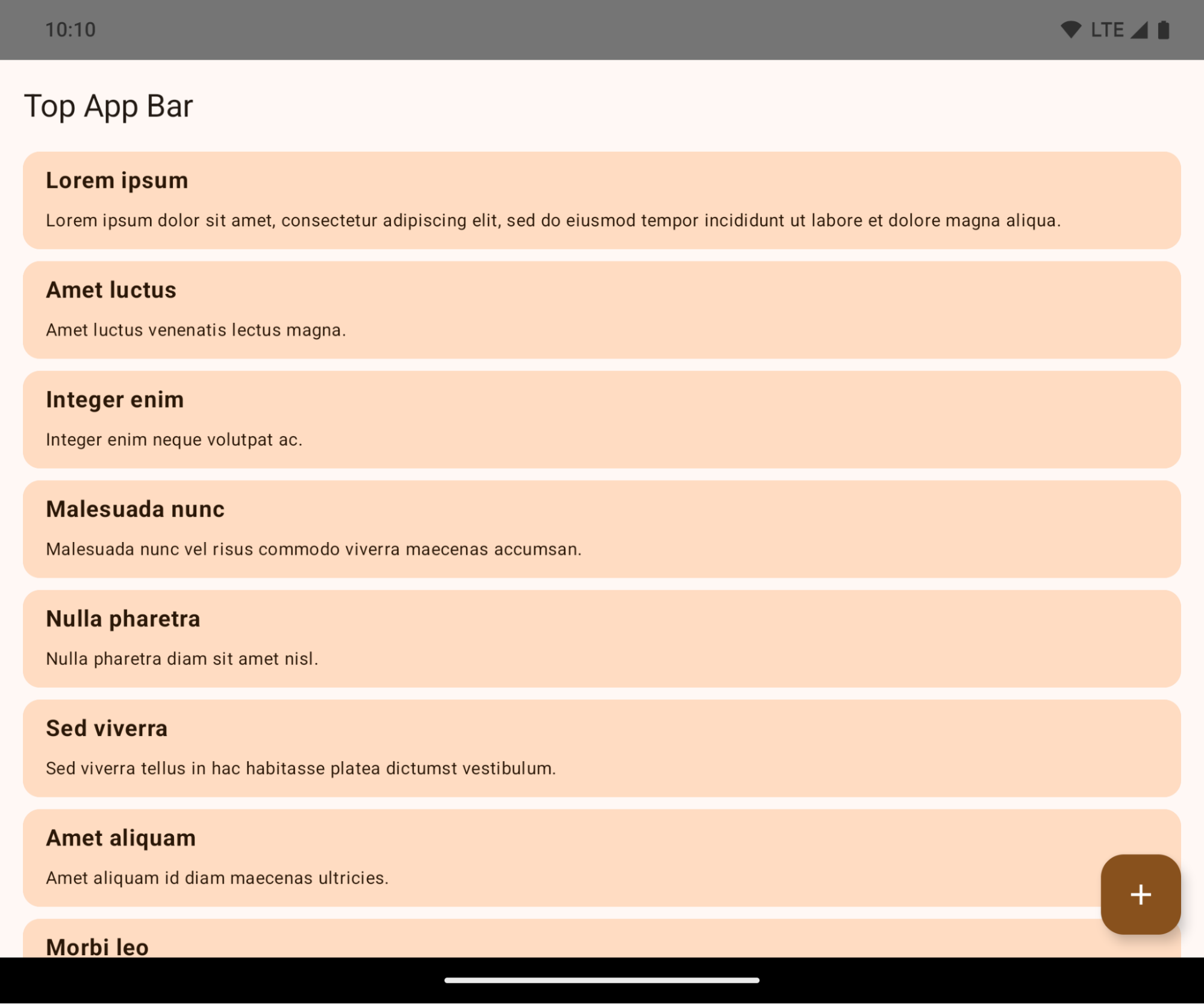
Ini adalah perubahan yang dapat menyebabkan gangguan dan berdampak negatif pada UI aplikasi Anda. Perubahan memengaruhi area UI berikut:
- Menu navigasi tuas gestur
- Transparan secara default.
- Offset bawah dinonaktifkan sehingga konten digambar di belakang menu navigasi sistem, kecuali jika inset diterapkan.
setNavigationBarColordanR.attr#navigationBarColortidak digunakan lagi dan tidak memengaruhi navigasi gestur.setNavigationBarContrastEnforceddanR.attr#navigationBarContrastEnforcedtetap tidak berpengaruh pada navigasi gestur.
- Navigasi 3 tombol
- Opasitas ditetapkan ke 80% secara default, dengan warna yang mungkin cocok dengan latar belakang jendela.
- Offset bawah dinonaktifkan sehingga konten digambar di belakang menu navigasi sistem kecuali jika inset diterapkan.
setNavigationBarColordanR.attr#navigationBarColorditetapkan agar sesuai dengan latar belakang jendela secara default. Latar belakang jendela harus berupa drawable warna agar default ini diterapkan. API ini sudah tidak digunakan lagi, tetapi terus memengaruhi navigasi 3 tombol.setNavigationBarContrastEnforceddanR.attr#navigationBarContrastEnforcedbernilai benar secara default, yang menambahkan latar belakang buram 80% di seluruh navigasi 3 tombol.
- Status bar
- Transparan secara default.
- Offset atas dinonaktifkan sehingga konten digambar di belakang status bar kecuali jika inset diterapkan.
setStatusBarColordanR.attr#statusBarColortidak digunakan lagi dan tidak berpengaruh pada Android 15.setStatusBarContrastEnforceddanR.attr#statusBarContrastEnforcedtidak digunakan lagi, tetapi masih memiliki efek pada Android 15.
- Potongan layar
layoutInDisplayCutoutModejendela non-mengambang harus berupaLAYOUT_IN_DISPLAY_CUTOUT_MODE_ALWAYS.SHORT_EDGES,NEVER, danDEFAULTditafsirkan sebagaiALWAYSsehingga pengguna tidak melihat batang hitam yang disebabkan oleh potongan layar dan muncul di layar penuh.
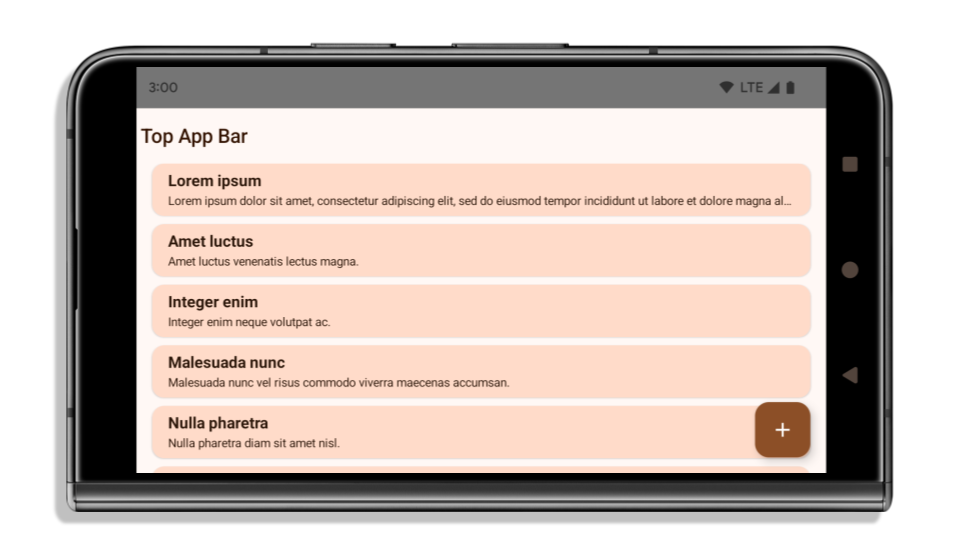
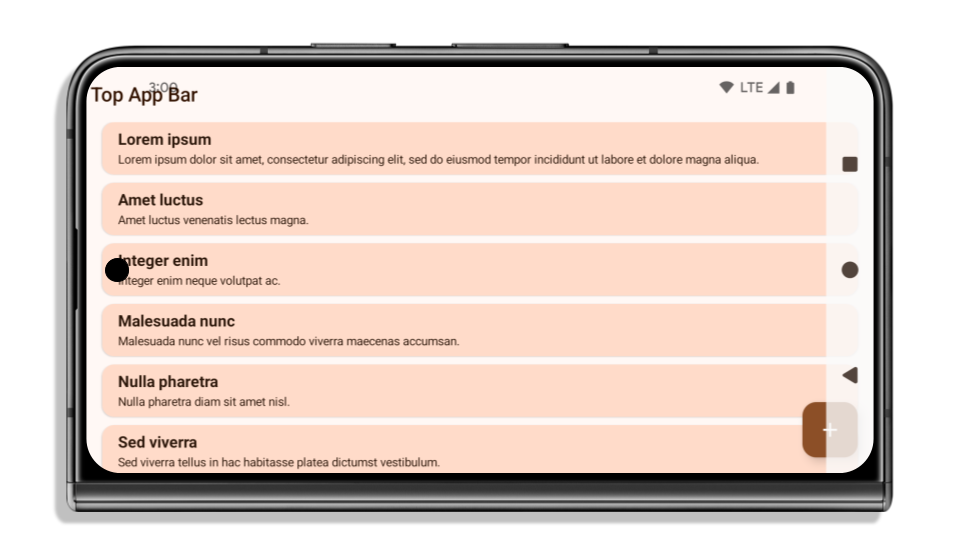
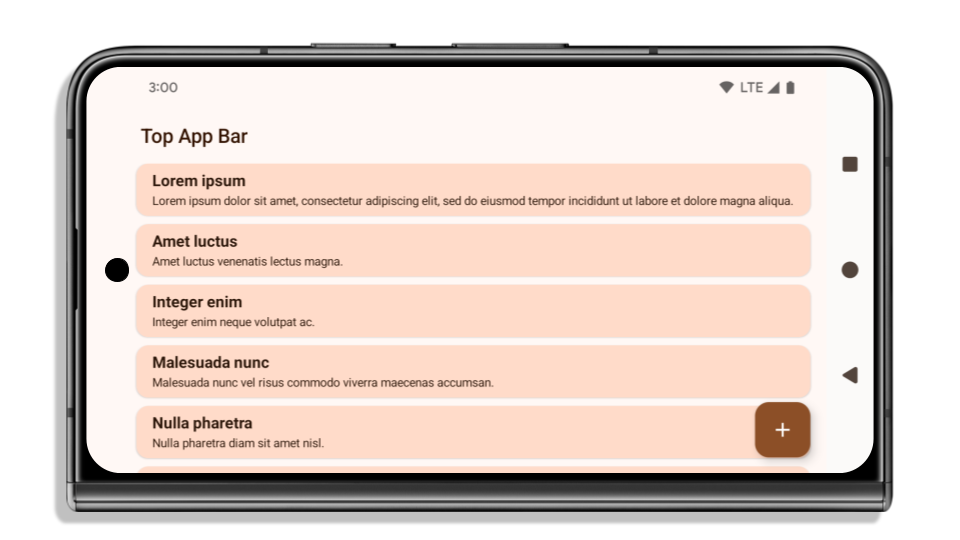
Contoh berikut menunjukkan aplikasi sebelum dan sesudah menargetkan Android 15 (level API 35), serta sebelum dan sesudah menerapkan inset. Contoh ini tidak lengkap, dan mungkin akan muncul secara berbeda di Android Auto.
Yang perlu diperiksa jika aplikasi Anda sudah ditampilkan di layar penuh
Jika aplikasi Anda sudah ditampilkan layar penuh dan menerapkan inset, Anda sebagian besar tidak terpengaruh, kecuali dalam skenario berikut. Namun, meskipun Anda merasa tidak terpengaruh, sebaiknya Anda menguji aplikasi Anda.
- Anda memiliki jendela non-mengambang, seperti
Activityyang menggunakanSHORT_EDGES,NEVER, atauDEFAULT, bukanLAYOUT_IN_DISPLAY_CUTOUT_MODE_ALWAYS. Jika aplikasi Anda error saat diluncurkan, penyebabnya mungkin adalah layar pembuka. Anda dapat mengupgrade dependensi layar pembuka inti ke 1.2.0-alpha01 atau yang lebih baru atau menetapkanwindow.attributes.layoutInDisplayCutoutMode = WindowManager.LayoutInDisplayCutoutMode.always. - Mungkin ada layar dengan traffic lebih rendah dengan UI yang tertutup. Pastikan layar yang jarang dikunjungi ini tidak memiliki UI yang tertutup. Layar dengan traffic lebih rendah mencakup:
- Layar aktivasi atau login
- Halaman setelan
Yang harus diperiksa jika aplikasi Anda belum ditampilkan di layar penuh
Jika aplikasi Anda belum ditampilkan dalam layar penuh, kemungkinan besar Anda akan terpengaruh. Selain skenario untuk aplikasi yang sudah ditampilkan di layar penuh, Anda harus mempertimbangkan hal berikut:
- Jika aplikasi Anda menggunakan Komponen Material 3 (
androidx.compose.material3) di Compose, sepertiTopAppBar,BottomAppBar, danNavigationBar, komponen ini kemungkinan tidak terpengaruh karena otomatis menangani inset. - Jika aplikasi Anda menggunakan Komponen Material 2 (
androidx.compose.material) di Compose, komponen ini tidak otomatis menangani inset. Namun, Anda dapat memperoleh akses ke inset dan menerapkannya secara manual. Di androidx.compose.material 1.6.0 dan yang lebih baru, gunakan parameterwindowInsetsuntuk menerapkan inset secara manual bagiBottomAppBar,TopAppBar,BottomNavigation, danNavigationRail. Demikian pula, gunakan parametercontentWindowInsetsuntukScaffold. - Jika aplikasi Anda menggunakan tampilan dan Komponen Material
(
com.google.android.material), sebagian besar Komponen Material berbasis tampilan sepertiBottomNavigationView,BottomAppBar,NavigationRailView, atauNavigationView, menangani inset dan tidak memerlukan pekerjaan tambahan. Namun, Anda perlu menambahkanandroid:fitsSystemWindows="true"jika menggunakanAppBarLayout. - Untuk composable kustom, terapkan inset secara manual sebagai padding. Jika konten Anda berada dalam
Scaffold, Anda dapat menggunakan inset dengan nilai paddingScaffold. Jika tidak, terapkan padding menggunakan salah satuWindowInsets. - Jika aplikasi Anda menggunakan tampilan dan
BottomSheet,SideSheet, atau kontainer kustom, terapkan padding menggunakanViewCompat.setOnApplyWindowInsetsListener. UntukRecyclerView, terapkan padding menggunakan pemroses ini dan juga tambahkanclipToPadding="false".
Yang harus diperiksa jika aplikasi Anda harus menawarkan perlindungan latar belakang kustom
Jika aplikasi Anda harus menawarkan perlindungan latar belakang kustom untuk navigasi 3 tombol atau status bar, aplikasi Anda harus menempatkan composable atau tampilan di belakang kolom sistem menggunakan WindowInsets.Type#tappableElement() untuk mendapatkan tinggi kolom navigasi 3 tombol atau WindowInsets.Type#statusBars.
Referensi layar penuh tambahan
Lihat panduan Tampilan Layar Penuh dan Compose Layar Penuh untuk mengetahui pertimbangan tambahan tentang penerapan inset.
API tidak digunakan lagi
API berikut tidak digunakan lagi, tetapi tidak dinonaktifkan:
R.attr#enforceStatusBarContrastR.attr#navigationBarColor(untuk navigasi 3 tombol, dengan alfa 80%)Window#isStatusBarContrastEnforcedWindow#setNavigationBarColor(untuk navigasi 3 tombol, dengan alpha 80%)Window#setStatusBarContrastEnforced
API berikut tidak digunakan lagi dan dinonaktifkan:
R.attr#navigationBarColor(untuk navigasi gestur)R.attr#navigationBarDividerColorR.attr#statusBarColorWindow#setDecorFitsSystemWindowsWindow#getNavigationBarColorWindow#getNavigationBarDividerColorWindow#getStatusBarColorWindow#setNavigationBarColor(untuk navigasi gestur)Window#setNavigationBarDividerColorWindow#setStatusBarColor
Konfigurasi stabil
Jika aplikasi Anda menargetkan Android 15 (level API 35) atau yang lebih tinggi, Configuration tidak
lagi mengecualikan kolom sistem. Jika Anda menggunakan ukuran layar di class
Configuration untuk penghitungan tata letak, Anda harus menggantinya dengan alternatif
yang lebih baik seperti ViewGroup, WindowInsets, atau
WindowMetricsCalculator yang sesuai, bergantung pada kebutuhan Anda.
Configuration telah tersedia sejak API 1. Biasanya diperoleh dari
Activity.onConfigurationChanged. Fitur ini memberikan informasi seperti kepadatan jendela,
orientasi, dan ukuran. Salah satu karakteristik penting tentang ukuran jendela yang ditampilkan dari Configuration adalah bahwa sebelumnya ukuran jendela tersebut tidak menyertakan kolom sistem.
Ukuran konfigurasi biasanya digunakan untuk pemilihan resource, seperti
/res/layout-h500dp, dan ini masih merupakan kasus penggunaan yang valid. Namun, penggunaannya untuk
kalkulasi tata letak tidak pernah dianjurkan. Jika Anda melakukannya, Anda harus menjauh dari perangkat tersebut sekarang. Anda harus mengganti penggunaan Configuration dengan sesuatu yang lebih sesuai, bergantung pada kasus penggunaan Anda.
Jika Anda menggunakannya untuk menghitung tata letak, gunakan ViewGroup yang sesuai, seperti
CoordinatorLayout atau ConstraintLayout. Jika Anda menggunakannya untuk menentukan tinggi
navbar sistem, gunakan WindowInsets. Jika Anda ingin mengetahui ukuran jendela aplikasi saat ini, gunakan computeCurrentWindowMetrics.
Daftar berikut menjelaskan kolom yang terpengaruh oleh perubahan ini:
- Ukuran
Configuration.screenWidthDpdanscreenHeightDptidak lagi mengecualikan bilah sistem. Configuration.smallestScreenWidthDpdipengaruhi secara tidak langsung oleh perubahan padascreenWidthDpdanscreenHeightDp.Configuration.orientationdipengaruhi secara tidak langsung oleh perubahan padascreenWidthDpdanscreenHeightDpdi perangkat yang hampir persegi.Display.getSize(Point)secara tidak langsung terpengaruh oleh perubahan diConfiguration. Tidak digunakan lagi mulai dari level API 30.Display.getMetrics()sudah berfungsi seperti ini sejak level API 33.
Atribut elegantTextHeight secara default adalah benar (true)
Untuk aplikasi yang menargetkan Android 15 (API level 35), atribut TextView elegantTextHeight
menjadi true secara default, menggantikan font ringkas yang digunakan secara default dengan beberapa
skrip yang memiliki metrik vertikal besar dengan skrip yang jauh lebih mudah dibaca.
Font rapat diperkenalkan untuk mencegah kerusakan tata letak; Android 13 (API
level 33) mencegah banyak kerusakan ini dengan memungkinkan tata letak teks
meregangkan tinggi vertikal menggunakan atribut
fallbackLineSpacing.
Di Android 15, font ringkas masih ada di sistem, sehingga aplikasi Anda dapat menetapkan
elegantTextHeight ke false untuk mendapatkan perilaku yang sama seperti sebelumnya, tetapi kemungkinan
tidak akan didukung dalam rilis mendatang. Jadi, jika aplikasi Anda mendukung
skrip berikut: Arab, Lao, Myanmar, Tamil, Gujarati, Kannada, Malayalam,
Odia, Telugu, atau Thai, uji aplikasi Anda dengan menetapkan elegantTextHeight ke true.

elegantTextHeight untuk aplikasi yang menargetkan Android 14 (API level 34) dan yang lebih lama.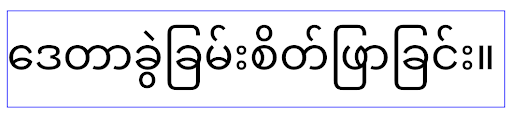 Perilaku
 elegantTextHeight untuk aplikasi yang menargetkan Android 15.Lebar TextView berubah untuk bentuk huruf yang kompleks
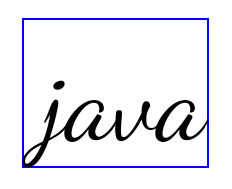
Pada versi Android sebelumnya, beberapa font atau bahasa kursif yang memiliki
bentuk kompleks dapat menggambar huruf di area karakter sebelumnya atau berikutnya.
Dalam beberapa kasus, huruf tersebut dipangkas di posisi awal atau akhir.
Mulai Android 15, TextView mengalokasikan lebar untuk menggambar ruang yang cukup
untuk huruf tersebut dan memungkinkan aplikasi meminta padding tambahan ke kiri untuk
mencegah pemangkasan.
Karena perubahan ini memengaruhi cara TextView menentukan lebar, TextView
mengalokasikan lebih banyak lebar secara default jika aplikasi menargetkan Android 15 (level API 35) atau
yang lebih baru. Anda dapat mengaktifkan atau menonaktifkan perilaku ini dengan memanggil
setUseBoundsForWidth API di TextView.
Karena menambahkan padding kiri dapat menyebabkan ketidaksejajaran untuk tata letak yang ada, padding
tidak ditambahkan secara default bahkan untuk aplikasi yang menargetkan Android 15 atau yang lebih tinggi.
Namun, Anda dapat menambahkan padding tambahan untuk mencegah pemangkasan dengan memanggil
setShiftDrawingOffsetForStartOverhang.
Contoh berikut menunjukkan bagaimana perubahan ini dapat meningkatkan tata letak teks untuk beberapa font dan bahasa.

<TextView
    android:fontFamily="cursive"
    android:text="java" />
<TextView
    android:fontFamily="cursive"
    android:text="java"
    android:useBoundsForWidth="true"
    android:shiftDrawingOffsetForStartOverhang="true" />

<TextView
    android:text="คอมพิวเตอร์" />

<TextView
    android:text="คอมพิวเตอร์"
    android:useBoundsForWidth="true"
    android:shiftDrawingOffsetForStartOverhang="true" />
Tinggi baris default yang sesuai dengan lokalitas untuk EditText
Pada versi Android sebelumnya, tata letak teks meregangkan tinggi
teks untuk memenuhi tinggi baris font yang cocok dengan lokalitas saat ini. Misalnya, jika konten dalam bahasa Jepang, karena tinggi baris font
Jepang sedikit lebih besar dari font Latin, tinggi teks
menjadi sedikit lebih besar. Namun, meskipun ada perbedaan tinggi baris ini, elemen
EditText berukuran seragam, terlepas
dari lokalitas yang digunakan, seperti yang diilustrasikan pada gambar berikut:

EditText yang
dapat berisi teks dari bahasa Inggris (en), Jepang (ja), dan Burma (my). Tinggi
EditText sama, meskipun bahasa ini
memiliki tinggi baris yang berbeda satu sama lain.Untuk aplikasi yang menargetkan Android 15 (API level 35), tinggi baris minimum kini
disediakan untuk EditText agar cocok dengan font referensi untuk Lokalitas yang ditentukan, seperti
yang ditunjukkan pada gambar berikut:

EditText yang
dapat berisi teks dari bahasa Inggris (en), Jepang (ja), dan Burma (my). Tinggi
EditText kini menyertakan ruang untuk mengakomodasi
tinggi baris default untuk font bahasa ini.Jika diperlukan, aplikasi Anda dapat memulihkan perilaku sebelumnya dengan menentukan
atribut useLocalePreferredLineHeightForMinimum
ke false, dan aplikasi Anda dapat menetapkan metrik vertikal minimum kustom menggunakan
setMinimumFontMetrics API di Kotlin dan Java.
Kamera dan media
Android 15 membuat perubahan berikut pada perilaku kamera dan media untuk aplikasi yang menargetkan Android 15 atau yang lebih tinggi.
Batasan permintaan fokus audio
Aplikasi yang menargetkan Android 15 (API level 35) harus menjadi aplikasi teratas atau menjalankan
layanan latar depan untuk meminta fokus audio. Jika aplikasi
mencoba meminta fokus saat tidak memenuhi salah satu persyaratan ini, panggilan akan menampilkan AUDIOFOCUS_REQUEST_FAILED.
Anda dapat mempelajari fokus audio lebih lanjut di Mengelola fokus audio.
Pembatasan non-SDK yang diperbarui
Android 15 menyertakan daftar terbaru antarmuka non-SDK yang dibatasi berdasarkan kolaborasi dengan developer Android dan pengujian internal terbaru. Jika memungkinkan, kami akan memastikan ketersediaan alternatif publik sebelum membatasi antarmuka non-SDK.
Jika aplikasi Anda tidak menargetkan Android 15, beberapa perubahan ini mungkin tidak langsung memengaruhi Anda. Namun, meskipun aplikasi Anda dapat mengakses beberapa antarmuka non-SDK bergantung pada level API target aplikasi Anda, penggunaan metode atau kolom non-SDK apa pun tetap berisiko tinggi merusak aplikasi Anda.
Jika tidak yakin apakah aplikasi Anda menggunakan antarmuka non-SDK atau tidak, Anda dapat menguji aplikasi untuk mencari tahu. Jika aplikasi Anda mengandalkan antarmuka non-SDK, sebaiknya Anda mulai merencanakan migrasi ke alternatif SDK. Namun demikian, kami memahami bahwa beberapa aplikasi memiliki kasus penggunaan yang valid untuk menggunakan antarmuka non-SDK. Jika tidak dapat menemukan alternatif penggunaan antarmuka non-SDK untuk suatu fitur dalam aplikasi Anda, sebaiknya minta API publik baru.
Untuk mempelajari perubahan dalam rilis Android ini lebih lanjut, baca Pembaruan pembatasan antarmuka non-SDK di Android 15. Untuk mempelajari lebih lanjut antarmuka non-SDK secara umum, baca Pembatasan antarmuka non-SDK.