

Android 14, geliştiriciler için harika özellikler ve API'ler sunuyor. Aşağıdaki yardım kaynakları, uygulamalarınızdaki özellikler hakkında bilgi edinmenize ve ilgili API'leri kullanmaya başlamanıza yardımcı olur.
Eklenen, değiştirilen ve kaldırılan API'lerin ayrıntılı listesi için API farklılıkları raporunu inceleyin. Eklenen API'lerle ilgili ayrıntılar için Android API referansını ziyaret edin. Android 14 için API düzeyi 34'te eklenen API'leri bulun. Platform değişikliklerinin uygulamalarınızı etkileyebileceği alanlar hakkında bilgi edinmek için Android 14'ü hedefleyen uygulamalarda ve tüm uygulamalarda Android 14 davranış değişikliklerini inceleyin.
Uluslararası hale getirme
Uygulamaya özgü dil tercihleri
Android 14, Android 13'te (API düzeyi 33) kullanıma sunulan uygulama başına dil özelliklerini aşağıdaki ek özelliklerle genişletir:
Uygulamanın
localeConfigdosyasını otomatik olarak oluşturma: Android Studio Giraffe Canary 7 ve AGP 8.1.0-alpha07'den itibaren uygulamanızı uygulama başına dil tercihlerini otomatik olarak destekleyecek şekilde yapılandırabilirsiniz. Android Gradle eklentisi, proje kaynaklarınızı temel alarakLocaleConfigdosyasını oluşturur ve nihai manifest dosyasına bu dosyaya referans ekler. Böylece artık dosyayı manuel olarak oluşturmanız veya güncellemeniz gerekmez. AGP,LocaleConfigdosyasına eklenecek yerel ayarları belirlemek için uygulama modüllerinizinresklasörlerindeki kaynakları ve kitaplık modülü bağımlılıklarını kullanır.Uygulamanın
localeConfigiçin dinamik güncellemeler:LocaleManager'dekisetOverrideLocaleConfig()vegetOverrideLocaleConfig()yöntemlerini kullanarak uygulamanızın desteklenen diller listesini cihazın sistem ayarlarında dinamik olarak güncelleyin. Bu esnekliği kullanarak bölgeye göre desteklenen diller listesini özelleştirebilir, A/B denemeleri çalıştırabilir veya uygulamanız yerelleştirme için sunucu tarafı push'ları kullanıyorsa güncellenmiş bir yerel ayar listesi sağlayabilirsiniz.Giriş yöntemi düzenleyiciler (IME'ler) için uygulama dili görünürlüğü: IME'ler, mevcut uygulamanın dilini kontrol etmek ve IME dilini bu dille eşleştirmek için
getApplicationLocales()yöntemini kullanabilir.
Grammatical Inflection API
3 billion people speak gendered languages: languages where grammatical categories—such as nouns, verbs, adjectives, and prepositions—inflect according to the gender of people and objects you talk to or about. Traditionally, many gendered languages use masculine grammatical gender as the default or generic gender.
Addressing users in the wrong grammatical gender, such as addressing women in masculine grammatical gender, can negatively impact their performance and attitude. In contrast, a UI with language that correctly reflects the user's grammatical gender can improve user engagement and provide a more personalized and natural-sounding user experience.
Android 14, cinsiyetli diller için kullanıcı odaklı bir kullanıcı arayüzü oluşturmanıza yardımcı olmak amacıyla Gramatik Eğim API'yi kullanıma sunar. Bu API, uygulamanızı yeniden düzenlemeden dil bilgisi cinsiyeti desteği eklemenize olanak tanır.
Bölgeye özgü tercihler
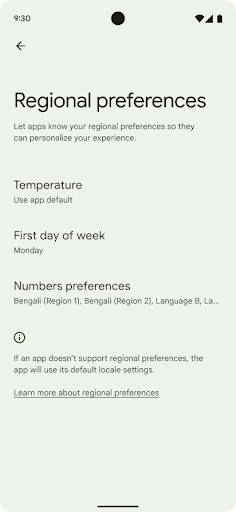
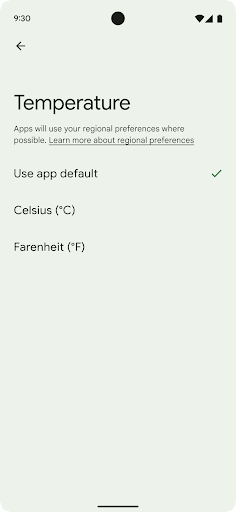
Bölgesel tercihler, kullanıcıların sıcaklık birimlerini, haftanın ilk gününü ve numaralandırma sistemlerini kişiselleştirmesine olanak tanır. ABD'de yaşayan Avrupalı sıcaklık biriminin Fahrenhayt yerine Santigrat cinsinden olmasını tercih edebilir ABD'de varsayılan gün yerine pazartesi günü kabul etmesini sağlayan uygulamalar Pazar.
Bu tercihler için yeni Android Ayarlar menüleri, kullanıcılara uygulama tercihlerini değiştirebilecekleri keşfedilebilir ve merkezi bir konum sunar. Bu tercihler, yedekleme ve geri yükleme sırasında da korunur. Çeşitli API ve
hedefler (ör.
getTemperatureUnit
ve
getFirstDayOfWeek -
uygulamanıza kullanıcı tercihlerine okuma erişimi verebilirsiniz, böylece uygulamanız
bilgileri görüntüler. Ayrıca bir
BroadcastReceiver açık
ACTION_LOCALE_CHANGED
kullanın.
Bu ayarları bulmak için Ayarlar uygulamasını açın ve Sistem > Diller ve giriş > Bölgesel tercihler.
Erişilebilirlik
%200'e kadar doğrusal olmayan yazı tipi ölçeklendirme
Starting in Android 14, the system supports font scaling up to 200%, providing users with additional accessibility options.
To prevent large text elements on screen from scaling too large, the system applies a nonlinear scaling curve. This scaling strategy means that large text doesn't scale at the same rate as smaller text. Nonlinear font scaling helps preserve the proportional hierarchy between elements of different sizes while mitigating issues with linear text scaling at high degrees (such as text being cut off or text that becomes harder to read due to an extremely large display sizes).
Test your app with nonlinear font scaling
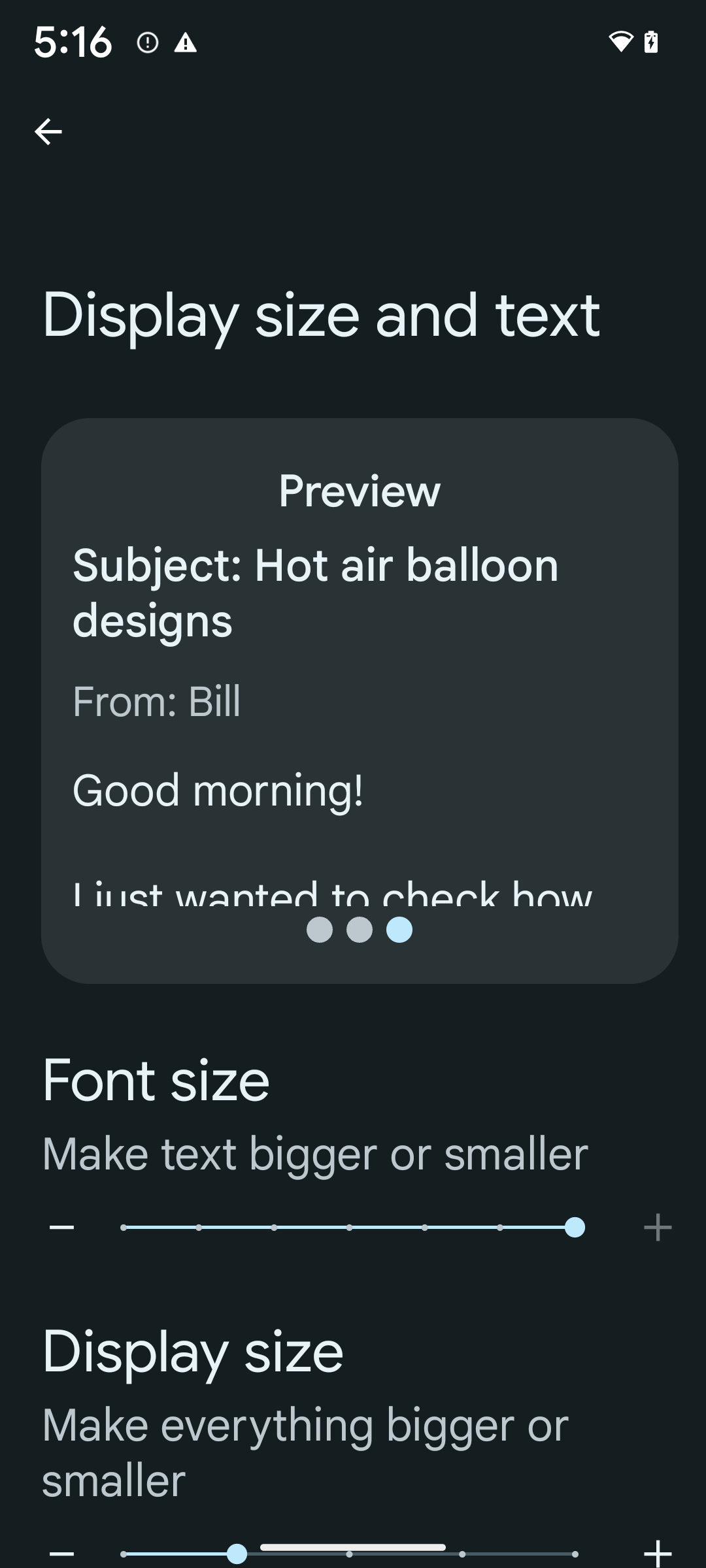
If you already use scaled pixels (sp) units to define text sizing, then these additional options and scaling improvements are applied automatically to the text in your app. However, you should still perform UI testing with the maximum font size enabled (200%) to ensure that your app applies the font sizes correctly and can accommodate larger font sizes without impacting usability.
To enable 200% font size, follow these steps:
- Open the Settings app and navigate to Accessibility > Display size and text.
- For the Font size option, tap the plus (+) icon until the maximum font size setting is enabled, as shown in the image that accompanies this section.
Use scaled pixel (sp) units for text-sizes
Remember to always specify text sizes in sp units. When your app uses sp units, Android can apply the user's preferred text size and scale it appropriately.
Don't use sp units for padding or define view heights assuming implicit padding: with nonlinear font scaling sp dimensions might not be proportional, so 4sp + 20sp might not equal 24sp.
Convert scaled pixel (sp) units
Use TypedValue.applyDimension() to convert from sp units
to pixels, and use TypedValue.deriveDimension() to
convert pixels to sp. These methods apply the appropriate nonlinear scaling
curve automatically.
Avoid hardcoding equations using
Configuration.fontScale or
DisplayMetrics.scaledDensity. Because font scaling is
nonlinear, the scaledDensity field is no longer accurate. The fontScale
field should be used for informational purposes only because fonts are no longer
scaled with a single scalar value.
Use sp units for lineHeight
Always define android:lineHeight using sp units instead
of dp, so the line height scales along with your text. Otherwise, if your text
is sp but your lineHeight is in dp or px, it doesn't scale and looks cramped.
TextView automatically corrects the lineHeight so that your intended
proportions are preserved, but only if both textSize and lineHeight are
defined in sp units.
Kamera ve medya içerikleri
Resimler için Ultra HDR
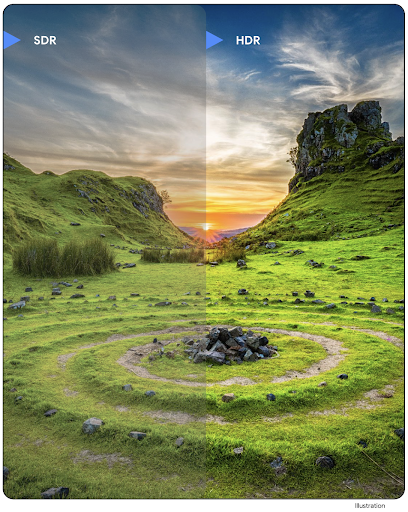
Android 14 adds support for High Dynamic Range (HDR) images that retain more of the information from the sensor when taking a photo, which enables vibrant colors and greater contrast. Android uses the Ultra HDR format, which is fully backward compatible with JPEG images, allowing apps to seamlessly interoperate with HDR images, displaying them in Standard Dynamic Range (SDR) as needed.
Rendering these images in the UI in HDR is done automatically by the framework
when your app opts in to using HDR UI for its Activity Window, either through a
manifest entry or at runtime by calling
Window.setColorMode(). You can also capture compressed Ultra
HDR still images on supported devices. With more colors recovered
from the sensor, editing in post can be more flexible. The
Gainmap associated with Ultra HDR images can be used to render
them using OpenGL or Vulkan.
Kamera uzantılarında yakınlaştırma, odaklama, son görüntü ve daha fazlası
Android 14 upgrades and improves camera extensions, allowing apps to handle longer processing times, which enables improved images using compute-intensive algorithms like low-light photography on supported devices. These features give users an even more robust experience when using camera extension capabilities. Examples of these improvements include:
- Dynamic still capture processing latency estimation provides much more
accurate still capture latency estimates based on the current scene and
environment conditions. Call
CameraExtensionSession.getRealtimeStillCaptureLatency()to get aStillCaptureLatencyobject that has two latency estimation methods. ThegetCaptureLatency()method returns the estimated latency betweenonCaptureStartedandonCaptureProcessStarted(), and thegetProcessingLatency()method returns the estimated latency betweenonCaptureProcessStarted()and the final processed frame being available. - Support for capture progress callbacks so that apps can display the current
progress of long-running, still-capture processing operations. You can check
if this feature is available with
CameraExtensionCharacteristics.isCaptureProcessProgressAvailable, and if it is, you implement theonCaptureProcessProgressed()callback, which has the progress (from 0 to 100) passed in as a parameter. Extension specific metadata, such as
CaptureRequest.EXTENSION_STRENGTHfor dialing in the amount of an extension effect, such as the amount of background blur withEXTENSION_BOKEH.Postview Feature for Still Capture in camera extensions, which provides a less-processed image more quickly than the final image. If an extension has increased processing latency, a postview image could be provided as a placeholder to improve UX and switched out later for the final image. You can check if this feature is available with
CameraExtensionCharacteristics.isPostviewAvailable. Then you can pass anOutputConfigurationtoExtensionSessionConfiguration.setPostviewOutputConfiguration.Support for
SurfaceViewallowing for a more optimized and power-efficient preview render path.Support for tap to focus and zoom during extension usage.
Sensör içi yakınlaştırma
CameraCharacteristics içindeki REQUEST_AVAILABLE_CAPABILITIES_STREAM_USE_CASE SCALER_AVAILABLE_STREAM_USE_CASES_CROPPED_RAW içeriyorsa uygulamanız, akış kullanım alanı CameraMetadata.SCALER_AVAILABLE_STREAM_USE_CASES_CROPPED_RAW olarak ayarlanmış bir RAW hedefi içeren CaptureRequest kullanarak kırpılmış bir RAW akışına tam görüş alanı ile aynı pikselleri vermek için gelişmiş sensör özelliklerini kullanabilir.
Güncellenen kamera, istek geçersiz kılma denetimlerini uygulayarak kullanıcılara diğer kamera kontrolleri hazır olmadan önce bile yakınlaştırma kontrolü sunar.
Kayıpsız USB ses
Android 14 gains support for lossless audio formats for audiophile-level
experiences over USB wired headsets. You can query a USB device for its
preferred mixer attributes, register a listener for changes in preferred mixer
attributes, and configure mixer attributes using the
AudioMixerAttributes class. This class represents the
format, such as channel mask, sample rate, and behavior of the audio mixer. The
class allows for audio to be sent directly, without mixing,
volume adjustment, or processing effects.
Geliştirici üretkenliği ve araçları
Kimlik Bilgisi Yöneticisi
Android 14 adds Credential Manager as a platform API, with additional support back to Android 4.4 (API level 19) devices through a Jetpack Library using Google Play services. Credential Manager aims to make sign-in easier for users with APIs that retrieve and store credentials with user-configured credential providers. Credential Manager supports multiple sign-in methods, including username and password, passkeys, and federated sign-in solutions (such as Sign-in with Google) in a single API.
Passkeys provide many advantages. For example, passkeys are built on industry standards, can work across different operating systems and browser ecosystems, and can be used with both websites and apps.
For more information, see the Credential Manager and passkeys documentation and the blogpost about Credential Manager and passkeys.
ve geri yükleme
Health Connect, kullanıcıların sağlık ve fitness verilerini saklayan cihaz üzerinde bir depolama alanıdır. Bu sayede kullanıcılar, en sevdikleri uygulamalar arasında veri paylaşabilir ve bu uygulamalarla hangi verileri paylaşmak istediklerini tek bir yerden kontrol edebilir.
Android 14'ten önceki Android sürümlerini çalıştıran cihazlarda Health Connect, Google Play Store'dan uygulama olarak indirilebilir. Android 14'ten itibaren Health Connect, platformun bir parçasıdır ve ayrı bir indirme işlemi gerektirmeden Google Play sistem güncellemeleri aracılığıyla güncelleme alır. Bu sayede Health Connect sık sık güncellenebilir ve uygulamalarınız, Health Connect'in Android 14 veya sonraki sürümleri çalıştıran cihazlarda kullanılabildiğinden emin olabilir. Kullanıcılar, sistem ayarlarına entegre edilmiş gizlilik denetimleriyle cihazlarındaki Ayarlar'dan Health Connect'e erişebilir.
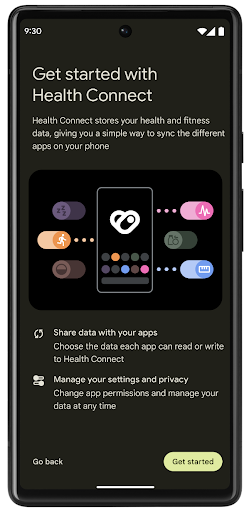
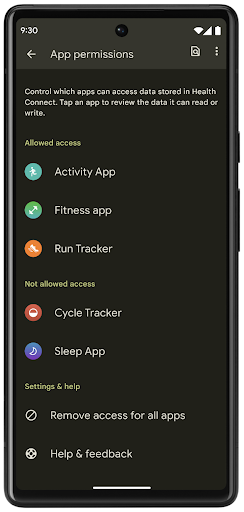
Health Connect, Android 14'te egzersiz rotaları gibi çeşitli yeni özellikler içerir. Bu özellikler sayesinde kullanıcılar, egzersiz rotalarını harita üzerinde görselleştirerek paylaşabilir. Rota, belirli bir zaman aralığında kaydedilen konumların listesi olarak tanımlanır. Uygulamanız, rotaları egzersiz oturumlarına ekleyerek bunları birbirine bağlayabilir. Kullanıcıların bu hassas veriler üzerinde tam kontrole sahip olması için kullanıcıların, rotaların tek tek diğer uygulamalarla paylaşılmasına izin vermesi gerekir.
Daha fazla bilgi için Health Connect dokümanlarına ve Android Sağlık'ta yenilikler başlıklı blog yayınına göz atın.
OpenJDK 17 güncellemeleri
Android 14 continues the work of refreshing Android's core libraries to align with the features in the latest OpenJDK LTS releases, including both library updates and Java 17 language support for app and platform developers.
The following features and improvements are included:
- Updated approximately 300
java.baseclasses to Java 17 support. - Text Blocks, which introduce multi-line string literals to the Java programming language.
- Pattern Matching for instanceof, which allows an object to
be treated as having a specific type in an
instanceofwithout any additional variables. - Sealed classes, which allow you restrict which classes and interfaces can extend or implement them.
Thanks to Google Play system updates (Project Mainline), over 600 million devices are enabled to receive the latest Android Runtime (ART) updates that include these changes. This is part of our commitment to give apps a more consistent, secure environment across devices, and to deliver new features and capabilities to users independent of platform releases.
Java and OpenJDK are trademarks or registered trademarks of Oracle and/or its affiliates.
Uygulama mağazalarıyla ilgili iyileştirmeler
Android 14 introduces several PackageInstaller APIs that
allow app stores to improve their user experience.
Request install approval before downloading
Installing or updating an app might require user approval.
For example, when an installer making use of the
REQUEST_INSTALL_PACKAGES permission attempts to install a
new app. In prior Android versions, app stores can only request user approval
after APKs are written to the install session and the
session is committed.
Starting with Android 14, the requestUserPreapproval()
method lets installers request user approval before committing the install
session. This improvement lets an app store defer downloading any APKs until
after the installation has been approved by the user. Furthermore, once a user
has approved installation, the app store can download and install the app in the
background without interrupting the user.
Claim responsibility for future updates
The setRequestUpdateOwnership() method allows an installer
to indicate to the system that it intends to be responsible for future updates
to an app it is installing. This capability enables update ownership
enforcement, meaning that only the update owner is permitted
to install automatic updates to the app. Update ownership enforcement helps to
ensure that users receive updates only from the expected app store.
Any other installer, including those making use of the
INSTALL_PACKAGES permission, must receive explicit user
approval in order to install an update. If a user decides to proceed with an
update from another source, update ownership is lost.
Update apps at less-disruptive times
App stores typically want to avoid updating an app that is actively in use because this leads to the app's running processes being killed, which potentially interrupts what the user was doing.
Starting with Android 14, the InstallConstraints API
gives installers a way to ensure that their app updates happen at an opportune
moment. For example, an app store can call the
commitSessionAfterInstallConstraintsAreMet() method to
make sure that an update is only committed when the user is no longer
interacting with the app in question.
Seamlessly install optional splits
With split APKs, features of an app can be delivered in separate APK files,
rather than as a monolithic APK. Split APKs allow app stores to optimize the
delivery of different app components. For example, app stores might optimize
based on the properties of the target device. The
PackageInstaller API has supported splits since its
introduction in API level 22.
In Android 14, the setDontKillApp() method allows an
installer to indicate that the app's running processes shouldn't be killed when
new splits are installed. App stores can use this feature to seamlessly install
new features of an app while the user is using the app.
Uygulama meta verileri paketleri
Android 14'ten itibaren Android paket yükleyici, Google Play gibi uygulama mağazası sayfalarına dahil edilecek uygulama meta verilerini (ör. veri güvenliği uygulamaları) belirtmenize olanak tanır.
Kullanıcıların cihaz ekran görüntüsü aldığını algılama
To create a more standardized experience for detecting screenshots, Android 14 introduces a privacy-preserving screenshot detection API. This API lets apps register callbacks on a per-activity basis. These callbacks are invoked, and the user is notified, when the user takes a screenshot while that activity is visible.
Kullanıcı deneyimi
Paylaşım sayfası özel işlemleri ve iyileştirilmiş sıralama
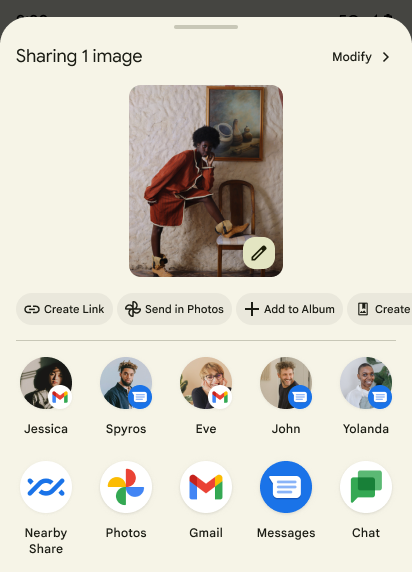
Android 14 updates the system sharesheet to support custom app actions and more informative preview results for users.
Add custom actions
With Android 14, your app can add custom actions to the system sharesheet it invokes.
Improve ranking of Direct Share targets
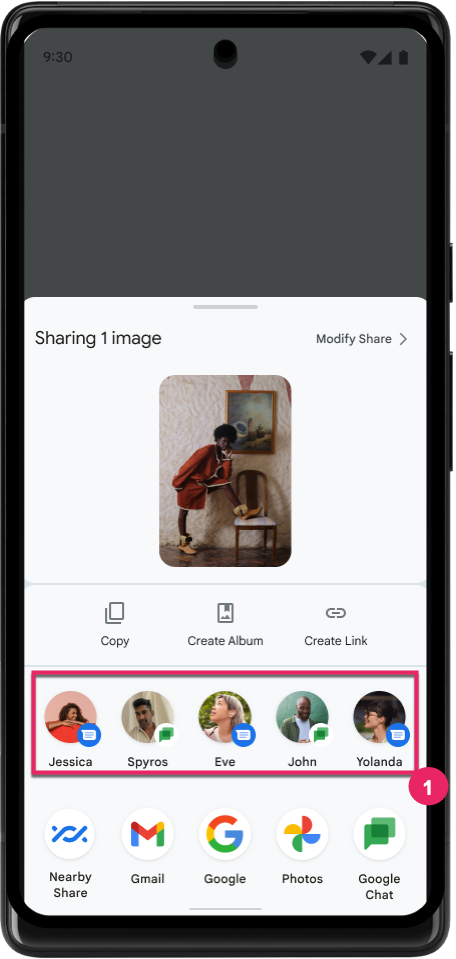
Android 14 uses more signals from apps to determine the ranking of the direct share targets to provide more helpful results for the user. To provide the most useful signal for ranking, follow the guidance for improving rankings of your Direct Share targets. Communication apps can also report shortcut usage for outgoing and incoming messages.
Tahmine dayalı geri hareketi için yerleşik ve özel animasyon desteği
Android 13 introduced the predictive back-to-home animation behind a developer option. When used in a supported app with the developer option enabled, swiping back shows an animation indicating that the back gesture exits the app back to the home screen.
Android 14 includes multiple improvements and new guidance for Predictive Back:
- You can set
android:enableOnBackInvokedCallback=trueto opt in to predictive back system animations per-Activity instead of for the entire app. - We've added new system animations to accompany the back-to-home animation from Android 13. The new system animations are cross-activity and cross-task, which you get automatically after migrating to Predictive Back.
- We've added new Material Component animations for Bottom sheets, Side sheets, and Search.
- We've created design guidance for creating custom in-app animations and transitions.
- We've added new APIs to support custom in-app transition animations:
handleOnBackStarted,handleOnBackProgressed,handleOnBackCancelledinOnBackPressedCallbackonBackStarted,onBackProgressed,onBackCancelledinOnBackAnimationCallback- Use
overrideActivityTransitioninstead ofoverridePendingTransitionfor transitions that respond as the user swipes back.
With this Android 14 preview release, all features of Predictive Back remain behind a developer option. See the developer guide to migrate your app to predictive back, as well as the developer guide to creating custom in-app transitions.
Büyük ekranlı cihaz üreticilerinin uygulama başına geçersiz kılmaları
Per-app overrides enable device manufacturers to change the behavior of apps on large screen devices. For example, the FORCE_RESIZE_APP override instructs the system to resize the app to fit display dimensions (avoiding size compatibility mode) even if resizeableActivity="false" is set in the app manifest.
Overrides are intended to improve the user experience on large screens.
New manifest properties enable you to disable some device manufacturer overrides for your app.
Büyük ekran kullanıcıları için uygulama başına geçersiz kılmalar
Per-app overrides change the behavior of apps on large screen devices. For example, the OVERRIDE_MIN_ASPECT_RATIO_LARGE device manufacturer override sets the app aspect ratio to 16:9 regardless of the app's configuration.
Android 14 QPR1 enables users to apply per‑app overrides by means of a new settings menu on large screen devices.
Uygulama ekran paylaşımı
Uygulama ekran paylaşımı, kullanıcıların ekran içeriği kaydı sırasında cihaz ekranının tamamı yerine bir uygulama penceresini paylaşmasını sağlar.
Uygulama ekranı paylaşımında durum çubuğu, gezinme çubuğu, bildirimler ve diğer sistem kullanıcı arayüzü öğeleri paylaşılan ekrandan hariç tutulur. Yalnızca seçilen uygulamanın içeriği paylaşılır.
Uygulama ekranı paylaşımı, kullanıcıların birden fazla uygulamayı çalıştırmasına olanak tanır ancak içerik paylaşımını tek bir uygulamayla sınırlandırır. Bu sayede üretkenliği ve gizliliği artırır.
Pixel 8 Pro'da Gboard'da LLM destekli Akıllı Yanıt
On Pixel 8 Pro devices with the December Feature Drop, developers can try out higher-quality smart replies in Gboard powered by on-device Large Language Models (LLMs) running on Google Tensor.
This feature is available as a limited preview for US English in WhatsApp, Line, and KakaoTalk. It requires using a Pixel 8 Pro device with Gboard as your keyboard.
To try it out, first enable the feature in Settings > Developer Options > AiCore Settings > Enable Aicore Persistent.
Next, open a conversation in a supported app to see LLM-powered Smart Reply in Gboard's suggestion strip in response to incoming messages.
Grafik
Yollar sorgulanabilir ve enterpolasyon yapılabilir
Android's Path API is a powerful and flexible mechanism for
creating and rendering vector graphics, with the ability to stroke or fill a
path, construct a path from line segments or quadratic or cubic curves, perform
boolean operations to get even more complex shapes, or all of these
simultaneously. One limitation is the ability to find out what is actually in a
Path object; the internals of the object are opaque to callers after creation.
To create a Path, you call methods such as
moveTo(), lineTo(), and
cubicTo() to add path segments. But there has been no way to
ask that path what the segments are, so you must retain that information at
creation time.
Starting in Android 14, you can query paths to find out what's inside of them.
First, you need to get a PathIterator object using the
Path.getPathIterator API:
Kotlin
val path = Path().apply {
    moveTo(1.0f, 1.0f)
    lineTo(2.0f, 2.0f)
    close()
}
val pathIterator = path.pathIterator
Java
Path path = new Path();
path.moveTo(1.0F, 1.0F);
path.lineTo(2.0F, 2.0F);
path.close();
PathIterator pathIterator = path.getPathIterator();
Next, you can call PathIterator to iterate through the segments
one by one, retrieving all of the necessary data for each segment. This example
uses PathIterator.Segment objects, which packages up the data
for you:
Kotlin
for (segment in pathIterator) {
    println("segment: ${segment.verb}, ${segment.points}")
}
Java
while (pathIterator.hasNext()) {
    PathIterator.Segment segment = pathIterator.next();
    Log.i(LOG_TAG, "segment: " + segment.getVerb() + ", " + segment.getPoints());
}
PathIterator also has a non-allocating version of next() where you can pass
in a buffer to hold the point data.
One of the important use cases of querying Path data is interpolation. For
example, you might want to animate (or morph) between two different paths. To
further simplify that use case, Android 14 also includes the
interpolate() method on Path. Assuming the two paths have
the same internal structure, the interpolate() method creates a new Path
with that interpolated result. This example returns a path whose shape is
halfway (a linear interpolation of .5) between path and otherPath:
Kotlin
val interpolatedResult = Path()
if (path.isInterpolatable(otherPath)) {
    path.interpolate(otherPath, .5f, interpolatedResult)
}
Java
Path interpolatedResult = new Path();
if (path.isInterpolatable(otherPath)) {
    path.interpolate(otherPath, 0.5F, interpolatedResult);
}
The Jetpack graphics-path library enables similar APIs for earlier versions of Android as well.
Köşe ve parça gölgelendiricileri içeren özel ağlar
Android has long supported drawing triangle meshes with custom shading, but the input mesh format has been limited to a few predefined attribute combinations. Android 14 adds support for custom meshes, which can be defined as triangles or triangle strips, and can, optionally, be indexed. These meshes are specified with custom attributes, vertex strides, varying, and vertex and fragment shaders written in AGSL.
The vertex shader defines the varyings, such as position and color, while the
fragment shader can optionally define the color for the pixel, typically by
using the varyings created by the vertex shader. If color is provided by the
fragment shader, it is then blended with the current Paint
color using the blend mode selected when
drawing the mesh. Uniforms can be passed
into the fragment and vertex shaders for additional flexibility.
Canvas için donanım arabelleği oluşturucu
To assist in using Android's Canvas API to draw with
hardware acceleration into a HardwareBuffer, Android 14
introduces HardwareBufferRenderer. This API is
particularly useful when your use case involves communication with the system
compositor through SurfaceControl for low-latency
drawing.