

O Android 14 introduz ótimos recursos e APIs para desenvolvedores. As seções a seguir ajudam você a conhecer os recursos disponíveis para os apps e a começar a usar as APIs relacionadas.
Para uma lista detalhada das APIs adicionadas, modificadas e removidas, leia o Relatório de diferenças da API. Para detalhes sobre as APIs adicionadas, acesse a Referência da API do Android. No Android 14, procure APIs que foram adicionadas no nível 34 da API. Para saber mais sobre as áreas em que as mudanças na plataforma podem afetar seus apps, confira as mudanças de comportamento do Android 14 para apps destinados ao Android 14 e para todos os apps.
Internacionalização
Seleção de idioma por app
Android 14 expands on the per-app language features that were introduced in Android 13 (API level 33) with these additional capabilities:
Automatically generate an app's
localeConfig: Starting with Android Studio Giraffe Canary 7 and AGP 8.1.0-alpha07, you can configure your app to support per-app language preferences automatically. Based on your project resources, the Android Gradle plugin generates theLocaleConfigfile and adds a reference to it in the final manifest file, so you no longer have to create or update the file manually. AGP uses the resources in theresfolders of your app modules and any library module dependencies to determine the locales to include in theLocaleConfigfile.Dynamic updates for an app's
localeConfig: Use thesetOverrideLocaleConfig()andgetOverrideLocaleConfig()methods inLocaleManagerto dynamically update your app's list of supported languages in the device's system settings. Use this flexibility to customize the list of supported languages per region, run A/B experiments, or provide an updated list of locales if your app utilizes server-side pushes for localization.App language visibility for input method editors (IMEs): IMEs can utilize the
getApplicationLocales()method to check the language of the current app and match the IME language to that language.
API Grammatical Inflection
3 billion people speak gendered languages: languages where grammatical categories—such as nouns, verbs, adjectives, and prepositions—inflect according to the gender of people and objects you talk to or about. Traditionally, many gendered languages use masculine grammatical gender as the default or generic gender.
Addressing users in the wrong grammatical gender, such as addressing women in masculine grammatical gender, can negatively impact their performance and attitude. In contrast, a UI with language that correctly reflects the user's grammatical gender can improve user engagement and provide a more personalized and natural-sounding user experience.
Para ajudar a criar uma interface focada no usuário para idiomas com flexão de gênero, o Android 14 apresenta a API Grammatical Inflection, que permite adicionar suporte aos gêneros gramaticais sem refatorar o app.
Preferências regionais
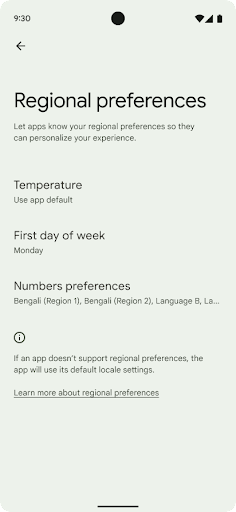
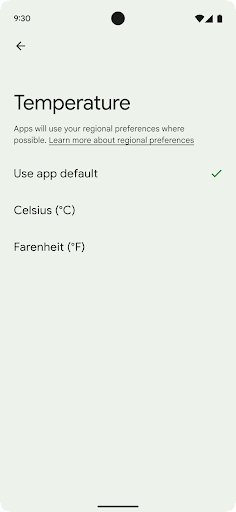
Regional preferences enable users to personalize temperature units, the first day of the week, and numbering systems. A European living in the United States might prefer temperature units to be in Celsius rather than Fahrenheit and for apps to treat Monday as the beginning of the week instead of the US default of Sunday.
New Android Settings menus for these preferences provide users with a
discoverable and centralized location to change app preferences. These
preferences also persist through backup and restore. Several APIs and
intents—such as
getTemperatureUnit
and
getFirstDayOfWeek—
grant your app read access to user preferences, so your app can adjust how it
displays information. You can also register a
BroadcastReceiver on
ACTION_LOCALE_CHANGED
to handle locale configuration changes when regional preferences change.
To find these settings, open the Settings app and navigate to System > Languages & input > Regional preferences.
Acessibilidade
Dimensionamento de fonte não linear para 200%
Starting in Android 14, the system supports font scaling up to 200%, providing users with additional accessibility options.
To prevent large text elements on screen from scaling too large, the system applies a nonlinear scaling curve. This scaling strategy means that large text doesn't scale at the same rate as smaller text. Nonlinear font scaling helps preserve the proportional hierarchy between elements of different sizes while mitigating issues with linear text scaling at high degrees (such as text being cut off or text that becomes harder to read due to an extremely large display sizes).
Test your app with nonlinear font scaling
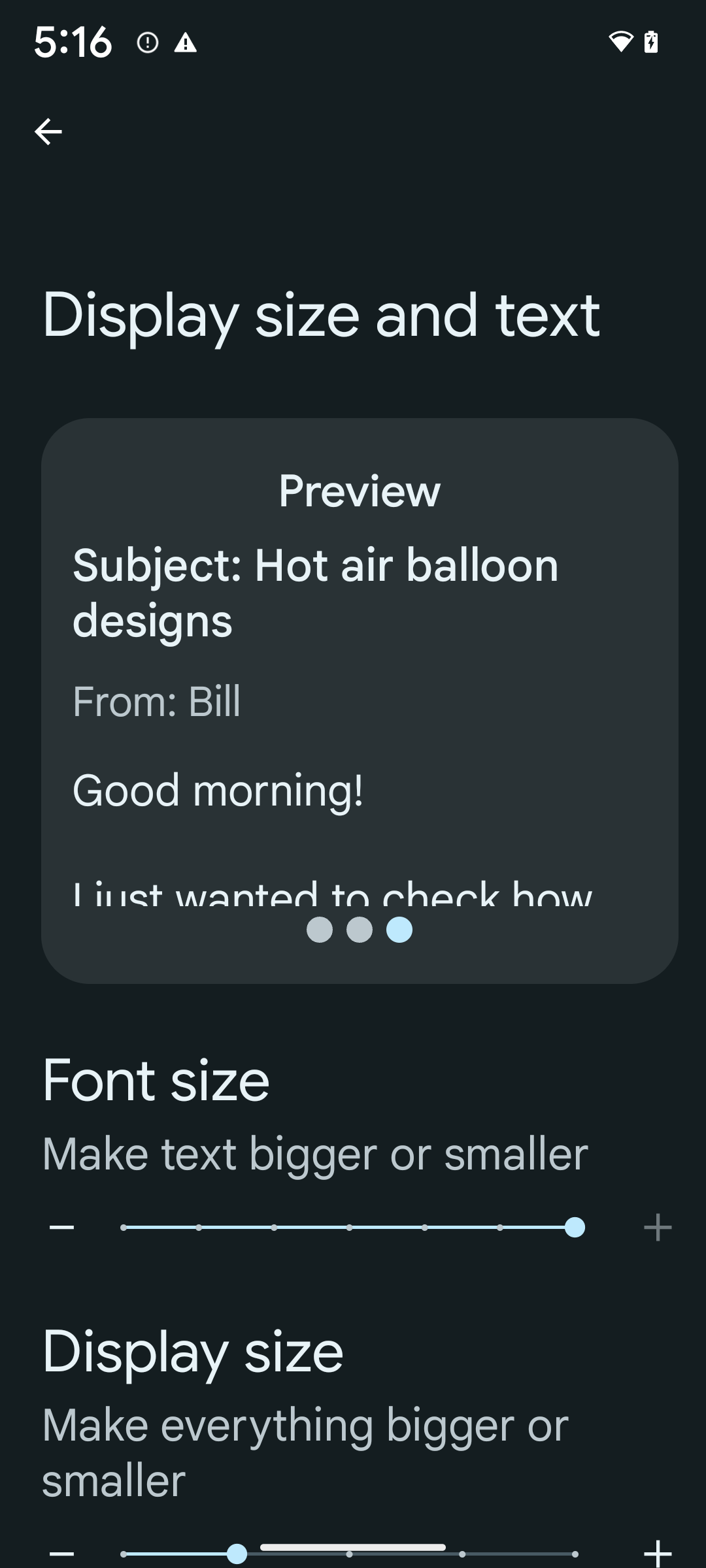
If you already use scaled pixels (sp) units to define text sizing, then these additional options and scaling improvements are applied automatically to the text in your app. However, you should still perform UI testing with the maximum font size enabled (200%) to ensure that your app applies the font sizes correctly and can accommodate larger font sizes without impacting usability.
To enable 200% font size, follow these steps:
- Open the Settings app and navigate to Accessibility > Display size and text.
- For the Font size option, tap the plus (+) icon until the maximum font size setting is enabled, as shown in the image that accompanies this section.
Use scaled pixel (sp) units for text-sizes
Remember to always specify text sizes in sp units. When your app uses sp units, Android can apply the user's preferred text size and scale it appropriately.
Don't use sp units for padding or define view heights assuming implicit padding: with nonlinear font scaling sp dimensions might not be proportional, so 4sp + 20sp might not equal 24sp.
Convert scaled pixel (sp) units
Use TypedValue.applyDimension() to convert from sp units
to pixels, and use TypedValue.deriveDimension() to
convert pixels to sp. These methods apply the appropriate nonlinear scaling
curve automatically.
Avoid hardcoding equations using
Configuration.fontScale or
DisplayMetrics.scaledDensity. Because font scaling is
nonlinear, the scaledDensity field is no longer accurate. The fontScale
field should be used for informational purposes only because fonts are no longer
scaled with a single scalar value.
Use sp units for lineHeight
Always define android:lineHeight using sp units instead
of dp, so the line height scales along with your text. Otherwise, if your text
is sp but your lineHeight is in dp or px, it doesn't scale and looks cramped.
TextView automatically corrects the lineHeight so that your intended
proportions are preserved, but only if both textSize and lineHeight are
defined in sp units.
Câmera e mídia
Ultra HDR para imagens

O Android 14 adiciona suporte a imagens de High Dynamic Range (HDR) que retêm mais informações do sensor ao tirar uma foto, o que permite cores vibrantes e maior contraste. O Android usa o formato Ultra HDR, que é totalmente compatível com versões anteriores de imagens JPEG, permitindo que os apps interajam perfeitamente com imagens HDR, exibindo-as no intervalo dinâmico padrão (SDR, na sigla em inglês) conforme necessário.
A renderização dessas imagens na interface em HDR é feita automaticamente pelo framework
quando o app opta por usar a interface HDR para a janela de atividade, seja por uma
entrada de manifesto ou no momento da execução, chamando
Window.setColorMode(). Também é possível capturar imagens estáticas Ultra
HDR compactadas em dispositivos compatíveis. Com mais cores recuperadas
do sensor, a edição na pós-produção pode ser mais flexível. O
Gainmap associado a imagens Ultra HDR pode ser usado para renderizá-las
usando OpenGL ou Vulkan.
Zoom, foco, pós-visualização e muito mais nas extensões de câmera
Android 14 upgrades and improves camera extensions, allowing apps to handle longer processing times, which enables improved images using compute-intensive algorithms like low-light photography on supported devices. These features give users an even more robust experience when using camera extension capabilities. Examples of these improvements include:
- Dynamic still capture processing latency estimation provides much more
accurate still capture latency estimates based on the current scene and
environment conditions. Call
CameraExtensionSession.getRealtimeStillCaptureLatency()to get aStillCaptureLatencyobject that has two latency estimation methods. ThegetCaptureLatency()method returns the estimated latency betweenonCaptureStartedandonCaptureProcessStarted(), and thegetProcessingLatency()method returns the estimated latency betweenonCaptureProcessStarted()and the final processed frame being available. - Support for capture progress callbacks so that apps can display the current
progress of long-running, still-capture processing operations. You can check
if this feature is available with
CameraExtensionCharacteristics.isCaptureProcessProgressAvailable, and if it is, you implement theonCaptureProcessProgressed()callback, which has the progress (from 0 to 100) passed in as a parameter. Extension specific metadata, such as
CaptureRequest.EXTENSION_STRENGTHfor dialing in the amount of an extension effect, such as the amount of background blur withEXTENSION_BOKEH.Postview Feature for Still Capture in camera extensions, which provides a less-processed image more quickly than the final image. If an extension has increased processing latency, a postview image could be provided as a placeholder to improve UX and switched out later for the final image. You can check if this feature is available with
CameraExtensionCharacteristics.isPostviewAvailable. Then you can pass anOutputConfigurationtoExtensionSessionConfiguration.setPostviewOutputConfiguration.Support for
SurfaceViewallowing for a more optimized and power-efficient preview render path.Support for tap to focus and zoom during extension usage.
Zoom no sensor
Quando REQUEST_AVAILABLE_CAPABILITIES_STREAM_USE_CASE em
CameraCharacteristics contém
SCALER_AVAILABLE_STREAM_USE_CASES_CROPPED_RAW, o app
pode usar recursos avançados do sensor para fornecer a um fluxo RAW cortado os mesmos
pixels do campo de visão completo usando um CaptureRequest
com um destino RAW que tenha o caso de uso do fluxo definido como
CameraMetadata.SCALER_AVAILABLE_STREAM_USE_CASES_CROPPED_RAW.
Ao implementar os controles de substituição de solicitação, a câmera atualizada oferece aos usuários
o controle de zoom antes mesmo que outros controles da câmera estejam prontos.
Áudio USB sem perdas
Android 14 gains support for lossless audio formats for audiophile-level
experiences over USB wired headsets. You can query a USB device for its
preferred mixer attributes, register a listener for changes in preferred mixer
attributes, and configure mixer attributes using the
AudioMixerAttributes class. This class represents the
format, such as channel mask, sample rate, and behavior of the audio mixer. The
class allows for audio to be sent directly, without mixing,
volume adjustment, or processing effects.
Produtividade e ferramentas para desenvolvedores
Credential Manager
O Android 14 adiciona o Gerenciador de credenciais como uma API da plataforma, com suporte adicional para dispositivos com o Android 4.4 (nível 19 da API) por meio de uma biblioteca Jetpack que usa o Google Play Services. O objetivo do Gerenciador de credenciais é facilitar o login para os usuários com APIs que extraem e armazenam credenciais com provedores de credenciais configurados pelo usuário. O Gerenciador de credenciais oferece suporte a vários métodos de login, incluindo nome de usuário e senha, chaves de acesso e soluções de login federadas (como o recurso Fazer login com o Google) em uma única API.
As chaves de acesso oferecem muitas vantagens. Por exemplo, as chaves de acesso são criadas com base nos padrões do setor, podem funcionar em diferentes sistemas operacionais e ecossistemas de navegadores e podem ser usadas em sites e apps.
Para mais informações, consulte a documentação do Gerenciador de credenciais e das chaves de acesso e o post do blog sobre o Gerenciador de credenciais e as chaves de acesso.
Conexão Saúde
Health Connect is an on-device repository for user health and fitness data. It allows users to share data between their favorite apps, with a single place to control what data they want to share with these apps.
On devices running Android versions prior to Android 14, Health Connect is available to download as an app on the Google Play store. Starting with Android 14, Health Connect is part of the platform and receives updates through Google Play system updates without requiring a separate download. With this, Health Connect can be updated frequently, and your apps can rely on Health Connect being available on devices running Android 14 or higher. Users can access Health Connect from the Settings in their device, with privacy controls integrated into the system settings.
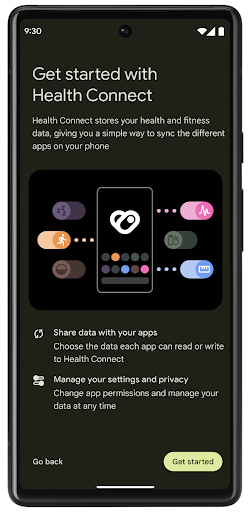
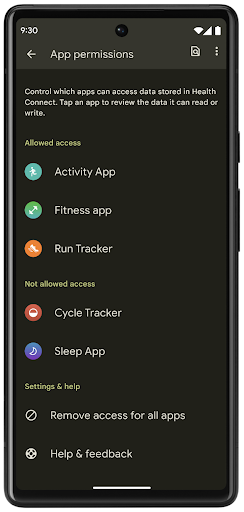
Health Connect includes several new features in Android 14, such as exercise routes, allowing users to share a route of their workout which can be visualized on a map. A route is defined as a list of locations saved within a window of time, and your app can insert routes into exercise sessions, tying them together. To ensure that users have complete control over this sensitive data, users must allow sharing individual routes with other apps.
For more information, see the Health Connection documentation and the blogpost on What's new in Android Health.
Atualizações do OpenJDK 17
O Android 14 continua o trabalho de atualizar as principais bibliotecas do Android para se alinhar aos recursos das versões mais recentes do LTS do OpenJDK, incluindo atualizações de bibliotecas e suporte à linguagem Java 17 para desenvolvedores de apps e plataformas.
Os seguintes recursos e melhorias estão incluídos:
- Aproximadamente 300 classes
java.baseforam atualizadas para oferecer suporte ao Java 17. - Blocos de texto, que introduzem literais de string de várias linhas à linguagem de programação Java.
- Correspondência de padrão para instanceof, que permite que um objeto
seja tratado como um tipo específico em uma
instanceofsem nenhuma outra variável. - Classes seladas, que permitem restringir quais classes e interfaces podem estender ou implementar essas classes.
Graças às atualizações do sistema do Google Play (Projeto Mainline), mais de 600 milhões de dispositivos podem receber as atualizações mais recentes do Android Runtime (ART), que incluem essas mudanças. Isso faz parte do nosso compromisso de oferecer aos apps um ambiente mais consistente e seguro em todos os dispositivos, com novos recursos para os usuários, independente da versão da plataforma.
Java e OpenJDK são marcas registradas da Oracle e/ou afiliadas.
Melhorias para app stores
Android 14 introduces several PackageInstaller APIs that
allow app stores to improve their user experience.
Request install approval before downloading
Installing or updating an app might require user approval.
For example, when an installer making use of the
REQUEST_INSTALL_PACKAGES permission attempts to install a
new app. In prior Android versions, app stores can only request user approval
after APKs are written to the install session and the
session is committed.
Starting with Android 14, the requestUserPreapproval()
method lets installers request user approval before committing the install
session. This improvement lets an app store defer downloading any APKs until
after the installation has been approved by the user. Furthermore, once a user
has approved installation, the app store can download and install the app in the
background without interrupting the user.
Claim responsibility for future updates
The setRequestUpdateOwnership() method allows an installer
to indicate to the system that it intends to be responsible for future updates
to an app it is installing. This capability enables update ownership
enforcement, meaning that only the update owner is permitted
to install automatic updates to the app. Update ownership enforcement helps to
ensure that users receive updates only from the expected app store.
Any other installer, including those making use of the
INSTALL_PACKAGES permission, must receive explicit user
approval in order to install an update. If a user decides to proceed with an
update from another source, update ownership is lost.
Update apps at less-disruptive times
App stores typically want to avoid updating an app that is actively in use because this leads to the app's running processes being killed, which potentially interrupts what the user was doing.
Starting with Android 14, the InstallConstraints API
gives installers a way to ensure that their app updates happen at an opportune
moment. For example, an app store can call the
commitSessionAfterInstallConstraintsAreMet() method to
make sure that an update is only committed when the user is no longer
interacting with the app in question.
Seamlessly install optional splits
With split APKs, features of an app can be delivered in separate APK files,
rather than as a monolithic APK. Split APKs allow app stores to optimize the
delivery of different app components. For example, app stores might optimize
based on the properties of the target device. The
PackageInstaller API has supported splits since its
introduction in API level 22.
In Android 14, the setDontKillApp() method allows an
installer to indicate that the app's running processes shouldn't be killed when
new splits are installed. App stores can use this feature to seamlessly install
new features of an app while the user is using the app.
Pacotes de metadados do app
Starting in Android 14, the Android package installer lets you specify app metadata, such as data safety practices, to include on app store pages such as Google Play.
Detectar quando usuários fazem capturas de tela no dispositivo
To create a more standardized experience for detecting screenshots, Android 14 introduces a privacy-preserving screenshot detection API. This API lets apps register callbacks on a per-activity basis. These callbacks are invoked, and the user is notified, when the user takes a screenshot while that activity is visible.
Experiência do usuário
Ações personalizadas e melhoria na classificação do Sharesheet
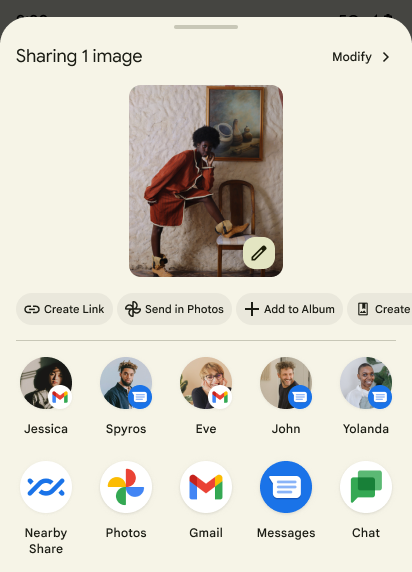
Android 14 updates the system sharesheet to support custom app actions and more informative preview results for users.
Add custom actions
With Android 14, your app can add custom actions to the system sharesheet it invokes.
Improve ranking of Direct Share targets
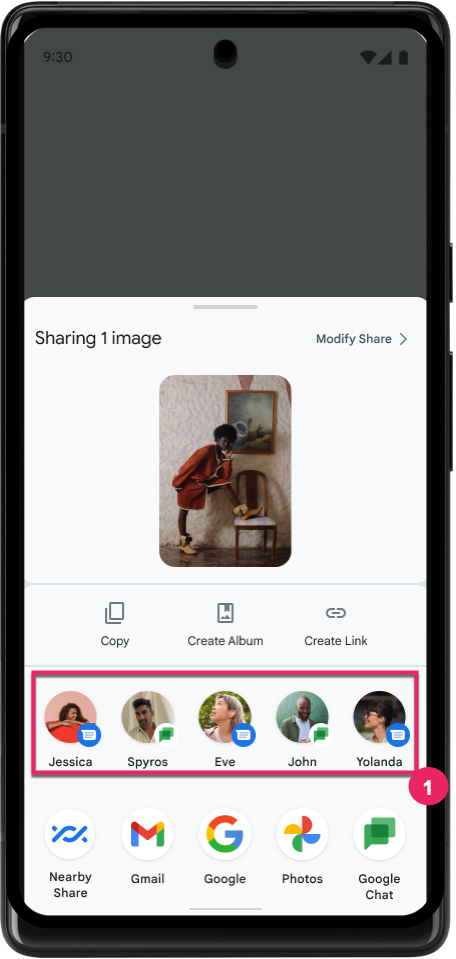
Android 14 uses more signals from apps to determine the ranking of the direct share targets to provide more helpful results for the user. To provide the most useful signal for ranking, follow the guidance for improving rankings of your Direct Share targets. Communication apps can also report shortcut usage for outgoing and incoming messages.
Suporte a animações de voltas preditivas integradas e personalizadas
O Android 13 introduziu a animação de volta preditiva à tela inicial por trás de uma opção do desenvolvedor. Quando usada em um app com suporte para a opção para desenvolvedor ativada, deslizar para trás mostra uma animação indicando que o gesto de retorno sai do app de volta à tela inicial.
O Android 14 inclui várias melhorias e novas orientações para a volta preditiva:
- Você pode configurar
android:enableOnBackInvokedCallback=truepara ativar as animações do sistema de volta preditiva por atividade em vez de para todo o app. - Adicionamos novas animações do sistema para acompanhar a animação de retorno à tela inicial do Android 13. As novas animações do sistema são entre atividades e tarefas, que são recebidas automaticamente após a migração para a volta preditiva.
- Adicionamos novas animações do componente Material Design para páginas inferiores, páginas laterais e pesquisa.
- Desenvolvemos orientações de design para a criação de transições e animações personalizadas no app.
- Adicionamos novas APIs para oferecer suporte a animações de transição personalizadas no app:
handleOnBackStarted,handleOnBackProgressed,handleOnBackCancelledinOnBackPressedCallbackonBackStarted,onBackProgressed,onBackCancelledinOnBackAnimationCallback- Use
overrideActivityTransitionem vez deoverridePendingTransitionpara transições que respondem à medida que o usuário desliza de volta.
Com esta versão de pré-lançamento do Android 14, todos os recursos de volta preditiva permanecem por trás de uma opção para desenvolvedores. Consulte o guia do desenvolvedor para migrar seu app para a volta preditiva e o guia do desenvolvedor para criar transições personalizadas no app.
Substituições por app do fabricante de dispositivos de tela grande
Per-app overrides enable device manufacturers to change the behavior of apps on large screen devices. For example, the FORCE_RESIZE_APP override instructs the system to resize the app to fit display dimensions (avoiding size compatibility mode) even if resizeableActivity="false" is set in the app manifest.
Overrides are intended to improve the user experience on large screens.
New manifest properties enable you to disable some device manufacturer overrides for your app.
Substituições por app para usuários de telas grandes
Per-app overrides change the behavior of apps on large screen devices. For example, the OVERRIDE_MIN_ASPECT_RATIO_LARGE device manufacturer override sets the app aspect ratio to 16:9 regardless of the app's configuration.
Android 14 QPR1 enables users to apply per‑app overrides by means of a new settings menu on large screen devices.
Compartilhamento de tela de app
App screen sharing enables users to share an app window instead of the entire device screen during screen content recording.
With app screen sharing, the status bar, navigation bar, notifications, and other system UI elements are excluded from the shared display. Only the content of the selected app is shared.
App screen sharing improves productivity and privacy by enabling users to run multiple apps but limit content sharing to a single app.
Resposta inteligente com tecnologia de LLM no Gboard do Pixel 8 Pro
Em dispositivos Pixel 8 Pro com a versão de dezembro, os desenvolvedores podem testar respostas inteligentes de maior qualidade no Gboard com modelos de linguagem grandes (LLMs) no dispositivo em execução no Google Tensor.
Esse recurso está disponível como uma prévia limitada para o inglês dos EUA no WhatsApp, no Line e no KakaoTalk. É necessário usar um dispositivo Pixel 8 Pro com o Gboard como teclado.
Para testar, primeiro ative o recurso em Configurações > Opções do desenvolvedor > Configurações do AICore > Ativar o AICore persistente.
Em seguida, abra uma conversa em um app compatível para conferir a resposta inteligente com LLM na faixa de sugestões do Gboard em resposta às mensagens recebidas.
Gráficos
Os caminhos podem ser consultados e interpolados
Android's Path API is a powerful and flexible mechanism for
creating and rendering vector graphics, with the ability to stroke or fill a
path, construct a path from line segments or quadratic or cubic curves, perform
boolean operations to get even more complex shapes, or all of these
simultaneously. One limitation is the ability to find out what is actually in a
Path object; the internals of the object are opaque to callers after creation.
To create a Path, you call methods such as
moveTo(), lineTo(), and
cubicTo() to add path segments. But there has been no way to
ask that path what the segments are, so you must retain that information at
creation time.
Starting in Android 14, you can query paths to find out what's inside of them.
First, you need to get a PathIterator object using the
Path.getPathIterator API:
Kotlin
val path = Path().apply {
    moveTo(1.0f, 1.0f)
    lineTo(2.0f, 2.0f)
    close()
}
val pathIterator = path.pathIterator
Java
Path path = new Path();
path.moveTo(1.0F, 1.0F);
path.lineTo(2.0F, 2.0F);
path.close();
PathIterator pathIterator = path.getPathIterator();
Next, you can call PathIterator to iterate through the segments
one by one, retrieving all of the necessary data for each segment. This example
uses PathIterator.Segment objects, which packages up the data
for you:
Kotlin
for (segment in pathIterator) {
    println("segment: ${segment.verb}, ${segment.points}")
}
Java
while (pathIterator.hasNext()) {
    PathIterator.Segment segment = pathIterator.next();
    Log.i(LOG_TAG, "segment: " + segment.getVerb() + ", " + segment.getPoints());
}
PathIterator also has a non-allocating version of next() where you can pass
in a buffer to hold the point data.
One of the important use cases of querying Path data is interpolation. For
example, you might want to animate (or morph) between two different paths. To
further simplify that use case, Android 14 also includes the
interpolate() method on Path. Assuming the two paths have
the same internal structure, the interpolate() method creates a new Path
with that interpolated result. This example returns a path whose shape is
halfway (a linear interpolation of .5) between path and otherPath:
Kotlin
val interpolatedResult = Path()
if (path.isInterpolatable(otherPath)) {
    path.interpolate(otherPath, .5f, interpolatedResult)
}
Java
Path interpolatedResult = new Path();
if (path.isInterpolatable(otherPath)) {
    path.interpolate(otherPath, 0.5F, interpolatedResult);
}
The Jetpack graphics-path library enables similar APIs for earlier versions of Android as well.
Malhas personalizadas com shaders de vértice e fragmento
Android has long supported drawing triangle meshes with custom shading, but the input mesh format has been limited to a few predefined attribute combinations. Android 14 adds support for custom meshes, which can be defined as triangles or triangle strips, and can, optionally, be indexed. These meshes are specified with custom attributes, vertex strides, varying, and vertex and fragment shaders written in AGSL.
The vertex shader defines the varyings, such as position and color, while the
fragment shader can optionally define the color for the pixel, typically by
using the varyings created by the vertex shader. If color is provided by the
fragment shader, it is then blended with the current Paint
color using the blend mode selected when
drawing the mesh. Uniforms can be passed
into the fragment and vertex shaders for additional flexibility.
Renderizador de buffer de hardware para Canvas
To assist in using Android's Canvas API to draw with
hardware acceleration into a HardwareBuffer, Android 14
introduces HardwareBufferRenderer. This API is
particularly useful when your use case involves communication with the system
compositor through SurfaceControl for low-latency
drawing.