

Android 14 wprowadza wiele przydatnych funkcji i interfejsów API dla deweloperów. Poniższe materiały pomogą Ci poznać funkcje aplikacji i zacząć korzystać z powiązanych interfejsów API.
Szczegółową listę dodanych, zmodyfikowanych i usuniętych interfejsów API znajdziesz w raporcie o różnicach w interfejsach API. Szczegółowe informacje o dodanych interfejsach API znajdziesz w dokumentacji interfejsu Android API. W przypadku Androida 14 poszukaj interfejsów API dodanych na poziomie 34. Aby dowiedzieć się więcej o obszarach, w których zmiany na platformie mogą mieć wpływ na Twoje aplikacje, zapoznaj się ze zmianami w działaniu Androida 14 w przypadku aplikacji kierowanych na Androida 14 i w przypadku wszystkich aplikacji.
Internacjonalizacja
Wybór języka według aplikacji
Android 14 expands on the per-app language features that were introduced in Android 13 (API level 33) with these additional capabilities:
Automatically generate an app's
localeConfig: Starting with Android Studio Giraffe Canary 7 and AGP 8.1.0-alpha07, you can configure your app to support per-app language preferences automatically. Based on your project resources, the Android Gradle plugin generates theLocaleConfigfile and adds a reference to it in the final manifest file, so you no longer have to create or update the file manually. AGP uses the resources in theresfolders of your app modules and any library module dependencies to determine the locales to include in theLocaleConfigfile.Dynamic updates for an app's
localeConfig: Use thesetOverrideLocaleConfig()andgetOverrideLocaleConfig()methods inLocaleManagerto dynamically update your app's list of supported languages in the device's system settings. Use this flexibility to customize the list of supported languages per region, run A/B experiments, or provide an updated list of locales if your app utilizes server-side pushes for localization.App language visibility for input method editors (IMEs): IMEs can utilize the
getApplicationLocales()method to check the language of the current app and match the IME language to that language.
Grammatical Inflection API
3 miliardy ludzi mówi językami z płcią: językami, w których kategorie gramatyczne (np. rzeczowniki, czasowniki, przymiotniki i przyimki) odmieniają się w zależności od płci osób i rzeczy, do których się zwracamy lub o których mówimy. Tradycyjnie wiele języków z płcią gramatyczną używa męskiej formy gramatycznej jako domyślnej lub uniwersalnej.
Zwracanie się do użytkowników w niewłaściwym rodzaju gramatycznym, np. do kobiet w męskim rodzaju gramatycznym, może negatywne wpłynąć na ich wyniki i postawę. Z kolei interfejs z językiem, który poprawnie odzwierciedla płeć gramatyczną użytkownika, może zwiększyć zaangażowanie użytkowników i zapewnić bardziej spersonalizowane i naturalne wrażenia.
To help you build a user-centric UI for gendered languages, Android 14 introduces the Grammatical Inflection API, which lets you add support for grammatical gender without refactoring your app.
Preferencje regionalne
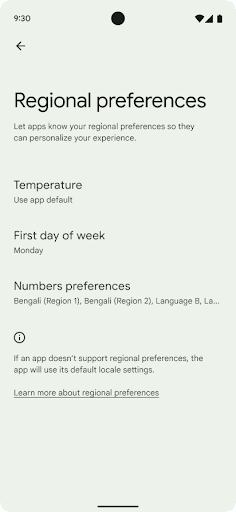
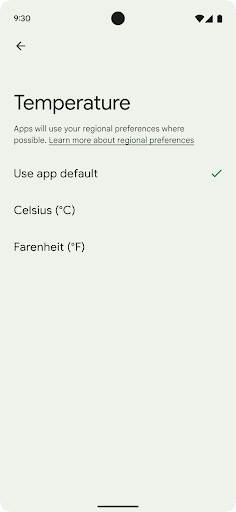
Preferencje regionalne pozwalają użytkownikom personalizować jednostki temperatury. dnia tygodnia i systemy numeracji. Europejczyk mieszkający w Stanach Zjednoczonych może preferować jednostki temperatury w stopniach Celsjusza zamiast w stopniach Fahrenheita, a aplikacje powinny traktować poniedziałek jako początek tygodnia zamiast niedzieli, która jest domyślną jednostką w Stanach Zjednoczonych.
Nowe menu ustawień Androida dla tych ustawień da użytkownikom
wykrywalną i scentralizowaną lokalizację na potrzeby zmiany ustawień aplikacji. Te ustawienia są również zachowywane podczas tworzenia kopii zapasowej i przywracania. Kilka interfejsów API i intencji, takich jak getTemperatureUnit i getFirstDayOfWeek, przyznaje aplikacji uprawnienia do odczytu ustawień użytkownika, dzięki czemu aplikacja może dostosowywać sposób wyświetlania informacji. Możesz też zarejestrować
BroadcastReceiver włączona
ACTION_LOCALE_CHANGED.
obsługi zmian konfiguracji języka w przypadku zmiany preferencji regionalnych.
Aby znaleźć te ustawienia, otwórz aplikację Ustawienia i kliknij System > Języki wejście > Ustawienia regionalne.
Ułatwienia dostępu
Nieliniowe skalowanie czcionki do 200%
Starting in Android 14, the system supports font scaling up to 200%, providing users with additional accessibility options.
To prevent large text elements on screen from scaling too large, the system applies a nonlinear scaling curve. This scaling strategy means that large text doesn't scale at the same rate as smaller text. Nonlinear font scaling helps preserve the proportional hierarchy between elements of different sizes while mitigating issues with linear text scaling at high degrees (such as text being cut off or text that becomes harder to read due to an extremely large display sizes).
Test your app with nonlinear font scaling
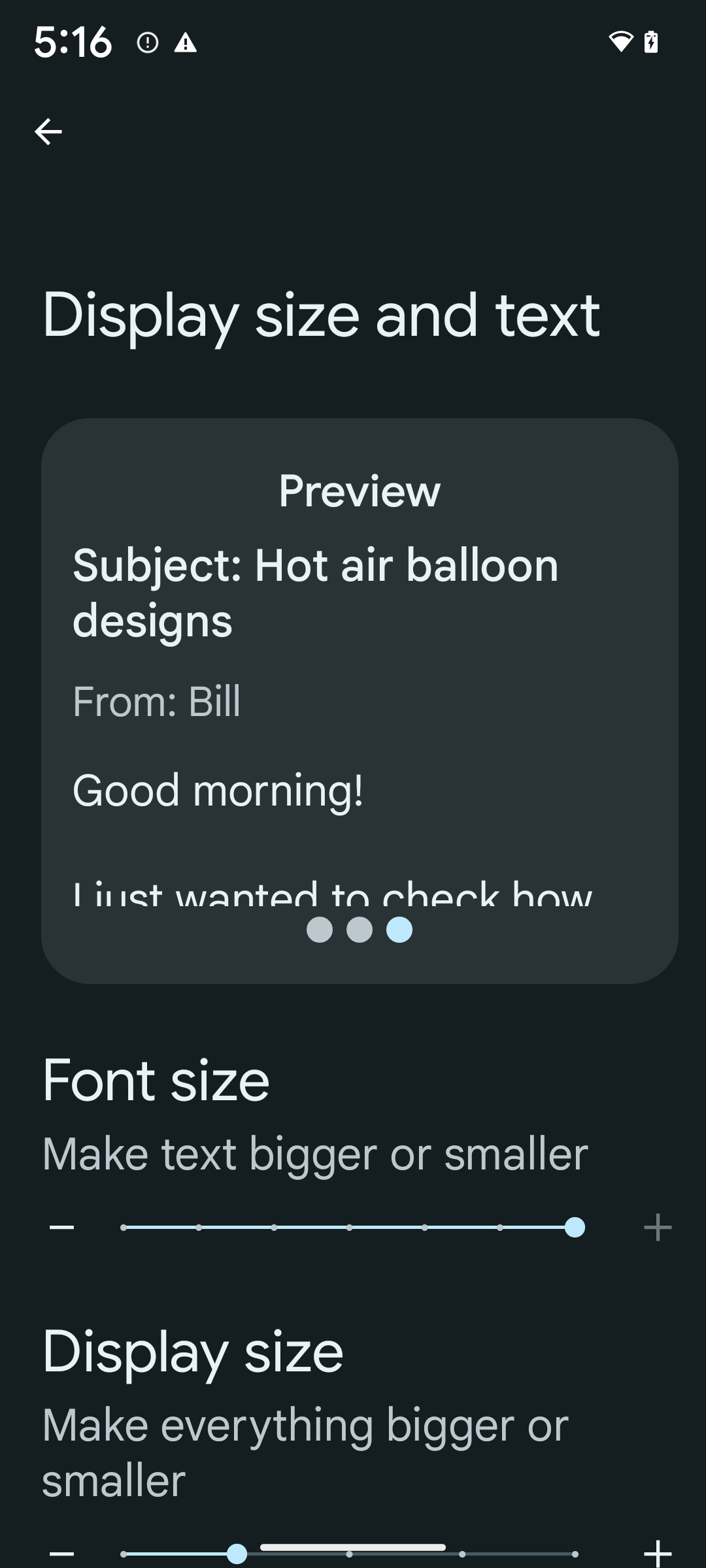
If you already use scaled pixels (sp) units to define text sizing, then these additional options and scaling improvements are applied automatically to the text in your app. However, you should still perform UI testing with the maximum font size enabled (200%) to ensure that your app applies the font sizes correctly and can accommodate larger font sizes without impacting usability.
To enable 200% font size, follow these steps:
- Open the Settings app and navigate to Accessibility > Display size and text.
- For the Font size option, tap the plus (+) icon until the maximum font size setting is enabled, as shown in the image that accompanies this section.
Use scaled pixel (sp) units for text-sizes
Remember to always specify text sizes in sp units. When your app uses sp units, Android can apply the user's preferred text size and scale it appropriately.
Don't use sp units for padding or define view heights assuming implicit padding: with nonlinear font scaling sp dimensions might not be proportional, so 4sp + 20sp might not equal 24sp.
Convert scaled pixel (sp) units
Use TypedValue.applyDimension() to convert from sp units
to pixels, and use TypedValue.deriveDimension() to
convert pixels to sp. These methods apply the appropriate nonlinear scaling
curve automatically.
Avoid hardcoding equations using
Configuration.fontScale or
DisplayMetrics.scaledDensity. Because font scaling is
nonlinear, the scaledDensity field is no longer accurate. The fontScale
field should be used for informational purposes only because fonts are no longer
scaled with a single scalar value.
Use sp units for lineHeight
Always define android:lineHeight using sp units instead
of dp, so the line height scales along with your text. Otherwise, if your text
is sp but your lineHeight is in dp or px, it doesn't scale and looks cramped.
TextView automatically corrects the lineHeight so that your intended
proportions are preserved, but only if both textSize and lineHeight are
defined in sp units.
Aparat i multimedia
Ultra HDR w przypadku zdjęć
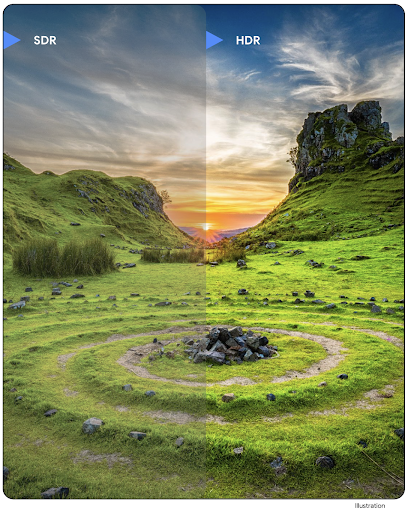
Android 14 obsługuje obrazy High Dynamic Range (HDR), które zachowują więcej informacji z czujnika podczas robienia zdjęcia, co umożliwia uzyskanie żywszych kolorów i większego kontrastu. Android używa formatu ultra HDR, który jest w pełni zgodny z wstecz z obrazami JPEG. Dzięki temu aplikacje mogą płynnie współpracować z obrazami HDR, wyświetlając je w standardowym zakresie dynamiki (SDR), gdy zajdzie taka potrzeba.
Przetwarzanie tych obrazów w interfejsie w HDR jest wykonywane automatycznie przez platformę, gdy aplikacja zechce używać interfejsu HDR w oknie aktywności, albo za pomocą elementu manifestu, albo w czasie działania przez wywołanieWindow.setColorMode(). Na obsługiwanych urządzeniach możesz też robić skompresowane zdjęcia Ultra
HDR. Dzięki większej liczbie kolorów odzyskanych z czujnika edytowanie w postprodukcji może być bardziej elastyczne. Pliki Gainmap powiązane z obrazami Ultra HDR mogą służyć do ich renderowania za pomocą OpenGL lub Vulkan.
Powiększanie, ustawianie ostrości, podgląd po zrobieniu zdjęcia i inne funkcje w rozszerzeniach aparatu
Android 14 ulepsza rozszerzenia aparatu, co pozwala aplikacjom na dłuższe przetwarzanie, co z kolei umożliwia uzyskiwanie lepszych zdjęć przy użyciu algorytmów wymagających dużej mocy obliczeniowej, takich jak fotografowanie przy słabym oświetleniu na obsługiwanych urządzeniach. Te funkcje zapewniają użytkownikom jeszcze większą wygodę podczas korzystania z możliwości rozszerzenia aparatu. Przykłady takich ulepszeń:
- Dynamiczna szacowana latencja przetwarzania zdjęć zapewnia znacznie dokładniejsze szacunki czasu przetwarzania zdjęć na podstawie bieżących warunków sceny i otoczenia. Wywołaj metodę
CameraExtensionSession.getRealtimeStillCaptureLatency(), aby uzyskać obiektStillCaptureLatency, który zawiera 2 metody oszacowania opóźnienia. MetodagetCaptureLatency()zwraca szacowane opóźnienie międzyonCaptureStartedaonCaptureProcessStarted(), a metodagetProcessingLatency()zwraca szacowane opóźnienie międzyonCaptureProcessStarted()a dostępnym ostatnim przetworzonym obrazem. - Obsługa wywołań zwrotnych postępu przechwytywania, dzięki którym aplikacje mogą wyświetlać bieżący postęp długotrwałych operacji przetwarzania zdjęć. Możesz sprawdzić, czy ta funkcja jest dostępna w
CameraExtensionCharacteristics.isCaptureProcessProgressAvailable, a jeśli tak, zaimplementować funkcję wywołania zwrotnegoonCaptureProcessProgressed(), która ma jako parametr postęp (od 0 do 100). metadane dotyczące rozszerzenia, takie jak
CaptureRequest.EXTENSION_STRENGTHdo powiększania obrazu, natężenie efektu rozszerzenia, np. rozmycie tła, za pomocąEXTENSION_BOKEH.Funkcja podglądu zdjęć w rozszerzeniach aparatu, która umożliwia wyświetlenie nieprzetworzonego obrazu szybciej niż w przypadku obrazu końcowego. Jeśli rozszerzenie wydłuża czas przetwarzania, obraz po wyświetleniu może być udostępniony jako element zastępczy, aby poprawić UX, a później zastąpiony przez ostateczny obraz. Aby sprawdzić, czy ta funkcja jest dostępna, przejdź do
CameraExtensionCharacteristics.isPostviewAvailable. Następnie możesz przekazać parametrOutputConfigurationdo funkcjiExtensionSessionConfiguration.setPostviewOutputConfiguration.Obsługa
SurfaceView, która umożliwia bardziej zoptymalizowaną i energooszczędną ścieżkę renderowania podglądu.Obsługa funkcji kliknięcia, aby ustawić ostrość i powiększyć widok podczas korzystania z rozszerzenia.
Zoom na matrycy
When REQUEST_AVAILABLE_CAPABILITIES_STREAM_USE_CASE in
CameraCharacteristics contains
SCALER_AVAILABLE_STREAM_USE_CASES_CROPPED_RAW, your app
can use advanced sensor capabilities to give a cropped RAW stream the same
pixels as the full field of view by using a CaptureRequest
with a RAW target that has stream use case set to
CameraMetadata.SCALER_AVAILABLE_STREAM_USE_CASES_CROPPED_RAW.
By implementing the request override controls, the updated camera gives users
zoom control even before other camera controls are ready.
Bezstratny dźwięk przez USB
Android 14 obsługuje bezstratne formaty dźwięku, dzięki czemu można uzyskać dźwięk w jakości studyjnej w przypadku przewodowych słuchawek USB. Możesz wysyłać zapytania do urządzenia USB w celu uzyskania preferowanych atrybutów miksera, rejestrować słuchacza zmian w preferowanych atrybutach miksera i konfigurować atrybuty miksera za pomocą klasy AudioMixerAttributes. Ta klasa reprezentuje format, np. maskę kanału, częstotliwość próbkowania i zachowanie miksera audio. Ta klasa umożliwia przesyłanie dźwięku bezpośrednio bez miksowania, regulowania głośności ani przetwarzania efektów.
Wydajność i narzędzia dla programistów
Credential Manager
Android 14 dodaje Credential Manager jako interfejs API platformy, z dodatkowym wsparciem dla urządzeń z Androidem 4.4 (poziom interfejsu API 19) za pomocą biblioteki Jetpack korzystającej z Usług Google Play. Credential Manager ułatwia użytkownikom logowanie się dzięki interfejsom API, które pobierają i przechowują dane logowania za pomocą dostawców danych logowania skonfigurowanych przez użytkownika. Credential Manager obsługuje wiele metod logowania, w tym logowanie przy użyciu nazwy użytkownika i hasła, kluczy dostępu i rozwiązań logowania sfederowanego (np. logowania przez Google) w jednym interfejsie API.
Klucze dostępu mają wiele zalet. Na przykład klucze dostępu oparte są na standardach branżowych, mogą działać w różnych systemach operacyjnych i ekosystemach przeglądarek oraz mogą być używane zarówno w witrynach, jak i w aplikacjach.
Więcej informacji znajdziesz w dokumentacji Menedżera danych uwierzytelniających i kluczy dostępu oraz w poście na blogu na temat Menedżera danych uwierzytelniających i kluczy dostępu.
Health Connect
Health Connect is an on-device repository for user health and fitness data. It allows users to share data between their favorite apps, with a single place to control what data they want to share with these apps.
On devices running Android versions prior to Android 14, Health Connect is available to download as an app on the Google Play store. Starting with Android 14, Health Connect is part of the platform and receives updates through Google Play system updates without requiring a separate download. With this, Health Connect can be updated frequently, and your apps can rely on Health Connect being available on devices running Android 14 or higher. Users can access Health Connect from the Settings in their device, with privacy controls integrated into the system settings.
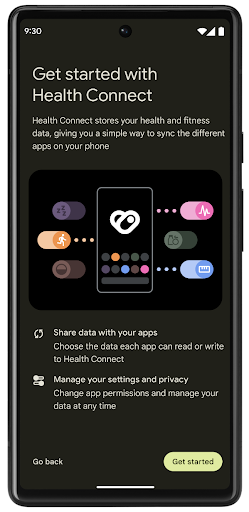
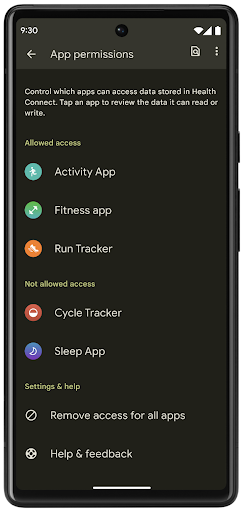
Health Connect includes several new features in Android 14, such as exercise routes, allowing users to share a route of their workout which can be visualized on a map. A route is defined as a list of locations saved within a window of time, and your app can insert routes into exercise sessions, tying them together. To ensure that users have complete control over this sensitive data, users must allow sharing individual routes with other apps.
For more information, see the Health Connection documentation and the blogpost on What's new in Android Health.
Aktualizacje OpenJDK 17
Android 14 continues the work of refreshing Android's core libraries to align with the features in the latest OpenJDK LTS releases, including both library updates and Java 17 language support for app and platform developers.
The following features and improvements are included:
- Updated approximately 300
java.baseclasses to Java 17 support. - Text Blocks, which introduce multi-line string literals to the Java programming language.
- Pattern Matching for instanceof, which allows an object to
be treated as having a specific type in an
instanceofwithout any additional variables. - Sealed classes, which allow you restrict which classes and interfaces can extend or implement them.
Thanks to Google Play system updates (Project Mainline), over 600 million devices are enabled to receive the latest Android Runtime (ART) updates that include these changes. This is part of our commitment to give apps a more consistent, secure environment across devices, and to deliver new features and capabilities to users independent of platform releases.
Java and OpenJDK are trademarks or registered trademarks of Oracle and/or its affiliates.
Ulepszenia w sklepach z aplikacjami
Android 14 introduces several PackageInstaller APIs that
allow app stores to improve their user experience.
Request install approval before downloading
Installing or updating an app might require user approval.
For example, when an installer making use of the
REQUEST_INSTALL_PACKAGES permission attempts to install a
new app. In prior Android versions, app stores can only request user approval
after APKs are written to the install session and the
session is committed.
Starting with Android 14, the requestUserPreapproval()
method lets installers request user approval before committing the install
session. This improvement lets an app store defer downloading any APKs until
after the installation has been approved by the user. Furthermore, once a user
has approved installation, the app store can download and install the app in the
background without interrupting the user.
Claim responsibility for future updates
The setRequestUpdateOwnership() method allows an installer
to indicate to the system that it intends to be responsible for future updates
to an app it is installing. This capability enables update ownership
enforcement, meaning that only the update owner is permitted
to install automatic updates to the app. Update ownership enforcement helps to
ensure that users receive updates only from the expected app store.
Any other installer, including those making use of the
INSTALL_PACKAGES permission, must receive explicit user
approval in order to install an update. If a user decides to proceed with an
update from another source, update ownership is lost.
Update apps at less-disruptive times
App stores typically want to avoid updating an app that is actively in use because this leads to the app's running processes being killed, which potentially interrupts what the user was doing.
Starting with Android 14, the InstallConstraints API
gives installers a way to ensure that their app updates happen at an opportune
moment. For example, an app store can call the
commitSessionAfterInstallConstraintsAreMet() method to
make sure that an update is only committed when the user is no longer
interacting with the app in question.
Seamlessly install optional splits
With split APKs, features of an app can be delivered in separate APK files,
rather than as a monolithic APK. Split APKs allow app stores to optimize the
delivery of different app components. For example, app stores might optimize
based on the properties of the target device. The
PackageInstaller API has supported splits since its
introduction in API level 22.
In Android 14, the setDontKillApp() method allows an
installer to indicate that the app's running processes shouldn't be killed when
new splits are installed. App stores can use this feature to seamlessly install
new features of an app while the user is using the app.
Pakiety metadanych aplikacji
Starting in Android 14, the Android package installer lets you specify app metadata, such as data safety practices, to include on app store pages such as Google Play.
Wykrywanie, kiedy użytkownicy robią zrzuty ekranu urządzenia
To create a more standardized experience for detecting screenshots, Android 14 introduces a privacy-preserving screenshot detection API. This API lets apps register callbacks on a per-activity basis. These callbacks are invoked, and the user is notified, when the user takes a screenshot while that activity is visible.
Interfejs użytkownika
Działania niestandardowe na arkuszu udostępniania i ulepszone rankingowanie
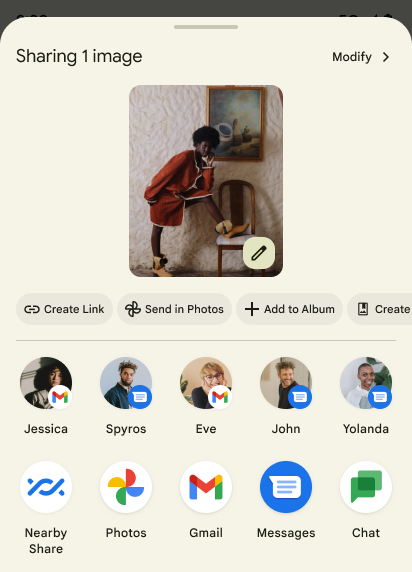
Android 14 aktualizuje systemowy panel udostępniania, aby obsługiwać niestandardowe działania aplikacji i bardziej szczegółowe podglądowe wyniki dla użytkowników.
Dodawanie działań niestandardowych
W Androidzie 14 aplikacja może dodawać niestandardowe działania do wywoływanego przez nią panelu udostępniania.
Ulepszanie rankingu celów udostępniania bezpośredniego
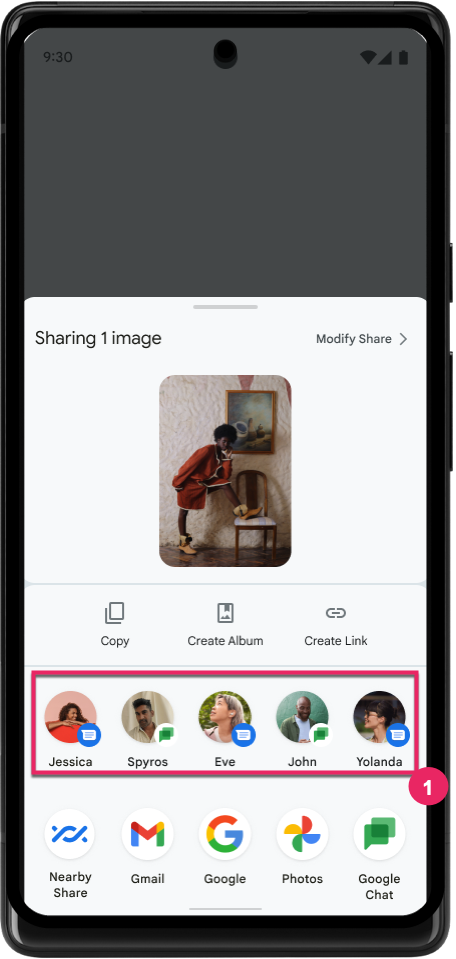
Android 14 używa większej liczby sygnałów z aplikacji, aby określać ranking celów udostępniania bezpośredniego i w ten sposób wyświetlać bardziej przydatne wyniki użytkownikom. Aby zapewnić najbardziej przydatny sygnał dotyczący rankingu, postępuj zgodnie ze wskazówkami dotyczącymi ulepszania pozycji docelowych w ramach funkcji Direct Share. Aplikacje do komunikacji mogą też zgłaszać użycie skrótu w przypadku wychodzących i przyjmowanych wiadomości.
Obsługa wbudowanych i niestandardowych animacji przewidywanego przejścia wstecz
Android 13 introduced the predictive back-to-home animation behind a developer option. When used in a supported app with the developer option enabled, swiping back shows an animation indicating that the back gesture exits the app back to the home screen.
Android 14 includes multiple improvements and new guidance for Predictive Back:
- You can set
android:enableOnBackInvokedCallback=trueto opt in to predictive back system animations per-Activity instead of for the entire app. - We've added new system animations to accompany the back-to-home animation from Android 13. The new system animations are cross-activity and cross-task, which you get automatically after migrating to Predictive Back.
- We've added new Material Component animations for Bottom sheets, Side sheets, and Search.
- We've created design guidance for creating custom in-app animations and transitions.
- We've added new APIs to support custom in-app transition animations:
handleOnBackStarted,handleOnBackProgressed,handleOnBackCancelledinOnBackPressedCallbackonBackStarted,onBackProgressed,onBackCancelledinOnBackAnimationCallback- Use
overrideActivityTransitioninstead ofoverridePendingTransitionfor transitions that respond as the user swipes back.
With this Android 14 preview release, all features of Predictive Back remain behind a developer option. See the developer guide to migrate your app to predictive back, as well as the developer guide to creating custom in-app transitions.
Zastąpienia ustawień producenta urządzenia z dużym ekranem dla poszczególnych aplikacji
Zastąpienia dotyczące aplikacji umożliwiają producentom urządzeń zmianę działania aplikacji na urządzeniach z dużym ekranem. Na przykład zastąpienie FORCE_RESIZE_APP instruuje system, aby zmienił rozmiar aplikacji, aby pasowała do wyświetlanych wymiarów (unikając trybu zgodności rozmiaru), nawet jeśli w manifeście aplikacji ustawiono resizeableActivity="false".
Zastąpienia mają na celu poprawę wrażeń użytkowników na dużych ekranach.
Nowe właściwości pliku manifestu umożliwiają wyłączenie w przypadku aplikacji niektórych zastąpień producenta urządzenia.
Zastąpienia ustawień aplikacji dla użytkowników dużych ekranów
Per-app overrides change the behavior of apps on large screen devices. For example, the OVERRIDE_MIN_ASPECT_RATIO_LARGE device manufacturer override sets the app aspect ratio to 16:9 regardless of the app's configuration.
Android 14 QPR1 enables users to apply per‑app overrides by means of a new settings menu on large screen devices.
Udostępnianie ekranu aplikacji
App screen sharing enables users to share an app window instead of the entire device screen during screen content recording.
With app screen sharing, the status bar, navigation bar, notifications, and other system UI elements are excluded from the shared display. Only the content of the selected app is shared.
App screen sharing improves productivity and privacy by enabling users to run multiple apps but limit content sharing to a single app.
Inteligentna odpowiedź na klawiaturze Gboard na Pixelu 8 Pro oparta na LLM
Na urządzeniach Pixel 8 Pro z aktualizacją z listopada deweloperzy mogą wypróbować inteligentne odpowiedzi lepszej jakości w klawiaturze Gboard, które są obsługiwane przez duże modele językowe (LLM) działające na procesorze Google Tensor.
Ta funkcja jest dostępna w wersji testowej w języku angielskim (USA) w aplikacji WhatsApp, Line i KakaoTalk. Wymaga użycia urządzenia Pixel 8 Pro z klawiaturą Gboard.
Aby wypróbować tę funkcję, najpierw włącz ją w sekcji Ustawienia > Opcje programisty > Ustawienia AICore > Włącz trwałe AICore.
Następnie otwórz rozmowę w obsługiwanej aplikacji, aby zobaczyć inteligentną odpowiedź w pasku sugestii Gboard, która jest obsługiwana przez LLM.
Grafika
Ścieżki można wyszukiwać i interpolować
Android's Path API is a powerful and flexible mechanism for
creating and rendering vector graphics, with the ability to stroke or fill a
path, construct a path from line segments or quadratic or cubic curves, perform
boolean operations to get even more complex shapes, or all of these
simultaneously. One limitation is the ability to find out what is actually in a
Path object; the internals of the object are opaque to callers after creation.
To create a Path, you call methods such as
moveTo(), lineTo(), and
cubicTo() to add path segments. But there has been no way to
ask that path what the segments are, so you must retain that information at
creation time.
Starting in Android 14, you can query paths to find out what's inside of them.
First, you need to get a PathIterator object using the
Path.getPathIterator API:
Kotlin
val path = Path().apply {
    moveTo(1.0f, 1.0f)
    lineTo(2.0f, 2.0f)
    close()
}
val pathIterator = path.pathIterator
Java
Path path = new Path();
path.moveTo(1.0F, 1.0F);
path.lineTo(2.0F, 2.0F);
path.close();
PathIterator pathIterator = path.getPathIterator();
Next, you can call PathIterator to iterate through the segments
one by one, retrieving all of the necessary data for each segment. This example
uses PathIterator.Segment objects, which packages up the data
for you:
Kotlin
for (segment in pathIterator) {
    println("segment: ${segment.verb}, ${segment.points}")
}
Java
while (pathIterator.hasNext()) {
    PathIterator.Segment segment = pathIterator.next();
    Log.i(LOG_TAG, "segment: " + segment.getVerb() + ", " + segment.getPoints());
}
PathIterator also has a non-allocating version of next() where you can pass
in a buffer to hold the point data.
One of the important use cases of querying Path data is interpolation. For
example, you might want to animate (or morph) between two different paths. To
further simplify that use case, Android 14 also includes the
interpolate() method on Path. Assuming the two paths have
the same internal structure, the interpolate() method creates a new Path
with that interpolated result. This example returns a path whose shape is
halfway (a linear interpolation of .5) between path and otherPath:
Kotlin
val interpolatedResult = Path()
if (path.isInterpolatable(otherPath)) {
    path.interpolate(otherPath, .5f, interpolatedResult)
}
Java
Path interpolatedResult = new Path();
if (path.isInterpolatable(otherPath)) {
    path.interpolate(otherPath, 0.5F, interpolatedResult);
}
The Jetpack graphics-path library enables similar APIs for earlier versions of Android as well.
Niestandardowe siatki z shaderami wierzchołków i fragmentów
Android od dawna obsługuje rysowanie trójkątnych siatek z niestandardowym cieniowaniem, ale format siatki wejściowej był ograniczony do kilku wstępnie zdefiniowanych kombinacji atrybutów. Android 14 obsługuje niestandardowe siatki, które można zdefiniować jako trójkąty lub trójkątne paski, a także opcjonalnie posortować. Te siatki są określane za pomocą niestandardowych atrybutów, kroków wierzchołków, zmiennych oraz shaderów wierzchołków i fragmentów napisanych w AGSL.
Shader wierzchołka definiuje zmienne, takie jak pozycja i kolor, a shader fragmentu może opcjonalnie zdefiniować kolor piksela, zwykle za pomocą zmiennych utworzonych przez shader wierzchołka. Jeśli kolor jest dostarczany przez fragment shadera, jest on mieszany z bieżącym kolorem Paint za pomocą trybu mieszania wybranego podczas rysowania siatki. Tablice jednolite można przekazywać do shaderów wierzchołkowych i fragmentów, aby zwiększyć elastyczność.
Renderowanie bufora sprzętowego w Canvas
Aby ułatwić korzystanie z interfejsu API Canvas w Androidzie do rysowania z przyspieszeniem sprzętowym w HardwareBuffer, Android 14 wprowadza HardwareBufferRenderer. Ten interfejs API jest
szczególnie przydatne, gdy Twój przypadek użycia obejmuje komunikację z systemem
kompozytor do SurfaceControl, by zapewnić małe opóźnienie
rysunek.