

En esta página, se describe cómo abordar problemas relacionados con los veredictos de integridad.
Cuando se solicita un token de integridad, tienes la opción de mostrarle al usuario un diálogo de Google Play. Puedes mostrar el diálogo cuando haya uno o más problemas con el veredicto de integridad o si se produjo una excepción durante una solicitud a la API de Integrity. Una vez que se cierra el diálogo, puedes verificar que el problema se haya solucionado con otra solicitud de token de integridad. Si realizas solicitudes estándar, debes volver a preparar el proveedor de tokens para obtener un veredicto nuevo.
Cómo solicitar un diálogo de integridad para solucionar un problema con el veredicto
Cuando el cliente solicite un token de integridad, puedes usar el método que se ofrece en
StandardIntegrityToken (API estándar) y en
IntegrityTokenResponse (API clásica):
showDialog(Activity activity, int integrityDialogTypeCode).
En los siguientes pasos, se describe cómo puedes usar la API de Play Integrity para mostrar un
diálogo de corrección con el GET_LICENSED código de diálogo.
Después de esta sección, se enumeran otros códigos de diálogo que puede solicitar tu app.
Solicita un token de integridad a tu app y envíalo a tu servidor. Puedes usar la solicitud estándar o clásica.
Kotlin
// Request an integrity token
val tokenResponse: StandardIntegrityToken = requestIntegrityToken()
// Send token to app server and get response on what to do next
val yourServerResponse: YourServerResponse = sendToServer(tokenResponse.token())
Java
// Request an integrity token
StandardIntegrityToken tokenResponse = requestIntegrityToken();
// Send token to app server and get response on what to do next
YourServerResponse yourServerResponse = sendToServer(tokenResponse.token());
Unity
// Request an integrity token
StandardIntegrityToken tokenResponse = RequestIntegrityToken();
// Send token to app server and get response on what to do next
YourServerResponse yourServerResponse = sendToServer(tokenResponse.Token);
Unreal Engine
// Request an integrity token
StandardIntegrityToken* Response = RequestIntegrityToken();
// Send token to app server and get response on what to do next
YourServerResponse YourServerResponse = SendToServer(Response->Token);
Nativo
/// Request an integrity token
StandardIntegrityToken* response = requestIntegrityToken();
/// Send token to app server and get response on what to do next
YourServerResponse yourServerResponse = sendToServer(StandardIntegrityToken_getToken(response));
En tu servidor, desencripta el token de integridad y verifica el campo
appLicensingVerdict. Tal vez se vería así:// Licensing issue { ... "accountDetails": { "appLicensingVerdict": "UNLICENSED" } }
Si el token contiene
appLicensingVerdict: "UNLICENSED", responde al cliente de tu app y solicítale que muestre el diálogo de licencia:Kotlin
private fun getDialogTypeCode(integrityToken: String): Int{
  // Get licensing verdict from decrypted and verified integritytoken
  val licensingVerdict: String = getLicensingVerdictFromDecryptedToken(integrityToken)

  return if (licensingVerdict == "UNLICENSED") {
          1 // GET_LICENSED
      } else 0
}
Java
private int getDialogTypeCode(String integrityToken) {
  // Get licensing verdict from decrypted and verified integrityToken
  String licensingVerdict = getLicensingVerdictFromDecryptedToken(integrityToken);

  if (licensingVerdict.equals("UNLICENSED")) {
    return 1; // GET_LICENSED
  }
  return 0;
}
Unity
private int GetDialogTypeCode(string IntegrityToken) {
  // Get licensing verdict from decrypted and verified integrityToken
  string licensingVerdict = GetLicensingVerdictFromDecryptedToken(IntegrityToken);

  if (licensingVerdict == "UNLICENSED") {
    return 1; // GET_LICENSED
  }
  return 0;
}
Unreal Engine
private int GetDialogTypeCode(FString IntegrityToken) {
  // Get licensing verdict from decrypted and verified integrityToken
  FString LicensingVerdict = GetLicensingVerdictFromDecryptedToken(IntegrityToken);

  if (LicensingVerdict == "UNLICENSED") {
    return 1; // GET_LICENSED
  }
  return 0;
}
Nativo
private int getDialogTypeCode(string integrity_token) {
  /// Get licensing verdict from decrypted and verified integrityToken
  string licensing_verdict = getLicensingVerdictFromDecryptedToken(integrity_token);

  if (licensing_verdict == "UNLICENSED") {
    return 1; // GET_LICENSED
  }
  return 0;
}
En tu app, llama a
showDialogcon el código solicitado recuperado de tu servidor:Kotlin
// Show dialog as indicated by the server
val showDialogType: Int? = yourServerResponse.integrityDialogTypeCode()
if (showDialogType == null) {
   return
}

// Create dialog request
val dialogRequest = StandardIntegrityDialogRequest.builder()
        .setActivity(activity)
        .setTypeCode(showDialogType)
        .setStandardIntegrityResponse(StandardIntegrityResponse.TokenResponse(token))
        .build()

// Call showDialog, the dialog will be shown on top of the provided activity
// and the task will complete when the dialog is closed.
val result: Task<Int> = standardIntegrityManager.showDialog(dialogRequest)

// Handle response code, call the Integrity API again to confirm that the
// verdict issue has been resolved.
Java
// Show dialog as indicated by the server
@Nullable Integer showDialogType = yourServerResponse.integrityDialogTypeCode();
if (showDialogType == null) {
   return;
}

// Create dialog request
StandardIntegrityDialogRequest dialogRequest =
    StandardIntegrityDialogRequest.builder()
        .setActivity(getActivity())
        .setTypeCode(showDialogTypeCode)
        .setStandardIntegrityResponse(new StandardIntegrityResponse.TokenResponse(token))
        .build();

// Call showDialog, the dialog will be shown on top of the provided activity
// and the task will complete when the dialog is closed.
Task<Integer> result = standardIntegrityManager.showDialog(dialogRequest);

// Handle response code, call the Integrity API again to confirm that the
// verdict issue has been resolved.
Unity
// Initialize the V2 manager. Requires Play Integrity Unity Plugin v2.0.0 or
// higher.
var standardIntegrityManager = new StandardIntegrityManagerV2();
IEnumerator ShowDialogCoroutine() {
  int showDialogType = yourServerResponse.IntegrityDialogTypeCode();

  PlayAsyncOperation<IntegrityDialogResponseCode, StandardIntegrityError> showDialogTask;

  using (var activity = UnityPlayerHelper.GetCurrentActivity())
  {
      // Create a dialog request
      var dialogRequest = new StandardIntegrityDialogRequest(tokenResponse, activity, showDialogType);

      // Call showDialog with the request, the dialog will be shown on top of the
      // provided activity and complete when the dialog is closed.
      showDialogTask = standardIntegrityManager.ShowDialog(dialogRequest);
  }

  // Wait for PlayAsyncOperation to complete.
  yield return showDialogTask;

  // Handle response code, call the Integrity API again to confirm that the
  // verdict issue been resolved.
}
Unreal Engine
// .h
void MyClass::OnShowDialogCompleted(
  EStandardIntegrityErrorCode Error,
  EIntegrityDialogResponseCode Response)
{
  // Handle response code, call the Integrity API again to confirm that the
  // verdict issue has been resolved.
}

// .cpp
void MyClass::RequestIntegrityToken()
{
  UStandardIntegrityToken* Response = ...
  int TypeCode = YourServerResponse.integrityDialogTypeCode();

  // Create a delegate to bind the callback function.
  FShowDialogStandardOperationCompletedDelegate Delegate;

  // Bind the completion handler (OnShowDialogCompleted) to the delegate.
  Delegate.BindDynamic(this, &MyClass::OnShowDialogCompleted);

  // Call ShowDialog with TypeCode which completes when the dialog is closed.
  Response->ShowDialog(TypeCode, Delegate);
}
Nativo
// Show dialog as indicated by the server
int show_dialog_type = yourServerResponse.integrityDialogTypeCode();
if(show_dialog_type == 0){
return;
}

/// Create dialog request
StandardIntegrityDialogRequest* dialog_request;
StandardIntegrityDialogRequest_create(&dialog_request);
StandardIntegrityDialogRequest_setTypeCode(dialog_request, show_dialog_type);
StandardIntegrityDialogRequest_setActivity(dialog_request, activity);
StandardIntegrityDialogRequest_setStandardIntegrityToken(dialog_request,
                                              token_response);

/// Call showDialog with the dialog request. The dialog will be shown on top
/// of the provided activity and complete when the dialog is closed by the
/// user.
StandardIntegrityDialogResponse* dialog_response;
StandardIntegrityErrorCode error_code =
  StandardIntegrityManager_showDialog(dialog_request, &dialog_response);

/// Use polling to wait for the async operation to complete. Note, the polling
/// shouldn't block the thread where the StandardIntegrityManager is running.
IntegrityDialogResponseCode response_code = INTEGRITY_DIALOG_RESPONSE_UNKNOWN;
while (error_code == STANDARD_INTEGRITY_NO_ERROR) {
  error_code = StandardIntegrityDialogResponse_getResponseCode(dialog_response, &response_code);
  if(response_code != INTEGRITY_DIALOG_RESPONSE_UNKNOWN){
    break;
  }
}

/// Free memory
StandardIntegrityDialogRequest_destroy(dialog_request);
StandardIntegrityDialogResponse_destroy(dialog_response);

/// Handle response code, call the Integrity API again to confirm that the
/// verdict issues have been resolved.
El diálogo se muestra en la parte superior de la actividad proporcionada. Cuando el usuario cierra el diálogo, la tarea se completa con un código de respuesta.
(Opcional) Solicita otro token para mostrar otros diálogos. Si realizas solicitudes estándar, debes volver a preparar el proveedor de tokens para obtener un veredicto nuevo.
Cómo solicitar un diálogo de integridad para corregir una excepción del cliente
Si una solicitud a la API de Integrity falla con una StandardIntegrityException
(API estándar) o IntegrityServiceException (API clásica) y la
excepción se puede corregir, puedes usar los diálogos GET_INTEGRITY o
GET_STRONG_INTEGRITY para corregir el error.
En los siguientes pasos, se describe cómo puedes usar el GET_INTEGRITY
diálogo para corregir un error del cliente que se puede corregir y que informó la API de Integrity.
Verifica que la excepción que se muestra de una solicitud a la API de Integrity se pueda corregir.
Kotlin
private fun isExceptionRemediable(exception: ExecutionException): Boolean {
  val cause = exception.cause
  if (cause is StandardIntegrityException && cause.isRemediable) {
      return true
  }
  return false
}
Java
private boolean isExceptionRemediable(ExecutionException exception) {
  Throwable cause = exception.getCause();
  if (cause instanceof StandardIntegrityException integrityException
&& integrityException.isRemediable()) {
      return true;
  }
  return false;
}
Unity
private bool IsExceptionRemediable(StandardIntegrityError error) {
  // Check if the operation resulted in a remediable error
  if (error != null && error.ErrorCode != StandardIntegrityErrorCode.NoError && error.IsRemediable) {
      return true;
  }
  return false;
}
Nativo
bool IsErrorRemediable(StandardIntegrityToken* token) {
  /// Check if the error associated with the token is remediable
  bool isRemediable = false;
  if(StandardIntegrityToken_getIsRemediable(response, &isRemediable) == STANDARD_INTEGRITY_NO_ERROR){
    return isRemediable;
  }
  return false;
}
Si la excepción se puede corregir, solicita el diálogo
GET_INTEGRITYcon la excepción que se muestra. El diálogo se mostrará sobre la actividad proporcionada y la tarea que se muestra se completará con un código de respuesta después de que el usuario cierre el diálogo.Kotlin
private fun showDialog(exception: StandardIntegrityException) {
  // Create a dialog request
  val standardIntegrityDialogRequest =
      StandardIntegrityDialogRequest.builder()
          .setActivity(activity)
          .setType(IntegrityDialogTypeCode.GET_INTEGRITY)
          .setStandardIntegrityResponse(ExceptionDetails(exception))
          .build()

  // Request dialog
  val responseCode: Task<Int> =
        standardIntegrityManager.showDialog(standardIntegrityDialogRequest)
}
Java
private void showDialog(StandardIntegrityException exception) {
  // Create a dialog request
  StandardIntegrityDialogRequest standardIntegrityDialogRequest =
      StandardIntegrityDialogRequest.builder()
          .setActivity(this.activity)
          .setType(IntegrityDialogTypeCode.GET_INTEGRITY)
          .setStandardIntegrityResponse(new ExceptionDetails(exception))
          .build();

  // Request dialog
  Task<Integer> responseCode =
        standardIntegrityManager.showDialog(standardIntegrityDialogRequest);
}
Unity
// Initialize the V2 manager. Requires Play Integrity Unity Plugin v2.0.0 or
// higher.
var standardIntegrityManager = new StandardIntegrityManagerV2();
IEnumerator ShowDialogToFixError(StandardIntegrityError error) {
  PlayAsyncOperation<IntegrityDialogResponseCode, StandardIntegrityError> showDialogTask;

  using (var activity = UnityPlayerHelper.GetCurrentActivity())
  {
      // Create a dialog request using the error
      var dialogRequest = new StandardIntegrityDialogRequest(error, activity, GET_INTEGRITY_DIALOG);

      // Request dialog
      showDialogTask = standardIntegrityManager.ShowDialog(dialogRequest);
  }

  // Wait for PlayAsyncOperation to complete.
  yield return showDialogTask;
}
Nativo
private void showDialogToFixError(StandardIntegrityToken* token) {
  /// If the token request failed, and the underlying error is not fixable
  /// then return early
  if(isErrorRemediable(token)) {
    return;
  }

  /// Create dialog request
  StandardIntegrityDialogRequest* dialog_request;
  StandardIntegrityDialogRequest_create(&dialog_request);
  StandardIntegrityDialogRequest_setTypeCode(dialog_request,
                                     kGetIntegrityDialogTypeCode);
  StandardIntegrityDialogRequest_setActivity(dialog_request, activity);
  StandardIntegrityDialogRequest_setStandardIntegrityToken(dialog_request,
                                                  token_response);

  /// Call showDialog with the dialog request. The dialog will be shown on
  /// top of the provided activity and complete when the dialog is closed by
  /// the user.
  StandardIntegrityDialogResponse* dialog_response;
  StandardIntegrityErrorCode error_code =
      StandardIntegrityManager_showDialog(dialog_request, &dialog_response);

  /// Use polling to wait for the async operation to complete.
  /// Note, the polling shouldn't block the thread where the
  /// StandardIntegrityManager is running.
  IntegrityDialogResponseCode response_code = INTEGRITY_DIALOG_RESPONSE_UNKNOWN;
  while (error_code == STANDARD_INTEGRITY_NO_ERROR) {
      error_code = StandardIntegrityDialogResponse_getResponseCode(response, &response_code);
      if(response_code != INTEGRITY_DIALOG_RESPONSE_UNKNOWN){
        break;
      }
  }

  /// Free memory
  StandardIntegrityDialogRequest_destroy(dialog_request);
  StandardIntegrityDialogResponse_destroy(dialog_response);

}
Si el código de respuesta que se muestra indica un éxito, la próxima solicitud de un token de integridad debería realizarse correctamente sin excepciones. Si realizas solicitudes estándar, debes volver a preparar el proveedor de tokens para obtener un veredicto nuevo.
Códigos de diálogo de integridad
GET_LICENSED (código de tipo 1)
Problema con el veredicto
Este diálogo es adecuado para dos problemas:
- Acceso no autorizado:
appLicensingVerdict: "UNLICENSED". Esto significa que la cuenta de usuario no tiene derecho a tu app, lo que puede suceder si el usuario la transfirió de forma local o la adquirió en una tienda de aplicaciones diferente a Google Play. - App alterada:
appRecognitionVerdict: "UNRECOGNIZED_VERSION". Esto significa que el objeto binario de tu app se modificó o no es una versión reconocida por Google Play.
Corrección
Puedes mostrar el diálogo GET_LICENSED para solicitarle al usuario que adquiera la app original desde Google Play. Este diálogo único aborda ambos casos:
- Para un usuario sin licencia, le otorga una licencia de Play. Esto permite que el usuario reciba actualizaciones de la app desde Google Play.
- Para un usuario con una versión de la app alterada, lo guía para instalar la app sin modificar desde Google Play.
Cuando el usuario completa el diálogo, las verificaciones de integridad posteriores muestran
appLicensingVerdict: "LICENSED" y appRecognitionVerdict: "PLAY_RECOGNIZED".
UX de ejemplo

CLOSE_UNKNOWN_ACCESS_RISK (código de tipo 2)
Problema con el veredicto
Cuando environmentDetails.appAccessRiskVerdict.appsDetected contiene
"UNKNOWN_CAPTURING" o "UNKNOWN_CONTROLLING", significa que hay otras apps
(que no instaló Google Play ni precargó el fabricante del dispositivo en la partición del sistema) que se ejecutan en el dispositivo y que podrían capturar la pantalla o
controlar el dispositivo.
Corrección
Puedes mostrar el diálogo CLOSE_UNKNOWN_ACCESS_RISK para solicitarle al usuario que cierre todas las apps desconocidas que podrían capturar la pantalla o controlar el dispositivo.
Si el usuario presiona el botón Close all, se cierran todas esas apps.
UX de ejemplo

CLOSE_ALL_ACCESS_RISK (código de tipo 3)
Problema con el veredicto
Cuando environmentDetails.appAccessRiskVerdict.appsDetected contiene cualquiera de
"KNOWN_CAPTURING", "KNOWN_CONTROLLING","UNKNOWN_CAPTURING" o
"UNKNOWN_CONTROLLING", significa que hay apps que se ejecutan en el dispositivo y que
podrían capturar la pantalla o controlar el dispositivo.
Corrección
Puedes mostrar el diálogo CLOSE_ALL_ACCESS_RISK para solicitarle al usuario que cierre todas las apps que podrían capturar la pantalla o controlar el dispositivo. Si el usuario presiona el botón Close all, se cierran todas esas apps en el dispositivo.
UX de ejemplo
GET_INTEGRITY (código de tipo 4)
Problema con el veredicto
Este diálogo es adecuado para cualquiera de los siguientes problemas:
Integridad débil del dispositivo: Cuando
deviceRecognitionVerdictno contieneMEETS_DEVICE_INTEGRITY, es posible que el dispositivo no sea un dispositivo Android original y certificado. Esto puede suceder, por ejemplo, si el bootloader del dispositivo está desbloqueado o si el SO Android cargado no es una imagen certificada del fabricante.Acceso no autorizado:
appLicensingVerdict: "UNLICENSED". Esto significa que la cuenta de usuario no tiene derecho a tu app, lo que puede suceder si el usuario la transfirió de forma local o la adquirió en una tienda de aplicaciones diferente a Google Play.App alterada:
appRecognitionVerdict: "UNRECOGNIZED_VERSION". Esto significa que el objeto binario de tu app se modificó o no es una versión reconocida por Google Play.Excepciones del cliente: Cuando se produce una excepción que se puede corregir durante una solicitud a la API de Integrity. Las excepciones que se pueden corregir son excepciones de la API de Integrity con códigos de error como
PLAY_SERVICES_VERSION_OUTDATED,NETWORK_ERROR,PLAY_SERVICES_NOT_FOUND, etcétera. Puedes usar el métodoexception.isRemediable()para verificar si el diálogo puede corregir una excepción.
Corrección
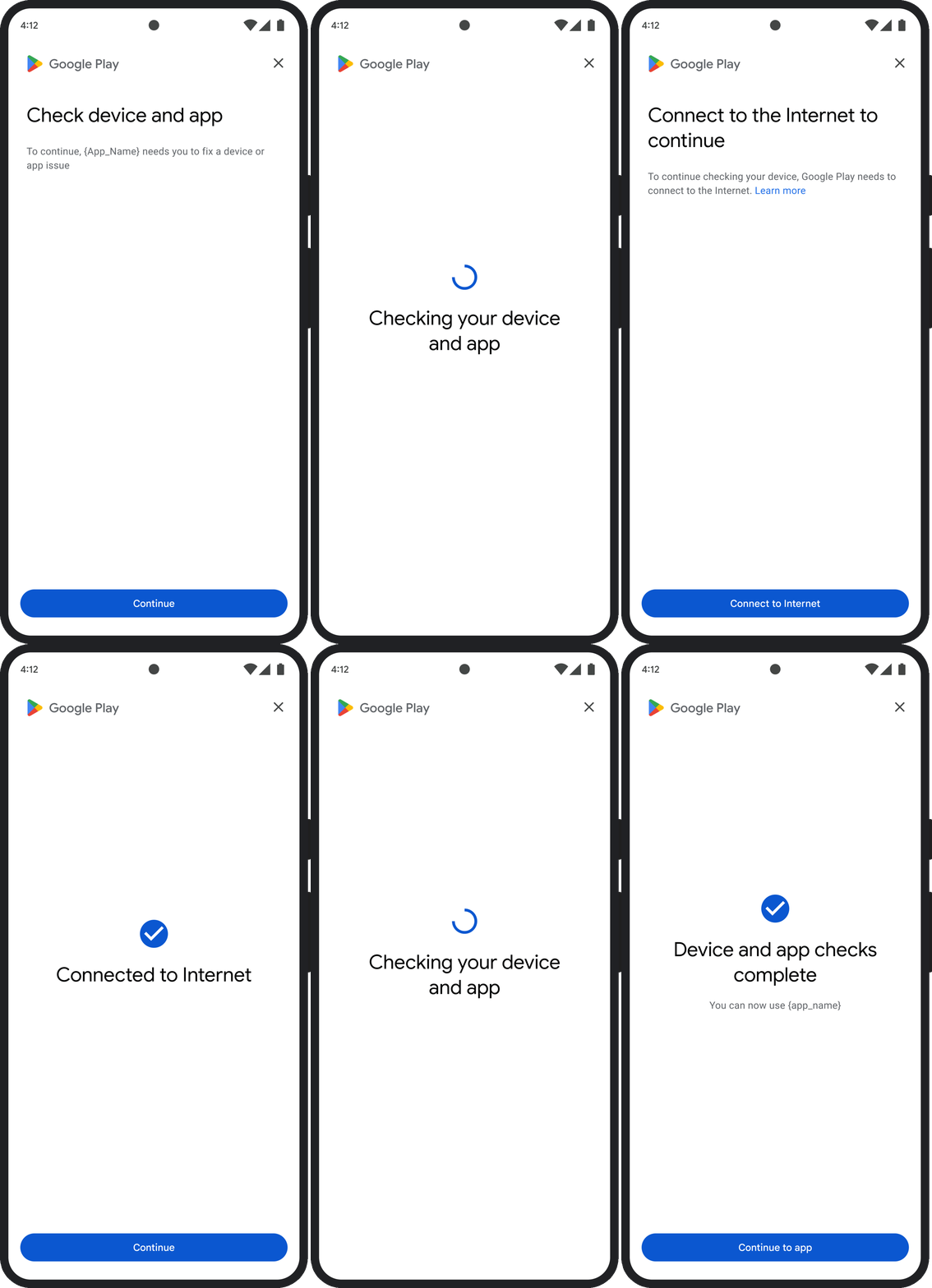
El diálogo GET_INTEGRITY está diseñado para optimizar la experiencia del usuario, ya que controla varios pasos de corrección en un flujo único y continuo. Esto evita que el usuario tenga que interactuar con varios diálogos separados para corregir diferentes problemas.
Cuando solicitas el diálogo, este detecta automáticamente cuáles de los problemas de veredicto objetivo están presentes y proporciona los pasos de corrección adecuados. Esto significa que una sola solicitud de diálogo puede abordar varios problemas a la vez, incluidos los siguientes:
- Integridad del dispositivo: Si se detecta un problema de integridad del dispositivo, el diálogo
guiará al usuario para mejorar el estado de seguridad del dispositivo y cumplir con los
requisitos para un veredicto
MEETS_DEVICE_INTEGRITY. - Integridad de la app: Si se detectan problemas como el acceso no autorizado o la alteración de la app, el diálogo dirigirá a los usuarios para que adquieran la app desde Play Store para corregirlos.
- Excepciones del cliente: El diálogo verifica y trata de resolver cualquier problema subyacente que haya causado una excepción de la API de Integrity. Por ejemplo, podría pedirle al usuario que actualice una versión desactualizada de los Servicios de Google Play.
UX de ejemplo
GET_STRONG_INTEGRITY (código de tipo 5)
Problema con el veredicto
Este diálogo está diseñado para corregir todos los mismos problemas que
GET_INTEGRITY
aborda, con la capacidad adicional de corregir problemas que impiden que un dispositivo
reciba un MEETS_STRONG_INTEGRITY veredicto y corregir problemas de veredicto de Play Protect.
Corrección
GET_STRONG_INTEGRITY está diseñado para optimizar la experiencia del usuario, ya que controla varios pasos de corrección en un flujo único y continuo. El diálogo verifica automáticamente los problemas de integridad aplicables a la dirección, incluidos los siguientes:
- Integridad del dispositivo: Si se detecta un problema de integridad del dispositivo, el diálogo
guiará al usuario para mejorar el estado de seguridad del dispositivo y cumplir con los
requisitos para un veredicto
MEETS_STRONG_INTEGRITY. Estado de Play Protect: Si
playProtectVerdictindica un problema, el diálogo guiará al usuario para corregirlo:- Si Play Protect está inhabilitado (
playProtectVerdict == POSSIBLE_RISK), el diálogo le pedirá al usuario que lo habilite y realice un análisis de todas las apps del dispositivo. - Si se detectan apps dañinas (
playProtectVerdict == MEDIUM_RISKoHIGH_RISK), el diálogo dirigirá al usuario para que las desinstale con Google Play Protect.
- Si Play Protect está inhabilitado (
Integridad de la app: Si se detectan problemas como el acceso no autorizado o la alteración de la app, el diálogo le pedirá al usuario que adquiera la app desde Play Store para corregir el problema.
Excepciones del cliente: El diálogo también intenta resolver cualquier problema subyacente que haya causado una excepción de la API de Integrity. Por ejemplo, puede pedirle al usuario que habilite los Servicios de Google Play si se descubre que están inhabilitados. Las excepciones que se pueden corregir son excepciones de la API de Integrity con códigos de error como
PLAY_SERVICES_VERSION_OUTDATED,NETWORK_ERRORoPLAY_SERVICES_NOT_FOUND. Puedes usar el métodoexception.isRemediable()para verificar si el diálogo puede corregir un error.
UX de ejemplo
