

Android 16 में डेवलपर के लिए, कई नई सुविधाएं और एपीआई उपलब्ध कराए गए हैं. यहां दिए गए सेक्शन में, इन सुविधाओं के बारे में खास जानकारी दी गई है. इससे आपको इनसे जुड़े एपीआई का इस्तेमाल शुरू करने में मदद मिलेगी.
नए, बदले गए, और हटाए गए एपीआई की पूरी सूची देखने के लिए, एपीआई में अंतर दिखाने वाली रिपोर्ट पढ़ें. नए एपीआई के बारे में ज़्यादा जानने के लिए, Android API रेफ़रंस पर जाएं. नए एपीआई को हाइलाइट किया गया है, ताकि वे आसानी से दिख सकें.आपको उन क्षेत्रों की भी समीक्षा करनी चाहिए जहां प्लैटफ़ॉर्म में हुए बदलावों से आपके ऐप्लिकेशन पर असर पड़ सकता है. ज़्यादा जानकारी के लिए, ये पेज देखें:
- Android 16 को टारगेट करने वाले ऐप्लिकेशन के काम करने के तरीके में होने वाले बदलाव
- ऐसे बदलाव जिनका असर सभी ऐप्लिकेशन पर पड़ता है, भले ही वे
targetSdkVersionके हों या न हों.
मुख्य फ़ंक्शन
Android में नए एपीआई शामिल किए गए हैं. इनसे Android सिस्टम की मुख्य क्षमताओं को बढ़ाया जा सकता है.
साल 2025 में Android के दो एपीआई रिलीज़
- यह झलक, Android के अगले मेजर वर्शन के लिए है. इसे 2025 की दूसरी तिमाही में लॉन्च किया जाएगा. यह रिलीज़, एपीआई की पिछली सभी रिलीज़ से मिलती-जुलती है. इसमें, व्यवहार में ऐसे बदलाव किए जा सकते हैं जो अक्सर targetSdkVersion से जुड़े होते हैं.
- हम मेजर रिलीज़ को एक तिमाही पहले रिलीज़ करने जा रहे हैं. पिछले सालों में, यह रिलीज़ तीसरी तिमाही में होती थी, लेकिन अब इसे दूसरी तिमाही में रिलीज़ किया जाएगा. ऐसा इसलिए किया जा रहा है, ताकि हमारे पूरे नेटवर्क में डिवाइस लॉन्च करने के शेड्यूल के साथ बेहतर तरीके से अलाइन किया जा सके. इससे ज़्यादा डिवाइसों पर Android का मेजर वर्शन जल्दी रिलीज़ किया जा सकेगा. साल की दूसरी तिमाही में, Android के नए वर्शन की रिलीज़ होने वाली है. इसलिए, आपको सालाना होने वाली, ऐप्लिकेशन के काम करने की जांच को पिछले सालों की तुलना में कुछ महीने पहले करना होगा. इससे यह पक्का किया जा सकेगा कि आपके ऐप्लिकेशन, नए वर्शन के साथ काम कर रहे हैं.
- हम साल 2025 की चौथी तिमाही में एक और रिलीज़ करने वाले हैं. इसमें नए डेवलपर एपीआई भी शामिल होंगे. साल 2025 में, दूसरी तिमाही में होने वाली मेजर रिलीज़ में ही, व्यवहार से जुड़े ऐसे बदलाव शामिल होंगे जिनका ऐप्लिकेशन पर असर पड़ सकता है.
चौथी तिमाही की मामूली रिलीज़ में, डेवलपर के लिए नए एपीआई के साथ-साथ, सुविधाओं के अपडेट, ऑप्टिमाइज़ेशन, और गड़बड़ियों को ठीक करने की सुविधाएं भी शामिल होंगी. हालांकि, इसमें ऐप्लिकेशन के काम करने के तरीके में कोई बदलाव नहीं किया जाएगा.
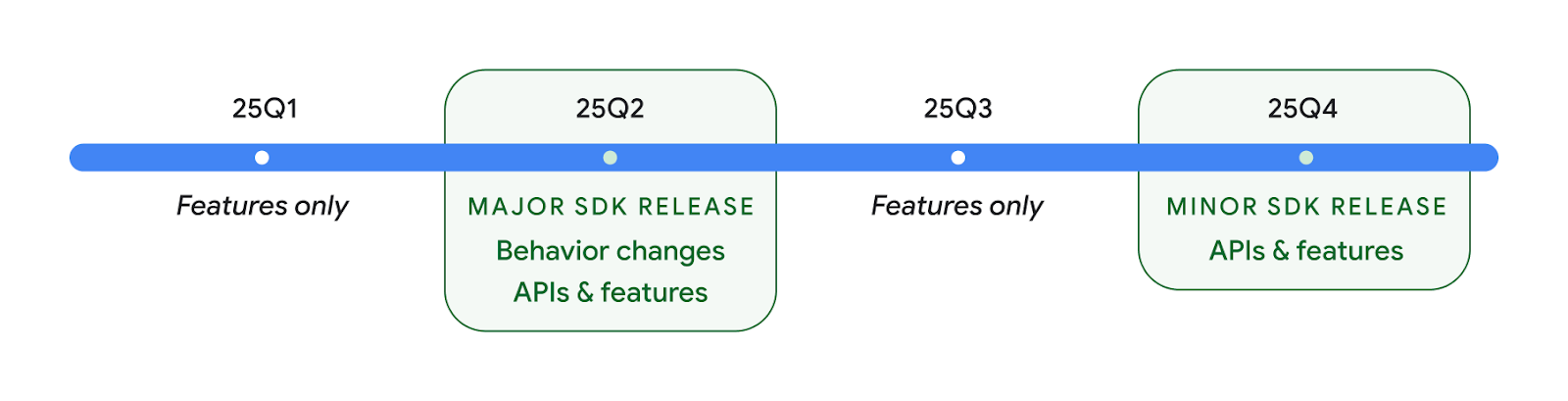
हम हर तीन महीने में Android वर्शन रिलीज़ करते रहेंगे. एपीआई रिलीज़ के बीच में, Q1 और Q3 के अपडेट से क्वालिटी को बेहतर बनाने में मदद मिलेगी. हम डिवाइस पार्टनर के साथ मिलकर, Q2 रिलीज़ को ज़्यादा से ज़्यादा डिवाइसों पर उपलब्ध कराने के लिए काम कर रहे हैं.
मुख्य और मामूली रिलीज़ के साथ नए एपीआई का इस्तेमाल करना
एपीआई लेवल की जांच करके, कोड ब्लॉक को सुरक्षित रखने के लिए, अब SDK_INT कॉन्स्टेंट के साथ VERSION_CODES का इस्तेमाल किया जाता है. यह सुविधा, Android के मुख्य वर्शन के लिए काम करती रहेगी.
if (SDK_INT >= VERSION_CODES.BAKLAVA) {
  // Use APIs introduced in Android 16
}
नए SDK_INT_FULL
कंसटेंट का इस्तेमाल, एपीआई की जांच के लिए किया जा सकता है. यह जांच, नए VERSION_CODES_FULL
एन्यूमरेशन की मदद से, मेजर और माइनर, दोनों वर्शन के लिए की जा सकती है.
if (SDK_INT_FULL >= VERSION_CODES_FULL.[MAJOR or MINOR RELEASE]) {
  // Use APIs introduced in a major or minor release
}
SDK टूल का सिर्फ़ मामूली वर्शन पाने के लिए, Build.getMinorSdkVersion() के तरीके का भी इस्तेमाल किया जा सकता है.
val minorSdkVersion = Build.getMinorSdkVersion(VERSION_CODES_FULL.BAKLAVA)
इन एपीआई को अभी तक फ़ाइनल नहीं किया गया है और इनमें बदलाव हो सकते हैं. इसलिए, अगर आपको कोई समस्या है, तो कृपया हमें सुझाव/राय दें या शिकायत करें.
उपयोगकर्ता अनुभव और सिस्टम यूज़र इंटरफ़ेस (यूआई)
Android 16, ऐप्लिकेशन डेवलपर और उपयोगकर्ताओं को अपनी ज़रूरतों के हिसाब से डिवाइस को कॉन्फ़िगर करने के लिए, ज़्यादा कंट्रोल और सुविधा देता है.
प्रोग्रेस के बारे में बताने वाली सूचनाएं
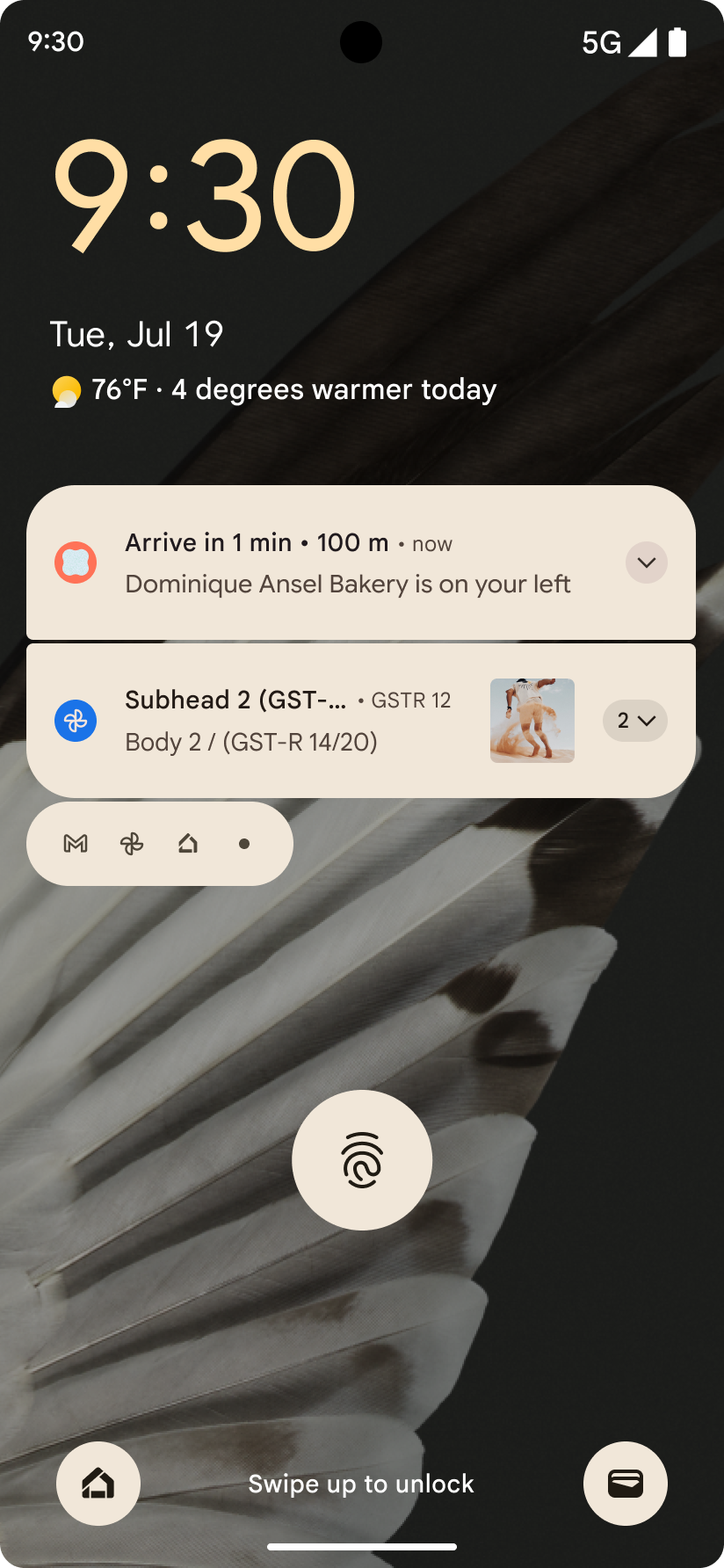
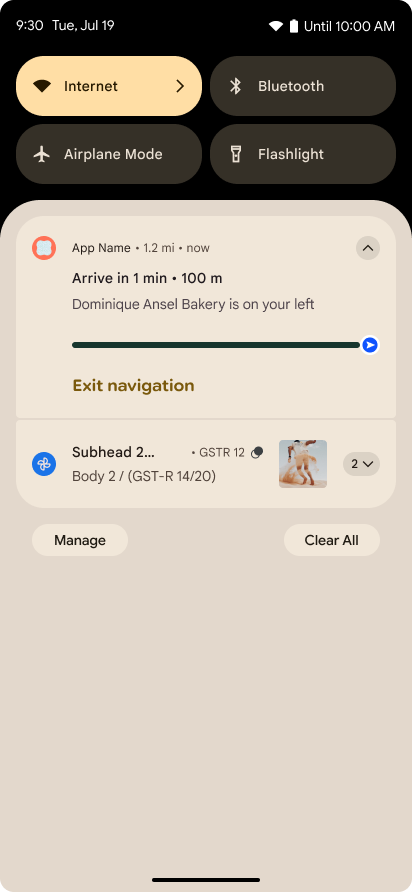
Android 16 में, प्रोग्रेस पर आधारित सूचनाएं देने की सुविधा जोड़ी गई है. इससे उपयोगकर्ताओं को, शुरू से लेकर आखिर तक की प्रोसेस को आसानी से ट्रैक करने में मदद मिलती है.
Notification.ProgressStyle, सूचनाओं का एक नया स्टाइल है. इसकी मदद से, प्रोग्रेस के बारे में सूचनाएं बनाई जा सकती हैं. इस्तेमाल के मुख्य उदाहरणों में, राइडशेयर, डिलीवरी, और नेविगेशन शामिल हैं. Notification.ProgressStyle
क्लास में, पॉइंट और सेगमेंट का इस्तेमाल करके, उपयोगकर्ता के सफ़र में स्टेटस और माइलस्टोन दिखाए जा सकते हैं.
ज़्यादा जानने के लिए, प्रगति से जुड़ी सूचनाएं दस्तावेज़ पेज देखें.
पीछे जाने पर झलक दिखाने वाले हाथ के जेस्चर से जुड़े अपडेट
Android 16 में नए एपीआई जोड़े गए हैं. इनकी मदद से, जेस्चर नेविगेशन में प्रिडिक्टिव बैक सिस्टम ऐनिमेशन चालू किए जा सकते हैं. जैसे, होम पेज पर वापस जाने के लिए ऐनिमेशन. onBackInvokedCallback को नए PRIORITY_SYSTEM_NAVIGATION_OBSERVER के साथ रजिस्टर करने पर, आपके ऐप्लिकेशन को सामान्य onBackInvoked कॉल तब मिलता है, जब सिस्टम बैक नेविगेशन को मैनेज करता है. इससे, बैक नेविगेशन के सामान्य फ़्लो पर कोई असर नहीं पड़ता.
Android 16 में,
finishAndRemoveTaskCallback() और
moveTaskToBackCallback भी जोड़े गए हैं. OnBackInvokedDispatcher के साथ इन कॉलबैक को रजिस्टर करके, सिस्टम कुछ खास व्यवहार को ट्रिगर कर सकता है. साथ ही, बैक जेस्चर का इस्तेमाल करने पर, उससे जुड़े ऐनिमेशन को पहले से चला सकता है.
बेहतर हैप्टिक
Android ने शुरुआत से ही, हैप्टिक ऐक्चुएटर को कंट्रोल करने की सुविधा दी है.
Android 11 में, ज़्यादा जटिल हैप्टिक इफ़ेक्ट के लिए सहायता जोड़ी गई है. ये इफ़ेक्ट, डिवाइस के लिए तय किए गए सेमैंटिक प्राइमिटिव के VibrationEffect.Compositions की मदद से, ज़्यादा बेहतर ऐक्चुएटर के साथ काम कर सकते हैं.
Android 16 में हैप्टिक एपीआई जोड़े गए हैं. इनकी मदद से, ऐप्लिकेशन किसी हैप्टिक इफ़ेक्ट के ऐम्प्ल्यट्यूड और फ़्रीक्वेंसी कर्व तय कर सकते हैं. साथ ही, डिवाइस की क्षमताओं के बीच के अंतर को भी हटा सकते हैं.
डेवलपर की प्रोडक्टिविटी और टूल
आपकी प्रॉडक्टिविटी को बेहतर बनाने के लिए, हम ज़्यादातर Android Studio, Jetpack Compose, और Android Jetpack लाइब्रेरी जैसे टूल पर काम करते हैं. हालांकि, हम हमेशा ऐसे तरीके ढूंढते रहते हैं जिनसे आपको अपने विज़न को पूरा करने में मदद मिल सके.
लाइव वॉलपेपर के लिए कॉन्टेंट हैंडलिंग
Android 16 में, लाइव वॉलपेपर फ़्रेमवर्क को एक नया कॉन्टेंट एपीआई मिल रहा है. इससे, उपयोगकर्ता के हिसाब से बदलने वाले डाइनैमिक वॉलपेपर से जुड़ी समस्याओं को हल किया जा सकेगा. फ़िलहाल, उपयोगकर्ता से मिले कॉन्टेंट को शामिल करने वाले लाइव वॉलपेपर के लिए, सेवा के हिसाब से कॉन्टेंट लागू करने की जटिल प्रक्रिया अपनानी पड़ती है. Android 16 में,
WallpaperDescription और
WallpaperInstance को शामिल किया गया है. WallpaperDescription की मदद से, एक ही सेवा के लाइव वॉलपेपर के अलग-अलग इंस्टेंस की पहचान की जा सकती है. उदाहरण के लिए, होम स्क्रीन और लॉक स्क्रीन, दोनों पर इस्तेमाल किए जा सकने वाले वॉलपेपर में, दोनों जगहों पर अलग-अलग कॉन्टेंट हो सकता है. वॉलपेपर पिकर और
WallpaperManager, इस मेटाडेटा का इस्तेमाल करके उपयोगकर्ताओं को बेहतर तरीके से वॉलपेपर दिखाते हैं. इससे, आपको अलग-अलग और पसंद के मुताबिक लाइव वॉलपेपर बनाने में मदद मिलती है.
परफ़ॉर्मेंस और बैटरी
Android 16 में ऐसे एपीआई पेश किए गए हैं जो आपके ऐप्लिकेशन के बारे में अहम जानकारी इकट्ठा करने में मदद करते हैं.
सिस्टम से ट्रिगर होने वाली प्रोफ़ाइलिंग
ProfilingManager को Android 15 में जोड़ा गया था. इससे ऐप्लिकेशन, फ़ील्ड में मौजूद सार्वजनिक डिवाइसों पर Perfetto का इस्तेमाल करके, प्रोफ़ाइलिंग डेटा इकट्ठा करने का अनुरोध कर सकते हैं.
हालांकि, यह प्रोफ़ाइलिंग ऐप्लिकेशन से शुरू की जानी चाहिए. इसलिए, ऐप्लिकेशन के लिए स्टार्टअप या ANR जैसे अहम फ़्लो को कैप्चर करना मुश्किल या असंभव होगा.
इसकी मदद करने के लिए, Android 16 में ProfilingManager के लिए, सिस्टम से ट्रिगर की जाने वाली प्रोफ़ाइलिंग की सुविधा जोड़ी गई है. ऐप्लिकेशन, कुछ ट्रिगर के लिए ट्रेस पाने में दिलचस्पी रजिस्टर कर सकते हैं. जैसे, कोल्ड स्टार्ट reportFullyDrawn या ANR. इसके बाद, सिस्टम ऐप्लिकेशन की ओर से ट्रेस शुरू और बंद करता है. ट्रैक पूरा होने के बाद, नतीजे ऐप्लिकेशन की डेटा डायरेक्ट्री में डिलीवर किए जाते हैं.
ApplicationStartInfo में कॉम्पोनेंट शुरू करें
ApplicationStartInfo को Android 15 में जोड़ा गया था. इससे ऐप्लिकेशन को प्रोसेस शुरू होने की वजहें, शुरू होने का टाइप, शुरू होने का समय, थ्रॉटलिंग, और गड़बड़ी की जानकारी देने वाला अन्य काम का डेटा देखने की सुविधा मिलती है. Android 16 में getStartComponent() को जोड़ा गया है, ताकि यह पता लगाया जा सके कि ऐप्लिकेशन को किस तरह के कॉम्पोनेंट ने ट्रिगर किया. इससे, ऐप्लिकेशन के स्टार्टअप फ़्लो को ऑप्टिमाइज़ करने में मदद मिल सकती है.
नौकरी के बारे में बेहतर जानकारी
JobScheduler#getPendingJobReason() एपीआई, किसी जॉब के लंबित होने की वजह बताता है. हालांकि, किसी जॉब के पूरा न होने की कई वजहें हो सकती हैं.
हम Android 16 में एक नया एपीआई JobScheduler#getPendingJobReasons(int jobId) पेश कर रहे हैं. इससे, किसी जॉब के लंबे समय से पेंडिंग होने की कई वजहें पता चलती हैं. ये वजहें, डेवलपर की ओर से सेट की गई साफ़ तौर पर बताई गई पाबंदियों और सिस्टम की ओर से सेट की गई छिपी हुई पाबंदियों, दोनों की वजह से होती हैं.
हम JobScheduler#getPendingJobReasonsHistory(int jobId) को भी पेश कर रहे हैं. इससे, पाबंदी में हुए सबसे हाल के बदलावों की सूची दिखती है.
हमारा सुझाव है कि एपीआई का इस्तेमाल करके, यह पता लगाएं कि आपकी जॉब क्यों नहीं चल रही हैं. ऐसा खास तौर पर तब करें, जब आपको कुछ टास्क के पूरा होने की दर में कमी दिख रही हो या किसी जॉब के पूरा होने में लगने वाले समय से जुड़ी गड़बड़ियां दिख रही हों. उदाहरण के लिए, बैकग्राउंड में विजेट अपडेट नहीं हो पाए या ऐप्लिकेशन शुरू होने से पहले, डेटा को पहले से लोड करने की सुविधा को कॉल नहीं किया जा सका.
इससे आपको यह समझने में भी मदद मिल सकती है कि कुछ जॉब, सिस्टम की तय की गई पाबंदियों की वजह से पूरी नहीं हो रहे हैं या साफ़ तौर पर सेट की गई पाबंदियों की वजह से.
अडैप्टिव रीफ़्रेश रेट
Android 15 में, अडैप्टिव रिफ़्रेश रेट (एआरआर) की सुविधा जोड़ी गई है. इसकी मदद से, डिसप्ले रिफ़्रेश रेट को डिवाइस के हिसाब से अडजस्ट किया जा सकता है. इसके लिए, अलग-अलग VSync चरण का इस्तेमाल करके, कॉन्टेंट के फ़्रेम रेट के हिसाब से डिसप्ले रिफ़्रेश रेट को अडजस्ट किया जाता है. इससे बिजली की खपत कम होती है. साथ ही, मोड स्विच करने की ज़रूरत भी नहीं पड़ती.
Android 16 में hasArrSupport() और
getSuggestedFrameRate(int) को शामिल किया गया है. साथ ही, getSupportedRefreshRates() को वापस लाया गया है, ताकि आपके ऐप्लिकेशन आसानी से ARR का फ़ायदा ले सकें. RecyclerView
1.4, फ़्लिंग या स्मूद स्क्रोल से सेटल होने पर, अंदरूनी तौर पर ARR के साथ काम करता है. हम ज़्यादा Jetpack लाइब्रेरी में ARR की सुविधा जोड़ने के लिए काम कर रहे हैं. फ़्रेम रेट के बारे में इस लेख में, ऐसे कई एपीआई के बारे में बताया गया है जिनका इस्तेमाल करके फ़्रेम रेट सेट किया जा सकता है. इससे आपका ऐप्लिकेशन सीधे तौर पर ARR का इस्तेमाल कर सकता है.
एडीपीएफ़ में हेडरूम एपीआई
SystemHealthManager में getCpuHeadroom और getGpuHeadroom एपीआई को शामिल किया गया है. इन एपीआई को गेम और ज़्यादा संसाधनों वाले ऐप्लिकेशन के लिए उपलब्ध सीपीयू और जीपीयू संसाधनों का अनुमान देने के लिए डिज़ाइन किया गया है. इन तरीकों से यह पता लगाया जा सकता है कि आपका ऐप्लिकेशन या गेम, सिस्टम की परफ़ॉर्मेंस को कैसे बेहतर बना सकता है. खास तौर पर, जब इनका इस्तेमाल Android डाइनैमिक परफ़ॉर्मेंस फ़्रेमवर्क (ADPF) के अन्य एपीआई के साथ किया जाता है, जो थर्मल ट्रिलिंग का पता लगाते हैं.
जिन डिवाइसों पर यह सुविधा काम करती है उन पर CpuHeadroomParams और
GpuHeadroomParams का इस्तेमाल करके, हेडरूम का हिसाब लगाने के लिए इस्तेमाल की जाने वाली समयावधि को पसंद के मुताबिक बनाया जा सकता है. साथ ही, संसाधन की औसत या कम से कम उपलब्धता में से किसी एक को चुना जा सकता है. इससे, सीपीयू या जीपीयू के संसाधनों के इस्तेमाल को कम करने में मदद मिल सकती है. इससे, उपयोगकर्ताओं को बेहतर अनुभव मिलता है और बैटरी लाइफ़ भी बेहतर होती है.
सुलभता
Android 16 में, ऐक्सेसिबिलिटी से जुड़े नए एपीआई और सुविधाएं जोड़ी गई हैं. इनकी मदद से, अपने ऐप्लिकेशन को हर उपयोगकर्ता तक पहुंचाया जा सकता है.
बेहतर सुलभता वाले एपीआई
Android 16 में यूज़र इंटरफ़ेस (यूआई) के सेमेटिक्स को बेहतर बनाने के लिए, अतिरिक्त एपीआई जोड़े गए हैं. इससे TalkBack जैसी सुलभता सेवाओं पर निर्भर उपयोगकर्ताओं के लिए, यूज़र इंटरफ़ेस को एक जैसा रखने में मदद मिलती है.
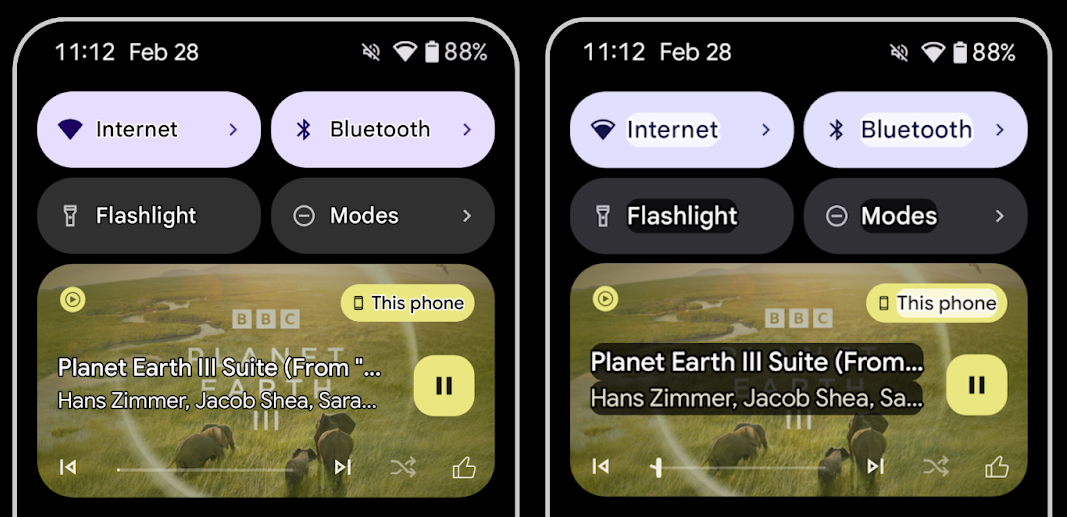
टेक्स्ट का कंट्रास्ट बढ़ाने के लिए, टेक्स्ट को आउटलाइन करना
कम विज़न वाले उपयोगकर्ताओं को अक्सर कंट्रास्ट की संवेदनशीलता कम होती है. इससे, ऑब्जेक्ट को उनके बैकग्राउंड से अलग करना मुश्किल हो जाता है. इन उपयोगकर्ताओं की मदद करने के लिए, Android 16 में आउटलाइन टेक्स्ट की सुविधा जोड़ी गई है. यह ज़्यादा कंट्रास्ट वाले टेक्स्ट की जगह लेती है. यह टेक्स्ट के चारों ओर, कंट्रास्ट वाला बड़ा हिस्सा बनाती है, ताकि टेक्स्ट को आसानी से पढ़ा जा सके.
Android 16 में नए AccessibilityManager एपीआई शामिल हैं. इनकी मदद से, आपके ऐप्लिकेशन यह जांच कर सकते हैं कि यह मोड चालू है या नहीं. इसके अलावा, किसी लिसनर को रजिस्टर भी किया जा सकता है. यह मुख्य रूप से Compose जैसे यूज़र इंटरफ़ेस टूलकिट के लिए है, ताकि उनमें भी ऐसा ही विज़ुअल अनुभव दिया जा सके. अगर आपके पास यूज़र इंटरफ़ेस टूलकिट लाइब्रेरी है या आपका ऐप्लिकेशन, android.text.Layout क्लास को बायपास करने वाला कस्टम टेक्स्ट रेंडर करता है, तो इस सुविधा का इस्तेमाल करके यह पता लगाया जा सकता है कि आउटलाइन टेक्स्ट कब चालू है.
TtsSpan में अवधि जोड़ी गई
Android 16 में TtsSpan को TYPE_DURATION के साथ जोड़ा गया है. इसमें ARG_HOURS, ARG_MINUTES, और ARG_SECONDS शामिल हैं. इससे, वीडियो के दिखने का कुल समय सीधे तौर पर एनोटेट किया जा सकता है. इससे, TalkBack जैसी सेवाओं की मदद से, लिखाई को बोली में बदलने की सुविधा के सटीक और एक जैसे नतीजे मिलते हैं.
एक से ज़्यादा लेबल वाले एलिमेंट के साथ काम करना
फ़िलहाल, Android में यूज़र इंटरफ़ेस (यूआई) एलिमेंट को एक-दूसरे से, सुलभता लेबल पाने की अनुमति है. साथ ही, अब एक से ज़्यादा लेबल जोड़े जा सकते हैं. यह वेब कॉन्टेंट में आम तौर पर होता है. AccessibilityNodeInfo में सूची पर आधारित एपीआई को शामिल करके, Android सीधे तौर पर इन कई लेबल वाले संबंधों का इस्तेमाल कर सकता है. इस बदलाव के तहत, हमने AccessibilityNodeInfo#setLabeledBy और #getLabeledBy को बंद कर दिया है. अब इनकी जगह #addLabeledBy, #removeLabeledBy, और #getLabeledByList का इस्तेमाल किया जाएगा.
बड़ा किए जा सकने वाले एलिमेंट के लिए बेहतर सहायता
Android 16 में, सुलभता एपीआई जोड़े गए हैं. इनकी मदद से, इंटरैक्टिव एलिमेंट की स्थिति को बड़ा या छोटा किया जा सकता है. जैसे, मेन्यू और बड़ा की जा सकने वाली सूचियां. setExpandedState का इस्तेमाल करके, बड़ा किया गया स्टेटस सेट करके और CONTENT_CHANGE_TYPE_EXPANDED कॉन्टेंट में बदलाव के टाइप के साथ TYPE_WINDOW_CONTENT_CHANGED AccessibilityEvents भेजकर, यह पक्का किया जा सकता है कि TalkBack जैसे स्क्रीन रीडर, स्टेटस में हुए बदलावों की सूचना दें. इससे, उपयोगकर्ताओं को बेहतर और आसान अनुभव मिलता है.
प्रोग्रेस बार के लिए तय नहीं किया गया
Android 16 में RANGE_TYPE_INDETERMINATE जोड़ा गया है. इससे, आपको ProgressBar विजेट के लिए, RangeInfo को दिखाने का विकल्प मिलता है. इसकी मदद से, TalkBack जैसी सेवाएं, प्रोग्रेस इंडिकेटर के लिए लगातार सुझाव दे सकती हैं.
तीन स्थितियों वाला चेकबॉक्स
Android 16 में, AccessibilityNodeInfo
getChecked और setChecked(int) के नए तरीकों का इस्तेमाल करके, अब "चुनी गई" और "चुनी नहीं गई" के अलावा, "कुछ हिस्से को चुना गया" स्थिति भी सेट की जा सकती है. यह, अब काम न करने वाले बूलियन isChecked और setChecked(boolean) फ़ंक्शन की जगह ले लेगा.
अतिरिक्त जानकारी
जब कोई सुलभता सेवा किसी ViewGroup के बारे में बताती है, तो वह अपने ब्यौरे में उस व्यू के चाइल्ड व्यू के कॉन्टेंट लेबल को भी शामिल कर लेती है. अगर आपने ViewGroup के लिए कोई contentDescription दिया है, तो सुलभता सेवाएं यह मान लेती हैं कि आपने फ़ोकस नहीं किए जा सकने वाले चाइल्ड व्यू के ब्यौरे को भी बदल दिया है. अगर आपको सुलभता के लिए चुने गए मौजूदा विकल्प (उदाहरण के लिए, "Roboto") को बनाए रखते हुए, ड्रॉप-डाउन (उदाहरण के लिए, "फ़ॉन्ट फ़ैमिली") जैसी चीज़ों को लेबल करना है, तो समस्या आ सकती है. Android 16 में setSupplementalDescription जोड़ा गया है, ताकि आप ViewGroup के बारे में जानकारी देने वाला टेक्स्ट दे सकें. ऐसा करने पर, ViewGroup के बच्चों की जानकारी बदली नहीं जाएगी.
फ़ॉर्म के ज़रूरी फ़ील्ड
Android 16 में, AccessibilityNodeInfo में setFieldRequired जोड़ा गया है, ताकि ऐप्लिकेशन किसी सुलभता सेवा को बता सकें कि फ़ॉर्म फ़ील्ड में इनपुट करना ज़रूरी है. यह कई तरह के फ़ॉर्म भरने वाले उपयोगकर्ताओं के लिए एक अहम स्थिति है. यहां तक कि ज़रूरी शर्तों वाले चेकबॉक्स जैसी आसान चीज़ों के लिए भी यह ज़रूरी है. इससे उपयोगकर्ताओं को ज़रूरी फ़ील्ड की पहचान करने और उनमें तेज़ी से नेविगेट करने में मदद मिलती है.
LEA वाली कान की मशीनों से वॉइस कॉल करने के लिए, फ़ोन को माइक्रोफ़ोन इनपुट के तौर पर इस्तेमाल करना
Android 16 में, LE Audio की सुविधा वाले कान की मशीन के उपयोगकर्ताओं के लिए, वॉइस कॉल के लिए कान की मशीन में पहले से मौजूद माइक्रोफ़ोन और फ़ोन के माइक्रोफ़ोन के बीच स्विच करने की सुविधा जोड़ी गई है. यह सुविधा, शोर वाले माहौल या ऐसी अन्य स्थितियों में मददगार हो सकती है जहां कान की मशीन के माइक्रोफ़ोन ठीक से काम न कर पाएं.
एलईए हियरिंग एड के लिए, आस-पास की आवाज़ों को कंट्रोल करने की सुविधा
Android 16 में, LE Audio की सुविधा वाली कान की मशीन के उपयोगकर्ताओं के लिए, आस-पास की आवाज़ की आवाज़ कम या ज़्यादा करने की सुविधा जोड़ी गई है. यह आवाज़, कान की मशीन के माइक्रोफ़ोन से रिकॉर्ड की जाती है. यह सुविधा, उन स्थितियों में मददगार हो सकती है जहां बैकग्राउंड का शोर बहुत ज़्यादा या बहुत कम हो.
कैमरा
Android 16 में, पेशेवर कैमरा उपयोगकर्ताओं के लिए बेहतर सपोर्ट उपलब्ध कराया गया है. इससे, सटीक कलर टेंपरेचर और टिंट अडजस्टमेंट के साथ-साथ, हाइब्रिड ऑटो एक्सपोज़र की सुविधा मिलती है. नाइट मोड इंडिकेटर की मदद से, आपका ऐप्लिकेशन यह जान पाता है कि नाइट मोड वाले कैमरा सेशन को कब चालू और बंद करना है. Intent नई कार्रवाइयों की मदद से, मोशन फ़ोटो कैप्चर करना आसान हो जाता है. साथ ही, हम HEIC एन्कोडिंग और आईएसओ 21496-1 के ड्राफ़्ट स्टैंडर्ड के नए पैरामीटर की मदद से, अल्ट्रा एचडीआर इमेज को बेहतर बनाते रहेंगे.
हाइब्रिड ऑटो-एक्सपोज़र
Android 16 में, Camera2 में नए हाइब्रिड ऑटो-एक्सपोज़र मोड जोड़े गए हैं. इनकी मदद से, एक्सपोज़र के कुछ खास पहलुओं को मैन्युअल तरीके से कंट्रोल किया जा सकता है. बाकी काम, ऑटो-एक्सपोज़र (एई) एल्गोरिदम करता है. ISO + AE और एक्सपोज़र टाइम + AE को कंट्रोल किया जा सकता है. इससे, मौजूदा तरीके की तुलना में ज़्यादा सुविधा मिलती है. मौजूदा तरीके में, आपके पास या तो पूरी तरह से मैन्युअल कंट्रोल होता है या पूरी तरह से ऑटो-एक्सपोज़र पर निर्भर रहना पड़ता है.
fun setISOPriority() {
    // ... (Your existing code before the snippet) ...

    val availablePriorityModes = mStaticInfo.characteristics.get(
        CameraCharacteristics.CONTROL_AE_AVAILABLE_PRIORITY_MODES
    )

    // ... (Your existing code between the snippets) ...

    // Turn on AE mode to set priority mode
    reqBuilder.set(
        CaptureRequest.CONTROL_AE_MODE,
        CameraMetadata.CONTROL_AE_MODE_ON
    )
    reqBuilder.set(
        CaptureRequest.CONTROL_AE_PRIORITY_MODE,
        CameraMetadata.CONTROL_AE_PRIORITY_MODE_SENSOR_SENSITIVITY_PRIORITY
    )
    reqBuilder.set(
        CaptureRequest.SENSOR_SENSITIVITY,
        TEST_SENSITIVITY_VALUE
    )
    val request: CaptureRequest = reqBuilder.build()

    // ... (Your existing code after the snippet) ...
}
कलर टेंपरेचर और टिंट में सटीक बदलाव करने की सुविधा
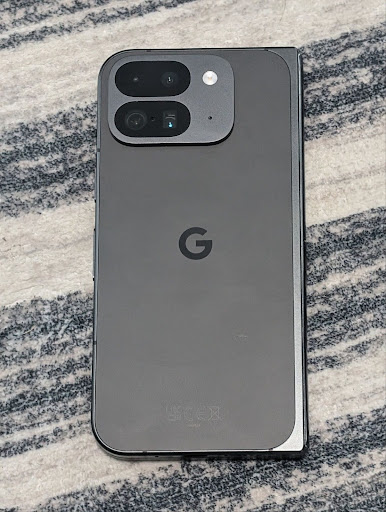
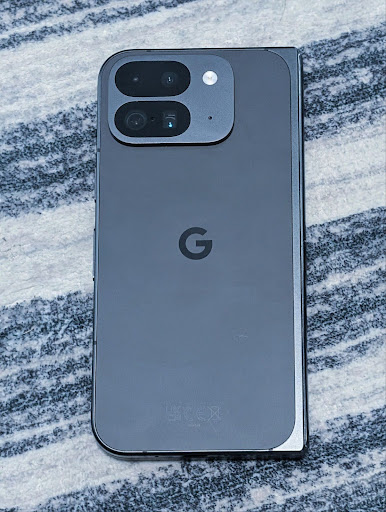
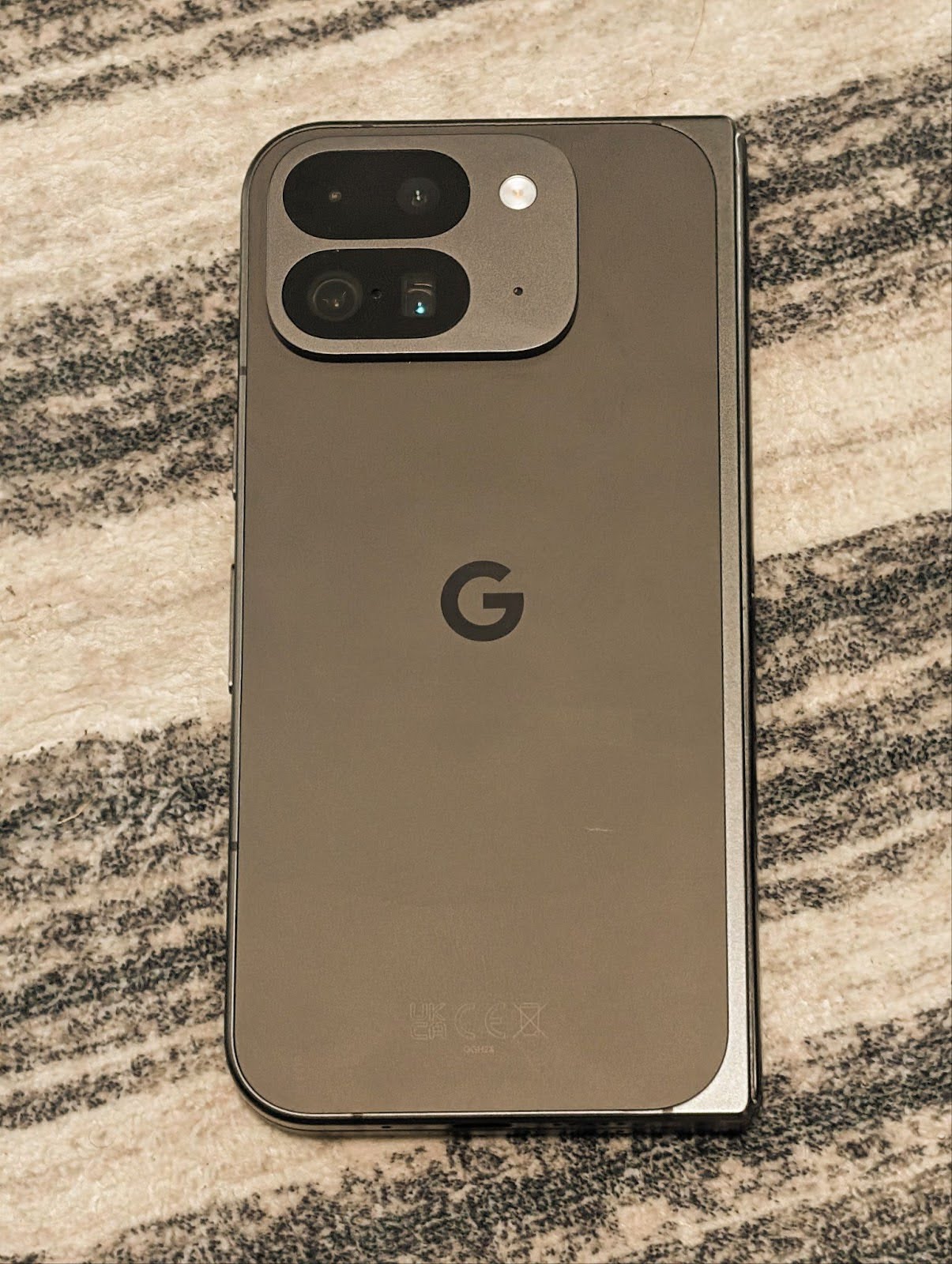
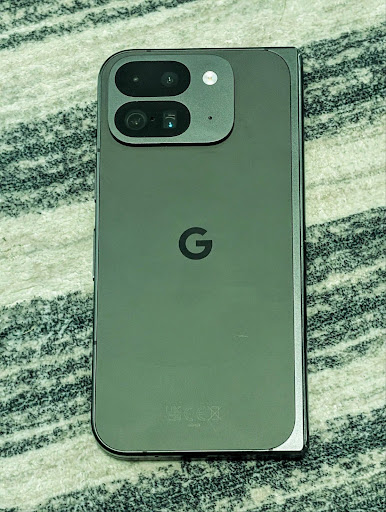
Android 16 में कैमरे के लिए, कलर टेंपरेचर और टिनट में बदलाव करने की सुविधा जोड़ी गई है. इससे, प्रोफ़ेशनल वीडियो रिकॉर्डिंग ऐप्लिकेशन को बेहतर तरीके से काम करने में मदद मिलेगी. Android के पिछले वर्शन में, CONTROL_AWB_MODE की मदद से व्हाइट बैलेंस की सेटिंग को कंट्रोल किया जा सकता था. इसमें पहले से तय की गई सूची में मौजूद विकल्प ही उपलब्ध होते थे. जैसे, इंकैंडेसेंट, बादल छाए होने पर, और शाम ढलते समय. COLOR_CORRECTION_MODE_CCT, COLOR_CORRECTION_COLOR_TEMPERATURE और COLOR_CORRECTION_COLOR_TINT का इस्तेमाल करने की सुविधा देता है. इससे, कलर टेंपरेचर के आधार पर, व्हाइट बैलेंस को सटीक तरीके से अडजस्ट किया जा सकता है.
fun setCCT() {
    // ... (Your existing code before this point) ...

    val colorTemperatureRange: Range<Int> =
        mStaticInfo.characteristics[CameraCharacteristics.COLOR_CORRECTION_COLOR_TEMPERATURE_RANGE]

    // Set to manual mode to enable CCT mode
    reqBuilder[CaptureRequest.CONTROL_AWB_MODE] = CameraMetadata.CONTROL_AWB_MODE_OFF
    reqBuilder[CaptureRequest.COLOR_CORRECTION_MODE] = CameraMetadata.COLOR_CORRECTION_MODE_CCT
    reqBuilder[CaptureRequest.COLOR_CORRECTION_COLOR_TEMPERATURE] = 5000
    reqBuilder[CaptureRequest.COLOR_CORRECTION_COLOR_TINT] = 30

    val request: CaptureRequest = reqBuilder.build()

    // ... (Your existing code after this point) ...
}
नीचे दिए गए उदाहरणों से पता चलता है कि अलग-अलग रंग के तापमान और रंग में बदलाव करने के बाद, फ़ोटो कैसी दिखेगी:
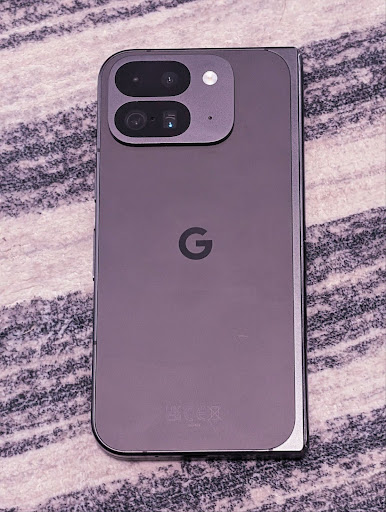
कैमरे के नाइट मोड में सीन का पता लगाने की सुविधा
Android 16 में EXTENSION_NIGHT_MODE_INDICATOR जोड़ा गया है. इससे आपके ऐप्लिकेशन को यह पता चलता है कि नाइट मोड वाले कैमरे के सेशन पर कब स्विच करना है और कब उससे बाहर निकलना है. अगर यह सुविधा काम करती है, तो यह Camera2 में CaptureResult में उपलब्ध होगी.
यह वह एपीआई है जिसके बारे में हमने Instagram ने कम रोशनी में शानदार फ़ोटो लेने की सुविधा कैसे उपलब्ध कराई ब्लॉग पोस्ट में बताया था. इस पोस्ट में, रात मोड को लागू करने का तरीका बताया गया है. साथ ही, एक केस स्टडी भी दी गई है. इसमें, ऐप्लिकेशन में मौजूद कैमरे से शेयर की गई फ़ोटो की संख्या में बढ़ोतरी के साथ-साथ, ऐप्लिकेशन में मौजूद रात मोड की बेहतर क्वालिटी वाली फ़ोटो को जोड़ा गया है.
मोशन फ़ोटो कैप्चर करने के इंटेंट ऐक्शन
Android 16 में स्टैंडर्ड इंटेंट ऐक्शन —
ACTION_MOTION_PHOTO_CAPTURE और
ACTION_MOTION_PHOTO_CAPTURE_SECURE — जोड़े गए हैं. इनसे कैमरा ऐप्लिकेशन को मोशन फ़ोटो कैप्चर करने और उसे दिखाने का अनुरोध किया जाता है.
इमेज को कहां लिखा जाएगा, यह कंट्रोल करने के लिए आपको एक अतिरिक्त EXTRA_OUTPUT पास करना होगा या Intent.setClipData(ClipData) के ज़रिए Uri पास करना होगा. अगर आपने कोई ClipData सेट नहीं किया है, तो Context.startActivity(Intent) को कॉल करते समय वह आपके लिए वहां कॉपी हो जाएगा.
अल्ट्रा एचडीआर इमेज को बेहतर बनाने की सुविधा
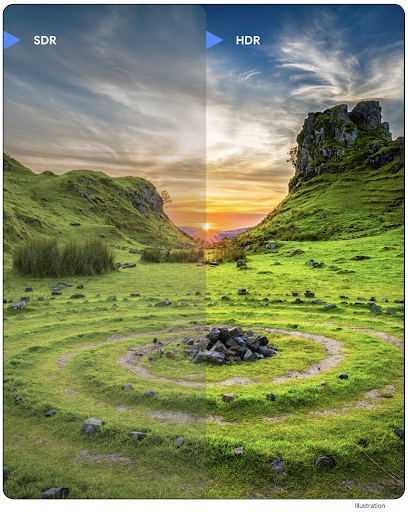
Android 16 में, हमने अल्ट्रा एचडीआर इमेज की मदद से बेहतरीन क्वालिटी वाली इमेज उपलब्ध कराने की सुविधा को जारी रखा है. इससे, HEIC फ़ाइल फ़ॉर्मैट में UltraHDR इमेज के लिए सहायता मिलती है. इन इमेज को ImageFormat टाइप HEIC_ULTRAHDR मिलेगा. साथ ही, इनमें मौजूदा UltraHDR JPEG फ़ॉर्मैट जैसा एम्बेड किया गया गेनमैप होगा. हम UltraHDR के लिए भी AVIF फ़ॉर्मैट की सुविधा उपलब्ध कराने पर काम कर रहे हैं. इसलिए, हमारे साथ बने रहें.
इसके अलावा, Android 16 में ISO 21496-1 ड्राफ़्ट स्टैंडर्ड के आधार पर, अल्ट्रा एचडीआर में कुछ और पैरामीटर लागू किए गए हैं. इनमें, गेनमैप के हिसाब से कलरस्पेस को सेट करने और उसे पाने की सुविधा शामिल है. साथ ही, एसडीआर गेनमैप के साथ एचडीआर में एन्कोड की गई बेस इमेज के लिए भी यह सुविधा काम करती है.
ग्राफ़िक
Android 16 में, ग्राफ़िक्स से जुड़े नए सुधार शामिल हैं. जैसे, एजीएसएल की मदद से पसंद के मुताबिक ग्राफ़िक इफ़ेक्ट.
AGSL की मदद से, पसंद के मुताबिक ग्राफ़िकल इफ़ेक्ट बनाना
Android 16 में RuntimeColorFilter और
RuntimeXfermode जोड़े गए हैं. इनकी मदद से, थ्रेशोल्ड, सेपिया, और ह्यू सेचुरेशन जैसे जटिल इफ़ेक्ट बनाए जा सकते हैं. साथ ही, इन्हें ड्रॉ कॉल पर लागू किया जा सकता है. Android 13 के बाद से, AGSL का इस्तेमाल करके, Shader को बढ़ाने वाले कस्टम RuntimeShaders बनाए जा सकते हैं. नया एपीआई, AGSL की मदद से काम करने वाला RuntimeColorFilter जोड़ता है, जो ColorFilter को बढ़ाता है. साथ ही, इसमें Xfermode इफ़ेक्ट भी जोड़ा गया है, जिसकी मदद से सोर्स और डेस्टिनेशन पिक्सल के बीच, AGSL पर आधारित कस्टम कंपोजिटिंग और ब्लेंडिंग लागू की जा सकती है.
private val thresholdEffectString = """
    uniform half threshold;

    half4 main(half4 c) {
        half luminosity = dot(c.rgb, half3(0.2126, 0.7152, 0.0722));
        half bw = step(threshold, luminosity);
        return bw.xxx1 * c.a;
    }"""

fun setCustomColorFilter(paint: Paint) {
   val filter = RuntimeColorFilter(thresholdEffectString)
   filter.setFloatUniform(0.5);
   paint.colorFilter = filter
}
कनेक्टिविटी
Android 16, प्लैटफ़ॉर्म को अपडेट करता है, ताकि आपके ऐप्लिकेशन को कम्यूनिकेशन और वायरलेस टेक्नोलॉजी के क्षेत्र में हुई नई तरक्की का ऐक्सेस मिल सके.
बेहतर सुरक्षा के साथ रेंजिंग
Android 16 में, वाई-फ़ाई 6 के 802.11az वाले डिवाइसों पर, वाई-फ़ाई लोकेशन की सुविधा में बेहतर सुरक्षा सुविधाएं जोड़ी गई हैं. इससे ऐप्लिकेशन, प्रोटोकॉल की ज़्यादा सटीक जानकारी, ज़्यादा स्केलेबलिटी, और डाइनैमिक शेड्यूलिंग के साथ-साथ बेहतर सुरक्षा का फ़ायदा ले सकते हैं. इन सुविधाओं में, AES-256 पर आधारित एन्क्रिप्शन और MITM हमलों से सुरक्षा शामिल है. इससे, इसे लैपटॉप या वाहन के दरवाज़े को अनलॉक करने जैसे कामों के लिए, ज़्यादा सुरक्षित तरीके से इस्तेमाल किया जा सकता है. 802.11az को वाई-फ़ाई 6 स्टैंडर्ड के साथ इंटिग्रेट किया गया है. इससे, इसे आसानी से डिप्लॉय किया जा सकता है और ज़्यादा से ज़्यादा लोग इसका इस्तेमाल कर सकते हैं.
सामान्य रेंजिंग एपीआई
Android 16 में नया RangingManager शामिल है. इससे, लोकल डिवाइस और रिमोट डिवाइस के बीच की दूरी और कोण का पता लगाने के लिए, काम करने वाले हार्डवेयर पर तरीके मिलते हैं. RangingManager, रेंजिंग की कई टेक्नोलॉजी का इस्तेमाल करता है. जैसे, बीएलई चैनल साउंडिंग, बीएलई आरएसएसआई पर आधारित रेंजिंग, अल्ट्रा वाइडबैंड, और वाई-फ़ाई राउंड ट्रिप टाइम.
कंपैनियन डिवाइस मैनेजर डिवाइस प्रेज़ेंस
Android 16 में, आपके साथी ऐप्लिकेशन की सेवा को बांधने के लिए नए एपीआई पेश किए जा रहे हैं. जब बीएलई की रेंज में डिवाइस होगा और ब्लूटूथ कनेक्ट होगा, तब सेवा बाउंड हो जाएगी. वहीं, जब बीएलई की रेंज में डिवाइस नहीं होगा या ब्लूटूथ डिसकनेक्ट हो जाएगा, तब सेवा अनबाउंड हो जाएगी. ऐप्लिकेशन को DevicePresenceEvent के अलग-अलग वैल्यू के आधार पर, एक नया 'onDevicePresenceEvent()' कॉलबैक मिलेगा.
ज़्यादा जानकारी के लिए, 'startObservingDevicePresence(ObservingDevicePresenceRequest)' देखें.
मीडिया
Android 16 में कई ऐसी सुविधाएं शामिल हैं जिनसे मीडिया का अनुभव बेहतर होता है.
फ़ोटो पिकर को बेहतर बनाया गया
फ़ोटो पिकर की सुविधा, उपयोगकर्ताओं के लिए ऐप्लिकेशन में पहले से मौजूद है. इसकी मदद से, उपयोगकर्ता अपने डिवाइस की पूरी मीडिया लाइब्रेरी के बजाय, ऐप्लिकेशन को सिर्फ़ अपनी चुनी हुई फ़ोटो और वीडियो का ऐक्सेस दे सकते हैं. यह सुविधा सुरक्षित है. Google के सिस्टम अपडेट और Google Play services की मदद से, मॉड्यूलर सिस्टम कॉम्पोनेंट का इस्तेमाल करके, यह सुविधा Android 4.4 (एपीआई लेवल 19) तक के वर्शन पर काम करती है. इंटिग्रेशन के लिए, Android Jetpack लाइब्रेरी के साथ सिर्फ़ कुछ लाइनों का कोड ज़रूरी है.
Android 16 में, फ़ोटो पिकर में ये सुधार किए गए हैं:
- एम्बेड किया गया फ़ोटो पिकर: नए एपीआई, जिनकी मदद से ऐप्लिकेशन, फ़ोटो पिकर को अपने व्यू की हैरारकी में एम्बेड कर सकते हैं. इससे, यह ऐप्लिकेशन के एक बेहतर हिस्से की तरह महसूस होता है. साथ ही, प्रोसेस को अलग रखने की सुविधा का फ़ायदा भी मिलता है. इस सुविधा की मदद से, उपयोगकर्ता ऐप्लिकेशन को ज़्यादा अनुमतियां दिए बिना ही मीडिया चुन सकते हैं. अगर आपको एम्बेड किए गए फ़ोटो पिकर को इंटिग्रेट करना है, तो आपको Android के आने वाले समय में लॉन्च होने वाली Jetpack लाइब्रेरी का इस्तेमाल करना होगा. इससे, सभी प्लैटफ़ॉर्म के वर्शन के साथ काम करने की सुविधा बढ़ेगी और इंटिग्रेशन आसान हो जाएगा.
- फ़ोटो पिकर में क्लाउड सर्च: Android फ़ोटो पिकर के लिए, क्लाउड मीडिया प्रोवाइडर से खोजने की सुविधा देने वाले नए एपीआई. फ़ोटो चुनने वाले टूल में खोजने की सुविधा जल्द ही उपलब्ध होगी.
ऐडवांस प्रोफ़ेशनल वीडियो
Android 16 में ऐडवांस प्रोफ़ेशनल वीडियो (एपीवी) कोडेक के लिए सहायता उपलब्ध है. इसे प्रोफ़ेशनल लेवल की अच्छी क्वालिटी वाली वीडियो रिकॉर्डिंग और पोस्ट प्रोडक्शन के लिए डिज़ाइन किया गया है.
APV कोडेक स्टैंडर्ड में ये सुविधाएं शामिल हैं:
- वीडियो की क्वालिटी में कोई बदलाव नहीं होता (रॉ वीडियो की क्वालिटी के करीब)
- एडिट करने के वर्कफ़्लो को बेहतर बनाने के लिए, कम कॉम्प्लेक्सिटी और ज़्यादा थ्रूपुट वाला सिर्फ़ इंट्रा-फ़्रेम कोडिंग (बिना पिक्सल डोमेन का अनुमान लगाए)
- 2K, 4K, और 8K रिज़ॉल्यूशन वाले कॉन्टेंट के लिए, कुछ जीबीपीएस तक की हाई बिटरेट रेंज के साथ काम करता है. यह सुविधा, लाइटवाइट एन्ट्रापी कोडिंग स्कीम की मदद से चालू होती है
- बेहतर अनुभव देने वाले कॉन्टेंट के लिए फ़्रेम टाइल करना. साथ ही, पैरलल एन्कोडिंग और डिकोडिंग की सुविधा चालू करना
- अलग-अलग क्रोम सैंपलिंग फ़ॉर्मैट और बिट-डेप्थ के साथ काम करना
- विज़ुअल क्वालिटी में ज़्यादा गिरावट के बिना, कई बार डिकोड करने और फिर से एन्कोड करने की सुविधा
- मल्टीव्यू वीडियो और सहायक वीडियो के साथ काम करना, जैसे कि डेप्थ, ऐल्फ़ा, और झलक
- HDR10/10+ और उपयोगकर्ता के तय किए गए मेटाडेटा के लिए काम करना
OpenAPV प्रोजेक्ट के ज़रिए, एपीवी को लागू करने का रेफ़रंस दिया जाता है. Android 16 में, APV 422-10 प्रोफ़ाइल के लिए सहायता लागू की जाएगी. यह प्रोफ़ाइल, 10-बिट एन्कोडिंग के साथ-साथ YUV 422 कलर सैंपलिंग की सुविधा देती है. साथ ही, 2 जीबीपीएस तक की टारगेट बिटरेट के लिए भी काम करती है.
निजता
Android 16 में कई ऐसी सुविधाएं शामिल हैं जिनसे ऐप्लिकेशन डेवलपर को उपयोगकर्ता की निजता को सुरक्षित रखने में मदद मिलती है.
Health Connect से जुड़े अपडेट
Health Connect में ACTIVITY_INTENSITY जोड़ा गया है. यह डेटा टाइप, विश्व स्वास्थ्य संगठन के दिशा-निर्देशों के मुताबिक, सामान्य और ज़्यादा गतिविधि के आधार पर तय किया जाता है. हर रिकॉर्ड के लिए, शुरू होने का समय, खत्म होने का समय, और गतिविधि की तीव्रता सामान्य है या ज़्यादा मेहनत वाली है, यह जानकारी देना ज़रूरी है.
Health Connect में, मेडिकल रिकॉर्ड के साथ काम करने वाले अपडेट किए गए एपीआई भी शामिल हैं. इससे ऐप्लिकेशन, उपयोगकर्ता की सहमति के साथ, एफ़एचआईआर फ़ॉर्मैट में मौजूद मेडिकल रिकॉर्ड पढ़ और लिख सकते हैं.
Android पर Privacy Sandbox
Android 16 में, Android पर Privacy Sandbox का नया वर्शन शामिल है. यह टेक्नोलॉजी बनाने के लिए, हम लगातार काम कर रहे हैं. इससे उपयोगकर्ताओं को यह भरोसा रहेगा कि उनकी निजता सुरक्षित है. Android डेवलपर बीटा प्रोग्राम में Privacy Sandbox के बारे में ज़्यादा जानने के लिए, हमारी वेबसाइट पर जाएं. इससे आपको इस प्रोग्राम को शुरू करने में मदद मिलेगी. SDK टूल के रनटाइम के बारे में जानें. इससे SDK टूल, उस ऐप्लिकेशन से अलग एक खास रनटाइम एनवायरमेंट में काम कर पाते हैं जिसमें उन्हें इस्तेमाल किया जा रहा है. साथ ही, उपयोगकर्ता के डेटा को इकट्ठा करने और शेयर करने के लिए ज़्यादा सुरक्षित तरीके उपलब्ध कराए जाते हैं.
सुरक्षा
Android 16 में ऐसी सुविधाएं शामिल हैं जिनसे आपको अपने ऐप्लिकेशन की सुरक्षा को बेहतर बनाने और ऐप्लिकेशन के डेटा को सुरक्षित रखने में मदद मिलती है.
डिजिटल कुंजी शेयर करने की सुविधा एपीआई
Android 16 में ऐसे एपीआई जोड़े गए हैं जिनकी मदद से, Android Keystore की कुंजियों का ऐक्सेस दूसरे ऐप्लिकेशन के साथ शेयर किया जा सकता है. नई KeyStoreManager क्लास, ऐप्लिकेशन uid के हिसाब से, पासकोड का ऐक्सेस देने और वापस लेने की सुविधा देती है. साथ ही, इसमें ऐप्लिकेशन के लिए, शेयर की गई पासकोड को ऐक्सेस करने वाला एपीआई भी शामिल है.
डिवाइस के नाप या आकार
Android 16, आपके ऐप्लिकेशन को Android के फ़ॉर्म फ़ैक्टर का ज़्यादा से ज़्यादा फ़ायदा पाने में मदद करता है.
टीवी के लिए, वीडियो और ऑडियो की क्वालिटी का स्टैंडर्ड फ़्रेमवर्क
Android 16 में मौजूद नए MediaQuality
पैकेज में, ऑडियो और पिक्चर प्रोफ़ाइलों के साथ-साथ, हार्डवेयर से जुड़ी सेटिंग को ऐक्सेस करने के लिए, स्टैंडर्ड वाले एपीआई का एक सेट उपलब्ध कराया गया है. इससे स्ट्रीमिंग ऐप्लिकेशन, प्रोफ़ाइलों के बारे में क्वेरी कर सकते हैं और उन्हें मीडिया पर डाइनैमिक तौर पर लागू कर सकते हैं:
- ज़्यादा डाइनैमिक रेंज वाली फ़िल्मों को बेहतर तरीके से देखने के लिए, रंगों की सटीक जानकारी ज़रूरी होती है. इससे, गहरे हिस्सों में मौजूद बारीकियों को देखा जा सकता है और आस-पास की रोशनी के हिसाब से फ़िल्म को अडजस्ट किया जा सकता है. इसलिए, ऐसी प्रोफ़ाइल चुनना बेहतर होता है जो चमक के बजाय रंगों की सटीक जानकारी को प्राथमिकता देती हो.
- खेल-कूद के लाइव इवेंट को अक्सर कम डाइनैमिक रेंज में मास्टर्ड किया जाता है. हालांकि, इन्हें अक्सर दिन के उजाले में देखा जाता है. इसलिए, रंग की सटीक जानकारी के बजाय चमक को प्राथमिकता देने वाली प्रोफ़ाइल से बेहतर नतीजे मिल सकते हैं.
- पूरी तरह से इंटरैक्टिव कॉन्टेंट के लिए, इंतज़ार का समय कम करने के लिए कम से कम प्रोसेसिंग की ज़रूरत होती है. साथ ही, ज़्यादा फ़्रेम रेट की ज़रूरत होती है. इसलिए, कई टीवी में गेम प्रोफ़ाइल होती है.
इस एपीआई की मदद से, ऐप्लिकेशन एक से दूसरी प्रोफ़ाइल पर स्विच कर सकते हैं. साथ ही, उपयोगकर्ता अपने कॉन्टेंट के हिसाब से, टीवी पर चैनल बदल सकते हैं.
इंटरनैशनलाइजेशन
Android 16 में ऐसी सुविधाएं जोड़ी गई हैं जो अलग-अलग भाषाओं में डिवाइस इस्तेमाल करने पर, उपयोगकर्ता अनुभव को बेहतर बनाती हैं.
वर्टिकल टेक्स्ट
Android 16 में, टेक्स्ट को वर्टिकल तौर पर रेंडर करने और मेज़र करने के लिए, लो-लेवल की सुविधा जोड़ी गई है. इससे लाइब्रेरी डेवलपर को वर्टिकल तौर पर लिखने की बुनियादी सुविधा मिलती है. यह सुविधा, खास तौर पर जैपनीज़ जैसी भाषाओं के लिए काम की है, जिनमें आम तौर पर वर्टिकल लिखने के सिस्टम का इस्तेमाल किया जाता है. Paint क्लास में एक नया फ़्लैग,
VERTICAL_TEXT_FLAG,
जोड़ा गया है. Paint.setFlags का इस्तेमाल करके इस फ़्लैग को सेट करने पर, Paint के टेक्स्ट मेज़रमेंट एपीआई, हॉरिज़ॉन्टल ऐडवांस के बजाय वर्टिकल ऐडवांस की रिपोर्ट करेंगे. साथ ही, Canvas टेक्स्ट को वर्टिकल तौर पर ड्रॉ करेगा.
val text = "「春は、曙。」"
Box(
    Modifier.padding(innerPadding).background(Color.White).fillMaxSize().drawWithContent {
        drawIntoCanvas { canvas ->
            val paint = Paint().apply { textSize = 64.sp.toPx() }
            // Draw text vertically
            paint.flags = paint.flags or VERTICAL_TEXT_FLAG
            val height = paint.measureText(text)
            canvas.nativeCanvas.drawText(
                text,
                0,
                text.length,
                size.width / 2,
                (size.height - height) / 2,
                paint
            )
        }
    }
) {}
मेज़रमेंट सिस्टम को पसंद के मुताबिक बनाना
उपयोगकर्ता अब सेटिंग में जाकर, क्षेत्र के हिसाब से अपनी पसंद के मुताबिक मेज़रमेंट सिस्टम चुन सकते हैं. उपयोगकर्ता की प्राथमिकता को स्थानीय भाषा के कोड के हिस्से के तौर पर शामिल किया जाता है. इसलिए, क्षेत्रीय प्राथमिकताएं बदलने पर, स्थानीय भाषा के कॉन्फ़िगरेशन में होने वाले बदलावों को मैनेज करने के लिए, ACTION_LOCALE_CHANGED पर BroadcastReceiver रजिस्टर किया जा सकता है.
फ़ॉर्मैटर का इस्तेमाल करके, स्थानीय अनुभव को मैच किया जा सकता है. उदाहरण के लिए, अगर किसी उपयोगकर्ता ने अपने फ़ोन पर अंग्रेज़ी (डेनमार्क) भाषा सेट की है या अंग्रेज़ी (अमेरिका) भाषा में, मेज़रमेंट सिस्टम के तौर पर मेट्रिक सिस्टम का इस्तेमाल किया है,तो उसके लिए अंग्रेज़ी (अमेरिका) में "0.5 इंच" का मतलब "12.7 मिमी" होगा.
ये सेटिंग ढूंढने के लिए, Settings ऐप्लिकेशन खोलें और सिस्टम > language & region पर जाएं.