

Android 16에는 개발자를 위한 훌륭한 새로운 기능과 API가 도입되었습니다. 다음 섹션에서는 관련 API를 시작하는 데 도움이 되도록 이러한 기능을 요약합니다.
새로운 API, 수정된 API, 삭제된 API에 관한 자세한 목록은 API 차이점 보고서를 참고하세요. 새로운 API에 관한 자세한 내용은 Android API 참조를 방문하세요. 새로운 API가 강조 표시되어 쉽게 확인 가능합니다.플랫폼 변경사항이 앱에 영향을 미칠 수 있는 영역도 검토해야 합니다. 자세한 내용은 다음 페이지를 참고하세요.
핵심 기능
Android에는 Android 시스템의 핵심 기능을 확장하는 새로운 API가 포함되어 있습니다.
2025년 Android API 두 번 출시
- This preview is for the next major release of Android with a planned launch in Q2 of 2025. This release is similar to all of our API releases in the past, where we can have planned behavior changes that are often tied to a targetSdkVersion.
- We're planning the major release a quarter earlier (Q2 rather than Q3 in prior years) to better align with the schedule of device launches across our ecosystem, so more devices can get the major release of Android sooner. With the major release coming in Q2, you'll need to do your annual compatibility testing a few months earlier than in previous years to make sure your apps are ready.
- We plan to have another release in Q4 of 2025 which also will include new developer APIs. The Q2 major release will be the only release in 2025 to include planned behavior changes that could affect apps.
In addition to new developer APIs, the Q4 minor release will pick up feature updates, optimizations, and bug fixes; it will not include any app-impacting behavior changes.
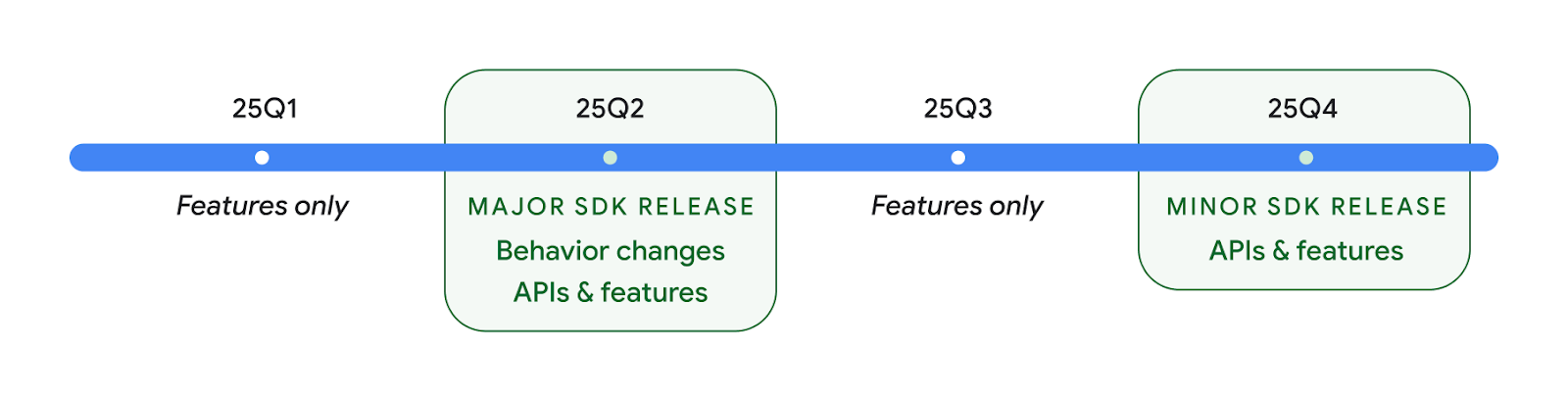
We'll continue to have quarterly Android releases. The Q1 and Q3 updates in-between the API releases will provide incremental updates to help ensure continuous quality. We're actively working with our device partners to bring the Q2 release to as many devices as possible.
Using new APIs with major and minor releases
Guarding a code block with a check for API level is done today using
the SDK_INT constant with
VERSION_CODES. This will continue
to be supported for major Android releases.
if (SDK_INT >= VERSION_CODES.BAKLAVA) {
  // Use APIs introduced in Android 16
}
The new SDK_INT_FULL
constant can be used for API checks against both major and minor versions with
the new VERSION_CODES_FULL
enumeration.
if (SDK_INT_FULL >= VERSION_CODES_FULL.[MAJOR or MINOR RELEASE]) {
  // Use APIs introduced in a major or minor release
}
You can also use the
Build.getMinorSdkVersion()
method to get just the minor SDK version.
val minorSdkVersion = Build.getMinorSdkVersion(VERSION_CODES_FULL.BAKLAVA)
These APIs have not yet been finalized and are subject to change, so please send us feedback if you have any concerns.
사용자 환경 및 시스템 UI
Android 16에서는 앱 개발자와 사용자가 필요에 맞게 기기를 구성할 수 있는 더 많은 제어 기능과 유연성을 제공합니다.
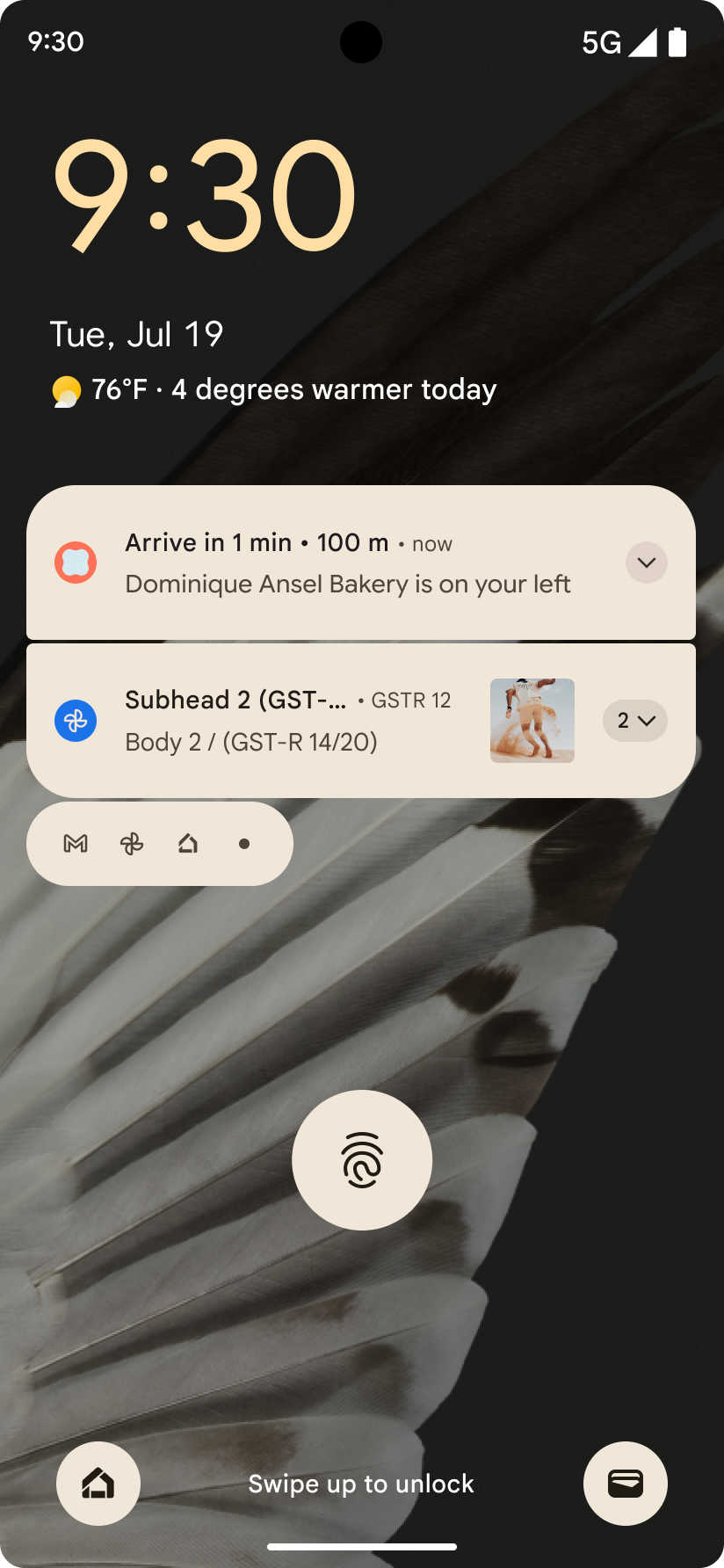
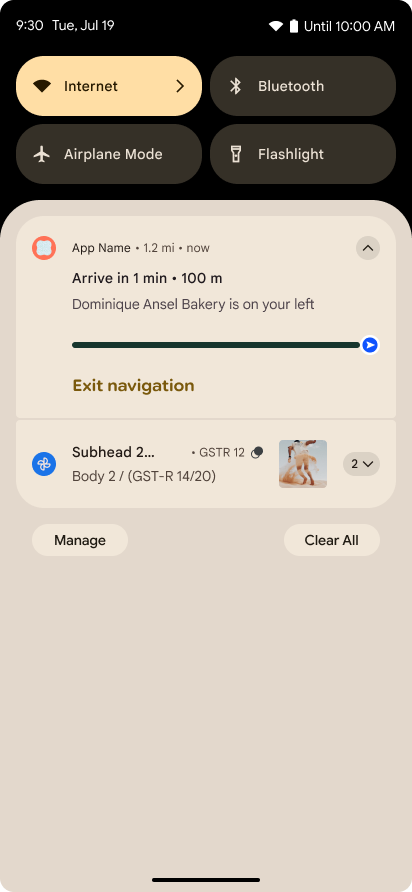
진행 상황 중심 알림
Android 16 introduces progress-centric notifications to help users seamlessly track user-initiated, start-to-end journeys.
Notification.ProgressStyle is a new notification
style that lets you create progress-centric notifications. Key use cases include
rideshare, delivery, and navigation. Within the Notification.ProgressStyle
class, you can denote states and milestones in a user journey using
points and segments.
자세한 내용은 진행률 중심 알림 문서 페이지를 참고하세요.
뒤로 탐색 예측 업데이트
Android 16 adds new APIs to help you enable predictive back system animations in
gesture navigation such as the back-to-home animation. Registering the
onBackInvokedCallback with the new
PRIORITY_SYSTEM_NAVIGATION_OBSERVER allows your app to
receive the regular onBackInvoked call whenever the
system handles a back navigation without impacting the normal back navigation
flow.
Android 16 additionally adds the
finishAndRemoveTaskCallback() and
moveTaskToBackCallback. By registering these callbacks
with the OnBackInvokedDispatcher, the system can trigger
specific behaviors and play corresponding ahead-of-time animations when the back
gesture is invoked.
더 풍부한 햅틱
Android는 처음부터 햅틱 액추에이터 제어를 노출했습니다.
Android 11에서는 기기 정의 시맨틱 프리미티브의 VibrationEffect.Compositions를 통해 고급 액추에이터가 지원할 수 있는 더 복잡한 햅틱 효과에 대한 지원을 추가했습니다.
Android 16에는 앱이 햅틱 효과의 진폭과 주파수 곡선을 정의하면서 기기 기능 간의 차이를 추상화할 수 있는 햅틱 API가 추가되었습니다.
개발자 생산성 및 도구
생산성 향상을 위한 대부분의 작업은 Android 스튜디오, Jetpack Compose, Android Jetpack 라이브러리와 같은 도구를 중심으로 이루어지지만, Google에서는 항상 플랫폼에서 개발자의 비전을 실현할 수 있는 방법을 모색합니다.
라이브 배경화면 콘텐츠 처리
In Android 16, the live wallpaper framework is gaining a new content API to
address the challenges of dynamic, user-driven wallpapers. Currently, live
wallpapers incorporating user-provided content require complex, service-specific
implementations. Android 16 introduces
WallpaperDescription and
WallpaperInstance. WallpaperDescription lets you
identify distinct instances of a live wallpaper from the same service. For
example, a wallpaper that has instances on both the home screen and on the lock
screen may have unique content in both places. The wallpaper picker and
WallpaperManager use this metadata to better present
wallpapers to users, streamlining the process for you to create diverse and
personalized live wallpaper experiences.
성능 및 배터리
Android 16에서는 앱에 관한 유용한 정보를 수집하는 데 도움이 되는 API를 도입합니다.
시스템 트리거 프로파일링
ProfilingManager was
added in Android 15, giving apps the ability to
request profiling data collection using Perfetto on public devices in the field.
However, since this profiling must be started from the app, critical flows such
as startups or ANRs would be difficult or impossible for apps to capture.
To help with this, Android 16 introduces system-triggered profiling to
ProfilingManager. Apps can register interest in receiving traces for certain
triggers such as cold start reportFullyDrawn
or ANRs, and then the system starts and stops a trace on the app's behalf. After
the trace completes, the results are delivered to the app's data directory.
ApplicationStartInfo에서 구성요소 시작
ApplicationStartInfo는 Android 15에서 추가되어 앱이 프로세스 시작 이유, 시작 유형, 시작 시간, 제한, 기타 유용한 진단 데이터를 볼 수 있습니다. Android 16에서는 시작을 트리거한 구성요소 유형을 구분하는 getStartComponent()를 추가합니다. 이는 앱의 시작 흐름을 최적화하는 데 도움이 될 수 있습니다.
작업 인트로스펙션 개선
The JobScheduler#getPendingJobReason() API returns a reason why a job
might be pending. However, a job might be pending for multiple reasons.
In Android 16, we are introducing a new API
JobScheduler#getPendingJobReasons(int jobId), which returns multiple
reasons why a job is pending, due to both explicit constraints set by the
developer and implicit constraints set by the system.
We're also introducing
JobScheduler#getPendingJobReasonsHistory(int jobId), which returns a list
of the most recent constraint changes.
We recommend using the API to help you debug why your jobs may not be executing, especially if you're seeing reduced success rates of certain tasks or have bugs around latency of certain job completion. For example, updating widgets in the background failed to occur or prefetch job failed to be called prior to app start.
This can also better help you understand if certain jobs are not completing due to system defined constraints versus explicitly set constraints.
자동 조절 새로고침 빈도
Adaptive refresh rate (ARR), introduced in Android 15, enables the display refresh rate on supported hardware to adapt to the content frame rate using discrete VSync steps. This reduces power consumption while eliminating the need for potentially jank-inducing mode-switching.
Android 16 introduces hasArrSupport() and
getSuggestedFrameRate(int) while restoring
getSupportedRefreshRates() to make it easier for your apps to take
advantage of ARR. RecyclerView
1.4 internally supports ARR when it is settling from a fling or
smooth scroll, and we're continuing our work to add ARR
support into more Jetpack libraries. This frame rate article covers
many of the APIs you can use to set the frame rate so that your app can directly
use ARR.
ADPF의 여유 공간 API
The SystemHealthManager introduces the
getCpuHeadroom and
getGpuHeadroom APIs, designed to provide games and
resource-intensive apps with estimates of available CPU and GPU resources. These
methods offer a way for you to gauge how your app or game can best improve
system health, particularly when used in conjunction with other Android Dynamic
Performance Framework (ADPF) APIs that detect thermal
throttling.
By using CpuHeadroomParams and
GpuHeadroomParams on supported devices, you can
customize the time window used to compute the headroom and select between
average or minimum resource availability. This can help you reduce your CPU or
GPU resource usage accordingly, leading to better user experiences and improved
battery life.
접근성
Android 16에서는 앱을 모든 사용자에게 제공하는 데 도움이 되는 새로운 접근성 API와 기능을 추가합니다.
접근성 API 개선
Android 16에는 TalkBack과 같은 접근성 서비스를 사용하는 사용자의 일관성을 개선하는 데 도움이 되는 UI 시맨틱을 개선하는 API가 추가되었습니다.
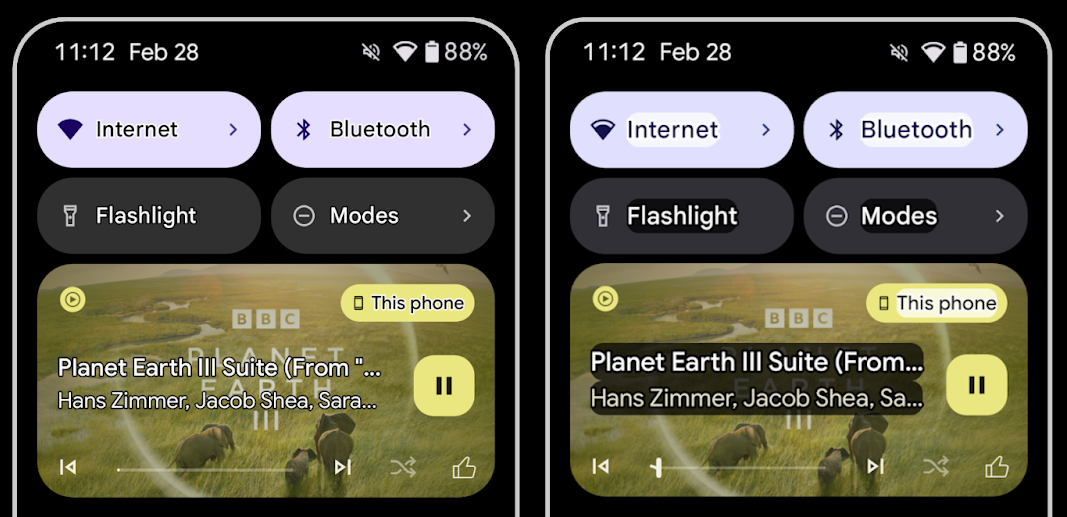
텍스트 대비를 극대화하기 위한 텍스트 윤곽선
저시력 사용자는 대비 감도가 낮아서 물체를 배경과 구분하기가 어렵습니다. 이러한 사용자를 지원하기 위해 Android 16에서는 고대비 텍스트를 대체하는 윤곽선 텍스트를 도입했습니다. 윤곽선 텍스트는 텍스트 주위에 더 큰 대비 영역을 그려 가독성을 크게 개선합니다.
Android 16에는 앱이 이 모드가 사용 설정되어 있는지 확인하거나 리스너를 등록할 수 있는 새로운 AccessibilityManager API가 포함되어 있습니다. 이는 주로 Compose와 같은 UI 도구 키트가 유사한 시각적 환경을 제공하기 위한 것입니다. UI 도구 키트 라이브러리를 유지 관리하거나 앱이 android.text.Layout 클래스를 우회하는 맞춤 텍스트 렌더링을 실행하는 경우 이를 사용하여 윤곽선 텍스트가 사용 설정된 시점을 알 수 있습니다.
TtsSpan에 길이가 추가됨
Android 16은 ARG_HOURS, ARG_MINUTES, ARG_SECONDS으로 구성된 TYPE_DURATION를 사용하여 TtsSpan를 확장합니다. 이를 통해 시간 길이에 직접 주석을 달 수 있으므로 TalkBack과 같은 서비스에서 정확하고 일관된 텍스트 음성 변환 출력을 보장할 수 있습니다.
여러 라벨이 있는 요소 지원
현재 Android에서는 UI 요소가 다른 요소에서 접근성 라벨을 파생할 수 있도록 허용하며, 이제 웹 콘텐츠에서 일반적인 시나리오인 여러 라벨을 연결하는 기능을 제공합니다. AccessibilityNodeInfo 내에 목록 기반 API를 도입하면 Android에서 이러한 다중 라벨 관계를 직접 지원할 수 있습니다. 이번 변경의 일환으로 AccessibilityNodeInfo#setLabeledBy 및 #getLabeledBy가 #addLabeledBy, #removeLabeledBy, #getLabeledByList로 대체되었습니다.
확장 가능한 요소 지원 개선
Android 16에는 메뉴 및 확장 가능한 목록과 같은 상호작용 요소의 펼쳐진 상태 또는 접힌 상태를 전달할 수 있는 접근성 API가 추가되었습니다. setExpandedState를 사용하여 펼쳐진 상태를 설정하고 CONTENT_CHANGE_TYPE_EXPANDED 콘텐츠 변경 유형으로 TYPE_WINDOW_CONTENT_CHANGED AccessibilityEvents를 전달하면 TalkBack과 같은 스크린 리더가 상태 변경을 알리도록 할 수 있으므로 더 직관적이고 포용적인 사용자 환경을 제공할 수 있습니다.
미확정 진행률 표시줄
Android 16에는 RANGE_TYPE_INDETERMINATE가 추가되어 결정된 ProgressBar 위젯과 결정되지 않은 ProgressBar 위젯 모두에 RangeInfo를 노출할 수 있는 방법이 제공됩니다. 이를 통해 TalkBack과 같은 서비스가 진행률 표시기에 더 일관되게 의견을 제공할 수 있습니다.
3-state CheckBox
이제 Android 16의 새로운 AccessibilityNodeInfo 메서드 getChecked 및 setChecked(int)는 '선택됨' 및 '선택 해제됨' 외에도 '부분 선택됨' 상태를 지원합니다. 이는 지원 중단된 불리언 isChecked 및 setChecked(boolean)를 대체합니다.
보충 설명
접근성 서비스가 ViewGroup를 설명하면 하위 뷰의 콘텐츠 라벨을 결합합니다. ViewGroup에 contentDescription를 제공하면 접근성 서비스는 포커스를 설정할 수 없는 하위 뷰의 설명도 재정의한다고 가정합니다. 이는 접근성 관련 현재 선택사항 (예: 'Roboto')을 유지하면서 드롭다운 (예: 'Font Family')과 같은 항목에 라벨을 지정하려는 경우 문제가 될 수 있습니다. Android 16에서는 setSupplementalDescription를 추가하여 하위 요소의 정보를 재정의하지 않고도 ViewGroup에 관한 정보를 제공하는 텍스트를 제공할 수 있습니다.
필수 양식 입력란
Android 16에서는 앱이 접근성 서비스에 양식 필드 입력이 필요하다고 알릴 수 있도록 AccessibilityNodeInfo에 setFieldRequired를 추가합니다. 이는 사용자가 필수 약관 체크박스와 같이 간단한 양식부터 다양한 유형의 양식을 작성할 때 중요한 시나리오입니다. 사용자가 필수 입력란을 일관되게 식별하고 빠르게 탐색할 수 있도록 도와줍니다.
LEA 보청기를 사용한 음성 통화 시 휴대전화를 마이크 입력으로 사용
Android 16에서는 LE Audio 보청기 사용자가 음성 통화를 위해 보청기의 내장 마이크와 휴대전화의 마이크 간에 전환할 수 있는 기능을 추가합니다. 이는 소음이 심한 환경이나 보청기의 마이크가 제대로 작동하지 않을 수 있는 다른 상황에서 유용할 수 있습니다.
LEA 보청기의 주변 볼륨 제어
Android 16에는 LE Audio 보청기 사용자가 보청기의 마이크에서 수신하는 주변 소음의 볼륨을 조절할 수 있는 기능이 추가되었습니다. 배경 소음이 너무 크거나 너무 조용한 경우에 유용합니다.
카메라
Android 16에서는 전문 카메라 사용자를 위한 지원이 강화되어 정확한 색온도 및 색조 조정과 함께 하이브리드 자동 노출이 가능합니다. 새 야간 모드 표시기를 사용하면 앱이 야간 모드 카메라 세션으로 전환해야 하는 시점을 알 수 있습니다. 새로운 Intent 작업을 통해 모션 포토를 더 쉽게 촬영할 수 있으며, HEIC 인코딩 지원 및 ISO 21496-1 초안 표준의 새로운 파라미터를 통해 UltraHDR 이미지를 계속 개선하고 있습니다.
하이브리드 자동 노출
Android 16에서는 Camera2에 새로운 하이브리드 자동 노출 모드를 추가하여 노출의 특정 측면을 수동으로 제어하는 동시에 자동 노출 (AE) 알고리즘이 나머지를 처리하도록 할 수 있습니다. ISO + AE 및 노출 시간 + AE를 제어할 수 있으므로 전체 수동 제어 또는 자동 노출에 전적으로 의존하는 기존 접근 방식에 비해 더 큰 유연성을 제공합니다.
fun setISOPriority() {
    // ... (Your existing code before the snippet) ...

    val availablePriorityModes = mStaticInfo.characteristics.get(
        CameraCharacteristics.CONTROL_AE_AVAILABLE_PRIORITY_MODES
    )

    // ... (Your existing code between the snippets) ...

    // Turn on AE mode to set priority mode
    reqBuilder.set(
        CaptureRequest.CONTROL_AE_MODE,
        CameraMetadata.CONTROL_AE_MODE_ON
    )
    reqBuilder.set(
        CaptureRequest.CONTROL_AE_PRIORITY_MODE,
        CameraMetadata.CONTROL_AE_PRIORITY_MODE_SENSOR_SENSITIVITY_PRIORITY
    )
    reqBuilder.set(
        CaptureRequest.SENSOR_SENSITIVITY,
        TEST_SENSITIVITY_VALUE
    )
    val request: CaptureRequest = reqBuilder.build()

    // ... (Your existing code after the snippet) ...
}
정확한 색상 온도 및 색조 조정
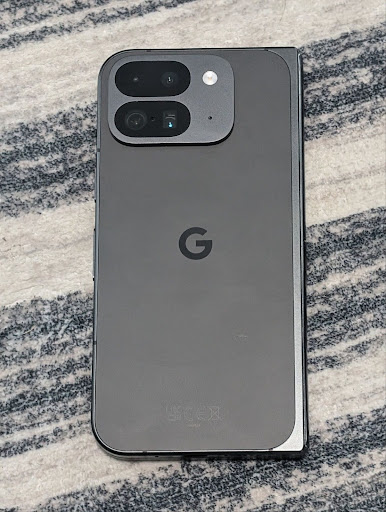
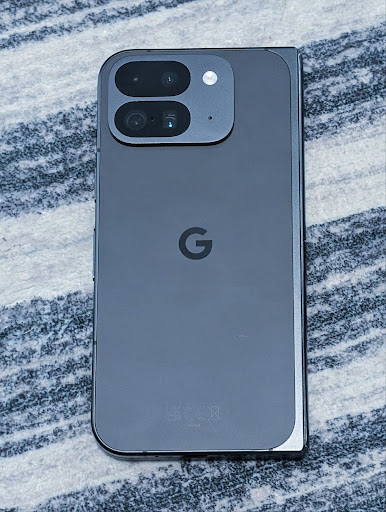
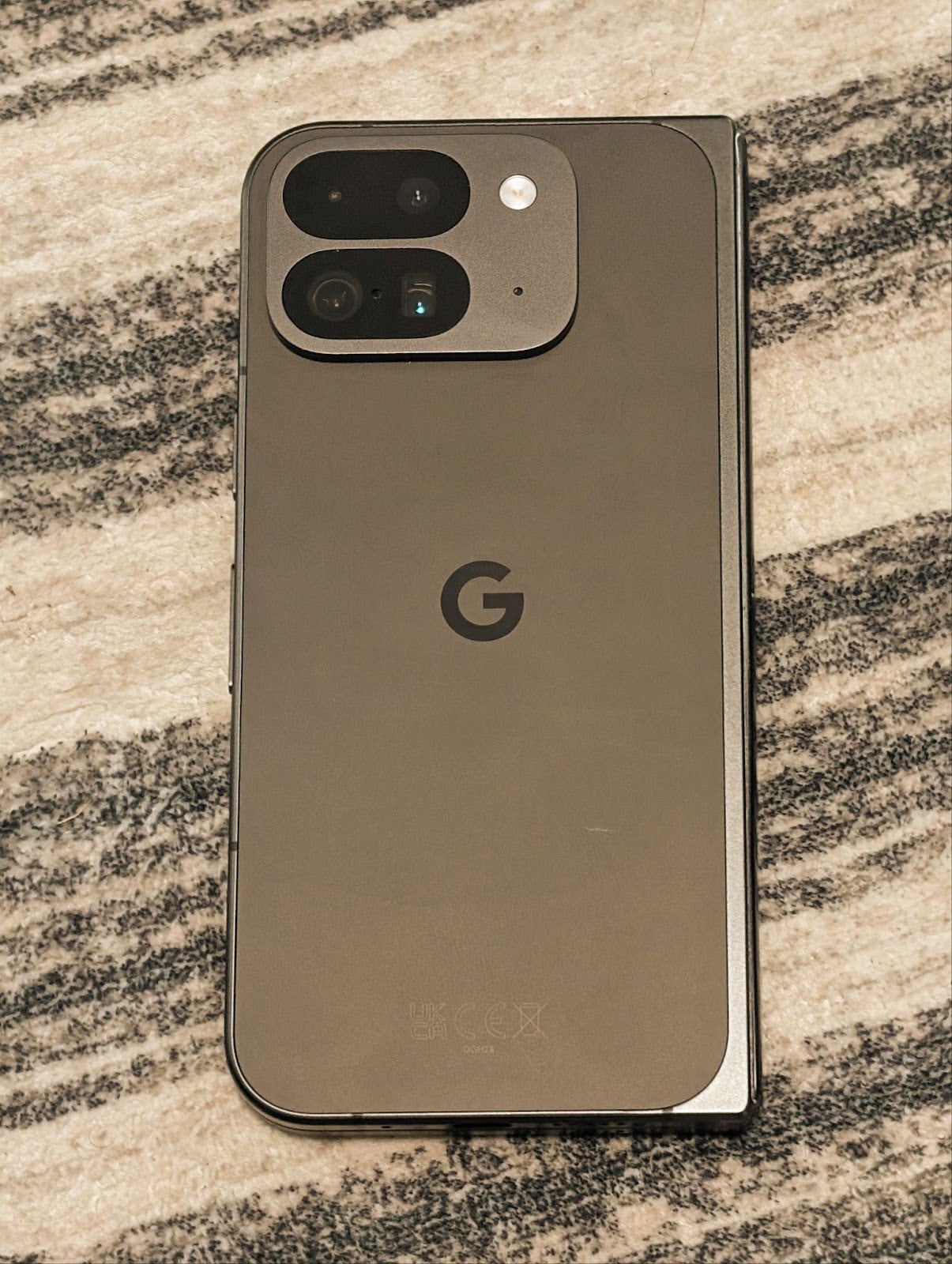
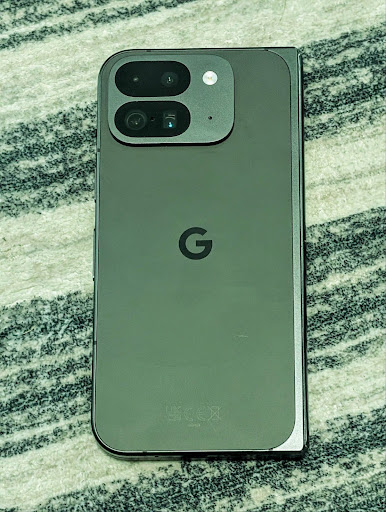
Android 16에서는 전문 동영상 녹화 애플리케이션을 더 효과적으로 지원하기 위해 미세한 색온도 및 색조 조정을 위한 카메라 지원을 추가합니다. 이전 Android 버전에서는 백열, 흐림, 황혼과 같이 사전 설정 목록으로 제한된 옵션이 포함된 CONTROL_AWB_MODE를 통해 화이트 밸런스 설정을 제어할 수 있었습니다. COLOR_CORRECTION_MODE_CCT를 사용하면 COLOR_CORRECTION_COLOR_TEMPERATURE 및 COLOR_CORRECTION_COLOR_TINT를 사용하여 상관 색상 온도에 따라 화이트 밸런스를 정확하게 조정할 수 있습니다.
fun setCCT() {
    // ... (Your existing code before this point) ...

    val colorTemperatureRange: Range<Int> =
        mStaticInfo.characteristics[CameraCharacteristics.COLOR_CORRECTION_COLOR_TEMPERATURE_RANGE]

    // Set to manual mode to enable CCT mode
    reqBuilder[CaptureRequest.CONTROL_AWB_MODE] = CameraMetadata.CONTROL_AWB_MODE_OFF
    reqBuilder[CaptureRequest.COLOR_CORRECTION_MODE] = CameraMetadata.COLOR_CORRECTION_MODE_CCT
    reqBuilder[CaptureRequest.COLOR_CORRECTION_COLOR_TEMPERATURE] = 5000
    reqBuilder[CaptureRequest.COLOR_CORRECTION_COLOR_TINT] = 30

    val request: CaptureRequest = reqBuilder.build()

    // ... (Your existing code after this point) ...
}
다음 예는 다양한 색온도 및 색조 조정을 적용한 후의 사진 모습을 보여줍니다.
카메라 야간 모드 장면 감지
To help your app know when to switch to and from a night mode camera session,
Android 16 adds EXTENSION_NIGHT_MODE_INDICATOR. If
supported, it's available in the CaptureResult within
Camera2.
This is the API we briefly mentioned as coming soon in the How Instagram enabled users to take stunning low light photos blog post. That post is a practical guide on how to implement night mode together with a case study that links higher-quality in-app night mode photos with an increase in the number of photos shared from the in-app camera.
모션 사진 캡처 인텐트 작업
Android 16에는 카메라 애플리케이션이 모션 사진을 캡처하고 반환하도록 요청하는 표준 인텐트 작업인 ACTION_MOTION_PHOTO_CAPTURE 및 ACTION_MOTION_PHOTO_CAPTURE_SECURE가 추가되었습니다.
이미지가 쓰여질 위치를 제어하기 위해 추가 EXTRA_OUTPUT를 전달하거나 Intent.setClipData(ClipData)을 통해 Uri를 전달해야 합니다. ClipData를 설정하지 않으면 Context.startActivity(Intent)를 호출할 때 자동으로 복사됩니다.
UltraHDR 이미지 개선
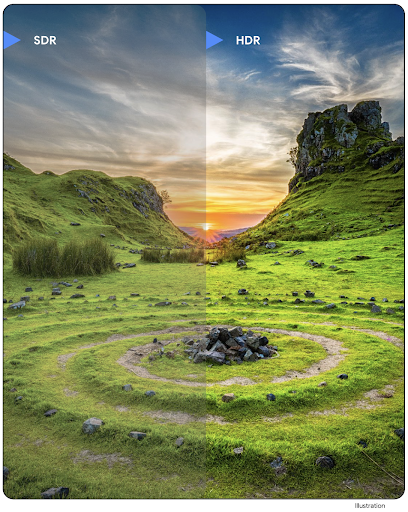
Android 16 continues our work to deliver dazzling image quality with UltraHDR
images. It adds support for UltraHDR images in the HEIC file
format. These images will get ImageFormat type
HEIC_ULTRAHDR and will contain an embedded gainmap similar
to the existing UltraHDR JPEG format. We're working on AVIF support for UltraHDR
as well, so stay tuned.
In addition, Android 16 implements additional parameters in UltraHDR from the ISO 21496-1 draft standard, including the ability to get and set the colorspace that gainmap math should be applied in, as well as support for HDR encoded base images with SDR gainmaps.
그래픽
Android 16에는 AGSL을 사용한 맞춤 그래픽 효과와 같은 최신 그래픽 개선사항이 포함되어 있습니다.
AGSL을 사용한 맞춤 그래픽 효과
Android 16 adds RuntimeColorFilter and
RuntimeXfermode, allowing you to author complex effects like
Threshold, Sepia, and Hue Saturation and apply them to draw calls. Since Android
13, you've been able to use AGSL to create custom
RuntimeShaders that extend Shader. The new API
mirrors this, adding an AGSL-powered RuntimeColorFilter that
extends ColorFilter, and a Xfermode effect that
lets you implement AGSL-based custom compositing and blending between source and
destination pixels.
private val thresholdEffectString = """
    uniform half threshold;

    half4 main(half4 c) {
        half luminosity = dot(c.rgb, half3(0.2126, 0.7152, 0.0722));
        half bw = step(threshold, luminosity);
        return bw.xxx1 * c.a;
    }"""

fun setCustomColorFilter(paint: Paint) {
   val filter = RuntimeColorFilter(thresholdEffectString)
   filter.setFloatUniform(0.5);
   paint.colorFilter = filter
}
연결
Android 16은 앱이 통신 및 무선 기술의 최신 발전에 액세스할 수 있도록 플랫폼을 업데이트합니다.
강화된 보안으로 범위 지정
Android 16은 Wi-Fi 6의 802.11az를 지원하는 기기의 Wi-Fi 위치에 강력한 보안 기능 지원을 추가합니다. 이를 통해 앱은 프로토콜의 더 높은 정확도, 확장성, 동적 예약을 AES-256 기반 암호화 및 MITM 공격 방지와 같은 보안 개선사항과 결합할 수 있습니다. 이를 통해 노트북이나 차량 도어 잠금 해제와 같은 근접 사용 사례에서 더 안전하게 사용할 수 있습니다. 802.11az는 Wi-Fi 6 표준과 통합되어 인프라와 기능을 활용하여 더 광범위하게 채택하고 더 쉽게 배포할 수 있습니다.
일반 범위 지정 API
Android 16 includes the new RangingManager, which provides
ways to determine the distance and angle on supported hardware between the local
device and a remote device. RangingManager supports the usage of a variety of
ranging technologies such as BLE channel sounding, BLE RSSI-based ranging, Ultra
Wideband, and Wi-Fi round trip time.
호환 기기 관리자 기기 감지
In Android 16, new APIs are being introduced for binding your companion app
service. Service will be bound when BLE is in range and Bluetooth is connected
and service will be unbound when BLE is out of range or Bluetooth is
disconnected. App will receives a new
'onDevicePresenceEvent()' callback based on various
of DevicePresenceEvent.
More details can be found in
'startObservingDevicePresence(ObservingDevicePresenceRequest)'.
미디어
Android 16에는 미디어 환경을 개선하는 다양한 기능이 포함되어 있습니다.
사진 선택 도구 개선사항
사진 선택 도구는 사용자가 전체 미디어 라이브러리가 아닌 로컬 저장소와 클라우드 저장소의 선택한 이미지 및 동영상에 대한 액세스 권한을 앱에 부여할 수 있는 안전한 내장 방법을 제공합니다. Google 시스템 업데이트 및 Google Play 서비스를 통해 모듈식 시스템 구성요소를 조합하여 사용하면 Android 4.4 (API 수준 19)까지 지원됩니다. 통합하려면 관련 Android Jetpack 라이브러리와 함께 코드 몇 줄만 있으면 됩니다.
Android 16에는 사진 선택 도구가 다음과 같이 개선되었습니다.
- 삽입된 사진 선택 도구: 앱이 사진 선택 도구를 뷰 계층 구조에 삽입할 수 있는 새로운 API입니다. 이렇게 하면 앱이 과도하게 광범위한 권한이 필요하지 않고도 사용자가 미디어를 선택할 수 있는 프로세스 격리를 활용하면서 앱의 더 통합된 부분처럼 느껴질 수 있습니다. 플랫폼 버전 간에 호환성을 극대화하고 통합을 간소화하려면 삽입된 사진 선택 도구를 통합하려는 경우 향후 Android Jetpack 라이브러리를 사용하는 것이 좋습니다.
- 포토 선택 도구의 Cloud Search: Android 포토 선택 도구의 클라우드 미디어 제공업체에서 검색을 사용 설정하는 새로운 API입니다. 사진 선택 도구의 검색 기능이 곧 제공될 예정입니다.
Advanced Professional Video
Android 16 introduces support for the Advanced Professional Video (APV) codec which is designed to be used for professional level high quality video recording and post production.
The APV codec standard has the following features:
- Perceptually lossless video quality (close to raw video quality)
- Low complexity and high throughput intra-frame-only coding (without pixel domain prediction) to better support editing workflows
- Support for high bit-rate range up to a few Gbps for 2K, 4K and 8K resolution content, enabled by a lightweight entropy coding scheme
- Frame tiling for immersive content and for enabling parallel encoding and decoding
- Support for various chroma sampling formats and bit-depths
- Support for multiple decoding and re-encoding without severe visual quality degradation
- Support multi-view video and auxiliary video like depth, alpha, and preview
- Support for HDR10/10+ and user-defined metadata
A reference implementation of APV is provided through the OpenAPV project. Android 16 will implement support for the APV 422-10 Profile that provides YUV 422 color sampling along with 10-bit encoding and for target bitrates of up to 2Gbps.
개인정보처리방침
Android 16에는 앱 개발자가 사용자 개인 정보를 보호하는 데 도움이 되는 다양한 기능이 포함되어 있습니다.
헬스 커넥트 업데이트
헬스 커넥트는 중간 및 고강도 활동에 관한 세계보건기구 가이드라인에 따라 정의된 데이터 유형인 ACTIVITY_INTENSITY를 추가합니다. 각 레코드에는 시작 시간, 종료 시간, 활동 강도가 보통인지 격렬한지 여부가 필요합니다.
헬스 커넥트에는 의료 기록을 지원하는 업데이트된 API도 포함되어 있습니다. 이를 통해 앱은 명시적인 사용자 동의를 얻어 FHIR 형식으로 의료 기록을 읽고 쓸 수 있습니다.
Android의 개인 정보 보호 샌드박스
Android 16에는 사용자가 자신의 개인 정보가 보호된다는 사실을 알 수 있는 기술을 개발하기 위한 Google의 지속적인 노력의 일환으로 Android의 개인 정보 보호 샌드박스의 최신 버전이 통합되어 있습니다. Android의 개인 정보 보호 샌드박스 개발자 베타 프로그램에 대한 자세한 내용은 웹사이트를 참고하세요. SDK가 제공하는 앱과 별도의 전용 런타임 환경에서 실행되도록 허용하여 사용자 데이터 수집 및 공유를 더 강력하게 보호하는 SDK 런타임을 확인하세요.
보안
Android 16에는 앱의 보안을 강화하고 앱의 데이터를 보호하는 데 도움이 되는 기능이 포함되어 있습니다.
키 공유 API
Android 16에는 Android 키 저장소 키에 대한 액세스 권한을 다른 앱과 공유하는 것을 지원하는 API가 추가되었습니다. 새 KeyStoreManager 클래스는 앱 uid의 키에 대한 액세스 권한 부여 및 취소를 지원하며 앱이 공유 키에 액세스할 수 있는 API를 포함합니다.
기기 폼 팩터
Android 16은 앱이 Android의 폼 팩터를 최대한 활용할 수 있도록 지원합니다.
TV용 표준화된 사진 및 오디오 품질 프레임워크
The new MediaQuality
package in Android 16 exposes
a set of standardized APIs for access to audio and picture profiles and
hardware-related settings. This allows streaming apps to query profiles and
apply them to media dynamically:
- Movies mastered with a wider dynamic range require greater color accuracy to see subtle details in shadows and adjust to ambient light, so a profile that prefers color accuracy over brightness may be appropriate.
- Live sporting events are often mastered with a narrow dynamic range, but are often watched in daylight, so a profile that preferences brightness over color accuracy can give better results.
- Fully interactive content wants minimal processing to reduce latency, and wants higher frame rates, which is why many TV's ship with a game profile.
The API allows apps to switch between profiles and users to enjoy tuning supported TVs to best suit their content.
다국어 지원
Android 16에서는 기기가 여러 언어로 사용될 때 사용자 환경을 보완하는 기능이 추가되었습니다.
세로 텍스트
Android 16 adds low-level support for rendering and measuring text vertically to
provide foundational vertical writing support for library developers. This is
particularly useful for languages like Japanese that commonly use vertical
writing systems. A new flag,
VERTICAL_TEXT_FLAG,
has been added to the Paint class. When
this flag is set using
Paint.setFlags, Paint's
text measurement APIs will report vertical advances instead of horizontal
advances, and Canvas will draw text
vertically.
val text = "「春は、曙。」"
Box(
    Modifier.padding(innerPadding).background(Color.White).fillMaxSize().drawWithContent {
        drawIntoCanvas { canvas ->
            val paint = Paint().apply { textSize = 64.sp.toPx() }
            // Draw text vertically
            paint.flags = paint.flags or VERTICAL_TEXT_FLAG
            val height = paint.measureText(text)
            canvas.nativeCanvas.drawText(
                text,
                0,
                text.length,
                size.width / 2,
                (size.height - height) / 2,
                paint
            )
        }
    }
) {}
측정 시스템 맞춤설정
Users can now customize their measurement system in regional preferences within
Settings. The user preference is included as part of the locale code, so you can
register a BroadcastReceiver on
ACTION_LOCALE_CHANGED to handle locale configuration changes when
regional preferences change.
Using formatters can help match the local experience. For example, "0.5 in" in English (United States), is "12,7 mm" for a user who has set their phone to English (Denmark) or who uses their phone in English (United States) with the metric system as the measurement system preference.
To find these settings, open the Settings app and navigate to System > Languages & region.