

Como nas versões anteriores, o Android 16 inclui mudanças de comportamento que podem afetar seu app. As mudanças de comportamento a seguir se aplicam exclusivamente a apps destinados ao Android 16 ou versões mais recentes. Se o app for direcionado ao Android 16 ou a versões mais recentes, faça modificações para oferecer suporte a esses comportamentos, quando aplicável.
Consulte também a lista de mudanças de comportamento que afetam todos os apps
executados no Android 16, independente da targetSdkVersion do seu app.
Experiência do usuário e interface do sistema
O Android 16 (nível 36 da API) inclui as seguintes mudanças que visam criar uma experiência do usuário mais consistente e intuitiva.
Fim da opção de desativar a exibição de ponta a ponta
O Android 15 impôs o modo de ponta a ponta para apps direcionados ao Android 15 (nível
35 da API), mas seu app pode desativar essa opção definindo
R.attr#windowOptOutEdgeToEdgeEnforcement como true. Em apps
direcionados ao Android 16 (nível 36 da API),
R.attr#windowOptOutEdgeToEdgeEnforcement é descontinuado e desativado, e seu
app não pode desativar a exibição de ponta a ponta.
- Se o app for destinado ao Android 16 (nível 36 da API) e estiver sendo executado em um
dispositivo Android 15, o
R.attr#windowOptOutEdgeToEdgeEnforcementvai continuar funcionando. - Se o app for direcionado ao Android 16 (nível 36 da API) e estiver sendo executado em um
dispositivo Android 16, o
R.attr#windowOptOutEdgeToEdgeEnforcementserá desativado.
Para testar no Android 16, verifique se o app é compatível com o modo de ponta a ponta e
remova qualquer uso de R.attr#windowOptOutEdgeToEdgeEnforcement para que o app
também seja compatível com o modo de ponta a ponta em um dispositivo Android 15. Para oferecer suporte de ponta a ponta, consulte as orientações do Compose e do Views.
Migração ou desativação necessárias para a volta preditiva
Em apps direcionados ao Android 16 (nível 36 da API) ou mais recente e executados em um
dispositivo Android 16 ou mais recente, as animações preditivas do sistema de retorno
(voltar para a tela inicial, entre tarefas e entre atividades) são ativadas por padrão.
Além disso, onBackPressed não é chamado, e KeyEvent.KEYCODE_BACK não é mais enviado.
Se o app interceptar o evento de retorno e você ainda não tiver migrado para a volta preditiva,
atualize o app para usar as APIs de navegação de retorno compatíveis ou
desative temporariamente definindo o
atributo android:enableOnBackInvokedCallback como false na
tag <application> ou <activity> do arquivo AndroidManifest.xml do app.
APIs de fontes elegantes descontinuadas e desativadas
Os apps destinados ao Android 15 (nível 35 da API) têm o atributo
elegantTextHeight
TextView definido como true por
padrão, substituindo a fonte compacta por uma muito mais legível. É possível substituir isso definindo o atributo elegantTextHeight como false.
O Android 16 descontinua o
atributo elegantTextHeight,
que será ignorado quando o app for destinado ao Android 16. As "fontes da interface" controladas por essas APIs serão descontinuadas. Por isso, adapte todos os layouts para garantir a renderização de texto consistente e à prova de futuro em árabe, laosiano, birmanês, tâmil, gujarati, canarês, malaiala, odia, télugo ou tailandês.

elegantTextHeight para apps destinados ao Android
14 (nível 34 da API) e versões anteriores ou para apps destinados ao Android 15 (nível 35 da API)
que substituíram o padrão definindo o atributo elegantTextHeight
como false.elegantTextHeight para apps direcionados ao Android
16 (nível 36 da API) ou ao Android 15 (nível 35 da API) que não
substituíram o padrão definindo o atributo elegantTextHeight
como false.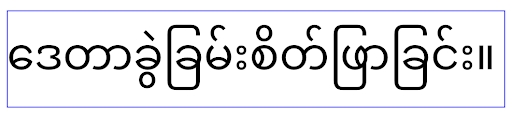
Principal recurso
O Android 16 (nível da API 36) inclui as seguintes mudanças que modificam ou expandem vários recursos principais do sistema Android.
Otimização de programação de trabalho com taxa fixa
Antes de segmentar o Android 16, quando o scheduleAtFixedRate
perdia uma execução de tarefa por estar fora de um
ciclo de vida do processo válido, todas as execuções perdidas eram executadas imediatamente
quando o app retornava a um ciclo de vida válido.
Ao segmentar o Android 16, no máximo uma execução perdida de
scheduleAtFixedRate é executada imediatamente quando o app
retorna a um ciclo de vida válido. Essa mudança de comportamento deve melhorar o desempenho
do app. Teste esse comportamento no seu app para verificar se ele é afetado.
Também é possível testar usando o framework de compatibilidade de apps
e ativando a flag de compatibilidade STPE_SKIP_MULTIPLE_MISSED_PERIODIC_TASKS.
Formatos de dispositivos
O Android 16 (nível 36 da API) inclui as seguintes mudanças para apps quando mostrados em dispositivos de tela grande.
Layouts adaptáveis
Com os apps Android agora sendo executados em vários dispositivos (como smartphones, tablets, dobráveis, computadores, carros e TVs) e modos de janelas em telas grandes (como tela dividida e janelas para computador), os desenvolvedores precisam criar apps Android que se adaptem a qualquer tamanho de tela e janela, independentemente da orientação do dispositivo. Paradigmas como restringir a orientação e o redimensionamento são muito restritivos no mundo de vários dispositivos de hoje.
Ignorar restrições de orientação, redimensionamento e proporção
Para apps direcionados ao Android 16 (nível 36 da API), as restrições de orientação, redimensionamento e proporção não se aplicam mais em telas com largura mínima >= 600 dp. Os apps preenchem toda a janela de exibição, independente da proporção ou da orientação preferida do usuário, e não usam pillarboxing.
Essa mudança introduz um novo comportamento padrão da plataforma. O Android está migrando para um modelo em que os apps precisam se adaptar a várias orientações, tamanhos de tela e proporções. Restrições como orientação fixa ou redimensionamento limitado dificultam a adaptabilidade do app. Deixe seu app adaptável para oferecer a melhor experiência possível aos usuários.
Também é possível testar esse comportamento usando o
framework de compatibilidade de apps e ativando a
flag de compatibilidade UNIVERSAL_RESIZABLE_BY_DEFAULT.
Mudanças importantes comuns
Ignorar as restrições de orientação, redimensionamento e proporção pode afetar a interface do app em alguns dispositivos, especialmente elementos projetados para layouts pequenos bloqueados na orientação retrato. Por exemplo, problemas como layouts esticados e animações e componentes fora da tela. Qualquer pressuposto sobre proporção ou orientação pode causar problemas visuais no app. Saiba mais sobre como evitar esses problemas e melhorar o comportamento adaptável do app.
Permitir a rotação do dispositivo resulta em mais recriação de atividades, o que pode resultar na perda do estado do usuário se não for preservado adequadamente. Saiba como salvar corretamente o estado da interface em Salvar estados da interface.
Detalhes de implementação
Os seguintes atributos de manifesto e APIs de tempo de execução são ignorados em dispositivos de tela grande nos modos de tela cheia e várias janelas:
screenOrientationresizableActivityminAspectRatiomaxAspectRatiosetRequestedOrientation()getRequestedOrientation()
Os seguintes valores para screenOrientation, setRequestedOrientation() e
getRequestedOrientation() são ignorados:
portraitreversePortraitsensorPortraituserPortraitlandscapereverseLandscapesensorLandscapeuserLandscape
Em relação ao redimensionamento da tela, android:resizeableActivity="false", android:minAspectRatio e android:maxAspectRatio não têm efeito.
Para apps direcionados ao Android 16 (nível 36 da API), as restrições de orientação, redimensionamento e proporção do app são ignoradas por padrão em telas grandes. Todos os apps que não estiverem totalmente prontos poderão substituir temporariamente esse comportamento desativando a opção, o que resulta no comportamento anterior de serem colocados no modo de compatibilidade.
Exceções
As restrições de orientação, redimensionamento e proporção do Android 16 não se aplicam nas seguintes situações:
- Jogos (com base na flag
android:appCategory) - Usuários ativando explicitamente o comportamento padrão do app nas configurações de proporção do dispositivo
- Telas menores que
sw600dp
Desativar temporariamente
Para desativar uma atividade específica, declare a propriedade
PROPERTY_COMPAT_ALLOW_RESTRICTED_RESIZABILITY do manifesto:
<activity ...>
  <property android:name="android.window.PROPERTY_COMPAT_ALLOW_RESTRICTED_RESIZABILITY" android:value="true" />
  ...
</activity>
Se muitas partes do seu app não estiverem prontas para o Android 16, você poderá desativar completamente aplicando a mesma propriedade no nível do aplicativo:
<application ...>
  <property android:name="android.window.PROPERTY_COMPAT_ALLOW_RESTRICTED_RESIZABILITY" android:value="true" />
</application>
Saúde e fitness
O Android 16 (nível da API 36) inclui as seguintes mudanças relacionadas a dados de saúde e condicionamento físico.
Permissões de saúde e fitness
Para apps direcionados ao Android 16 (nível 36 da API) ou mais recentes, as permissões
BODY_SENSORS são mais granulares
em android.permissions.health, um modelo adotado também pelo Conexão Saúde. No Android 16, qualquer API que antes exigia BODY_SENSORS
ou BODY_SENSORS_BACKGROUND agora precisa da permissão
android.permissions.health correspondente. Isso afeta os seguintes tipos de dados, APIs e tipos de serviços em primeiro plano:
HEART_RATE_BPMdos Recursos de Saúde no Wear OSSensor.TYPE_HEART_RATEdo Android Sensor ManagerheartRateAccuracyeheartRateBpmdoProtoLayoutno Wear OSFOREGROUND_SERVICE_TYPE_HEALTH, em que a permissãoandroid.permission.healthrespectiva é necessária em vez deBODY_SENSORS
Se o app usa essas APIs, ele precisa solicitar as respectivas permissões granulares:
- Para monitoramento da frequência cardíaca, SpO₂ ou temperatura da pele durante o uso, peça a permissão granular em
android.permissions.health, comoREAD_HEART_RATEem vez deBODY_SENSORS. - Para acesso a sensores em segundo plano, solicite
READ_HEALTH_DATA_IN_BACKGROUNDem vez deBODY_SENSORS_BACKGROUND.
Essas permissões são as mesmas que protegem o acesso à leitura de dados da Conexão Saúde, o repositório de dados do Android para informações de saúde, condicionamento físico e bem-estar.
Apps para dispositivos móveis
Os apps para dispositivos móveis que migrarem para usar o READ_HEART_RATE e outras permissões
granulares também precisam declarar uma atividade para mostrar
a Política de Privacidade do app. Esse é o mesmo requisito do Conexão Saúde.
Conectividade
O Android 16 (nível 36 da API) inclui as seguintes mudanças na pilha Bluetooth para melhorar a conectividade com dispositivos periféricos.
Novas intents para lidar com perda de vinculação e mudanças na criptografia
Como parte do Processamento de perda de vínculo aprimorado, o Android 16 também apresenta duas novas intents para dar aos apps mais consciência da perda de vínculo e mudanças de criptografia.
Os apps destinados ao Android 16 agora podem:
- Receber uma intent
ACTION_KEY_MISSINGquando a perda de vínculo remoto é detectada, permitindo que eles forneçam feedback mais informativo ao usuário e realizem ações adequadas. - Receba uma intent
ACTION_ENCRYPTION_CHANGEsempre que o status de criptografia do link mudar. Isso inclui a mudança de status de criptografia, de algoritmo de criptografia e de tamanho da chave de criptografia. Os apps precisam considerar a vinculação restaurada se o link for criptografado ao receber a intentACTION_ENCRYPTION_CHANGEmais tarde.
Como se adaptar a diferentes implementações de OEM
Embora o Android 16 apresente essas novas intents, a implementação e a transmissão delas podem variar de acordo com os diferentes fabricantes de dispositivos (OEMs). Para garantir que o app ofereça uma experiência consistente e confiável em todos os dispositivos, os desenvolvedores precisam projetar o processamento de perda de vínculo para se adaptar a essas variações.
Recomendamos os seguintes comportamentos do app:
Se a intent
ACTION_KEY_MISSINGfor transmitida:O link ACL (Asynchronous Connection-Less) será desconectado pelo sistema, mas as informações de vinculação do dispositivo serão mantidas, conforme descrito aqui.
Seu app precisa usar essa intent como o indicador principal para a detecção de perda de conexão e orientar o usuário a confirmar se o dispositivo remoto está no alcance antes de iniciar o esquecimento ou o novo pareamento do dispositivo.
Se um dispositivo se desconectar depois que o
ACTION_KEY_MISSINGfor recebido, o app precisará ter cuidado ao se reconectar, porque o dispositivo pode não estar mais vinculado ao sistema.Se a intent
ACTION_KEY_MISSINGNÃO for transmitida:O link ACL vai permanecer conectado, e as informações de vinculação do dispositivo serão removidas pelo sistema, assim como no comportamento do Android 15.
Nesse cenário, o app precisa continuar com os mecanismos de processamento de perda de vínculo existentes, como nas versões anteriores do Android, para detectar e gerenciar eventos de perda de vínculo.
Nova maneira de remover a vinculação Bluetooth
Todos os apps destinados ao Android 16 agora podem desvincular dispositivos Bluetooth usando uma
API pública em CompanionDeviceManager. Se um dispositivo complementar estiver
sendo gerenciado como uma associação de CDM, o app poderá acionar
a remoção de pareamento Bluetooth usando a nova API removeBond(int)
no dispositivo associado. O app pode monitorar as mudanças de estado de vinculação
ouvindo o evento de transmissão do dispositivo Bluetooth
ACTION_BOND_STATE_CHANGED.
Segurança
O Android 16 (nível da API 36) inclui as seguintes mudanças de segurança.
Bloqueio da versão do MediaStore
Para apps destinados ao Android 16 ou mais recente, o MediaStore#getVersion() agora
será exclusivo para cada app. Isso elimina as propriedades de identificação da string
de versão para evitar abuso e uso para técnicas de impressão digital. Os apps não podem
fazer suposições sobre o formato dessa versão. Os apps já precisam
processar mudanças de versão ao usar essa API e, na maioria dos casos, não precisam
mudar o comportamento atual, a menos que o desenvolvedor tenha tentado inferir
informações adicionais que estão além do escopo pretendido dessa API.
Intents mais seguras
O recurso Safer Intents é uma iniciativa de segurança multifásica projetada para melhorar a segurança do mecanismo de resolução de intents do Android. O objetivo é proteger os apps contra ações maliciosas adicionando verificações durante o processamento de intents e filtrando intents que não atendem a critérios específicos.
No Android 15, o recurso se concentrava no app de envio. Agora, com o Android 16, o controle passa para o app de recebimento, permitindo que os desenvolvedores ativem a resolução estrita de intents usando o manifesto do app.
Duas mudanças importantes estão sendo implementadas:
Intents explícitas precisam corresponder ao filtro de intent do componente de destino: se uma intent segmenta explicitamente um componente, ela precisa corresponder ao filtro de intent desse componente.
Intents sem uma ação não podem corresponder a nenhum filtro de intent: intents que não têm uma ação especificada não devem ser resolvidas para nenhum filtro de intent.
Essas mudanças só se aplicam quando vários apps estão envolvidos e não afetam o processamento de intents em um único app.
Impacto
Como a ativação é opcional, os desenvolvedores precisam habilitar explicitamente esse recurso no manifesto do app para que ele entre em vigor. Como resultado, o impacto do recurso será limitado aos apps cujos desenvolvedores:
- Conhecer o recurso "Objetivos mais seguros" e os benefícios dele.
- Escolher ativamente incorporar práticas mais rigorosas de processamento de intents nos apps.
Essa abordagem de ativação minimiza o risco de quebrar apps atuais que podem depender do comportamento de resolução de intent menos seguro.
Embora o impacto inicial no Android 16 possa ser limitado, a iniciativa Safer Intents tem um roteiro para um impacto mais amplo em versões futuras do Android. O plano é tornar a resolução estrita de intents o comportamento padrão.
O recurso "Intents mais seguras" tem o potencial de melhorar significativamente a segurança do ecossistema Android, dificultando que apps maliciosos explorem vulnerabilidades no mecanismo de resolução de intents.
No entanto, a transição para a recusa e a aplicação obrigatória precisam ser gerenciadas com cuidado para resolver possíveis problemas de compatibilidade com apps atuais.
Implementação
Os desenvolvedores precisam ativar explicitamente a correspondência de intents mais restrita usando o
atributo intentMatchingFlags no manifesto do app.
Confira um exemplo em que o recurso é ativado para todo o app,
mas desativado/desativado em um receptor:
<application android:intentMatchingFlags="enforceIntentFilter">
    <receiver android:name=".MyBroadcastReceiver" android:exported="true" android:intentMatchingFlags="none">
        <intent-filter>
            <action android:name="com.example.MY_CUSTOM_ACTION" />
        </intent-filter>
        <intent-filter>
            <action android:name="com.example.MY_ANOTHER_CUSTOM_ACTION" />
        </intent-filter>
    </receiver>
</application>
Mais sobre as flags aceitas:
| Nome da flag | Descrição |
|---|---|
| enforceIntentFilter | Aplica uma correspondência mais rigorosa para intents recebidas |
| nenhum | Desativa todas as regras especiais de correspondência para intents recebidos. Ao especificar várias flags, valores conflitantes são resolvidos dando precedência à flag "none". |
| allowNullAction | Relaxa as regras de correspondência para permitir que intents sem uma ação correspondam. Essa flag será usada em conjunto com "enforceIntentFilter" para alcançar um comportamento específico. |
Como testar e depurar
Quando a aplicação estiver ativa, os apps vão funcionar corretamente se o
chamador de intent tiver preenchido a intent corretamente.
No entanto, intents bloqueadas vão acionar mensagens de registro de aviso, como
"Intent does not match component's intent filter:" e "Access blocked:"
com a tag "PackageManager."
Isso indica um possível problema que pode afetar o app e exige
atenção.
Filtro do Logcat:
tag=:PackageManager & (message:"Intent does not match component's intent filter:" | message: "Access blocked:")
Filtragem de syscalls da GPU
Para reforçar a superfície da GPU Mali, os IOCTLs da GPU Mali que foram descontinuados ou destinados apenas ao desenvolvimento de GPU foram bloqueados em builds de produção. Além disso, as IOCTLs usadas para criação de perfil de GPU foram restritas ao processo de shell ou a aplicativos depuráveis. Consulte a atualização do SAC para mais detalhes sobre a política no nível da plataforma.
Essa mudança acontece em dispositivos Pixel que usam a GPU Mali (Pixel 6 a 9). A Arm
forneceu a categorização oficial dos IOCTLs em
Documentation/ioctl-categories.rst da versão r54p2. Essa
lista vai continuar sendo mantida em versões futuras de drivers.
Essa mudança não afeta as APIs gráficas compatíveis (incluindo Vulkan e OpenGL) e não deve impactar desenvolvedores ou aplicativos atuais. Ferramentas de criação de perfil da GPU, como o Streamline Performance Analyzer e o Android GPU Inspector, não serão afetadas.
Teste
Se você encontrar uma negação do SELinux semelhante a esta, é provável que seu aplicativo tenha sido afetado por essa mudança:
06-30 10:47:18.617 20360 20360 W roidJUnitRunner: type=1400 audit(0.0:85): avc:  denied  { ioctl }
for  path="/dev/mali0" dev="tmpfs" ino=1188 ioctlcmd=0x8023
scontext=u:r:untrusted_app_25:s0:c512,c768 tcontext=u:object_r:gpu_device:s0 tclass=chr_file
permissive=0 app=com.google.android.selinux.pts
Se o aplicativo precisar usar IOCTLs bloqueados, registre um bug e atribua-o a android-partner-security@google.com.
Perguntas frequentes
Essa mudança na política se aplica a todos os OEMs? Essa mudança será de aceitação, mas estará disponível para qualquer OEM que queira usar esse método de reforço da proteção. As instruções para implementar a mudança estão na documentação de implementação.
É obrigatório fazer mudanças na base de código do OEM para implementar isso, ou ele vem com uma nova versão do AOSP por padrão? A mudança no nível da plataforma virá com uma nova versão do AOSP por padrão. Os fornecedores podem ativar essa mudança no codebase se quiserem aplicá-la.
Os SoCs são responsáveis por manter a lista de IOCTLs atualizada? Por exemplo, se meu dispositivo usa uma GPU ARM Mali, preciso entrar em contato com a ARM para fazer alguma mudança? Os SoCs individuais precisam atualizar as listas de IOCTL por dispositivo após o lançamento do driver. Por exemplo, a ARM vai atualizar a lista de IOCTLs publicada quando houver atualizações de driver. No entanto, os OEMs precisam incorporar as atualizações na SEPolicy e adicionar os IOCTLs personalizados selecionados às listas, conforme necessário.
Essa mudança se aplica automaticamente a todos os dispositivos Pixel disponíveis no mercado ou é necessário que o usuário faça alguma ação para ativar algo e aplicar a mudança? Essa mudança se aplica a todos os dispositivos Pixel no mercado que usam a GPU Mali (Pixel 6 a 9). Nenhuma ação do usuário é necessária para aplicar essa mudança.
O uso dessa política afeta o desempenho do driver do kernel? Essa política foi testada na GPU Mali usando o GFXBench, e não foi observada nenhuma mudança mensurável no desempenho da GPU.
É necessário que a lista de IOCTLs esteja alinhada com as versões atuais do espaço do usuário e do driver do kernel? Sim, a lista de IOCTLs permitidos precisa ser sincronizada com os IOCTLs compatíveis com os drivers de espaço do usuário e do kernel. Se os IOCTLs no espaço do usuário ou no driver do kernel forem atualizados, a lista de IOCTLs da SEPolicy também precisará ser atualizada para corresponder.
A ARM categorizou IOCTLs como "restritas" / "instrumentação", mas queremos usar algumas delas em casos de uso de produção e/ou negar outras. Os OEMs/SoCs individuais são responsáveis por decidir como categorizar os IOCTLs que usam, com base na configuração das bibliotecas Mali do espaço do usuário. A lista da ARM pode ser usada para ajudar a decidir sobre isso, mas o caso de uso de cada OEM/SoC pode ser diferente.
Privacidade
O Android 16 (nível da API 36) inclui as seguintes mudanças de privacidade.
Permissão de rede local
Os dispositivos na LAN podem ser acessados por qualquer app com a permissão INTERNET.
Isso facilita a conexão de apps com dispositivos locais, mas também tem implicações de privacidade, como a formação de uma impressão digital do usuário e o uso como proxy de localização.
O projeto Local Network Protections visa proteger a privacidade do usuário restringindo o acesso à rede local com uma nova permissão de execução.
Plano de lançamento
Essa mudança será implementada entre dois lançamentos, 25Q2 e 26Q2, respectivamente. É fundamental que os desenvolvedores sigam essas orientações para o 25Q2 e compartilhem feedback, porque essas proteções serão aplicadas em uma versão posterior do Android. Além disso, eles precisam atualizar os cenários que dependem do acesso implícito à rede local usando as orientações a seguir e se preparar para a rejeição e revogação da nova permissão pelo usuário.
Impacto
No momento, a LNP é um recurso de ativação. Isso significa que apenas os apps que ativarem o recurso serão afetados. O objetivo da fase de ativação é que os desenvolvedores de apps entendam quais partes do app dependem do acesso implícito à rede local para que possam se preparar para proteger as permissões na próxima versão.
Os apps serão afetados se acessarem a rede local do usuário usando:
- Uso direto ou de biblioteca de sockets brutos em endereços de rede local (por exemplo, protocolo de descoberta de serviços mDNS ou SSDP)
- Uso de classes no nível do framework que acessam a rede local (por exemplo, NsdManager)
O tráfego para e de um endereço de rede local exige permissão de acesso à rede local. A tabela a seguir lista alguns casos comuns:
| Operação de rede de baixo nível do app | Permissão de acesso à rede local necessária |
|---|---|
| Fazer uma conexão TCP de saída | sim |
| Aceitar conexões TCP recebidas | sim |
| Enviar um unicast, multicast ou broadcast UDP | sim |
| Receber um unicast, multicast ou broadcast UDP | sim |
Essas restrições são implementadas na pilha de rede e, portanto, se aplicam a todas as APIs de rede. Isso inclui sockets criados em código nativo ou gerenciado, bibliotecas de rede como Cronet e OkHttp, e todas as APIs implementadas sobre elas. Tentar resolver serviços na rede local (ou seja, aqueles com um sufixo .local) vai exigir permissão de rede local.
Exceções às regras acima:
- Se o servidor DNS de um dispositivo estiver em uma rede local, o tráfego de ou para ele (na porta 53) não exigirá permissão de acesso à rede local.
- Os aplicativos que usam o Output Switcher como seletor no app não vão precisar de permissões de rede local (mais orientações serão fornecidas no 4º trimestre de 2025).
Orientação para desenvolvedores (ativação)
Para ativar as restrições de rede local, faça o seguinte:
- Atualize o dispositivo para um build com a versão Beta 3 do 25Q2 ou mais recente.
- Instale o app a ser testado.
Ative ou desative a flag Appcompat no adb:
adb shell am compat enable RESTRICT_LOCAL_NETWORK <package_name>Reiniciar o dispositivo
Agora, o acesso do app à rede local está restrito, e qualquer tentativa de acessar a rede local vai gerar erros de soquete. Se você estiver usando APIs que realizam operações de rede local fora do processo do app (por exemplo, NsdManager), elas não serão afetadas durante a fase de ativação.
Para restaurar o acesso, conceda ao app permissão para NEARBY_WIFI_DEVICES.
- Verifique se o app declara a permissão
NEARBY_WIFI_DEVICESno manifesto. - Acesse Configurações > Apps > [Nome do aplicativo] > Permissões > Dispositivos por perto > Permitir.
Agora, o acesso do app à rede local será restaurado, e todos os seus cenários vão funcionar como antes de ativar o app.
Quando a aplicação da proteção de rede local começar, o tráfego de rede do app será afetado da seguinte forma.
| Permissão | Solicitação de LAN de saída | Solicitação de Internet de saída/entrada | Solicitação de LAN de entrada |
|---|---|---|---|
| Concedido | funciona | funciona | funciona |
| Não concedido | Falhas | funciona | Falhas |
Use o comando a seguir para desativar a flag App-Compat
adb shell am compat disable RESTRICT_LOCAL_NETWORK <package_name>
Erros
Os erros decorrentes dessas restrições serão retornados ao soquete de chamada sempre que ele invocar o envio ou uma variante de envio para um endereço de rede local.
Exemplo de erros:
sendto failed: EPERM (Operation not permitted)

sendto failed: ECONNABORTED (Operation not permitted)
Definição de rede local
Uma rede local neste projeto se refere a uma rede IP que usa uma interface de rede com capacidade de transmissão, como Wi-Fi ou Ethernet, mas exclui conexões celulares (WWAN) ou VPN.
As seguintes opções são consideradas redes locais:
IPv4:
- 169.254.0.0/16 // Link Local
- 100.64.0.0/10 // CGNAT
- 10.0.0.0/8 // RFC1918
- 172.16.0.0/12 // RFC1918
- 192.168.0.0/16 // RFC1918
IPv6:
- Link-local
- Rotas conectadas diretamente
- Redes stub, como Thread
- Várias sub-redes (a ser definido)
Além disso, os endereços multicast (224.0.0.0/4, ff00::/8) e o endereço de transmissão IPv4 (255.255.255.255) são classificados como endereços de rede local.
Fotos do app
Quando um app destinado ao SDK 36 ou mais recente solicitar permissões de fotos e vídeos em dispositivos com o Android 16 ou versões mais recentes, os usuários que optarem por limitar o acesso à mídia selecionada vão encontrar as fotos pertencentes ao app pré-selecionadas no seletor de fotos. Os usuários podem desmarcar qualquer um desses itens pré-selecionados, o que revoga o acesso do app a essas fotos e vídeos.