

Al igual que las versiones anteriores, Android 16 incluye cambios de comportamiento que podrían afectar tu app. Los siguientes cambios se aplican exclusivamente a las apps orientadas a Android 16 o versiones posteriores. Si tu app está orientada a Android 16 o versiones posteriores, debes modificarla para que admita estos comportamientos, cuando corresponda.
Asegúrate de revisar también la lista de cambios en el comportamiento que afectan a todas las apps que se ejecutan en Android 16, independientemente de targetSdkVersion de la app.
Experiencia del usuario y la IU del sistema
Android 16 (nivel de API 36) incluye los siguientes cambios que tienen como objetivo crear una experiencia del usuario más coherente e intuitiva.
Se quitará la opción para inhabilitar el diseño de borde a borde
Android 15 aplicó el modo de borde a borde para las apps orientadas a Android 15 (nivel de API 35), pero tu app podía inhabilitarlo configurando R.attr#windowOptOutEdgeToEdgeEnforcement como true. En el caso de las apps
que se orientan a Android 16 (nivel de API 36),
R.attr#windowOptOutEdgeToEdgeEnforcement está obsoleto y se inhabilita, y tu
app no puede inhabilitar la opción de ir de borde a borde.
- Si tu app se orienta a Android 16 (nivel de API 36) y se ejecuta en un dispositivo con Android 15,
R.attr#windowOptOutEdgeToEdgeEnforcementseguirá funcionando. - Si tu app se orienta a Android 16 (nivel de API 36) y se ejecuta en un dispositivo con Android 16, se inhabilita
R.attr#windowOptOutEdgeToEdgeEnforcement.
Para realizar pruebas en Android 16, asegúrate de que tu app admita el modo de borde a borde y quita cualquier uso de R.attr#windowOptOutEdgeToEdgeEnforcement para que tu app también admita el modo de borde a borde en un dispositivo con Android 15. Para admitir el diseño de borde a borde, consulta la guía de Compose y Views.
Se requiere la migración o la inhabilitación para el gesto atrás predictivo
En el caso de las apps que se orientan a Android 16 (nivel de API 36) o versiones posteriores y que se ejecutan en un dispositivo con Android 16 o versiones posteriores, las animaciones del sistema de atrás predictivo (volver a la pantalla principal, entre tareas y entre actividades) están habilitadas de forma predeterminada.
Además, ya no se llama a onBackPressed ni se envía KeyEvent.KEYCODE_BACK.
Si tu app intercepta el evento atrás y aún no migraste al gesto atrás predictivo, actualiza tu app para usar las APIs de navegación hacia atrás compatibles o inhabilita temporalmente la función configurando el atributo android:enableOnBackInvokedCallback como false en la etiqueta <application> o <activity> del archivo AndroidManifest.xml de tu app.
Se inhabilitaron y dejaron de estar disponibles las APIs de fuentes elegantes
Las apps segmentadas para Android 15 (nivel de API 35) tienen el atributo elegantTextHeight
TextView establecido en true de forma predeterminada, lo que reemplaza la fuente compacta por una que es mucho más legible. Puedes anular este comportamiento si estableces el atributo elegantTextHeight en false.
Android 16 dejó de admitir el atributo elegantTextHeight, y se ignorará una vez que tu app se oriente a Android 16. Las "fuentes de IU" controladas por estas APIs se descontinuarán, por lo que debes adaptar los diseños para garantizar una renderización de texto coherente y a prueba de futuro en árabe, laosiano, birmano, tamil, gujarati, kannada, malayalam, odia, telugu o tailandés.
 Comportamiento de
 elegantTextHeight para las apps que se segmentan para Android
14 (nivel de API 34) y versiones anteriores, o para las apps que se segmentan para Android 15 (nivel de API 35)
que anularon el valor predeterminado estableciendo el atributo elegantTextHeight
en false.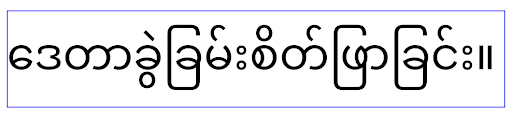 Comportamiento de
 elegantTextHeight para las apps que se segmentan para Android
16 (nivel de API 36) o para las apps que se segmentan para Android 15 (nivel de API 35) que no
anularon el valor predeterminado estableciendo el atributo elegantTextHeight
en false.Funcionalidad principal
Android 16 (nivel de API 36) incluye los siguientes cambios que modifican o expanden varias funciones principales del sistema Android.
Optimización de la programación de trabajo con tarifa fija
Antes de orientarse a Android 16, cuando scheduleAtFixedRate omitía la ejecución de una tarea debido a que estaba fuera de un ciclo de vida del proceso válido, todas las ejecuciones omitidas se ejecutaban de inmediato cuando la app regresaba a un ciclo de vida válido.
Cuando se orienta a Android 16, se ejecuta de inmediato una ejecución perdida de scheduleAtFixedRate cuando la app vuelve a un ciclo de vida válido. Se espera que este cambio de comportamiento mejore el rendimiento de la app. Prueba este comportamiento en tu app para verificar si se ve afectada.
También puedes realizar pruebas con el marco de compatibilidad de apps y habilitar la marca de compatibilidad STPE_SKIP_MULTIPLE_MISSED_PERIODIC_TASKS.
Factores de forma de los dispositivos
Android 16 (nivel de API 36) incluye los siguientes cambios para las apps cuando se muestran en dispositivos con pantallas grandes.
Diseños adaptables
Dado que las apps para Android ahora se ejecutan en una variedad de dispositivos (como teléfonos, tablets, dispositivos plegables, computadoras de escritorio, automóviles y TVs) y modos de ventanas en pantallas grandes (como pantalla dividida y modo de ventanas de escritorio), los desarrolladores deben crear apps para Android que se adapten a cualquier tamaño de pantalla y ventana, independientemente de la orientación del dispositivo. Los paradigmas como restringir la orientación y la capacidad de cambiar el tamaño son demasiado restrictivos en el mundo multidispositivo actual.
Ignora las restricciones de orientación, cambio de tamaño y relación de aspecto
En el caso de las apps que se orientan a Android 16 (nivel de API 36), las restricciones de orientación, cambio de tamaño y relación de aspecto ya no se aplican en las pantallas con un ancho mínimo de 600 dp o más. Las apps ocupan toda la ventana de visualización, independientemente de la relación de aspecto o la orientación preferida del usuario, y no se usa el formato pillarbox.
Este cambio introduce un nuevo comportamiento estándar de la plataforma. Android está adoptando un modelo en el que se espera que las apps se adapten a varias orientaciones, tamaños de pantalla y relaciones de aspecto. Las restricciones, como la orientación fija o la capacidad de cambio de tamaño limitada, dificultan la adaptabilidad de la app. Haz que tu app sea adaptable para brindar la mejor experiencia del usuario posible.
También puedes probar este comportamiento con el
framework de compatibilidad de apps y habilitando la
marca de compatibilidad UNIVERSAL_RESIZABLE_BY_DEFAULT.
Cambios rotundos comunes
Ignorar las restricciones de orientación, cambio de tamaño y relación de aspecto podría afectar la IU de tu app en algunos dispositivos, en especial los elementos que se diseñaron para diseños pequeños bloqueados en orientación vertical, por ejemplo, problemas como diseños estirados, y animaciones y componentes fuera de la pantalla. Cualquier suposición sobre la relación de aspecto o la orientación puede causar problemas visuales en tu app. Obtén más información para evitarlos y mejorar el comportamiento adaptable de tu app.
Permitir la rotación del dispositivo genera más recreación de actividades, lo que puede provocar la pérdida del estado del usuario si no se conserva correctamente. Obtén más información para guardar correctamente el estado de la IU en Cómo guardar estados de la IU.
Detalles de la implementación
Los siguientes atributos de manifiesto y APIs de tiempo de ejecución se ignoran en los dispositivos con pantalla grande en los modos de pantalla completa y multiventana:
screenOrientationresizableActivityminAspectRatiomaxAspectRatiosetRequestedOrientation()getRequestedOrientation()
Se ignoran los siguientes valores para screenOrientation, setRequestedOrientation() y
getRequestedOrientation():
portraitreversePortraitsensorPortraituserPortraitlandscapereverseLandscapesensorLandscapeuserLandscape
En cuanto a la capacidad de cambio de tamaño de la pantalla, android:resizeableActivity="false", android:minAspectRatio y android:maxAspectRatio no tienen ningún efecto.
En el caso de las apps que se orientan a Android 16 (nivel de API 36), las restricciones de orientación, cambio de tamaño y relación de aspecto de la app se ignoran en las pantallas grandes de forma predeterminada. Todas las apps que no estén completamente listas pueden anular temporalmente este comportamiento inhabilitándolo, lo que hace que se vuelva al comportamiento anterior de colocarse en el modo de compatibilidad.
Excepciones
Las restricciones de orientación, cambio de tamaño y relación de aspecto de Android 16 no se aplican en las siguientes situaciones:
- Juegos (según la marca
android:appCategory) - Usuarios que habilitan de forma explícita el comportamiento predeterminado de la app en la configuración de la relación de aspecto del dispositivo
- Pantallas de menos de
sw600dp
Inhabilitar temporalmente
Para inhabilitar una actividad específica, declara la propiedad de manifiesto PROPERTY_COMPAT_ALLOW_RESTRICTED_RESIZABILITY:
<activity ...>
  <property android:name="android.window.PROPERTY_COMPAT_ALLOW_RESTRICTED_RESIZABILITY" android:value="true" />
  ...
</activity>
Si demasiadas partes de tu app no están listas para Android 16, puedes inhabilitar la función por completo aplicando la misma propiedad a nivel de la aplicación:
<application ...>
  <property android:name="android.window.PROPERTY_COMPAT_ALLOW_RESTRICTED_RESIZABILITY" android:value="true" />
</application>
Salud y fitness
Android 16 (nivel de API 36) incluye los siguientes cambios relacionados con los datos de salud y actividad física.
Permisos de salud y fitness
En el caso de las apps que se orientan a Android 16 (nivel de API 36) o versiones posteriores, los permisos de BODY_SENSORS usan permisos más detallados en android.permissions.health, que también usa Health Connect. A partir de Android 16, cualquier API que antes requería BODY_SENSORS o BODY_SENSORS_BACKGROUND requiere el permiso android.permissions.health correspondiente. Esto afecta los siguientes tipos de datos, APIs y tipos de servicios en primer plano:
HEART_RATE_BPMde los Servicios de salud en Wear OSSensor.TYPE_HEART_RATEdel Administrador de sensores de AndroidheartRateAccuracyyheartRateBpmdeProtoLayouten Wear OSFOREGROUND_SERVICE_TYPE_HEALTH, en el que se necesita el permisoandroid.permission.healthcorrespondiente en lugar deBODY_SENSORS
Si tu app usa estas APIs, debe solicitar los permisos detallados correspondientes:
- Para el monitoreo en uso de la frecuencia cardíaca, la SpO2 o la temperatura cutánea, solicita el permiso específico en
android.permissions.health, comoREAD_HEART_RATEen lugar deBODY_SENSORS. - Para acceder a los sensores en segundo plano, solicita
READ_HEALTH_DATA_IN_BACKGROUNDen lugar deBODY_SENSORS_BACKGROUND.
Estos permisos son los mismos que protegen el acceso para leer datos de Health Connect, el almacén de datos de Android para datos de salud, actividad física y bienestar.
Apps para dispositivos móviles
Las apps para dispositivos móviles que migren para usar READ_HEART_RATE y otros permisos específicos también deben declarar una actividad para mostrar la política de privacidad de la app. Este es el mismo requisito que Health Connect.
Conectividad
Android 16 (nivel de API 36) incluye los siguientes cambios en la pila de Bluetooth para mejorar la conectividad con los dispositivos periféricos.
Nuevos intents para controlar la pérdida de vinculación y los cambios de encriptación
Como parte de la manejo mejorado de la pérdida de vínculo, Android 16 también presenta 2 intents nuevos para proporcionar a las apps una mayor conciencia de la pérdida de vínculo y los cambios de encriptación.
Las apps orientadas a Android 16 ahora pueden hacer lo siguiente:
- Recibir un intent
ACTION_KEY_MISSINGcuando se detecta la pérdida de la vinculación remota, lo que les permite proporcionar comentarios más informativos a los usuarios y tomar las medidas adecuadas - Recibir un intent
ACTION_ENCRYPTION_CHANGEcada vez que cambie el estado de encriptación del vínculo Esto incluye el cambio de estado de encriptación, el cambio de algoritmo de encriptación y el cambio de tamaño de la clave de encriptación. Las apps deben considerar que la vinculación se restableció si el vínculo se encripta correctamente cuando se recibe el intentACTION_ENCRYPTION_CHANGEmás adelante.
Adaptación a diferentes implementaciones de OEM
Si bien Android 16 presenta estos intents nuevos, su implementación y transmisión pueden variar según los diferentes fabricantes de dispositivos (OEM). Para garantizar que tu app proporcione una experiencia coherente y confiable en todos los dispositivos, los desarrolladores deben diseñar su control de pérdida de vínculo para que se adapte de forma fluida a estas posibles variaciones.
Recomendamos los siguientes comportamientos de las apps:
Si se transmite el intent
ACTION_KEY_MISSING, sucede lo siguiente:El sistema desconectará el vínculo de ACL (conexión asíncrona sin conexión), pero se conservará la información de vinculación del dispositivo (como se describe aquí).
Tu app debe usar este intent como el indicador principal para la detección de pérdida de vinculación y guiar al usuario para que confirme que el dispositivo remoto está dentro del alcance antes de iniciar el olvido del dispositivo o la vinculación nuevamente.
Si un dispositivo se desconecta después de recibir
ACTION_KEY_MISSING, tu app debe tener cuidado al volver a conectarse, ya que es posible que el dispositivo ya no esté vinculado con el sistema.Si NO se transmite el intent
ACTION_KEY_MISSING, haz lo siguiente:El vínculo de ACL permanecerá conectado, y el sistema quitará la información de vinculación del dispositivo, al igual que en Android 15.
En esta situación, tu app debe continuar con sus mecanismos existentes de control de pérdida de vinculación, como en versiones anteriores de Android, para detectar y administrar eventos de pérdida de vinculación.
Nueva forma de quitar la vinculación de Bluetooth
Todas las apps que se orientan a Android 16 ahora pueden desvincular dispositivos Bluetooth con una API pública en CompanionDeviceManager. Si un dispositivo complementario se administra como una asociación de CDM, la app puede activar la eliminación de la vinculación Bluetooth con la nueva API de removeBond(int) en el dispositivo asociado. La app puede supervisar los cambios de estado de vinculación escuchando el evento de transmisión del dispositivo Bluetooth ACTION_BOND_STATE_CHANGED.
Seguridad
Android 16 (nivel de API 36) incluye los siguientes cambios de seguridad.
Bloqueo de la versión de MediaStore
En el caso de las apps orientadas a Android 16 o versiones posteriores, MediaStore#getVersion() ahora será único para cada app. Esto elimina las propiedades de identificación de la cadena de versión para evitar el abuso y el uso de técnicas de creación de huellas digitales. Las apps no deben hacer suposiciones sobre el formato de esta versión. Las apps ya deberían controlar los cambios de versión cuando usan esta API y, en la mayoría de los casos, no deberían necesitar cambiar su comportamiento actual, a menos que el desarrollador haya intentado inferir información adicional que esté más allá del alcance previsto de esta API.
Intents más seguros
La función Safer Intents es una iniciativa de seguridad de varias fases diseñada para mejorar la seguridad del mecanismo de resolución de intents de Android. El objetivo es proteger las apps de acciones maliciosas agregando verificaciones durante el procesamiento de intents y filtrando los intents que no cumplen con criterios específicos.
En Android 15, la función se enfocaba en la app que enviaba el intent. Ahora, con Android 16, el control se traslada a la app que lo recibe, lo que permite que los desarrolladores habiliten la resolución estricta de intents con el manifiesto de la app.
Se implementarán dos cambios clave:
Los intents explícitos deben coincidir con el filtro de intents del componente de destino: Si un intent se orienta explícitamente a un componente, debe coincidir con el filtro de intents de ese componente.
Los intents sin una acción no pueden coincidir con ningún filtro de intents: Los intents que no tienen una acción especificada no se deben resolver en ningún filtro de intents.
Estos cambios solo se aplican cuando hay varias apps involucradas y no afectan el control de intents dentro de una sola app.
Impacto
La naturaleza de aceptación significa que los desarrolladores deben habilitarla de forma explícita en el manifiesto de la app para que se aplique. Por lo tanto, el impacto de la función se limitará a las apps cuyos desarrolladores cumplan con los siguientes requisitos:
- Conocer la función Safer Intents y sus beneficios
- Elegir activamente incorporar prácticas más estrictas de manejo de intents en sus apps
Este enfoque de habilitación minimiza el riesgo de que se dañen las apps existentes que pueden depender del comportamiento actual de resolución de intents menos seguro.
Si bien el impacto inicial en Android 16 puede ser limitado, la iniciativa de intents más seguros tiene una hoja de ruta para un impacto más amplio en futuras versiones de Android. El plan es que, con el tiempo, la resolución estricta de intents sea el comportamiento predeterminado.
La función Safer Intents tiene el potencial de mejorar significativamente la seguridad del ecosistema Android, ya que dificulta que las apps maliciosas aprovechen las vulnerabilidades del mecanismo de resolución de intents.
Sin embargo, la transición a la inhabilitación y la aplicación obligatoria de políticas se deben administrar con cuidado para abordar los posibles problemas de compatibilidad con las apps existentes.
Implementación
Los desarrolladores deben habilitar de forma explícita una coincidencia de intents más estricta con el atributo intentMatchingFlags en el manifiesto de la app.
Este es un ejemplo en el que la función está habilitada para toda la app, pero inhabilitada o inhabilitada en un receptor:
<application android:intentMatchingFlags="enforceIntentFilter">
    <receiver android:name=".MyBroadcastReceiver" android:exported="true" android:intentMatchingFlags="none">
        <intent-filter>
            <action android:name="com.example.MY_CUSTOM_ACTION" />
        </intent-filter>
        <intent-filter>
            <action android:name="com.example.MY_ANOTHER_CUSTOM_ACTION" />
        </intent-filter>
    </receiver>
</application>
Más información sobre las marcas compatibles:
| Nombre de la marca | Descripción |
|---|---|
| enforceIntentFilter | Aplica una coincidencia más estricta para los intents entrantes |
| ninguno | Inhabilita todas las reglas de coincidencia especiales para los intents entrantes. Cuando se especifican varias marcas, los valores en conflicto se resuelven dando prioridad a la marca "none" |
| allowNullAction | Flexibiliza las reglas de coincidencia para permitir que los intents sin una acción coincidan. Esta marca se debe usar junto con "enforceIntentFilter" para lograr un comportamiento específico. |
Pruebas y depuración
Cuando la aplicación de medidas por incumplimiento esté activa, las apps deberían funcionar correctamente si el emisor del intent lo completó de forma adecuada.
Sin embargo, los intents bloqueados activarán mensajes de registro de advertencia, como
"Intent does not match component's intent filter:" y "Access blocked:",
con la etiqueta "PackageManager.".
Esto indica un posible problema que podría afectar la app y requiere
atención.
Filtro de Logcat:
tag=:PackageManager & (message:"Intent does not match component's intent filter:" | message: "Access blocked:")
Filtrado de llamadas al sistema de GPU
Para endurecer la superficie de la GPU Mali, se bloquearon en las compilaciones de producción los IOCTL de la GPU Mali que quedaron obsoletos o que se diseñaron solo para el desarrollo de GPU. Además, los IOCTL que se usan para la generación de perfiles de GPU se restringieron al proceso de shell o a las aplicaciones depurables. Consulta la actualización de SAC para obtener más detalles sobre la política a nivel de la plataforma.
Este cambio se aplica a los dispositivos Pixel que usan la GPU Mali (Pixel 6 a 9). Arm
proporcionó una categorización oficial de sus IOCTL en
Documentation/ioctl-categories.rst de su versión r54p2. Esta
lista se seguirá manteniendo en las versiones futuras del controlador.
Este cambio no afecta a las APIs de gráficos compatibles (incluidas Vulkan y OpenGL) ni se espera que afecte a los desarrolladores o las aplicaciones existentes. Las herramientas de generación de perfiles de GPU, como Streamline Performance Analyzer y Android GPU Inspector, no se verán afectadas.
Pruebas
Si ves un rechazo de SELinux similar al siguiente, es probable que tu aplicación se haya visto afectada por este cambio:
06-30 10:47:18.617 20360 20360 W roidJUnitRunner: type=1400 audit(0.0:85): avc:  denied  { ioctl }
for  path="/dev/mali0" dev="tmpfs" ino=1188 ioctlcmd=0x8023
scontext=u:r:untrusted_app_25:s0:c512,c768 tcontext=u:object_r:gpu_device:s0 tclass=chr_file
permissive=0 app=com.google.android.selinux.pts
Si tu aplicación necesita usar IOCTL bloqueados, informa un error y asígnalo a android-partner-security@google.com.
Preguntas frecuentes
¿Este cambio de política se aplica a todos los OEM? Este cambio será opcional, pero estará disponible para cualquier OEM que quiera usar este método de endurecimiento. Puedes encontrar las instrucciones para implementar el cambio en la documentación de implementación.
¿Es obligatorio realizar cambios en la base de código del OEM para implementar esto o viene con una nueva versión del AOSP de forma predeterminada? El cambio a nivel de la plataforma vendrá con una nueva versión de AOSP de forma predeterminada. Los proveedores pueden habilitar este cambio en su base de código si desean aplicarlo.
¿Los SoC son responsables de mantener actualizada la lista de IOCTL? Por ejemplo, si mi dispositivo usa una GPU ARM Mali, ¿debería comunicarme con ARM para realizar alguno de los cambios? Los SoC individuales deben actualizar sus listas de IOCTL por dispositivo cuando se lance el controlador. Por ejemplo, ARM actualizará su lista de IOCTL publicada cuando se actualicen los controladores. Sin embargo, los OEM deben asegurarse de incorporar las actualizaciones en su SEPolicy y agregar los IOCTL personalizados seleccionados a las listas según sea necesario.
¿Este cambio se aplica automáticamente a todos los dispositivos Pixel disponibles en el mercado o se requiere que el usuario realice alguna acción para activarlo? Este cambio se aplica a todos los dispositivos Pixel disponibles en el mercado que usan la GPU Mali (Pixel 6 a 9). No se requiere ninguna acción del usuario para aplicar este cambio.
¿El uso de esta política afectará el rendimiento del controlador del kernel? Esta política se probó en la GPU Mali con GFXBench y no se observó ningún cambio medible en el rendimiento de la GPU.
¿Es necesario que la lista de IOCTL se alinee con las versiones actuales del espacio de usuario y del controlador del kernel? Sí, la lista de IOCTL permitidas debe sincronizarse con las IOCTL compatibles con los controladores del espacio de usuario y del kernel. Si se actualizan los IOCTL en el espacio del usuario o el controlador del kernel, se debe actualizar la lista de IOCTL de SEPolicy para que coincida.
ARM categorizó los IOCTL como "restringidos" o "instrumentación", pero queremos usar algunos de ellos en casos de uso de producción o denegar otros. Los OEM o SoC individuales son responsables de decidir cómo categorizar los IOCTL que usan, según la configuración de sus bibliotecas de Mali de espacio de usuario. La lista de ARM se puede usar para ayudar a decidir sobre estos, pero el caso de uso de cada OEM o SoC puede ser diferente.
Privacidad
Android 16 (nivel de API 36) incluye los siguientes cambios de privacidad.
Permiso de Red Local
Cualquier app que tenga el permiso INTERNET puede acceder a los dispositivos de la LAN.
Esto facilita que las apps se conecten a dispositivos locales, pero también tiene implicaciones de privacidad, como formar una huella digital del usuario y ser un proxy de ubicación.
El proyecto de protecciones de red local tiene como objetivo proteger la privacidad del usuario restringiendo el acceso a la red local detrás de un nuevo permiso de tiempo de ejecución.
Plan de lanzamiento
Este cambio se implementará entre dos versiones, 25Q2 y 26Q2, respectivamente. Es fundamental que los desarrolladores sigan esta guía para 25Q2 y compartan comentarios, ya que estas protecciones se aplicarán en una versión posterior de Android. Además, deberán actualizar las situaciones que dependen del acceso implícito a la red local con la siguiente guía y prepararse para el rechazo y la revocación del nuevo permiso por parte del usuario.
Impacto
En la etapa actual, la LNP es una función opcional, lo que significa que solo se verán afectadas las apps que la habiliten. El objetivo de la fase de habilitación es que los desarrolladores de apps comprendan qué partes de su app dependen del acceso implícito a la red local, de modo que puedan prepararse para protegerlas con permisos en la próxima versión.
Las apps se verán afectadas si acceden a la red local del usuario con lo siguiente:
- Uso directo o de biblioteca de sockets sin procesar en direcciones de red locales (p.ej., protocolo de descubrimiento de servicios mDNS o SSDP)
- Uso de clases de nivel de framework que acceden a la red local (p.ej., NsdManager)
El tráfico hacia y desde una dirección de red local requiere permiso de acceso a la red local. En la siguiente tabla, se muestran algunos casos comunes:
| Operación de red de bajo nivel de la app | Se requiere permiso de red local |
|---|---|
| Establece una conexión TCP saliente | sí |
| Acepta conexiones TCP entrantes | sí |
| Envía una transmisión de unidifusión, multidifusión o difusión de UDP | sí |
| Recibir una transmisión unicast, multicast o de emisión UDP entrante | sí |
Estas restricciones se implementan en lo profundo de la pila de red y, por lo tanto, se aplican a todas las APIs de red. Esto incluye los sockets creados en código nativo o administrado, las bibliotecas de herramientas de redes, como Cronet y OkHttp, y las APIs implementadas sobre ellas. Intentar resolver servicios en la red local (es decir, aquellos con un sufijo .local) requerirá permiso de red local.
Excepciones a las reglas anteriores:
- Si el servidor DNS de un dispositivo está en una red local, el tráfico hacia o desde él (en el puerto 53) no requiere permiso de acceso a la red local.
- Las aplicaciones que usen el Selector de salida como su selector integrado en la app no necesitarán permisos de red local (se proporcionarán más instrucciones en el cuarto trimestre de 2025).
Orientación para desarrolladores (aceptación)
Para habilitar las restricciones de red local, haz lo siguiente:
- Escribe en la memoria flash del dispositivo una compilación con la versión beta 3 de 25Q2 o una posterior.
- Instala la app que se probará.
Activa o desactiva la marca de Appcompat en adb:
adb shell am compat enable RESTRICT_LOCAL_NETWORK <package_name>Reinicia el dispositivo
Ahora, el acceso de tu app a la red local está restringido, y cualquier intento de acceder a la red local generará errores de socket. Si usas APIs que realizan operaciones de red local fuera del proceso de tu app (p. ej., NsdManager), no se verán afectadas durante la fase de habilitación.
Para restablecer el acceso, debes otorgarle a la app permiso para NEARBY_WIFI_DEVICES.
- Asegúrate de que la app declare el permiso
NEARBY_WIFI_DEVICESen su manifiesto. - Ve a Configuración > Apps > [nombre de la app] > Permisos > Dispositivos cercanos > Permitir.
Ahora, se debería restablecer el acceso de tu app a la red local, y todas tus situaciones deberían funcionar como antes de habilitar la app.
Una vez que comience la aplicación de la protección de la red local, el tráfico de red de la app se verá afectado de la siguiente manera.
| Permiso | Solicitud de LAN saliente | Solicitud de Internet entrante o saliente | Solicitud de LAN entrante |
|---|---|---|---|
| Concedido | Works | Works | Works |
| No otorgado | Errores | Works | Errores |
Usa el siguiente comando para desactivar la marca de compatibilidad de la app:
adb shell am compat disable RESTRICT_LOCAL_NETWORK <package_name>
Errores
Los errores que surjan de estas restricciones se devolverán al socket de llamada cada vez que invoque send o una variante de send a una dirección de red local.
Errores de ejemplo:
sendto failed: EPERM (Operation not permitted)

sendto failed: ECONNABORTED (Operation not permitted)
Definición de red local
Una red local en este proyecto se refiere a una red IP que utiliza una interfaz de red con capacidad de transmisión, como Wi-Fi o Ethernet, pero excluye las conexiones móviles (WWAN) o de VPN.
Las siguientes se consideran redes locales:
IPv4:
- 169.254.0.0/16 // Link Local
- 100.64.0.0/10 // CGNAT
- 10.0.0.0/8 // RFC1918
- 172.16.0.0/12 // RFC1918
- 192.168.0.0/16 // RFC1918
IPv6:
- Vínculo local
- Rutas conectadas directamente
- Redes de stub como Thread
- Varias subredes (por definir)
Además, tanto las direcciones de multidifusión (224.0.0.0/4, ff00::/8) como la dirección de broadcast IPv4 (255.255.255.255) se clasifican como direcciones de red local.
Fotos que pertenecen a la app
Cuando una app orientada al SDK 36 o versiones posteriores en dispositivos con Android 16 o versiones posteriores solicite permisos de fotos y videos, los usuarios que elijan limitar el acceso al contenido multimedia seleccionado verán las fotos que pertenecen a la app preseleccionadas en el selector de fotos. Los usuarios pueden anular la selección de cualquiera de estos elementos preseleccionados, lo que revocará el acceso de la app a esas fotos y videos.