

和先前版本一樣,Android 16 也包含可能會影響應用程式的行為變更。以下行為變更僅適用於指定 Android 16 以上版本的應用程式。如果您的應用程式指定 Android 16 以上版本,建議您視情況修改應用程式,以支援這些行為。
此外,無論應用程式的 targetSdkVersion 為何,請務必查看對所有 Android 16 應用程式有影響的行為變更清單。
使用者體驗和系統 UI
Android 16 (API 級別 36) 包含下列異動,目的是打造更一致、直觀的使用者體驗。
無邊框停用選項即將移除
Android 15 對指定 Android 15 (API 級別 35) 的應用程式強制執行無邊框設計,但您可以將 R.attr#windowOptOutEdgeToEdgeEnforcement 設為 true,選擇不採用這項設計。如果應用程式指定 Android 16 (API 級別 36) 為目標,系統會淘汰並停用 R.attr#windowOptOutEdgeToEdgeEnforcement,且應用程式無法選擇不採用無邊框設計。
- 如果您的應用程式指定 Android 16 (API 級別 36) 版本為目標,且在 Android 15 裝置上執行,
R.attr#windowOptOutEdgeToEdgeEnforcement仍可正常運作。 - 如果應用程式指定 Android 16 (API 級別 36),且在 Android 16 裝置上執行,系統會停用
R.attr#windowOptOutEdgeToEdgeEnforcement。
如要在 Android 16 中進行測試,請確保應用程式支援無邊框設計,並移除所有 R.attr#windowOptOutEdgeToEdgeEnforcement 的使用情形,讓應用程式也能在 Android 15 裝置上支援無邊框設計。如要支援無邊框設計,請參閱 Compose 和 Views 指南。
必須遷移或停用預測返回手勢
如果應用程式指定 Android 16 (API 級別 36) 以上版本,且在搭載 Android 16 以上版本的裝置上執行,系統會預設啟用預測返回系統動畫 (返回首頁、跨工作和跨活動)。此外,系統不會再呼叫 onBackPressed,也不會再分派 KeyEvent.KEYCODE_BACK。
如果應用程式會攔截返回事件,但您尚未遷移至預測返回手勢,請更新應用程式以使用支援的返回瀏覽 API,或在應用程式 AndroidManifest.xml 檔案的 <application> 或 <activity> 標記中,將 android:enableOnBackInvokedCallback 屬性設為 false,暫時停用這項功能。
已淘汰並停用優雅字型 API
Apps targeting Android 15 (API level 35) have the
elegantTextHeight
TextView attribute set to true by
default, replacing the compact font with one that is much more readable. You
could override this by setting the elegantTextHeight attribute to false.
Android 16 deprecates the
elegantTextHeight attribute,
and the attribute will be ignored once your app targets Android 16. The "UI
fonts" controlled by these APIs are being discontinued, so you should adapt any
layouts to ensure consistent and future proof text rendering in Arabic, Lao,
Myanmar, Tamil, Gujarati, Kannada, Malayalam, Odia, Telugu or Thai.

elegantTextHeight behavior for apps targeting Android
14 (API level 34) and lower, or for apps targeting Android 15 (API level 35)
that overrode the default by setting the elegantTextHeight
attribute to false.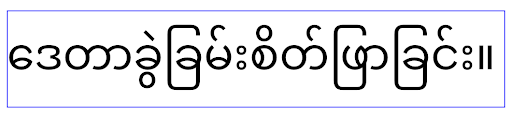
elegantTextHeight behavior for apps targeting Android
16 (API level 36), or for apps targeting Android 15 (API level 35) that didn't
override the default by setting the elegantTextHeight attribute
to false.核心功能
Android 16 (API 級別 36) 包含下列異動項目,這類變更會修改或擴充 Android 系統的各種核心功能。
固定費率工作排程最佳化
Prior to targeting Android 16, when scheduleAtFixedRate
missed a task execution due to being outside a valid
process lifecycle, all missed executions immediately
execute when the app returns to a valid lifecycle.
When targeting Android 16, at most one missed execution of
scheduleAtFixedRate is immediately executed when the app
returns to a valid lifecycle. This behavior change is expected to improve app
performance. Test this behavior in your app to check if your app is impacted.
You can also test by using the app compatibility framework
and enabling the STPE_SKIP_MULTIPLE_MISSED_PERIODIC_TASKS compat flag.
裝置板型規格
在大型螢幕裝置上顯示時,Android 16 (API 級別 36) 會對應用程式進行下列變更。
自動調整式版面配置
Android 應用程式現在可在各種裝置上執行 (例如手機、平板電腦、折疊式裝置、桌機、車輛和電視),並支援大螢幕上的視窗模式 (例如分割畫面和電腦視窗),因此開發人員應建構可配合任何螢幕和視窗大小調整的 Android 應用程式,無論裝置螢幕方向為何。在現今多裝置的世界中,限制螢幕方向和大小調整等範例過於嚴苛。
忽略螢幕方向、是否可調整大小和顯示比例限制
如果應用程式指定 Android 16 (API 級別 36),螢幕方向、大小調整和螢幕比例限制將不再適用於最小寬度 >= 600 dp 的螢幕。無論顯示比例或使用者偏好的螢幕方向為何,應用程式都會填滿整個顯示視窗,且不會出現左右黑邊。
這項異動會導入新的標準平台行為。Android 正在朝向某種模式發展,預期應用程式會根據各種螢幕方向、顯示大小和顯示比例自動調整。如果應用程式設有固定螢幕方向或大小調整限制,就無法適應各種裝置。讓應用程式具備適應性,提供最佳使用者體驗。
您也可以使用應用程式相容性架構,並啟用 UNIVERSAL_RESIZABLE_BY_DEFAULT 相容性標記,測試這項行為。
常見的破壞性變更
忽略螢幕方向、大小調整和顯示比例限制,可能會影響應用程式在某些裝置上的 UI,尤其是專為鎖定直向的小版面配置設計的元素,例如版面配置遭到延展,以及動畫和元件超出螢幕範圍等問題。如果對顯示比例或螢幕方向做出任何假設,都可能導致應用程式出現視覺問題。請參閱這篇文章,進一步瞭解如何避免這類問題,並改善應用程式的適應性行為。
允許裝置旋轉會導致更多活動重建,如果未妥善保留,可能會導致使用者狀態遺失。請參閱「儲存 UI 狀態」,瞭解如何正確儲存 UI 狀態。
實作詳細資料
在全螢幕和多視窗模式下,大型螢幕裝置會忽略下列資訊清單屬性和執行階段 API:
screenOrientationresizableActivityminAspectRatiomaxAspectRatiosetRequestedOrientation()getRequestedOrientation()
系統會忽略 screenOrientation、setRequestedOrientation() 和 getRequestedOrientation() 的下列值:
portraitreversePortraitsensorPortraituserPortraitlandscapereverseLandscapesensorLandscapeuserLandscape
就螢幕大小調整功能而言,android:resizeableActivity="false"、android:minAspectRatio 和 android:maxAspectRatio 不會產生任何影響。
如果應用程式指定 Android 16 (API 級別 36),系統預設會在大螢幕上忽略應用程式的螢幕方向、大小調整和長寬比限制。如果應用程式尚未完全準備就緒,可以暫時停用這項行為,改為採用先前的相容性模式。
例外狀況
在下列情況中,Android 16 的螢幕方向、大小調整和長寬比限制不適用:
- 遊戲 (根據
android:appCategory旗標) - 使用者在裝置的顯示比例設定中,明確選擇採用應用程式的預設行為
- 小於
sw600dp的螢幕
暫時退出
如要停用特定活動,請宣告 PROPERTY_COMPAT_ALLOW_RESTRICTED_RESIZABILITY 資訊清單屬性:
<activity ...>
  <property android:name="android.window.PROPERTY_COMPAT_ALLOW_RESTRICTED_RESIZABILITY" android:value="true" />
  ...
</activity>
如果應用程式有太多部分尚未支援 Android 16,您可以在應用程式層級套用相同屬性,完全停用這項功能:
<application ...>
  <property android:name="android.window.PROPERTY_COMPAT_ALLOW_RESTRICTED_RESIZABILITY" android:value="true" />
</application>
健康與健身
Android 16 (API 級別 36) 包含下列與健康和健身資料相關的變更。
健康與健身權限
For apps targeting Android 16 (API level 36) or higher,
BODY_SENSORS permissions use more granular permissions
under android.permissions.health, which Health Connect
also uses. As of Android 16, any API previously requiring BODY_SENSORS
or BODY_SENSORS_BACKGROUND requires the corresponding
android.permissions.health permission instead. This affects the following data
types, APIs, and foreground service types:
HEART_RATE_BPMfrom Health Services on Wear OSSensor.TYPE_HEART_RATEfrom Android Sensor ManagerheartRateAccuracyandheartRateBpmfromProtoLayouton Wear OSFOREGROUND_SERVICE_TYPE_HEALTHwhere the respectiveandroid.permission.healthpermission is needed in place ofBODY_SENSORS
If your app uses these APIs, it should request the respective granular permissions:
- For while-in-use monitoring of Heart Rate, SpO2, or Skin Temperature:
request the granular permission under
android.permissions.health, such asREAD_HEART_RATEinstead ofBODY_SENSORS. - For background sensor access: request
READ_HEALTH_DATA_IN_BACKGROUNDinstead ofBODY_SENSORS_BACKGROUND.
These permissions are the same as those that guard access to reading data from Health Connect, the Android datastore for health, fitness, and wellness data.
Mobile apps
Mobile apps migrating to use the READ_HEART_RATE and other granular
permissions must also declare an activity to display
the app's privacy policy. This is the same requirement as Health Connect.
連線能力
Android 16 (API 級別 36) 的藍牙堆疊包含下列變更,可提升與周邊裝置的連線能力。
處理連線中斷和加密異動的新意圖
除了改善連結遺失處理功能,Android 16 也推出了 2 個新的意圖,讓應用程式更能察覺連結遺失和加密變更。
鎖定 Android 16 的應用程式現在可以:
- 在偵測到遠端連結中斷時接收
ACTION_KEY_MISSING意圖,以便提供更有用的使用者意見回饋,並採取適當行動。 - 每當連結的加密狀態變更時,就會收到
ACTION_ENCRYPTION_CHANGE意圖。包括加密狀態變更、加密演算法變更和加密金鑰大小變更。如果應用程式稍後收到ACTION_ENCRYPTION_CHANGE意圖,且連結已成功加密,則必須考慮恢復連結。
因應不同原始設備製造商 (OEM) 實作
雖然 Android 16 推出了這些新意圖,但不同裝置製造商 (OEM) 的實作和廣播方式可能有所不同。為確保應用程式可在所有裝置上提供一致且可靠的體驗,開發人員應設計連結中斷處理機制,以便妥善因應這些潛在的變化。
我們建議您採用下列應用程式行為:
如果廣播
ACTION_KEY_MISSING意圖:系統會中斷 ACL (非同步無連結) 連結,但會保留裝置的連結資訊 (如這裡所述)。
應用程式應使用這個意圖做為偵測連結中斷的主要信號,並在啟動裝置忘記或重新配對功能前,引導使用者確認遠端裝置是否在範圍內。
如果裝置在收到
ACTION_KEY_MISSING後中斷連線,應用程式應謹慎重新連線,因為裝置可能已不再與系統綁定。如果
ACTION_KEY_MISSING意圖未廣播:ACL 連結會保持連線狀態,系統會移除裝置的連結資訊,這與 Android 15 的行為相同。
在這種情況下,應用程式應繼續使用與先前 Android 版本相同的現有連結失效處理機制,以偵測及管理連結失效事件。
移除藍牙配對的新方式
All apps targeting Android 16 are now able to unpair bluetooth devices using a
public API in CompanionDeviceManager. If a companion device is
being managed as a CDM association, then the app can trigger
bluetooth bond removal by using the new removeBond(int) API
on the associated device. The app can monitor the bond state changes by
listening to the bluetooth device broadcast event
ACTION_BOND_STATE_CHANGED.
安全性
Android 16 (API 級別 36) 包含下列安全性異動。
MediaStore 版本鎖定
針對指定 Android 16 以上版本的應用程式,MediaStore#getVersion() 現已成為每個應用程式的專屬值。這麼做可移除版本字串中的識別屬性,以免遭到濫用,並防止用於指紋辨識技術。應用程式不應對此版本的格式做出任何假設。應用程式在使用此 API 時應已處理版本變更,且在大多數情況下,不必變更目前的行為,除非開發人員嘗試推斷超出此 API 預期範圍的其他資訊。
更安全的意圖
The Safer Intents feature is a multi-phase security initiative designed to improve the security of Android's intent resolution mechanism. The goal is to protect apps from malicious actions by adding checks during intent processing and filtering intents that don't meet specific criteria.
In Android 15 the feature focused on the sending app. Now with Android 16, control shifts to the receiving app, allowing developers to opt-in to strict intent resolution using their app manifest.
Two key changes are being implemented:
Explicit Intents Must Match the Target Component's Intent Filter: If an intent explicitly targets a component, it should match that component's intent filter.
Intents Without an Action Cannot Match any Intent Filter: Intents that don't have an action specified shouldn't be resolved to any intent filter.
These changes only apply when multiple apps are involved and don't affect intent handling within a single app.
Impact
The opt-in nature means that developers must explicitly enable it in their app manifest for it to take effect. As a result, the feature's impact will be limited to apps whose developers:
- Are aware of the Safer Intents feature and its benefits.
- Actively choose to incorporate stricter intent handling practices into their apps.
This opt-in approach minimizes the risk of breaking existing apps that may rely on the current less-secure intent resolution behavior.
While the initial impact in Android 16 may be limited, the Safer Intents initiative has a roadmap for broader impact in future Android releases. The plan is to eventually make strict intent resolution the default behavior.
The Safer Intents feature has the potential to significantly enhance the security of the Android ecosystem by making it more difficult for malicious apps to exploit vulnerabilities in the intent resolution mechanism.
However, the transition to opt-out and mandatory enforcement must be carefully managed to address potential compatibility issues with existing apps.
Implementation
Developers need to explicitly enable stricter intent matching using the
intentMatchingFlags attribute in their app manifest.
Here is an example where the feature is opt-in for the entire app,
but disabled/opt-out on a receiver:
<application android:intentMatchingFlags="enforceIntentFilter">
    <receiver android:name=".MyBroadcastReceiver" android:exported="true" android:intentMatchingFlags="none">
        <intent-filter>
            <action android:name="com.example.MY_CUSTOM_ACTION" />
        </intent-filter>
        <intent-filter>
            <action android:name="com.example.MY_ANOTHER_CUSTOM_ACTION" />
        </intent-filter>
    </receiver>
</application>
More on the supported flags:
| Flag Name | Description |
|---|---|
| enforceIntentFilter | Enforces stricter matching for incoming intents |
| none | Disables all special matching rules for incoming intents. When specifying multiple flags, conflicting values are resolved by giving precedence to the "none" flag |
| allowNullAction | Relaxes the matching rules to allow intents without an action to match. This flag to be used in conjunction with "enforceIntentFilter" to achieve a specific behavior |
Testing and Debugging
When the enforcement is active, apps should function correctly if the intent
caller has properly populated the intent.
However, blocked intents will trigger warning log messages like
"Intent does not match component's intent filter:" and "Access blocked:"
with the tag "PackageManager."
This indicates a potential issue that could impact the app and requires
attention.
Logcat filter:
tag=:PackageManager & (message:"Intent does not match component's intent filter:" | message: "Access blocked:")
GPU 系統呼叫篩選
To harden the Mali GPU surface, Mali GPU IOCTLs that have been deprecated or are intended solely for GPU development have been blocked in production builds. Additionally, IOCTLs used for GPU profiling have been restricted to the shell process or debuggable applications. Refer to the SAC update for more details on the platform-level policy.
This change takes place on Pixel devices using the Mali GPU (Pixel 6-9). Arm
has provided official categorization of their IOCTLs in
Documentation/ioctl-categories.rst of their r54p2 release. This
list will continue to be maintained in future driver releases.
This change does not impact supported graphics APIs (including Vulkan and OpenGL), and is not expected to impact developers or existing applications. GPU profiling tools such as the Streamline Performance Analyzer and the Android GPU Inspector won't be affected.
Testing
If you see a SELinux denial similar to the following, it is likely your application has been impacted by this change:
06-30 10:47:18.617 20360 20360 W roidJUnitRunner: type=1400 audit(0.0:85): avc:  denied  { ioctl }
for  path="/dev/mali0" dev="tmpfs" ino=1188 ioctlcmd=0x8023
scontext=u:r:untrusted_app_25:s0:c512,c768 tcontext=u:object_r:gpu_device:s0 tclass=chr_file
permissive=0 app=com.google.android.selinux.pts
If your application needs to use blocked IOCTLs, please file a bug and assign it to android-partner-security@google.com.
FAQ
Does this policy change apply to all OEMs? This change will be opt-in, but available to any OEMs who would like to use this hardening method. Instructions for implementing the change can be found in the implementation documentation.
Is it mandatory to make changes in the OEM codebase to implement this, or does it come with a new AOSP release by default? The platform-level change will come with a new AOSP release by default. Vendors may opt-in to this change in their codebase if they would like to apply it.
Are SoCs responsible for keeping the IOCTL list up to date? For example, if my device uses an ARM Mali GPU, would I need to reach out to ARM for any of the changes? Individual SoCs must update their IOCTL lists per device upon driver release. For example, ARM will update their published IOCTL list upon driver updates. However, OEMs should make sure that they incorporate the updates in their SEPolicy, and add any selected custom IOCTLs to the lists as needed.
Does this change apply to all Pixel in-market devices automatically, or is a user action required to toggle something to apply this change? This change applies to all Pixel in-market devices using the Mali GPU (Pixel 6-9). No user action is required to apply this change.
Will use of this policy impact the performance of the kernel driver? This policy was tested on the Mali GPU using GFXBench, and no measurable change to GPU performance was observed.
Is it necessary for the IOCTL list to align with the current userspace and kernel driver versions? Yes, the list of allowed IOCTLs must be synchronized with the IOCTLs supported by both the userspace and kernel drivers. If the IOCTLs in the user space or kernel driver are updated, the SEPolicy IOCTL list must be updated to match.
ARM has categorized IOCTLs as 'restricted' / 'instrumentation', but we want to use some of them in production use-cases, and/or deny others. Individual OEMs/SoCs are responsible for deciding on how to categorize the IOCTLs they use, based on the configuration of their userspace Mali libraries. ARM's list can be used to help decide on these, but each OEM/SoC's use-case may be different.
隱私權
Android 16 (API 級別 36) 包含下列隱私權異動。
區域網路權限
只要應用程式具有 INTERNET 權限,就能存取區域網路上的裝置。
這項功能可讓應用程式輕鬆連線至本機裝置,但也會造成隱私權問題,例如形成使用者指紋,以及成為位置資訊的 Proxy。
「區域網路保護」專案的目標是透過新的執行階段權限,限制區域網路的存取權,進而保護使用者隱私權。
發布計畫
這項異動將在兩個版本之間部署,分別是 25Q2 和 26Q2。開發人員務必在 2025 年第 2 季遵循這項指引,並分享意見回饋,因為這些保護措施將在日後的 Android 版本中強制執行。此外,開發人員也必須按照下列指引更新依附於隱含本機網路存取的案例,並做好準備,因應使用者拒絕或撤銷新權限。
影響
目前 LNP 是選擇加入的功能,因此只有選擇加入的應用程式會受到影響。在選擇加入階段,應用程式開發人員的目標是瞭解應用程式的哪些部分依附於隱含的區域網路存取權,以便為下一個版本準備權限防護措施。
如果應用程式使用下列方式存取使用者的本機網路,就會受到影響:
- 直接或透過程式庫使用本機網路位址上的原始通訊端 (例如 mDNS 或 SSDP 服務探索通訊協定)
- 使用可存取本機網路的架構層級類別 (例如 NsdManager)
傳送至和傳送自區域網路位址的流量需要區域網路存取權。下表列出一些常見案例:
| 應用程式低層級網路作業 | 必須授予區域網路權限 |
|---|---|
| 建立外送 TCP 連線 | 是 |
| 接受傳入的 TCP 連線 | 是 |
| 傳送 UDP 單點傳播、多點傳播、廣播 | 是 |
| 接收傳入的 UDP 單點傳播、多點傳播、廣播 | 是 |
這些限制是在網路堆疊深處實作,因此適用於所有網路 API。包括以原生或受管理程式碼建立的通訊端、Cronet 和 OkHttp 等網路程式庫,以及在這些程式庫上實作的任何 API。如要解析區域網路上的服務 (即含有 .local 後置字元的服務),必須具備區域網路權限。
上述規則的例外狀況:
- 如果裝置的 DNS 伺服器位於區域網路上,則往返該伺服器的流量 (通訊埠 53) 不需要區域網路存取權。
- 如果應用程式使用 Output Switcher 做為應用程式內選取器,則不需要區域網路權限 (更多指引將於 2025 年第 4 季發布)。
開發人員指引 (選擇加入)
如要啟用區域網路限制,請按照下列步驟操作:
- 將裝置刷機為 25Q2 Beta 3 以上版本。
- 安裝要測試的應用程式。
在 adb 中切換 Appcompat 標記:
adb shell am compat enable RESTRICT_LOCAL_NETWORK <package_name>重新啟動裝置
現在應用程式的區域網路存取權受到限制,任何存取區域網路的嘗試都會導致通訊端錯誤。如果您使用的 API 會在應用程式程序外部執行本機網路作業 (例如 NsdManager),在選擇加入階段不會受到影響。
如要還原存取權,請授予應用程式 NEARBY_WIFI_DEVICES 權限。
- 確認應用程式在資訊清單中宣告
NEARBY_WIFI_DEVICES權限。 - 依序前往「設定」>「應用程式」>「[應用程式名稱]」>「權限」>「鄰近裝置」>「允許」。
現在應用程式應該已恢復區域網路存取權,所有情境也應能正常運作,與應用程式加入測試前相同。
區域網路保護措施開始強制執行後,應用程式網路流量會受到以下影響。
| 權限 | 傳出 LAN 要求 | 傳出/傳入網際網路要求 | 傳入 LAN 要求 |
|---|---|---|---|
| 已允許 | Works | Works | Works |
| 未授予 | 凸槌影片 | Works | 凸槌影片 |
使用下列指令切換關閉 App-Compat 旗標
adb shell am compat disable RESTRICT_LOCAL_NETWORK <package_name>
錯誤
每當呼叫端通訊端叫用 send 或 send 變數傳送至區域網路位址時,系統就會將因這些限制而產生的錯誤傳回該通訊端。
錯誤示例:
sendto failed: EPERM (Operation not permitted)

sendto failed: ECONNABORTED (Operation not permitted)
區域網路定義
本專案中的本機網路是指使用可廣播的網路介面 (例如 Wi-Fi 或乙太網路) 的 IP 網路,但不包括行動網路 (WWAN) 或 VPN 連線。
下列為本機網路:
IPv4:
- 169.254.0.0/16 // 連結本機
- 100.64.0.0/10 // CGNAT
- 10.0.0.0/8 // RFC1918
- 172.16.0.0/12 // RFC1918
- 192.168.0.0/16 // RFC1918
IPv6:
- 連結至本機
- 直接連線的路徑
- Thread 等存根網路
- 多個子網路 (待定)
此外,多點播送位址 (224.0.0.0/4、ff00::/8) 和 IPv4 廣播位址 (255.255.255.255) 都屬於本機網路位址。
應用程式擁有的相片
當指定 SDK 36 以上版本的應用程式在搭載 Android 16 以上版本的裝置上執行時,如果系統提示使用者授予相片和影片權限,選擇限制所選媒體存取權的使用者會在相片挑選器中看到應用程式預先選取的所有相片。使用者可以取消選取任何預先選取的項目,這樣一來,應用程式就無法存取這些相片和影片。