

Platform Android 15 menyertakan perubahan perilaku yang mungkin memengaruhi aplikasi Anda.
Perubahan perilaku berikut berlaku untuk semua aplikasi saat dijalankan di Android 15,
terlepas dari targetSdkVersion. Sebaiknya Anda menguji aplikasi, lalu memodifikasinya sesuai yang diperlukan untuk mendukung perubahan ini dengan tepat, jika memungkinkan.
Selain itu, pastikan Anda meninjau daftar perubahan perilaku yang hanya memengaruhi aplikasi yang menargetkan Android 15.
Fungsi inti
Android 15 mengubah atau memperluas berbagai kemampuan inti sistem Android.
Perubahan pada status paket yang dihentikan
The intention of the package FLAG_STOPPED state (which users
can engage in AOSP builds by long-pressing an app icon and selecting "Force
Stop") has always been to keep apps in this state until the user explicitly
removes the app from this state by directly launching the app or indirectly
interacting with the app (through the sharesheet or a widget, selecting the app
as live wallpaper, etc.). In Android 15, we've updated the behavior of the
system to be aligned with this intended behavior. Apps should only be removed
from the stopped state through direct or indirect user action.
To support the intended behavior, in addition to the existing restrictions, the
system also cancels all pending intents when the app enters the
stopped state on a device running Android 15. When the user's actions remove the
app from the stopped state, the ACTION_BOOT_COMPLETED
broadcast is delivered to the app providing an opportunity to re-register any
pending intents.
You can call the new
ApplicationStartInfo.wasForceStopped()
method to confirm whether the app was put into the stopped state.
Dukungan untuk ukuran halaman 16 KB
Sebelumnya, Android hanya mendukung ukuran halaman memori 4 KB, yang telah mengoptimalkan performa memori sistem untuk jumlah total memori rata-rata yang biasanya dimiliki perangkat Android. Mulai dari Android 15, AOSP mendukung perangkat yang dikonfigurasi untuk menggunakan ukuran halaman 16 KB (perangkat 16 KB). Jika aplikasi Anda menggunakan library NDK, baik secara langsung maupun tidak langsung melalui SDK, Anda harus membangun ulang aplikasi agar dapat berfungsi di perangkat 16 KB ini.
Seiring produsen perangkat terus membuat perangkat dengan jumlah memori fisik (RAM) yang lebih besar, banyak perangkat ini akan mengadopsi ukuran halaman 16 KB (dan pada akhirnya lebih besar) untuk mengoptimalkan performa perangkat. Menambahkan dukungan untuk perangkat dengan ukuran halaman 16 KB memungkinkan aplikasi Anda berjalan di perangkat ini dan membantu aplikasi Anda mendapatkan manfaat dari peningkatan performa terkait. Tanpa dikompilasi ulang, aplikasi tidak akan berfungsi di perangkat 16 KB dalam rilis Android mendatang.
Untuk membantu Anda menambahkan dukungan bagi aplikasi, kami telah memberikan panduan tentang cara memeriksa apakah aplikasi Anda terpengaruh, cara membangun ulang aplikasi (jika berlaku), dan cara menguji aplikasi Anda di lingkungan 16 KB menggunakan emulator (termasuk image sistem Android 15 untuk Android Emulator).
Benefits and performance gains
Perangkat yang dikonfigurasi dengan ukuran halaman 16 KB menggunakan memori yang sedikit lebih banyak secara rata-rata, tetapi juga mendapatkan berbagai peningkatan performa untuk sistem dan aplikasi:
- Waktu peluncuran aplikasi lebih rendah saat sistem berada dalam tekanan memori: rata-rata 3,16% lebih rendah, dengan peningkatan yang lebih signifikan (hingga 30%) untuk beberapa aplikasi yang kami uji
- Mengurangi penggunaan daya selama peluncuran aplikasi: Pengurangan rata-rata 4,56%
- Peluncuran kamera lebih cepat: rata-rata hot start 4,48% lebih cepat dan cold start 6,60% lebih cepat
- Waktu booting sistem yang lebih baik: rata-rata meningkat sebesar 8% (sekitar 950 milidetik)
Peningkatan ini didasarkan pada pengujian awal kami, dan hasil pada perangkat aktual kemungkinan akan berbeda. Kami akan memberikan analisis tambahan tentang potensi keuntungan untuk aplikasi saat kami melanjutkan pengujian.
Check if your app is impacted
Jika aplikasi Anda menggunakan kode native, Anda harus membangun ulang aplikasi dengan dukungan untuk perangkat 16 KB. Jika tidak yakin apakah aplikasi Anda menggunakan kode native atau tidak, Anda dapat menggunakan APK Analyzer untuk mengidentifikasi apakah ada kode native atau tidak, lalu memeriksa perataan segmen ELF untuk library bersama yang Anda temukan. Android Studio juga menyediakan fitur yang membantu Anda mendeteksi masalah perataan secara otomatis.
Jika aplikasi Anda hanya menggunakan kode yang ditulis dalam bahasa pemrograman Java atau di Kotlin, termasuk semua library atau SDK, berarti aplikasi Anda sudah mendukung perangkat 16 KB. Namun, sebaiknya Anda menguji aplikasi di lingkungan 16 KB untuk memverifikasi bahwa tidak ada regresi perilaku aplikasi yang tidak terduga.
Perubahan yang diperlukan untuk beberapa aplikasi agar mendukung ruang pribadi
Private space is a new feature in Android 15 that lets users create a separate space on their device where they can keep sensitive apps away from prying eyes, under an additional layer of authentication. Because apps in the private space have restricted visibility, some types of apps need to take additional steps to be able to see and interact with apps in a user's private space.
All apps
Because apps in the private space are kept in a separate user profile, similar to work profiles, apps shouldn't assume that any installed copies of their app that aren't in the main profile are in the work profile. If your app has logic related to work profile apps that make this assumption, you'll need to adjust this logic.
Medical apps
When a user locks the private space, all apps in the private space are stopped, and those apps can't perform foreground or background activities, including showing notifications. This behavior might critically impact the use and function of medical apps installed in the private space.
The private space setup experience warns users that the private space is not suitable for apps that need to perform critical foreground or background activities, such as showing notifications from medical apps. However, apps can't determine whether or not they're being used in the private space, so they can't show a warning to the user for this case.
For these reasons, if you develop a medical app, review how this feature might impact your app and take appropriate actions—such as informing your users not to install your app in the private space—to avoid disrupting critical app capabilities.
Launcher apps
If you develop a launcher app, you must do the following before apps in the private space will be visible:
- Your app must be assigned as the default launcher app for the device—that
is, possessing the
ROLE_HOMErole. - Your app must declare the
ACCESS_HIDDEN_PROFILESnormal permission in your app's manifest file.
Launcher apps that declare the ACCESS_HIDDEN_PROFILES permission must handle
the following private space use cases:
- Your app must have a separate launcher container for apps installed in the
private space. Use the
getLauncherUserInfo()method to determine which type of user profile is being handled. - The user must be able to hide and show the private space container.
- The user must be able to lock and unlock the private space container. Use
the
requestQuietModeEnabled()method to lock (by passingtrue) or unlock (by passingfalse) the private space. While locked, no apps in the private space container should be visible or discoverable through mechanisms such as search. Your app should register a receiver for the
ACTION_PROFILE_AVAILABLEandACTION_PROFILE_UNAVAILABLEbroadcasts and update the UI in your app when the locked or unlocked state of the private space container changes. Both of these broadcasts includeEXTRA_USER, which your app can use to refer to the private profile user.You can also use the
isQuietModeEnabled()method to check whether the private space profile is locked or not.
App store apps
The private space includes an "Install Apps" button that launches an implicit
intent to install apps into the user's private space. In order for your app to
receive this implicit intent, declare an <intent-filter>
in your app's manifest file with a <category> of
CATEGORY_APP_MARKET.
Font emoji berbasis PNG dihapus
The legacy, PNG-based emoji font file (NotoColorEmojiLegacy.ttf) has been
removed, leaving just the vector-based file. Beginning with Android 13 (API
level 33), the emoji font file used by the system emoji renderer changed from a
PNG-based file to a vector based file. The system retained
the legacy font file in Android 13 and 14 for compatibility reasons, so that
apps with their own font renderers could continue to use the legacy font file
until they were able to upgrade.
To check if your app is affected, search your app's code for references to the
NotoColorEmojiLegacy.ttf file.
You can choose to adapt your app in a number of ways:
- Use platform APIs for text rendering. You can render text to a bitmap-backed
Canvasand use that to get a raw image if necessary. - Add COLRv1 font support to your app. The FreeType open source library supports COLRv1 in version 2.13.0 and higher.
- As a last resort, you can bundle the legacy emoji font file
(
NotoColorEmoji.ttf) into your APK, although in that case your app will be missing the latest emoji updates. For more information, see the Noto Emoji GitHub project page.
Peningkatan versi SDK target minimum dari 23 menjadi 24
Android 15 dibuat berdasarkan
perubahan yang dibuat di Android 14 dan memperluasnya
keamanan lebih lanjut. Di Android 15, aplikasi dengan
targetSdkVersion yang lebih rendah dari 24 tidak dapat diinstal.
Mewajibkan aplikasi memenuhi API level modern membantu memastikan keamanan dan
privasi.
Malware sering kali menargetkan API level yang lebih rendah untuk mengabaikan keamanan dan privasi
yang telah diperkenalkan di versi
Android yang lebih tinggi. Misalnya,
beberapa aplikasi malware menggunakan targetSdkVersion dari 22 agar tidak dikenai
model izin runtime yang diperkenalkan pada tahun 2015 oleh Android 6.0 Marshmallow (API
level 23). Perubahan Android 15 ini mempersulit malware untuk menghindari keamanan
dan peningkatan privasi. Mencoba menginstal aplikasi yang menargetkan API yang lebih rendah
tingkat yang mengakibatkan kegagalan instalasi, dengan pesan seperti berikut
muncul di Logcat:
INSTALL_FAILED_DEPRECATED_SDK_VERSION: App package must target at least SDK version 24, but found 7
Pada perangkat yang diupgrade ke Android 15, aplikasi apa pun dengan targetSdkVersion lebih rendah
dari 24 unit organisasi yang
tetap terinstal.
Jika Anda perlu menguji aplikasi yang menargetkan API level lama, gunakan perintah ADB berikut:
adb install --bypass-low-target-sdk-block FILENAME.apk
Keamanan dan privasi
Android 15 memperkenalkan langkah-langkah andal untuk memerangi penipuan kode sandi sekali pakai (OTP) dan untuk melindungi konten sensitif pengguna, dengan berfokus pada hardening Layanan Pemroses Notifikasi dan perlindungan berbagi layar. Peningkatan utama meliputi menyamarkan OTP dari notifikasi yang dapat diakses oleh aplikasi yang tidak tepercaya, menyembunyikan notifikasi selama berbagi layar, dan mengamankan aktivitas aplikasi saat OTP diposting. Perubahan ini bertujuan untuk menjaga konten sensitif pengguna agar aman dari pelaku yang tidak sah.
Developer harus mengetahui hal berikut untuk memastikan aplikasi mereka kompatibel dengan perubahan di Android 15:
Penyamaran OTP
Android akan menghentikan aplikasi tidak tepercaya yang menerapkan
NotificationListenerService agar tidak membaca konten yang tidak disamarkan
dari notifikasi tempat OTP telah terdeteksi. Aplikasi tepercaya seperti
asosiasi pengelola perangkat pendamping dikecualikan dari batasan ini.
Perlindungan Berbagi Layar
- Konten notifikasi disembunyikan selama sesi berbagi layar untuk menjaga
privasi pengguna. Jika aplikasi menerapkan
setPublicVersion(), Android akan menampilkan versi publik notifikasi yang berfungsi sebagai notifikasi pengganti dalam konteks yang tidak aman. Jika tidak, konten notifikasi akan disamarkan tanpa konteks lebih lanjut. - Konten sensitif seperti input sandi disembunyikan dari penonton jarak jauh untuk mencegah pengungkapan informasi sensitif pengguna.
- Aktivitas dari aplikasi yang memposting notifikasi selama berbagi layar saat OTP telah terdeteksi akan disembunyikan. Konten aplikasi disembunyikan dari penampil jarak jauh saat diluncurkan.
- Selain identifikasi otomatis Android terhadap kolom sensitif, developer
dapat menandai bagian aplikasi mereka sebagai sensitif secara manual menggunakan
setContentSensitivity, yang disembunyikan dari penonton jarak jauh selama berbagi layar. - Developer dapat memilih untuk mengalihkan opsi Nonaktifkan perlindungan berbagi layar di bagian Opsi Developer agar dikecualikan dari perlindungan berbagi layar untuk tujuan demo atau pengujian. Perekam layar sistem default dikecualikan dari perubahan ini, karena rekaman tetap berada di perangkat.
Kamera dan media
Android 15 membuat perubahan berikut pada perilaku kamera dan media untuk semua aplikasi.
Pemutaran audio langsung dan offload membatalkan trek audio langsung atau offload yang sebelumnya dibuka saat batas resource tercapai
Sebelum Android 15, jika aplikasi meminta pemutaran audio langsung atau offload saat
aplikasi lain memutar audio dan batas resource tercapai, aplikasi
akan gagal membuka AudioTrack baru.
Mulai Android 15, saat aplikasi meminta pemutaran langsung atau
pemuatan dan batas
resource tercapai, sistem akan membatalkan objek
AudioTrack yang saat ini terbuka yang mencegah pemenuhan permintaan trek baru.
(Jalur audio langsung dan offload biasanya dibuka untuk pemutaran format audio terkompresi. Kasus penggunaan umum untuk memutar audio langsung mencakup streaming audio yang dienkode melalui HDMI ke TV. Jalur offload biasanya digunakan untuk memutar audio yang dikompresi di perangkat seluler dengan akselerasi DSP hardware.)
Pengalaman pengguna dan UI sistem
Android 15 menyertakan beberapa perubahan yang dimaksudkan untuk menciptakan pengalaman pengguna yang lebih konsisten dan intuitif.
Animasi kembali prediktif diaktifkan untuk aplikasi yang ikut serta
Mulai Android 15, opsi developer untuk animasi kembali prediktif telah dihapus. Animasi sistem seperti kembali ke layar utama, lintas tugas, dan lintas aktivitas kini muncul untuk aplikasi yang telah mengaktifkan gestur kembali prediktif secara keseluruhan atau di tingkat aktivitas. Jika aplikasi Anda terpengaruh, lakukan tindakan berikut:
- Pastikan aplikasi Anda telah dimigrasikan dengan benar untuk menggunakan gestur kembali prediktif.
- Pastikan transisi fragmen Anda berfungsi dengan navigasi kembali prediktif.
- Bermigrasi dari animasi dan transisi framework, lalu gunakan transisi animator dan androidx.
- Bermigrasi dari data sebelumnya yang tidak diketahui
FragmentManager. Gunakan data sebelumnya yang dikelola olehFragmentManageratau oleh komponen Navigasi.
Widget dinonaktifkan saat pengguna menghentikan aplikasi secara paksa
If a user force-stops an app on a device running Android 15, the system temporarily disables all the app's widgets. The widgets are grayed out, and the user cannot interact with them. This is because beginning with Android 15, the system cancels all an app's pending intents when the app is force-stopped.
The system re-enables those widgets the next time the user launches the app.
For more information, see Changes to package stopped state.
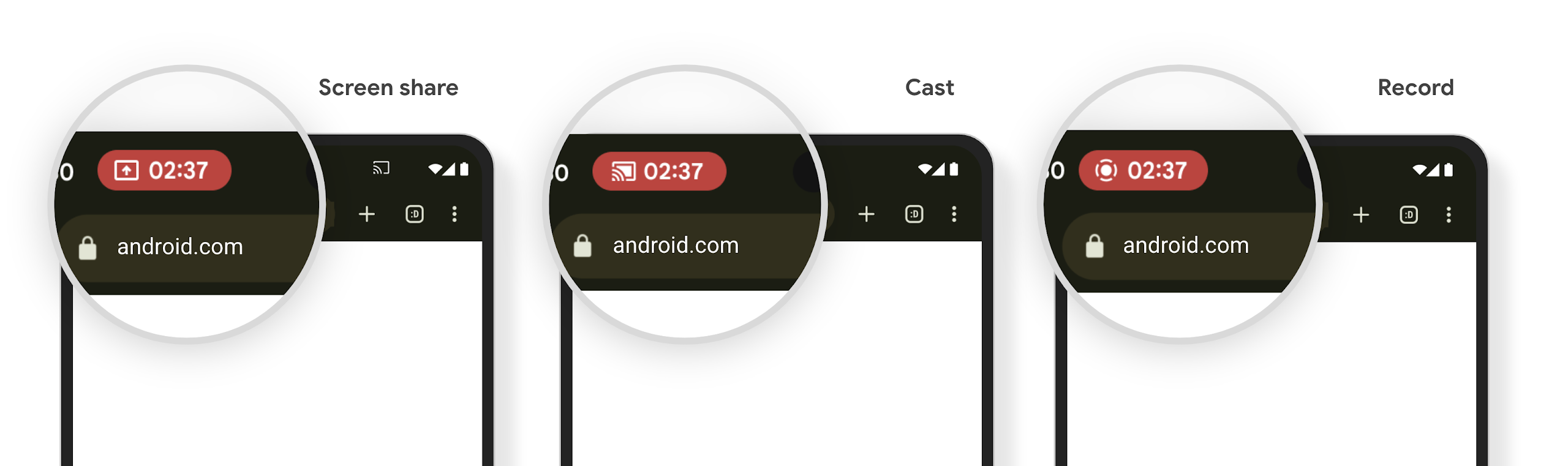
Chip status bar proyeksi media memberi tahu pengguna tentang berbagi layar, transmisi, dan perekaman
Screen projection exploits expose private user data such as financial information because users don't realize their device screen is being shared.
For apps running on devices with Android 15 QPR1 or higher, a status bar chip that is large and prominent alerts users to any in‑progress screen projection. Users can tap the chip to stop their screen from being shared, cast, or recorded. Also, screen projection automatically stops when the device screen is locked.
Check if your app is impacted
By default, your app includes the status bar chip and automatically suspends screen projection when the lock screen activates.
To learn more about how to test your app for these use cases, see Status bar chip and auto stop.
Pembatasan akses jaringan latar belakang
Di Android 15, aplikasi yang memulai permintaan jaringan di luar siklus proses yang valid akan menerima pengecualian. Biasanya, UnknownHostException atau IOException
terkait soket lainnya. Permintaan jaringan yang terjadi di luar siklus proses yang valid
biasanya karena aplikasi tidak sengaja melanjutkan permintaan jaringan bahkan setelah aplikasi
tidak lagi aktif.
Untuk mengurangi pengecualian ini, pastikan permintaan jaringan Anda berbasis siklus proses dan dibatalkan setelah keluar dari siklus proses yang valid dengan menggunakan komponen berbasis siklus proses. Jika permintaan jaringan harus terjadi meskipun pengguna keluar dari aplikasi, pertimbangkan untuk menjadwalkan permintaan jaringan menggunakan WorkManager atau melanjutkan tugas yang terlihat pengguna menggunakan Layanan Latar Depan.
Penghentian penggunaan
Dengan setiap rilis, API Android tertentu mungkin tidak digunakan lagi atau harus difaktorkan ulang untuk memberikan pengalaman developer yang lebih baik atau mendukung kemampuan platform baru. Dalam kasus ini, kami secara resmi menghentikan API yang tidak digunakan lagi dan mengarahkan developer ke API alternatif yang akan digunakan.
Penghentian berarti bahwa kami telah mengakhiri dukungan resmi untuk API, tetapi akan tetap tersedia bagi developer. Untuk mempelajari lebih lanjut penghentian penggunaan penting dalam rilis Android ini, lihat halaman penghentian penggunaan.