

পূর্ববর্তী রিলিজগুলোর মতোই, অ্যান্ড্রয়েড ১৫-এ এমন কিছু আচরণগত পরিবর্তন রয়েছে যা আপনার অ্যাপকে প্রভাবিত করতে পারে। নিম্নলিখিত আচরণগত পরিবর্তনগুলো শুধুমাত্র সেইসব অ্যাপের জন্য প্রযোজ্য যেগুলো অ্যান্ড্রয়েড ১৫ বা তার উচ্চতর সংস্করণকে টার্গেট করছে। যদি আপনার অ্যাপটি অ্যান্ড্রয়েড ১৫ বা তার উচ্চতর সংস্করণকে টার্গেট করে থাকে, তবে প্রযোজ্য ক্ষেত্রে এই আচরণগুলোকে সঠিকভাবে সমর্থন করার জন্য আপনার অ্যাপটি পরিবর্তন করা উচিত।
আপনার অ্যাপের targetSdkVersion নির্বিশেষে Android 15-এ চালিত সমস্ত অ্যাপকে প্রভাবিত করে এমন আচরণগত পরিবর্তনের তালিকাটিও পর্যালোচনা করতে ভুলবেন না।
মূল কার্যকারিতা
অ্যান্ড্রয়েড ১৫ অ্যান্ড্রয়েড সিস্টেমের বিভিন্ন মূল সক্ষমতাকে পরিবর্তন বা প্রসারিত করে।
ফোরগ্রাউন্ড পরিষেবাগুলিতে পরিবর্তন
We are making the following changes to foreground services with Android 15.
- Data sync foreground service timeout behavior
- New media processing foreground service type
- Restrictions on
BOOT_COMPLETEDbroadcast receivers launching foreground services - Restrictions on starting foreground services while an app holds the
SYSTEM_ALERT_WINDOWpermission
Data sync foreground service timeout behavior
Android 15 Android 15 (API স্তর 35) বা উচ্চতরকে লক্ষ্য করে এমন অ্যাপগুলির জন্য dataSync একটি নতুন টাইমআউট আচরণ প্রবর্তন করে৷ এই আচরণটি নতুন mediaProcessing ফোরগ্রাউন্ড পরিষেবা প্রকারের ক্ষেত্রেও প্রযোজ্য।
সিস্টেমটি একটি অ্যাপের dataSync পরিষেবাগুলিকে 24-ঘন্টা সময়ের মধ্যে মোট 6 ঘন্টা চালানোর অনুমতি দেয়, তারপরে সিস্টেমটি চলমান পরিষেবাটির Service.onTimeout(int, int) পদ্ধতিতে কল করে (Android 15 এ চালু করা হয়েছে)৷ এই সময়ে, পরিষেবাটিতে Service.stopSelf() কল করার জন্য কয়েক সেকেন্ড সময় আছে। যখন Service.onTimeout() কল করা হয়, তখন পরিষেবাটিকে আর অগ্রভাগের পরিষেবা হিসাবে বিবেচনা করা হয় না। যদি পরিষেবাটি Service.stopSelf() কল না করে, তবে সিস্টেমটি একটি অভ্যন্তরীণ ব্যতিক্রম নিক্ষেপ করে৷ ব্যতিক্রমটি নিম্নলিখিত বার্তার সাথে লগক্যাটে লগ ইন করা হয়েছে:
Fatal Exception: android.app.RemoteServiceException: "A foreground service of
type dataSync did not stop within its timeout: [component name]"
এই আচরণ পরিবর্তনের সমস্যাগুলি এড়াতে, আপনি নিম্নলিখিতগুলির মধ্যে এক বা একাধিক করতে পারেন:
- আপনার পরিষেবাকে নতুন
Service.onTimeout(int, int)পদ্ধতি প্রয়োগ করতে দিন। আপনার অ্যাপ কলব্যাক গ্রহণ করলে, কয়েক সেকেন্ডের মধ্যেstopSelf()কল করতে ভুলবেন না। (যদি আপনি এখনই অ্যাপটি বন্ধ না করেন তবে সিস্টেমটি একটি ব্যর্থতা তৈরি করে।) - নিশ্চিত করুন যে আপনার অ্যাপের
dataSyncপরিষেবাগুলি যে কোনও 24-ঘণ্টার সময়ের মধ্যে মোট 6 ঘন্টার বেশি চলবে না (যদি না ব্যবহারকারী অ্যাপটির সাথে ইন্টারঅ্যাক্ট করে, টাইমার রিসেট করে)। - শুধুমাত্র
dataSyncফোরগ্রাউন্ড পরিষেবাগুলি সরাসরি ব্যবহারকারীর ইন্টারঅ্যাকশনের ফলে শুরু করুন; যেহেতু পরিষেবাটি শুরু হওয়ার সময় আপনার অ্যাপটি ফোরগ্রাউন্ডে থাকে, তাই অ্যাপটি ব্যাকগ্রাউন্ডে যাওয়ার পরে আপনার পরিষেবার পুরো ছয় ঘন্টা থাকে। - একটি
dataSyncফোরগ্রাউন্ড পরিষেবা ব্যবহার করার পরিবর্তে, একটি বিকল্প API ব্যবহার করুন৷
যদি আপনার অ্যাপের dataSync ফোরগ্রাউন্ড পরিষেবাগুলি গত 24-এর মধ্যে 6 ঘন্টা ধরে চলে থাকে, তবে ব্যবহারকারী আপনার অ্যাপটিকে ফোরগ্রাউন্ডে না আনলে আপনি অন্য dataSync ফোরগ্রাউন্ড পরিষেবা শুরু করতে পারবেন না (যা টাইমার রিসেট করে)। আপনি যদি অন্য একটি dataSync ফোরগ্রাউন্ড পরিষেবা শুরু করার চেষ্টা করেন, তাহলে সিস্টেমটি "ফোরগ্রাউন্ড সার্ভিস টাইপ ডেটাসিঙ্কের জন্য সময়সীমা ইতিমধ্যেই শেষ" এর মতো একটি ত্রুটি বার্তা সহ ForegroundServiceStartNotAllowedException ছুড়ে দেয়৷
টেস্টিং
আপনার অ্যাপের আচরণ পরীক্ষা করার জন্য, আপনি ডেটা সিঙ্ক টাইমআউট সক্ষম করতে পারেন এমনকি যদি আপনার অ্যাপ অ্যান্ড্রয়েড 15 টার্গেট না করে (যতক্ষণ অ্যাপটি একটি Android 15 ডিভাইসে চলছে)। টাইমআউট সক্ষম করতে, নিম্নলিখিত adb কমান্ডটি চালান:
adb shell am compat enable FGS_INTRODUCE_TIME_LIMITS your-package-name
আপনি টাইমআউট পিরিয়ড সামঞ্জস্য করতে পারেন, সীমা পৌঁছে গেলে আপনার অ্যাপ কীভাবে আচরণ করে তা পরীক্ষা করা সহজ করতে। একটি নতুন টাইমআউট পিরিয়ড সেট করতে, নিম্নলিখিত adb কমান্ডটি চালান:
adb shell device_config put activity_manager data_sync_fgs_timeout_duration duration-in-milliseconds
New media processing foreground service type
Android 15 introduces a new foreground service type, mediaProcessing. This
service type is appropriate for operations like transcoding media files. For
example, a media app might download an audio file and need to convert it to a
different format before playing it. You can use a mediaProcessing foreground
service to make sure the conversion continues even while the app is in the
background.
The system permits an app's mediaProcessing services to run for a total of 6
hours in a 24-hour period, after which the system calls the running service's
Service.onTimeout(int, int) method (introduced in Android
15). At this time, the service has a few seconds to call
Service.stopSelf(). If the service does not
call Service.stopSelf(), the system throws an internal exception. The
exception is logged in Logcat with the following message:
Fatal Exception: android.app.RemoteServiceException: "A foreground service of
type mediaProcessing did not stop within its timeout: [component name]"
To avoid having the exception, you can do one of the following:
- Have your service implement the new
Service.onTimeout(int, int)method. When your app receives the callback, make sure to callstopSelf()within a few seconds. (If you don't stop the app right away, the system generates a failure.) - Make sure your app's
mediaProcessingservices don't run for more than a total of 6 hours in any 24-hour period (unless the user interacts with the app, resetting the timer). - Only start
mediaProcessingforeground services as a result of direct user interaction; since your app is in the foreground when the service starts, your service has the full six hours after the app goes to the background. - Instead of using a
mediaProcessingforeground service, use an alternative API, like WorkManager.
If your app's mediaProcessing foreground services have run for 6 hours in the
last 24, you cannot start another mediaProcessing foreground service unless
the user has brought your app to the foreground (which resets the timer). If you
try to start another mediaProcessing foreground service, the system throws
ForegroundServiceStartNotAllowedException
with an error message like "Time limit already exhausted for foreground service
type mediaProcessing".
For more information about the mediaProcessing service type, see Changes to
foreground service types for Android 15: Media processing.
Testing
To test your app's behavior, you can enable media processing timeouts even if
your app is not targeting Android 15 (as long as the app is running on an
Android 15 device). To enable timeouts, run the following adb command:
adb shell am compat enable FGS_INTRODUCE_TIME_LIMITS your-package-name
You can also adjust the timeout period, to make it easier to test how your
app behaves when the limit is reached. To set a new timeout period, run the
following adb command:
adb shell device_config put activity_manager media_processing_fgs_timeout_duration duration-in-milliseconds
Restrictions on BOOT_COMPLETED broadcast receivers launching foreground services
There are new restrictions on BOOT_COMPLETED broadcast receivers launching
foreground services. BOOT_COMPLETED receivers are not allowed to launch the
following types of foreground services:
dataSynccameramediaPlaybackphoneCallmediaProjectionmicrophone(this restriction has been in place formicrophonesince Android 14)
If a BOOT_COMPLETED receiver tries to launch any of those types of foreground
services, the system throws ForegroundServiceStartNotAllowedException.
Testing
To test your app's behavior, you can enable these new restrictions even if your
app is not targeting Android 15 (as long as the app is running on an Android 15
device). Run the following adb command:
adb shell am compat enable FGS_BOOT_COMPLETED_RESTRICTIONS your-package-name
To send a BOOT_COMPLETED broadcast without restarting the device,
run the following adb command:
adb shell am broadcast -a android.intent.action.BOOT_COMPLETED your-package-name
Restrictions on starting foreground services while an app holds the SYSTEM_ALERT_WINDOW permission
Previously, if an app held the SYSTEM_ALERT_WINDOW permission, it could launch
a foreground service even if the app was currently in the background (as
discussed in exemptions from background start restrictions).
If an app targets Android 15, this exemption is now narrower. The app now needs
to have the SYSTEM_ALERT_WINDOW permission and also have a visible overlay
window. That is, the app needs to first launch a
TYPE_APPLICATION_OVERLAY window and the window
needs to be visible before you start a foreground service.
If your app attempts to start a foreground service from the background without
meeting these new requirements (and it does not have some other exemption), the
system throws ForegroundServiceStartNotAllowedException.
If your app declares the SYSTEM_ALERT_WINDOW permission
and launches foreground services from the background, it may be affected by this
change. If your app gets a ForegroundServiceStartNotAllowedException, check
your app's order of operations and make sure your app already has an active
overlay window before it attempts to start a foreground service from the
background. You can check if your overlay window is currently visible
by calling View.getWindowVisibility(), or you
can override View.onWindowVisibilityChanged()
to get notified whenever the visibility changes.
Testing
To test your app's behavior, you can enable these new restrictions even if your
app is not targeting Android 15 (as long as the app is running on an Android 15
device). To enable these new restrictions on starting foreground services
from the background, run the following adb command:
adb shell am compat enable FGS_SAW_RESTRICTIONS your-package-name
অ্যাপগুলো কখন ডু নট ডিস্টার্ব মোডের গ্লোবাল স্টেট পরিবর্তন করতে পারবে, সেই নিয়মে পরিবর্তন আনা হয়েছে।
যে অ্যাপগুলি Android 15 (API লেভেল 35) এবং উচ্চতরকে টার্গেট করে তারা আর কোনও ডিভাইসে গ্লোবাল স্টেট বা Do Not Disturb (DND) এর নীতি পরিবর্তন করতে পারে না (হয় ব্যবহারকারী সেটিংস পরিবর্তন করে বা DND মোড বন্ধ করে)। পরিবর্তে, অ্যাপগুলিকে অবশ্যই একটি AutomaticZenRule অবদান রাখতে হবে, যা সিস্টেমটি বিদ্যমান সর্বাধিক-নিষেধমূলক-নীতি-জয় স্কিমের সাথে একটি বৈশ্বিক নীতিতে একত্রিত করে। বিদ্যমান API-এ কল যা পূর্বে গ্লোবাল স্টেটকে প্রভাবিত করেছিল ( setInterruptionFilter , setNotificationPolicy ) এর ফলে একটি অন্তর্নিহিত AutomaticZenRule তৈরি বা আপডেট হয়, যা সেই API কলগুলির কল-চক্রের উপর নির্ভর করে টগল করা এবং বন্ধ করা হয়।
মনে রাখবেন যে এই পরিবর্তনটি শুধুমাত্র পর্যবেক্ষণযোগ্য আচরণকে প্রভাবিত করে যদি অ্যাপটি setInterruptionFilter(INTERRUPTION_FILTER_ALL) কল করে এবং আশা করে যে কলটি একটি AutomaticZenRule নিষ্ক্রিয় করবে যা আগে তাদের মালিকদের দ্বারা সক্রিয় করা হয়েছিল৷
OpenJDK API পরিবর্তন
সর্বশেষ OpenJDK LTS রিলিজের ফিচারগুলোর সাথে সামঞ্জস্য রাখতে Android 15, Android-এর কোর লাইব্রেরিগুলোকে নতুন করে সাজানোর কাজ চালিয়ে যাচ্ছে।
এই পরিবর্তনগুলোর কিছু কিছু অ্যান্ড্রয়েড ১৫ (এপিআই লেভেল ৩৫) টার্গেট করা অ্যাপগুলোর সামঞ্জস্যতাকে প্রভাবিত করতে পারে:
স্ট্রিং ফরম্যাটিং এপিআই-তে পরিবর্তন : নিম্নলিখিত
String.format()এবংFormatter.format()এপিআই ব্যবহার করার সময় আর্গুমেন্ট index, flags, width, এবং precision-এর ভ্যালিডেশন এখন আরও কঠোর করা হয়েছে:-
String.format(String, Object[]) -
String.format(Locale, String, Object[]) -
Formatter.format(String, Object[]) -
Formatter.format(Locale, String, Object[])
উদাহরণস্বরূপ, যখন আর্গুমেন্ট ইনডেক্স 0 ব্যবহার করা হয় (ফরম্যাট স্ট্রিং-এ
%0), তখন নিম্নলিখিত এক্সেপশনটি থ্রো করা হয়:IllegalFormatArgumentIndexException: Illegal format argument index = 0এক্ষেত্রে, ফরম্যাট স্ট্রিং-এ আর্গুমেন্ট ইনডেক্স ১ (
%1) ব্যবহার করে সমস্যাটি সমাধান করা যেতে পারে।-
Arrays.asList(...).toArray()এর কম্পোনেন্ট টাইপের পরিবর্তন :Arrays.asList(...).toArray()ব্যবহার করার ফলে, তৈরি হওয়া অ্যারের কম্পোনেন্ট টাইপ এখন একটিObjectহয় — যা মূল অ্যারের এলিমেন্টগুলোর টাইপ নয়। তাই নিচের কোডটি একটিClassCastExceptionথ্রো করে:String[] elements = (String[]) Arrays.asList("one", "two").toArray();এই ক্ষেত্রে, ফলাফল অ্যারেতে কম্পোনেন্ট টাইপ হিসেবে
Stringবজায় রাখতে, আপনি এর পরিবর্তেCollection.toArray(Object[])ব্যবহার করতে পারেন:String[] elements = Arrays.asList("two", "one").toArray(new String[0]);ভাষা কোড পরিচালনায় পরিবর্তন : লোকেল এপিআই (
LocaleAPI) ব্যবহার করার সময়, হিব্রু, ইদ্দিশ এবং ইন্দোনেশীয় ভাষার কোডগুলিকে আর তাদের অপ্রচলিত রূপে (হিব্রু:iw, ইদ্দিশ:ji, এবং ইন্দোনেশীয়:in) রূপান্তর করা হয় না। এই লোকেলগুলির কোনো একটির জন্য ভাষা কোড নির্দিষ্ট করার সময়, এর পরিবর্তে ISO 639-1 থেকে কোডগুলি ব্যবহার করুন (হিব্রু:he, ইদ্দিশ:yi, এবং ইন্দোনেশীয়:id)।র্যান্ডম ইন্ট সিকোয়েন্সে পরিবর্তন : https://bugs.openjdk.org/browse/JDK-8301574- এ করা পরিবর্তনগুলো অনুসরণ করে, নিম্নলিখিত
Random.ints()মেথডগুলো এখনRandom.nextInt()মেথডগুলোর থেকে ভিন্ন একটি সংখ্যার সিকোয়েন্স রিটার্ন করে:সাধারণত, এই পরিবর্তনের ফলে অ্যাপে কোনো সমস্যা হওয়ার কথা নয়, কিন্তু আপনার কোডের এমনটা আশা করা উচিত নয় যে
Random.ints()মেথড থেকে তৈরি হওয়া সিকোয়েন্সটিRandom.nextInt()এর সাথে মিলবে।
আপনার অ্যাপের বিল্ড কনফিগারেশনে compileSdk আপডেট করে Android 15 (API লেভেল 35) ব্যবহার করার পর, নতুন SequencedCollection API আপনার অ্যাপের কম্প্যাটিবিলিটিকে প্রভাবিত করতে পারে।
kotlin-stdlibএMutableList.removeFirst()এবংMutableList.removeLast()এক্সটেনশন ফাংশনগুলির সাথে সংঘর্ষ।জাভার
Listটাইপটি কোটলিনেরMutableListটাইপের সাথে ম্যাপ করা হয়েছে। যেহেতু Android 15 (API লেভেল 35)-এList.removeFirst()এবংList.removeLast()API-গুলো চালু করা হয়েছে, তাই কোটলিন কম্পাইলার ফাংশন কলগুলোকে, যেমনlist.removeFirst(),kotlin-stdlibএর এক্সটেনশন ফাংশনগুলোর পরিবর্তে নতুনListAPI-গুলোতে স্ট্যাটিক্যালি রিজলভ করে।যদি কোনো অ্যাপকে
compileSdk35এবংminSdk34বা তার কম মানে সেট করে পুনরায় কম্পাইল করা হয়, এবং তারপর অ্যাপটি অ্যান্ড্রয়েড ১৪ বা তার নিচের সংস্করণে চালানো হয়, তাহলে একটি রানটাইম এরর দেখা দেয়:java.lang.NoSuchMethodError: No virtual method removeFirst()Ljava/lang/Object; in class Ljava/util/ArrayList;অ্যান্ড্রয়েড গ্রেডল প্লাগইনে বিদ্যমান
NewApiলিন্ট অপশনটি এই নতুন এপিআই ব্যবহারগুলো ধরতে পারে।./gradlew lintMainActivity.kt:41: Error: Call requires API level 35 (current min is 34): java.util.List#removeFirst [NewApi] list.removeFirst()রানটাইম এক্সেপশন এবং লিন্ট এরর ঠিক করার জন্য, কোটলিনে
removeFirst()এবংremoveLast()ফাংশন কলগুলোকে যথাক্রমেremoveAt(0)এবংremoveAt(list.lastIndex)দিয়ে প্রতিস্থাপন করা যায়। আপনি যদি অ্যান্ড্রয়েড স্টুডিও লেডিবাগ | 2024.1.3 বা তার উচ্চতর সংস্করণ ব্যবহার করেন, তবে এটি এই এররগুলোর জন্য একটি কুইক ফিক্স অপশনও প্রদান করে।যদি লিন্ট অপশনটি নিষ্ক্রিয় করা হয়ে থাকে, তাহলে
@SuppressLint("NewApi")এবংlintOptions { disable 'NewApi' }সরিয়ে ফেলার কথা বিবেচনা করুন।জাভাতে অন্যান্য পদ্ধতির সাথে সংঘর্ষ
বিদ্যমান টাইপগুলোতে, যেমন
ListএবংDeque, নতুন মেথড যোগ করা হয়েছে। এই নতুন মেথডগুলো অন্যান্য ইন্টারফেস এবং ক্লাসের একই নাম ও আর্গুমেন্ট টাইপের মেথডগুলোর সাথে সামঞ্জস্যপূর্ণ নাও হতে পারে। অসামঞ্জস্যতার কারণে মেথড সিগনেচারের সংঘর্ষের ক্ষেত্রে,javacকম্পাইলার একটি বিল্ড-টাইম এরর আউটপুট করে। উদাহরণস্বরূপ:উদাহরণ ত্রুটি ১:
javac MyList.javaMyList.java:135: error: removeLast() in MyList cannot implement removeLast() in List public void removeLast() { ^ return type void is not compatible with Object where E is a type-variable: E extends Object declared in interface Listউদাহরণ ত্রুটি ২:
javac MyList.javaMyList.java:7: error: types Deque<Object> and List<Object> are incompatible; public class MyList implements List<Object>, Deque<Object> { both define reversed(), but with unrelated return types 1 errorউদাহরণ ত্রুটি ৩:
javac MyList.javaMyList.java:43: error: types List<E#1> and MyInterface<E#2> are incompatible; public static class MyList implements List<Object>, MyInterface<Object> { class MyList inherits unrelated defaults for getFirst() from types List and MyInterface where E#1,E#2 are type-variables: E#1 extends Object declared in interface List E#2 extends Object declared in interface MyInterface 1 errorএই বিল্ড ত্রুটিগুলি সমাধান করার জন্য, এই ইন্টারফেসগুলি বাস্তবায়নকারী ক্লাসটিকে একটি সামঞ্জস্যপূর্ণ রিটার্ন টাইপ দিয়ে মেথডটি ওভাররাইড করতে হবে। উদাহরণস্বরূপ:
@Override
public Object getFirst() {
    return List.super.getFirst();
}
নিরাপত্তা
অ্যান্ড্রয়েড ১৫-এ এমন কিছু পরিবর্তন আনা হয়েছে যা সিস্টেমের নিরাপত্তা বাড়িয়ে অ্যাপ এবং ব্যবহারকারীদের ক্ষতিকর অ্যাপ থেকে সুরক্ষিত রাখতে সাহায্য করে।
সীমাবদ্ধ TLS সংস্করণ
Android 15 restricts the usage of TLS versions 1.0 and 1.1. These versions had previously been deprecated in Android, but are now disallowed for apps targeting Android 15.
সুরক্ষিত পটভূমি কার্যকলাপ চালু হয়
Android 15 protects users from malicious apps and gives them more control over their devices by adding changes that prevent malicious background apps from bringing other apps to the foreground, elevating their privileges, and abusing user interaction. Background activity launches have been restricted since Android 10 (API level 29).
Other changes
- Change
PendingIntentcreators to block background activity launches by default. This helps prevent apps from accidentally creating aPendingIntentthat could be abused by malicious actors. - Don't bring an app to the foreground unless the
PendingIntentsender allows it. This change aims to prevent malicious apps from abusing the ability to start activities in the background. By default, apps are not allowed to bring the task stack to the foreground unless the creator allows background activity launch privileges or the sender has background activity launch privileges. - Control how the top activity of a task stack can finish its task. If the top activity finishes a task, Android will go back to whichever task was last active. Moreover, if a non-top activity finishes its task, Android will go back to the home screen; it won't block the finish of this non-top activity.
- Prevent launching arbitrary activities from other apps into your own task. This change prevents malicious apps from phishing users by creating activities that appear to be from other apps.
- Block non-visible windows from being considered for background activity launches. This helps prevent malicious apps from abusing background activity launches to display unwanted or malicious content to users.
নিরাপদ উদ্দেশ্য
Android 15 introduces StrictMode for
intents.
In order to see detailed logs about Intent usage violations, use following
method:
Kotlin
fun onCreate() {
    StrictMode.setVmPolicy(VmPolicy.Builder()
        .detectUnsafeIntentLaunch()
        .build()
    )
}
Java
public void onCreate() {
    StrictMode.setVmPolicy(new VmPolicy.Builder()
            .detectUnsafeIntentLaunch()
            .build());
}
ব্যবহারকারীর অভিজ্ঞতা এবং সিস্টেম UI
অ্যান্ড্রয়েড ১৫-এ এমন কিছু পরিবর্তন আনা হয়েছে, যার উদ্দেশ্য হলো আরও সামঞ্জস্যপূর্ণ ও স্বজ্ঞামূলক ব্যবহারকারীর অভিজ্ঞতা তৈরি করা।
জানালার ভেতরের পরিবর্তন
There are two changes related to window insets in Android 15: edge-to-edge is enforced by default, and there are also configuration changes, such as the default configuration of system bars.
Edge-to-edge enforcement
অ্যান্ড্রয়েড ১৫ চালিত ডিভাইসগুলিতে অ্যাপগুলি ডিফল্টরূপে এজ-টু-এজ হয়, যদি অ্যাপটি অ্যান্ড্রয়েড ১৫ (এপিআই লেভেল ৩৫) টার্গেট করে তৈরি করা হয়।
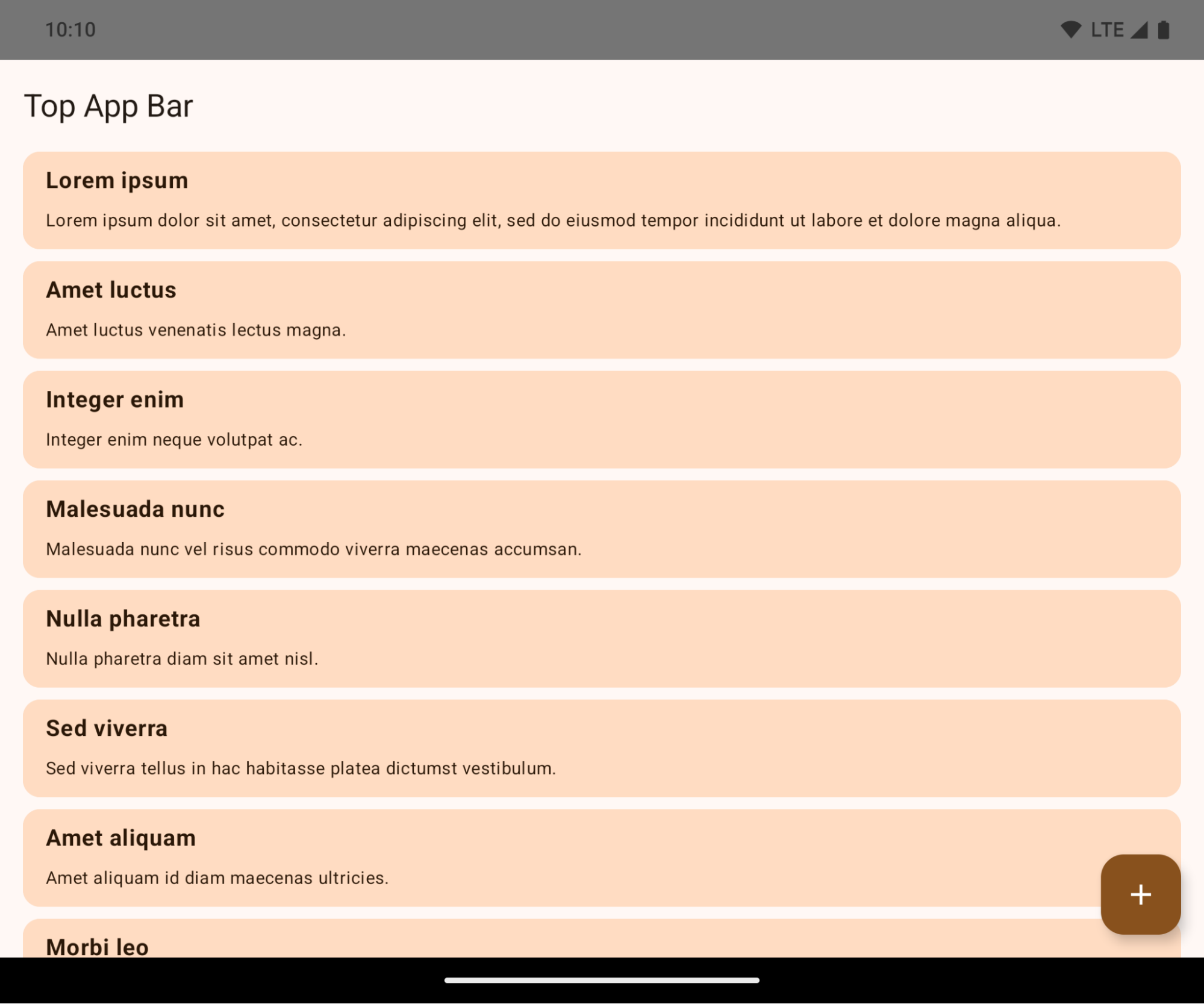
এটি একটি ব্রেকিং চেঞ্জ যা আপনার অ্যাপের UI-কে নেতিবাচকভাবে প্রভাবিত করতে পারে। এই পরিবর্তনগুলো UI-এর নিম্নলিখিত অংশগুলোকে প্রভাবিত করবে:
- অঙ্গভঙ্গি হ্যান্ডেল নেভিগেশন বার
- ডিফল্টরূপে স্বচ্ছ।
- বটম অফসেট নিষ্ক্রিয় থাকায়, ইনসেট প্রয়োগ না করা হলে কন্টেন্ট সিস্টেম নেভিগেশন বারের পিছনে প্রদর্শিত হয়।
-
setNavigationBarColorএবংR.attr#navigationBarColorঅপ্রচলিত এবং জেসচার নেভিগেশনকে প্রভাবিত করে না। -
setNavigationBarContrastEnforcedএবংR.attr#navigationBarContrastEnforcedজেসচার নেভিগেশনের উপর কোনো প্রভাব ফেলে না।
- ৩-বোতাম নেভিগেশন
- ডিফল্টরূপে অস্বচ্ছতা ৮০% এ সেট করা থাকে এবং এর রঙ উইন্ডোর ব্যাকগ্রাউন্ডের সাথে মিলে যেতে পারে।
- বটম অফসেট নিষ্ক্রিয় করা হয়েছে, তাই ইনসেট প্রয়োগ না করা হলে কন্টেন্ট সিস্টেম নেভিগেশন বারের পিছনে প্রদর্শিত হয়।
- ডিফল্টরূপে
setNavigationBarColorএবংR.attr#navigationBarColorউইন্ডোর ব্যাকগ্রাউন্ডের সাথে মেলানোর জন্য সেট করা থাকে। এই ডিফল্টটি প্রয়োগ হওয়ার জন্য উইন্ডোর ব্যাকগ্রাউন্ড অবশ্যই একটি কালার ড্রয়েবল হতে হবে। এই API-টি এখন আর ব্যবহৃত হয় না, কিন্তু এটি এখনও ৩-বাটন নেভিগেশনকে প্রভাবিত করে। -
setNavigationBarContrastEnforcedএবংR.attr#navigationBarContrastEnforcedডিফল্টরূপে true থাকে, যা ৩-বাটন নেভিগেশন জুড়ে একটি ৮০% অস্বচ্ছ ব্যাকগ্রাউন্ড যোগ করে।
- স্ট্যাটাস বার
- ডিফল্টরূপে স্বচ্ছ।
- টপ অফসেট নিষ্ক্রিয় করা আছে, তাই ইনসেট প্রয়োগ না করা হলে কন্টেন্ট স্ট্যাটাস বারের পিছনে প্রদর্শিত হয়।
-
setStatusBarColorএবংR.attr#statusBarColorঅপ্রচলিত হয়ে গেছে এবং Android 15-এ এগুলোর কোনো প্রভাব নেই। -
setStatusBarContrastEnforcedএবংR.attr#statusBarContrastEnforcedঅপ্রচলিত হলেও Android 15-এ এখনও এগুলোর প্রভাব রয়েছে।
- ডিসপ্লে কাটআউট
- নন-ফ্লোটিং উইন্ডোগুলোর
layoutInDisplayCutoutModeঅবশ্যইLAYOUT_IN_DISPLAY_CUTOUT_MODE_ALWAYSহতে হবে।SHORT_EDGES,NEVER, এবংDEFAULTALWAYSহিসেবে গণ্য করা হয়, যাতে ব্যবহারকারীরা ডিসপ্লে কাটআউটের কারণে সৃষ্ট কালো বার দেখতে না পান এবং উইন্ডোটি প্রান্ত থেকে প্রান্ত পর্যন্ত দেখা যায়।
- নন-ফ্লোটিং উইন্ডোগুলোর
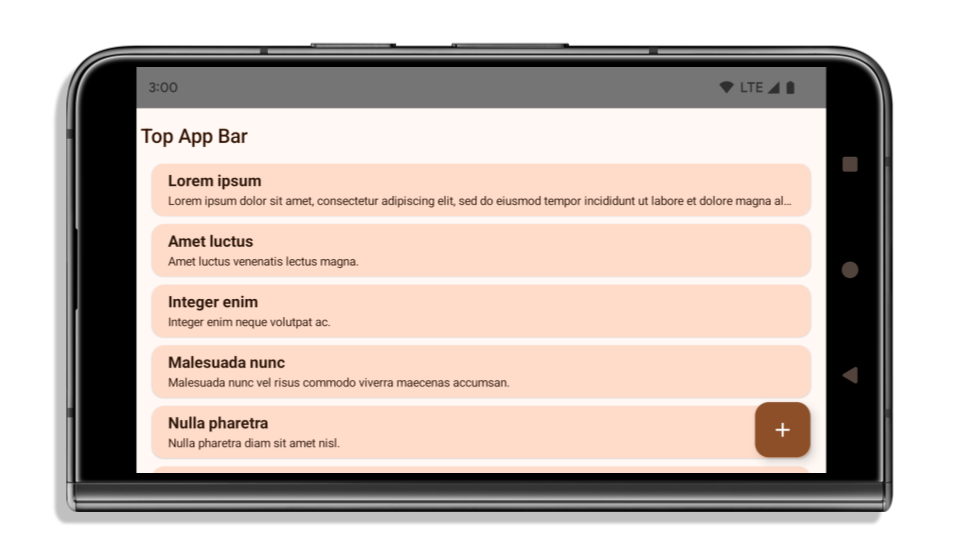
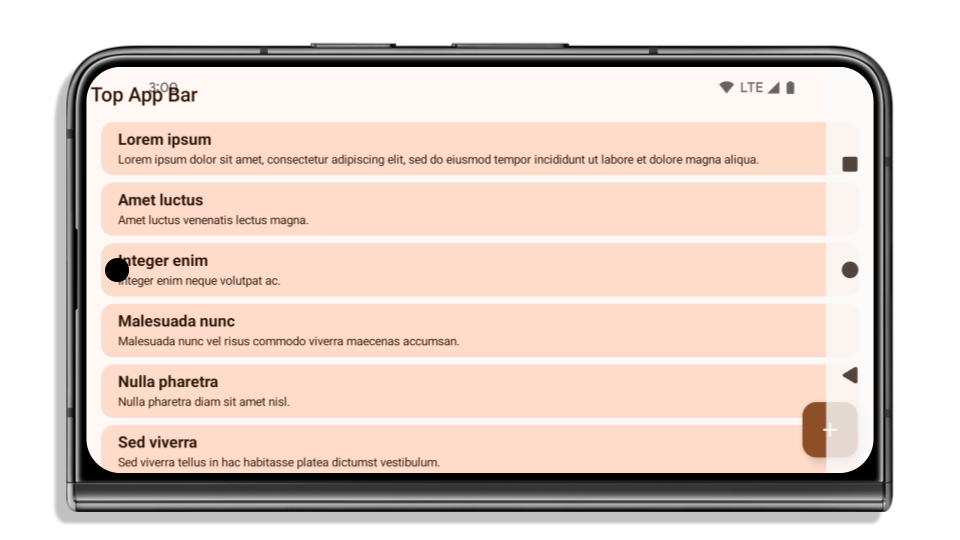
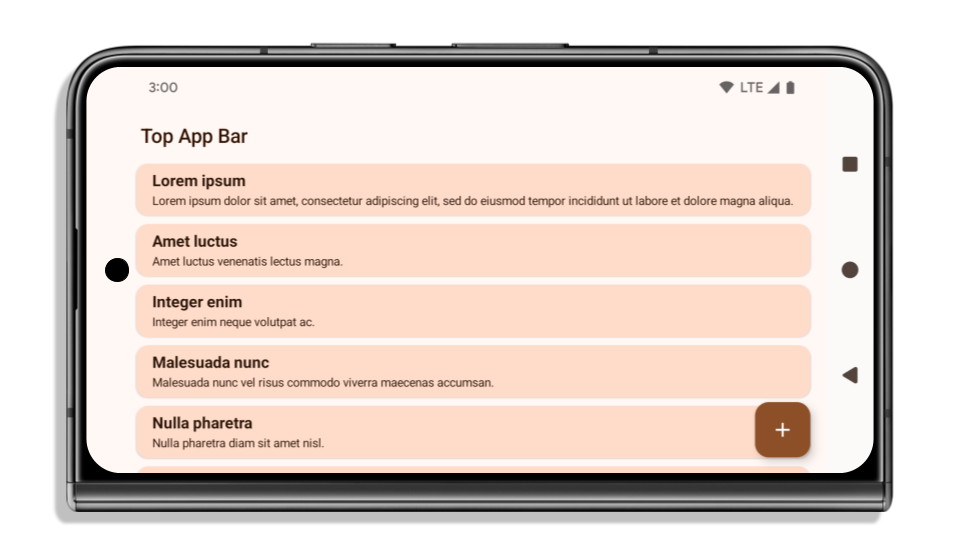
নিম্নলিখিত উদাহরণটি অ্যান্ড্রয়েড ১৫ (এপিআই লেভেল ৩৫) টার্গেট করার আগে ও পরে এবং ইনসেট প্রয়োগ করার আগে ও পরের একটি অ্যাপ দেখাচ্ছে। এই উদাহরণটি সম্পূর্ণ নয়, অ্যান্ড্রয়েড অটোতে এটি ভিন্নভাবে প্রদর্শিত হতে পারে।
আপনার অ্যাপটি ইতিমধ্যে এজ-টু-এজ কিনা তা পরীক্ষা করতে হবে।
আপনার অ্যাপটি যদি ইতিমধ্যেই এজ-টু-এজ হয় এবং ইনসেট প্রয়োগ করে, তবে নিম্নলিখিত পরিস্থিতিগুলো ছাড়া আপনি মূলত অপ্রভাবিত থাকবেন। তবে, আপনি প্রভাবিত হচ্ছেন না বলে মনে করলেও, আমরা আপনাকে আপনার অ্যাপটি পরীক্ষা করার পরামর্শ দিচ্ছি।
- আপনার একটি নন-ফ্লোটিং উইন্ডো আছে, যেমন একটি
ActivityযাLAYOUT_IN_DISPLAY_CUTOUT_MODE_ALWAYSএর পরিবর্তেSHORT_EDGES,NEVERবাDEFAULTব্যবহার করে। যদি আপনার অ্যাপ চালু হওয়ার সময় ক্র্যাশ করে, তবে এর কারণ আপনার স্প্ল্যাশস্ক্রিন হতে পারে। আপনি হয় কোর স্প্ল্যাশস্ক্রিন ডিপেন্ডেন্সিটি 1.2.0-alpha01 বা তার পরবর্তী সংস্করণে আপগ্রেড করতে পারেন অথবাwindow.attributes.layoutInDisplayCutoutMode = WindowManager.LayoutInDisplayCutoutMode.alwaysসেট করতে পারেন। - কম ব্যবহৃত কিছু স্ক্রিনের UI আড়াল হয়ে থাকতে পারে। যাচাই করুন যে এই কম ব্যবহৃত স্ক্রিনগুলিতে UI আড়াল হয়ে নেই। কম ব্যবহৃত স্ক্রিনগুলির মধ্যে রয়েছে:
- অনবোর্ডিং বা সাইন-ইন স্ক্রিন
- সেটিংস পৃষ্ঠাগুলি
আপনার অ্যাপটি যদি আগে থেকেই এজ-টু-এজ না হয়ে থাকে, তাহলে কী পরীক্ষা করতে হবে।
আপনার অ্যাপটি যদি ইতিমধ্যে এজ-টু-এজ না হয়ে থাকে, তাহলে সম্ভবত আপনি এর দ্বারা প্রভাবিত হবেন। যেসব অ্যাপ ইতিমধ্যে এজ-টু-এজ, সেগুলোর জন্য প্রযোজ্য পরিস্থিতিগুলোর পাশাপাশি আপনার নিম্নলিখিত বিষয়গুলো বিবেচনা করা উচিত:
- আপনার অ্যাপে যদি কম্পোজে Material 3 কম্পোনেন্ট (
androidx.compose.material3) ব্যবহৃত হয়, যেমনTopAppBar,BottomAppBar, এবংNavigationBar, তাহলে এই কম্পোনেন্টগুলো সম্ভবত প্রভাবিত হবে না , কারণ এগুলো স্বয়ংক্রিয়ভাবে ইনসেট পরিচালনা করে। - আপনার অ্যাপ যদি কম্পোজে ম্যাটেরিয়াল ২ কম্পোনেন্ট (
androidx.compose.material) ব্যবহার করে, তবে এই কম্পোনেন্টগুলো স্বয়ংক্রিয়ভাবে ইনসেটগুলো পরিচালনা করে না। তবে, আপনি ইনসেটগুলো অ্যাক্সেস করতে এবং ম্যানুয়ালি প্রয়োগ করতে পারেন। androidx.compose.material 1.6.0 এবং এর পরবর্তী সংস্করণগুলোতে,BottomAppBar,TopAppBar,BottomNavigation, এবংNavigationRailজন্য ইনসেটগুলো ম্যানুয়ালি প্রয়োগ করতেwindowInsetsপ্যারামিটারটি ব্যবহার করুন। একইভাবে,Scaffoldজন্যcontentWindowInsetsপ্যারামিটারটি ব্যবহার করুন। - আপনার অ্যাপে যদি ভিউ এবং ম্যাটেরিয়াল কম্পোনেন্ট (
com.google.android.material) ব্যবহৃত হয়, তাহলেBottomNavigationView,BottomAppBar,NavigationRailViewবাNavigationViewএর মতো বেশিরভাগ ভিউ-ভিত্তিক ম্যাটেরিয়াল কম্পোনেন্ট ইনসেট (inset) পরিচালনা করতে পারে এবং এর জন্য কোনো অতিরিক্ত কাজের প্রয়োজন হয় না। তবে,AppBarLayoutব্যবহার করলে আপনাকেandroid:fitsSystemWindows="true"যোগ করতে হবে। - কাস্টম কম্পোজেবলের জন্য, ইনসেটগুলো প্যাডিং হিসেবে ম্যানুয়ালি প্রয়োগ করুন। যদি আপনার কন্টেন্ট কোনো
Scaffoldমধ্যে থাকে, তাহলে আপনিScaffoldপ্যাডিং ভ্যালু ব্যবহার করে ইনসেটগুলো ব্যবহার করতে পারেন। অন্যথায়,WindowInsets) যেকোনো একটি ব্যবহার করে প্যাডিং প্রয়োগ করুন। - আপনার অ্যাপে যদি ভিউ এবং
BottomSheet,SideSheetবা কাস্টম কন্টেইনার ব্যবহার করা হয়, তাহলেViewCompat.setOnApplyWindowInsetsListenerব্যবহার করে প্যাডিং প্রয়োগ করুন।RecyclerViewএর ক্ষেত্রে, এই লিসেনারটি ব্যবহার করে প্যাডিং প্রয়োগ করুন এবং সাথেclipToPadding="false"যোগ করুন।
আপনার অ্যাপে কাস্টম ব্যাকগ্রাউন্ড সুরক্ষা থাকা আবশ্যক কিনা তা পরীক্ষা করতে হবে।
যদি আপনার অ্যাপকে ৩-বাটন নেভিগেশন বা স্ট্যাটাস বারের জন্য কাস্টম ব্যাকগ্রাউন্ড সুরক্ষা দিতেই হয়, তবে ৩-বাটন নেভিগেশন বারের উচ্চতা পাওয়ার জন্য WindowInsets.Type#tappableElement() অথবা WindowInsets.Type#statusBars ব্যবহার করে সিস্টেম বারের পিছনে একটি কম্পোজেবল বা ভিউ স্থাপন করা উচিত।
অতিরিক্ত প্রান্ত থেকে প্রান্ত পর্যন্ত সম্পদ
ইনসেট প্রয়োগের ক্ষেত্রে অতিরিক্ত বিবেচনার জন্য ‘ এজ টু এজ ভিউ’ এবং ‘এজ টু এজ কম্পোজ’ গাইডগুলো দেখুন।
অপ্রচলিত এপিআই
নিম্নলিখিত API-গুলি অপ্রচলিত কিন্তু নিষ্ক্রিয় করা হয়নি:
-
R.attr#enforceStatusBarContrast -
R.attr#navigationBarColor(৩টি বাটন নেভিগেশনের জন্য, ৮০% আলফা সহ) -
Window#isStatusBarContrastEnforced -
Window#setNavigationBarColor(৩টি বাটন নেভিগেশনের জন্য, ৮০% আলফা সহ) -
Window#setStatusBarContrastEnforced
নিম্নলিখিত API-গুলি অপ্রচলিত এবং নিষ্ক্রিয় করা হয়েছে:
-
R.attr#navigationBarColor(জেসচার নেভিগেশনের জন্য) -
R.attr#navigationBarDividerColor -
R.attr#statusBarColor -
Window#setDecorFitsSystemWindows -
Window#getNavigationBarColor -
Window#getNavigationBarDividerColor -
Window#getStatusBarColor -
Window#setNavigationBarColor(জেসচার নেভিগেশনের জন্য) -
Window#setNavigationBarDividerColor -
Window#setStatusBarColor
Stable configuration
If your app targets Android 15 (API level 35) or higher, Configuration no
longer excludes the system bars. If you use the screen size in the
Configuration class for layout calculation, you should replace it with better
alternatives like an appropriate ViewGroup, WindowInsets, or
WindowMetricsCalculator depending on your need.
Configuration has been available since API 1. It is typically obtained from
Activity.onConfigurationChanged. It provides information like window density,
orientation, and sizes. One important characteristic about the window sizes
returned from Configuration is that it previously excluded the system bars.
The configuration size is typically used for resource selection, such as
/res/layout-h500dp, and this is still a valid use case. However, using it for
layout calculation has always been discouraged. If you do so, you should move
away from it now. You should replace the use of Configuration with something
more suitable depending on your use case.
If you use it to calculate the layout, use an appropriate ViewGroup, such as
CoordinatorLayout or ConstraintLayout. If you use it to determine the height
of the system navbar, use WindowInsets. If you want to know the current size
of your app window, use computeCurrentWindowMetrics.
The following list describes the fields affected by this change:
Configuration.screenWidthDpandscreenHeightDpsizes no longer exclude the system bars.Configuration.smallestScreenWidthDpis indirectly affected by changes toscreenWidthDpandscreenHeightDp.Configuration.orientationis indirectly affected by changes toscreenWidthDpandscreenHeightDpon close-to-square devices.Display.getSize(Point)is indirectly affected by the changes inConfiguration. This was deprecated beginning in API level 30.Display.getMetrics()has already worked like this since API level 33.
elegantTextHeight অ্যাট্রিবিউটের ডিফল্ট মান true থাকে।
অ্যান্ড্রয়েড 15 (API স্তর 35) লক্ষ্য করা অ্যাপগুলির জন্য, elegantTextHeight TextView বৈশিষ্ট্যটি ডিফল্টরূপে true হয়ে যায়, ডিফল্টরূপে ব্যবহৃত কমপ্যাক্ট ফন্টটিকে এমন কিছু স্ক্রিপ্টের সাথে প্রতিস্থাপন করে যেখানে বড় উল্লম্ব মেট্রিক্স রয়েছে যা অনেক বেশি পাঠযোগ্য। বিন্যাস ভাঙা প্রতিরোধ করার জন্য কমপ্যাক্ট ফন্ট চালু করা হয়েছিল; অ্যান্ড্রয়েড 13 (এপিআই লেভেল 33) fallbackLineSpacing অ্যাট্রিবিউট ব্যবহার করে টেক্সট লেআউটকে উল্লম্ব উচ্চতা প্রসারিত করার অনুমতি দিয়ে এই ধরনের অনেক ভাঙন প্রতিরোধ করে।
অ্যান্ড্রয়েড 15-এ, কমপ্যাক্ট ফন্টটি এখনও সিস্টেমে রয়ে গেছে, তাই আপনার অ্যাপটি আগের মতো একই আচরণ পেতে elegantTextHeight false সেট করতে পারে, তবে এটি আসন্ন রিলিজে সমর্থিত হওয়ার সম্ভাবনা কম। সুতরাং, যদি আপনার অ্যাপ নিম্নলিখিত স্ক্রিপ্টগুলিকে সমর্থন করে: আরবি, লাও, মায়ানমার, তামিল, গুজরাটি, কন্নড়, মালয়ালম, ওড়িয়া, তেলুগু বা থাই, তাহলে আপনার অ্যাপটি true elegantTextHeight সেট করে পরীক্ষা করুন।

elegantTextHeight আচরণ। 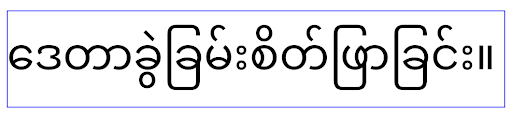
elegantTextHeight আচরণ।জটিল অক্ষরের আকারের জন্য TextView-এর প্রস্থ পরিবর্তিত হয়
In previous versions of Android, some cursive fonts or languages that have
complex shaping might draw the letters in the previous or next character's area.
In some cases, such letters were clipped at the beginning or ending position.
Starting in Android 15, a TextView allocates width for drawing enough space
for such letters and allows apps to request extra paddings to the left to
prevent clipping.
Because this change affects how a TextView decides the width, TextView
allocates more width by default if the app targets Android 15 (API level 35) or
higher. You can enable or disable this behavior by calling the
setUseBoundsForWidth API on TextView.
Because adding left padding might cause a misalignment for existing layouts, the
padding is not added by default even for apps that target Android 15 or higher.
However, you can add extra padding to preventing clipping by calling
setShiftDrawingOffsetForStartOverhang.
The following examples show how these changes can improve text layout for some fonts and languages.
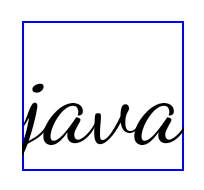
<TextView
    android:fontFamily="cursive"
    android:text="java" />

<TextView
    android:fontFamily="cursive"
    android:text="java"
    android:useBoundsForWidth="true"
    android:shiftDrawingOffsetForStartOverhang="true" />
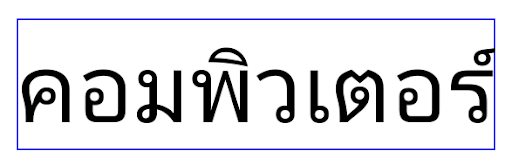
<TextView
    android:text="คอมพิวเตอร์" />
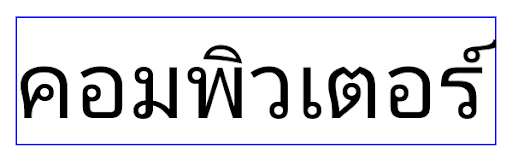
<TextView
    android:text="คอมพิวเตอร์"
    android:useBoundsForWidth="true"
    android:shiftDrawingOffsetForStartOverhang="true" />
EditText-এর জন্য লোকাল-সচেতন ডিফল্ট লাইন উচ্চতা
অ্যান্ড্রয়েডের পূর্ববর্তী সংস্করণগুলিতে, বর্তমান লোকেলের সাথে মেলে ফন্টের লাইনের উচ্চতা মেটাতে পাঠ্য বিন্যাস পাঠ্যের উচ্চতাকে প্রসারিত করে। উদাহরণস্বরূপ, যদি বিষয়বস্তু জাপানি ভাষায় হয়, কারণ জাপানি ফন্টের লাইনের উচ্চতা একটি ল্যাটিন ফন্টের চেয়ে সামান্য বড়, পাঠ্যের উচ্চতা কিছুটা বড় হয়ে গেছে। যাইহোক, লাইনের উচ্চতায় এই পার্থক্য থাকা সত্ত্বেও, EditText উপাদানটি অভিন্ন আকারের ছিল, লোকেল ব্যবহার করা নির্বিশেষে, নিম্নলিখিত ছবিতে চিত্রিত হয়েছে:

EditText উপাদানের প্রতিনিধিত্বকারী তিনটি বাক্স যা ইংরেজি (en), জাপানি (ja), এবং বার্মিজ (my) থেকে পাঠ্য ধারণ করতে পারে। EditText এর উচ্চতা একই, যদিও এই ভাষাগুলির একে অপরের থেকে আলাদা লাইন উচ্চতা রয়েছে। Android 15 (API লেভেল 35) লক্ষ্য করা অ্যাপগুলির জন্য, একটি ন্যূনতম লাইন উচ্চতা এখন EditText এর জন্য নির্দিষ্ট লোকেলের রেফারেন্স ফন্টের সাথে মেলে, যা নিম্নলিখিত ছবিতে দেখানো হয়েছে:

EditText উপাদানের প্রতিনিধিত্বকারী তিনটি বাক্স যা ইংরেজি (en), জাপানি (ja), এবং বার্মিজ (my) থেকে পাঠ্য ধারণ করতে পারে। EditText এর উচ্চতায় এখন এই ভাষার ফন্টগুলির জন্য ডিফল্ট লাইনের উচ্চতা মিটমাট করার জন্য স্থান রয়েছে। প্রয়োজনে, আপনার অ্যাপ useLocalePreferredLineHeightForMinimum অ্যাট্রিবিউটটি false নির্দিষ্ট করে পূর্ববর্তী আচরণ পুনরুদ্ধার করতে পারে এবং আপনার অ্যাপটি Kotlin এবং Java এ setMinimumFontMetrics API ব্যবহার করে কাস্টম ন্যূনতম উল্লম্ব মেট্রিক্স সেট করতে পারে।
ক্যামেরা এবং মিডিয়া
অ্যান্ড্রয়েড ১৫ বা তার উচ্চতর সংস্করণকে লক্ষ্য করে তৈরি অ্যাপগুলোর ক্যামেরা এবং মিডিয়ার আচরণে অ্যান্ড্রয়েড ১৫ নিম্নলিখিত পরিবর্তনগুলো এনেছে।
অডিও ফোকাস অনুরোধ করার উপর বিধিনিষেধ
Apps that target Android 15 (API level 35) must be the top app or running a
foreground service in order to request audio focus. If an app
attempts to request focus when it does not meet one of these requirements, the
call returns AUDIOFOCUS_REQUEST_FAILED.
You can learn more about audio focus at Manage audio focus.
আপডেট করা নন-এসডিকে বিধিনিষেধ
অ্যান্ড্রয়েড ডেভেলপারদের সাথে সহযোগিতা এবং সর্বশেষ অভ্যন্তরীণ পরীক্ষার উপর ভিত্তি করে অ্যান্ড্রয়েড ১৫-এ সীমাবদ্ধ নন-এসডিকে ইন্টারফেসের হালনাগাদ তালিকা অন্তর্ভুক্ত করা হয়েছে। যখনই সম্ভব, আমরা নন-এসডিকে ইন্টারফেস সীমাবদ্ধ করার আগে নিশ্চিত করি যে সেগুলোর পাবলিক বিকল্প উপলব্ধ আছে।
আপনার অ্যাপটি যদি অ্যান্ড্রয়েড ১৫-কে টার্গেট না করে, তবে এই পরিবর্তনগুলোর কিছু হয়তো আপনাকে তাৎক্ষণিকভাবে প্রভাবিত করবে না। তবে, আপনার অ্যাপের টার্গেট এপিআই লেভেলের উপর নির্ভর করে কিছু নন-এসডিকে ইন্টারফেস অ্যাক্সেস করা সম্ভব হলেও, যেকোনো নন-এসডিকে মেথড বা ফিল্ড ব্যবহার করলে আপনার অ্যাপটি ভেঙে যাওয়ার ঝুঁকি সবসময়ই অনেক বেশি থাকে।
আপনার অ্যাপ নন-এসডিকে ইন্টারফেস ব্যবহার করে কিনা, সে বিষয়ে আপনি অনিশ্চিত থাকলে, তা জানার জন্য আপনার অ্যাপটি পরীক্ষা করে দেখতে পারেন। যদি আপনার অ্যাপ নন-এসডিকে ইন্টারফেসের উপর নির্ভরশীল হয়, তবে আপনার এসডিকে বিকল্পগুলিতে স্থানান্তরের পরিকল্পনা শুরু করা উচিত। তা সত্ত্বেও, আমরা বুঝি যে কিছু অ্যাপের ক্ষেত্রে নন-এসডিকে ইন্টারফেস ব্যবহারের যৌক্তিক কারণ থাকে। যদি আপনি আপনার অ্যাপের কোনো ফিচারের জন্য নন-এসডিকে ইন্টারফেস ব্যবহারের কোনো বিকল্প খুঁজে না পান, তবে আপনার একটি নতুন পাবলিক এপিআই-এর জন্য অনুরোধ করা উচিত।
অ্যান্ড্রয়েডের এই প্রকাশের পরিবর্তনগুলি সম্পর্কে আরও জানতে, Android 15-এ নন-SDK ইন্টারফেস সীমাবদ্ধতার আপডেটগুলি দেখুন। সাধারণত নন-SDK ইন্টারফেস সম্পর্কে আরও জানতে, নন-SDK ইন্টারফেসের উপর সীমাবদ্ধতা দেখুন।